Plan your SuiteCommerce to Shopify Plus migration with effective data mapping strategies that help migrate products, customers, and orders accurately while reducing errors.
Key Takeaways
- A clear data mapping strategy ensures information moves accurately between SuiteCommerce and Shopify Plus.
- Mapping products, customers, orders, and inventory before migration reduces costly errors later.
- Cleaning duplicate and outdated records improves migration speed and data quality.
- Field mapping documents help technical teams validate every data point before launch.
- Testing a small data set first helps identify issues before migrating the entire store.
Why Data Mapping Should Come Before Migration
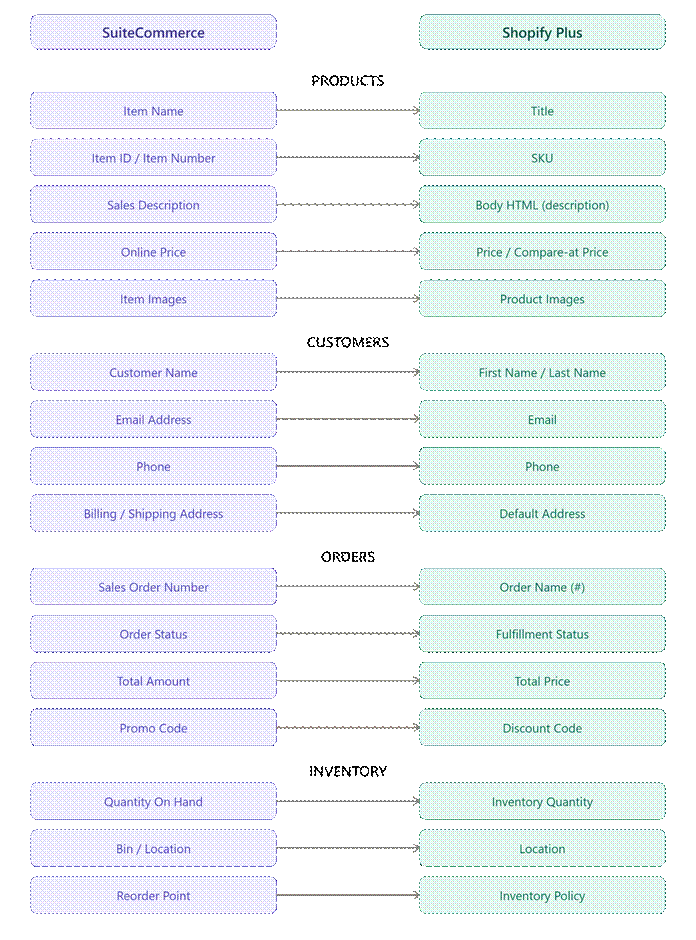
A successful migration starts long before data is moved. Every product, customer, order, and inventory record in SuiteCommerce needs a matching destination in Shopify Plus.
Without proper planning, businesses may end up with duplicate records, missing product information, or incomplete customer profiles.
Creating a mapping strategy first makes the rest of the migration far more predictable.
Start By Organizing The Data You Actually Need
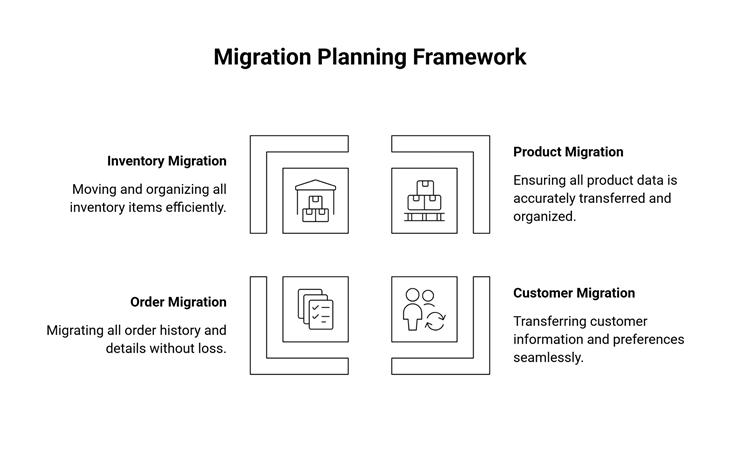
Don’t migrate everything simply because it exists. Review your data and decide what should move to the new store.
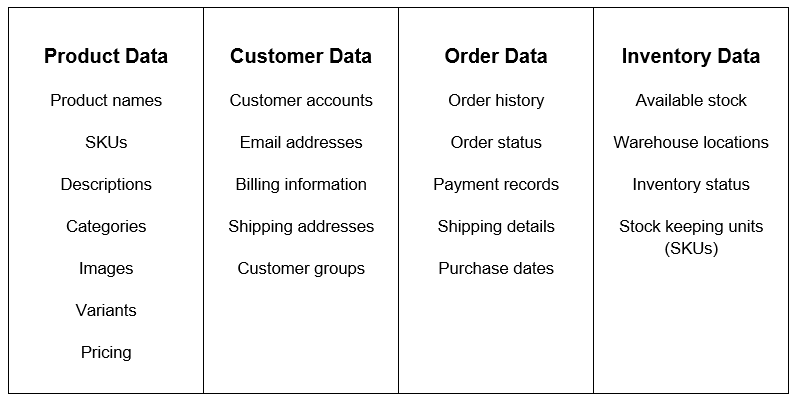
Technical Tip: Archive or remove duplicate and outdated records before migration. Cleaner data leads to a smoother migration.
Create A Field Mapping Document Before You Move Any Data
A field mapping document also makes collaboration easier.
Business teams can confirm that important information, such as pricing, customer details, or inventory levels, is being handled correctly, while technical teams use the same document to configure Migration Tools and validate the results.
Everyone works from a single source of truth, which reduces confusion and minimizes costly mistakes later in the project.
A field mapping document acts as a blueprint for your migration. It tells your team exactly where each piece of information belongs in Shopify Plus.
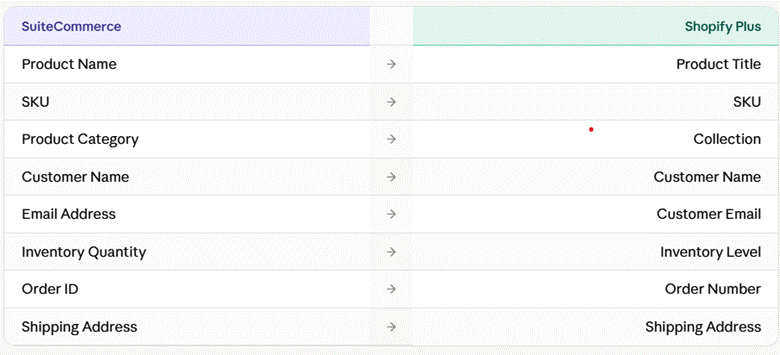
If a field doesn’t have a direct match, decide whether it should be transformed, combined with another field, or left out of the migration. Well-planned SuiteCommerce to Shopify Plus data mapping strategies reduce manual work after launch.
Map Data Based On Business Priority, Not Database Order
Another benefit of prioritizing your data is that it helps you identify critical issues earlier. If products, customers, and inventory are migrated successfully, your team can begin testing core business operations while the remaining data is still being prepared. This phased approach keeps the project moving instead of waiting for every record to be migrated before testing begins.
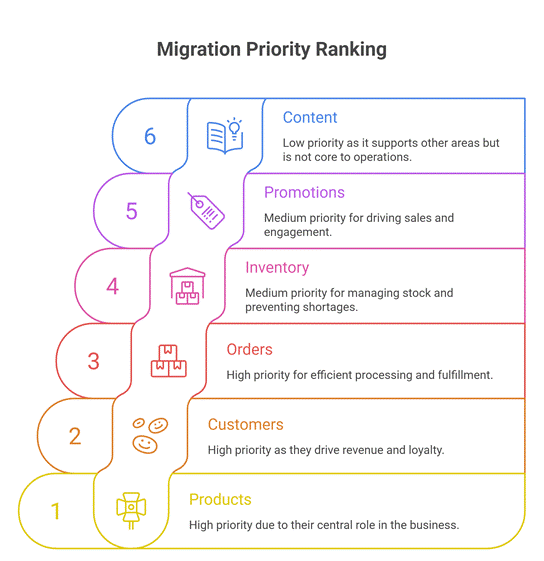
Not every data type has the same impact on your business. Start with the information customers interact with every day, then move to supporting records afterward.
➔ High Priority
Migrate these first because they’re essential for your store to operate.
- Product catalog
- Customer accounts
- Inventory Management
- Pricing
- Product images
Then we move forward to the secondary things.
➔ Medium Priority
Move these once the core store has been validated.
- Order history
- Shipping information
- Collections
- Discount rules
- Customer groups
Next come the things that are of the least priority.
➔ Low Priority
Review whether these records still provide business value before migrating.
- Archived products
- Inactive customers
- Old promotions
- Legacy content
- Historical reports
Technical Tip: Prioritizing business-critical data makes testing easier and reduces the impact of migration issues.
Validate Your Data Before It Reaches Shopify Plus
Data validation is also an opportunity to improve the quality of your store. Many businesses discover duplicate products, outdated customer records, inconsistent product categories, or incomplete descriptions during this stage. Fixing these issues before migration gives you a cleaner Shopify Plus store and reduces the amount of manual cleanup after launch.
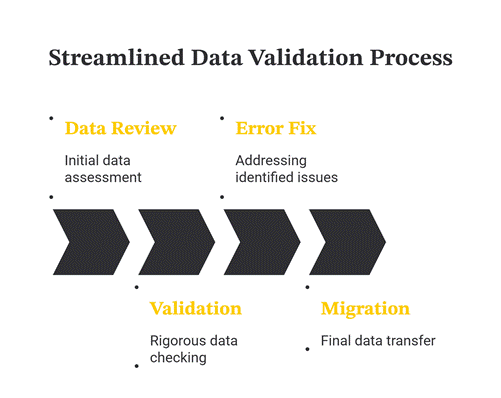
Migrating inaccurate data only transfers existing problems to a new platform. Validate your records before importing them.
Use This Validation Checklist
✔ Duplicate SKUs removed
✔ Product variants are complete
✔ Customer email addresses are valid
✔ Required fields are populated
✔ Product images are accessible
✔ Inventory quantities are accurate
✔ Categories are consistent
✔ Order totals match historical records
✔ Currency and tax settings are verified
Common Field Mapping Challenges And Their Solutions
Not every challenge has a one-size-fits-all solution. Some businesses use custom fields to support unique workflows, while others rely on third-party applications that store data differently from SuiteCommerce or Shopify Plus. Identifying these exceptions early allows your team to decide whether the data should be transformed, stored as a custom field, or handled through Integration.
| Challenge | Recommended Solution |
| Missing field equivalent | Create a custom Shopify metafield or transform the data. |
| Duplicate customer records | Merge duplicates before migration. |
| Different category structures | Reorganize categories into Shopify Collections. |
| Variant inconsistencies | Standardize options before exporting. |
| Broken image references | Verify image URLs before import. |
| Missing mandatory fields | Complete the required information before migration. |
Many migration issues aren’t caused by the migration tool itself. They’re often the result of inconsistent or incomplete source data.
Test Small, Then Scale
Testing should involve more than the technical team. Ask people from sales, operations, customer support, and marketing to review the migrated data from their perspective.
They often notice missing information or workflow issues that automated tests can’t detect, making the final migration much more reliable.
Running a full migration without testing increases the risk of widespread issues. Start with a small sample and validate the results before moving to the complete dataset.
1. Test Products
Confirm names, descriptions, images, pricing, variants, and collections display correctly.
2. Test Customer Records
Verify that customer accounts, addresses, and contact details are imported accurately.
3. Test Orders
Review order numbers, totals, taxes, shipping details, and order statuses.
4. Test Integrations
Ensure NetSuite, payment gateways, shipping providers, and other connected systems continue exchanging data correctly.
Technical Tip: Keep a migration log throughout testing. Recording every issue and its resolution makes troubleshooting faster during the final migration.
A Simple Data Mapping Checklist Before Go-Live
Before completing your migration, confirm the following:
- Field mapping document has been approved.
- Product data has been validated.
- Customer records have been reviewed.
- Duplicate data has been removed.
- Product images have been verified.
- Inventory levels have been reconciled.
- Sample migration completed successfully.
- Integrations tested.
- Redirects prepared, if required.
- Backup created before final migration.
For further guidance on how to integrate NetSuite with Shopify, read our previous blog.
Good Data Mapping Pays Off Long After Migration
The benefits of accurate data mapping don’t stop once your new store goes live. Clean and well-structured data makes it easier to manage products, generate reliable reports, automate business processes, and integrate with other systems as your business grows.
More importantly, your team spends less time fixing data issues and more time focusing on customers, sales, and business growth. Investing extra effort in data mapping today can save countless hours of troubleshooting in the future.
Why Folio3?
Successful migrations depend on more than moving data from one platform to another. Folio3 helps businesses plan data mapping, validate records, and integrate NetSuite with Shopify Plus to reduce migration risks and support a smoother transition.
Final Thoughts
Data mapping isn’t the most visible part of a migration, but it’s often the most important. A well-planned mapping strategy helps ensure products, customers, and orders arrive in Shopify Plus accurately, reducing manual fixes after launch.
Taking the time to organize, validate, and test your data before migration makes the entire project smoother and gives your team more confidence when it’s time to go live.
Frequently Asked Questions
What is data mapping in a SuiteCommerce to Shopify Plus migration?
Data mapping defines where each field from SuiteCommerce, such as products, customers, and orders, will be stored in Shopify Plus to ensure information remains accurate after migration.
Can custom fields be migrated to Shopify Plus?
Yes. If Shopify Plus doesn’t have an equivalent field, custom data can often be stored using metafields or handled through custom development.
Should historical orders be migrated?
It depends on your reporting and operational needs. Many businesses migrate recent orders while archiving older records separately.
How can I reduce data migration errors?
Data Migration can be done by cleaning duplicate records, validating required fields, creating a field mapping document, and testing a sample migration before moving the complete dataset.
What data should be migrated first?
Products, customers, inventory, and pricing should typically be prioritized because they’re essential for store operations immediately after launch.
Can Shopify Plus preserve customer accounts during migration?
Yes. Customer profiles, contact details, and addresses can usually be migrated, provided the data is correctly mapped and validated beforehand.