
Allocation is super important in supply chain management. NetSuite Supply Allocation feature is a big help. Many of our clients use it, but only some use it to its full potential. This feature is crucial because it can solve many problems our clients face. For example, it helps get supplies from suppliers faster, manage inventory commitments, and organize across different locations.
This feature acts like a bridge, connecting when goods arrive with when they’re ordered. It lets users quickly allocate supply orders to meet demand and gives flexibility to prioritize allocations based on different criteria.
Plus, it’s easy to manage locations, items, and order types. Whether you prefer automated processes or need to step in manually, Supply Allocation has covered you.
This guide explains what supply allocation is, why it matters, how it works, and how to enable it in your NetSuite environment. If you are new to advanced inventory features in NetSuite, start by understanding NetSuite’s Advanced Inventory Management capabilities.
Key Takeaways
- Shrinkage, stockouts, and overstock directly impact profitability. Smart allocation prevents these costly mistakes.
- Instead of tracking commitments as ‘Available,’ ‘Complete,’ or ‘Do Not Commit,’ allocation assigns specific incoming stock to specific orders.
- Without proper allocation, you cannot see when incoming purchases will arrive relative to sales order demand.
- Allocation directly impacts on-time delivery. Better allocation = fewer stockouts and missed deadlines.
- Configure automatic daily allocation or handle unique situations manually with full visibility into missing stock.

What is NetSuite Supply Allocation?
Supply Allocation is an advanced inventory management feature that strategically aligns incoming inventory with outgoing orders. Instead of tracking inventory commitment using the old system (Available, Complete, Do Not Commit), allocation assigns specific units of incoming stock to specific sales orders based on your configured rules.
How It Works: The Core Concept
Imagine you have:
- A sales order from Customer A needing 100 units by March 15
- A sales order from Customer B needing 50 units by March 20
- A purchase order arriving March 18 with 150 units
Without allocation, Customer A might not receive their order on time because the PO arrives after their delivery date. With allocation, NetSuite automatically assigns 100 units to Customer A from alternative sources (safety stock, transfer orders, or expedited POs) and reserves the March 18 PO for Customer B.
Key Differences from Traditional Commitment States
- Allocation method: Specific incoming supply matched to specific outgoing orders (precise reservations)
- Old method: ‘Available,’ ‘Complete,’ ‘Do Not Commit’ (generic supply/demand visibility)
Why Supply Allocation Matters for Your Business
1. Accurate Customer Service Promises
Your customer service team can promise delivery dates they will actually meet because they see exactly which purchase orders supply which sales orders. This improves customer satisfaction and reduces expedited shipping costs (which eat into margins).
2. Efficient Resource Allocation
NetSuite automatically prioritizes allocation based on your rules: orders with the closest ship date get priority, or orders can be grouped by sales channel, customer tier, or profitability. No more guessing—allocation follows your business logic.
3. Early Visibility into Supply Gaps
The system immediately highlights orders that cannot be fulfilled by available or incoming stock. Your procurement team can create emergency purchase orders before the shortage becomes a crisis, not after the customer is unhappy.
4. Reduced Excess Inventory
Because allocation shows you exactly which supply fulfills which demand, you no longer need to carry bloated safety stock as a buffer against uncertainty. This frees up cash and warehouse space for more profitable use.
5. Multi-Location Efficiency
For businesses with multiple warehouses, distribution centers, or subsidiaries, allocation automatically determines which location’s stock should fulfill which order. Transfer orders can be automatically created if needed, optimizing fulfillment costs.
How NetSuite Supply Allocation Works
The Allocation Process
Supply Allocation works through a continuous matching process:
- 1. Demand sources are identified: sales orders, work orders, any outgoing inventory
- 2. Supply sources are identified: purchase orders, inbound shipments, work orders, transfer orders, on-hand inventory
- 3. Allocation rules prioritize demand: by required-by date, by sales channel, by customer, or by profitability
- 4. NetSuite automatically assigns supply to demand: each unit of incoming stock is matched to a specific order
- 5. Visibility is created: Customer Service and Procurement can see exactly when stock will arrive and what it will fulfill
Allocated Supply Details
When you click “Allocated Supply” on a sales order, you see:
- How much stock is allocated to this order
- Which purchase orders or shipments will provide that stock
- Expected arrival dates for each allocated shipment
- Any unallocated demand (showing supply gaps that need action)
Configuring Supply Allocation in NetSuite
Key Configuration Decisions
Before enabling Supply Allocation, decide on these configurations:
1. Order Allocation Strategy
Define which supply sources can fulfill which demand sources:
- Purchase orders → sales orders?
- Transfer orders → sales orders?
- Work orders → sales orders?
- On-hand inventory → which priority?
2. Allocation Prioritization
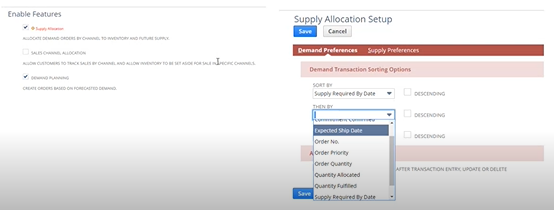
By default, orders are sorted by “required by date” (when the customer needs the goods). You can customize to prioritize by:
- Ship date (closest ship date gets priority)
- Sales channel (prioritize retail over wholesale, for example)
- Customer class (VIP customers first)
- Profitability (highest-margin orders first)
3. Allocation Schedule
Decide whether allocation runs automatically or on-demand:
- Daily automated allocation: allocates orders from yesterday each morning
- On-demand manual allocation: runs when you manually trigger it
- Hybrid: automated with manual override capability
How to Enable NetSuite Supply Allocation
Supply Allocation requires Advanced Inventory Management to be enabled first. Follow these steps:
- Navigate to Setup > Company > Enable Features
- Under the Items & Inventory subtab, check “Supply Allocation”
- Confirm “Multi-Location Inventory” is also enabled
- Click Save to initiate the data check
- NetSuite verifies your current inventory structure for compatibility
- Once verified, access Setup > Company > Supply Allocation Setup to configure your allocation strategy
- Define which supply sources can fulfill which demand sources
- Set your allocation prioritization rules
- Establish whether allocation runs automatically or manually
For businesses with complex multi-location or manufacturing operations, NetSuite also provides NetSuite Materials Requirement Planning (MRP), which pairs supply allocation with production planning and demand forecasting for end-to-end visibility.

Combining Supply Allocation With Demand Planning
Supply allocation works best when paired with demand forecasting. While allocation answers “which supply fulfills which demand,” demand planning answers “how much demand will there actually be?”
NetSuite Demand Planning uses historical sales, seasonal patterns, and forecasts to predict future demand. This feed determines how much supply you actually need to order. When combined with allocation, you get:
- Accurate demand forecasts (from Demand Planning)
- Precise purchase order quantities (calculated from demand forecasts)
- Strategic allocation of incoming supply (matched to forecasted demand)
- Visibility into supply-demand alignment (Planning Workbench shows demand vs. supply in real time)
How Supply Allocation Connects to Order Fulfillment
Supply Allocation does not work in isolation. It integrates with your broader order fulfillment process:
- Sales order created → Supply Allocation assigns available stock → Fulfillment request generates → Picking/packing begins → Shipment is processed
By showing your fulfillment team exactly which stock is allocated to which order, you avoid the confusion of “which inventory should I pick for this order?” The allocation is explicit and trackable.
For a deep dive into how fulfillment works end-to-end in NetSuite, see our guide to NetSuite’s order fulfillment process.
Best Practices for NetSuite Supply Allocation
1. Start With Clear Allocation Rules
Before enabling allocation, document your prioritization logic. What matters more: ship date, customer tier, margin, or sales channel? Different businesses answer differently. Be explicit about your rules.
2. Monitor Allocation Gaps Regularly
Supply Allocation surfaces gaps when demand cannot be fulfilled by available or incoming supply. Review these gaps weekly and create purchase orders to close them before they become problems.
3. Adjust Allocation Criteria as Business Changes
If you launch a new sales channel or change your business model, your allocation rules may no longer be optimal. Revisit your configuration periodically.
4. Integrate With Demand Planning
Allocation is most effective when based on accurate demand forecasts. Implement Demand Planning alongside Allocation to optimize both.
5. Train Customer Service and Procurement Teams
Your teams need to understand how allocation works so they can make informed decisions. Customer Service must know how to read “Allocated Supply” information. Procurement must understand how to act on allocation gaps.
How to Measure Supply Allocation Success
Track these metrics to understand the impact of allocation in your business:
- On-time delivery rate: percentage of orders shipped by promised date
- Inventory turnover: how many times inventory is sold and replaced annually
- Days inventory outstanding (DIO): average days stock sits before sale
- Stockout rate: frequency of “stock not available” situations
- Allocation gap rate: percentage of demand with unallocated supply
- Cash tied up in inventory: total dollar value of on-hand stock
Conclusion
NetSuite Supply Allocation transforms inventory management from a reactive, manual process into a proactive, rule-based system. By automatically matching incoming supply with outgoing demand, you ensure customer promises are kept, inventory is used efficiently, and supply gaps are visible early.
The feature is most powerful when combined with demand planning, multi-location operations, and clear allocation rules. Start by enabling it in your environment, configuring your allocation strategy, and training your team. The result will be happier customers, lower carrying costs, and better cash flow.
If you need help implementing Supply Allocation, designing your allocation strategy, or connecting it with broader supply chain planning, Folio3 can provide expert guidance throughout the process. You can book a call with us!

