
Manufacturers do not fail because they picked the wrong software. They fail because they picked software that does not match how they actually make things. A process manufacturer running batch production has fundamentally different ERP requirements than a job shop building engineer-to-order assemblies. Generic ERP lists treat them as the same, which is why so many manufacturers end up with a system that handles their finances well but leaves the shop floor on spreadsheets.
This guide cuts through the noise. It covers what best software for manufacturing actually needs to do, how to evaluate it against your production model, which platforms are worth considering for your business, and why NetSuite consistently outperforms the alternatives for mid-market manufacturers who need a unified system without enterprise-level complexity.
Key Takeaways
- Manufacturing ERP must support BOMs, routing, WIP, MRP, and quality natively. Workarounds increase cost as you scale.
- Matching your production model is critical. Discrete, process, ETO, and MTO require different setups.
- Oracle NetSuite ERP is a strong fit for mid-market manufacturers needing unified operations without heavy complexity.
- Cloud ERP offers better long-term value than on-premises when factoring in IT and upgrade costs.
- Choosing the right implementation partner is as important as the software itself.
- Scalability should be planned early. Replacing ERP later is far more costly.
Our Top Picks for Best Manufacturing ERP Software
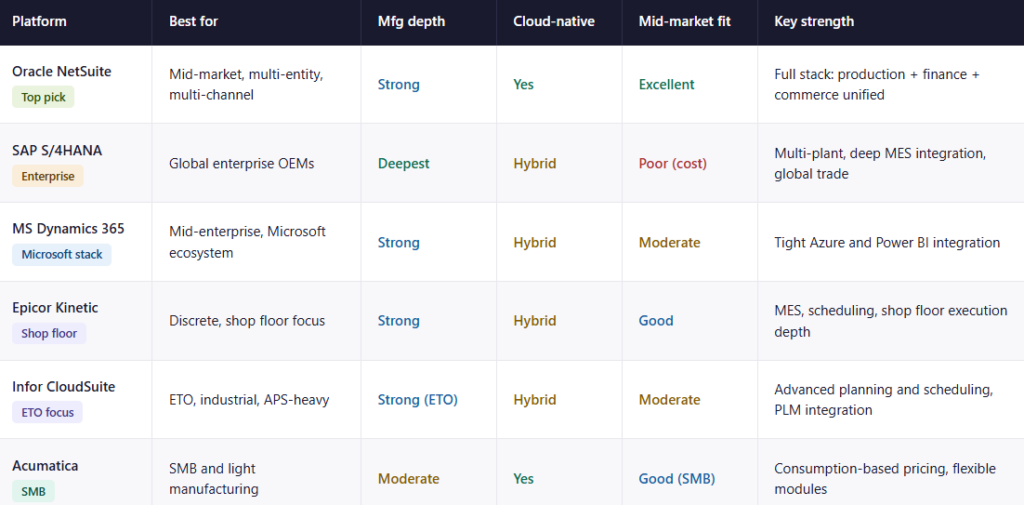
The top picks for best manufacturing cloud ERP software include Folio3 (NetSuite Alliance Partner), Dynamics 365, Epicor Kinetic, Infor CloudSuite, and Acumatica. Take a look below at the tale to quickly understand the differences between each and why NetSuite stands out.
What Manufacturing ERP Software Actually Does
A manufacturing ERP system is the operational backbone that connects the shop floor with procurement, supply chain, engineering, quality, and finance. It gives every department a single version of the same data: material availability, production status, work-in-progress valuations, delivery commitments, and financial results, all updated in real time as events happen.
Without an ERP, these functions operate on separate systems or spreadsheets. Data moves between them manually, with a lag. A production manager does not know if a purchase order has shipped. A finance team does not know the true cost of a production run until someone manually calculates it days later. A sales team quotes lead times without knowing the current capacity.
ERP eliminates this fragmentation. Every transaction on the shop floor (a material issue, a work order completion, a quality rejection) posts to inventory and financials immediately. Managers see what is happening now, not what happened last week.
Why Manufacturing ERP Is Different from General ERP
Unlike retail or professional services, the best software for manufacturing must handle production logic that has no equivalent in other industries.
- Multi-level bill of materials with revision control and change management
- Material Requirements Planning (MRP) that calculates what to buy, when, and in what quantity
- Production routing that defines the sequence of operations, work centres, and labour standards for each item
- Work-in-progress (WIP) tracking that values partially completed goods at each production stage
- Shop floor execution and real-time dashboards that reflect machine status, job progress, and queue depths
- Quality management with inspection workflows, non-conformance tracking, and traceability
- Landed cost allocation for imported raw materials
A financial-first ERP adapted for manufacturing handles some of these. A manufacturing-built ERP handles all of them natively.

Manufacturing Types and ERP Requirements
One of the most overlooked steps in ERP selection is matching the platform to the production model. Each manufacturing type generates different data, follows different costing logic, and requires different scheduling approaches. An ERP that works well for one model may be deeply inadequate for another.
1. Discrete Manufacturing
Discrete manufacturing produces individual, countable units from assemblies of components. Examples: machinery, electronics, industrial equipment.
- Requires multi-level BOM with sub-assembly tracking
- Work orders linked to each production run
- Serial and lot number tracking from component receipt through finished goods
- Routing with operation-level time standards and labour costing
- NetSuite covers discrete manufacturing natively through its Manufacturing module with WIP and Routing
2. Process Manufacturing
Process manufacturing converts raw ingredients into bulk or packaged outputs. Examples: food and beverage, chemicals, pharmaceuticals.
- A formula-based or recipe-based BOM rather than a component assembly
- Batch processing with yield tracking and wastage accounting
- Catch-weight inventory for items measured by weight rather than unit count
- Lot traceability for regulatory compliance and recall management
- Quality testing at intake, in-process, and finished goods stages
3. Engineer-to-Order (ETO)
ETO manufacturers build to a customer specification that does not exist until the order is received. Examples: custom capital equipment, industrial automation systems.
- Project-based production management linked to the sales order
- BOM created or modified per order rather than from a standard template
- Job costing that tracks actual labour, material, and overhead against the quoted estimate
- Engineering change management tied to open production jobs
4. Make-to-Order (MTO) and Job Shops
MTO businesses produce standard products only when an order is received. Job shops handle diverse, low-volume, high-mix work.
- Short-run production with high scheduling complexity
- Capacity-constrained scheduling across shared work centres
- Estimating and quoting tied to actual routing times and material costs
- Real-time queue visibility to prevent bottlenecks
5. Make-to-Stock (MTS)
MTS manufacturers produce to forecast, maintaining finished goods inventory for immediate order fulfilment.
- Demand-driven MRP to trigger production and purchase orders from forecast
- Safety stock and reorder point management
- Inventory turns optimisation across SKUs
6. Mixed-Mode Manufacturing
Most mid-market manufacturers combine models: standard products built to stock alongside custom products built to order.
- The ERP must handle both models simultaneously without forcing workarounds
- NetSuite’s flexible work order and BOM structure support mixed-mode natively
| Production Model | BOM Type | Costing Method | Key ERP Requirement |
|---|---|---|---|
| Discrete | Multi-level assembly | Standard or actual cost | WIP routing, serial tracking |
| Process | Formula/recipe | Average or batch cost | Catch weight, lot traceability |
| ETO | Per-order BOM | Job cost | Project management, change control |
| MTO / Job Shop | Standard or custom | Actual job cost | Capacity scheduling, estimating |
| MTS | Standard | Standard cost | Demand-driven MRP, safety stock |
| Mixed-mode | Both | Mixed | Flexible work order structure |
Core Features to Look for in Manufacturing ERP Software
The feature evaluation for end-to-end manufacturing ERP should start with the production layer, not the financial layer. Most ERP platforms handle accounting well. The differentiation happens in how they handle the manufacturing-specific requirements below.
1. Multi-Level BOM Management
A manufacturing BOM is not a flat list of components. It is a multi-level structure with sub-assemblies, component yield factors, revision history, and engineering change tracking.
- The ERP must support BOM versions so production orders always reference the approved specification
- Engineering changes must be traceable to effective dates and open job impact
- BOM structures must feed directly into MRP, costing, and purchasing without re-entry
2. Material Requirements Planning
MRP calculates what materials need to be purchased or produced, in what quantity, and by what date, based on the production schedule and current inventory positions.
- Forward scheduling from demand and backward scheduling from due dates both need to be supported
- Open purchase orders, work orders, and inventory on hand must all net against requirements
- MRP outputs should trigger purchase order suggestions and production order recommendations automatically
3. Production Routing and Work Centre Management
Routing defines the sequence of operations, the work centres involved, and the labour and machine time standards at each step.
- Routing drives capacity planning; the ERP cannot produce realistic schedules without it
- Each operation in the routing should carry setup time, run time, and queue time standards
- Actual vs planned variance at each operation is the basis for cost and efficiency reporting
4. WIP Tracking and Shop Floor Visibility
Work-in-progress tracking values partially completed goods as they move through production stages and gives supervisors real-time visibility into job status.
- WIP must update as production events are posted — not at period-end
- Shop floor dashboards should show queue lengths, job status, and machine availability without manual data entry
- Deloitte’s Smart Manufacturing Survey identified real-time production visibility as the top digital priority for discrete manufacturers
5. Quality Management
Quality control in manufacturing spans incoming inspection of raw materials, in-process inspection at defined production stages, and final goods inspection before shipment.
- Non-conformance records must link to the affected job, lot, or serial number
- Corrective action workflows should be documented and traceable
- For regulated industries (food, pharma, aerospace), traceability documentation must be generated automatically
6. Inventory Management Across the Production Chain
Manufacturing inventory is more complex than retail inventory because it exists in multiple states simultaneously: raw materials, purchased components, work-in-progress at each production stage, and finished goods.
- Bin-level and location-level tracking within the warehouse
- Lot and serial number tracking across all inventory states
- Automatic landed cost allocation on inbound material receipts for accurate COGS
7. Multi-Entity Financial Management
Mid-market manufacturers frequently operate with a manufacturing entity, a sales entity, and sometimes a holding company in different locations.
- Intercompany transactions must reconcile automatically
- Consolidated financial reporting across entities should be available in real time
- Multi-currency operations for global sourcing and sales

The Best Manufacturing ERP Platforms
The manufacturing enterprise resource planning market ranges from purpose-built shop floor systems for SMBs to enterprise platforms built for global OEM complexity. The right choice depends on your production model, company size, entity structure, and growth trajectory.
1. Oracle NetSuite
NetSuite is the most widely deployed cloud ERP for mid-market manufacturers. It covers the full stack: manufacturing, inventory, supply chain, financials, order management, and ecommerce on a single platform with no integration middleware required.
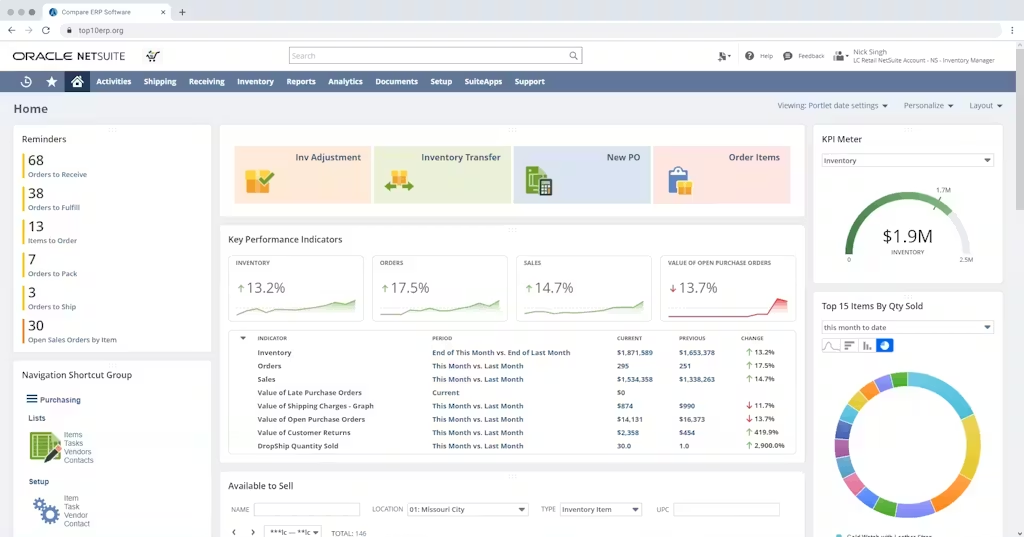
- Native support for discrete and mixed-mode manufacturing: multi-level BOMs, WIP and Routing, MRP, demand planning, and landed cost allocation
- True cloud architecture: no infrastructure to manage, automatic twice-yearly updates included in the subscription
- Multi-entity financials with intercompany eliminations and consolidated reporting
- SuiteCommerce for manufacturers with direct-to-consumer or B2B ecommerce channels
- Best for: mid-market manufacturers ($10M to $500M) with multi-channel sales, multi-entity structures, or growth plans that will outgrow an SMB platform
2. MRPeasy
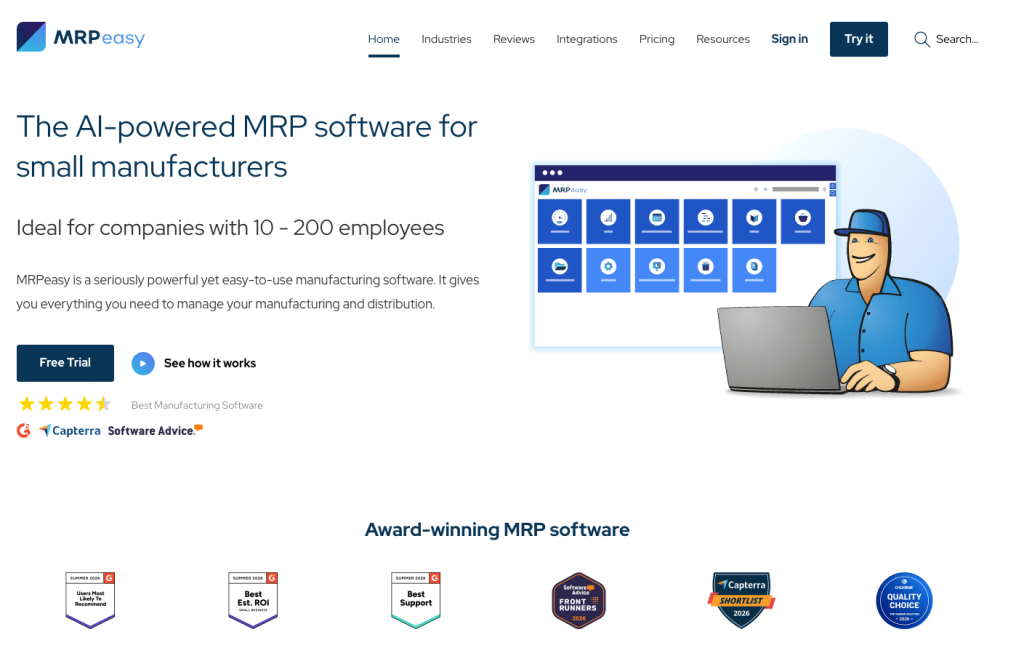
MRPeasy is a cloud-based manufacturing ERP and MRP platform designed specifically for small manufacturers. It combines production planning, inventory management, procurement, shop floor reporting, CRM, and financial workflows in a single system without the complexity typically associated with enterprise ERP implementations.
- Built for manufacturers with 10–200 employees, with strong support for multi-level BOMs, routings, production scheduling, capacity planning, and material requirements planning (MRP)
- Real-time inventory management with batch and serial number tracking, purchasing automation, and shop floor reporting tools
- Faster implementation and lower total cost of ownership than most mid-market ERP platforms, making it accessible for growing manufacturers transitioning from spreadsheets or entry-level systems
- Strong cloud-native architecture with integrations for accounting, ecommerce, CRM, and fulfillment platforms
Best for: small manufacturers, contract manufacturers, and hardware companies that need dedicated manufacturing functionality without the cost and complexity of larger ERP systems.
3. SAP S/4HANA
SAP S/4HANA is the enterprise benchmark for large manufacturers with global operations, complex supply chains, and deep MES integration requirements.
- Unmatched depth in production planning, plant maintenance, and multi-plant manufacturing
- Supports virtually every manufacturing model and industry vertical
- Implementation complexity and total cost of ownership are significant: typically requires a dedicated SAP team and a major systems integrator
- Best for: enterprise manufacturers with $500M+ revenue and the internal IT capacity to manage a complex platform
- Not a practical choice for mid-market businesses without enterprise-level budgets and timelines
4. Microsoft Dynamics 365 Finance and Supply Chain Management
Dynamics 365 is a credible mid-to-enterprise ERP with strong manufacturing capabilities and tight integration with the Microsoft product ecosystem.
- Supports discrete, process, and project-based manufacturing
- Strong capacity planning and finite scheduling capabilities
- Ideal for businesses already running Azure, Power BI, and Microsoft 365 at scale
- Implementation complexity for manufacturers is higher than NetSuite; mid-market businesses often overpay for capabilities they do not use
- Best for: mid-to-enterprise manufacturers with a strong Microsoft technology foundation
5. Epicor Kinetic
Epicor Kinetic is a manufacturing-focused platform with deep shop floor capabilities and strong support for discrete and mixed-mode production environments.
- Shop floor execution, MES integration, and production scheduling are core strengths
- Reporting and analytics lag behind NetSuite: the BI module uses a separate database and does not support real-time reporting natively
- Available in cloud and on-premises configurations
- Best for: mid-market discrete manufacturers where shop floor depth is the primary requirement
6. Infor CloudSuite Industrial
Infor is designed for industrial manufacturers and has strong support for engineer-to-order and project-based production models.
- Advanced Planning and Scheduling (APS) and PLM integration are differentiators
- Implementation complexity is significant; it typically requires specialist Infor consultants
- Best for: mid-to-large ETO manufacturers and industrial equipment producers
7. Acumatica
Acumatica is a cloud-based ERP with a flexible pricing model (by resource consumption rather than per user) suited to SMB and lower mid-market manufacturers.
- Covers discrete and light process manufacturing
- Strong for businesses outgrowing QuickBooks or a basic manufacturing system
- Manufacturing depth is less extensive than NetSuite or Epicor at scale
- Best for: manufacturers under $30M seeking a modern cloud system without NetSuite’s cost at full scale
| Platform | Best For | Manufacturing Depth | Cloud-Native | Mid-Market Fit |
|---|---|---|---|---|
| Oracle NetSuite | Mid-market, multi-entity, multi-channel | Strong | Yes | Excellent |
| SAP S/4HANA | Enterprise, global operations | Deepest | Hybrid | Poor (cost) |
| Microsoft Dynamics 365 | Mid-enterprise, Microsoft ecosystem | Strong | Hybrid | Moderate |
| Epicor Kinetic | Discrete, shop floor focus | Strong (shop floor) | Hybrid | Good |
| Infor CloudSuite | ETO, industrial, APS-heavy | Strong (ETO) | Hybrid | Moderate |
| Acumatica | SMB, light manufacturing | Moderate | Yes | Good (SMB) |
| MRPeasy | Small manufacturers, production-focused SMBs | Strong (SMB-focused) | Yes | Good (SMB) |
Why NetSuite Is the Right ERP for Mid-Market Manufacturers
NetSuite’s advantage for mid-market manufacturers is not a single module. It is the combination of manufacturing, financial, and commercial capabilities in one system with no middleware required.
When production data, inventory valuations, purchase order costs, and sales order commitments all live in the same database, the reporting delays and reconciliation errors that consume finance team time each month disappear.
Manufacturing Modules That Cover the Production Stack
NetSuite’s manufacturing capabilities go well beyond basic work orders. The platform covers the full production chain natively.
- Multi-level BOM management with version control and engineering change tracking
- WIP and Routing module for stage-level production tracking and actual vs standard variance reporting
- Material Requirements Planning for demand-driven purchasing and production scheduling
- Demand Planning module for forecast-based replenishment on make-to-stock products
- Lot and serial number tracking from supplier receipt through finished goods to customer shipment
- Advanced inventory management with bin-level tracking and multi-location visibility
A Single System for Production and Finance
Most manufacturing ERP comparisons focus on the production layer. The financial integration is equally important. When a production order closes in NetSuite, the actual material consumption, labour, and overhead costs are posted directly to the general ledger. Finance does not need to import a cost report or manually calculate WIP valuations.
For multi-entity manufacturers, NetSuite’s intercompany transaction management handles transfer pricing, intercompany eliminations, and consolidated financial reporting without a separate consolidation tool. For manufacturers with international sourcing, landed cost allocation applies inbound freight, duty, and handling costs to inventory valuation at receipt, giving an accurate COGS from day one.
Scalability Without Re-Implementation
The most expensive ERP decision a growing manufacturer can make is choosing a platform it will outgrow. Businesses that start on a basic manufacturing or accounting system typically hit a ceiling between $20M and $50M in revenue and face a full re-implementation to move to a platform that can handle their operational complexity.
NetSuite’s architecture supports businesses from startup through to several hundred million in revenue without a platform change. Modules are added as the business grows. Multi-subsidiary management activates when the company structure requires it. SuiteCommerce adds a direct channel without a separate ecommerce platform.
For manufacturers evaluating the cloud ERP decision specifically, the cloud ERP manufacturing guide covers how cloud deployment changes the total cost of ownership calculation compared to on-premises alternatives.
How NetSuite Handles Each Production Model
NetSuite’s configuration flexibility means the same platform serves different production models without requiring a complete re-implementation for each one. The configuration differs; the platform does not.
Discrete Manufacturing in NetSuite
NetSuite’s discrete manufacturing configuration covers the full production lifecycle from sales order to finished goods receipt.
- Multi-level BOMs with sub-assembly work orders generated automatically
- WIP and Routing for stage-level tracking through each production operation
- Lot and serial number tracking at every transaction point
- Actual cost capture against each work order for accurate job-level margin reporting
For manufacturers running outsourced or contract production alongside in-house manufacturing, the NetSuite outsourced manufacturing guide covers how subcontract purchase orders, material issuance, and finished goods reconciliation work within the same NetSuite environment.
Mixed-Mode Manufacturing in NetSuite
Mixed-mode manufacturers, running make-to-stock on standard products and make-to-order on custom variants, configure both models in NetSuite without separate systems.
- Standard items use MRP-driven production orders tied to forecast and safety stock levels
- Custom items use sales order-driven work orders with customer-specific BOM modifications
- Both models share the same inventory, routing, and financial configuration
Multi-Entity Manufacturing Groups in NetSuite
Manufacturing groups with a production entity in one location and sales entities in others use NetSuite’s multi-subsidiary management to consolidate operations.
- Intercompany purchase orders and transfer pricing configured within NetSuite
- Consolidated financial reporting across all entities in real time
- Each entity maintains its own local chart of accounts while contributing to the group consolidation

How to Choose the Right Manufacturing ERP
Choosing a manufacturing ERP is not primarily a software decision. It is an operational decision about how the business will run. The questions below cut through the feature checklist noise and focus on what actually determines whether an ERP fits.
Production Model Fit
Does the platform support your production model natively, or does it require workarounds? An ERP that requires extensive customisation to handle your BOM structure or routing requirements will create maintenance overhead on every future update.
Total Cost of Ownership Over Five Years
Year-one cost (licence plus implementation) is the smallest part of the total ERP investment. Infrastructure costs, IT staffing for on-premises systems, annual upgrade project costs, and the productivity cost of working around a platform that does not fit your model all add up over a five-year horizon.
Cloud ERP platforms eliminate infrastructure and upgrade costs. A well-implemented cloud ERP typically delivers better five-year TCO than an on-premises system of comparable capability.
Implementation Partner Experience
According to research across manufacturing ERP implementations, partner selection is one of the top three determinants of implementation success. A partner who has implemented the platform for manufacturers in your production model works faster, configures more accurately, and requires fewer post-go-live corrections.
For NetSuite specifically, the best NetSuite implementation partners for manufacturing guide covers what to look for when selecting a partner with genuine manufacturing ERP experience, not a generalist team that configures manufacturing as a secondary practice.
Scalability Against Your Growth Plan
Your ERP should support the business you expect to be in three to five years, not just the business you are today. If you are planning to add a second manufacturing facility, expand internationally, or add a direct sales channel, the platform you choose now needs to handle that without a re-implementation.
Why Folio3 for NetSuite Manufacturing Implementation
NetSuite’s value to a manufacturer is almost entirely determined by how well it is configured. A generic implementation that follows a standard template without manufacturing domain knowledge leaves the production layer partially configured and creates workarounds that compound over time.
Folio3 is a certified Oracle NetSuite Alliance Partner with a dedicated manufacturing practice. The team has implemented NetSuite for manufacturers across discrete, process, ETO, and mixed-mode production environments, in businesses ranging from $10M to $200M in revenue.
The manufacturing implementation methodology covers:
- Production model mapping before configuration begins: discrete, process, mixed-mode, outsourced, or all of the above
- BOM migration and validation against historical production costs before go-live
- WIP and Routing configuration validated through parallel production runs, not just testing scripts
- Demand planning setup using historical velocity data rather than generic parameters
- Integration with shop floor systems, EDI partners, and third-party logistics providers
- Post go-live support through the first full production cycle to catch and resolve configuration gaps before they become embedded bad habits
The reasons NetSuite is the best ERP for manufacturing guide covers the platform capabilities in detail. The Folio3 manufacturing implementation practice delivers those capabilities correctly configured for your specific production environment.
Conclusion
The manufacturing ERP decision is not really about which platform has the longest feature list. It is about which platform fits how you make things, can scale with where the business is going, and will be implemented by a team that understands production environments well enough to configure it correctly from the start.
NetSuite consistently delivers that combination for mid-market manufacturers. The platform covers the full production-to-finance stack in a true cloud architecture, without the infrastructure overhead of on-premises systems or the enterprise-level complexity of SAP. With the right implementation partner, the configuration reflects the reality of your shop floor rather than a generic manufacturing template.
If you are evaluating manufacturing ERP options, the Folio3 NetSuite manufacturing implementation practice offers a complimentary production environment assessment that maps your specific manufacturing model to a realistic implementation scope and timeline.
FAQs
What Is Manufacturing ERP Software?
Manufacturing ERP software is an integrated platform that connects production planning, inventory management, procurement, shop floor execution, quality control, and financial management into a single system. It replaces disconnected spreadsheets and standalone applications with one source of data that updates in real time as production events occur.
What Are the Most Important Features in Manufacturing ERP?
The most important features are multi-level BOM management, MRP, production routing with work centre management, WIP tracking, shop floor visibility, quality management, and landed cost allocation. Financial management and multi-entity support are equally important for manufacturers with complex company structures.
Is NetSuite Good for Manufacturing?
Yes, for mid-market manufacturers. NetSuite covers discrete and mixed-mode manufacturing natively with multi-level BOMs, WIP and Routing, MRP, demand planning, and lot and serial tracking. It is the most deployed cloud ERP for mid-market manufacturers globally. For enterprise-level OEM manufacturing with deep MES requirements, SAP S/4HANA has greater depth.
What Is the Difference Between Discrete and Process Manufacturing ERP?
Discrete manufacturing produces countable individual units from assembled components. Process manufacturing converts raw ingredients into bulk or packaged outputs using formulas or recipes. The ERP requirements differ significantly: discrete manufacturing needs assembly BOMs, serial tracking, and routing; process manufacturing needs formulas, batch tracking, catch weight, and lot traceability for compliance.
How Long Does a Manufacturing ERP Implementation Take?
A mid-market manufacturer with a single production facility, standard discrete or mixed-mode production, and up to 50 users typically takes four to six months from kickoff to go-live. Multi-entity implementations, complex integrations, or process manufacturing with regulatory traceability requirements extend the timeline. ETO manufacturers with project-based production typically require six to nine months.
How Do I Choose the Right Manufacturing ERP?
Start with your production model: discrete, process, ETO, MTO, or mixed-mode. Match the platform to that model, not the other way around. Evaluate the total cost of ownership over five years rather than the year-one licence cost. Select a partner with verified experience in manufacturing ERP implementation, not a generalist who covers manufacturing as one of many verticals.

