
Key Takeaways
- NetSuite marketing automation is native to the CRM module, which comes included with every NetSuite license. It covers campaign management, lead capture, email marketing, lead scoring, and ROI attribution, all from the same system as your financials and inventory.
- The core advantage is ERP data. NetSuite can segment customers by purchase history, payment behavior, support history, and revenue contribution alongside standard demographic data. No standalone marketing tool has that.
- 82% of companies cite productivity and efficiency gains as the leading ERP benefit. Marketing automation inside NetSuite extends that efficiency directly into campaign execution.
- NetSuite’s native automation has real limits. Complex multi-step drip sequences, advanced A/B testing, and deep behavioral scoring are better handled by dedicated platforms like HubSpot or Marketo, integrated into NetSuite rather than replacing it.
- AI is changing what NetSuite marketing automation can do. The native Upsell Manager uses AI to recommend products. Third-party AI connectors go further, enabling predictive segmentation, intent scoring, and automated content personalization.
- The right model for most mid-market businesses is NetSuite CRM for ERP-driven segmentation, with HubSpot or Marketo for campaign execution, connected through a real-time integration.
Most businesses that use NetSuite for marketing automation fall into one of two camps. The first uses NetSuite’s native CRM marketing tools and gets something functional but limited: campaign management that works, but not the behavioral automation of a dedicated platform. The second uses a standalone tool like HubSpot or Marketo and keeps it disconnected from NetSuite, running campaigns without the financial and operational data that would make them more targeted.
There is a third approach. It is less common, and it is what this guide explains.
NetSuite’s ERP data: purchase history, lifetime value, payment behavior, support interactions, product usage, margin contribution. This is the most accurate segmentation dataset most businesses have.
When that data drives marketing automation, whether through NetSuite’s native tools or through a connected platform, the campaigns it produces are more relevant and the results are measurably better.
This guide covers what NetSuite marketing automation natively offers, where it falls short, how AI is changing the landscape, and how to configure the right marketing automation model for your business.
What Is NetSuite Marketing Automation?
NetSuite marketing automation is the set of campaign management, lead generation, email marketing, segmentation, and ROI tracking capabilities built into NetSuite CRM.
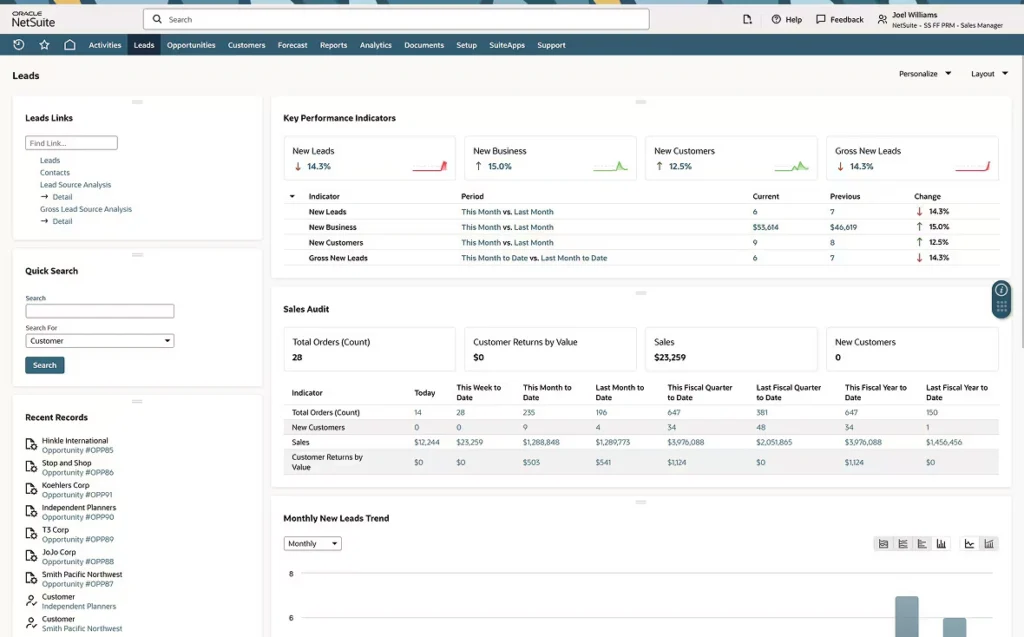
As it is native, it does not require a third-party integration to work. It runs inside the same system as your financials, your inventory, your orders, and your customer records. Marketing automation enables firms to target, engage, and nurture buyers, especially when supported by B2B SaaS marketing services that focus on scalable lead generation and pipeline growth. Landing pages with gated content can increase a company’s lead generation. .
Automate your entire marketing process, allowing you to better align campaigns and programs with your sales team. A framework enables marketing to target, build, execute, and measure the success of campaigns, taking the complexity out of lead qualification and conversion.
What makes it different from standalone marketing automation tools is the data it draws on. A HubSpot or Marketo segment is built from behavioral data: email opens, page visits, and form submissions. A NetSuite segment is built from everything: behavioral data plus purchase history, invoice aging, product lines, geographic distribution, and revenue contribution. That data depth is the core advantage.
What Is Included in NetSuite CRM Marketing Automation?
NetSuite marketing automation capabilities are part of NetSuite CRM, which comes with the NetSuite platform. Here is what is available natively.
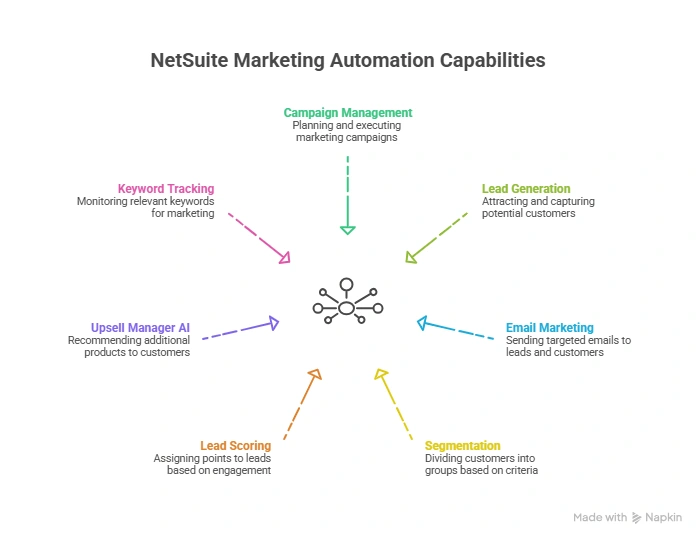
Campaign Management
NetSuite’s campaign management covers the full campaign lifecycle from planning through ROI reporting.
What it includes:
- Campaign creation with defined objectives, budgets, and target audiences
- Multi-channel execution: email, direct mail, events, and online
- Real-time performance tracking during active campaigns
- Revenue attribution from campaign to final transaction
- A/B testing at the campaign level
- ROI reporting that ties campaign spend to closed revenue
NetSuite reports and KPIs provide a comprehensive look into your marketing campaigns. You can effectively track return on investment (ROI) for campaigns, as well as campaign responses and lead source data for individual campaign events.
The revenue attribution capability is where NetSuite separates itself from standalone marketing tools. A HubSpot campaign shows you that a lead clicked an email. NetSuite shows you that the lead clicked an email, became an opportunity, closed for $47,000, and paid within terms. That full-funnel visibility informs budget allocation decisions a standalone tool cannot support.
Lead Generation and Capture
NetSuite handles the full lead intake process natively.
- Web-to-lead forms: Custom entry forms that create new lead records in NetSuite CRM in real time when submitted. Field-level configuration controls what data is captured and what record type is created.
- List imports: Lead lists can be imported via CSV or XML with deduplication logic to prevent duplicate records.
- Automatic routing: Leads are immediately routed to the right salesperson based on configurable assignment rules.
With native web-to-lead forms, as soon as your prospect completes a form, lead details and other critical information are entered into NetSuite CRM in real-time and routed immediately to the right sales representative. No manual import. No sync dependency on a third-party tool.
Email Marketing
NetSuite includes a native email marketing engine with:
- Custom email templates using CRMSDK tags for per-recipient personalization
- Campaign scheduling and deployment
- Automatic ROI tracking tied to lead source data
- SPAM-compliant auto-unsubscribe management
- Open rate, click-through, and response tracking
The email marketing capabilities work well for standard campaign execution. Where they become limiting is in complex behavioral trigger sequences: multi-step drip workflows based on specific user actions. For those use cases, a dedicated email platform connected to NetSuite produces better outcomes.
Segmentation
NetSuite’s segmentation capability is where the ERP data advantage shows up most clearly.
Standard demographic segmentation (job role, geography, company size) is available in any marketing tool. NetSuite adds:
- Purchase history (what they bought, when, at what volume)
- Revenue contribution (total lifetime value, margin by customer)
- Payment behavior (on-time payers vs. slow payers)
- Support history (ticket volume, issue types, resolution patterns)
- Response patterns to previous campaigns
- Product usage and renewal data
Segment data to deliver personalized marketing campaigns based on demographics, purchase trends, response patterns, and support histories. A segment built from this data produces fundamentally different targeting than one built from behavioral data alone.
For a detailed breakdown of how email segmentation improves campaign performance, our blog on targeted email marketing and segmentation covers the practical impact of data-driven segmentation.
Lead Scoring and Qualification
NetSuite tracks and measures a prospect’s activity across touchpoints, identifying when a lead meets buyer-readiness conditions and automatically passing it to sales.
Lead scoring in NetSuite is built on:
- Profile fit data captured through forms
- Campaign response behavior (email opens, event attendance, form submissions)
- Website activity tracked through the NetSuite CRM
When a lead reaches a defined score threshold, NetSuite routes it to the assigned sales rep with full activity history attached.
Upsell Manager With AI Recommendations
NetSuite’s Upsell Manager is a native AI feature that identifies customers with strong upsell potential.
Use the Upsell Manager to find customers with good selling potential. Add items to sales orders and estimates based on recommendations calculated using artificial intelligence algorithms.
The AI analyzes purchase patterns, product combinations, and customer segments to surface upsell and cross-sell recommendations. For marketing automation, this means campaigns targeting existing customers can be built around AI-generated product recommendations rather than manual analysis.

Keyword Campaign Tracking
For businesses running paid search, NetSuite tracks revenue from paid keywords using the Lead Source field on sales transactions.
Keyword campaigns track paid keywords, search engines, and target audiences alongside the revenue those keywords generate. For marketing teams that need to justify paid search spend against closed revenue, this native tracking removes the attribution gap that exists when ad platforms and ERP systems do not share data.
Where NetSuite Marketing Automation Has Limits
Being direct about what NetSuite’s native marketing automation does not do well helps you build a more effective overall model.
Complex behavioral trigger sequences
NetSuite’s native email marketing does not support multi-step, behavior-triggered drip workflows the way HubSpot, Marketo, or ActiveCampaign do. Logic like “if a contact opens email A but does not click the CTA, wait 3 days, send email B, if they visit the pricing page within 5 days, alert the sales rep” requires a dedicated platform.
Advanced A/B testing at the content level
Campaign-level A/B testing is available. Content-level multivariate testing: subject lines, body copy, CTA placement, send times require a dedicated email platform.
Social media publishing and management
NetSuite tracks social media as a campaign channel for attribution. It does not manage social posting, scheduling, or engagement natively. The impact of marketing strategy, powered by automation tools like WhatsApp Automation, was reflected beyond sales.
Deep behavioral scoring models
Lead scoring in NetSuite uses activity and profile fit data. Behavioral scoring models that weight activity differently based on page depth, time on site, content type, and engagement pattern require a dedicated marketing automation platform.
Landing page creation and testing
NetSuite does not include a landing page builder. Lead capture forms are configurable, but full landing page design, testing, and optimization require external tools like lead capture software.
NetSuite Marketing Automation and AI: The 2025 Landscape
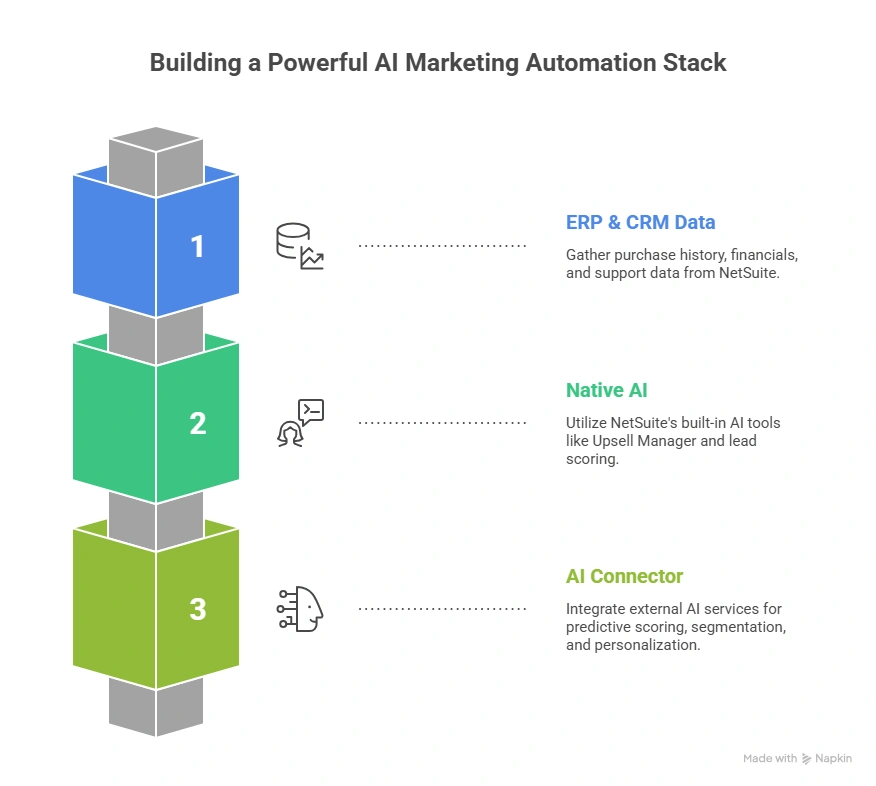
The most significant development in NetSuite marketing automation is the expanding role of AI, both within NetSuite’s native capabilities and through AI connector integrations.
Native AI in NetSuite Marketing
NetSuite’s Upsell Manager AI analyzes purchase history and customer patterns to generate product recommendations. In a marketing automation context, this means:
- Existing customer campaigns can include AI-generated “recommended for you” product content
- Sales order upsell suggestions can be triggered by marketing campaign engagement
- Customer segments for upsell campaigns can be built from AI-identified high-potential accounts
AI Connector Integration for Marketing
Folio3’s NetSuite AI connector services extend AI capabilities deeper into the marketing automation workflow by connecting NetSuite’s ERP data to external AI models.
Here is what this enables that NetSuite’s native AI cannot do:
Predictive lead scoring
Rather than rules-based lead scoring (lead scores X points for each email open), AI models analyze the full behavioral and transactional profile to predict conversion probability. A lead with modest engagement but a purchase pattern that closely mirrors your best customers scores higher than a highly engaged lead from a segment with historically low close rates.
Intent-based segmentation
AI models trained on NetSuite’s historical transaction data identify intent signals: patterns in browsing, purchasing, and support behavior that precede a buying decision. Marketing campaigns can be triggered when a customer profile matches these signals, reaching buyers at the right moment rather than on a predetermined schedule.
Churn prediction and win-back automation
AI models that analyze payment patterns, order frequency declines, and support ticket volumes can identify customers at risk of churn before they cancel. Marketing automation triggered by these signals runs win-back campaigns proactively.
Content personalization at scale
AI connected to NetSuite’s customer data drives dynamic content personalization, where the specific content served to each recipient is determined by their purchase history, lifecycle stage, and engagement pattern, rather than static segmentation-based personalization.
Campaign performance optimization
AI models that analyze campaign performance data across segments, channels, and time periods recommend optimal send times, subject line approaches, and audience configurations for upcoming campaigns.
For businesses looking to extend NetSuite’s marketing automation capabilities with AI-driven intelligence, our NetSuite AI connector services page covers the specific integrations and use cases available.
How NetSuite Integrates With Marketing Automation Platforms
For businesses that need the campaign sophistication of HubSpot, Marketo, or Pardot alongside the ERP data depth of NetSuite, integration is the answer.
Marketing automation integration is the process of connecting marketing platforms with core business systems such as CRM, analytics, and ERP software. The goal is to create a synchronized, data-driven environment.
NetSuite and HubSpot
The HubSpot-NetSuite integration creates a bidirectional data flow where:
- Contacts, companies, and deals in HubSpot sync to NetSuite CRM records
- Customer financial data (lifetime value, purchase history, payment behavior) from NetSuite enriches HubSpot contact profiles
- HubSpot campaign engagement data (email activity, page visits, form submissions) flows into NetSuite
- Closed deals in HubSpot automatically trigger sales orders in NetSuite
- Invoice and payment status from NetSuite is visible to sales reps in HubSpot
The result: HubSpot runs campaign execution with its full behavioral automation capability. NetSuite provides the ERP data that makes the segmentation accurate.
For a detailed breakdown of how HubSpot and NetSuite work together across sales, marketing, and finance, our blog on best use cases for HubSpot and NetSuite integration covers the specific use cases with operational detail.
NetSuite and Marketo
The Marketo-NetSuite integration follows a similar pattern:
- Marketo handles behavioral automation, drip sequences, and lead nurturing
- NetSuite handles lead source attribution, opportunity management, and revenue tracking
- Data flows bidirectionally so campaign performance can be measured against closed revenue in NetSuite
NetSuite and Salesforce Marketing Cloud
For businesses using Salesforce alongside NetSuite, Marketing Cloud connects to NetSuite through an integration layer that synchronizes customer records, order history, and campaign attribution data bidirectionally.
Choosing the Right Integration Model
| Scenario | Recommended Model |
|---|---|
| Simple campaigns, small team | NetSuite CRM marketing automation native |
| Mid-market, active email nurturing, behavioral triggers needed | NetSuite + HubSpot integration |
| Enterprise, complex multi-channel automation | NetSuite + Marketo or Pardot |
| AI-driven segmentation and predictive scoring needed | NetSuite + AI Connector |
| Full sales-marketing-finance alignment | NetSuite + HubSpot with bidirectional sync |
How to Set Up Marketing Automation in NetSuite
For businesses using NetSuite’s native marketing automation capabilities, here is how to configure the core components.
Step 1: Configure Campaign Management
In NetSuite, navigate to CRM > Marketing > Campaigns. Set up your campaign structure:
- Create campaign categories (email, event, direct mail, online)
- Define lead sources for tracking
- Set up campaign budgets and cost tracking fields
- Configure the campaign calendar
Step 2: Build Lead Capture Forms
Navigate to CRM > Marketing > Online Customer Forms to create web-to-lead forms:
- Define required fields and optional fields
- Set the record type created on submission (lead, prospect, customer)
- Configure deduplication logic using a unique field like email address
- Set up lead assignment rules for routing
- Embed the form on your website or landing pages
Step 3: Set Up Email Templates
Navigate to CRM > Marketing > Email Templates:
- Create templates using CRMSDK personalization tags
- Include dynamic fields for first name, company, recent purchase, and other CRM data
- Configure unsubscribe links (required for CAN-SPAM compliance)
- Set up template categories by campaign type
Step 4: Configure Segmentation
In NetSuite, segments are built from saved searches:
- Navigate to Lists > Search > Saved Searches and create customer or contact searches
- Filter by transaction data (purchase date, product, revenue range)
- Filter by CRM data (lead source, campaign response, lead score)
- Filter by support data (ticket volume, issue type)
- Save the search as a target audience for campaigns
Step 5: Set Up Lead Scoring
Navigate to CRM > Setup > Lead Scoring:
- Define scoring criteria by activity type (email open = X points, form submission = Y points, demo request = Z points)
- Set score thresholds for sales qualification
- Configure automatic routing when threshold is reached
- Set up score decay rules for inactive leads
Step 6: Activate the Upsell Manager
Navigate to CRM > Marketing > Upsell Manager:
- Define the customer segment for upsell analysis
- Review AI-generated upsell recommendations
- Add recommended items to active campaigns
- Connect recommendations to email templates for personalized campaign content
Step 7: Set Up Campaign Attribution
For accurate ROI reporting:
- Confirm all lead records have a Lead Source field populated
- Configure campaign cost tracking
- Set up the Campaign ROI dashboard in NetSuite Analytics
- Create saved searches that tie campaign spend to closed revenue
NetSuite Marketing Automation vs. Standalone Platforms: Honest Comparison
| Capability | NetSuite Native | HubSpot | Marketo | NetSuite + AI Connector |
|---|---|---|---|---|
| ERP data in segmentation | Yes | No (integration needed) | No (integration needed) | Yes |
| Multi-step behavioral drip | Limited | Yes | Yes | Yes (via AI triggers) |
| Landing page builder | No | Yes | Yes | No |
| Revenue attribution | Full (to final invoice) | Partial | Partial | Full |
| Native lead scoring | Basic | Advanced | Advanced | AI-driven predictive |
| Social media management | Tracking only | Yes | Yes | Tracking only |
| Upsell and cross-sell AI | Native (Upsell Manager) | No | No | Enhanced |
| Financial data in campaigns | Yes | No | No | Yes |
| Implementation complexity | Low | Medium | High | Medium |
| Cost (standalone) | Included in license | Additional | Additional | Additional |
Final Thoughts
NetSuite marketing automation is not a replacement for HubSpot or Marketo. It is a complement to them, and for businesses that have not connected their ERP data to their marketing engine, it is a significantly underused asset.
The financial and operational data in NetSuite is the most accurate picture of customer behavior most businesses have. When that data drives segmentation, content personalization, and lead qualification, whether through NetSuite’s native tools, through a connected platform like HubSpot, or through an AI connector that adds predictive intelligence to the workflow, the campaigns it produces are more targeted, and the results are measurably better.
If you want to understand how to configure the right marketing automation model for your specific NetSuite environment, or how Folio3’s AI connector can extend your current capabilities, reach out to the team for a straight answer.
FAQs
What is NetSuite marketing automation?
NetSuite marketing automation is the campaign management, lead generation, email marketing, segmentation, lead scoring, and ROI attribution capability built into NetSuite CRM. It is included with every NetSuite license and runs natively in the same system as financials, inventory, and customer records. Its core advantage is the ability to segment and personalize campaigns using ERP data: purchase history, payment behavior, and lifetime value, which standalone marketing tools do not have access to.
What does NetSuite CRM marketing automation include?
NetSuite CRM marketing automation includes campaign management, web-to-lead forms, email marketing with personalization, lead list management, multi-channel campaign execution, lead scoring, campaign ROI attribution, the Upsell Manager with AI product recommendations, and keyword campaign tracking. Complex multi-step behavioral drip sequences and landing page builders are not included natively.
How does NetSuite marketing automation differ from HubSpot or Marketo?
NetSuite’s native marketing automation is stronger on ERP data integration and revenue attribution. HubSpot and Marketo are stronger on behavioral automation, multi-step drip sequences, and landing page creation. The most effective model for mid-market businesses is typically NetSuite handling segmentation and attribution while HubSpot or Marketo handles campaign execution, connected through a real-time bidirectional integration.
What is the NetSuite AI connector for marketing automation?
Folio3’s NetSuite AI connector integrates NetSuite’s ERP data with AI models to enable predictive lead scoring, intent-based segmentation, churn prediction, and personalized content automation. It extends what NetSuite’s native Upsell Manager AI can do by applying machine learning models to the full customer data profile for marketing automation decisions.
How do I set up marketing automation in NetSuite?
The core setup involves configuring campaign management, building web-to-lead forms, creating email templates with CRM personalization tags, building segmentation through saved searches, setting up lead scoring criteria, activating the Upsell Manager, and configuring campaign ROI attribution. Each step is managed through the NetSuite CRM module without additional software.
Does NetSuite integrate with HubSpot for marketing automation?
Yes. The HubSpot-NetSuite integration creates a bidirectional sync where HubSpot handles behavioral automation and campaign execution while NetSuite provides ERP data for segmentation and revenue attribution. Customer financial data from NetSuite enriches HubSpot contact profiles. Closed deals in HubSpot automatically trigger sales orders in NetSuite.


