Key Takeaways
- The NetSuite balance sheet updates in real time with every posted transaction. The report itself is not where errors come from. The period close process feeding it is where accuracy is won or lost.
- The Financial Report Builder lets you customize layout, add comparative columns, slice by dimension, and apply row layouts to standard reports without touching the underlying transaction data.
- A balance sheet that gets questioned by the CFO every month is not a reporting problem. It is a process problem, and it has a specific set of causes that can be traced and fixed in NetSuite.
Think about a car’s fuel gauge that consistently reads a quarter tank higher than the actual fuel level. The instrument is working. The display is accurate for what it measures. But if you have filled up based on that reading and run out of fuel twice, you stop trusting the gauge. You start doing your own mental calculation instead.
That is exactly what happens in finance teams where the balance sheet is produced every month, but the CFO asks for the backup before doing anything with it. The report runs fine. The numbers add up. But somewhere in the process, a late journal entry, an unlocked period, an accrual that never got posted to the balance sheet, stopped being the thing people relied on and became the thing that needed to be explained.
According to APQC’s benchmarking study of over 2,300 firms, the median monthly close cycle runs 6.4 calendar days, with the bottom quartile taking 10 or more days. Finance teams that close more slowly are almost always the ones spending extra days reconciling a balance sheet that does not tie to the underlying subledgers.
This guide covers everything your team needs to produce a NetSuite balance sheet that is accurate, customized for its audience, and trustworthy enough that nobody asks for the backup.
What Is a NetSuite Balance Sheet and What Does It Do Automatically?
A balance sheet shows your company’s assets, liabilities, and equity at a specific point in time. Every transaction that posts to the NetSuite general ledger updates the balance sheet in real time. There is no manual assembly, no export-and-combine process, no version you have to reconcile against another version.
The job of the finance team is not to build the balance sheet. It is to ensure three things are true before sharing it:
- The transactions feeding it are correctly classified
- The accounting period is properly locked, so no one can backdate entries
- The report layout presents the data in a format that is readable for its intended audience
Most of the work that makes a balance sheet trustworthy happens upstream of the report, not inside it. Understanding that distinction changes how you approach both the setup and the monthly close process.
For the broader account structure context that determines what appears on your balance sheet, our NetSuite general ledger best practices guide covers how the chart of accounts design and dimension structure directly affect what the balance sheet shows.
How to Create a Monthly Balance Sheet in NetSuite
Creating a balance sheet in NetSuite takes about 30 seconds. Getting it right for a monthly management pack takes a bit more thought.
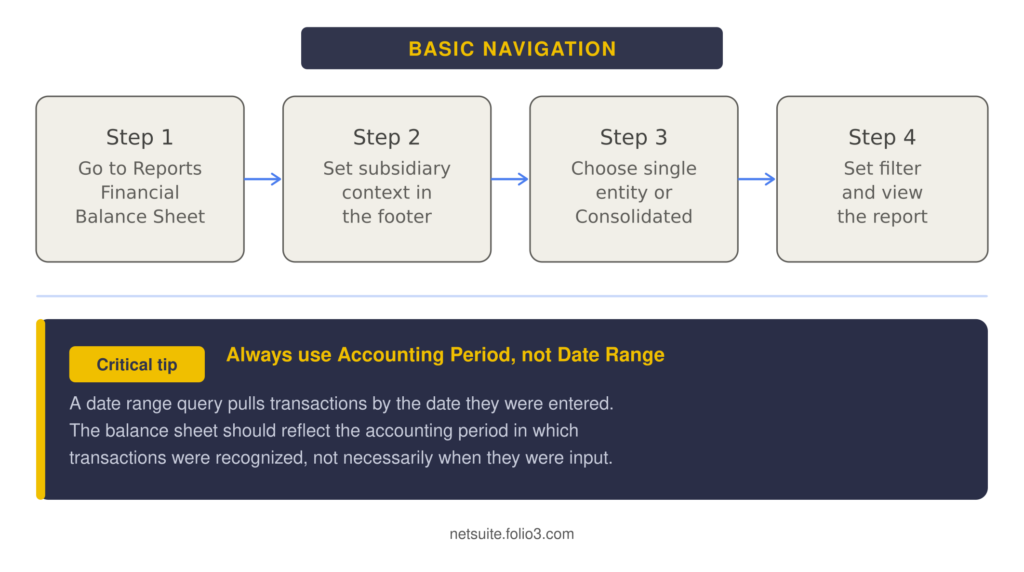
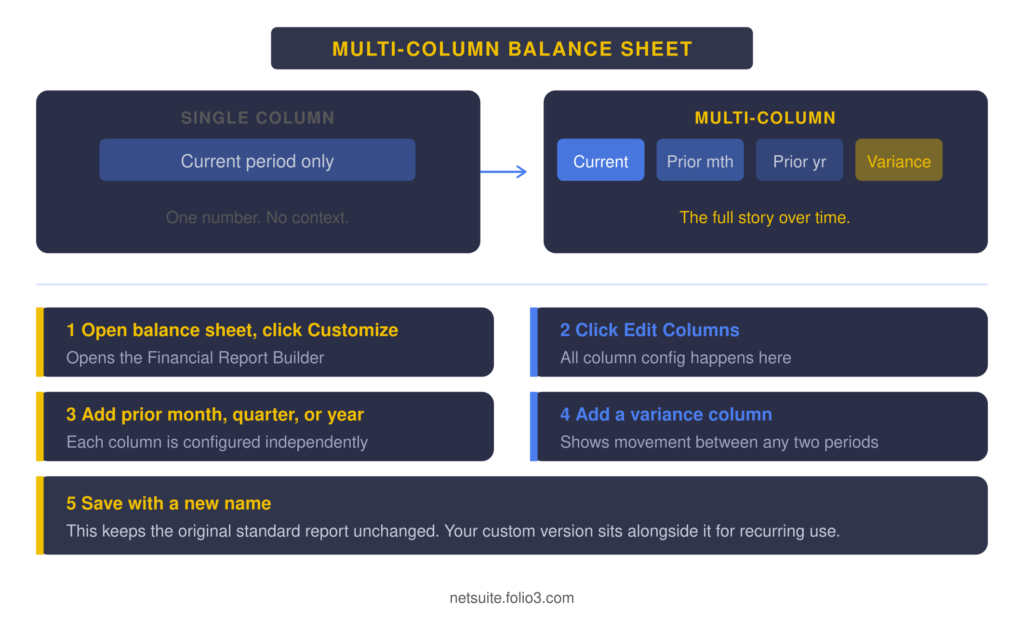
The comparative format is what most boards and investors expect. A balance sheet that shows only today’s number without context requires the reader to remember last month’s number or ask for it separately. Adding the prior period column removes that question before it is asked. Our guide to NetSuite planning and budgeting covers how to add a budget column alongside actuals for management reporting.
How to Customize Your NetSuite Balance Sheet Layout
The standard NetSuite balance sheet layout is designed to be correct, not to be readable for your specific audience. A board member does not need to see every sub-account in your chart of accounts. A bank reviewer does not need internal management labels. The Financial Report Builder is where you close that gap.
What you can change in the Financial Report Builder
- Row layout: add, remove, reorder, and rename sections and rows. Collapse sub-accounts into a single parent line for cleaner presentation.
- Negative number formatting: change minus signs to parentheses for a presentation-ready format that auditors and investors expect.
- Zero-balance rows: hide accounts with no balance so the report does not show lines that add no information.
- Custom labels: rename accounts to business-friendly terms without changing the underlying account name in the system.
- Section groupings: group accounts differently from how they appear in the chart of accounts, for example, combining all short-term debt into a single “current borrowings” line for a simplified view.
Applying a custom layout to the standard report
Here is the step most teams miss. When you customize the balance sheet and save it as a new report, you now have two versions: the standard one and your custom one. Every time the standard report is run for a stakeholder, it still shows the old layout. To apply your custom layout to the standard balance sheet permanently, use Row Layout Assignment:
- Go to Reports > Financial > Financial Row Layouts and note the name of your custom layout
- Go to Reports > Financial > Row Layout Assignment
- Enable inline edit and find the Standard Balance Sheet
- Replace the default row layout with your custom layout name
Now, every time anyone runs the standard balance sheet in NetSuite, they see your customized layout. For OneWorld companies, this process needs to be repeated per subsidiary, since each entity can carry a different layout.
How to Slice the Balance Sheet by Department, Class, or Location
Here is a question that comes up often: your company runs three business units from a single legal entity. The CFO wants to see a balance sheet that shows assets and liabilities attributable to each unit separately. NetSuite handles this through dimension filtering, and it is simpler than most teams expect.
In the footer of the balance sheet report, there is a Column dropdown. Change it from Amount to a dimension, Department, Class, or Location, and the report shifts from a single column to one column per dimension value. Inventory by warehouse. Liabilities by business unit. Equity by cost center.
This is not the same as a true subsidiary split. If your business units are separate legal entities with their own tax filings and bank accounts, they need to be set up as subsidiaries in NetSuite OneWorld, not filtered as dimensions within a single entity. The dimension filter is for internal management reporting within one legal entity. The distinction matters both for how you set up the report and for what the output means legally and for audit purposes.
The Consolidated Balance Sheet in NetSuite OneWorld
If you manage multiple legal entities in NetSuite, the consolidated balance sheet is where everything either comes together cleanly or exposes every structural decision made during implementation.
NetSuite generates the consolidated balance sheet from a single database in real time. There is no batch consolidation job, no manual import from subsidiary reports. When you change the subsidiary context in the footer to Consolidated, you see every entity’s assets, liabilities, and equity combined, with intercompany balances eliminated automatically based on the elimination rules configured in your account.
Two things commonly produce questions on a consolidated balance sheet:
Intercompany accounts: If Entity A has a $500,000 receivable from Entity B and Entity B has a matching $500,000 payable to Entity A, those two balances should cancel each other out on the consolidated view. If they do not, either the intercompany transactions were not posted correctly on both sides, or the elimination rules were not configured. Our guide to NetSuite consolidation covers how intercompany elimination rules work in practice.
Cumulative Translation Adjustment (CTA): When you consolidate entities operating in different currencies, the balance sheet can technically go out of balance because assets and liabilities translate at different rates.
NetSuite uses a CTA account to absorb this difference. If you see a CTA balance on your consolidated balance sheet and it is growing, that is not an error. It is correct accounting reflecting the cumulative effect of foreign exchange movements on your net assets.
For more on how multi-entity and multi-currency accounting works in NetSuite, our guide to NetSuite multi-entity accounting covers both the structural setup and the reporting implications.
Why Your Balance Sheet Is Only as Accurate as Your Period Close
Here is the part of the balance sheet reporting that most how-to guides skip entirely.
Your NetSuite balance sheet is not a snapshot of a frozen moment in time. It is a live view of every transaction that has been posted to the general ledger, filtered to a period boundary.
If that boundary is not actually enforced because the period is still open or because Override Period Restrictions is assigned too broadly, the balance sheet changes every time someone posts a transaction to that period. A disciplined routine for closing the month enforces that boundary, so reported balances stay fixed once the period locks. What the CFO saw on the 5th of the month and what the auditor sees on the 20th could be different numbers, even though they both ran the same report.
The five things to confirm before treating a balance sheet as final:
- AR is locked: no new invoices, cash receipts, or credit memos can post to the period
- AP is locked: no new bills, payments, or vendor credits can post
- All accrual and deferral journal entries are posted and approved
- Intercompany transactions are balanced for all subsidiaries (OneWorld)
- The Controller has reviewed the report for anomalies before it is distributed
A balance sheet produced before these five steps are complete is a working document, not a close deliverable. The difference between those two things is what determines whether the CFO trusts the report or questions it.
We conducted an in-depth survey with our clients on the impact of tightening their period close process inside NetSuite. A UK land and estate management firm operating across 22 entities reported shaving 10 working days off their monthly close cycle after restructuring their intercompany automation and period lock workflow. The direct result was a balance sheet that the board could read on the 5th of the month instead of waiting until the 15th.
What to Actually Look for When You Read a Monthly Balance Sheet
Most of the content written about balance sheets focuses on how to produce them. Very little focuses on what to do with one once you have it. These are the five things worth checking every time you open the monthly balance sheet.
Current ratio (current assets/current liabilities)
Is it above 1.0? Is it moving in the right direction month over month? A ratio below 1.0 means current liabilities exceed current assets, which is a liquidity warning worth understanding before the board asks about it.
AR trend vs. revenue trend
If AR is growing faster than revenue, collections may be slowing. If AR is shrinking while revenue is flat, collections are improving. Either way, the relationship between these two numbers tells you something about cash flow that the AR balance alone does not.
Inventory trend vs. COGS
Inventory growing while COGS is flat or declining means stock is accumulating. That is either a deliberate safety stock decision or a signal of demand weakness. Either way, it shows up on the balance sheet before it shows up on the P&L.
Deferred revenue balance (SaaS and subscription companies)
Deferred revenue is a liability representing cash received for services not yet delivered. If it is growing, the obligation to deliver is growing. If it is shrinking faster than new bookings would suggest, revenue recognition may be accelerating in ways worth reviewing.
Equity movement
Net equity change should tie to net income from the P&L, adjusted for any contributions or distributions. If it does not, there is a journal entry somewhere that posted directly to equity without going through the P&L. That is worth understanding before an auditor finds it.
How to Schedule Automated Balance Sheet Delivery in NetSuite
Every month, someone on the finance team exports the balance sheet, saves it as a PDF, and emails it to the board or investors. If that person is on leave, the report does not go out. If they remember to do it before the period is fully closed, the report shows an incomplete picture.
NetSuite’s scheduled report delivery removes both of those risks. To set it up:
- Open the balance sheet report you want to deliver
- Click Schedule at the top of the report
- Set the recurrence (monthly on a specific day), file format (PDF for boards, Excel for working documents), and recipient list (email addresses or internal roles)
- Set the schedule to run after the period is locked, not on a fixed calendar day that may precede close
Once configured, the report delivers automatically to every recipient every month without anyone needing to remember. The board gets the same formatted balance sheet every month on the same day, in the same layout, regardless of who is in the office.
Common NetSuite Balance Sheet Discrepancies and How to Find Them
If your balance sheet is producing numbers that do not match your expectations, the cause is almost always one of five things.
The balance does not match the prior period closing balance
Check for transactions posted to the prior period after it was closed. If Override Period Restrictions is assigned broadly, users can post to closed periods without any system warning. Review the transaction list for the account in question and filter by posting period.
The AR or AP balance looks wrong
Run the AR or AP aging report and total the balance. It should match the corresponding balance sheet account exactly. If it does not, there is a transaction posted directly to the AR or AP GL account via a journal entry rather than through the proper transaction type.
Retained earnings do not tie to the P&L
Check for journal entries that posted directly to a retained earnings or equity account. These bypass the income statement and change equity without changing net income. They are legitimate in some cases (prior period adjustments, equity distributions), but should be documented and reviewed.
The inventory balance is unexpected
Run the inventory valuation report and compare the total to the inventory balance sheet account. If they do not tie, check for inventory adjustments posted outside the proper inventory adjustment transaction type.
Intercompany accounts are not zeroing out on the consolidated view
Use a saved search filtered to intercompany accounts to find unmatched transactions between entities. The most common cause is a transaction posted on one entity’s books without the corresponding entry on the other entity.
Getting the Balance Sheet to the Point Where It Answers Questions Rather Than Creates Them
A NetSuite balance sheet that gets questioned every month is telling you something specific about the process behind it. It is not a reporting problem. It is a close process problem, a period lock problem, or a dimension structure problem that shows up in the output.
The companies that produce balance sheets their CFOs trust are the ones that invested time in the upstream setup: period close governance, account structure, intercompany rules, and report layout design.
Once those are right, the balance sheet becomes the thing it is supposed to be: a reliable picture of the company’s financial position that anyone can open and read without needing a spreadsheet to verify it.
If your current balance sheet setup is producing friction rather than clarity, Folio3’s NetSuite consulting services cover report layout design, period close process review, and reconciliation troubleshooting as focused engagements. To explore the full NetSuite financial module stack that feeds the balance sheet, visit the NetSuite modules overview.
People Also Ask
What is a NetSuite balance sheet?
A NetSuite balance sheet is a financial report that shows a company’s assets, liabilities, and equity at a specific point in time. It is generated automatically from all posted general ledger transactions in NetSuite, updated in real time, and available as a standard report under Reports > Financial > Balance Sheet. It can be customized for layout, filtered by dimension, displayed with comparative columns, and scheduled for automated delivery.
How do you create a monthly balance sheet in NetSuite?
Navigate to Reports > Financial > Balance Sheet. In the footer, change the period filter to the accounting period you want to report on rather than using a date range. Select the subsidiary context if you are in a multi-entity environment.
To create a multi-column comparative version showing prior period or prior year alongside the current period, click Customize and use the Financial Report Builder to add additional columns. Save the customized version under a new name for recurring use.
How do you customize a NetSuite balance sheet?
Open the balance sheet and click Customize to access the Financial Report Builder. On the Edit Layout tab, you can add, remove, and reorder rows, rename sections, hide zero-balance lines, format negative numbers as parentheses, and group accounts differently from the standard chart of accounts hierarchy.
To apply your custom layout to the standard balance sheet report permanently, use Reports > Financial > Row Layout Assignment to replace the default layout with your custom one.
Can NetSuite produce a consolidated balance sheet across multiple entities?
Yes. In a NetSuite OneWorld environment, changing the subsidiary context in the footer to Consolidated generates a consolidated balance sheet that combines all entities, eliminates intercompany balances automatically, and handles multi-currency translation. The Cumulative Translation Adjustment account absorbs any differences that arise from translating assets and liabilities at different exchange rates across currencies.
How do you add comparative columns to a NetSuite balance sheet?
Open the balance sheet report and click Customize. In the Financial Report Builder, click Edit Columns and add additional columns for the prior month, prior quarter, prior year, or budget. Each column can be configured independently to show a specific period or to calculate a variance between two periods. Save the report with a new name to preserve the customized version for recurring use.
Why does the NetSuite balance sheet show a Cumulative Translation Adjustment?
The Cumulative Translation Adjustment (CTA) is a balance sheet account used in consolidated financial statements to absorb differences that arise when entities operating in different currencies are consolidated. Because assets, liabilities, and equity translate at different exchange rates, a consolidated balance sheet may technically go out of balance without this adjustment. The CTA represents the cumulative effect of foreign exchange movements on net assets and is correct accounting under both US GAAP and IFRS, not an error in the system.
How do you schedule automated balance sheet delivery in NetSuite?
Open the balance sheet report and click Schedule at the top. Set the recurrence (monthly on a specific date), the file format (PDF for board distribution, Excel for working files), and the recipient list. Configure the schedule to run after the period lock is complete rather than on a fixed calendar day that may fall before close is finished. Once set up, the report delivers automatically to all recipients every period without manual intervention.
What are the most common NetSuite balance sheet discrepancies, and how do you fix them?
- Balance does not match prior period closing balance: Caused by transactions posted to a closed period via Override Period Restrictions. Review the transaction list for the account filtered by posting period.
- AR or AP balance does not tie to the aging report: Caused by journal entries posted directly to subledger accounts rather than through proper transaction types. Run the aging report and compare the total to the balance sheet account.
- Retained earnings do not reconcile to the P&L: Caused by journal entries posted directly to equity accounts, bypassing the income statement. Search for journal entries hitting equity accounts directly.
- Unexpected inventory balance: Run the inventory valuation report and compare the total to the inventory balance sheet account to identify the gap.
- Intercompany accounts not zeroing out on consolidated view: Caused by unmatched intercompany transactions between entities. Use a saved search filtered to intercompany accounts to find the unmatched transactions.
What should I look for when reading a monthly NetSuite balance sheet?
- Current ratio (current assets divided by current liabilities): Is liquidity improving or deteriorating month over month?
- AR trend vs. revenue trend: Is accounts receivable growing faster than revenue? If yes, collections may be slowing.
- Inventory trend vs. COGS: Is stock accumulating while the cost of goods sold stays flat? That signals demand weakness or an intentional safety stock decision worth confirming.
- Deferred revenue balance (for subscription and SaaS businesses): Is the obligation growing or being recognized as expected against the delivery schedule?
- Equity movement vs. net income: The change in equity should tie to net income adjusted for any contributions or distributions. If it does not, a journal entry posted directly to an equity account warrants review.