
NetSuite Electronic Invoicing refers to the automation and digital exchange of invoices through NetSuite’s built-in SuiteApp and integrations. It enables companies to generate, send, and receive e-invoices in structured formats such as XML or JSON, automating both inbound and outbound document flows. For finance leaders and operations teams, this means fewer manual touches, reduced errors, and stronger compliance control across multi-entity and multi-currency environments.
As mid-market organizations push for finance digitalization, electronic invoicing addresses persistent pain points—manual entry, non-compliant invoice formats, and fragmented systems. By connecting directly to networks like PEPPOL and embedding automated verification and approval workflows, NetSuite helps teams move from reactive invoice management toward end-to-end financial transparency and audit readiness.
What is NetSuite E-Invocing?
NetSuite E-Invoicing is a digital invoicing solution within NetSuite that allows businesses to create, send, and manage invoices electronically, reducing paper usage and manual processing. It automates the invoicing workflow, ensures compliance with regional tax and regulatory requirements, and integrates directly with your accounting and ERP modules.
Key Features of NetSuite Electronic Invoicing
NetSuite’s electronic invoicing capability integrates automation, compliance, and control in a single platform. Core features include:
- Automatic creation and parsing of electronic invoices in XML or JSON formats, converting data directly into NetSuite transaction records.
- Full audit trails through the E-Document subtab for every invoice, ensuring traceability and supporting internal control testing.
- Workflow automation using SuiteFlow for routing, approval, and exception management.
- Saved searches and dashboards that track document status, rejection reasons, or pending approvals.
- Built-in compliance checks and validation rules to ensure outgoing invoices meet country-specific tax standards.
Supporting capabilities and connectivity
Supporting capabilities such as optical character recognition (OCR) and AI-powered data capture enable faster processing and increased accuracy.
Direct PEPPOL connectivity simplifies cross-border transactions, while role-based workflows provide controlled access.
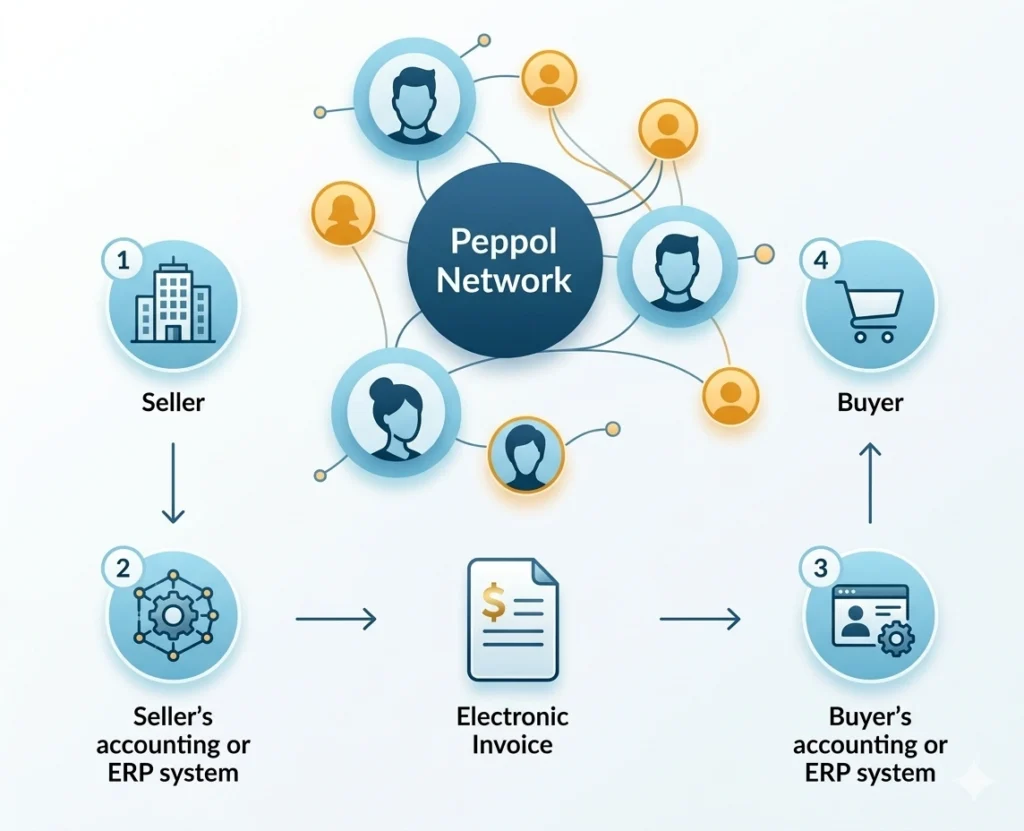
Many organizations report up to 70% faster invoice processing when using NetSuite e-invoicing combined with automation extensions.
The table below highlights how native functionality compares to add-on options.
| Capability | Native NetSuite SuiteApp | Folio3 Implementation with SuiteApp | ZoneCapture / Tipalti Integration |
|---|---|---|---|
| Invoice Automation | XML/JSON file creation & import | End-to-end configuration and testing for XML/JSON | OCR + AI pattern learning |
| Compliance Support | Country templates | Country templates and regulatory mapping | Global templates + real-time validation |
| Approval Workflows | SuiteFlow workflows | Custom multi-level approval routes | Extended multi-stage routing |
| Connectivity | Direct PEPPOL (optional) | Direct PEPPOL (full setup & monitoring) | Vendor portal & API |
| Data Location | Stored in NetSuite | Stored securely in NetSuite | May sync to external cloud |
With Folio3’s NetSuite-certified team, organizations can extend these features further with AI-first customizations, pre-built connectors, and integration governance frameworks.
Compliance Requirements for Electronic Invoicing
The compliance requirements that your business must fulfil for electronic invoicing include:
Core controls and audit alignment
Electronic invoicing compliance involves ensuring invoices adhere to local tax, format, and archiving rules while maintaining full audit integrity. This often includes digital signatures, legally mandated file structures, retention periods, and segregation of duties among staff.
NetSuite’s architecture supports key compliance requirements, including:
- Immutable audit trails for all document actions.
- Role-based approval and access segregation.
- Automated retention and archival of invoices per jurisdiction.
For multinational operations, template configuration and country-specific licensing may be necessary to meet differing standards. Increasingly, companies are pairing these configurations with AI-driven monitoring tools that validate data integrity and track compliance for SOX or internal audit purposes.
Preparing for NetSuite Electronic Invoicing Implementation
Foundation and team alignment
A well-prepared foundation ensures smooth deployment. Organizations should first define their business goals: what processes will move to e-invoicing, the number of legal entities involved, and transaction volumes. Establishing the company structure, fiscal calendar, subsidiaries, and currencies in NetSuite provides essential groundwork.
Equally important is forming a cross-functional team that includes finance, IT, and operational leads. Early collaboration ensures that both system design and data mapping align with business workflows.
Step 1: Defining Scope and Legal Requirements
What to document
Begin by documenting every entity, jurisdiction, and invoicing channel involved. Identify legal obligations—such as country-specific e-invoicing mandates or government platforms (e.g., PEPPOL, SDI).
| Entity | Jurisdiction | Invoice Format | Exchange Channel |
|---|---|---|---|
| US Subsidiary | USA | JSON | Email/Web service |
| FR Subsidiary | France | XML | PEPPOL Network |
| SG Subsidiary | Singapore | XML | InvoiceNow Portal |
This scoping table is the blueprint for your configuration, helping ensure that each area meets its respective legal and reporting needs.
Step 2: Selecting the Right SuiteApp or Integration Approach
Options to consider
Deciding between NetSuite’s native SuiteApp and third-party integrations depends on scale and requirements:
- Native Electronic Invoicing SuiteApp: Ideal for single-country use. Maintains all invoice data within NetSuite, ensuring unified reporting and simplified compliance.
- Folio3 Custom Configuration: Perfect for multi-entity or fast-growing businesses seeking unified control. Provides tailored workflows, audit alignment, and cross-border validation.
- Third-Party SuiteApps: Tools like ZoneCapture or Tipalti add OCR scanning, vendor portals, and enhanced PEPPOL capabilities. These are best suited for organizations handling large invoice volumes or multi-region compliance.
In general, prioritize native or Folio3-supported approaches to minimize synchronization issues. For complex environments, hybrid setups can provide balance—keeping compliance functions centralized while enhancing automation.
Step 3: Installing and Licensing SuiteApps
Installation basics and licensing
Installation begins from NetSuite’s SuiteApp Marketplace under the Electronic Invoicing category. After downloading, activate the app in your environment and enable any relevant permissions.
Learn how you can develop a NetSuite SuiteApp using SDF
Single-country usage is typically included at no cost, while multi-country operations require extended licensing from NetSuite. Keep records of license details and renewal cycles as part of your audit documentation. Folio3 assists clients with licensing, activation, and permission setup to ensure readiness from day one.
Step 4: Building and Configuring E-Document Templates
Template strategy and versioning
Templates define how invoices are transmitted or imported. Start with the provided sample XML or JSON layouts, then customize tags, headers, and transactional fields per local regulation or partner specifications.
For global teams, maintain a centralized library of reusable templates. Assign version control and track regulatory updates to ensure continuous compliance. Folio3 can automate version control and change management workflows for high-volume environments.
Step 5: Setting Up Inbound Channels and Document Processing
Supported channels and processing flow
NetSuite supports three main inbound invoice channels:
- Email capture – Parsing PDFs or XML files sent by vendors.
- SOAP web services – Direct integration with vendor or tax portals.
- Manual upload – Controlled entry for exceptions or legacy systems.
Transformation rules convert incoming files into native NetSuite transactions, maintaining end-to-end visibility. A simple process map—capture → verify → post—helps visualize and enforce consistency across all sources.
Step 6: Designing Approval Workflows and Audit Controls
Workflow design and testing
Using SuiteFlow, organizations can configure multi-level approval routes tied to role hierarchies. Separate duties between invoice creation, review, and approval to meet audit expectations.
The E-Document subtab maintains full action histories, supporting SOX and internal audit requirements. Before launch, simulate test scenarios in a sandbox environment to verify that unauthorized actions trigger control blocks as intended.
Folio3’s implementation specialists help model and test these workflows to meet both operational and audit standards.
Step 7: Piloting and Testing Electronic Invoicing
Pilot scope and measurement
A pilot phase mitigates deployment risk. Choose a small representative vendor or customer group and monitor key metrics such as data accuracy, latency, and error rates. Validate tax calculations, document formatting, and system notifications.
Use this data to refine workflows—adjusting template rules or approval thresholds—before global rollout. A sandbox-based approach helps reduce errors at scale.
Step 8: User Training and Continuous Monitoring
Training and visibility
Training underpins long-term success. Conduct role-based sessions with real scenario testing for finance, procurement, and operations teams.
Establish dashboards to monitor status, approval bottlenecks, and exceptions. Incorporate AI-driven alerts to highlight anomalies and track compliance automatically during audits.
Get to know the best strategies for ERP user training.
Step 9: Going Live and Ongoing Optimization
Stabilization and improvement
Go-live is the transition from pilot to production. Monitor early invoice runs for reconciliation variances and process bottlenecks.
Schedule a post-launch review within the first month to identify recurring exceptions and fine-tune templates or machine learning models accordingly. Perform regular control testing to ensure sustained compliance and operational efficiency.
Our managed support helps organizations optimize and future-proof their e-invoicing processes after launch.
Best Practices for Tool Selection and Compliance Management
Selection and governance principles
Selecting the right approach and governance framework is key for long-term ROI. Consider these principles:
- Favor NetSuite-native or Folio3-supported integrations for data consistency and reduced latency.
- Evaluate extensions based on OCR accuracy, PEPPOL connectivity, and reporting support.
- Conduct regular compliance audits, updating configurations as legal frameworks evolve.
- Align IT and finance ownership of e-invoicing processes to maintain transparency and accountability.
Conclusion
NetSuite Electronic Invoicing centralizes invoice creation, exchange, and compliance monitoring in one platform, helping teams reduce errors and increase visibility. With clear governance, well-structured templates, and robust approval workflows, organizations can scale across entities and jurisdictions. A staged approach—scope, configure, pilot, and optimize—sets the foundation for sustained performance.
Ready to modernize e-invoicing in NetSuite? Connect with our NetSuite team to discuss your roadmap and next steps.
FAQs
What is NetSuite Electronic Invoicing?
NetSuite Electronic Invoicing automates the creation, exchange, and reconciliation of digital invoices within the NetSuite platform. It standardizes invoice data in machine-readable formats so records flow directly into transactions without rekeying. This improves accuracy, accelerates cycle times, and strengthens auditability across AP and AR. Teams also gain real-time visibility through dashboards and saved searches.
- Automates outbound and inbound invoice handling in XML/JSON
- Reduces manual entry and exceptions through validation rules
- Improves traceability via E-Document audit trails
- Enhances reporting with status tracking and exception analytics
Does NetSuite support e-invoicing compliance in multiple countries?
Yes. NetSuite supports multi-country e-invoicing through localized templates and extended licensing that align with regional standards. Configuration can be adapted for specific file structures, tax rules, and exchange channels, including PEPPOL and country portals. With clear version control and ongoing monitoring, organizations maintain compliance even as regulations evolve.
- Localized templates tailored to jurisdictional formats
- Role-based access and approval segregation for control
- Archive and retention settings aligned with legal requirements
- Centralized governance to manage multi-entity operations
How are inbound e-invoices processed in NetSuite?
Inbound e-invoices can arrive via email, web services, or manual upload, then flow through transformation rules that map fields into transaction records. Validation steps check vendor, tax, and amount details before posting. Exceptions route to approvers or queues for review, maintaining end-to-end visibility from receipt to posting. Dashboards help track statuses and cycle times.
- Supported channels: email capture, SOAP web services, manual upload
- Transformation and validation into native transactions
- Exception routing through SuiteFlow approval logic
- Monitoring via saved searches and work queues
What are the benefits of using native SuiteApps for e-invoicing?
Native SuiteApps keep data within a single platform, simplifying security, reporting, and maintenance. They minimize synchronization issues that can occur with external systems and reduce latency between creation and posting. Built-in SuiteFlow and audit trails further streamline governance and control testing. Customization options allow adaptation to entity-specific needs.
- Unified data model and reduced integration overhead
- Faster processing with fewer sync errors
- Embedded approvals and audit logs for compliance
- Template-driven formats for quick configuration
Can NetSuite handle both AP and AR e-invoicing?
Yes, NetSuite supports electronic invoicing for both accounts payable and receivable. AP teams can ingest vendor invoices via supported channels and route them for approval, while AR teams can generate compliant outbound e-invoices for customers. This unified approach enhances visibility across the cash conversion cycle and simplifies reconciliation.
- AP: capture, validate, and approve vendor invoices
- AR: generate and transmit customer e-invoices
- Shared controls and dashboards across functions
- Consistent templates for multi-entity standardization
How do AI and OCR features enhance NetSuite e-invoicing?
AI and OCR accelerate data capture by extracting key fields from PDFs or semi-structured files and learning vendor patterns over time. This reduces manual entry, shortens approval cycles, and lowers exception rates. When paired with validation rules and SuiteFlow, teams achieve faster, more reliable posting at scale. Insights from exceptions also improve template accuracy.
- OCR for header/line-level extraction and field mapping
- Machine learning to refine accuracy with usage
- Validation controls to prevent posting errors
- Analytics to identify anomalies and training opportunities
What should organizations do before going live with NetSuite Electronic Invoicing?
A thorough readiness check reduces risk at go-live. Validate templates against local requirements and trading partner specs, confirm approvals and segregation of duties, and run end-to-end tests in a sandbox. Train users with realistic scenarios and establish dashboards to monitor accuracy, timing, and exceptions from day one.
- End-to-end testing of capture → verify → post
- Approval and control checks in SuiteFlow
- User training with sample vendor/customer cases
- Dashboards and alerts for pilot and early production

