Key Takeaways
- SuiteCommerce and WooCommerce Are Built on Fundamentally Different Architectures. SuiteCommerce lives inside NetSuite as a native module. WooCommerce is a WordPress plugin. After migration, your NetSuite ERP does not disappear. It needs a new integration layer to stay connected to your storefront.
- Most Migrations Cover Three Things. Customer data, product information, and historical orders are transferred to WooCommerce. Your SuiteCommerce theme, custom SuiteScript, SuiteTax configuration, and native ERP workflows do not transfer. They all need to be rebuilt or replaced.
- B2B Portals Add the Most Complexity to This Migration. A closed distributor portal with approval workflows, role-based pricing, and restricted access requires custom WooCommerce development that has no direct equivalent in standard SuiteCommerce features.
- Dynamic Pricing Requires a Separate Plugin or Custom Logic in WooCommerce. If your SuiteCommerce store uses live-rate pricing (precious metals, commodities, exchange-rate-based pricing), WooCommerce does not handle this natively. You need a purpose-built plugin or custom pricing engine.
- The Three-Phase Migration Sequence Matters. The three-phase migration sequence follows. Discovery and design first, on the second step, there is development and B2B feature build, and lastly, it includes the data migration, UAT, and go-live.
- WooCommerce powers over 4.4 million active online stores globally. The plugin ecosystem, WordPress hosting flexibility, and developer availability are the most common reasons businesses move from SuiteCommerce to WooCommerce.
Migrating from SuiteCommerce to WooCommerce is an entire platform build and not just a data transfer. Before we jump right into the nitty-gritties of both platforms, it is important to understand the differences between the two.
SuiteCommerce is not just a storefront. It is a module that runs inside NetSuite, where your pricing, inventory, customer records, and order management all live in one system. When you migrate to WooCommerce, you are separating the storefront from the ERP. WooCommerce becomes the front end, whereas NetSuite stays as the back end. And everything SuiteCommerce handled natively (the ERP connection, the pricing rules, the tax logic, the B2B workflows) has to be rebuilt or reintegrated in the new environment.
We have managed migrations in exactly this situation. These include businesses running closed B2B distributor portals on SuiteCommerce with approval workflows, live-rate dynamic pricing, role-based access controls, and other features. The technical complexity in those projects is in rebuilding the business logic in a platform that was not designed for that logic out of the box.
This guide covers every phase of the migration, including what to audit before you start, how to rebuild B2B complexity in WooCommerce, how to handle data migration correctly, what UAT needs to cover before go-live, and what post-migration integration you need to keep NetSuite in sync.
Let’s get started.
Migration from SuiteCommerce to WooCommerce
When a business migrates from SuiteCommerce to WooCommerce, it involves four phases that have certain milestones. Phase one involves discovery, audit, and UX planning. The second phase involves WooCommerce development. The third phase is data migration, and the fourth phase includes testing, UAT, and go-live. Let’s take a look in detail.
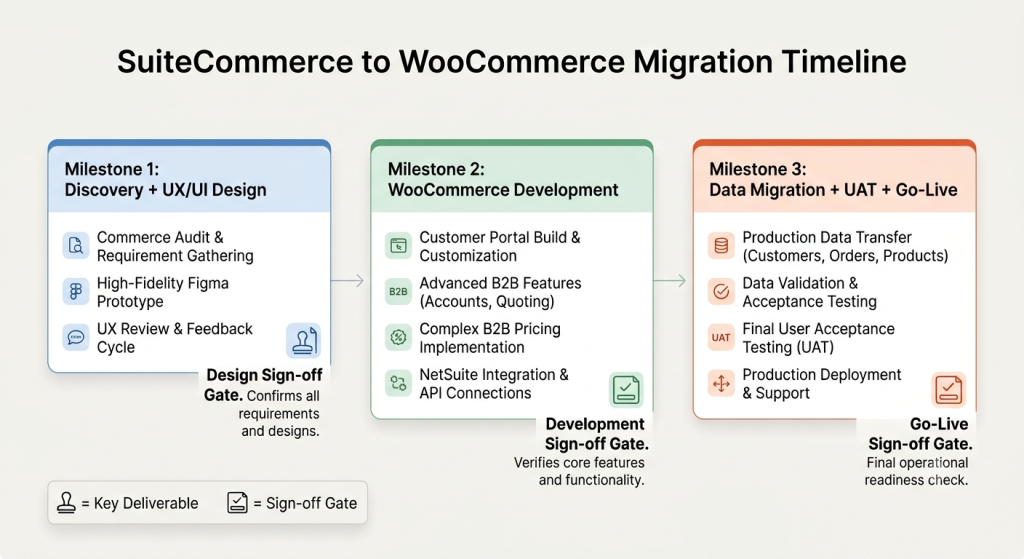
Phase One: Discovery, Audit, and UX Planning
The first mistake most businesses make is jumping into WooCommerce setup before they have a complete picture of what their SuiteCommerce environment actually does.
SuiteCommerce stores accumulate complexity over time, i.e., custom SuiteScript that modifies checkout behavior, pricing rules that only exist inside NetSuite, tax configurations that SuiteTax handles automatically, and B2B workflows that rely on NetSuite’s native customer record structure.
Before any design or development work begins, audit the following:
- All active SuiteCommerce extensions and customizations: list every SuiteScript attached to the storefront and what it does
- Pricing rules and customer price levels: document how different customer types see different prices and how those rules are configured in NetSuite
- Tax setup: confirm whether taxes are handled through SuiteTax, a third-party integration, or both, and what logic drives tax calculation at checkout
- B2B access controls: if the portal is closed (login required to browse or purchase), document the user registration flow, the approval workflow, and what changes when a customer is approved
- Payment gateways: list all active payment methods and whether they have WooCommerce plugins already available
- Shipping setup: document all shipping rules, free shipping thresholds, and any carrier integrations currently in place
- Historical data scope: confirm what needs to be migrated (customer accounts, product catalog, order history) and what does not
This audit becomes the scope document, and everything on the list gets a destination in WooCommerce. Entities that have no destination are either rebuilt with custom development or replaced with a WooCommerce plugin.
UX Planning and Design Before Development
One of the most valuable things the discovery phase produces is a Figma prototype before a single line of WooCommerce code is written. Many migrations skip it and pay for it during development when the client wants to change a user flow that is already built.
The right approach is to gather branding materials (fonts, colors, visual guidelines), define the complete user journey for the portal, including how distributors register, what they see before approval, and how the post-approval experience differs, and then build a clickable Figma prototype.
This applies even for B2C stores. For B2B portals with complex access logic, it is essential. The approval workflow, the distributor dashboard, the restricted product, and the pricing view all of that has to be fully designed and signed off on before it is built. Changing a user flow after it is coded costs three times what it costs to change it in a prototype.
Phase Two: WooCommerce Development
Once the design is approved, WooCommerce development begins. For a standard B2C migration, this means installing WooCommerce on WordPress, implementing the approved design, configuring products and categories, setting up shipping and payment methods, and connecting tax calculation.
For B2B portals, the scope is larger, and the sequence matters more. The B2B access layer has to be built before product or pricing work begins, because product visibility and pricing behavior both depend on user role and approval status.
1. Building a Closed B2B Portal in WooCommerce
This is where most generic migration guides stop being useful. Standard WooCommerce is public-facing by default, as every product, price, and other similar details are visible. There is no concept of a pending distributor waiting for backend approval before they can see B2B pricing.
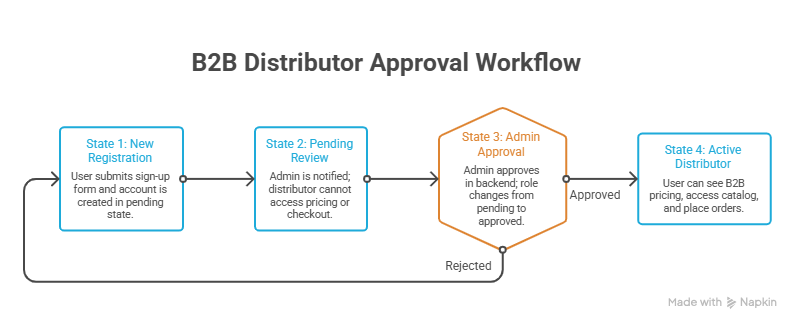
Building a closed distributor portal on WooCommerce requires custom roles and access logic. You can follow the given architecture to build a closed WooCommerce distributor portal:
2. Distributor sign-up flow
New users register through a custom sign-up form. On submission, they receive a confirmation, but their account is set to a pending role. They cannot browse products, see distributor pricing, or place orders until approved.
3. Admin approval workflow
An admin reviews pending distributors in the WordPress backend, approves or rejects each one, and triggers a role change from pending to approved distributor. Email notifications fire at each status change.
4. Role-based access control
Once approved, the user’s WordPress role changes to an approved distributor role. WooCommerce then serves them B2B pricing, unlocks distributor-only products, and grants checkout access. Unapproved users and guests see none of this.
5. Self-service portal capabilities
Approved distributors get access to their account dashboard, order history, and profile management. These are configured within WooCommerce’s My Account system, extended with custom fields and views that match the portal design.
This architecture requires WooCommerce plugins for role management combined with custom PHP development to build the pending state, the approval trigger, and the conditional visibility logic that none of the plugins handle out of the box.
Handling Two Product Types in WooCommerce
A common scenario in B2B product catalogs is supporting two fundamentally different pricing models simultaneously. Fixed-price products behave like standard WooCommerce products, whereas Dynamic-price products are where the complexity lies.
- Fixed-price products use WooCommerce’s native pricing. The price is set in the admin, shown on the product page, and does not change between visits.
- Dynamic-price products tie their price to a live external data source, most commonly a commodity spot price or exchange rate. The product price shown to the customer is calculated at the moment the page loads rather than being stored as a static value.
WooCommerce does not support dynamic pricing natively. The solution is either a dedicated pricing plugin or custom development. For precious metals, tools like the nFusion pricing plugin connect to live spot price feeds and automatically update product prices. For other live-rate scenarios, custom development queries the external API on page load and displays the calculated price.
The critical implementation detail is that the dynamic price must display consistently through the product page, the cart, and the checkout. A price that recalculates on the product page but uses a static value in the cart creates reconciliation problems and customer trust issues.
Checkout Price Reservation Logic for Dynamic Products
This is the single most technically specific challenge in any migration involving dynamic pricing, and it is the challenge most migration guides never mention because they are not written by people who have built it.
When a customer adds a dynamically priced product to their cart, the cart price keeps updating with the live rate (that is correct behavior). But the moment the customer initiates checkout, the price needs to lock for a defined window so the customer can complete payment without the total changing under them mid-transaction.
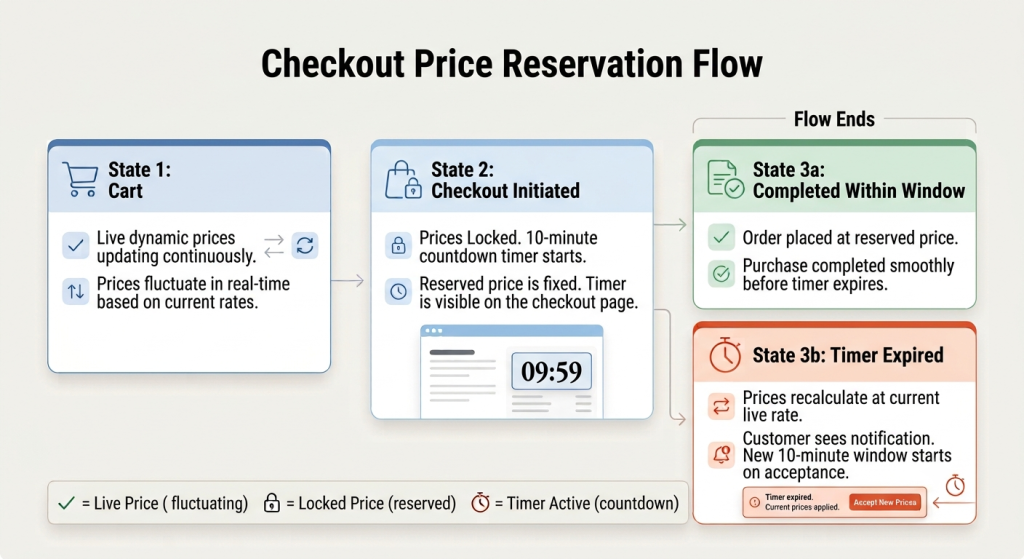
The correct implementation works like this:
- Before checkout initiation: Cart items show live dynamic pricing, and the total updates on every page load.
- Checkout initiation: The moment the customer proceeds to checkout, the current prices for all items in the cart are reserved, and a countdown timer starts.
- Price hold window: The reserved prices remain fixed for a defined period, and the timer is visible to the customer on the checkout page. Ten minutes is a common standard.
- Timer expiry: If checkout is not completed within the window, the system recalculates all line item prices using the current live rate. A notification informs the customer that prices have updated and asks them to review and accept the new total before a new timer starts.
Building this in WooCommerce requires session-based price storage at the point of checkout initiation, a JavaScript countdown timer visible on the checkout page, a server-side recalculation trigger when the timer expires, and a customer notification system that surfaces the updated total before the order is submitted.
This logic does not exist in standard WooCommerce or in most pricing plugins. It is custom development work. Any migration scope that includes dynamic pricing should confirm explicitly whether price reservation is required and build the development estimate accordingly.
Payment, Shipping, and Tax Setup
These three areas are the ones that feel simple and become complicated when the business logic is specific.
1. Payment gateways
WooCommerce supports most major payment gateways through plugins (Stripe, PayPal, Authorize.net, Square). The complexity comes when a gateway used in SuiteCommerce does not have a maintained WooCommerce plugin. Therefore, it is important to verify gateway availability early. If a gateway requires custom API integration, add that to the development scope before estimates are finalized.
2. Shipping rules
Free shipping thresholds, flat rate rules, and carrier-calculated rates all configure directly in WooCommerce. The complexity comes from conditional shipping logic, like free shipping only for orders above a certain value, different shipping rules for different customer roles, or carrier integration that requires a plugin not already in the WooCommerce ecosystem. Document every shipping rule from SuiteCommerce and confirm the WooCommerce equivalent before development.
3. Tax calculation
SuiteTax in SuiteCommerce calculates taxes automatically using NetSuite’s tax engine. After migration, WooCommerce needs its own tax calculation. The two main options are: WooCommerce’s built-in manual tax tables or a third-party tax service integration (TaxJar, Avalara, or similar). For businesses selling across multiple US states or international markets, a third-party tax service is the reliable option. Manual tax tables at scale become a maintenance problem quickly.
Phase Three: Data Migration
What migrates and what does not? This is the question every migration project needs to answer explicitly, because the wrong assumption here causes more post-launch problems than anything else in the project.
What migrates from SuiteCommerce to WooCommerce:
The following entities get migrated from SuiteCommerce to WooCommerce:
- Customer accounts (email addresses, names, shipping and billing addresses, order history links)
- Product data (names, descriptions, SKUs, images, categories, attributes)
- Historical orders (order numbers, dates, items, totals, fulfillment status)
What does not migrate:
The following entities do not get migrated from SuiteCommerce to WooCommerce:
- SuiteCommerce themes and templates (rebuilt in WooCommerce with the new design)
- Custom SuiteScript (functionality is rebuilt in WooCommerce with PHP or plugins)
- SuiteTax configuration (replaced with WooCommerce tax setup or third-party integration)
- NetSuite pricing rules (recreated in WooCommerce as role-based pricing or pricing plugins)
- NetSuite customer roles and approval status (rebuilt with WooCommerce roles)
- ERP integration (SuiteCommerce’s native ERP connection does not transfer. This requires a separate integration, covered below)
How to Execute the Data Migration Correctly
When you are executing data migration from SuiteCommerce to WooCommerce, make sure you are doing it correctly by migrating the following data.
Customer data: Export customer records from NetSuite, including email, name, address fields, and account status. Map each field to the corresponding WooCommerce customer field. Import using WooCommerce’s CSV import tool or a migration plugin. After import, validate a sample of records to confirm that fields are populated correctly and no duplicates were created.
Product data: Export product records from NetSuite, including all item fields, pricing, categories, and images, and map them to WooCommerce product fields. Products with variants (size, color, configuration) require careful mapping to WooCommerce’s variation structure. Import and validate pricing, images, and category assignments across a sample before accepting the full import.
Historical orders: This is optional in some migrations but important for businesses where customer service teams reference order history, or where the business needs historical reporting. Orders are exported from NetSuite with order number, date, customer link, line items, and status, and then imported into WooCommerce as historical records. They do not reprocess or trigger fulfillment workflows and exist for reference only.
Validation before launch: Before any data migration is considered complete, run a validation check. Compare total customer count, total product count, and total historical order count in WooCommerce against the exported source records. Sample records randomly and verify field-level accuracy. Any discrepancy gets resolved before the staging environment is signed off.
Phase Four: Testing, UAT, and Go-Live
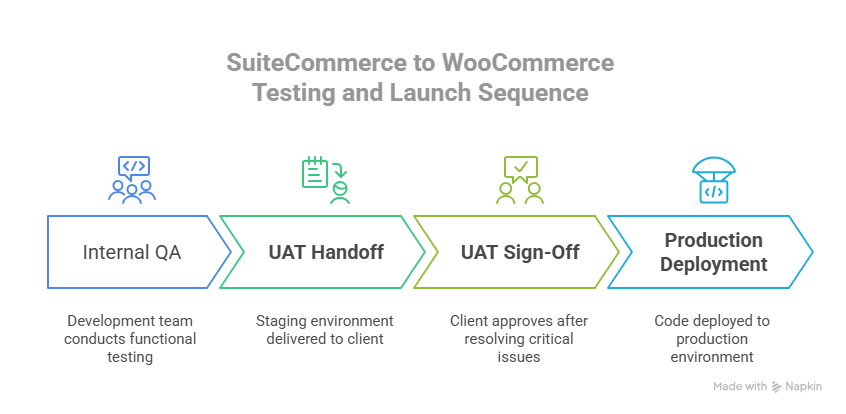
Quality assurance on a SuiteCommerce-to-WooCommerce migration covers more ground than a standard ecommerce build because both the portal logic and the pricing behavior need to be tested, rather than just the basic storefront functions.
The QA checklist should cover:
- Distributor sign-up flow: New user registers, account is created in pending state, admin receives notification
- Approval workflow: Admin approves user, role changes to approved distributor, user receives confirmation email
- Access control: Pending users cannot see B2B pricing or access checkout. Approved users see correct pricing and can complete checkout
- Fixed product pricing: Product prices display correctly and do not change on page refresh
- Dynamic product pricing: Prices update on page load, pull from the correct live data source, and display consistently across the product page, cart, and checkout before price reservation activates
- Price reservation logic: Checkout initiation triggers price lock, timer displays correctly, timer expiry triggers price recalculation and customer notification, new timer starts after customer accepts updated prices
- Checkout flow: Complete an order end-to-end, including payment processing, shipping calculation, and tax calculation
- Shipping rules: Test threshold-based free shipping, flat rate rules, and any conditional logic
- Tax calculation: Confirm third-party tax service is calculating correctly for relevant order scenarios
UAT Protocol and Timeline
After QA sign-off, the staging environment is handed over to the client for User Acceptance Testing. UAT is the client’s team confirming that the system meets their business requirements based on how their actual team works, rather than how the development team expects them to work.
UAT should be time-boxed. An open-ended UAT period expands the scope unnecessarily and causes delays. A defined window (two to three business days is standard for most portal migrations) keeps the project on track. Any issues found during UAT go through a change prioritization process. Critical bugs are fixed before go-live, and non-critical improvements become post-launch tasks.
After UAT sign-off, production deployment happens. A final QA pass on the production environment confirms all customizations transferred from staging correctly, and the live integrations are connected and functioning.
The Critical Post-Migration Step: Reconnecting NetSuite
SuiteCommerce sits inside NetSuite, and the ERP integration is native. Orders from SuiteCommerce automatically create NetSuite sales orders. Inventory in NetSuite automatically reflects in the storefront. Customer records in NetSuite are the same records the storefront uses.
After migrating to WooCommerce, the process changes. WooCommerce and NetSuite are now two separate systems. Orders placed in WooCommerce do not automatically appear in NetSuite. Inventory updated in NetSuite does not automatically reflect in WooCommerce. Customer data in WooCommerce does not automatically sync to NetSuite customer records.
You need a NetSuite-WooCommerce integration to restore that connection. The integration should handle:
- Order sync: Sales orders from WooCommerce create corresponding records in NetSuite automatically
- Inventory sync: Stock levels in NetSuite are pushed to WooCommerce in real time to prevent overselling
- Customer sync: New WooCommerce customer accounts create or update NetSuite customer records
- Product sync: Item data from NetSuite is pushing to WooCommerce to keep product information consistent
- Fulfillment and shipping updates: Fulfillment status and tracking data in NetSuite pushing back to WooCommerce so customers see accurate order status
If you want a prebuilt connector rather than a custom integration, Folio3’s NetSuite WooCommerce integration connector handles bidirectional sync for orders, inventory, customers, and products between WooCommerce and NetSuite without requiring custom development for standard sync scenarios.
How Long Does Migration from SuiteCommerce to WooCommerce Take?
The timeline depends on the scope. Here is a realistic breakdown based on what the phases actually involve:
Discovery and UX design
Two to three weeks. This covers the audit, user flow definition, Figma prototype creation, and client sign-off cycles.
WooCommerce development
Four to six weeks for a standard B2B portal. This includes the closed portal access controls, approval workflow, role-based pricing, product setup, dynamic pricing integration (if applicable), checkout price reservation logic (if applicable), shipping configuration, payment gateway setup, and tax integration.
Data migration, UAT, and go-live
One to two weeks. This includes the actual data migration, validation, UAT, any critical issue fixes, and production deployment.
Total range for a B2B portal migration with custom features: ten to twelve weeks from kickoff to go-live. A simpler B2C migration without B2B portal complexity runs in six to eight weeks.
These timelines assume client-side dependencies are met. Staging environment access is provided before kickoff, feedback on design deliverables is returned within defined windows, and UAT is completed within the agreed timeframe. Delays in any of these extend the project regardless of development pace.
What are the Common Mistakes That Delay SuiteCommerce to WooCommerce Migrations?
We see the same mistakes across migrations repeatedly. Knowing them in advance is the fastest way to avoid them.
1. Starting development before design approval
The first and foremost step is to get the design approval. One of the common mistakes in migration is that teams start development without having prior approval and this only leads to time and resource wastage. So, make sure you get the design approval first and then satrt development.
2. Assuming WooCommerce handles B2B access controls natively.
The case is otherwise, as WooCommerce does not handle B2B access controls natively. Closed portals, approval workflows, and role-based pricing are all custom development work.
3. Skipping the tax integration decision
Manual WooCommerce tax tables work for simple single-state businesses. They break down fast for businesses operating across multiple states or countries. Make the tax calculation decision before development, not after go-live.
4. Not scoping the price reservation logic for dynamic pricing.
If your products use live-rate pricing, the checkout price reservation behavior needs to be explicitly scoped and built. Generic WooCommerce dynamic pricing plugins handle the product page. They do not handle the checkout lock, the timer, or the expiry recalculation.
5. Migrating data without validation
Importing 10,000 customer records and assuming they are correct will result in duplicate accounts, incorrect email addresses, and broken order history references.
6. Forgetting the NetSuite integration
The most common post-launch surprise. The storefront works and the orders are coming in. Nobody told the operations team that those orders are not in NetSuite, because the integration was not scoped as part of the migration project.
Final Thoughts
Migrating from SuiteCommerce to WooCommerce is achievable for any business. The technical path is well established. The mistakes that derail it are also well-established, and most of them stem from underestimating the scope of what needs to be rebuilt, like the B2B access logic, the dynamic pricing behavior, the checkout price reservation, the tax integration, and, above all, the NetSuite ERP reconnection.
The businesses that do this migration well are the ones that go through a real discovery phase, get design approved before development begins, scope the post-migration NetSuite integration as part of the original project, and run UAT against a defined checklist rather than an open-ended review.
If your team is planning this migration and wants an accurate scope assessment, Folio3 has managed SuiteCommerce migrations in both directions and has built B2B portals on WooCommerce with the exact complexity this guide covers. The conversation about what your migration actually requires is worth having before you scope and price it.
Get an accurate scope assessment for your SuiteCommerce to WooCommerce migration. Talk to the Folio3 Team!
FAQs
How long does a SuiteCommerce to WooCommerce migration take?
A standard B2B portal migration with custom features runs ten to twelve weeks from kickoff to go-live. A simpler B2C migration without distributor portal complexity runs six to eight weeks. Timeline depends on scope complexity, the speed of design approval cycles, and whether UAT is completed within the agreed window.
Does WooCommerce support B2B distributor portals with approval workflows?
Not natively. WooCommerce is public-facing by default. Building a closed B2B portal with distributor sign-up, pending approval state, admin approval workflow, role-based pricing that only activates after approval, and restricted access for unapproved users requires custom WordPress and WooCommerce development. Plugins can handle parts of it. The full workflow requires custom code.
How does WooCommerce handle dynamic pricing (live commodity or exchange rates)?
WooCommerce does not handle dynamic pricing natively. Products with live-rate pricing require either a dedicated pricing plugin (such as nFusion for precious metals) or custom development that queries an external pricing API on page load. The critical additional requirement is checkout price reservation logic: locking the price when checkout begins, showing a countdown timer, recalculating if the timer expires, and asking the customer to accept the updated total before a new timer starts.
What happens to the NetSuite ERP after migrating to WooCommerce?
NetSuite stays as your ERP. What changes is the connection between NetSuite and your storefront. SuiteCommerce is connected to NetSuite natively. After migration, WooCommerce and NetSuite are two separate systems. You need a dedicated integration to sync orders, inventory, customers, and product data between them. Without this integration, orders placed in WooCommerce do not reach NetSuite automatically.
Can you migrate only part of the data from SuiteCommerce to WooCommerce?
Yes. The most common approach is migrating customer accounts, active products, and recent order history while leaving very old historical orders in NetSuite for reference only. What you migrate depends on what your team actually needs to access in WooCommerce post-launch. A good migration scope defines this explicitly and validates the migrated subset before launch.