Key Takeaways
- The Comparison Starts With a Different Question Than Most Guides Ask. The right question is not “which platform is better?” It is “are you already running NetSuite?” Your answer determines whether SuiteCommerce and WooCommerce are even solving the same problem for you.
- SuiteCommerce Standard Costs $2,499 Per Month. SuiteCommerce Advanced Costs $4,999 Per Month. These are the published license fees, before implementation, customization, and support costs are added. WooCommerce’s core platform is free, but the total cost of ownership depends heavily on hosting, plugins, and development.
- SuiteCommerce and SuiteCommerce Advanced Are Not the Same Product. Standard gives you a managed, hosted storefront with limited code access. Advanced gives you full access to the underlying codebase. Most comparisons on the Internet treat them as one product. They are not.
- SuiteCommerce Runs Inside NetSuite, So There Is No Integration to Build. Orders, inventory, pricing, and customer data are all in one system, because the storefront and the ERP are the same system. WooCommerce needs a separate integration layer to connect to NetSuite and keep that same data in sync.
- WooCommerce’s Core Advantage Is Developer Availability and Ecosystem Size. WooCommerce powers over 4.4 million active online stores. The WordPress developer pool is orders of magnitude larger than the SuiteCommerce developer pool. That difference shows up in cost, speed, and the available options.
- B2B Complexity Changes the Calculation for Both Platforms. SuiteCommerce handles customer-specific pricing, gated portals, and order approvals natively through NetSuite’s customer record structure. WooCommerce requires custom development or plugins to replicate the same logic.
When someone asks whether SuiteCommerce or WooCommerce is the better platform, the first response is that it depends entirely on whether you are already running NetSuite.
SuiteCommerce is a module inside NetSuite’s ERP. WooCommerce is a WordPress plugin. They serve different buyer profiles and different operational models, and they define “integrated” differently. Comparing them purely on features, the way most articles do, misses the most important dimension of the decision.
We have built on both platforms. We have migrated businesses between them in both directions and supported companies that chose each one from the start. The right answer varies by business model, existing tech stack, B2B complexity, development resources, and budget. This guide gives you the information that actually determines which one fits: real pricing, real capability differences, and a practical decision framework for five business scenarios.
What Is SuiteCommerce (and What Is SuiteCommerce Advanced)?
SuiteCommerce is NetSuite’s native ecommerce platform and runs inside NetSuite as a module, which means the storefront, inventory, pricing, orders, and customer records all exist in the same system. There is no integration to maintain between the store and the ERP because there is no separation between them.
The most important thing to understand about SuiteCommerce is that it is not a standalone ecommerce platform. It is an ecommerce layer built on top of a running NetSuite ERP environment. If you are not on NetSuite, SuiteCommerce requires you to adopt NetSuite as your ERP as well.
SuiteCommerce Standard vs SuiteCommerce Advanced
SuiteCommerce Standard is the managed, hosted version, as Oracle controls the infrastructure. The storefront runs on SuiteCommerce’s standard framework with configuration-level customization. Developers cannot access the underlying source code, and updates apply automatically without breaking customizations because customizations are built within the allowed extension model rather than in the core code.
SuiteCommerce Advanced (SCA) gives developers full access to the underlying codebase, built on Backbone.js, RequireJS, and Sass. This means custom checkout flows, custom UI components, deep third-party API integrations, and business logic that goes far beyond what Standard supports. The tradeoff is that every biannual NetSuite release requires regression testing against all custom code.
SuiteCommerce Standard pricing costs $2,499 per month, while SuiteCommerce Advanced costs $4,999 per month, with additional fees for integrations, applications, and support. Implementation, customization, and integration costs are separate and depend on the scope.
That said, if you are looking for a full breakdown of all NetSuite ecommerce options, including Standard, Advanced, SuiteSuccess for SuiteCommerce, and SiteBuilder, this guide on the top NetSuite solutions for ecommerce growth covers each product’s architecture, limitations, and ideal use cases.
What Is WooCommerce?
WooCommerce is an open-source ecommerce plugin for WordPress and is free to install. The storefront runs on WordPress, which requires separate hosting, a domain, and SSL. Beyond the core plugin, most stores add paid plugins for payment gateways, shipping carriers, tax calculation, subscriptions, and other features. These are the costs that make WooCommerce’s “free” label misleading for anyone doing a real cost comparison.
WooCommerce does not have a built-in ERP. For businesses that also run NetSuite, WooCommerce and NetSuite are two separate systems that need to be connected through an integration layer. For businesses that run a different back-office system or no formal ERP, WooCommerce is self-contained and connects to whatever accounting or operations tools the business uses through the WordPress plugin ecosystem.
The core advantage of WooCommerce is the size and accessibility of its ecosystem. WooCommerce powers well over 4 million active online stores, and the WordPress developer community is one of the largest in web development.
How Does the ERP Integration Work for Each Platform?
This is the most important technical question in the comparison.
SuiteCommerce: No ERP Integration Required
As SuiteCommerce runs inside NetSuite, the store and the ERP are one system. When a customer places an order in SuiteCommerce, a NetSuite sales order is created automatically, and inventory updates in NetSuite reflect on the storefront in real time. Customer records and pricing work the same way. The storefront uses NetSuite’s actual customer records, and price levels or customer-specific pricing come directly from NetSuite’s pricing configuration.
This native connection is SuiteCommerce’s strongest argument. There is no data sync to manage and no lag between what the store shows and what the ERP records.
WooCommerce: Integration Is a Separate Project
WooCommerce and NetSuite are two separate systems. Connecting them requires a dedicated integration that handles:
- Order sync: WooCommerce orders creating NetSuite sales orders
- Inventory sync: NetSuite stock levels pushing to WooCommerce product availability in real time
- Customer sync: WooCommerce customer accounts creating or updating NetSuite customer records
- Product sync: NetSuite item data pushing to WooCommerce product listings
- Fulfillment updates: NetSuite shipment records pushing tracking data back to WooCommerce
A prebuilt connector like Folio3’s NetSuite WooCommerce integration connector handles this bidirectional sync without custom development for standard scenarios. Complex sync logic, such as matching customer-specific pricing from NetSuite price levels to WooCommerce role-based pricing, typically requires configuration work on top of the connector.
B2B Ecommerce: SuiteCommerce or WooCommerce?
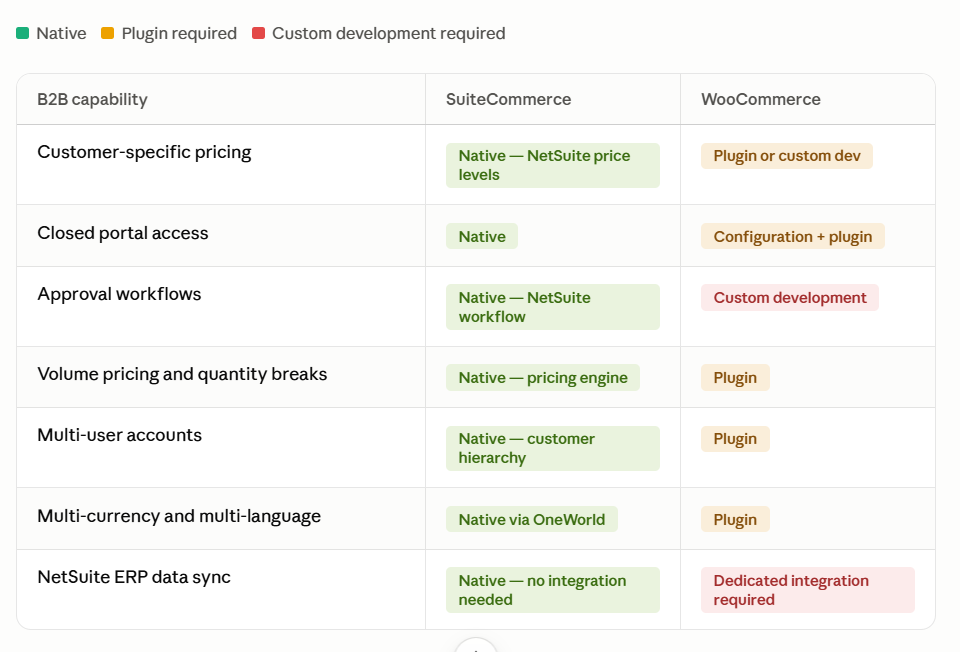
B2B is where these two platforms diverge most sharply. SuiteCommerce inherits its B2B capability directly from NetSuite’s customer record structure, so pricing tiers, gated access, and approvals are configuration rather than development. WooCommerce reaches similar outcomes through plugins and custom PHP, which gives more control over how the experience looks and behaves, but means building the logic instead of inheriting it.
What SuiteCommerce Handles Natively for B2B
SuiteCommerce draws its B2B capabilities directly from NetSuite’s customer record structure:
- Customer-specific pricing: NetSuite’s price levels apply directly to the storefront. A customer with a negotiated discount sees their contracted price the moment they log in, without any additional configuration.
- Gated portals: Restrict storefront access to logged-in customers only and control which products customers can see based on NetSuite customer class or group.
- Volume pricing and quantity breaks: Configured in NetSuite’s pricing engine, applied automatically at checkout.
- Purchase approvals and multi-user accounts: Configurable through NetSuite’s customer hierarchy. This supports situations where a purchasing manager submits orders for the finance team’s approval.
- Multi-currency and multi-language: Handled through NetSuite OneWorld for businesses operating across regions.
What WooCommerce Requires for B2B
WooCommerce is built for public-facing B2C retail by default. B2B features require one of two approaches. These include a B2B-specific WooCommerce plugin (several good ones exist), custom PHP development, or both.
- Closed portals: Requires configuration or a plugin to restrict access to logged-in approved users only.
- Role-based pricing: Requires a pricing plugin or custom development to serve different prices to different user roles.
- Approval workflows: There is no native equivalent for approval workflows in WooCommerce. It requires custom development to build the pending state, admin approval trigger, and role-change logic after approval.
- Customer-specific pricing tied to NetSuite: Requires the NetSuite integration to push price levels from NetSuite to WooCommerce and map them correctly to WooCommerce user roles.
SuiteCommerce draws the logic from NetSuite, where it is already hosted. WooCommerce needs to build or import that logic through plugins and custom development.
For businesses with straightforward B2B requirements (a few pricing tiers, basic login gating), WooCommerce is achievable. For businesses with complex approval hierarchies and many customer-specific price levels, SuiteCommerce’s native NetSuite connection is an operational advantage, especially once purchase flows get customized beyond what a plugin handles cleanly.
If your B2B requirements go beyond what’s covered above, custom pricing engines, non-standard approval chains, or gated portals with unusual access rules, SuiteCommerce customization is where that gets built.
Developer Ecosystem and Post-Launch Maintenance: SuiteCommerce or WooCommerce?
WooCommerce has a clear advantage in developer availability. Businesses can choose from a large pool of WordPress and WooCommerce developers, while SuiteCommerce expertise is more specialized and often harder to find. Long-term maintenance is a more mixed picture, which the sections below cover.
SuiteCommerce Developer Availability
SuiteCommerce development requires specific expertise, including SuiteScript, the SuiteCommerce template structure, and, for SCA, the Backbone.js and RequireJS framework that underlie the front end. The pool of developers with this combination is significantly smaller than the WordPress developer pool. Certified SuiteCommerce developers typically work through authorized NetSuite partners.
The practical implication is that making changes to a SuiteCommerce store is a partner engagement. You do not post a job on outsourcing platforms and hire someone tomorrow. You work with a certified SuiteCommerce partner who understands the NetSuite architecture underneath the store. That relationship has real value, but it also has a cost structure and lead time that differ from WooCommerce. Most businesses handle this through an ongoing SuiteCommerce support arrangement rather than a one-off partner engagement.
For guidance on what to look for when choosing a SuiteCommerce partner, this guide on working with NetSuite SuiteCommerce consultants covers what separates capable partners from those who will cause problems at launch.
WooCommerce Developer Availability
WordPress is the most widely used CMS in the world, and given that, the developer pool is enormous. Junior developers, senior developers, boutique agencies, and global freelancers all work in WordPress and WooCommerce daily. This availability drives down cost and increases the speed at which you can find someone to work on your store.
The tradeoff is that quality varies more widely than in the SuiteCommerce partner ecosystem. A poorly built WooCommerce store with conflicting plugins and undocumented customizations creates technical debt that shows up at scale. Plugin dependency chains can create compatibility issues when plugins update on different schedules.
The right WooCommerce developer or agency with proper code standards, well-chosen plugins, and documented customizations produces a highly maintainable store. Finding that developer requires the same diligence as finding a good SuiteCommerce partner, just in a larger pool.
Five Scenarios in Choosing SuiteCommerce vs WooCommerce: Which Platform Fits
Here are five specific situations and an honest answer for each, to help you make the right call between SuiteCommerce and WooCommerce.
| Scenario | Platform |
| Already on NetSuite, complex B2B | SuiteCommerce |
| Growing across subsidiaries, currencies, or regions on NetSuite | SuiteCommerce |
| High SKU volume where inventory accuracy is critical | SuiteCommerce |
| On NetSuite, simple B2B, strong WordPress team | Worth considering WooCommerce |
| Not on NetSuite, no ERP plans | WooCommerce |
| Dynamic or live-rate pricing | WooCommerce, with custom work either way |
Scenario 1: You Are Already Running NetSuite and Selling Primarily B2B
SuiteCommerce wins here. The native ERP connection means your pricing, customer records, and inventory are already where the store needs them, with nothing to keep in sync. Building B2B portal logic in WooCommerce and then syncing it back to NetSuite adds a layer of complexity and a potential failure point that does not exist in SuiteCommerce. If this describes your business, SuiteCommerce implementation is the more direct path.
Scenario 2: You’re Expanding Across Subsidiaries, Currencies, or Regions
If your growth plan includes new NetSuite subsidiaries, multiple currencies, or region-specific pricing, SuiteCommerce inherits that structure directly through NetSuite OneWorld. WooCommerce can support multi-currency through plugins, but subsidiary-level logic, different entities, different tax rules, different reporting, has to be built and maintained separately from your ERP rather than read from it.
Scenario 3: You Have High SKU Volume and Inventory Accuracy Is Critical
Distributors and manufacturers moving thousands of SKUs feel sync lag directly, in oversells and stock mismatches that cost real money. SuiteCommerce shows the actual NetSuite inventory figure with nothing in between. WooCommerce syncs on a schedule, which is fine for most catalogs but becomes a real operational risk at high volume or during demand spikes.
Scenario 4: You Are on NetSuite, but Your B2B Requirements Are Simple and Your Team Knows WordPress
WooCommerce is worth considering here, not an automatic choice. If your pricing model is straightforward, one or two tiers with no complex approval hierarchies, a well-configured WooCommerce store connected to NetSuite can serve the need at a lower ongoing cost, using a development team your business already has. The integration adds a layer to manage, but for simple B2B logic, it stays manageable rather than becoming its own project.
Scenario 5: You Are Not on NetSuite and Have No Plans to Adopt an ERP
WooCommerce wins clearly. Choosing SuiteCommerce means also choosing NetSuite as your ERP, since the two cannot be separated. If your business does not need ERP-level inventory and financial management, that is real cost for functionality you would not use. WooCommerce, connected to whatever accounting and operations tools you already run, is the right fit here.
Scenario 6: You Sell Products With Dynamic or Live-Rate Pricing (Commodities, Precious Metals, Exchange-Rate-Based)
This is the one case where WooCommerce genuinely has more off-the-shelf options, and it’s worth saying so plainly. SuiteCommerce’s native pricing model is built for static price levels, so dynamic pricing driven by external data requires custom SuiteScript. WooCommerce has dedicated plugins for live-rate pricing that can be paired with custom checkout logic to reserve a price at the moment of sale. Both platforms need custom work here. WooCommerce simply has more existing tools to start from.
If You’re Migrating Between Platforms
Direction matters more than platform here. Moving from SuiteCommerce to WooCommerce is a full rebuild, not a data transfer, since the ERP connection has to be recreated as an integration from scratch. Moving from WooCommerce to SuiteCommerce means adopting NetSuite if you are not already running it, which is a bigger organizational decision than a storefront change. Either direction is worth scoping properly before you commit budget to it. If you’re weighing this, talk to a team that has done both before you scope the project.
What About SuiteCommerce Advanced vs WooCommerce for Custom Development?
For businesses with genuine custom development requirements, SCA and WooCommerce with custom PHP development are both capable. The difference is in the development environment and the developer pool.
SCA gives access to the full storefront codebase. A developer who knows NetSuite’s architecture and the SCA framework can build almost anything. The constraint is that every customization needs to be regression-tested against biannual NetSuite releases.
WooCommerce with custom PHP development gives access to a more familiar environment for most web developers, since WordPress hooks and filters are well-documented and custom plugins follow patterns any experienced WordPress developer already knows. The plugin marketplace also reduces how much custom development standard functionality actually needs.
If your business needs the level of customization SCA is built for, deep integrations, custom checkout logic, business rules that go beyond what plugins can replicate, SuiteCommerce Advanced implementation is where that work gets scoped and built.
Final Thoughts
If you are on NetSuite and your B2B operations are complex, pricing tiers, approvals, credit terms, SuiteCommerce’s native ERP connection gives you that logic directly. On another platform, the same logic has to be built as an integration and kept working as both systems change over time.
If you are not on NetSuite, or your team has strong WordPress skills and your B2B requirements are manageable through plugins, WooCommerce at a lower cost with broader developer availability is the more practical choice.
The most common mistake in this decision is treating it as a features comparison when it is really an architecture and operational fit decision. Start with your ERP situation, then layer in your B2B complexity and your development team’s existing skills. The right platform choice follows from those three inputs almost automatically. Platform decisions like these often involve calls across stakeholders and time zones; a noise-cancelling app keeps those conversations clear and precise.
If you want to talk through your specific situation with a team that has built on both platforms, the Folio3 team has worked in SuiteCommerce, SuiteCommerce Advanced, and WooCommerce with NetSuite integration across B2B and B2C businesses. Book a Free Consultation.
FAQs
Is WooCommerce cheaper than SuiteCommerce?
WooCommerce starts cheaper, the plugin is free, with cost coming from hosting, paid plugins, and development. SuiteCommerce starts at $2,499 per month for Standard or $4,999 for Advanced. If you’re already on NetSuite, SuiteCommerce adds that fee on top of your existing license. WooCommerce adds hosting, plugins, and integration costs instead. For complex B2B setups needing heavy WooCommerce customization, the gap narrows.
Which is better for B2B ecommerce?
SuiteCommerce, for complex B2B. Pricing, customer roles, and approvals come directly from NetSuite with no extra development. WooCommerce handles B2B through plugins and custom code, which gets harder to maintain as the pricing model gets more sophisticated.
Can WooCommerce connect to NetSuite?
Yes, through a dedicated integration. A prebuilt connector syncs orders, inventory, customers, and product data both ways. SuiteCommerce skips this step since the storefront and ERP are the same system.
How does inventory accuracy compare between SuiteCommerce and WooCommerce?
WooCommerce syncs with NetSuite every few minutes to fifteen minutes, fine for most stores, risky for high-volume SKUs or limited stock. SuiteCommerce reads inventory directly from NetSuite, so there’s no delay.
Can a business use both SuiteCommerce and WooCommerce?
Yes, though uncommon. Some run SuiteCommerce for B2B and WooCommerce for B2C, both connected to the same NetSuite instance. Works when the two channels need different things from their platform.