Key Takeaways
- NetSuite automated invoicing generates, delivers, and tracks invoices without manual entry. The system fires billing based on triggers you define: shipment, subscription cycle, project milestone, or a fixed schedule.
- Three trigger types cover almost every billing model. Event-based triggers fire when something happens (an order ships). Schedule-based triggers fire on a recurring calendar. Milestone-based triggers fire when a project phase completes.
- Manual invoicing costs businesses significantly more per invoice than automated invoicing. The cost gap comes from labor, errors, and the delayed cash collection that follows late or incorrect invoices.
- DSO drops when invoices go out faster. Every day between delivery and invoicing is a day the payment clock has not started. Automation closes that gap by triggering invoices the same day the billable event occurs.
- SuiteBilling extends native automation for subscription and usage-based revenue. For businesses with recurring revenue models, SuiteBilling handles proration, mid-cycle changes, and renewal logic that the native billing module does not cover.
- The setup is configuration, not code. Billing rules, invoice templates, delivery preferences, and collections sequences are all configured through NetSuite’s interface.
How long does it take from the moment your team completes a billable event to the moment the customer receives an invoice?
If the answer is more than a few hours, you are leaving cash on the table. Every day between delivery and invoicing is a day the payment clock has not started. A business invoicing three days after shipment, with net 30 payment terms, is effectively giving customers net 33. Across a year of transactions, that gap compounds into real working capital impact.
We see this pattern consistently with businesses that moved to NetSuite but did not configure automated invoicing. They have the platform. They have the sales order data. They have the fulfillment records. The invoice just does not go out until someone in accounting creates it manually, which happens on a schedule that almost never matches the speed of the operation.
Automated invoicing in NetSuite closes that gap. This guide covers how it works, what the three billing trigger types are, how to set up billing rules and schedules, how SuiteBilling extends the capability for subscription businesses, and what the operational impact looks like in practice.
What Is NetSuite Automated Invoicing?
NetSuite automated invoicing is the system-driven process of generating, formatting, and sending invoices based on predefined rules. No manual invoice creation. No one in accounting opening a sales order and building a bill from scratch. The system does it automatically when the defined trigger fires.
NetSuite billing and invoicing automation refers to system-driven processes that automatically generate invoices, manage billing schedules, and track payments based on predefined rules. Instead of finance teams manually preparing invoices, the system triggers billing using contract terms, usage data, subscription plans, or project milestones, ensuring accuracy and consistency.
The automation sits inside NetSuite’s native platform. Invoice data pulls directly from the originating transaction: the sales order, the project record, the subscription contract, or the fulfillment record. There is no data re-entry, no version mismatch between what the system records and what the customer receives.
The invoice is formatted using a customizable template, delivered by email or customer portal, and logged in the AR ledger automatically. The payment record updates when the customer pays. The cash application matches the payment to the invoice. Nobody needs to touch the transaction unless an exception occurs.
The Three Invoice Trigger Types in NetSuite
The most important decision in setting up automated invoicing is choosing the right trigger type for each billing model. NetSuite supports three distinct trigger patterns, and most businesses use all three across different parts of their operation.
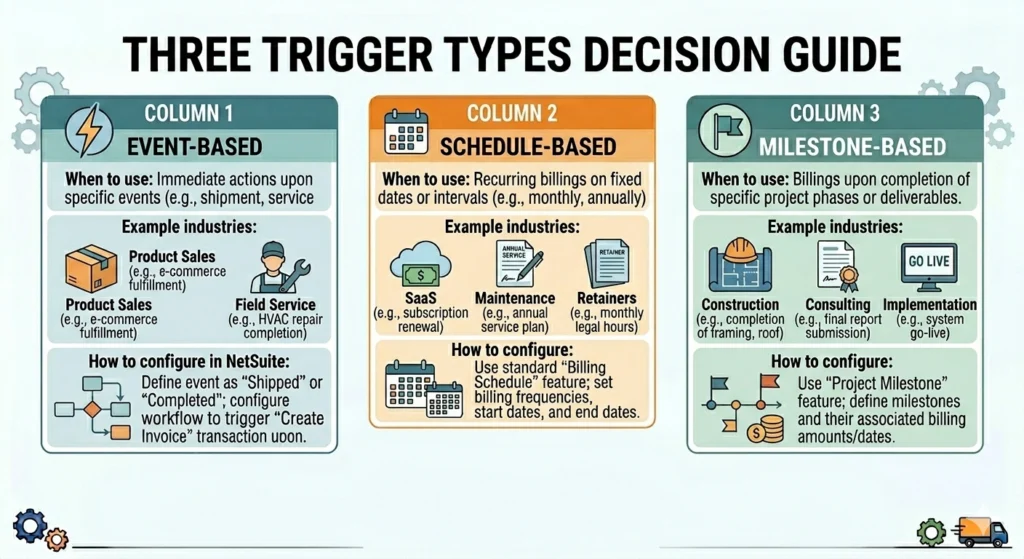
Event-Based Triggers: Invoice When Something Happens
An event-based trigger fires an invoice automatically when a defined transaction event occurs. The most common event is fulfillment: when an item ships, the system generates an invoice for that shipment.
Other event-based triggers include:
- Sales order approval: Invoice generates as soon as an order is confirmed, before shipment (typical for pre-payment or deposit billing)
- Service order completion: Relevant for field service operations where the technician marks the job complete on their mobile app
- Cash sale conversion: Invoice auto-generates when a cash sale transaction closes
NetSuite’s invoice creation can happen automatically based on rules you define: when a sales order ships, when a subscription billing cycle hits, or when a project milestone is completed. You set the triggers once, and NetSuite invoicing takes it from there.
Event-based triggers work best for transactional businesses: product sales, service delivery, and field service operations, where billing should happen as close to the delivery event as possible.
Schedule-Based Triggers: Invoice on a Calendar
A schedule-based trigger fires invoices on a recurring calendar. The customer is billed monthly, quarterly, or annually regardless of specific delivery events.
This is the primary trigger type for:
- Software subscriptions: Monthly or annual SaaS contracts
- Maintenance agreements: Annual service contracts for equipment or software support
- Retainer arrangements: Professional services firms billing a fixed monthly amount
- Lease payments: Equipment or property leases billed on fixed dates
NetSuite billing schedules define the frequency, start date, and number of periods. Once the schedule is attached to a customer record or subscription contract, invoices generate automatically on each scheduled date. The finance team does not need to remember to bill. The system does.
For subscription-heavy businesses that need advanced proration, mid-cycle changes, and renewal management, understanding how NetSuite SuiteBilling extends this capability beyond native billing schedules is worth exploring before configuring your recurring billing setup.
Milestone-Based Triggers: Invoice When a Phase Completes
Milestone-based triggers fire invoices when a defined project phase reaches completion. This is the right trigger type for:
- Construction and engineering: Invoice at project phase completion (design, foundation, structure, fit-out)
- Professional services: Invoice when a project deliverable is accepted
- Software implementation: Invoice per project stage (discovery, development, UAT, go-live)
- Consulting engagements: Invoice at defined checkpoints tied to statement of work deliverables
NetSuite links billing milestones to project records. When the project manager marks a phase complete, the billing event fires automatically. The invoice generates from the project data without requiring finance to track project progress manually.
This trigger type reduces billing disputes because the invoice is tied to a documented completion event in the system, not to a memory of when something was finished.
How to Set Up Automated Invoicing in NetSuite
Setup follows a clear configuration sequence. The goal is to build billing rules that match how your business actually invoices, not a generic template that requires workarounds.
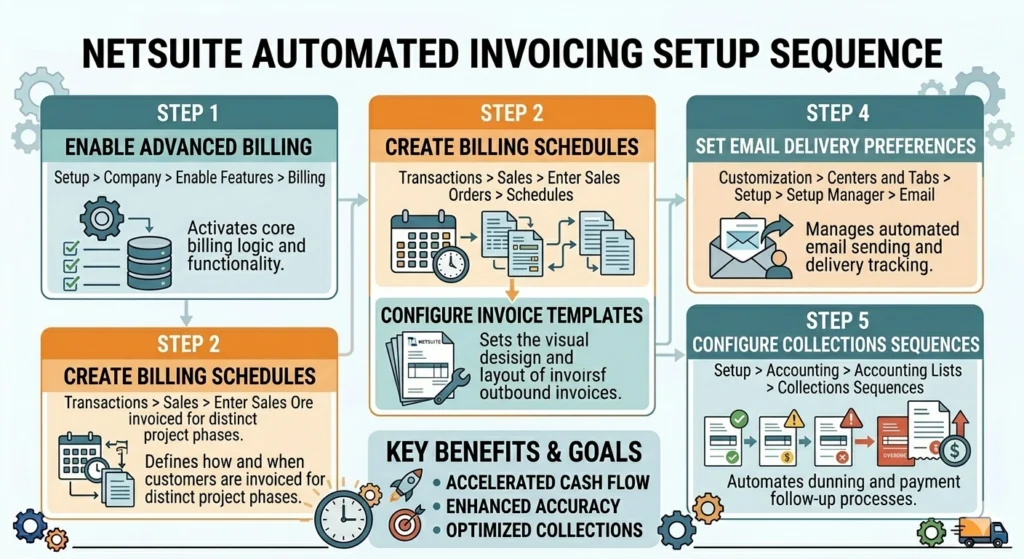
Step 1: Enable Advanced Billing
Navigate to Setup > Accounting > Accounting Preferences > Order Management and enable Advanced Billing. This activates billing schedules and the full invoice automation feature set.
For subscription businesses, also enable SuiteBilling (requires a separate module license) under Setup > Company > Enable Features > Transactions tab.
Step 2: Create Billing Schedules (for Schedule-Based Triggers)
Navigate to Setup > Accounting > Billing Schedules > New.
Configure:
- Schedule Type: Standard (fixed amount), Charge-Based (usage), or Custom
- Frequency: Monthly, quarterly, annually, or custom intervals
- Initial Amount: For milestone or front-loaded billing structures
- Number of Periods: Total billing cycles for fixed-term contracts
Billing schedules attach to item records or customer records. When a transaction uses that item, the billing schedule determines when invoices generate.
Step 3: Configure Invoice Templates
Navigate to Customization > Forms > Transaction Forms and configure your invoice PDF/HTML template.
Templates define:
- What information appears on the invoice (line items, payment terms, contact info)
- The payment link location and format (for electronic payment collection)
- Custom fields specific to your business or industry
- Branding elements (logo, colors, typography)
The template connects to the billing rule, so every auto-generated invoice uses the correct format for that customer or transaction type.
Step 4: Set Up Email Delivery Preferences
Navigate to Setup > Company > Email Preferences and configure:
- Default sender address and reply-to address
- Automatic email delivery on invoice creation (toggle: Send Email When Invoice is Created)
- Customer-specific delivery preferences (some customers may require portal delivery rather than email)
For customers using a self-service payment portal, configure the Customer Center portal access separately so customers can log in, view invoices, and pay directly.
Step 5: Configure Automated Collections Sequences
Invoice delivery is only half of the automation. Collecting payment is the other half.
Navigate to Setup > Accounting > Statement Cycles and set up automated dunning sequences:
- Day 0: Invoice delivered with payment link
- Day 7 past due: Automated reminder sent
- Day 30 past due: Escalated reminder with finance contact
- Day 60 past due: Collections notification
Each sequence runs automatically against your outstanding AR without manual follow-up from the team.
For businesses managing the full accounts receivable workflow, not just invoice generation, our complete guide on NetSuite accounts receivable automation covers the collections, cash application, and reconciliation layers in depth.
NetSuite Advanced Billing vs. SuiteBilling: Which Do You Need?
This is the most common question we get from businesses setting up automated invoicing in NetSuite. The answer depends on the complexity of your billing model.
NetSuite Advanced Billing
Use it when:
- You have straightforward recurring invoices on a fixed schedule
- Your pricing is consistent across billing cycles
- You do not need mid-cycle proration or subscription upgrade/downgrade logic
- You are billing for products and time-and-materials services
Advanced Billing handles the majority of B2B billing automation well. For businesses that invoice on delivery, on a calendar, or at project milestones, Advanced Billing with the right schedule configuration covers the requirement.
NetSuite SuiteBilling
Use it when:
- You manage subscription contracts with variable pricing tiers
- Customers frequently upgrade, downgrade, or pause subscriptions mid-cycle
- You bill based on usage metrics (consumption-based pricing)
- You need automated proration calculations for contract changes
- Your revenue recognition must comply with ASC 606 or IFRS 15 for subscription revenue
NetSuite SuiteBilling unifies and automates billing for recurring subscriptions, usage-based charges, and complex pricing models. It supports flat-rate, usage-based, tiered, and combination pricing, giving you full flexibility with promotions, volume discounts, and customer-specific rates.
SuiteBilling integrates with NetSuite’s Advanced Revenue Management (ARM) module, which means subscription billing events connect directly to compliant revenue recognition schedules. For SaaS businesses, this removes the manual work of mapping billing to revenue separately.
For a detailed breakdown of SuiteBilling’s features, pricing model support, and how the subscription lifecycle management works, our blog on what is NetSuite SuiteBilling and how does it work covers the full module in detail.
How Automated Invoicing Connects to the Broader Order-to-Cash Cycle
Invoice automation does not exist in isolation. It is one stage in the order-to-cash (O2C) cycle, and its value grows when the stages before and after it are also automated.
Before invoicing: A customer places an order. The order goes through credit check, approval, and fulfillment. When the fulfillment event fires, the invoice trigger picks it up. If the order management and fulfillment processes are manual, the invoice trigger may fire on incorrect or incomplete data.
During invoicing: The invoice generates from the source transaction, is formatted, and is delivered. The payment link is embedded. The customer receives a clear, accurate bill with a single click to pay.
After invoicing: The customer pays. The cash application engine matches the payment to the open invoice automatically. The AR ledger updates. The reconciliation runs. If any step in this post-invoice workflow is manual, the efficiency gain from automated invoice generation is partially offset.
To understand how automated invoicing fits into the complete O2C process and where NetSuite handles each stage, our detailed guide on the order-to-cash process in NetSuite covers the full cycle from order placement through cash collection.
What Automated Invoicing Changes Operationally
The business case for invoice automation is measurable. Here is what changes in practice.
DSO Drops
Days Sales Outstanding (DSO) measures how long it takes to collect payment after invoicing. DSO starts the moment the invoice goes out. If invoicing is delayed by two to four days after fulfillment because someone has to manually create the invoice, those days add directly to DSO.
Businesses that automate invoicing typically see DSO fall by three to seven days in the first quarter after go-live. At scale, that represents real working capital. A business with $5 million in annual revenue and a 30-day average payment cycle that reduces DSO by five days frees up roughly $68,000 in working capital.
For a broader view of how invoicing automation connects to working capital management, our guide on using NetSuite for working capital management covers the full cash cycle including AR, AP, and inventory.
Error Rate Falls
Manual invoice creation introduces errors. Wrong quantities, wrong rates, wrong billing addresses, wrong payment terms. Each error creates a dispute. Each dispute delays payment.
When invoices generate directly from the source transaction data, the sales order, the fulfillment record, the subscription contract, the data is the same data the customer approved when they placed the order. There is nothing to mistype.
Finance Team Workload Shifts
Finance teams that no longer spend time on invoice creation spend that time on exception management, collections strategy, and financial analysis. The transactional work becomes automated. The analytical work, which is where finance creates real value, gets more attention.
Customer Experience Improves
Customers receive invoices faster, with accurate amounts, and with a clear payment path embedded in the invoice. Self-service payment portals let customers pay on their schedule without waiting for an AR contact to process a payment. Fewer disputes, fewer follow-up calls, faster resolution when issues arise.
For how automated payment processing connects to the invoicing workflow, our guide on NetSuite payment processing features covers the full payment collection capability.
Who Benefits Most From NetSuite Invoice Automation?
Invoice automation delivers the most impact for businesses where:
Volume is high. The more invoices generated per period, the greater the time savings from automation. A business generating 20 invoices per month sees limited impact. A business generating 500 sees a real difference.
Billing is recurring. Subscription businesses, maintenance contract providers, and any business with predictable recurring revenue have the highest return on automation investment because the billing event repeats every cycle.
Revenue recognition matters. For businesses subject to ASC 606 or IFRS 15, connecting billing events to revenue recognition schedules is a compliance requirement. Automated invoicing that flows into Advanced Revenue Management keeps billing and recognition aligned.
DSO is a problem. If your current DSO exceeds your payment terms, automated invoicing and collections sequences are one of the fastest ways to bring it down.
For how AP automation connects to the other side of the payment cycle, our guide on NetSuite accounts payable automation covers the vendor payment automation layer.
Final Thoughts
Automated invoicing in NetSuite is not a technical complexity. It is a configuration decision. The billing rules, the schedule frequency, the template format, the delivery preference — these are all set once and run automatically from that point forward.
The operational return comes from three places: faster invoices mean faster payment clocks, accurate invoices mean fewer disputes, and automated collections mean fewer invoices aging without follow-up.
For businesses already on NetSuite, the question is not whether to automate invoicing. It is which trigger type fits each billing relationship, and whether Advanced Billing or SuiteBilling is the right layer for the complexity involved.
If you want a direct answer on how to configure automated invoicing for your specific billing model, the Folio3 team has configured this across product businesses, subscription companies, professional services firms, and field service operations. Reach out for a straight answer.
Ready to automate your billing and reduce DSO? Get a free consultation. Book a Demo
Frequently Asked Questions
What is NetSuite automated invoicing?
NetSuite automated invoicing is the process of generating, formatting, and delivering invoices automatically based on predefined triggers and rules. The system creates invoices when a defined event occurs (shipment, milestone completion, subscription cycle), formats them using a configured template, delivers them by email or portal, and updates the AR ledger without manual intervention.
What triggers can automatically generate an invoice in NetSuite?
Three main trigger types: event-based (when a sales order ships, a service job completes, or a sales order is approved), schedule-based (on a recurring calendar, monthly, quarterly, annually), and milestone-based (when a project phase is marked complete). Most businesses use all three types across different billing relationships.
What is the difference between NetSuite Advanced Billing and SuiteBilling?
Advanced Billing handles standard recurring invoices on fixed schedules, event-based invoice generation, and milestone billing. It fits most B2B billing needs. SuiteBilling handles subscription lifecycle management with proration, mid-cycle changes, usage-based billing, tiered pricing, and ASC 606/IFRS 15 compliance for subscription revenue. Use SuiteBilling when your subscription model requires more complexity than fixed-schedule billing.
How do automated collections sequences work in NetSuite?
After an invoice is delivered, NetSuite’s statement cycle configuration sends automated payment reminders at defined intervals: at due date, at days-past-due thresholds, and at escalation points. Each reminder goes out automatically without the AR team needing to track overdue invoices manually. The collection sequence runs against open invoices until payment is received or the account is escalated.
Q: How does automated invoicing affect DSO?
DSO starts when the invoice goes out. Automated invoicing fires on the same day as the billable event, removing the two-to-four-day manual creation lag that inflates DSO. Combined with automated payment reminders, businesses typically see DSO fall by three to seven days in the first quarter after automation is live.
Can NetSuite automate invoicing for international customers?
Yes. NetSuite’s multi-currency support means invoices generate in the customer’s currency. Tax rules apply automatically based on the customer’s location. Invoice templates can be configured for different regions and languages. For businesses with cross-border billing complexity, this removes a real manual workload from the finance team.