
Connecting NetSuite with other applications is easier when you follow the proven best practices for integration in order to improve a particular business’s security, data accuracy, and long-term performance.
Key Takeaways
- Successful NetSuite integrations begin with clear business goals. Connecting in a decentralised way creates more problems than solutions.
- The right integration method depends on your business needs. Native connectors, APIs, middleware, and iPaaS platforms each have different purposes.
- Before the integration, the data should be clean and organised. Duplicate or unnecessary data can cause errors.
- Security should be checked into every integration. Strong authentication and encrypted data transfers help protect sensitive business information.
- Real-time monitoring and analysis prevent integration errors at an early stage to keep the streamlining smooth.
For instance, let’s assume your company’s departments, i.e., Finance, Accounts, Sales, etc., are working separately and they have all the needed information, but their systems aren’t streamlined and aren’t synced.
In that case, you’ll find most of the employees copying data rather than making important decisions.
Luckily for you, that’s where NetSuite integration comes in. It performs as an information hub for the business while keeping track of data and security.
But here’s the catch: businesses assume that only connecting the applications would be sufficient.
In reality, the most important challenge is the most seamless one: security, reliability, and control.
Some Common NetSuite Integration Challenges
Let’s talk about some common challenges that companies face while implementing NetSuite integration and what the one-line solution would be for them.
| Challenge | Why It Happens | Solution |
| Duplicate records | Poor data quality | Clean data before migration |
| API limits | Too many requests | Optimize integration frequency |
| Incorrect mapping | Different field structures | Validate mappings |
| Permission errors | Incorrect user roles | Review access controls |
| Slow synchronization | Large data volumes | Schedule batch processing |
These are some core problems that occur alongside other qualitative mistakes from the management as well, which brings me to my next point.
Why Disconnected Business Software Utilities Create Bigger Problems Than You Think?
Most of the businesses start with one or two basic tools, and as they grow, their departments start to shift to their own separate software programs for automation.
For example:
- The Sales department switches to CRM.
- The Accounting department switches to ERP.
- The Marketing department switches to Salesforce Cloud or HubSpot.
- The Warehouse gets an Inventory Management System.
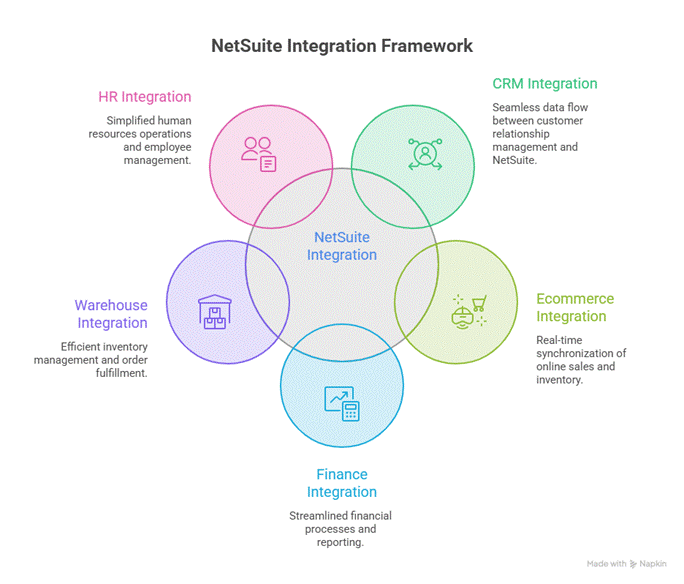
They all work really well for their expertise, but the problem starts when they don’t share information, and every software works independently.
Employees spend more time on sharing data, which is not only time-consuming but also creates a data risk as well. Disconnected systems increase the chances of mistakes and make it harder to get a clear picture of the business.
Small Mistakes Can Create a Huge Failure
A missing product code or replicated customer data doesn’t look like a big problem at first, but when it is shared with multiple departments, it becomes an issue.
It can affect inventory planning, financial reporting, customer service, and even compliance.
Hence, it is necessary to define the objective and choose the right integration method.
But the question arises, how can one know how to choose the right method while also taking the precautions to avoid mistakes?
Before directly jumping into the integration model, there are some steps that you must follow.
It is necessary to clean and organise the data first, and make sure your data follows these protocols:
- There should be no duplicate data
- No incorrect product codes should be mentioned
- Make sure the records are complete, and there is no missing data
- There should be a workflow that helps in mapping the data
- Standardization must be done to adhere to the basic regulations of the departments
Use a simple analogy, such as moving to a new house without sorting your belongings first.
The Next Step Would Be to Identify the Single Source of Truth
It is necessary to identify the information source hub for each department.
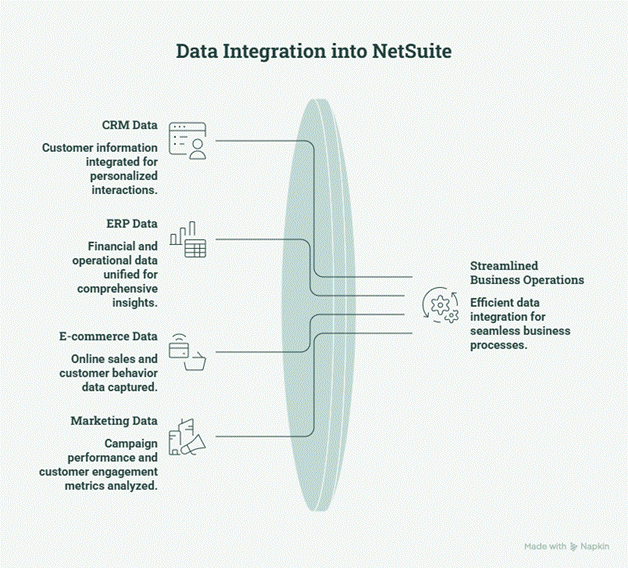
Connecting multiple applications is only half the job. You also need to decide which system is responsible for each type of information.
Think of it like a family calendar. If everyone keeps their own version, dates will eventually stop matching. But if the whole family updates one shared calendar, everyone sees the same information.
The same idea applies to business software.
When two or more systems can update the same data, they may start showing different information. This creates confusion, duplicate records, and reporting errors. That’s why one system should always be the single source of truth for each type of data.
What Is a Single Source of Truth?
A single source of truth is the system your business trusts as the official place for specific information.
Other applications can read or receive that data, but they shouldn’t overwrite it unless there’s a clear business rule.
For example, if NetSuite is your financial system, it should remain the primary source for invoices, payments, and financial records. Even if another application displays this information, the original data should come from NetSuite.
Here is a clear picture of keeping specific data in a system;
| System | Owns This Data |
| CRM | Leads, opportunities, and sales activities |
| NetSuite ERP | Customers, sales orders, invoices, inventory, and financial records |
| E-commerce Platform | Product listings, online orders, and customer shopping activity |
| Warehouse Management System (WMS) | Picking, packing, shipping, and warehouse operations |
| HR Software | Employee records and payroll information |
Now, let’s talk about the actual NetSuite Integration that we’re here for. First, let’s break down the methods:
| Integration Method | Best For |
| Native Connectors | Common business applications |
| APIs | Real-time custom integrations |
| Middleware / iPaaS | Multiple connected systems |
| Custom Integrations | Unique business processes |
Let me explain these to you a little:
- Native Connectors: These are ready-made integrations built to connect NetSuite with commonly used platforms. They’re usually the quickest option because they require less setup and are designed to work out of the box.
- APIs: It lets two applications communicate directly with each other. They’re a good choice when information, like new orders or inventory updates, needs to move almost instantly.
- Middleware (iPaaS): acts like a translator between different systems. Instead of creating separate connections for every application, it helps them all communicate through one central platform.
- Custom Integration: When standard integrations can’t meet your needs, a custom integration is built specifically for your business. It offers more flexibility but usually takes more time and planning to develop.
The goal isn’t to choose the most advanced integration method. It’s to choose the one that fits your business today while leaving room to grow tomorrow.
It’s necessary to make sure about the security at each step, which leads to;
1. Building Security from Day 1 – Necessary
Connecting your business applications means important data is constantly moving between systems. Without the right security measures, that data can be exposed to unauthorized access or accidental changes.
That’s why security shouldn’t be something you think about after the integration is complete. It should be part of the plan from the very beginning.
2. Give Users Only the Access They Need
Not everyone needs access to every part of your NetSuite account. Assign roles and permissions based on each person’s job so sensitive business data stays protected.
3. Use Secure Authentication
Instead of sharing usernames and passwords between applications, use secure authentication methods like OAuth and API tokens. They help verify that only trusted systems can connect to NetSuite.
4. Protect Data While It’s Moving
Business data should always be encrypted when it travels between applications. Encryption helps keep information like customer details and financial records safe from unauthorized access.
5. Monitor and Review Your Integrations
Even after your integration goes live, review activity logs and monitor for unusual behavior. Catching small issues early can prevent bigger security problems later.
Even after making sure of the right method and security, there are still some problems that may arise; let’s quickly go through them as well as their solutions, just to make sure we are doing everything right.
Factors That You Should Not Miss Out On
Even the best NetSuite integrations can run into occasional issues. A network interruption, a system update, or incorrect data can cause information to stop syncing.
Instead of expecting everything to work all the time perfectly, plan for these situations so they can be resolved quickly with minimal impact on your business.
Start by enabling error logging so you can quickly identify what went wrong and where the problem occurred. Set up automatic notifications to alert your team if an integration fails, allowing them to take action before it affects customers or business operations.
You can also use retry mechanisms, which automatically attempt to process failed transactions again if the issue is only temporary.
Finally, keep an eye on your integrations with monitoring dashboards that show the health and performance of connected systems.
Combined with regular maintenance, such as reviewing logs, updating integrations, and testing after software updates, these practices help keep your NetSuite integrations reliable, secure, and ready to support your business as it grows.
One Last Check Before You Hit “Go Live”
Before launching your NetSuite integration, take a final step back and review the essentials. A simple checklist can help you catch small issues before they turn into costly problems and ensure your systems are ready for day-to-day operations.
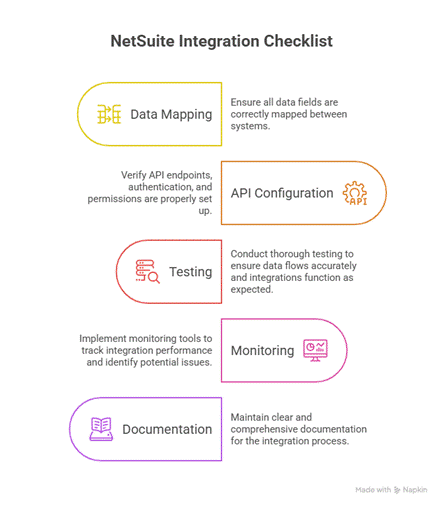
Before you go live, make sure you have:
- Defined clear business goals for the integration.
- Cleaned and validated your data.
- Choose the right integration method.
- Configured user roles and security settings.
- Tested real business scenarios, not just ideal ones.
- Verified that data is syncing correctly between systems.
- Enabled error logging and monitoring.
- Trained users on any new workflows or processes.
- Documented the integration for future maintenance and updates.
Final Thoughts
Integrating NetSuite with other applications isn’t just about connecting software. It’s about making sure your teams can trust the data they’re working with every day. When you take the time to plan your integrations, clean your data, prioritize security, and test real business scenarios, you’ll avoid many of the problems that slow businesses down later.
In my opinion, one of the biggest mistakes companies make is treating integration as a one-time technical project. Your business will keep growing, your processes will change, and new applications will be added over time. A well-planned NetSuite integration should be flexible enough to grow with you, not something you have to rebuild every few years.
If you’re planning to integrate NetSuite with your existing business applications, working with an experienced NetSuite partner like Folio3 NetSuite can help you build a solution that’s secure, reliable, and ready to support your business for the long run.
Frequently Asked Questions
What is the best way to integrate NetSuite with other applications?
The best approach depends on your business needs. Native connectors work well for popular applications, while APIs, middleware, or custom integrations are better for businesses with more complex workflows. The key is choosing a solution that fits your current needs and can grow with your business.
How does the NetSuite integration process work?
The process usually starts by identifying what you want to achieve, followed by choosing an integration method, preparing your data, connecting the systems, testing the workflows, and monitoring everything after launch to ensure it runs smoothly.
Which applications can integrate with NetSuite?
NetSuite can integrate with a wide range of business applications, including Salesforce platforms of CRM, e-commerce platforms like Shopify, payment gateways, warehouse management systems, HR software, marketing tools, and many other third-party applications.
What are the most common NetSuite integration challenges?
Some of the biggest challenges include poor data quality, incorrect data mapping, security concerns, duplicate records, and keeping information synchronized across multiple systems. Careful planning and thorough testing can help avoid most of these issues.
How do businesses secure NetSuite integrations?
Businesses secure NetSuite integrations by using strong authentication methods, limiting user access with role-based permissions, encrypting data during transfer, and regularly monitoring integrations to identify and fix potential security issues.
