
Key Takeaways
- Field Service Management (FSM) Is Not Just Scheduling: It is the full lifecycle from service order creation through technician dispatch, job completion, parts usage, billing, and customer sign-off, all running in real time.
- The Biggest FSM Problem Is Not Operational. It Is a Data Gap: When your field team and your back office are on different systems, every job creates reconciliation work. Billing lags. Inventory drifts. Customer records go stale.
- NetSuite FSM Closes the Field-to-Office Gap: NetSuite FSM is a cloud-based module that connects scheduling, dispatch, mobile technician access, inventory, and asset management directly to NetSuite’s core financial and inventory systems.
- The Scheduling Board Is the Operational Core: Drag-and-drop dispatch, skills-based assignment, real-time job status, and technician location visibility all run from one screen. Dispatchers see everything. Technicians see what they need.
- The Mobile App Is What Makes Field Teams Productive: Technicians access work orders, service history, customer asset records, and parts availability on any device, without calling the office.
- FSM Works Best When It Is Part of Your ERP, Not Next to It: When NetSuite FSM connects to your billing, inventory, CRM, and projects modules natively, jobs close faster, invoices go out sooner, and your margin visibility is real.
Think about the last time a technician showed up to a job without the right parts. Or arrived an hour late because dispatch did not have accurate traffic routing. Or submitted a job report three days after the work was done, creating a billing delay that pushed the invoice into the following month.
These are not exceptional failures. They are the normal operational cost of running field service without the right tools. And they compound. A 200-person field service operation with just one missed first-time fix per technician per week is generating hundreds of unnecessary return visits per year. Each one costs labor, travel, and customer trust.
We work with businesses across construction, utilities, HVAC, medical equipment, and facilities management, where field operations are central to revenue. In every case, the shift from disconnected scheduling tools and paper-based job reports to a unified FSM system changes the math on field service profitability. This guide covers how NetSuite Field Service Management works, what it includes, which industries it fits, and what to expect from an implementation.
What Is Field Service Management?
Field Service Management (FSM) is the process of coordinating people, equipment, and work orders for services delivered at customer locations. It covers everything from the moment a service request comes in to the moment the invoice goes out, and the customer signs off.
Field service management is the process of coordinating employees, equipment, and services delivered at customer locations. From installation and repairs to ongoing maintenance, FSM ensures your field workforce operates efficiently while meeting customer expectations.
Before FSM software became standard, most field service operations ran on a combination of spreadsheets, whiteboards, email chains, and phone calls. Dispatch was manual. Technicians carried printed job sheets. Parts availability required a call to the warehouse. Billing happened when someone got around to processing the completed paperwork. Smaller contractors often make the first move away from that setup long before they are ready for a full ERP, using tools like Method CRM to run scheduling and dispatch off their existing QuickBooks data so jobs and invoices stop living in two places.
It reduces work conflicts, eliminates time lags, minimizes physical effort, hence presenting better customer service. Also, the waiting time and delays find themselves at their lowest which allows helps smoothen every employee’s schedule. In addition to task automation, it’s equally important to find a mutually suitable meeting time and schedule regular meetings with your team. Regular check-ins ensure alignment, provide space for feedback, and help address issues facing by employees.
Each manual step created friction. Jobs ran late. Parts were not there. Invoices went out days after the work was done. Customers called to check on job status because nobody had sent them an update. Every one of these friction points is a cost.
What NetSuite Field Service Management Includes
NetSuite FSM is a SuiteApp (NextService, now natively integrated) that runs directly on the NetSuite platform. It does not require a separate system login, a middleware layer, or a data sync. The field service data is NetSuite data.
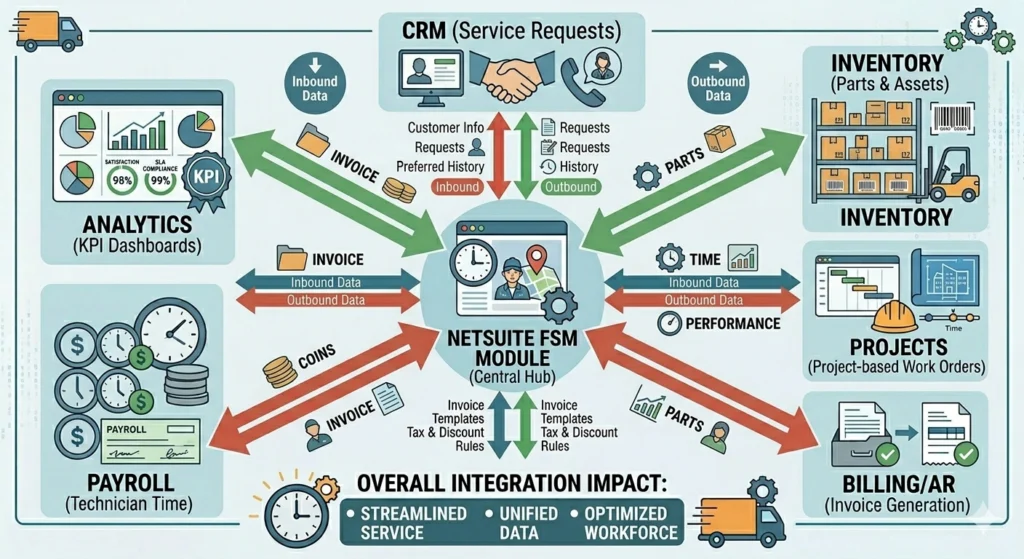
Here is what each core component does in practice.
Scheduling and Dispatch
The scheduling board is the dispatcher’s primary workspace. It shows every technician’s schedule, availability, current location (via GPS), and skill set in one view. Dispatchers assign jobs by dragging and dropping service orders onto the right technician based on proximity, skills, and availability.
NetSuite FSM scheduling and dispatch capabilities enable schedulers to easily assign and dispatch the technician with the right skills who is closest to the job. The drag-and-drop schedule board provides a clear view of your team’s availability, letting you make efficient decisions about scheduling and dispatching.
The board updates in real time. When a technician marks a job complete, their next slot opens. When a priority job comes in, a dispatcher can reassign the closest available technician and push the updated schedule to their phone instantly. Emergency reallocation that used to take 20 minutes of phone calls now takes 90 seconds.
For businesses running construction projects alongside field service operations, this scheduling visibility integrates directly with project timelines in NetSuite. To understand how NetSuite handles the construction-specific layer of this coordination, our overview of NetSuite for construction companies covers how project and field operations connect.
Work Order Management
Service orders in NetSuite FSM can be created from multiple sources: a customer case in the CRM, a sales order, a project task, a preventive maintenance schedule, or an incoming service request.
Each work order contains customer details, the asset being serviced, job instructions, required skills, estimated time, parts list, and any relevant service history. The technician sees a complete picture before they arrive on site.
Work orders update in real time as the job progresses. Labor hours are logged as they are worked, not summarized at the end of the day. Parts are consumed from inventory as they are used, not estimated at month end. The job record reflects what actually happened.
For businesses where field service intersects with manufacturing or assembly work, understanding how NetSuite handles work orders and assemblies as part of the broader operations picture is worth exploring before configuring your FSM workflows.
Mobile Technician App
Technicians access their schedule, job details, customer asset records, service history, and parts availability on any mobile device. No paperwork. No phone calls to the office to confirm job details. No waiting until they get back to the depot to log time.
The mobile app covers:
- Job schedule and routing: Technicians see their day’s jobs with optimized driving routes
- Customer asset records: Full service history for the specific equipment being serviced
- Parts and inventory: Real-time check on parts availability before confirming what can be fixed on the first visit
- Time tracking: Start and stop timers directly from the app (updated in the 2025.1 release)
- Job completion and sign-off: Customer signature captured digitally on the device, triggering billing automatically
Field technicians appreciate mobile access to work orders, customer information, and technical documentation, all of which can help eliminate trips back to the office.
The geo-fencing capability added in the 2025.1 release automatically tracks technician arrival and departure at job sites, which feeds directly into payroll accuracy and billing verification without any manual time entry.
Asset Management
For businesses that service customer-owned equipment, medical devices, HVAC systems, industrial machinery, IT infrastructure, asset management is where the repeat service revenue lives.
NetSuite FSM tracks each customer asset individually: installation date, service history, warranty status, maintenance schedule, and parts history. Preventive maintenance jobs generate automatically based on calendar schedules or usage-based triggers. An asset due for its quarterly service creates a work order without anyone having to remember to schedule it.
This preventive maintenance visibility reduces equipment downtime for customers and increases planned service revenue for the service provider. Reactive break-fix calls are more expensive and harder to schedule than planned maintenance visits. Every reactive call that gets converted to a scheduled maintenance contract improves both sides of that equation.
Inventory Management for Field Service
Parts availability is the single biggest driver of first-time fix rates. A technician who arrives at a job without the right part has to come back. That second visit costs the same as the first but typically cannot be billed.
NetSuite FSM connects to NetSuite’s inventory management system directly. Technicians can check parts availability on their mobile app before confirming they can complete a job in one visit. When parts are consumed on a job, inventory updates immediately. No end-of-day batch sync, no manual parts reconciliation.
Dispatchers can see parts availability when scheduling, which means they can assign jobs to technicians who are already carrying the required parts or are routed to pass a supply location.
Billing and Revenue Recognition
The last mile of field service profitability is how quickly and accurately you bill for completed work. Manual billing processes that depend on technician paperwork create delays and errors. Jobs get billed at the wrong rate. Labor hours are under-reported. Parts costs are missed.
NetSuite FSM closes this loop automatically. When a technician completes a job and the customer signs off on the mobile app, the billing data, labor hours, parts consumed, travel time, is already in NetSuite. The invoice generates from actual job data, not from a technician’s estimate written on a form.
For service businesses that handle project-based billing alongside time-and-materials field work, understanding how NetSuite’s SuiteProjects Pro handles the project billing layer alongside FSM is relevant before configuring your billing workflows.
Who Needs NetSuite Field Service Management?
FSM is the right tool for any business where revenue depends on work that happens at customer locations. The industries where we see the most consistent return from NetSuite FSM implementation are:
HVAC, Mechanical, and Utilities
High-volume service scheduling with a mix of reactive calls and planned maintenance contracts. Inventory management for parts and refrigerants is critical. Asset tracking for customer equipment drives renewal revenue. Billing accuracy directly affects margin on fixed-price service contracts.
Medical and Scientific Equipment
Compliance requirements for service documentation are strict. Asset records need to include calibration history, certifications, and warranty status. Technicians need access to safety procedures and compliance documentation before working on regulated equipment. Billing connects to service contracts with specific coverage terms.
Construction and Facilities Management
Field operations coordinate with project schedules. Labor tracking feeds project costing. Multiple crews across multiple sites need unified scheduling visibility. Change orders and scope changes in the field need to connect to project billing records. For the construction-specific operations layer, our page on NetSuite for construction covers how FSM connects to project management and job costing in that context.
IT and Technology Services
Installation, deployment, and ongoing support work for customer technology infrastructure. Asset records are critical for warranty and support contract management. Remote diagnostics connecting to on-site visits. Recurring maintenance billing for managed service contracts.
Professional Services With On-Site Delivery
Consulting, training, and professional services that require on-site work alongside project-based billing. For businesses in this category, the FSM and professional services modules overlap. Our overview of NetSuite for professional services covers how the scheduling and project management layers connect for service delivery businesses.
What Changes When You Implement NetSuite FSM
The operational improvements from NetSuite FSM are measurable because they address specific quantifiable problems. Here is what changes in practice.
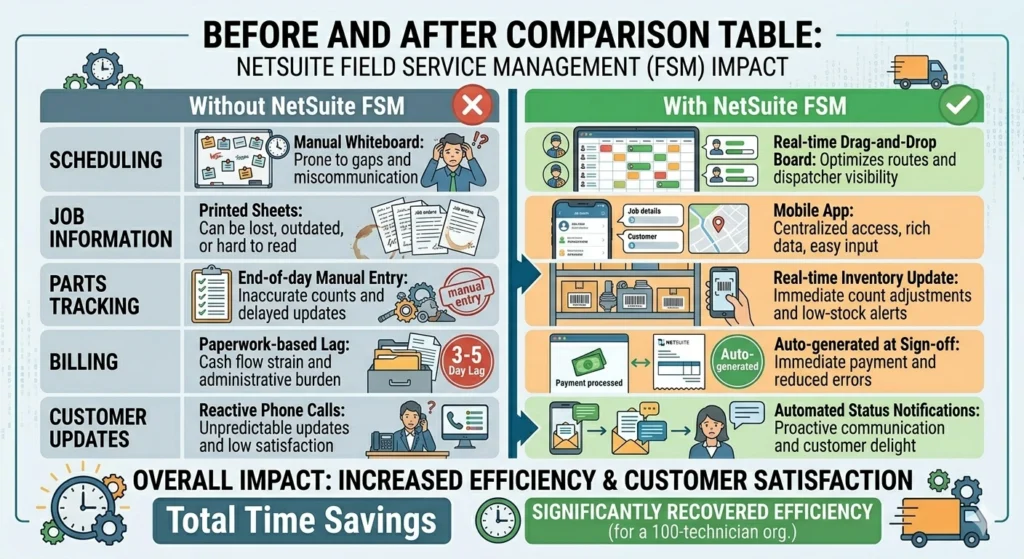
First-time fix rates improve because technicians arrive with the right parts, the right information, and the right access to service history. The primary cause of return visits is incomplete information at the point of service. FSM removes that gap.
Billing cycle shortens because invoices generate from actual job data the moment the customer signs off, not from paperwork submitted days later. Businesses running manual billing processes typically see three to five days come off their billing cycle in the first quarter after go-live.
Technician utilization increases because the scheduling board removes the administrative overhead that dispatchers previously managed manually. The same dispatcher can manage more technicians with better assignment accuracy when they have a real-time view of availability, location, and skills.
Inventory shrinkage in field operations decreases because parts are tracked from the warehouse to the van to the job. The variance between what should have been used and what was actually consumed becomes visible and traceable.
Customer satisfaction improves because customers receive accurate arrival windows, real-time status updates, and invoices that reflect what was actually done. The most common customer complaint in field service is not about the quality of the work. It is about communication.
How Folio3 Implements NetSuite FSM
Folio3 implements NetSuite Field Service Management for businesses across construction, utilities, manufacturing services, medical equipment, and professional services.
The implementation approach follows the configuration sequence that determines whether FSM changes field operations or becomes another system the team works around:
Service order configuration first. The work order structure needs to reflect how your jobs run: what information dispatchers need, what technicians need on site, what billing needs to close a job. Getting this right before configuring the scheduling board prevents rework.
Scheduling board configuration second. The board needs to reflect your technician skills taxonomy, your geographic zones, and your service level agreement (SLA) requirements. A board configured generically does not give dispatchers the visibility that changes their decisions.
Mobile app configuration third. Technicians need to see what they need and nothing they do not. The app configuration determines whether field teams adopt the system or go back to paper.
Billing integration last. Connecting job completion to invoice generation requires confirming that labor rates, parts pricing, and billing rules are correctly configured before making the connection live. Billing errors that go to customers are the hardest to recover from.
For a broader view of how FSM connects to the full NetSuite module ecosystem and what other modules support service operations, our guide to top Oracle NetSuite modules every business should know covers the full platform landscape.
If you want a direct answer on whether NetSuite FSM fits your specific field operation, reach out to the Folio3 team. Book a Demo.
Final Thoughts
Field service management is where the gap between what was promised to a customer and what was delivered becomes visible in the most direct way. A technician who shows up without the right parts, a billing delay that confuses a customer, a missed maintenance window that leads to equipment failure. These are not process problems. They are visibility problems. The information exists. It is just not connected.
NetSuite FSM connects it. The schedule, the technician, the parts, the customer record, the job completion, and the invoice live in the same system. When the job closes, the billing follows. When parts are used, inventory adjusts. When a customer calls to check status, the answer is already there.
For field service businesses where these connections currently require manual work to maintain, the implementation conversation is worth having.
FAQs
What is NetSuite Field Service Management?
NetSuite Field Service Management is a SuiteApp that adds field service capabilities to the NetSuite platform. It covers scheduling and dispatch, work order management, mobile technician access, asset management, inventory tracking for field operations, and billing integration. It connects field teams to the back office through the same NetSuite instance that handles financials, inventory, CRM, and projects.
What is the difference between NetSuite FSM and a standalone field service tool?
A standalone FSM tool handles scheduling and dispatch but requires integration with your ERP, inventory, and billing systems to complete the field-to-office connection. NetSuite FSM runs on the NetSuite platform natively, which means job data, parts usage, labor time, and billing all live in the same system. There is no sync, no middleware, and no data lag between what happens in the field and what finance and operations see.
Which industries use NetSuite FSM?
NetSuite FSM fits any industry where revenue-generating work happens at customer locations: HVAC and mechanical services, medical and scientific equipment, construction and facilities management, IT and technology services, utilities, and professional services with on-site delivery. The common requirement is coordinating technicians, customer assets, and billing in a single system.
What does the NetSuite FSM mobile app do?
The mobile app gives technicians access to their schedule, work order details, customer asset records, service history, parts availability, and time tracking from any mobile device. Technicians can update job status, log parts used, capture customer signatures, and complete jobs from the field without returning to the office or calling dispatch.
How does NetSuite FSM handle preventive maintenance?
NetSuite FSM tracks customer assets individually and generates preventive maintenance work orders automatically based on calendar schedules or usage-based triggers. When an asset is due for service, the system creates the work order, which enters the scheduling queue. This converts reactive break-fix revenue into planned maintenance revenue, which is easier to schedule, staff, and price.
Does NetSuite FSM require a separate license?
NetSuite FSM is a SuiteApp that requires a NetSuite license and a separate FSM module license. Pricing varies by the number of technician users, the modules included, and any customizations required. Contact Folio3 or your NetSuite account manager for a quote based on your specific headcount and configuration requirements.

