Key Takeaways
- Batch Tracking and Lot Tracking Are Not the Same Thing. A lot number identifies a group of raw materials received from a supplier. A batch number identifies what was produced in a single production run. These two identifiers connect inside the ERP to form the traceability chain from supplier delivery to customer shipment.
- Chemical Manufacturing Rarely Follows a Neat One-Lot-In, One-Lot-Out Pattern. Splits, merges, rework, co-products, and by-products all create traceability branches that a simple linear system cannot handle.
- FEFO (First Expired, First Out) Is the Right Inventory Rotation Logic for Chemical Manufacturing, Not FIFO. An ERP that enforces FEFO at the picking level prevents a newer lot from being consumed before an older lot reaches its expiration date.
- Bidirectional Traceability Means Two Separate Queries. Forward traceability answers which customers received product from lot X. Backward traceability answers which raw material lots went into batch Y. Both are required for a complete regulatory response.
- A traceability system should help you identify affected lots and recipients in minutes, not hours or days. The difference between a targeted recall and a blanket recall depends on how fast and how granularly the ERP can answer that question.
When a chemical manufacturer receives a call about a quality issue in a finished product already in a customer’s hands, one question drives everything that happens next. The question is how fast the ERP can tell you exactly which raw material lots went into that batch, which other batches used the same raw materials, and which customers received product from any of them?
That question is not hypothetical. It is the moment when the value of a properly configured traceability system becomes visible in dollars. A $10 million recall that covers 50,000 units becomes a $250,000 recall if the ERP can narrow it to the 2,500 units affected. The data has to be there, collected at every transaction point, to make that distinction possible.
This guide covers how batch tracking and lot traceability actually work inside a chemical manufacturing ERP. It answers how the identifiers are created, how they connect across the production lifecycle, how splits and merges break simple traceability models, how FEFO differs from FIFO, how co-products and by-products are handled, and how a mock recall drill tests whether the system actually works before regulators do it for you.
Batch Tracking vs. Lot Tracking: Why the Difference Matters?
In chemical manufacturing, batch tracking and lot tracking are used interchangeably. But these are two different concepts, explained below.
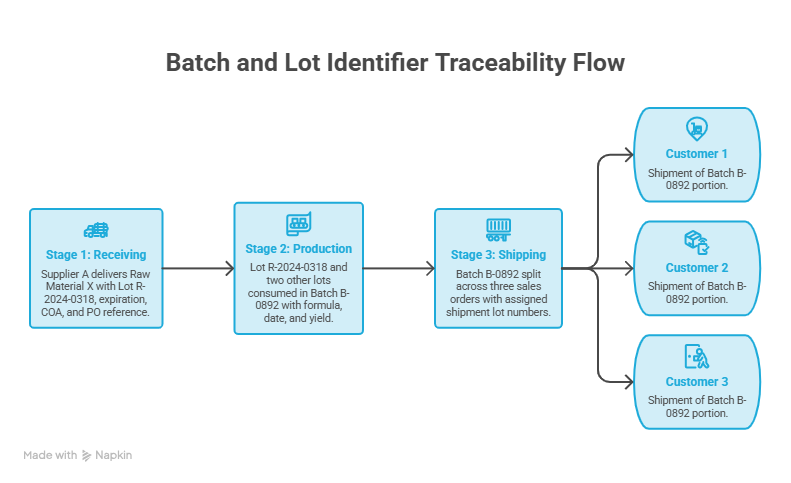
A lot number is assigned upon receipt. When a shipment of a product, say ethylene glycol, arrives from a supplier, the ERP creates a lot number for that specific delivery. The lot number carries the supplier identity, the purchase order, the delivery date, the certificate of analysis, and the expiration date. It identifies a specific quantity of a specific material that arrived at a specific time from a specific source.
On the other hand, a batch number is assigned at production. When that product, ethylene glycol, goes into a production run to make a coolant formulation, the ERP creates a batch number for that production event. The batch number carries the formula version used, the quantity produced, the date of production, the operator or shift, and the quality inspection results. It identifies what was made, not what was received.
The traceability chain connects them as lot numbers feed into batch numbers. One batch may consume multiple raw material lots, or one raw material lot may feed multiple batches. The ERP has to record both sides of that relationship at the moment the transaction occurs.
At a basic level, lot tracking helps you identify where a material or product is right now. Whereas, traceability allows you to reconstruct the full history of a material or product, including which raw materials went into the product, what operations took place during production, where raw materials and finished goods were stored, and determine the end purchasing customers.
Bidirectional Traceability: Forward and Backward
Traceability in chemical manufacturing ERP runs in two directions, i.e., forward traceability and backward traceability, and each direction answers a different question.
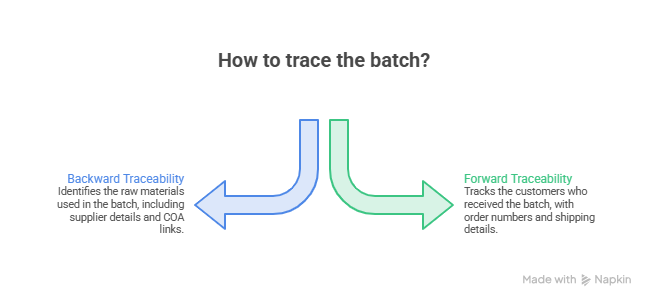
Backward Traceability (Upstream)
Backward traceability starts from a finished goods batch and traces back to every raw material lot that went into it, allowing manufacturers to identify exactly which materials were used.
A regulator asking for the material history of batch B-0892 should be able to pull a report showing every raw material lot consumed, the supplier of each lot, the COA for each lot, and the receiving date of each lot. This data has to exist in the ERP as a transaction record, not as something reconstructed from memory or paper tickets after the fact.
Forward Traceability (Downstream)
Forward traceability starts from a raw material lot and follows its path through production and distribution, showing exactly which products and customers were affected.
When a supplier issues a raw material quality alert for Lot R-2024-0318, forward traceability tells you which batches used that lot, which finished goods came from those batches, and which customers received those finished goods.
Without forward traceability, the only response to a supplier quality alert is a precautionary recall of all products that might have been made with that material over some indeterminate window.
Bidirectional traceability tracks suspect products from vendor delivery into WIP to customer order shipments, from shipment to WIP to delivery, and anywhere across these processes. The traceability graphical display offers a nodal map of receiving, production, and shipping steps.
Simple Traceability Systems Breakdown: Splits, Merges, and Rework
Most traceability guides describe a clean, linear flow: raw material in, product out. Chemical manufacturing works differently, as explained below.
Lot Splits
A 2,000-litre batch of a cleaning concentrate may be packaged into three different container sizes: 20-litre drums, 5-litre jugs, and 1-liter bottles. Each packaging run receives its own lot number for shipping and inventory purposes. A traceability system that treats these as separate, unconnected lots loses the link back to the original batch and the raw materials that went into it.
In a properly configured ERP, a lot split creates child lot records that carry a parent reference back to the batch from which they came. The parent batch record still carries the full raw material genealogy. Any child’s lot can be traced back through the parent to the original raw materials.
Lot Merges
A manufacturer consolidates two partial drums of the same raw material lot from a previous delivery into one container for production use. If the ERP does not handle lot merges, the consolidated container now has an identity that traces back to nothing. The entire downstream chain from that point is untracked.
ERP handling of lot merges creates a merged lot record that retains references to all source lots. The merged record is a new entity, but the genealogy includes both parents.
Rework Batches
A batch fails final quality inspection. Rather than discarding it, the production team adds corrective materials, reprocesses it, and submits it for re-inspection. The reworked batch is technically a new production event with new raw material inputs. But the original failed batch is part of its genealogy.
How will you handle splits, merges, and rework? This is where many traceability systems break down. Real manufacturing rarely follows a neat one-lot-in, one-lot-out pattern. An ERP that tracks only the simple case, one lot in, one lot out, produces traceability gaps at every split, merge, and rework event. Those gaps are the ones that turn targeted recalls into blanket recalls.
FEFO vs. FIFO: The Right Inventory Rotation Logic for Chemical Manufacturing
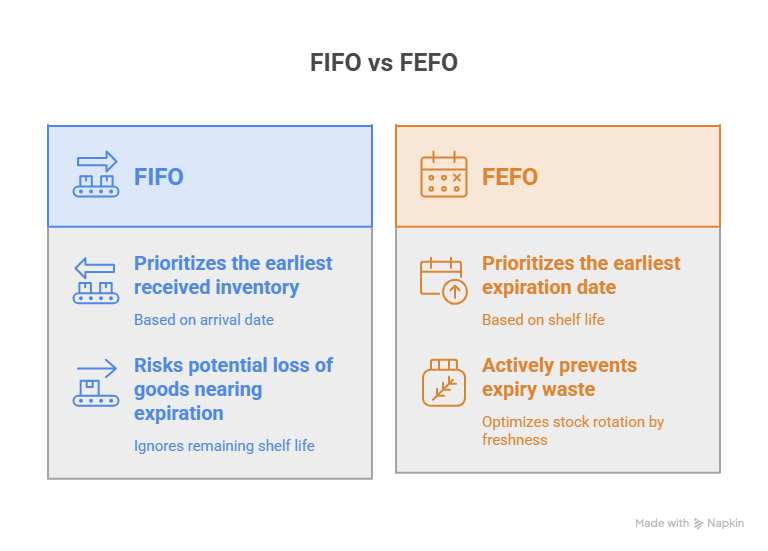
Most ERPs default to FIFO (First In, First Out) inventory rotation. This means that the earliest-received lot is consumed first. FIFO is the right approach for many industries. But, for chemical manufacturing, it is often wrong.
Why FIFO Creates Problems in Chemical Manufacturing?
Consider two lots of a solvent:
- Lot A: received January 15, expires March 31
- Lot B: received February 1, expires April 30
Under FIFO, Lot A is consumed first because it arrived earlier. That happens to work in this case. But now consider:
- Lot A: received January 15, expires April 30
- Lot B: received February 1, expires March 31
Under FIFO, Lot A is still consumed first because it arrived earlier. But Lot B expires sooner. Consuming Lot A first means Lot B may expire in storage before it is consumed. FIFO based on receipt date does not account for expiration date differences between lots.
Why FEFO Is the Correct Default for Chemical Manufacturing?
FEFO (First Expired, First Out) uses the expiration date rather than the receipt date to determine the consumption order. The lot expiring soonest is consumed first, regardless of when it was received.
FEFO (First Expiry First Out) is an inventory method ensuring products nearing expiration are used before newer stock, vital for reducing waste in process manufacturing. For chemicals with shelf life constraints, FEFO prevents a lot from expiring in the warehouse while a newer lot with a later expiration date is consumed ahead of it.
How ERP Enforces FEFO?
FEFO requires the ERP to carry expiration dates at the lot level and use them to determine picking sequence at the warehouse level. When a production run requires 500 kg of a raw material with three lots in inventory at different quantities and different expiration dates, the ERP calculates the consumption sequence based on expiration dates, not receipt dates.
This also applies to finished goods. When a customer orders a 100-liter batch of product, the ERP selects from available lots based on expiration date. The lot expiring soonest is picked first, which reduces the risk of finished goods expiring in the warehouse.
For a broader view of how lot and serial tracking work inside NetSuite’s inventory management system, this guide on advanced inventory management in NetSuite covers FEFO configuration, lot attribute tracking, and expiration management in detail.
Lot Attributes: What the Lot Number Carries in Chemical Manufacturing?
A lot number in a generic ERP is typically just a label. In a chemical manufacturing ERP, a lot number is a container for a set of attributes that define the properties of that specific group of material.
Lot attributes in chemical manufacturing typically include:
- Expiration date or retest date: The date after which the material must be tested again before use or disposed of
- Concentration or purity: The actual measured concentration of the active ingredient in this lot, which may differ from the nominal specification
- Potency factor: A multiplier used in formula scaling when the actual concentration differs from the target specification
- Physical properties: Specific gravity, pH, viscosity, moisture content, or other measured properties for this lot
- COA link: The Certificate of Analysis from the supplier, linked directly to the lot record
- Supplier batch number: The supplier’s own batch reference, separate from the internal lot number
- Quarantine status: Whether this lot is released for use, on hold pending testing, or rejected
The potency and concentration attributes have a direct effect on formula scaling. If a raw material specification calls for 98% pure acetic acid but this lot tests at 96%, the formula must compensate by using a larger quantity of this lot to deliver the same effective amount of active ingredient. An ERP that does not carry potency at the lot level requires someone to manually calculate and adjust the formula for every production run using a non-specification lot.
Batch attributes such as concentration, purity, shelf life, and catch weight are essential for product quality and regulatory auditing. These attributes are what make the lot record useful rather than just a label attached to a quantity.
Catch Weight in Chemical Manufacturing
Catch weight is a specific inventory challenge that chemical manufacturers deal with more than most industries. It occurs when a product is sold by one unit of measure but tracked by another.
A drum of a specialty polymer is sold by weight (kilograms) but received, stored, and picked as a single drum (each). The nominal fill is 200 kg, but each actual drum contains a slightly different amount based on the filling process. The ERP has to track both the drum count and the actual weight of each drum at once.
In a catch weight system, the ERP maintains two quantities for each lot. The first is the nominal unit (drums), and the second is the actual measured quantity (kilograms). Sales orders and invoices reference the weight. Warehouse picking references the drum count. The lot record holds both, and the COA reflects the actual weight delivered, not the nominal.
Without catch weight support in the ERP, chemical manufacturers either manage weight variance manually (creating reconciliation work) or lose weight-based billing accuracy.
If you are looking for the best catch-weight software solution, we have compiled a list of the top contenders for weight-based inventory management.
Certificate of Analysis (COA) Management in Lot Traceability
A Certificate of Analysis is a quality document that accompanies a lot of raw material from the supplier and a lot of finished product to the customer. It records the actual test results for that specific lot against the specification values.
In chemical manufacturing, COA management is not just a documentation task. It is a requirement for releasing material into production (incoming COA from supplier) and for shipping finished goods (outgoing COA to customer).
Incoming COA Workflow
When a raw material lot arrives, the ERP attaches the supplier’s COA to the lot record. If the COA shows any out-of-specification results, the ERP places the lot on quarantine hold. The lot cannot be issued to production until a quality disposition decision is recorded.
Outgoing COA Generation
When a finished goods batch passes final quality inspection, the ERP generates a COA from the actual test results recorded during production. The COA is linked to the finished goods lot number and can be attached to the shipment automatically.
Store Certificates of Analysis and other QC documentation with each lot for fast reference. A customer who requests a COA for a lot they received should be able to retrieve it immediately from the ERP, linked to the specific shipment lot, without searching through a separate document management system.
For the quality management workflows that connect COA generation to inspection plans, non-conformance tracking, and CAPA management in an ERP context, this overview of NetSuite’s Quality Management module covers how quality holds, inspection workflows, and documentation link to lot records in an integrated system.
How to Conduct a Mock Recall Drill Using ERP Traceability Data?
A mock recall drill is the operational test that verifies whether your traceability system actually works before you need it under pressure. Regulators and major customers increasingly require chemical manufacturers to demonstrate recall capability through mock drills with a defined time target.
The standard for a well-configured traceability system is identifying affected lots and recipients in minutes. If your team is still pulling this information in hours, the system has a gap that a real recall will expose.
A Standard Mock Recall Drill Procedure
The steps given below entail the steps to run a mock recall drill procedure by using the ERP data.
Step 1: Define the scenario
Select a specific raw material lot number as the subject of the simulated quality alert. The drill assumes that the lot is out of specification for a critical property.
Step 2: Run backward traceability
Query the ERP for all production batches that consumed the selected lot. This query should return the list instantly from the ERP’s transaction records. If it requires manual searching, the system is not configured for rapid recall response.
Step 3: Run forward traceability from each affected batch
For each production batch identified in Step 2, query the ERP for all customer shipments containing product from that batch. The result is the affected customer list: who received the product and how much.
Step 4: Identify affected inventory still on hand
Query the ERP for any finished goods from the affected batches that have not yet shipped. This inventory can be placed on hold immediately in the ERP. The hold prevents further shipment and triggers a quality review before any release.
Step 5: Document the response time
Record how long the drill took from the start of Step 1 to the completed customer list in Step 3. This is the recovery time benchmark. Most regulatory and customer standards expect this to be completed within 2 to 4 hours for a well-configured system.
A modern lot traceability program requires the ability to quickly perform a recall or mock recall. A traceability system should help you identify affected lots and recipients in minutes, not hours or days.
For chemical manufacturers who want to understand how process manufacturing ERP handles batch genealogy, recall readiness, and quality holds as a connected system, this guide on ERP for process manufacturing covers the lot genealogy, recall tools, and FEFO configuration that form the operational foundation of recall readiness.
The Document Trail That Traceability Must Support
Chemical manufacturing traceability is not just about tracking quantities. It must maintain a document trail that answers regulatory and customer questions without manual reconstruction.
The documents that must be followed throughout the chemical manufacturing lifecycle include:
Incoming materials:
The following are the incoming materials that must be included:
- Purchase order (links the lot to the supplier contract)
- Goods receipt (records what actually arrived)
- Supplier COA (quality results for the specific lot)
- Incoming inspection record (internal test results confirming the supplier COA)
- SDS (Safety Data Sheet for hazardous materials)
During production:
During production, make sure you have these records available:
- Batch record (the actual production record: formula used, quantities consumed, conditions, operator)
- In-process quality records (test results captured during production)
- Deviation records (any departure from the standard formula or process)
- Equipment cleaning records (for regulated facilities)
Finished goods:
In the end, you will have these finished goods:
- Final inspection record
- Outgoing COA
- Labels (GHS/HazMat labels for regulated materials)
An ERP that does not attach these documents to the relevant lot and batch records forces manual document retrieval during audits and recalls. The time spent gathering that documentation during a recall or regulatory inspection is time that should be spent managing the response.
For more on how lot and serial number tracking connect to the full inventory and production record in NetSuite, this guide on managing serialized inventory with NetSuite covers how transaction records attach to each lot movement from receipt to shipment.
What Breaks When Traceability Is Not Configured Correctly?
The failures that most chemical manufacturers experience are configuration gaps that leave traceability incomplete.
Gap 1: Lot numbers assigned manually after the fact
When lot numbers are entered retrospectively rather than captured at the transaction point (receiving, production, shipping), the link between the lot number and the actual physical event is no longer guaranteed. Manual entry creates the risk of assigning the wrong lot to the wrong transaction.
Gap 2: Traceability breaks at packaging
Packaging events that do not create a lot split record break the chain. The packaged drums have no documented link to the production batch they came from.
Gap 3: Paper COAs filed separately from the ERP
When COAs exist as PDFs in a shared drive rather than attached to the lot record in the ERP, retrieving them during a recall or audit requires someone to know where to look and not have made a filing error when the document was originally received.
Gap 4: FEFO is not enforced at picking
When warehouse staff manually select lots without ERP enforcement of FEFO, older expiring lots may be bypassed in favor of newer lots that are more accessible. The traceability record correctly shows which lot was picked, but the outcome is waste and compliance risk.
Gap 5: Lot attributes not captured at receiving
When expiration dates, purity, and potency are not entered at receiving, formula scaling cannot compensate for off-specification materials, and FEFO cannot operate because the expiration dates are not in the system.
For a view of how NetSuite’s manufacturing modules handle the full production record, including lot assignments, batch execution, and quality holds as an integrated system rather than a collection of separate tools, this overview of NetSuite manufacturing modules covers how each module connects to the traceability chain.
Final Thoughts
Batch tracking and lot traceability in chemical manufacturing ERP are not a single feature. They are a collection of interconnected data capture points, including lot attributes at receiving, batch genealogy at production, lot splits and merges during packaging, FEFO enforcement at picking, COA linkage at both ends, and a bidirectional query capability that connects all of it.
When every data point is captured correctly at the transaction level, a recall response that would otherwise take days takes hours. A regulatory audit that would otherwise require weeks of document gathering becomes a set of standard reports. The difference is not the ERP platform. It is the completeness of the traceability configuration.
If your current system cannot run a bidirectional traceability query from a raw material lot to every affected customer in under an hour, that is worth addressing before the next quality event or regulatory audit makes it a requirement instead of a suggestion.
How Folio3 Helps Manufacturers
For manufacturers, traceability works best when it is built directly into the ERP system that runs day-to-day operations.
Folio3 implements NetSuite ERP for manufacturing with built-in support for lot tracking, batch management, warehouse operations, and production workflows in a single connected system. This allows manufacturers to track materials from receiving through production and finished goods without relying on separate tools or manual records.
With NetSuite configured for manufacturing needs, teams gain real-time visibility into inventory movements, production history, and lot-level details across the entire supply chain. Quality and compliance data stay connected to each batch, making it easier to investigate issues or track materials when needed.
The result is better inventory control, clearer production records, improved compliance readiness, and reliable traceability across every lot and batch.
Get in touch with our ERP experts today!
FAQs
How should co-products and by-products be tracked in a chemical manufacturing ERP?
Co-products and by-products are separate output items linked to the same production batch. A chemical reaction or distillation process may produce a primary product and a co-product at the same time. Both receive their own lot numbers and their own forward traceability from the batch to the customer or disposal destination. The ERP must track both as separate inventory items while maintaining their link to the parent batch for backward traceability.
How long should a mock recall drill take?
A well-configured traceability system should complete the full recall workflow, identifying which raw material lots went into affected batches, which batches used those lots, which customers received product from those batches, and which inventory is still on hand and should be placed on hold, within 2 to 4 hours. If the process takes longer, it indicates configuration gaps in how lot genealogy is captured and stored in the ERP.