Key Takeaways
- NetSuite Stays, the Storefront Moves: A SuiteCommerce to Shopify Plus migration replaces the customer-facing layer only. NetSuite keeps running inventory, orders, and financials through a middleware connector like Burq.
- B2B Logic Needs Custom Build: Distributor pricing, monthly activation rules, and commission attribution have no out-of-the-box match on Shopify. You build these with Shopify Functions, metafields, and webhooks.
- You Lose Some Native Features: SuiteCommerce ships with built-in faceted search and ERP-driven merchandising zones. Shopify needs apps for the first and has no real equivalent for the second.
- Checkout Is More Locked Than People Expect: Shopify Plus checkout is fast and converts well, but you customize it through Checkout Extensibility, not open code. URL paths like /products/ and /collections/ cannot be renamed.
- Subscriptions Do Not Carry Over: Active auto-ship orders end on cutover. Customers rebuild them on the new platform, so your communication plan matters as much as your technical plan.
- Budget 16 to 19 Weeks for Mid-Complexity Projects: That covers discovery, multi-region setup, B2B workflows, and integration through go-live, run as four sequential milestones.
What Does the SuiteCommerce to Shopify Plus Migration Involve?
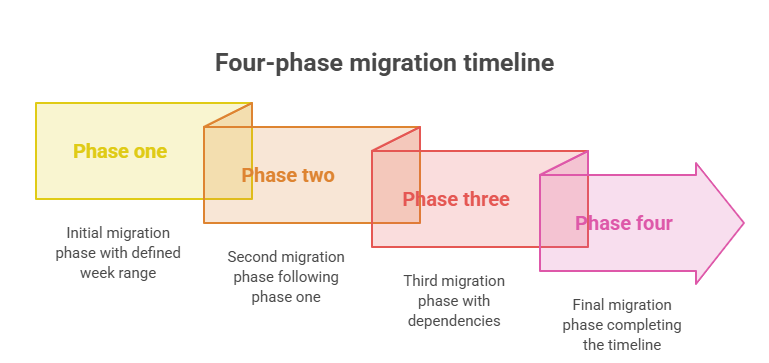
A SuiteCommerce to Shopify Plus migration is a four-phase process, each with its own sign-off before the next begins: design discovery, multi-region and pricing setup, B2B and subscription workflows, and finally data migration and go-live.
What Data Migrates and What Gets Left Behind in SuiteCommerce to Shopify Plus Migration?
Four categories of data move from the old platform to Shopify: customer records, product data, historical orders, and subscription history. Run the migration in this order:
- Clean the product catalog before touching Shopify. Products with inconsistent variants or stale records cause import failures that need manual cleanup later, which is slower than fixing them upfront.
- Migrate customer records. Names, emails, account history, shipping addresses, and customer-group assignments move over, but passwords do not. Every customer resets theirs after launch, so plan that communication early rather than as an afterthought.
- Migrate product data. Titles, descriptions, images, SKUs, variants, pricing, and categories all need to land correctly before any storefront testing can start.
- Migrate historical orders through an app or API process. Shopify does not support CSV import for order history, so this needs dedicated tooling and time, not a spreadsheet upload.
- Import subscription history for reference only. Active subscriptions do not carry over as active. Existing subscriptions close on the old platform, and customers have to recreate them in Shopify’s subscription flow.
- Validate every migrated record set in Shopify before go-live. Spot-check customer counts, order totals, and product variant counts against the old platform to catch silent import failures.
- Send subscription transition communication to customers early. Without a clear, well-timed message, a meaningful share of subscribers simply never recreate their order, and you lose that recurring revenue permanently.
How Do You Run Design Discovery and UX Planning in the migration from SuiteCommerce to Shopify Plus?
In this phase, primarily five steps are involved that serve as a holistic process for designing and UX planning.
- Audit every customer journey. Document direct purchase, distributor sign-up, monthly reorder, and subscription renewal as separate flows, not one generic “checkout” flow.
- Inventory every content page and its URL. This list becomes the backbone of your redirect map later, so build it properly the first time.
- Separate custom functionality from native SuiteCommerce features. Anything custom-built needs a rebuild decision on Shopify. Anything native usually has a direct or close equivalent.
- Run competitor analysis. Skipping this step is the fastest way to rebuild the same weak patterns on a new platform. Reviewing how comparable multilingual, multi-region brands handle country selection, language switching, and B2B registration on Shopify usually surfaces two or three UX fixes you did not know you needed.
- Produce and approve Figma wireframes for every core page and flow. These are not decoration. They are the spec the development team builds against, and approving them before development starts is what keeps the next phase from turning into rework.
This phase typically runs 4 to 5 weeks.
How Do You Configure Multi-Region, Multi-Currency, and Multilingual Storefronts in Migration?
Multi-region migrations require separate configurations for currencies, languages, tax rules, regional catalogs, payment gateways, and shipping providers. Each storefront must also be integrated with NetSuite to maintain accurate pricing, inventory, customer, and order data across regions.
| Region | Currency | Tax Treatment |
|---|---|---|
| Mexico | MXN | Tax-inclusive |
| United States | USD | Tax-exclusive |
| Colombia | COP | Tax-inclusive |
| Peru | PEN | Tax-inclusive |
| Puerto Rico | USD | Tax-exclusive |
| Costa Rica | USD | Tax-exclusive |
| U.S. Virgin Islands | USD | Tax-exclusive |
Setting this up correctly runs in a fixed order:
- Create a separate Shopify Market for each region. Markets is the native tool for setting currency display, language routing, and region-specific storefront behavior.
- Set the currency per market. Each market carries its own currency, so a customer in Mexico sees MXN and a customer in Peru sees PEN without any manual switching.
- Enable location detection and routing. Shopify Markets detects a visitor’s location and routes them to the correct regional experience automatically, so this should be tested from IP ranges in every region, not just the one you’re sitting in.
- Turn on the second language and let Shopify generate localized URLs. Shopify generates /es/ prefixed URLs for translated content automatically once a language is added to a market.
- Translate every layer of the experience, not just product pages. Checkout labels, error messages, and notification copy all need translation. Spanish text runs 20 to 30% longer than English, so content blocks that fit cleanly in English can break a layout in Spanish.
- Validate every region and language combination with a native speaker before launch. A machine-translated string that passes a spot check in English review can still read wrong to an actual Spanish-speaking customer.
How Should You Handle Regional Tax Configuration?
Tax-inclusive and tax-exclusive pricing are two different display models, and mixing them up creates a trust problem fast. If a customer sees $49.99 and gets charged $56.49 at checkout in a market where they expect tax already included, they abandon the cart.
To avoid this, you can implement regional tax configuration in Suitecommerce to Shopify Plus miration in four steps:
- Classify every region as tax-inclusive or tax-exclusive. This decision comes from local tax law and customer expectation, not personal preference, so confirm it with a tax advisor per region rather than assuming.
- Set tax-inclusive pricing for the relevant markets. Prices display with tax already baked in, and no separate line item appears at checkout.
- Configure tax-exclusive calculation for the remaining markets. Tax calculates at checkout using either Shopify Tax or an existing integration such as TaxCloud.
- Get QA sign-off per region before go-live. Test the actual checkout total in every currency and region combination, not just the display price on the product page.
Keep this scope Shopify-side only. Anything that touches NetSuite’s tax or order handling is a separate, explicitly agreed piece of work.
What’s the Difference Between B2C and B2B Customer Flows?
B2C and B2B customer journeys differ in both purchasing behavior and system requirements. While B2C storefronts typically support standard pricing and direct checkout, B2B storefronts often require customer-specific pricing, account hierarchies, approval workflows, purchase orders, and negotiated payment terms.
How distributor registration and activation works
Registering as a distributor is not a simple form. The flow is gated:
- The customer chooses the distributor registration path.
- They see available starter or product bundles.
- They select a bundle and complete the purchase.
- A webhook marks the customer as an active distributor using a metafield or tag.
- Distributor pricing and features unlock immediately.
Building this requires a custom registration section, a bundle-selection flow tied to checkout, a post-purchase webhook, and conditional Liquid logic that checks distributor status before rendering price or content.
How the monthly activation and reactivation logic works
Distributors typically need to place a minimum qualifying order every month to stay active. Two automated pieces make this work:
- Monthly status check: A scheduled job, run through Shopify Flow or a custom app, checks each distributor’s order history against the threshold at the end of the billing period and tags anyone who missed it as inactive.
- Reactivation: When an inactive distributor places a qualifying order, a webhook flips their status back to active and restores distributor pricing without requiring them to log out and back in.
None of this is native to Shopify. It runs through the Shopify Admin API combined with Flow automations or a dedicated app built for this.
How Do You Build Customer-Specific Pricing?
Active distributors see distributor pricing, while Inactive ones drop back to standard pricing. Shopify Functions handle the price override at checkout, while customer metafields store the distributor status that theme-level Liquid logic reads to display the right price on the storefront itself.
For a multi-region store with two pricing tiers per region, the pricing matrix grows fast. Every currency and tier combination needs its own test pass before launch.
How Do Affiliate Pages and Commission Attribution Work?
Distributors often get a personalized page with a custom URL or handle. When a customer buys through that page, the system needs to capture attribution and tie it to the right distributor. The attribution chain runs in four steps:
- Build a custom page template that reads a distributor identifier from the URL. This is what turns a generic product page into “this distributor’s page” for tracking purposes.
- Store the referral data in the cart and carry it through checkout. If this step drops, the attribution disappears the moment the customer moves past the landing page.
- Write the attribution data to the order’s metafields. This is where the referral becomes a permanent, queryable part of the order record.
- Fire a webhook to the commission engine on order creation. This is what actually credits the distributor for the sale.
Skip any one of these steps and a distributor’s sale goes unattributed, which is the fastest way to damage trust in a commission program.
How Do Subscriptions and Auto-Ship Orders Work?
Shopify has no native subscription engine, so this runs through a third-party app such as Recharge or Seal Subscriptions. Configuring it correctly takes five steps:
- Install and connect a subscription app to the theme. This is the engine that will actually create recurring orders, so pick one with proven Shopify Plus support rather than the cheapest option.
- Configure product selection per distributor. The app needs to support whatever specific products or bundles a given distributor has chosen for auto-ship.
- Set the monthly order schedule. Orders need to generate automatically on a fixed cadence that lines up with the monthly activation window.
- Wire subscription orders into the same activation check as manual orders. A subscription order should trigger the exact same status logic a manual qualifying order would.
- Give distributors self-service controls. Pause, manage, and cancel options need to live on their account page, not require a support ticket.
Subscription orders also need to feed the commission engine the same way manual orders do. If they do not, a distributor on auto-ship stops earning commission without anyone noticing until they complain.
How Do You Integrate a Commission or Partner Payout Engine?
Every order event needs to reach the commission engine through an API call. That covers direct purchases, attributed affiliate sales, and subscription renewals. This typically requires a dedicated server with an SSL certificate and a subdomain for secure hosting. Flag that as a project dependency before development starts, not something you discover mid-build.
How Do You Handle NetSuite ERP Integration After Migration?
NetSuite keeps handling inventory, financials, order management, and fulfillment. Shopify and NetSuite talk to each other through middleware, most commonly Celigo. <cite index=”9-1″>Industry migration guides note that identifying gaps between SuiteCommerce and Shopify Plus is an early planning step, particularly for custom product fields or NetSuite-managed product bundles that need to be mapped to how Shopify or the integration will handle them.</cite>
The integration typically covers order sync to NetSuite as sales orders, scheduled inventory pushes back to Shopify, two-way customer record sync, fulfillment and tracking updates, and two-way refund and cancellation sync. For a multi-region store, it also needs to preserve the actual transaction currency in NetSuite’s financial records instead of defaulting to a base currency.
Treat the integration as an ongoing operational cost, not a one-time setup. A stable, well-tested integration removes manual data entry almost entirely. A rushed one, tested only under light load, tends to fail exactly when order volume spikes, which is the worst possible time to discover the gap.
If you want to compare pre-built connector options against a custom build before committing to one, this guide on how to integrate Shopify with NetSuite walks through pricing, setup, and multi-store mapping.
What Do You Lose When You Leave SuiteCommerce?
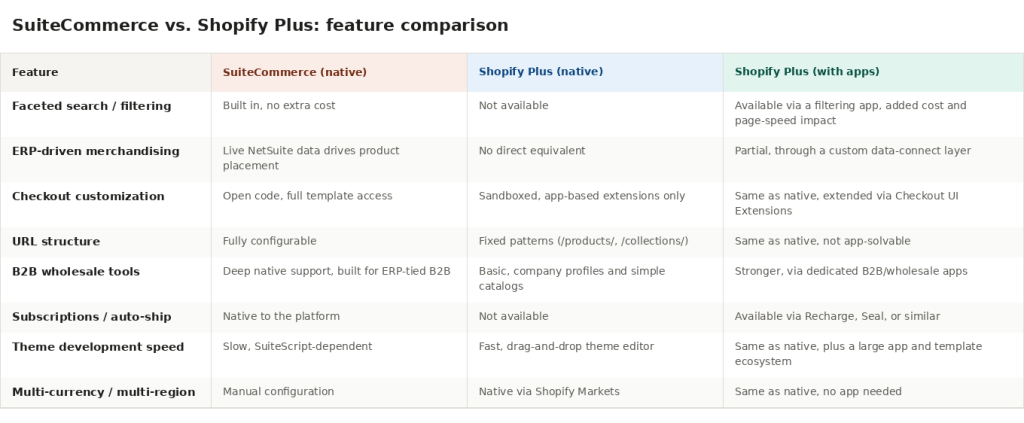
The most common gaps include faceted search, ERP-driven merchandising, checkout customization, and flexible URL structures. Understanding these differences helps businesses estimate migration scope, implementation effort, and ongoing maintenance costs before the project begins
Faceted search and filtering is not native
<cite index=”9-1,14-1″>SuiteCommerce ships with faceted navigation and advanced search as a built-in feature, letting customers filter by attributes like size or category without extra cost, while Shopify Plus has no native equivalent and requires a filtering app, which adds cost and can affect page performance.</cite> Budget for a filtering app and factor its performance impact into your Core Web Vitals targets from day one.
ERP-driven merchandising has no direct match
SuiteCommerce can surface products dynamically based on live NetSuite data, such as highest-margin or highest-stock items, through what’s often called merchandising zones. Shopify has no purely native way to replicate ERP-driven merchandising logic like this. You either build a custom data-connect layer or accept simpler, Shopify-native collection rules.
Checkout is fast, but it is not open code
Shopify Plus checkout converts well, and Shop Pay is genuinely one of the better-performing checkouts in ecommerce. But you no longer get to edit checkout templates directly. <cite index=”15-1″>Checkout Extensions cannot read or modify other parts of the checkout page, cannot access browser cookies or localStorage, and any network requests from an extension have to go through Shopify’s approved endpoints.</cite> If your current SuiteCommerce checkout has deep custom logic, plan to rebuild it as a Shopify Function or UI Extension, not port it as-is.
It’s worth comparing that against what’s possible on the platform you’re leaving, and this overview of custom checkout flows on SuiteCommerce shows what open-code checkout customization actually looks like in practice
URL structure is fixed
Shopify uses fixed URL patterns: /products/ for products, /collections/ for categories. <cite index=”14-1″>These paths cannot be arbitrarily changed</cite>, which matters more than it sounds like for a store with years of SEO equity built on a different URL structure. This is a redirect-mapping problem, not a configuration option.
How Long Does Testing and UAT Take when Migrating from SuiteCommerce to Shopify Plus?
Testing needs to run across every major flow before anything hits production: regional storefront behavior, language switching, currency and tax display per region, B2C checkout, distributor registration and bundle purchase, activation and deactivation logic, distributor pricing enforcement, subscription creation, affiliate attribution, and the full NetSuite sync (orders, inventory, fulfillment).
Once QA is complete, the build goes to the client for UAT on staging. Keep this window tight, two working days is a realistic ask, because every day UAT stretches pushes the whole go-live date back.
What Does the Go-Live Process Look Like in the migration from SuiteCommerce to Shopify Plus?
Go-live is a sequence, not a single event:
- Lower DNS TTL to 300 seconds at least 72 hours before cutover.
- Confirm every 301 redirect is in place and tested.
- Validate the ERP integration is running on production credentials, not sandbox.
- Confirm the subscription app is active and auto-ship schedules are configured.
- Send customer communication about subscription migration.
- Update the DNS A record to point to Shopify.
- Monitor integration logs for the first 24 hours.
- Monitor Search Console for 404 errors for the first 30 days.
- Keep the old environment accessible for 48 to 72 hours after cutover as a fallback.
How Do You Protect SEO Rankings During Migration?
Every URL changes when you move off SuiteCommerce, and every changed URL without a 301 redirect becomes a 404 in Google’s eyes, taking its ranking signal with it. <cite index=”3-1″>Monitoring Google Search Console daily during the first 30 days is standard practice</cite>, and a well-managed migration is also a chance to fix UX problems you inherited from the old platform.
For a multilingual store, double the redirect work: English and Spanish URLs both need mapping, and Spanish paths carry the /es/ prefix convention on the new platform. Build the redirect map in a spreadsheet, validate it on staging, and import it before DNS cutover, not during it. Shopify supports bulk 301 imports via CSV, so there is no reason to do this manually page by page.
your store currently ranks well on SuiteCommerce, it’s worth understanding what’s actually driving those rankings before you migrate, and this breakdown of SuiteCommerce SEO technical audits covers the JS rendering and duplicate content issues that most affect migration planning.
Shopify Plus or Shopify Advanced: Which Do You Actually Need?
For a project with custom B2B workflows, checkout logic, and multi-region configuration at this scale, Shopify Plus is the only option that fits. It gives you Shopify Functions for custom pricing and checkout logic, native B2B features like company profiles and customer-specific catalogs, and higher API rate limits, which matter once you’re pushing commission data on every order event. Shopify Advanced does not clear that bar.
If your workflow includes something like approval-based ordering (a manager or practitioner sign-off before an order confirms) or credit-limit validation for B2B accounts, that’s another clear signal you need Plus-tier Functions access, not a workaround on a lower plan.
Migration planning starts with understanding whether your current platform has become a limitation. If you’re still evaluating the decision, this guide on When Should You Move from SuiteCommerce to Shopify Plus? covers the common operational and technical indicators that signal it’s time to migrate.
Bottom Line
Migrating from SuiteCommerce to Shopify Plus requires careful planning around data migration, NetSuite integration, custom functionality, SEO preservation, and testing to ensure business continuity. With the right migration strategy, businesses can take advantage of Shopify Plus’s flexibility while continuing to rely on NetSuite as the system of record for finance, inventory, and order management.
Folio3 helps businesses migrate from SuiteCommerce to Shopify Plus without disrupting critical business operations. From migration planning and data transfer to NetSuite integration and post-launch support, our team can help you deliver a smooth transition.
Talk to a Migration Expert Today!
FAQs
Can I migrate from SuiteCommerce to Shopify Plus without losing my NetSuite ERP?
Yes. The migration moves the storefront only. NetSuite keeps running as your ERP, connected to Shopify through middleware such as Celigo, which syncs orders, inventory, customers, and financial data. That connection needs setup and ongoing monitoring.
How long does a SuiteCommerce to Shopify Plus migration take?
A mid-complexity project with multi-region setup, B2B workflows, and an ERP integration realistically takes 16 to 19 weeks. Simpler stores can finish in 8 to 12 weeks. Enterprise projects with heavy B2B logic, subscriptions, and commission integrations can run 16 to 24 weeks.
What happens to active subscriptions during migration?
They do not transfer as active. Subscriptions close on the old platform, and customers rebuild them through Shopify’s subscription flow after launch. Historical subscription data can still be imported for reference, but a clear customer communication plan is what actually protects that recurring revenue.
How do I set up B2B distributor pricing on Shopify Plus?
Through Shopify Functions and customer metafields. A tag or metafield value determines the customer’s pricing tier, and theme-level Liquid logic displays the right price based on that value. Pricing access ties directly to active or inactive distributor status, managed through custom activation logic.
What data can I actually migrate?
Products, variants, customer records, historical orders, and subscription history. Passwords cannot transfer due to encryption differences, so every customer resets theirs post-launch. Historical order data needs a migration app or API process since Shopify has no native CSV import for order history.
What does SuiteCommerce do natively that Shopify Plus does not?
Faceted search and filtering, and ERP-driven merchandising logic that reacts to live NetSuite data. Both are solvable on Shopify, through a filtering app for the first and custom data-connect logic for the second, but neither ships out of the box the way it does inside SuiteCommerce.
Will my SEO rankings survive the migration?
With full 301 redirect coverage, most stores see minimal long-term impact. The risk is incomplete mapping. Every changed URL without a redirect shows up as a 404 to search engines, and for a multilingual store, that means mapping two full URL sets, not one. Treat redirect mapping as a dedicated multi-week task, not a final-week scramble.