Key Takeaways
- Migration Scope is Broader: Products, customers, order history, SEO, custom features, and NetSuite integrations all need to migrate
- SEO is the Biggest Risk: Missing 301 redirects after migration can cost 20–30% of your organic traffic within weeks; therefore, map every URL before DNS cutover.
- Downtime Can Be Zero: With the right DNS TTL prep and a parallel-platform setup, your store can stay live right up to the moment you switch.
- Timeline Varies by Complexity: Simple stores can migrate in 4–6 weeks, and complex B2B stores with multiple integrations often take 12–24 weeks. Plan for your actual scope, not an industry average.
- Test Everything Before Launch: Checkout, payments, inventory sync, account login, and integrations all need sign-off on staging before you go live.
Most businesses do not decide to migrate off SuiteCommerce because the platform breaks. They leave because it cannot keep up, as adding a new promotional banner takes a developer, and connecting a modern email tool requires custom SuiteScript. That can stretch into months of work.
We have worked with businesses in distribution, manufacturing, and retail who stuck with SuiteCommerce because they assumed migrating to BigCommerce would be worse than staying put. BigCommerce gives your marketing team independence, developers a modern API ecosystem, and your business a storefront that does not require NetSuite-certified talent every time you want to update a page.
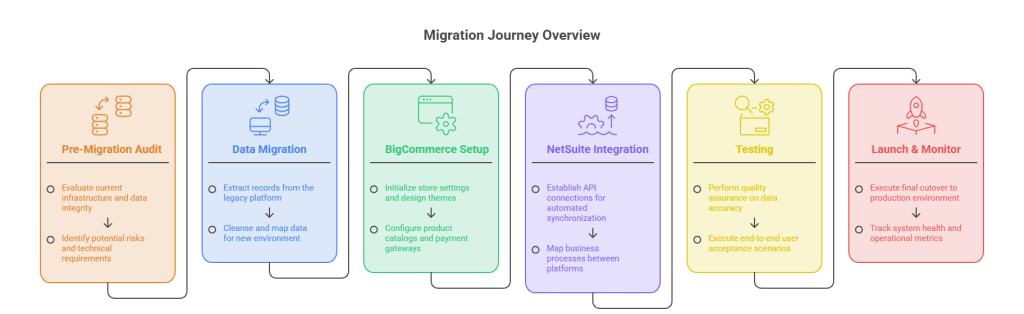
This guide covers every part of migrating from SuiteCommerce to BigCommerce: what data moves, how SEO is protected, how NetSuite stays connected, what gets tested, and how long the whole thing realistically takes.
Why Are Businesses Leaving SuiteCommerce?
Below are some of the common reasons why businesses are moving to BigCommerce from SuiteCommerce:
1. The Front-End Is Tied to NetSuite
SuiteCommerce is not really a separate product, as it runs inside NetSuite. Your storefront reads directly from the same database that manages your ERP. When inventory changes in your warehouse, the website reflects it instantly.
Because everything is connected to NetSuite, every front-end change requires NetSuite knowledge. Want a new landing page design? You need a developer familiar with NetSuite’s SuiteCommerce Architecture. Want to run an A/B test on your checkout? That is a SuiteScript project. For businesses that want to move fast, this becomes a real bottleneck.
BigCommerce separates the storefront from the ERP. Your marketing team can launch pages, run promotions, and update content without ever opening NetSuite. Developers connect the two systems through a middleware layer running in the background.
2. The App Ecosystem is Small
BigCommerce has hundreds of pre-built apps for email marketing, reviews, loyalty programs, search, and analytics. In comparison to this, SuiteCommerce has far fewer native options. Adding third-party tools to SuiteCommerce often means custom development, which adds cost and time to every new initiative.
3. SEO Performance Has Limits
BigCommerce is built for SEO. It supports customizable URL structures, automatic sitemaps, structured data, and direct integrations with Google Shopping and Meta. SuiteCommerce’s URL flexibility is more limited, and marketing integrations typically require custom SuiteScript or SuiteApps.
According to BigCommerce’s own comparison, a Forrester Total Economic Impact study found that merchants on BigCommerce achieved a 211% ROI and recouped their investment in under 8 months.
Understanding the Full Scope of Data Migration in SuiteCommerce to BigCommerce
Data migration includes every business asset required to keep the ecommerce store operational after launch. In addition to products, businesses must migrate customers, historical orders, pricing, categories, content, redirects, and connected integrations to ensure continuity.
A. Product Catalog
Your full product catalog migrates: titles, descriptions, images, variants, SKUs, pricing, inventory levels, categories, and custom fields. This is the most visible part of migration, and the one most tools handle well.
One of the SuiteCommerce to BigCommerce migration challenges is data quality. If your SuiteCommerce catalog has been running for years, there is likely some mess in it, such as duplicate SKUs, inconsistent naming, and outdated products that should have been archived. A migration is the best time to clean this up.
B. Customer Accounts
When you are migrating your setup from SuiteCommerce to BigCommerce, customer records move: names, email addresses, account history, shipping addresses, and customer group assignments. The one thing that cannot be transferred is passwords. BigCommerce uses a different encryption system, so every customer will need to reset their password after launch. The best way to handle it is to plan your customer communication around it so they are not surprised.
C. Order History
Historical order data can migrate to BigCommerce with the right tools. This matters for customer service agents who need to see past orders, for account holders who track their own purchase history, and for your finance team’s reporting. BigCommerce does not support CSV import for sales history, and you might need a migration app or an API-based transfer.
D. SEO Assets
Every indexed URL on your SuiteCommerce store is an asset. Meta titles, meta descriptions, heading tags, image alt text, and the URL structures themselves all need to carry over as these do not migrate automatically. These assets require manual export, mapping to the new BigCommerce structure, and configuration before launch
E. Blog Content and Static Pages
If your SuiteCommerce store has a blog or resource pages, those need to migrate too. The content moves, but the URL paths almost certainly change. That means 301 redirects are required for every blog post and page that has indexed traffic.
F. Integrations and Third-Party Tools
Payment gateways, shipping providers, email tools, loyalty programs, and review platforms all need to be reconnected on BigCommerce. Some tools have native BigCommerce apps and reconnect quickly, while others need to be evaluated and potentially replaced.
How to Handle SEO and 301 Redirects During Migration
SEO damage from a poorly planned migration can take months to recover from. Let’s see now how you can avoid it easily.
1. 301 Redirects
When you move from SuiteCommerce to BigCommerce, your URL structure will likely change. A product that lived at /products/item-name on SuiteCommerce might live at /product-name/ on BigCommerce.
Without a 301 redirect, Google sees the old page as gone and loses confidence in your site.
Research across 127 e-commerce migrations shows that sites with 99%+ redirect coverage see less than 5% traffic loss after migration. Sites with less than 95% redirect coverage lose an average of 23% of organic traffic. That is a significant gap, and it comes down entirely to preparation.
2. How to Build Your Redirect Map
Start by crawling your existing SuiteCommerce store with a tool like Screaming Frog and export every live URL. Then, in parallel, set up BigCommerce and map each old URL to its new equivalent. This becomes your redirect map: a spreadsheet where Column A is the old URL and Column B is the new one.
BigCommerce supports bulk 301 redirect imports via CSV and handles up to 25,000 redirects. Import this map before you change your DNS settings. The redirects need to be live the moment traffic hits your new store.
What Else to Preserve
In addition to redirects, you also need to carry over your meta titles and meta descriptions for every product and category page. Here is what you can do when handling 301 redirects:
- Set up canonical tags correctly so BigCommerce does not generate duplicate URL issues.
- Submit a fresh XML sitemap to Google Search Console on launch day.
- Monitor the Coverage report in Search Console daily for the first 30 days to catch any 404 errors before they compound.
If you have pages with high-authority backlinks, those pages get priority treatment. Every link pointing to your site is a signal Google uses to rank you. A redirect preserves roughly 90–99% of that signal.
Expect a Short-Term Dip
Even with solid redirect coverage, it is normal to see a small, short-term traffic dip after any platform migration. Google takes time to recrawl and re-index your new URLs. This typically resolves within 30–60 days if your redirects are solid and your new site is fast.
If you see traffic drop and keep dropping past 60 days, that is a sign something went wrong in the redirect map or on-page setup because that is not a normal post-migration fluctuation.
How to Keep NetSuite Connected? Integration After SuiteCommerce
On SuiteCommerce, BigCommerce and NetSuite were the same system. When you move to BigCommerce, they are two separate platforms. You need a middleware connector to keep them in sync.
The Core Integration Flows You Need
A properly configured BigCommerce-NetSuite integration handles:
- Orders: Orders placed on BigCommerce sync to NetSuite as sales orders
- Inventory: Inventory levels in NetSuite push to BigCommerce in near-real time
- Customers: Customer records stay in sync in both directions
- Products: Product data flows from NetSuite to BigCommerce
- Fulfillments: Shipping and tracking information updates from NetSuite back to BigCommerce
- Refunds and Cancellations: These flow in both directions
Which Integration Tool Is Right for Your Business?
The three most common options are Celigo, Boomi, and a custom-built connector.
Celigo is the most popular choice for mid-market businesses. It has a pre-built BigCommerce-NetSuite integration app (Bundle ID 119235 in NetSuite’s SuiteBundler), strong error handling, and a support ecosystem. Most businesses with standard NetSuite configurations can configure Celigo in 4–12 weeks. If your team wants to monitor and adjust flows without developer help, Celigo is usually the right call.
Boomi and Workato work well for enterprise businesses with complex workflow logic or high order volumes. These platforms offer more flexibility in custom mapping and multi-subsidiary routing, but they require more setup time and often a specialist.
Custom SuiteScript integration makes sense for businesses with deeply customized NetSuite environments, unique B2B pricing logic, or requirements that standard connectors cannot handle. Expect $10,000–$60,000 in development costs plus ongoing maintenance.
If your ecommerce operation also requires advanced shipping orchestration, platforms such as Burq can complement the NetSuite integration. Rather than synchronizing ERP data, Burq connects BigCommerce with multiple shipping carriers and delivery providers, helping businesses automate shipping selection, rate management, and fulfillment workflows. For companies that ship through multiple logistics partners, it can become an important part of the overall ecommerce architecture alongside the NetSuite integration.
B2B Considerations
If you run a B2B business, the integration complexity goes up. SuiteCommerce natively handled customer-specific pricing, credit terms, and account hierarchies because everything lived inside NetSuite. When you move to BigCommerce, those workflows need to be configured through BigCommerce B2B Edition and mapped correctly through your integration layer.
Generic connectors can struggle here. You may need one that explicitly supports customer group pricing, quote workflows, approval hierarchies, and multi-subsidiary routing. Confirm this before you choose your integration tool.
Rebuilding Custom Code and Achieving Feature Parity
One of the most underestimated parts of any SuiteCommerce migration is custom code. If your current store has custom product finders, quote tools, B2B account portals, configurators, or specialized checkout flows, those do not move automatically, and those custom features need to be evaluated.
What to Audit Before You Start
Before your migration begins, document every custom feature on your current SuiteCommerce store. For each one, ask three questions: Does BigCommerce have a native equivalent or app? Does BigCommerce’s API support rebuilding this with a custom component? Does this feature still serve a business purpose, or has the need changed?
Some SuiteCommerce custom features translate cleanly to BigCommerce apps. Others need to be rebuilt using Stencil (BigCommerce’s theme framework), and a few might be better retired entirely. Sometimes custom features exist because SuiteCommerce could not do something natively that BigCommerce handles out of the box.
BigCommerce’s Theme System vs. SuiteCommerce’s SCA
BigCommerce’s Stencil framework is more modern and more widely supported than SuiteCommerce’s SCA architecture. There are far more pre-built themes, more developers who know the system, and better tooling for testing and deployment.
The practical implication is that your SuiteCommerce theme code cannot be transplanted to BigCommerce. A new theme needs to be built or configured, and most teams treat this as an opportunity to modernize their storefront design alongside the technical move, which is usually the right call.
The Pre-Launch Testing Checklist
Never launch a migrated store without completing a full test cycle on staging. The goal is to find every broken workflow before customers do.
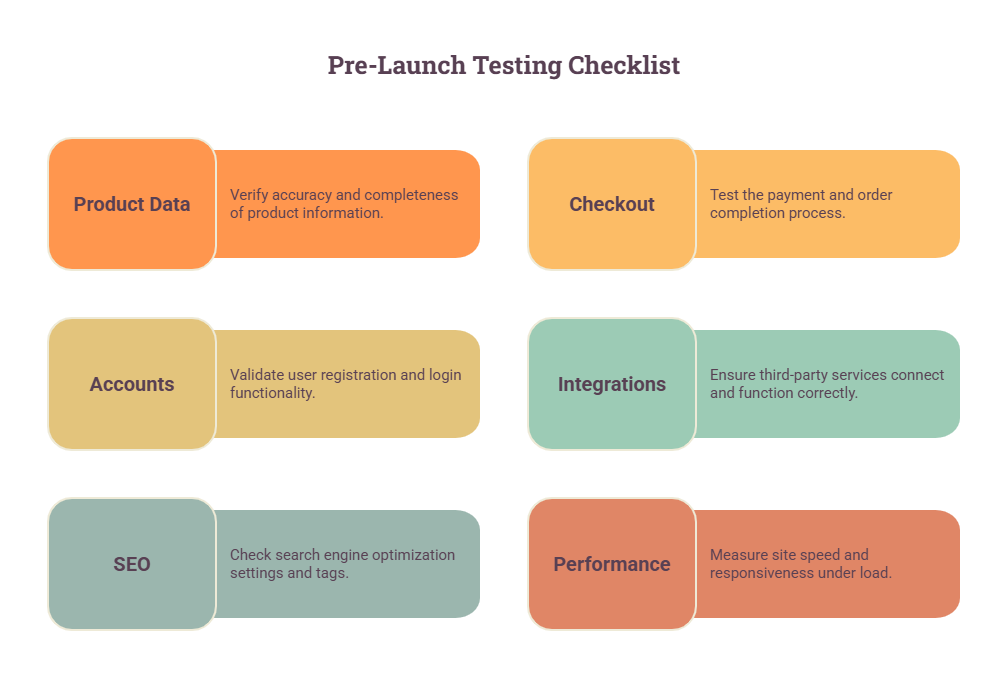
✔ Product Pages: Verify that product titles, descriptions, images, variants, and pricing all display correctly. Spot-check 10–20% of your catalog.
✔ Search and Navigation: Make sure category pages load, filters work, and the site search returns relevant results.
✔ Checkout Flow: Complete test purchases from cart through payment confirmation. Test every payment method your customers use.
✔ Customer Accounts: Log in as a test customer. Verify that order history appears, addresses are saved correctly, and account settings work.
✔ NetSuite Integration: Place a test order and confirm it appears in NetSuite. Update inventory in NetSuite and confirm BigCommerce reflects the change. Test refund and cancellation flows.
✔ 301 Redirects: Spot-check a sample of your redirect map. Paste old URLs into a browser and confirm they land on the right new pages.
✔ Mobile and Cross-Browser: Test the full purchase flow on mobile, tablet, and at least three browsers.
✔ Email Notifications: Confirm that order confirmation, shipping notification, and password reset emails fire correctly and look right.
✔ Core Web Vitals: Run a PageSpeed Insights test on your homepage, a category page, and a product page. Target homepage under 2 seconds and product pages under 2.5 seconds.
Launch Strategy: How to Go Live Without Downtime
The DNS cutover is the moment your domain switches from pointing at SuiteCommerce to pointing at BigCommerce. Done right, customers experience no interruption. Done wrong, you are managing two live stores and confused orders at the same time.
Prep Work: Lower Your DNS TTL
At least 72 hours before your planned cutover, lower your domain’s DNS TTL (Time to Live) to 300 seconds or less. The TTL controls how long DNS changes take to propagate globally. Lowering it in advance means that when you make the switch, the change spreads in minutes rather than hours.
Run Both Platforms Simultaneously
Your BigCommerce store should be fully built, tested, and ready before you touch DNS. The old SuiteCommerce store should stay live and continue taking orders right up until the cutover moment. This parallel-platform approach means there is no moment when your domain resolves to nothing.
The Cutover Window
The actual DNS cutover takes minutes. You change your domain’s A record to point to BigCommerce’s IP, and traffic starts shifting immediately. But DNS propagation is not instant globally. About 25% of traffic will still hit your old platform 12 hours after the switch.
Plan for 24–48 hours of dual-platform order management. Either set up webhook forwarding from your old platform to push new orders into BigCommerce automatically, or manually export and reconcile orders every few hours. Most stores processing under 50 daily orders can manage this manually. Higher-volume stores need an automated solution.
Keep your old SuiteCommerce store operational for at least 48–72 hours post-cutover. Do not cancel the subscription until you have confirmed zero orders are arriving there and all data has been backed up.
Post-Launch Monitoring
In the first 72 hours after launch, submit your new XML sitemap to Google Search Console and monitor the Coverage report for 404 errors. Make sure that you check that your top 20 organic landing pages are returning 200 status codes, and verify that all 301 redirects are working in production. Watch checkout conversion rate against your pre-migration baseline. Monitor your NetSuite integration logs for sync errors.
How Long Does a SuiteCommerce to BigCommerce Migration Take?
The timeline is determined by catalog size, integration count, custom feature complexity, and how much content needs to move. Here is a realistic breakdown based on what we see across projects:
- Small Stores (under 1,000 SKUs, 1–2 integrations, minimal customization): 4–6 weeks
- Mid-Market Stores (1,000–10,000 SKUs, 3–5 integrations, some custom features): 8–12 weeks
- Enterprise or Complex B2B (large catalogs, custom B2B workflows, multiple integrations, international storefronts): 16–24 weeks
The most common cause of timeline overruns is data cleanup. If your SuiteCommerce catalog has messy product data, inconsistent variant structures, or outdated records, that cleanup takes time, and it has to happen before migration.
The second most common cause is integration scope creep. Teams discover mid-project that their NetSuite configuration is more customized than anyone realized, and the standard connector does not map every field correctly. Budget extra time for integration testing and edge case handling.
Your team’s time commitment through a migration project is typically 4–6 hours per week: one review meeting, async feedback on staging builds, and final sign-off on testing. Your migration partner or development team handles the build work.
Every migration is different. Our NetSuite specialists can assess your current SuiteCommerce environment, identify customizations and integrations, and help you build a migration plan that minimizes risk and keeps your business running smoothly.
Talk to a NetSuite Migration Expert today!
Bottom Line
Successful migrations usually begin long before the first record is moved. Product and customer data should be reviewed and cleaned, existing URLs mapped to 301 redirects, and the NetSuite integration fully tested in a staging environment. A structured round of user acceptance testing helps uncover issues before launch, while keeping the existing SuiteCommerce store live until the new site is validated reduces unnecessary risk.
Most migration issues stem from overlooked preparation rather than the migration itself. Incomplete testing, underestimated customizations, or assumptions that integrations will work without validation often lead to avoidable delays after go-live.
Before committing to a migration, take time to assess your current SuiteCommerce environment. Review the size of your product catalog, identify custom features that need to be rebuilt, document active integrations, and evaluate your NetSuite configuration. This assessment provides the foundation for an accurate project scope and a realistic implementation plan.
For many businesses, the long-term benefits outweigh the effort involved. BigCommerce offers greater flexibility over the storefront experience while NetSuite continues to manage financials, inventory, customers, and orders. When both platforms are integrated correctly, businesses gain a scalable ecommerce architecture that is easier to maintain and adapt as requirements evolve.
FAQs
What data can be migrated from SuiteCommerce to BigCommerce?
Products, product variants, inventory levels, categories, customer accounts, order history, blog content, and static pages can all migrate from SuiteCommerce to BigCommerce. Customer passwords cannot transfer due to encryption differences. Order history requires a migration app or API-based process since BigCommerce does not support CSV import for sales records. All data should be audited and cleaned before migration begins.
Will migrating from SuiteCommerce to BigCommerce hurt my SEO?
It can, if 301 redirects are not properly implemented. When your URL structure changes, search engines need to be told where each old URL now lives. Without 301 redirects, those pages appear as 404 errors, and Google drops the ranking signals associated with them. Research shows that stores with 99%+ redirect coverage see less than 5% traffic loss. Stores below 95% coverage average 23% organic traffic loss. Map every URL before DNS cutover and submit a fresh sitemap to Google Search Console on launch day.
Can I keep NetSuite as my ERP after migrating to BigCommerce?
Yes. Most businesses migrating from SuiteCommerce to BigCommerce keep NetSuite as their ERP. The key change is that BigCommerce and NetSuite are now separate systems. You connect them through a middleware integration tool such as Celigo, Boomi, Workato, or a custom-built connector. The integration handles order sync, inventory updates, customer records, fulfillment data, and refunds. The main difference from SuiteCommerce is a small sync delay, typically seconds to minutes, rather than the real-time native connection SuiteCommerce provided.
How do I maintain NetSuite-specific features like customer-specific pricing and credit terms in BigCommerce?
This requires BigCommerce B2B Edition combined with a properly configured integration. BigCommerce B2B Edition supports customer group pricing, company account structures, quote workflows, and approval processes. Your integration connector maps these to the corresponding NetSuite pricing lists, customer records, and credit terms. Standard connectors handle basic customer group pricing. Complex B2B setups with account hierarchies and multi-subsidiary routing may require a more advanced connector or custom integration logic.
What is the expected downtime when migrating from SuiteCommerce to BigCommerce?
With proper preparation, the expected downtime is zero. You build and test BigCommerce in a staging environment while SuiteCommerce stays live. Your domain only switches to BigCommerce when the new store is fully ready. Lowering your DNS TTL 72 hours before cutover ensures the switch propagates in minutes rather than hours. After DNS cutover, you manage both platforms simultaneously for 24–48 hours while DNS propagates globally.
How long does a SuiteCommerce to BigCommerce migration take?
Small stores with straightforward catalogs and minimal integrations can complete migration in 4–6 weeks. Mid-market stores typically take 8–12 weeks. Enterprise stores with complex B2B requirements, large catalogs, and multiple integrations can take 16–24 weeks. The biggest timeline variables are data quality, poor data requires cleanup before migration, and integration complexity, since heavily customized NetSuite configurations take longer to map and test.
What custom code from SuiteCommerce needs to be rebuilt for BigCommerce?
Any custom front-end features built on SuiteCommerce’s SCA architecture need to be rebuilt for BigCommerce’s Stencil framework. Common examples include custom product configurators, B2B account portals, quote request tools, advanced product finders, and custom checkout flows. Your SuiteCommerce theme cannot be ported directly. Before migration, audit every custom feature and determine whether BigCommerce has a native equivalent, an app that covers the need, or whether custom development is required.
What should I test before launching my new BigCommerce store?
Before launching the BigCommerce store, make sure you test the complete checkout flow for every payment method. In addition to that, also test customer account login, password reset, and order history visibility, and verify all 301 redirects are working.
It would be best practice to confirm NetSuite integration by placing test orders and checking they appear in NetSuite, then update inventory in NetSuite and confirm BigCommerce reflects the change. Test on mobile and at least three browsers and run PageSpeed Insights for Core Web Vitals.