
Key Takeaways
- A Stripe payout is a bundled deposit covering many individual charges, refunds, and fees, which is why reconciling Stripe transactions in NetSuite takes more than matching one bank line to one sale.
- Knowing what type of Stripe transaction is recorded in NetSuite – charge, refund, fee, or payout – determines how each line should actually be matched.
- Reconciling Stripe payments in NetSuite generally follows four steps: pulling the payout report, matching gross charges, recording fees separately, and reconciling the resulting bank deposit.
- Automating Stripe reconciliation in NetSuite removes the manual matching work entirely once transaction volume makes spreadsheet-based matching unreliable.
What Type of Stripe Transaction Is Recorded in NetSuite?
Charges, Refunds, and Fees
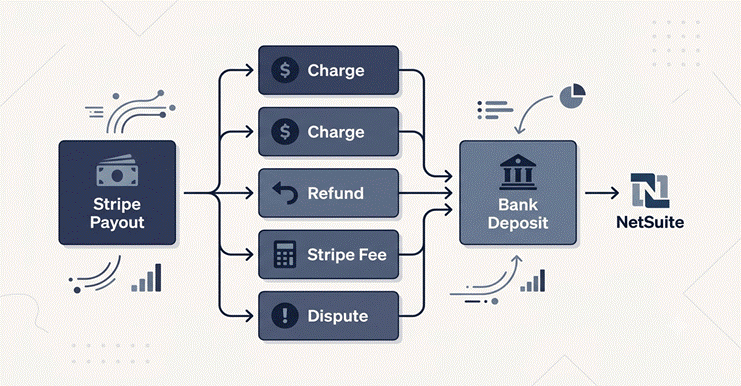
Every Stripe payout is really a settlement of several distinct transaction types, and each one needs to land differently in NetSuite:
- Charges: individual customer payments, typically recorded as sales receipts or invoice payments
- Refunds: reversals tied to a specific original charge, recorded as credit memos or refund transactions
- Stripe fees: the processing cost deducted before funds reach the bank, recorded as a separate expense line
- Disputes and chargebacks: funds withheld or reversed outside the normal charge-refund cycle
Payouts vs. Individual Transactions
A payout is not itself a transaction type in the accounting sense. It is a settlement batch, a single bank deposit representing the net result of dozens or hundreds of the transaction types above. Reconciling Stripe payouts in NetSuite means working backward from that one deposit to confirm every underlying charge, refund, and fee is accounted for correctly.
Treating a payout as if it were a single transaction is one of the more common setup mistakes, since it papers over exactly the detail a proper reconciliation is supposed to verify.
Why Reconciling Stripe Payouts in NetSuite Is Different From a Bank Feed?
What a Payout Actually Bundles Together
A standard bank feed assumes one deposit roughly corresponds to one transaction. Stripe payouts break that assumption by design, batching multiple days of activity into a single deposit on a schedule the business does not directly control.
That scheduling detail matters more than it first appears. A payout dated the 5th might settle transactions from the 1st through the 3rd, which means the deposit date and the transaction dates rarely line up cleanly, and any reconciliation process built around matching by date alone will produce mismatches by design.
Stripe’s Own View of the Same Problem
Stripe’s own documentation on payout reconciliation confirms this directly: an automatic payout can include funds from multiple transactions, and Stripe provides its payout reconciliation report specifically to show which transactions were included in each settlement batch. That report is generally the starting point for any accurate reconciliation in NetSuite, since matching against the bank deposit alone provides no visibility into what it actually contains.
4 Steps to Reconcile Stripe Payouts in NetSuite
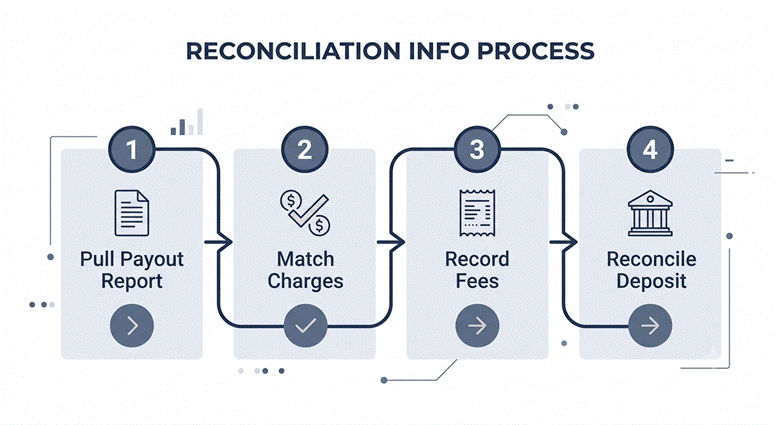
Step 1: Pull the Stripe Payout Report
Start with Stripe’s payout reconciliation report for the relevant date range. This report groups every charge, refund, and fee by the specific payout it was settled in, rather than by transaction date alone.
Step 2: Match Gross Charges to Sales Receipts
Match each charge in the payout report to its corresponding sales receipt or invoice payment in NetSuite. This should reflect the gross amount charged to the customer, before any Stripe fee is deducted.
Step 3: Record Stripe Fees Separately
Stripe deducts its processing fee before the net amount reaches the bank. That fee needs its own expense line in NetSuite rather than being absorbed into the sales receipt amount, or gross revenue and processing costs end up blended in a way that distorts margin reporting.
Step 4: Reconcile the Bank Deposit
Once charges, refunds, and fees are all recorded individually, the sum should match the single bank deposit Stripe generated. Oracle’s own documentation on reconciling transactions describes this final matching step directly: submitted, cleared transactions get checked off against the account statement until the reconciled total agrees with the ending statement balance.
Automating Stripe Reconciliation in NetSuite
Where Manual Reconciliation Breaks Down at Volume
At low transaction volumes, this four-step process is manageable, but with hundreds of monthly Stripe transactions, manual matching can consume days during month-end close.
Automating Stripe reconciliation in NetSuite is largely about removing that manual matching step, not changing what gets reconciled. A properly configured NetSuite Stripe integration records each charge, refund, and fee as it happens and ties them back to their originating payout automatically. Hence, the matching step described above happens continuously rather than in a monthly scramble.
What Automation Actually Needs to Handle
Automation is reliable only when it includes gross charges, fees, refunds, and disputes, properly mapped to specific NetSuite transaction types. Simply recording the net deposit amount does not achieve true reconciliation, as it only replicates a manual shortcut without improving visibility.
Keeping Stripe-NetSuite Reconciliation Accurate Over Time
Reconciliation accuracy tends to drift for reasons that have nothing to do with the initial setup:
- Stripe fee schedules change periodically and need to be reflected in expense mapping
- New payment methods or currencies introduce transaction types the original mapping didn’t anticipate
- Disputes and chargebacks require their own review cadence, since they rarely resolve within a single payout cycle
Pairing Stripe reconciliation with a broader NetSuite Bank Feeds setup extends the same automatic matching logic to the rest of a business’s bank activity, not just Stripe-originated deposits, which keeps the final bank reconciliation step consistent across every payment source.
Why Folio3?
Folio3 has built and supported NetSuite Stripe integration for businesses that needed reconciliation to hold up at real transaction volume, not just in a demo environment.
That experience shapes how fee mapping, refund handling, and payout matching get configured from the start, rather than patched in after the first reconciliation discrepancy shows up. Talk to our NetSuite integration team to get a clear picture of where your current setup stands.
Final Thoughts
Learning how to reconcile Stripe payouts in NetSuite comes down to remembering that a payout is a batch, not a transaction. Matching the deposit alone will never reconcile cleanly; matching the charges, refunds, and fees that make it up will. Whether that matching happens manually every month-end or automatically as transactions occur, the underlying accounting logic stays the same.
Frequently Asked Questions
1. What type of Stripe transaction is recorded in NetSuite?
Charges, refunds, Stripe fees, and disputes are the four main transaction types, each mapped to a different NetSuite record: sales receipts, credit memos, expense lines, and held or reversed funds, respectively.
2. Why doesn’t a Stripe payout match a single NetSuite transaction?
A payout is a settlement batch covering multiple charges, refunds, and fees accumulated over a payout cycle, not a single sale, so it needs to be broken down before it can be reconciled.
3. Can Stripe payout reconciliation in NetSuite be automated?
Yes. A native NetSuite-Stripe connector can record charges, refunds, and fees as they occur and tie them to their originating payout automatically, removing the manual matching step.
4. How often should Stripe-NetSuite reconciliation be reviewed?
Monthly at minimum, aligned with the close process, though businesses with high transaction volume or frequent disputes often benefit from reviewing weekly.
5. What happens if Stripe fees aren’t recorded separately in NetSuite?
Gross revenue and processing costs get blended into a single figure, which distorts margin reporting and makes it harder to spot fee schedule changes or pricing errors.

