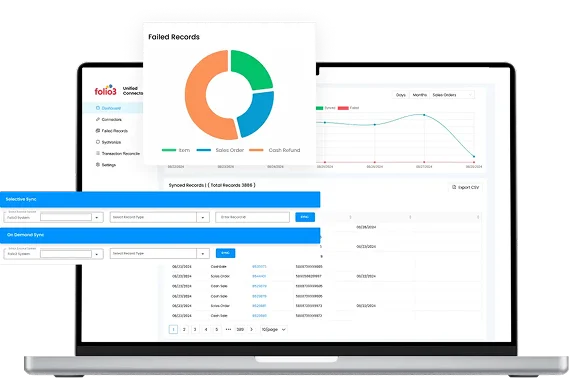













woo-img (1)

WooCommerce NetSuite Integration That Syncs Every Order Instantly

Sync inventory, orders, refunds, and customer data in real-time with NetSuite WooCommerce integration. The native NetSuite WooCommerce connector by Folio3 automates your order-to-cash workflow, eliminates batch latency, and speeds up fulfillment at scale, without any middleware.

our customers

Join the Companies Scaling Faster with Folio3 NetSuite Connectors

From fast-growing startups to established enterprises, businesses choose us to power reliable, scalable integrations.

Folio3 WooCommerce Connector is NetSuite Next Ready

Future-ready SuiteApp, built to run smoothly on NetSuite’s Next platform.

netsuite-naext-ready (1)
challenges & solutions

What Unifying Your Store and Back Office with NetSuite WooCommerce Integration Actually Fixes

WooCommerce NetSuite integration by Folio3 ensures that your data is accurate and consistent across both systems, so you get complete visibility into inventory, customer information, refund status, and more.

Inventory Accuracy

Stock updates flow between systems the moment inventory moves, keeping every channel accurate in real time.

Consistent Customer Profiles

Every sale builds a properly formatted NetSuite customer record automatically, with full order history included.

Refund Sync

A refund processed in either system syncs to the other immediately, no discrepancy to chase down.

Up-to-date Product Catalog

A product added in NetSuite goes live on the storefront instantly, images, pricing, and variations included.

Custom Workflows

Custom fields and workflows map between both systems to match how the business actually operates.

Enterprise Security

The connector runs as a Built-for-NetSuite SuiteApp, keeping data inside NetSuite with no third-party servers.

AUTOMATED SYNC

Get Real-time Visibility Across Every Datapoint with WooCommerce NetSuite Integration App

With NetSuite WooCommerce integration, you get up-to-date visibility of every datapoint, from billing information to order fulfillment and tracking data across both platforms.

Orders Flow Automatically from Checkout to Fulfillment

Every WooCommerce sale creates a sales order in NetSuite, ready to pick, pack, and ship.

Customer Data Stays Perfectly Consistent

Sync sales orders and customer data from NetSuite to WooCommerce and back.

Product Details Match Everywhere, Automatically

All product info, categories, pricing, and SKUs are the same across both platforms.

Fulfillment Tracking Syncs Without Lifting a Finger

Keep fulfillment and tracking information updated across WooCommerce and NetSuite.

Inventory Updates Instantly with NetSuite WooCommerce Integration

Live NetSuite inventory counts update your WooCommerce store automatically.

Order-to-Cash Flow is Automated with NetSuite WooCommerce Connector

Run the order-to-cash process on autopilot with WooCommerce and NetSuite integration.

Customer Trust

Trusted by leading companies across the globe

Hear directly from our clients who have transformed their business operations with our NetSuite integration expertise.

Benefits

Order-to-Cash Process Management at Scale Using NetSuite Integration with WooCommerce

Maintain perfect inventory accuracy, achieve instant financial close, and handle operations at scale.

Eliminate Overselling

Live inventory sync stops stockouts at the cart

Close Books Quickly

Payments reconcile automatically, instantly

Handle 10X Volume

Same team, same system, 10X the orders

Rated

by Clients on Clutch

We’re proud to be recognized for our consistency, quality, and impact. 

Case Studies

See How Our Customers Use Folio3 WooCommerce NetSuite Connector Application

Discover how leading brands leverage seamless connectivity between WooCommerce and NetSuite to unify commerce, finance, and fulfillment.

Top-rated NetSuite SuiteApp Loved by Users

Our native NetSuite WooCommerce integration application is trusted for its performance and security standards.

logo-built-for-netsuite-native-suiteapp-badge-lq-121819-wht (1)

Not Seeing Your Exact Scenario? Get Custom NetSuite WooCommerce Integration

Our pre-built WooCommerce NetSuite connector is designed to meet the needs of any business. However, if you still have any specific requirements, we do offer custom solutions personalized to your unique needs.

People Also Ask

What's the biggest problem this WooCommerce NetSuite integration solves?

It eliminates the manual work of transferring orders, updating inventory, and reconciling payments between your store and your ERP. When a customer buys from your WooCommerce store, a complete sales order appears in NetSuite instantly. When stock moves in your warehouse, your store updates automatically.

By automating manual processes, you can handle large order volumes with your existing team. The integration that works at 100 orders a day works just as smoothly at 1,000, so you can grow without adding operational complexity or headcount. Your team focuses on growth, not data entry.

No. Once configured, the integration runs automatically. Your team works in WooCommerce and NetSuite as they always have. The data just stays in sync behind the scenes. We handle the setup, and you handle your business.

WooCommerce is the ecommerce plugin that runs on WordPress and manages orders, inventory, and customer data. Our connector integrates directly with WooCommerce, covering what most people mean by a WordPress NetSuite integration.

Yes. The core sync applies across industries, though each benefits differently. Wholesale distributors rely most on multi-warehouse inventory sync for high order volumes. Retailers depend on real-time stock updates to prevent overselling during peak traffic. Apparel sellers benefit from accurate handling of product variations like size and color across both systems.

The integration runs as a native SuiteApp within your NetSuite environment. Once installed, it maps your WooCommerce orders, inventory, and customer records directly to NetSuite, so a purchase on your store automatically creates a sales order without manual entry.

How does the integration prevent overselling during flash sales?

Live inventory counts from your NetSuite warehouse update your WooCommerce product pages in real time. When stock hits zero (or your defined threshold), the product can hide or show “out of stock” automatically. This happens instantly across all channels simultaneously, so you never sell what you can’t fulfill.

Yes. The integration supports multi-location inventory sync. You can define which NetSuite warehouses fulfill your WooCommerce sales, and stock levels for each location are managed and reflected accordingly. This enables sophisticated fulfillment logic and accurate channel-specific inventory.

The moment an order is placed on WooCommerce, it appears as a complete sales order in NetSuite, ready for fulfillment. When you fulfill the order and generate a tracking number in NetSuite (or via an integrated 3PL/carrier), the tracking information syncs back to the customer’s WooCommerce order automatically.

Does it support complex WooCommerce products with variations?

Absolutely. We map your WooCommerce product variations (size, color, material) directly to NetSuite item records, including custom fields, attributes, and metafields. Every variant syncs with its own SKU and inventory level. This ensures accurate tracking for every product configuration.

All product data flows from NetSuite to WooCommerce, including images, categories, descriptions, and attributes. Add or update an image in NetSuite, and it appears on your store automatically. This maintains a consistent, professional storefront without duplicate work.

How are new customer records handled?

Every WooCommerce sale automatically creates a properly formatted customer record in NetSuite with the correct role assignments. The customer’s order history, contact information, and purchase behavior are preserved. This gives your finance and support teams a complete view without manual data entry.

Yes. During implementation, we can migrate historical customer and order data from WooCommerce to NetSuite (or vice versa) to ensure your systems have a complete, consistent history from day one.

What are the main cost components of a NetSuite integration project?

A NetSuite integration project typically involves three primary cost areas:

  • Integration Solution/License Fee: The cost for the integration software itself, which could be a one-time purchase, a monthly/annual subscription, or a usage-based model
  • Implementation & Configuration Services: The professional services cost to analyze your needs, map data, configure the integration, test, and deploy it. This is often the most variable and significant portion
  • Ongoing Support & Maintenance: Costs for post-launch support, updates, and troubleshooting, which may be included for a period or offered via a separate annual plan

Integrating NetSuite with other critical business systems (such as HubSpot, Salesforce, Stripe, and Square) is a specialized service. The effort and cost depend on the number of systems, the complexity of the data flows, and whether pre-built connectors or custom development are required. This is typically a key part of the overall implementation scope.

Schedule Your
Integration Demo Today

Locations

Lets discuss your integration needs

Hello, How can we help you?