
We work with growers, packers, and fresh produce distributors regularly. The one thing they all say before they implement an ERP? “We thought what we had was good enough.” After go-live, that sentence changes to “I wish we had done this sooner.”
That shift usually comes from what they were dealing with before. This brings up a question in my mind.
Have you ever tried to manage a harvest season using spreadsheets and gut instinct? If you have, you already know what happens. You lose track of lot numbers. You missed a compliance report. A buyer calls about a shipment, and nobody can find the documentation.
We work with growers, packers, and fresh produce distributors regularly. The one thing they all say before they implement an ERP? “We thought what we had was good enough.” After go-live, that sentence changes to “I wish we had done this sooner.”
ERP implementation for fresh produce growers is not just an IT project. It is a business decision that touches your field operations, your packing house, your finance team, and your compliance obligations. Done right, it gives you complete control over your business operations. Done wrong, it creates chaos.
This guide walks you through what an agriculture ERP software actually means, what growers need to prepare for, and how to get it right the first time.
Key Takeaways
- Agriculture ERP Is Not Generic Software: Farms and fresh produce businesses have unique needs, such as traceability, lot tracking, seasonal inventory, and perishability that standard ERP systems cannot handle out of the box.
- Planning Beats Speed: A rushed ERP rollout causes more problems than it solves. A phased approach with clear milestones keeps your operation running during the transition.
- Data Quality Determines Success: Clean, accurate data before go-live is what separates a smooth ERP launch from a costly failure.
- Choose a Partner With Agricultural Industry Experience: A general ERP consultant may not understand harvest cycles, food safety compliance, or produce traceability. Industry-specific expertise matters.
- ROI Is Real but Takes Time: Most growers see measurable gains in inventory accuracy, compliance readiness, and reporting within 6 to 12 months post-implementation.
What Does ERP Implementation for Agriculture Actually Mean?
In simple terms, it is one system that connects all parts of your business. For agriculture, that means connecting your fields, your inventory, your finance, your compliance records, and your customer orders in one place.
But here is where it gets specific. While a manufacturing company runs an ERP to track parts on an assembly line, a grower runs an ERP to track a lot of tomatoes from the field to a retail shelf. Those are very different problems.
Agriculture ERP implementation means:
- Configuring lot and batch tracking to follow the produce from planting to sale
- Setting up perishability and shelf-life rules so that inventory does not get mismanaged
- Integrating food safety compliance into daily workflows instead of treating it as a separate process
- Connecting field data to financial reporting so you know your true cost per acre or per SKU
If you want a deeper look at what an ERP for agriculture should cover end to end, we’ve laid out the full picture, from field operations to financial management.
Why Generic ERP Fails Fresh Produce Businesses
Most ERP systems are built for stable, predictable inventory. Produce is the opposite of that.
You are dealing with seasonality, weather risk, short shelf lives, FSMA compliance, and buyers who want real-time traceability. A generic, off-the-shelf ERP handles none of that well without heavy customization.
Here is what typically goes wrong when a grower picks the wrong system:
- Lot tracking breaks down because the system treats produce like a manufactured part with a fixed SKU
- Compliance reporting becomes manual because the ERP does not understand food safety regulations
- Seasonal spikes crash workflows because the system was not designed for harvest-scale volume changes
- Cost of goods is always off because the system cannot account for yield loss, shrinkage, or field-to-pack conversion rates
The result is that your team ends up running spreadsheets alongside the ERP. You paid for a system, but you are still doing things the old way.
Choosing the right system from the start is the decision that changes everything. If you are evaluating your options, this comparison of the best ERP software for agriculture breaks down what to look for and what to avoid.
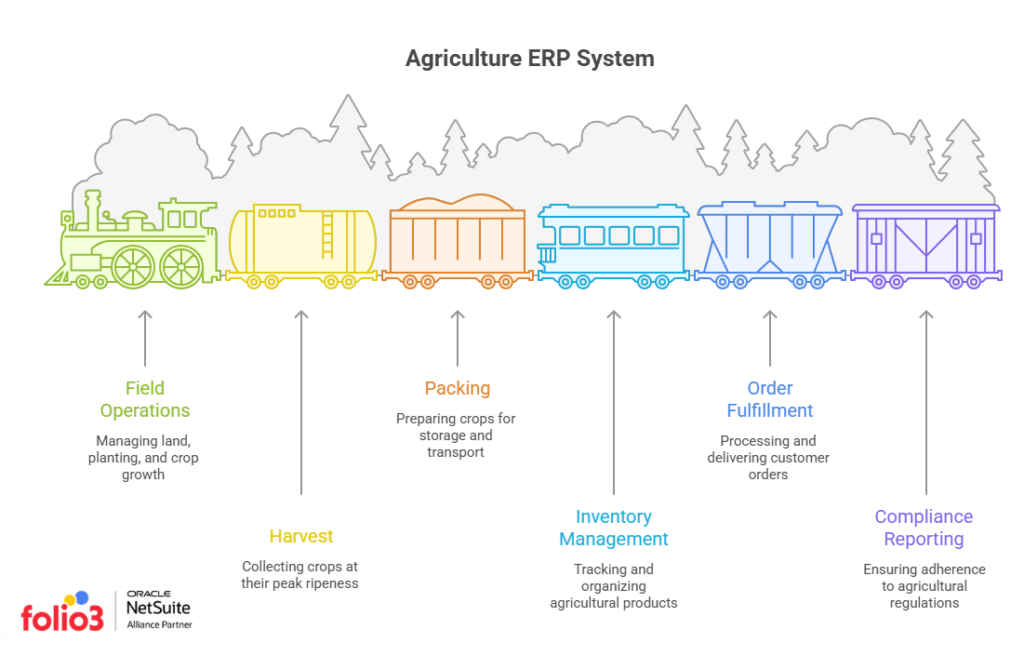
The 6 Stages of an Agriculture ERP Implementation
Understanding the implementation process before you start saves you time, money, and frustration. Here is how a well-run agriculture ERP implementation project typically unfolds.
Stage 1: Discovery and Requirements Gathering
This is the stage most growers want to skip. Do not.
Before any system is configured, your implementation partner needs to understand your operation in detail. That means documenting your harvest cycles, your packing workflows, your compliance requirements, and your current reporting gaps.
Key questions your team should be able to answer:
- What certifications do you need to maintain (USDA, FSMA, GlobalG.A.P.)?
- How do you currently track lot numbers and field records?
- What does your order-to-cash process look like today?
- Where does your data live — spreadsheets, legacy software, paper?
Stage 2: System Design and Configuration
Once your requirements are clear, your implementation partner configures the system to match your workflows. For agriculture, this includes:
- Lot and traceability setup tied to field blocks, harvest dates, and certifications
- Inventory management rules for perishable goods and FIFO handling
- Custom fields for farm-specific data like crop variety, growing region, or spray records
- Finance module configuration for farm accounting, crop costing, and grower payables
Stage 3: Data Migration
There’s a universal truth about systems. When you feed bad data in, you get bad data out. This stage determines the health of your ERP from day one.
Data migration in agriculture is complex because grower data is often scattered. You may have customer records in one place, inventory in another, and compliance records on paper. Your team needs to clean, consolidate, and validate data before it ever moves into the new system.
What needs to migrate:
- Customer and vendor master records
- Item and product master data with correct units of measure
- Historical inventory and lot data
- Open purchase and sales orders
- Chart of accounts and financial history
Stage 4: Integrations
Your ERP should not operate as an island. For fresh produce businesses, common integrations include:
- EDI connections for large retail or foodservice buyers
- Cold chain and logistics platforms for temperature monitoring and carrier data
- Farm management software for field records and spray logs
- eCommerce or order portals for direct-to-buyer channels
Each integration requires testing. Do not assume it will work the first time.
Stage 5: User Training
The most overlooked part of any ERP rollout. You can have a perfectly configured system and still fail if your team does not know how to use it.
Training for agriculture operations should be role-specific:
- Packing house supervisors need to know lot receipt, quality inspection, and inventory adjustments
- Finance staff need to handle grower settlements, AP/AR, and reporting
- Operations managers need dashboards, replenishment alerts, and compliance document pulls
Run training in multiple sessions. One training day is never enough.
Stage 6: Go-Live and Hypercare
Don’t ever make the mistake of thinking that go-live is the finish line. It is the beginning of a new phase.
For the first 30 to 90 days after launch, your team will hit issues they did not anticipate. A good implementation partner provides hypercare support during this window. That means fast response times, daily check-ins if needed, and a clear escalation path when something breaks.
Plan your go-live away from your peak harvest season if at all possible. Going live during your busiest weeks is a high-risk choice.
Here is a quick video for you to watch on how to get NetSuite support.
What Makes Agriculture ERP Implementation Different From Other Industries
If you have read anything about ERP implementation in general, most of it applies to manufacturing or distribution. Agriculture has its own challenges that are worth calling out directly.
Traceability Is A Must
Your ERP needs to trace a lot from the field to the consumer and back again in under four hours if there is a recall. The FDA’s Food Safety Modernization Act (FSMA) makes this mandatory for most fresh produce categories.
Your ERP configuration must account for:
- Field block identification and harvest crew records
- Packing line data capture (date, shift, lot number)
- Customer shipment records linked to the original lot
- Cooling and temperature chain documentation
Seasonality Disrupts Standard ERP Logic
Most ERP systems assume a steady, predictable flow of inventory. Produce does not work that way.
You go from zero inventory to full capacity in a matter of weeks during harvest. Then you may have nothing for months. Your ERP needs to handle that volume spike without breaking workflows or requiring manual overrides.
Farm Accounting Has Unique Requirements
Standard accounting modules are not built for agricultural finance. Crop costing, grower payables, consignment arrangements, and commodity price fluctuations all require specific configuration.
If your finance team is still managing grower settlements manually, that is a clear signal that your current system is not built for agriculture. A purpose-built farm accounting software approach within your ERP fixes that directly.
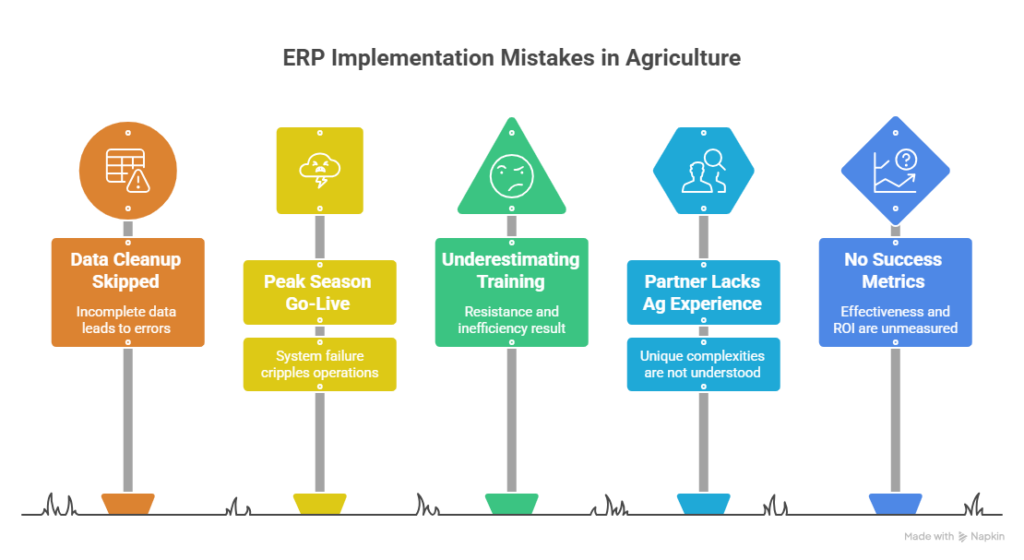
Common ERP Implementation Mistakes Growers Make
We have seen enough agriculture ERP projects to know where things go wrong. Here are the most common mistakes and how to avoid them.
Mistake 1: Skipping the Data Cleanup
Migrating dirty data into a new system does not clean it. It just moves the problem. Allocate real time and real resources to data preparation before go-live.
Mistake 2: Going Live During Peak Season
This is tempting because everyone is already in the building. But go-live stress plus harvest stress is a combination that breaks teams. Schedule your go-live during a slower period whenever possible.
Mistake 3: Underestimating Training Needs
Your team uses software every day. When that software changes, they need time to adjust. One training session is not enough. Build a training plan that runs from pre-go-live through the first 90 days.
Mistake 4: Choosing a Partner Without Agriculture Industry Experience
A partner who has implemented ERP for retail or distribution will configure your system the way they know. They will not understand your lot tracking requirements, your food safety obligations, or your grower settlement process. Industry experience is not a bonus. It is a baseline requirement.
Mistake 5: Not Defining Success Metrics
If you do not know what you are measuring, you cannot evaluate whether the implementation worked. Define your KPIs before go-live. Common ones for agriculture include:
- Inventory accuracy rate
- Time to produce a traceability report
- Days to close the monthly financial books
- Order fulfillment accuracy
How to Choose the Right ERP for Your Agriculture Operation
Not every ERP is built for agriculture. And not every agriculture ERP handles fresh produce well. Here is what to evaluate.
Does It Handle Lot Traceability Natively?
Some systems bolt on traceability as an afterthought. Look for a system where lot tracking is built into every transaction, be it receipts, production, shipments, and returns.
Can It Handle Your Compliance Requirements?
FSMA, USDA organic certification, GlobalG.A.P., retailer-specific audits — your ERP should help you maintain compliance records automatically, not make you build a separate process for it.
Is There an Agriculture-Specific Implementation Partner?
Even great ERP software fails with a weak implementation. Finding a partner who understands both the technology and the agriculture industry is the single highest-leverage decision you will make.
If you are running NetSuite or considering it, take a look at what to look for when choosing the right NetSuite partner for your agriculture business before you sign anything. The right partner changes your outcome significantly.
Is NetSuite a Good ERP for Agriculture?
NetSuite is one of the most widely used cloud ERP platforms across industries. For agriculture, it offers several capabilities that make it a strong fit when properly configured:
- Lot and serial tracking across the full supply chain
- Multi-location inventory for operations with multiple farms, packing facilities, or storage sites
- Flexible financial reporting that can be adapted for crop costing and grower payables
- Scalability for businesses moving from regional to national distribution
There is a detailed analysis of why NetSuite is one of the best ERPs for agriculture that covers the specific modules and configurations that matter most for growers and packers.
What to Expect in Terms of Timeline and Cost
Agriculture ERP implementations are not quick. Here is a realistic picture.
Typical Implementation Timelines
| Operation Size | Typical Timeline |
|---|---|
| Small grower (under $10M revenue) | 3 to 5 months |
| Mid-size packer/shipper | 5 to 9 months |
| Large multi-site operation | 9 to 18 months |
These timelines assume a dedicated internal project team and a qualified implementation partner. Add two to three months if your data is in poor shape or your team has limited bandwidth.
Cost Factors to Plan For
ERP implementation costs vary widely. The main factors include:
- Software licensing (subscription or perpetual)
- Implementation services (configuration, data migration, training)
- Integrations (EDI, third-party platforms, custom API work)
- Ongoing support post go-live
Ask every vendor for a detailed scope of work before comparing prices. A lower quote that excludes training or integrations is not actually a lower cost.
Signs Your Agriculture Business Is Ready for ERP
Not every operation needs ERP immediately. But there are clear signals that the time has come.
You are likely ready if:
- Your team manages inventory, orders, and compliance in separate systems or spreadsheets
- You struggle to produce accurate traceability records on demand
- Your finance team closes the books manually, and it takes longer than two weeks
- You are growing into new markets or retail channels, and your current systems cannot scale
- You have had a compliance incident or near-miss that exposed a gap in your records
If two or more of those apply to you, the cost of not implementing ERP is probably already greater than the cost of doing it.

Final Thoughts
ERP implementation for agriculture is a significant project. It takes time, resources, and a partner who genuinely understands how your operation works.
But growers who go through a proper implementation consistently say the same thing on the other side: they can see their business clearly for the first time. They know their actual cost of production. They can pull a traceability report in minutes. They close the books on time. Their buyers trust them more.
That is not a small thing in an industry where margins are tight, and compliance requirements keep growing.
The question is not whether your operation needs better systems. The question is when you are ready to put the right ones in place.
Looking for help with ERP implementation for your agriculture or fresh produce operation? Explore how NetSuite for agriculture is being used by growers and packers to manage everything from field to financials, all in one place.
FAQs
Which agriculture ERP systems support crop planning, inventory, and financial management?
The best agriculture ERP systems combine crop planning, inventory management, procurement, and financial reporting in one platform. This gives growers better visibility across planting, harvest, storage, fulfillment, and accounting operations.
Some of the most commonly used platforms include:
- NetSuite ERP for integrated financials, inventory, grower accounting, and multi-location operations
- AgriERP by Folio3 for agriculture-specific workflows like lot tracking, crop cycles, and traceability
- Microsoft Dynamics 365 for enterprise agriculture operations with advanced reporting needs
- Deacom ERP for food processing and batch-based agricultural manufacturing
- SAP Business One for larger agribusinesses managing distribution and procurement complexity
For fresh produce growers, the biggest requirement is usually not just accounting. It is connecting crop planning, warehouse inventory, lot tracking, and financial management in one system without relying on spreadsheets.
What are the best ERP systems for agribusiness grower accounting and lot reporting?
The best ERP systems for agribusiness grower accounting and lot reporting are built around traceability and operational visibility. Fresh produce businesses need more than standard accounting software because every shipment, harvest batch, and storage location needs to be tracked accurately.
A strong agriculture ERP should support:
- Lot and batch traceability from field to customer
- Grower accounting and settlement tracking
- Cost-per-acre and yield reporting
- Inventory visibility across warehouses and cool storage
- Compliance reporting for food safety audits
- Real-time shipment and fulfillment tracking
This becomes critical during recalls or compliance reviews. Your team should be able to trace the produce origin, harvest date, and shipment history without manually searching through spreadsheets.
NetSuite combined with agriculture-specific ERP customization, is commonly used for these workflows because it connects operations, inventory, and accounting in one platform.
How does ERP implementation for fresh produce growers improve harvest and fulfillment planning?
ERP implementation for fresh produce growers helps operations teams plan around real harvest volumes instead of assumptions. During peak season, growers often struggle with inventory shortages, shipment delays, and disconnected warehouse updates.
With ERP, growers can:
- Track expected harvest volumes by field or crop cycle
- Manage packaging and warehouse inventory in real time
- Coordinate fulfillment schedules across locations
- Improve communication between field, warehouse, and finance teams
- Reduce fulfillment delays during seasonal spikes
This creates better planning visibility from harvest through distribution.
Why is agriculture ERP consulting important before implementation?
Agriculture ERP consulting helps growers avoid choosing systems that only work for generic manufacturing or distribution businesses. Farming operations have different requirements around perishability, crop cycles, traceability, and seasonal inventory fluctuations.
A good consulting team helps configure:
- Lot tracking and traceability workflows
- Crop planning structures
- Grower accounting and reporting
- Procurement and warehouse operations
- Multi-location farm management
Without proper agriculture ERP consulting, businesses often end up forcing manual workarounds into the system later.
Can ERP systems improve traceability and compliance for fresh produce operations?
Yes. Modern agriculture ERP systems improve traceability by tracking produce movement from harvest to shipment in real time. This is especially important for food safety compliance and recall readiness.
ERP systems help growers:
- Track lot numbers and harvest dates
- Monitor inventory movement across facilities
- Maintain shipment and fulfillment records
- Generate compliance and audit reports faster
- Reduce manual data entry errors
For fresh produce operations, this level of visibility is difficult to maintain with spreadsheets or disconnected software.

