
Key Takeaways
- Most NetSuite performance problems stem from a handful of recurring issues, including unoptimized saved searches, overloaded dashboards, inefficient workflows and scripts, and unreviewed customizations.
- A single poorly optimized saved search can add 5 to 10 seconds to every page load. One distribution business we worked with cut dashboard load time from 45 seconds to 3 seconds by reducing a 25,000-record saved search down to 500 active records.
- Configuration Should Always Come Before Customization. SuiteFlow, SuiteAnalytics, and SuiteBuilder solve most business process needs without code. SuiteScript should be reserved for logic that configuration genuinely cannot express.
- NetSuite’s Biannual Releases Require a Standing Process, Not a One-Time Check. Release Preview sandboxes let you test customizations and integrations against upcoming changes before they go live in production.
- Map/Reduce scripts handle large data operations that Scheduled Scripts cannot. For bulk data work, Map/Reduce avoids the governance timeouts that cause scheduled jobs to fail partway through.
- Maintenance KPIs Turn Guesswork Into a Plan. Tracking MTTR, saved search execution times, script queue health, and training completion rates gives you a baseline to know whether maintenance is working.
One thing that stands out across NetSuite communities, Reddit discussions, and support forums is how often the same issues come up. Users rarely complain about NetSuite itself. Instead, they talk about slow dashboards, inefficient saved searches, broken customizations after updates, and systems that have become harder to manage over time.
In our experience, these problems usually aren’t caused by a single major issue. In fact, they are the result of small inefficiencies that accumulate after go-live and go unchecked for months or even years.
The good news is that most of these challenges are preventable. With regular health checks, proactive optimization, release testing, and clear customization governance, businesses can keep NetSuite running efficiently long after implementation.
This guide covers the maintenance and support best practices that help organizations protect and maximize their NetSuite investment.
What Does NetSuite Maintenance Cover?
NetSuite maintenance and customer support and maintenance covers both technical response and strategic enablement, including proactive performance optimization, release readiness, customization lifecycle management, and data hygiene, going well beyond resolving incidents as they occur.
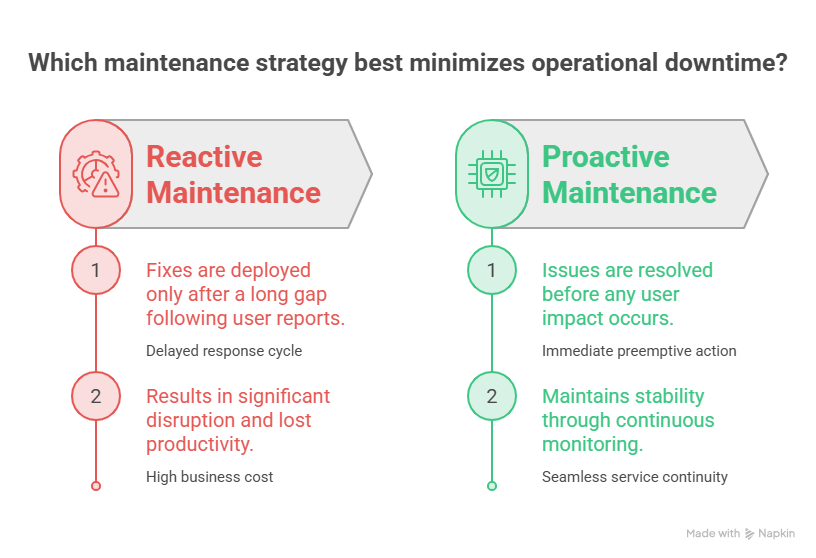
Two models exist for how this gets handled. Reactive maintenance means issues get fixed after users report them. Proactive maintenance means issues get caught and resolved before users notice. The difference is that Reactive maintenance treats every issue as a surprise. On the other hand, proactive maintenance treats system health as something measured continuously, with problems addressed while they are still small.
For a full breakdown of what a comprehensive NetSuite support and maintenance program includes, from technical troubleshooting through strategic system governance, this guide on NetSuite customer support and maintenance covers the complete model.
#1. Audit Saved Searches and Dashboards Regularly
Saved searches are the single most common cause of NetSuite slowdowns. But, on the bright side, they are also the easiest to fix once identified.
Saved searches are the number one cause of slow NetSuite performance. A single poorly optimized search can add 5 to 10 seconds to every page load. In one real example from one of our clients, a saved search returning 25,000 customer records on every dashboard load was reduced to 500 active records with recent orders. The dashboard load time was reduced from 45 seconds to 3 seconds just by doing this.
It might come as a surprise to you, but the fix in the above particular example was not a technical overhaul. In fact, it was as simple as adding filter criteria that most users never think to add.
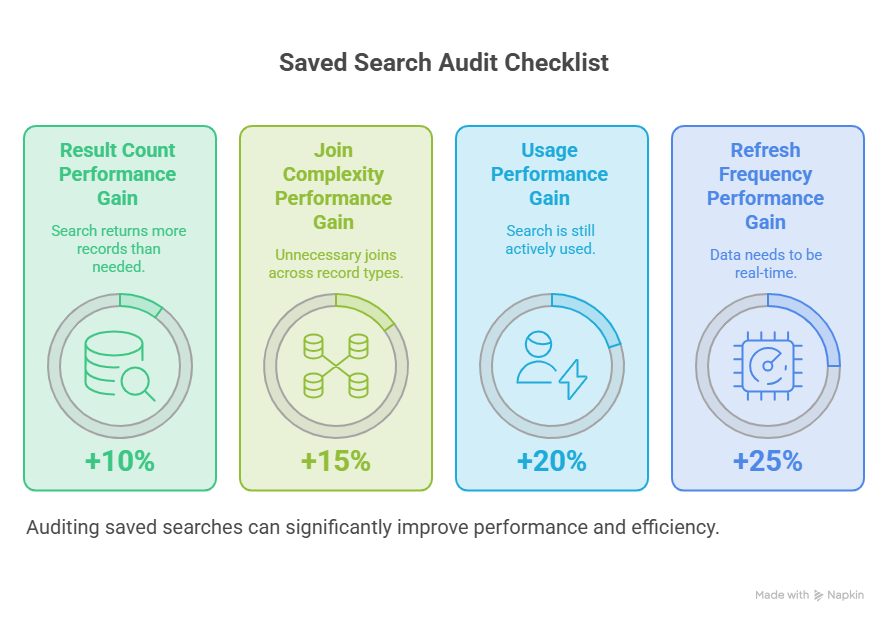
What a Saved Search Audit Should Check
- Result count: Is the search returning thousands of records when the dashboard only displays a summary? Add filters to narrow the result set to what is actually needed.
- Join complexity: Searches with multiple joins across record types are slower than searches against a single record type. Where possible, simplify joins or split complex searches into smaller ones.
- Usage: Is the search still being used? Saved searches built for a project that ended two years ago continue consuming resources on every run if they remain attached to dashboards or scheduled reports.
- Refresh frequency: Does this search need to run in real time, or would an hourly refresh be sufficient? Real-time data has a cost. Not every portlet needs it.
Dashboard Cleanup
Dashboards with many portlets, each running its own saved search, compound the problem. Each portlet that pulls real-time data can take 30 to 60 seconds to load. Reducing the number of portlets, consolidating searches where possible, and setting appropriate refresh intervals brings load times down by a real margin.
#2. Establish a Structured Release Management Process
Oracle ships two major NetSuite releases per year. Each release can change field behavior, deprecate features, or affect how your existing customizations run. Without a release management process, these changes arrive as surprises in production.
NetSuite’s biannual releases can affect customizations, and proactive testing and planning are non-negotiable. Requesting a Release Preview sandbox and freezing non-critical changes around release windows allows teams to test customizations and integrations against upcoming changes before they go live.
The Release Management Cycle
The release management cycle takes four core steps to ensure that the
Before the release
Request access to the Release Preview sandbox when it becomes available. This sandbox runs the upcoming release version ahead of the production rollout.
During the preview window
Run smoke tests on critical scripts, workflows, and integrations against the preview sandbox. Focus on the highest-impact customizations first: financial close processes, order management workflows, and any external integrations.
Document findings
If something behaves differently in the preview, document it. Some changes require updating a script. Others are cosmetic and do not need action, but should be communicated to users who will notice the difference.
After the release
Run the same smoke tests in production once the release has gone live. Confirm that what worked in preview also works in production, since sandbox and production environments are not always identical.
For businesses managing a large volume of customizations, the release management cycle is one of the most valuable parts of a structured maintenance program because it converts unpredictable post-release firefighting into a scheduled, manageable process.
#3. Prioritize Configuration Before Customization
This is one of the most consistently overlooked maintenance principles, and it has a direct effect on how much ongoing support a NetSuite instance requires.
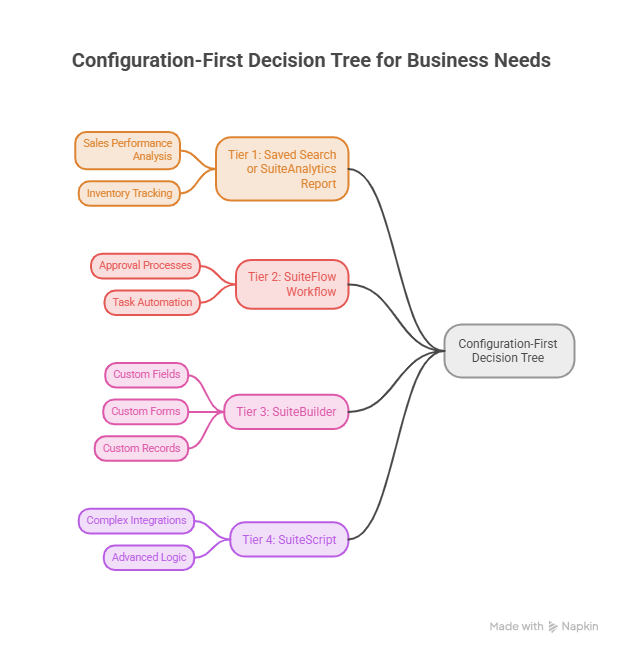
The recommended approach is to start with configuration, saved searches, SuiteAnalytics, and SuiteFlow before considering scripts. Configuration is easier to support, audit, and upgrade, while over-customizing can slow agility and duplicate native features that NetSuite already provides.
The Configuration-First Hierarchy
SuiteAnalytics and Saved Searches handle reporting, alerts, and data views. If a business need can be met by a report or an alert, this is the first place to look.
SuiteFlow handles approval routing, automated notifications, and multi-step business processes. Most workflow logic that feels like it “needs a developer” can actually be built visually in SuiteFlow by an administrator.
SuiteBuilder handles custom fields, custom records, and form layout changes. No code required.
SuiteScript should be reserved for logic that genuinely cannot be expressed through the tools above, like complex conditional branching, external API integrations, custom user interfaces, and large-scale data processing.
Why This Order Matters for Maintenance
Every line of custom code is something that has to be reviewed before each biannual release, tested in the Release Preview sandbox, and maintained by someone who understands what it does. Configuration-based solutions are reviewed by NetSuite itself as part of the platform update. Custom code is reviewed by you.
Excess or undocumented custom code leads to code bloat, upgrade surprises, and support friction after NetSuite’s biannual releases. The safest path is minimal, well-documented customization with disciplined processes, including clear ownership and rationale for each change.
For organizations with an existing library of SuiteScript customizations, this overview of NetSuite customization support best practices covers how to manage the customization lifecycle, including version control, code review, and regression testing.
#4. Use the Right Approach for Large Data Operations
For businesses processing large data volumes, daily syncs, bulk updates, and large reports, governance limits become a real constraint if the wrong script type is used.
Map/Reduce scripts enable parallel processing for large data operations and avoid governance timeouts. Bulk CSV imports handle simple, high-volume updates more reliably than custom loops built in Scheduled Scripts.
When to Use Each Approach
CSV Import for straightforward bulk updates: price changes, inventory adjustments, or any update that follows a consistent pattern across many records. No custom code needed.
Map/Reduce Scripts for large data operations that require custom logic, like processing tens of thousands of transactions with conditional logic that a CSV import cannot express. Map/Reduce splits the work into chunks and processes them in parallel, which avoids the governance failures that occur when a Scheduled Script tries to process too much in a single execution.
Scheduled Scripts for smaller recurring jobs that fit comfortably within governance limits, like nightly tasks that affect a few hundred or a thousand records, not tens of thousands.
Choosing the wrong tool here is one of the most common causes of jobs that “used to work” and then start failing as data volumes grow. A Scheduled Script that processed 2,000 records fine a year ago may start failing at 8,000 records, not because anything changed in NetSuite, but because the business grew and the script was never designed for that volume.
#5. Track Key NetSuite Maintenance and Performance KPIs
KPIs, including MTTR (mean time to resolution), search execution times, script queue health, and training completion rates, guide continuous improvement and turn maintenance into a measurable program rather than an assumption.
NetSuite System Maintenance KPIs
Mean Time to Resolution (MTTR): How long does it take from when an issue is reported to when it is resolved? Tracking this over time shows whether your support process is improving or degrading as the system grows more complex.
Saved Search Execution Times: Track execution time for your highest-traffic saved searches. A search that takes 2 seconds today and 8 seconds in six months tells you something has changed, usually data volume, that needs addressing before it becomes a dashboard-wide slowdown.
Script Queue Health: Are scheduled and Map/Reduce scripts completing within their expected windows, or are they queuing up and running late? A growing backlog in the script queue is an early warning sign of capacity issues.
Training Completion Rates: User-generated errors, incorrect data entry, misused features, and duplicate records are a large source of support tickets. Tracking training completion for new features and new hires reduces this category of issue at the source.
#6. Perform Regular NetSuite System Health Checks
Conducting regular system health checks is one of the best ways to ensure your system continues to function at its highest potential, covering data integrity (validating accuracy and consistency), performance analysis (reviewing system performance metrics), and customization review (confirming custom scripts and configurations are still functioning as intended).
A practical timeline to perform regular NetSuite system health checks are as follows:
Monthly: Audit saved searches and dashboards for the issues described earlier. This is a relatively quick check and catches performance degradation early.
Quarterly: Review customizations for relevance. Are all active scripts still serving a business purpose? Are there workflows attached to record types that no longer use them?
Per Release (Twice a Year): Run the full release management cycle described above, including Release Preview testing and post-release verification.
Annually: Conduct a full data hygiene pass. Archive historical data that is no longer needed for active operations, review user access and permissions for anyone who has changed roles, and confirm that integrations are still pointed at current endpoints and credentials.
#7. Engage a NetSuite Support Partner When Needed
Internal teams can handle a fair amount of NetSuite maintenance, especially in the areas covered above, including saved search audits, dashboard cleanup, and basic configuration changes.
Where internal teams often struggle is with the things that require dedicated time and specialized expertise, like release management across complex customizations, Map/Reduce development for data operations, and the discipline of running a maintenance cadence consistently when the team is also handling day-to-day support requests.
Running NetSuite effectively after go-live requires staying proactive, optimizing the system regularly, and making sure the team has the right support structure in place on top of fixing issues as they surface.
Partnering with an experienced NetSuite support provider gives businesses faster resolutions, industry knowledge, and long-term optimization that internal teams often struggle to manage alone.
The signal that it is time to bring in a partner is usually not a single crisis. In fact, it is the gradual realization that maintenance tasks are being deferred because there is never enough time, and the backlog of deferred items is starting to show up as performance complaints.
There are different support levels by NetSuite that you can assess based on your requirements for system health and maintenance. These NetSuite support levels, such as Premium, Silver, Gold, Platinum, and Enterprise, provide support that matches a given maintenance need, from basic troubleshooting through dedicated account management.
Final Thoughts
NetSuite maintenance is about a small set of recurring checks, done consistently, that prevent the slow accumulation of saved search bloat, untested customizations, and deferred cleanup that eventually shows up as a system that feels slower every month without an obvious single cause.
Audit saved searches monthly. Run the release management cycle every six months. Keep configuration as the default and reserve SuiteScript for what configuration cannot do. Track a handful of KPIs so maintenance has a measurable baseline instead of being a feeling.
For businesses that want this cadence built into an ongoing support relationship rather than managed internally, the NetSuite support services cover how we structure proactive maintenance, release management, and performance optimization as part of an ongoing engagement.
FAQs
How often should NetSuite’s saved searches be reviewed?
Monthly. Saved searches are the most common cause of NetSuite performance degradation, and the issues, large result sets, unnecessary joins, and unused searches still attached to dashboards, accumulate gradually. A monthly review catches these before they compound into a dashboard-wide slowdown.
What is the Release Preview sandbox, and why does it matter for maintenance?
The Release Preview sandbox is a NetSuite environment that runs the upcoming biannual release version ahead of its production rollout. Testing customizations, scripts, and integrations against this sandbox before the release goes live in production lets you catch and fix issues proactively rather than discovering them as production incidents after the release.
Why should configuration come before customization in NetSuite?
Configuration-based solutions (SuiteFlow, SuiteAnalytics, SuiteBuilder) are maintained by NetSuite as part of its platform updates. Custom code (SuiteScript) has to be reviewed, tested, and maintained by your team or partner before every release. Minimizing custom code reduces the ongoing maintenance burden and the risk of customizations breaking when NetSuite updates.
What is the difference between Map/Reduce scripts and Scheduled Scripts for data operations?
Scheduled Scripts run on a timer and are suited to smaller jobs that fit within governance limits, typically a few thousand records or fewer. Map/Reduce Scripts split large data operations into chunks and process them in parallel, which avoids the governance timeouts that cause Scheduled Scripts to fail when data volumes grow too large.
What KPIs indicate that NetSuite maintenance is working?
Mean Time to Resolution (MTTR) trending down or stable, saved search execution times staying consistent over time rather than increasing, scheduled and Map/Reduce scripts completing within expected windows without a growing backlog, and high training completion rates for new features and new users.
Should a small business with one NetSuite administrator worry about all of this?
The principles scale down. A small business can apply a lighter version of the same cadence: a quick monthly saved search check, a basic release preview test for the handful of customizations in use, and tracking just one or two KPIs like ticket resolution time. The goal is the same regardless of size: catch small issues before they compound.

