
Key Takeaways
- SuiteScript is NetSuite’s JavaScript-Based Scripting Language: It lets developers extend NetSuite beyond its native configuration. Every major customization that cannot be done through point-and-click setup is done through SuiteScript.
- There Are Ten Script Types, each for a Specific Use Case: Client Scripts run in the browser. User Event Scripts fire on record saves. Scheduled Scripts run in the background on a timer. Choosing the right type is the first and most important decision in any scripting project.
- SuiteScript 2.x Is the Current Standard. 1.0 Is End-of-Life: SuiteScript 2.x uses a modular, AMD-based architecture. It supports object-oriented programming, asynchronous operations, and dependency management that SuiteScript 1.0 does not.
- Governance Limits Cap Every Script’s Execution: NetSuite imposes usage limits on every script type. Understanding governance before you write code prevents scripts from failing in production on real data volumes.
- SuiteScript 2.1 Now Includes a Generative AI API: The N/LLM module, released in 2025.1, lets developers integrate large language models into NetSuite customizations for report generation, NLP queries, and anomaly detection.
- SuiteScript and SuiteFlow Serve Different Needs: SuiteFlow handles logic that business users can configure. SuiteScript handles logic that requires code. Knowing when to use each one keeps your system maintainable.
What happens when NetSuite’s default configuration cannot do what your business needs?
Most NetSuite users reach that point eventually. Standard workflows cover common processes well. But the moment a business needs logic that is conditional, data-intensive, or connected to an external system, point-and-click configuration runs out of road.
SuiteScript is NetSuite’s built-in programming language, based on JavaScript, and it is what makes truly custom NetSuite functionality possible. Whether you need a validation rule that fires when a sales order is saved, a background job that recalculates pricing on 50,000 item records overnight, or a custom-built page that your customers access through a portal, SuiteScript is what builds it.
This blog covers what SuiteScript is, how the ten script types work, what changed with version 2.x, how governance limits affect real projects, and how SuiteScript fits alongside NetSuite’s other customization tools.
What Is SuiteScript?
SuiteScript is the JavaScript-based programming language built into NetSuite that lets developers customize, automate, and extend the platform beyond its native functionality.
SuiteScript is the backbone of NetSuite customization. It is the JavaScript-based programming language that allows developers to extend NetSuite’s native functionality, automate business processes, and build custom solutions tailored to specific business needs.
It runs directly inside the NetSuite environment. Scripts are uploaded to the File Cabinet, attached to Script records, and deployed to specific records, pages, or schedules. Once deployed, SuiteScript listens for the event or trigger it is configured for and executes when that event fires.
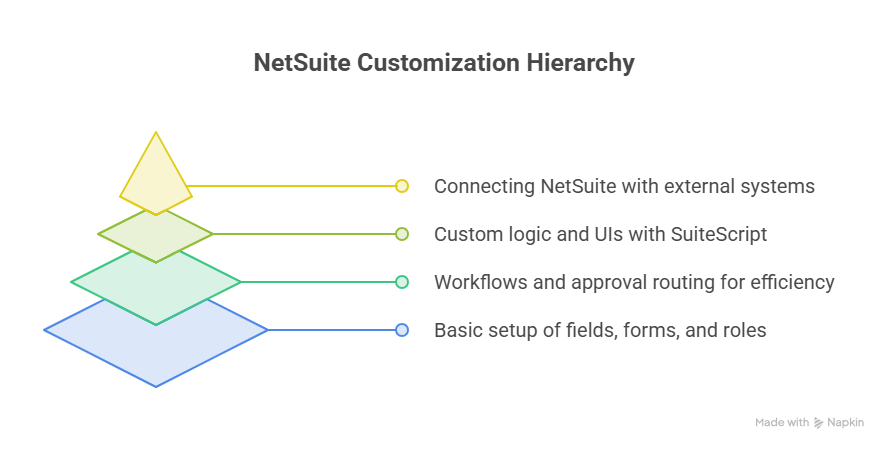
Think of NetSuite’s native configuration as the frame of a building. Point-and-click setup, saved searches, and SuiteFlow workflows are the rooms and furniture. SuiteScript is the ability to knock down a wall and rebuild the layout from scratch when the existing structure does not fit the business. It is the layer of the platform where custom logic, custom data handling, and custom integrations live.
SuiteScript Versions: 1.0, 2.0, and 2.1
Before covering script types, it helps to understand which version you should be writing.
SuiteScript 1.0
SuiteScript 1.0 was the original version. It used a flat, global-scope approach where all functions and variables existed in one namespace. This made naming conflicts common and made large scripts hard to maintain. NetSuite has announced end-of-life plans for SuiteScript 1.0. Any existing 1.0 scripts should be migrated.
If you are evaluating a legacy NetSuite implementation and wondering whether old scripts need attention, this blog discusses the key differences between SuiteScript 1.0 vs 2.0 in terms of architecture, governance, and what the migration actually involves.
SuiteScript 2.0 and 2.1
SuiteScript 2.x is a modern scripting framework that uses JavaScript and supports modular programming, better integration, and improved performance. It supports modular code, object-oriented programming, and asynchronous operations like Promises and Async/Await.
The key differences from 1.0 are practical:
- Modularity: Code is organized into reusable modules using AMD (Asynchronous Module Definition). A billing calculation module can be written once and reused across multiple scripts without copying the same logic.
- Automatic dependency management: You declare what your script needs and NetSuite loads it. In 1.0, you managed load order manually.
- Object-oriented programming: You can write classes, inherit from them, and structure code the way modern JavaScript developers expect.
- Asynchronous support: Promises and Async/Await let scripts handle operations that take time without blocking execution.
SuiteScript 2.1 is the current version. It introduces strict mode JavaScript enforcement and the new N/LLM module for generative AI integration, covered later in this guide.
The Ten SuiteScript Script Types
Each script type has a specific execution context, a trigger that fires it, and governance limits that cap how much it can do. Choosing the wrong type for a use case is the most common SuiteScript mistake.
Choose the Right Script Type: Select the appropriate script type based on the use case. User Event Scripts for record operations. Suitelets for custom UIs. Scheduled Scripts for background tasks.
Client Script
A Client Script runs in the user’s browser, not on the server. It fires in response to user actions: opening a record, changing a field value, clicking a button, or saving a record. Because it runs client-side, it has direct access to the form the user is looking at.
Common uses: real-time field validation, auto-populating fields based on other field values, showing or hiding fields based on user selection, preventing a save if required conditions are not met.
Client Scripts have lower governance limits than server-side scripts because they run in the browser where resource constraints are stricter.
User Event Script
A User Event Script runs on the server and fires at three specific moments in a record’s save lifecycle: beforeLoad (when the record is being loaded), beforeSubmit (before the record is saved to the database), and afterSubmit (after the record has been saved).
User Event Scripts are the most commonly used script type. They handle business logic that must run every time a specific record is saved, regardless of how that save is triggered. Setting default field values, validating data before it persists, sending notifications after a save, and creating related records on save are all typical User Event Script use cases.
For developers new to NetSuite scripting, this blog entails a SuiteScript getting started guide that covers setting up your first User Event Script, deploying it, and testing it against a real record.
Scheduled Script
A Scheduled Script runs on the server on a timer or on-demand. It does not require a user action to trigger. Minimum scheduling interval is 15 minutes.
Scheduled Scripts have the highest governance limits of the standard script types, which makes them the right choice for bulk processing. Nightly price updates across a large item catalog, end-of-period data aggregation, batch invoice generation, and daily sync jobs to external systems are all Scheduled Script use cases.
In SuiteScript 2.0, developers must implement their own logic to handle yielding when governance limits approach. Unlike 1.0, automatic yielding is not supported.
Map/Reduce Script
A Map/Reduce Script is designed for processing large datasets. It splits data into chunks (the Map phase), processes each chunk (the Reduce phase), and then consolidates results (the Summarize phase). This architecture lets it handle data volumes that would exceed a Scheduled Script’s governance limits.
If a Scheduled Script runs out of governance processing 5,000 records, a Map/Reduce Script handling the same data splits the work across multiple queues and processes it in parallel. For high-volume operations like processing tens of thousands of transactions, Map/Reduce is the right choice.
Suitelet
A Suitelet is a server-side script that builds a custom page within NetSuite. It responds to HTTP GET and POST requests sent to a system-generated URL. Suitelets are used to build custom forms, custom dashboards, and custom workflows that require a user interface beyond what native NetSuite pages provide.
Examples include custom approval interfaces, custom data entry pages that combine fields from multiple record types, and internal portals for specific user roles that should not have access to the full NetSuite UI.
RESTlet
A RESTlet is a server-side script that exposes a custom REST API endpoint. External systems can call a RESTlet to read data from NetSuite, write data to NetSuite, or trigger business logic in NetSuite. RESTlets are the primary way to build custom integrations with systems that are not covered by native NetSuite connectors.
For developers building integrations and wanting to understand how SuiteScript drives custom business process automation beyond standard integrations, this blog covers SuiteScript for custom business processes with practical integration examples.
Portlet Script
A Portlet Script adds a custom widget to a NetSuite dashboard. Portlets display dynamic data, links, or custom-built interfaces directly on the NetSuite home page or a role-specific dashboard. Finance teams, operations teams, and executives each have different information needs. Portlet Scripts let developers build data displays tailored to each role without requiring the user to run a report manually.
Workflow Action Script
A Workflow Action Script bridges SuiteScript and SuiteFlow. It is a script that is called as an action within a SuiteFlow workflow. This lets workflow designers incorporate custom scripted logic into a workflow without writing the entire workflow in code.
User Interface Object (UIO) Script
A UIO Script modifies the appearance and behavior of NetSuite’s built-in pages and forms at the page level. It can add, remove, or modify elements on a page, inject custom JavaScript, or alter how a native page behaves. UIO Scripts operate at a higher level of abstraction than Client Scripts.
Bundle Installation Script
A Bundle Installation Script automates tasks during bundle installation, updates, or uninstallation in a target NetSuite account. These scripts handle setup configuration, data seeding, and post-install validation automatically, removing manual steps for administrators installing a SuiteApp.
SuiteScript Governance Limits
Every SuiteScript execution is subject to governance limits. These are caps on the number of API calls, search results, and database operations a script can perform in a single execution. When a script hits its governance limit, it stops executing.
This is not an edge case. It is a daily reality for any team running scripts on real production data volumes. A script that works fine in a sandbox with 100 records may fail in production against 10,000 records because the governance limit was never factored into the design.
Governance limits vary by script type. Scheduled Scripts and Map/Reduce Scripts have higher limits than User Event or Client Scripts. The Map/Reduce architecture exists specifically to work around governance constraints on large data operations.
Practical governance considerations every SuiteScript developer needs to understand:
- Batch your searches: A search returning 10,000 results in one call costs more governance than 10 searches returning 1,000 results each.
- Use yield in Scheduled Scripts: In SuiteScript 1.0, automatic yielding saved governance state at intervals. In 2.0, you implement yield logic yourself.
- Profile before deploying: Test against production-scale data in a sandbox before going live. Governance failures on small datasets do not reveal production problems.
SuiteScript and Records: What Can and Cannot Be Scripted
Not every NetSuite record is scriptable. Some records are read-only from SuiteScript. Others have partial scripting support. Understanding which records can be created, edited, and deleted through scripts prevents building functionality that requires a record type that cannot be modified programmatically.
This distinction matters most for integrations and bulk processing scripts, where developers sometimes discover mid-project that the target record type cannot be written to via SuiteScript. For a complete reference on which records are fully scriptable and which have restrictions, this blog details scriptable and non-scriptable records in NetSuite with a full breakdown by record category.
SuiteScript Code Structure: Modular vs. Class-Based
SuiteScript 2.x defaults to a modular approach using AMD module patterns. This is how most SuiteScript guides teach it. But some teams prefer a class-based, object-oriented structure for larger codebases where inheritance and encapsulation are valuable.
Both approaches are valid in SuiteScript 2.x. The choice affects maintainability, readability, and how the codebase scales over time. For teams building large custom applications on top of NetSuite where code reuse and structure matter, this blog explains how SuiteScript can be written in a class structure with examples showing when the class-based approach is the better choice.
SuiteScript 2.1 and the Generative AI API
The 2025.1 NetSuite release added a capability that changes what is possible in SuiteScript: a native generative AI API.
With NetSuite 2025 Release 1, SuiteCloud developers can access large language models (LLMs) powered by Oracle Cloud Infrastructure (OCI) Generative AI services, using an API in SuiteScript version 2.1. The module, called N/LLM, lets developers integrate generative AI models into NetSuite customizations and SuiteApps. SuiteScript developers can use these models to generate reports, summarize data, manipulate text, and perform natural language processing (NLP) queries.
Practical use cases now available to any NetSuite developer:
- Automated documentation: Scripts that summarize transaction records, generate descriptions, or create summaries of customer activity using AI
- NLP-based queries: Searching NetSuite data using natural language rather than saved search filters
- Anomaly detection: Scripts that identify unusual patterns in financial or operational data and flag them for review
- Email and template generation: AI-drafted communications triggered by record events
This brings enterprise-grade AI functionality into SuiteScript without requiring external AI service accounts, API keys, or integration development. It runs natively through the N/LLM module in SuiteScript 2.1.
SuiteScript vs. SuiteFlow: Knowing When to Use Each
SuiteScript and SuiteFlow (NetSuite’s workflow builder) are often presented as alternatives. They are not. They solve different problems and are often used together.
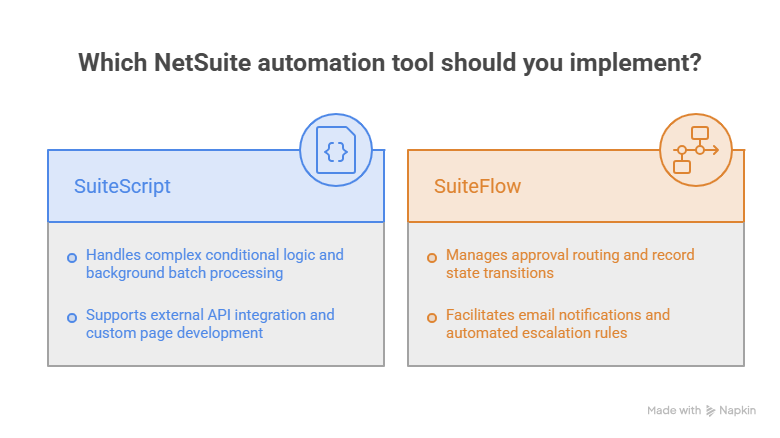
SuiteFlow is the right tool when:
- The logic can be built visually by a business user or administrator
- The process follows a defined sequence of states (approve, reject, escalate)
- The customization does not require conditional branching more complex than SuiteFlow supports
- You want a change that can be maintained without a developer
SuiteScript is the right tool when:
- The logic requires code to express (complex conditionals, loops, external API calls)
- The process needs to handle large data volumes that SuiteFlow cannot manage
- The business needs a custom UI or a custom REST endpoint
- The logic needs to run in the background on a schedule, not in response to a user action
The combination works well: SuiteFlow manages the workflow state and approval routing. A Workflow Action Script handles the custom logic that SuiteFlow cannot express natively. This keeps the workflow maintainable for business users while still incorporating developer-built logic.
For teams working on complex automation projects that mix scripting and workflow capabilities, this blog covers automation and customization using SuiteScript’s top-requested features with practical examples of how scripting and workflow design work together.
Final Thoughts
SuiteScript is not complicated to understand at the conceptual level. It is JavaScript, running inside NetSuite, with ten script types that each match a specific execution context. The complexity comes from governance limits, from choosing the right script type for each situation, and from understanding which records and APIs are available in each context.
The developers who are most productive with SuiteScript are the ones who understand the rules clearly before writing code. They know which script type to reach for. They design around governance limits from the start. They know the difference between what SuiteScript should handle and what SuiteFlow should handle.
If your team is building on NetSuite and wants to develop that fluency, reaching out to the Folio3 development team is a direct path to getting there without learning everything through trial and error.
FAQs
What version of SuiteScript should I use?
SuiteScript 2.1 is the current version and the right choice for all new development. SuiteScript 1.0 is end-of-life and should be migrated. SuiteScript 2.0 is still supported but 2.1 adds strict mode enforcement and the N/LLM generative AI module. For all new scripts and any migration from 1.0, write in 2.1.
What are the most commonly used SuiteScript types?
User Event Scripts are the most commonly used. They run on the server at record save events (beforeLoad, beforeSubmit, afterSubmit) and handle the majority of record-level business logic. Client Scripts are the second most common, handling real-time browser-side validations and field logic. Scheduled Scripts and Map/Reduce Scripts are used for background processing and large data operations.
What are SuiteScript governance limits?
Governance limits are caps on the number of API calls and database operations a script can perform in a single execution. When a script hits its governance limit, execution stops. Limits vary by script type: Scheduled and Map/Reduce Scripts have higher limits than User Event or Client Scripts. Governance-aware design, batching searches, using yield logic, and testing against production-scale data, is essential for any script that processes more than a few hundred records.
Is SuiteScript hard to learn?
For developers who already know JavaScript, SuiteScript 2.x has a moderate learning curve. The main new concepts are NetSuite’s module system (AMD), its record and search APIs, the governance model, and the deployment and testing process within the NetSuite environment. For developers new to JavaScript, learning JavaScript first is the right approach before moving to SuiteScript.
When should I use SuiteScript instead of SuiteFlow?
Use SuiteScript when the logic requires code to express: complex conditional branching, loops, external API calls, large data processing, or custom UI elements. Use SuiteFlow when the logic can be visually configured and maintained by a business user. Use both when you need workflow state management (SuiteFlow) combined with developer-built logic at a specific step (Workflow Action Script).

