SuiteScript is a core part of NetSuite customization, but for developers new to the ecosystem, the learning curve can be steep and often confusing. This article aims to focus on pain points for new as well as seasoned developers to assist with problems that may not be obvious from SuiteScripts’ official documentation. Going through this article will equip you with fundamentals of SuiteScripts, useful tools and extensions and finally incorporating AI within your learning.
SuiteScript Use Cases:
Before development, developers must identify the requirements, judge the scenario and decide which SuiteScript type is suited best. One of the most common mistakes a developer may make during training is choosing the wrong SuiteScript for a use case.
The following tables highlight the variance of different scripts and their use cases.
| Script Type | Use Cases | Limitations | Governance |
|---|---|---|---|
| Client Scripts | Best for user interface specific tasks especially for managing line items. | Can be bypassed via CSV imports, REST APIs and scheduled executions. Avoid placing critical logic only in Client Scripts. Rule of thumb: if logic must always be enforced, it should not rely solely on client-side execution. | 1,000 units per invocation |
| User-Event Scripts | User Event script ensures consistent logic for all inputs (including CSV import).Best for validation, post and pre form submission logic implementation. | Not suitable for large processing due to low governance. | 1,000 units per invocation |
| Scheduled Scripts | Best for large data processing periodically or once. | Requires manual rescheduling mechanism by checking governance left, exiting and re-queuing themselves. However, this is not true yielding. | 10,000 units per invocation |
| Map/Reduce Scripts | For bulk processing as data processing split into stages; allowing parallelism and rescheduling in case of unit exhaustion. This supports true yielding and automatic retries along with better governance handling. | Higher complexity, debugging overhead and governance considerations.Not suitable for smaller tasks. | getInput: 10,000 units per invocation |
| Map: 1,000 usage per object | |||
| Reduce: 5,000 usage per object | |||
| Summary: 10,000 units per invocation |
Note that in real-life practice developers are often required to use combinations of different script types. Thus, an in depth-knowledge of each script type is essential for developing real-world projects.
SuiteScripts’ Execution Contexts:
SuiteScript execution contexts describe the environment in which a script runs. They determine whether a script is triggered by a user action, a background process, an integration, or a system event and directly influence script behavior, permissions, and governance usage.

User Event, Client and Scheduled scripts in NetSuite execute within a defined execution context that is configured at the script deployment level. Their execution is directly tied to a specific system action, record event, or user interaction.
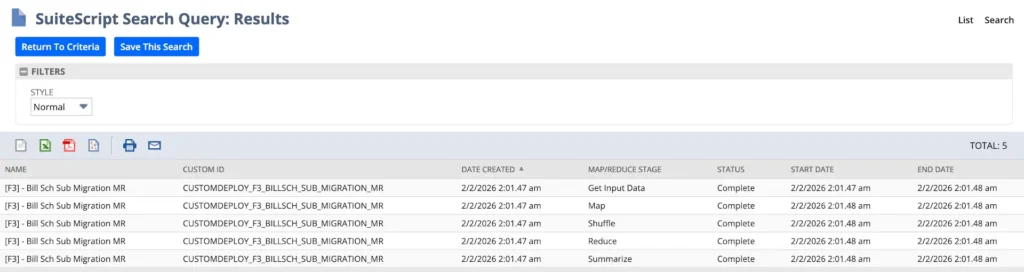
Unlike User Event or Scheduled scripts that execute directly within a defined execution context, Map/Reduce scripts are processed asynchronously in multiple system-managed stages. Each stage runs independently and is tracked on the Map/Reduce Status page, making Map/Reduce scripts ideal for large-scale, long-running operations.
Make Life Suite-er: Utilize tools and extensions
Following are some tools and extensions that may provide a better developer experience. However, note that these tools enhance productivity only after the developer actually understands NetSuite fundamentals, execution context and record lifecycle.
1. Upgrade to SuiteCloud CLI
The SuiteCloud CLI provides commands to manage your files enabling a structured File Cabinet management. Thus, enabling governed and repeatable deployments, and controlled release workflows that are difficult to achieve through manual UI-based changes.
Find the installation guide here at Installing SuiteCloud CLI for Node.js.
The pre-requisite include:
- A NetSuite Account
- Node.JS Version 22 LTS
- Oracle JDK version 17 or 21 is required
SuiteCloud CLI is essential for real-life projects, however, must remember that usage of these commands with lacking deployment context knowledge, may lead to further confusions in some cases. For example, after deploying a script change, the old script may still be running thus not reflecting immediate changes and leading to confusion.
Keeping in mind the deployment contexts and their effects, here are some commands you must know as a beginner.
| Command | Purpose |
|---|---|
| suitecloud account:setup | Setup authentication for a NetSuite account |
| suitecloud project:create | Create a new SuiteCloud project |
| suitecloud project:deploy | Deploy the project to NetSuite |
| suitecloud file:create | Create new script files or templates |
| suitecloud file:upload | Upload local files to the File Cabinet |
| suitecloud <command> -h | Show help for a specific command |
2. Install SuiteCloud Extension
Although SuiteCloud does make life easier, you can take it to the next level by installing the SuiteCloud Visual Studio Code extension to eliminate the need of remembering common commands.
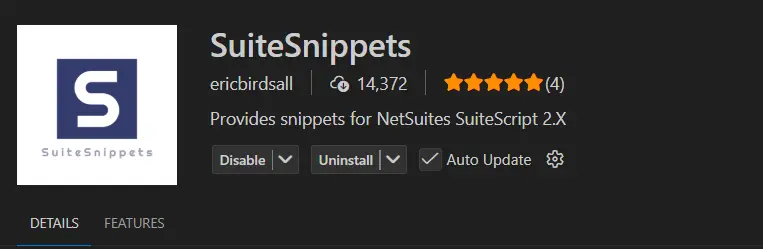
Now, you can simply press CTRL+SHIFT+P (CMD+SHIFT+P for MAC OS), and simply select commands and perform actions using a UI and no need for CLI.
3. Install SuiteSnippets in Visual Studio Code
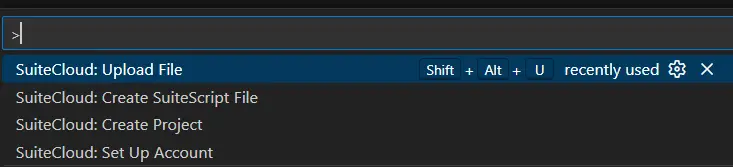
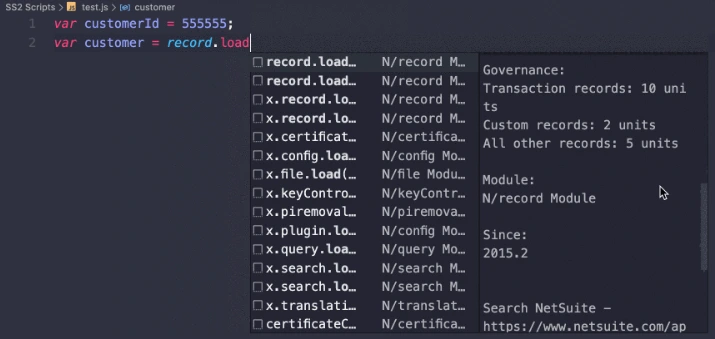
SuiteSnippets provides snippets of SuiteScripts, acting as IntelliSense for your code.Simply, go to your Visual Studio Code editor and search for “SuiteSnippets” and click on install.
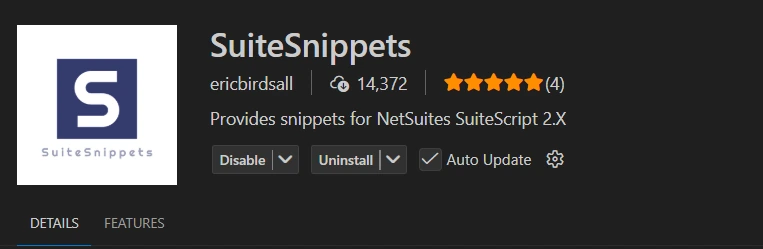
With SuiteSnippets, there is no need to memorize all the functions module as it suggests you related methods for a specific module. However, these snippets are for assistance only and are best utilized when developers fully understand modules’ purpose and their governance impacts.
Still Confused? Involve AI!
Although Oracle provides sufficient documentation for developers, to understand and implement scripts. However, the wordings and examples used may not be beginner-friendly.
AI tools are an effective way of learning and coding, especially when a developer understands the NetSuite-specific contexts such as record types, script types, execution context, governance and successfully provides this information to the AI tool.
In addition to using AI for conventional code generation. Here are some prompts and their respective use cases for better learning:
| Prompt | Use Case |
|---|---|
| Draw a detailed parallel between <NetSuite Concept> and <Your familiar stack>, including examples, similarities, differences, and a visual diagram | Provides parallels to comprehend newer concepts from your older concepts |
| Review my code and only provide hints about problems instead of actual fixes. | Best for practicing when you want to identify mistakes but still try on your own. |
| Summarize <NetSuite Module> documentation in easier vocabulary and code examples. Also provide points to remember. | Suitable for complex worded NetSuite modules with difficult examples. |
| Quiz me for <NetSuite Concept>. Rigidly tell in case of any wrong answers. | To quiz your knowledge of a concept. |
| Provide me a real-life coding problem scenario for <NetSuite Script type>. | Provides coding problems adhering to real-life scenarios to build better understanding. |
Conclusion
Although NetSuite has a learning curve, due to its requirement of ERP understanding, platform-specific knowledge and scripting for customizations. However, when combined with easier analogies for understanding and better tools for assistance, it clarifies core concepts. Hence, the developer is equipped with the necessary knowledge to think, build and maintain business solutions that are technically feasible.
This blog provides a starting point by drawing analogies, suggesting tools and summarizing SuiteScript related information. However, do note that this blog does not serve as complete documentation for SuiteScripts and only offers an insight for the vast topic.
Resources
Following are official documentation resources to assist in further understanding of SuiteScripts concepts:
- SuiteScript 2.x API Documentation
- Script Types Overview
- Installing SuiteCloud CLI for Node.js
- SuiteScript 2.x Code Samples Catalog
- NetSuite Official Training Resources
Related Reads
Before exploring advanced custom AI integrations, ensure you’ve completed the essential setup steps covered in our previous guides:
Getting Started
- A Complete Setup Guide for NetSuite AI Connector
- A Setup Guide for NetSuite AI Connector with Postman: API Integration Tutorial
- Getting Started with NetSuite SuiteTalk REST API in Postman
- NetSuite MCP OAuth 2.0 Token Generator Tool
MCP + Client Integrations
- IDE Integration Guide for NetSuite MCP Tools in Cursor & VS Code
- Connecting MCP with ChatGPT: A Complete Guide
- Connecting MCP Tools with Qwen
- Connecting ChatGPT Business with NetSuite via MCP: The Future of Enterprise AI Integration