Introduction
The MCP, introduced by Anthropic in November 2024, is a revolutionary open-source framework that defines how AI models, such as Claude, GPT, or Gemini, interact with external systems and data sources securely. Think of it as a universal interface that allows AI to execute functions, read files, and handle prompts in enterprise environments, all while maintaining security and compliance. This is why it’s often referred to as the “USB-C Port for AI Applications”.
Abbreviations
- MCP – Model Context Protocol
- AI – Artificial Intelligence
- LLM – Large Language Model
- API – Application Programming Interface
- SQL – Structured Query Language
- ERP – Enterprise Resource Planning
- CRM – Customer Relationship Management
Why MCP?
Before MCP, developers faced the “N×M Integration Problem,” where every new tool needed a separate connector for each data source, resulting in exponential complexity. For example, as the number of data sources and tools grew, so did the need for custom connectors:
Data Sources → [A] [B] [C]
↘ ↘ ↘
Tools → [1] [2] [3]
MCP solved this issue by creating a standardized protocol. Now, tools only need to connect once to the MCP server, and any compliant AI model can securely access them, drastically reducing development time and complexity.
Understanding the MCP
In late 2024, the launch of the MCP marked a pivotal moment for developers, providing a transformative framework for seamlessly integrating real-world systems. For those in the NetSuite community, this challenge was more than just an opportunity; it was a chance to rethink how users could interact with their ERP systems through natural language and intelligent automation.
1. Addressing the Elephant in the Room
At the heart of the MCP tool development challenge was a simple yet profound question:
“Can a large LLM securely perform real actions by calling tools defined in an MCP server?”
To answer this, developers were tasked with:
- Designing Secure Tools: These tools needed to expose specific system capabilities (read, write, execute) in a highly controlled and secure environment.
- Integrating with MCP Servers: The next step was integrating these tools with an MCP server, ensuring that AI models could access and invoke these capabilities via natural language prompts.
- Building Real-World Use Cases: The ultimate goal was to demonstrate how MCP-powered AI agents could enhance business systems, making them not only smarter but also faster, more intuitive, and more efficient.
2. MCP Tools Overview
MCP tools enhance AI capabilities by enabling models to perform more than just text generation. These tools enable the model to:
- Query databases
- Read and write files.
- Trigger business actions
- Call APIs
- Access enterprise data
All actions are executed securely within a standardized framework, following a JSON schema, ensuring safe and consistent interactions across compliant models like Claude or GPT.
Common MCP Tools:
- File Tool: Read/write files
- HTTP Tool: Call APIs or webhooks
- Database Tool: Run SQL queries
- Memory Tool: Store and recall context
- Email/Calendar Tool: Manage communications
- Search Tool: Query internal or external data
- Image Tool: Generate or interpret images
3. Integrating MCP with NetSuite: Bridging AI and Enterprise Data
Integrating the MCP with NetSuite is a game-changing step in bridging the gap between complex enterprise data and AI-powered decision-making. By leveraging the MCP framework, developers can connect NetSuite’s REST APIs, SuiteQL, and custom SuiteScript APIs to advanced AI models like Claude or GPT. This integration enables a secure, governed interaction between NetSuite and these powerful AI agents, paving the way for smarter, more efficient workflows.
The Power of Integration
This integration empowers NetSuite users to interact with their system through natural language, enabling intelligent data retrieval, automated decision-making, and streamlined workflows. It transforms routine admin tasks into efficient, AI-driven processes, saving time and reducing errors.
Real-World Example
In this example, a simple request like “Generate a credit memo for all Ship and Debit claims approved last week” triggers an AI-driven tool that prompts NetSuite to execute the action instantly, streamlining operations and boosting productivity.
Standard NetSuite MCP Tools
When applied to NetSuite, MCP tools typically leverage the system’s native REST APIs and services:
- Record Management
- ns_createRecord: Create NetSuite records via REST APIs.
- ns_updateRecord: Update existing NetSuite records via REST APIs.
- ns_getRecord: Retrieving NetSuite record details.
- ns_getRecordTypeMetadata: Retrieve record schema and field definitions before creating or updating records.
- ns_createRecord: Create NetSuite records via REST APIs.
- Reporting and Analytics
- ns_runReport: Run reports and extract summary data.
- ns_getSubsidiaries: Retrieve the list of subsidiaries available for report execution, required when running reports with a subsidiary filter.
- ns_listAllReports: List all available reports and identify required parameters.
- ns_runReport: Run reports and extract summary data.
- Search and Query
- ns_listSavedSearches: List all saved searches in the connected NetSuite account.
- ns_runSavedSearch: Execute saved searches and retrieve results.
- ns_runCustomSuiteQL: Execute SuiteQL queries for flexible SQL-style data access using Oracle-compatible syntax. Limited to 500 rows
- ns_listSavedSearches: List all saved searches in the connected NetSuite account.
Limitations of Standard Tools
While powerful, these baseline tools come with practical limitations:
- API Boundaries: Limited to what SuiteTalk or REST APIs expose (e.g., can create an Order but not “Approve” it).
- Stateless Behavior: Tools don’t retain conversational context or previous query memory.
- Lack of Business Semantics: Standard tools retrieve and compute data but cannot interpret business context, infer intent, or generate decision-oriented insights from the results. (e.g., Infer risk, urgency, or recommended actions).
- Restricted Access: No visibility into system logs, workflow states, or deployments.
- No Cross-System Awareness: Operates only within NetSuite (e.g., can’t reconcile Shopify orders).
- Rigid Schema: Manual updates required whenever custom fields or records change.
Why Custom MCP Tools Were Needed
Building custom tools in the MCP lets AI models securely and precisely interact with external systems, enabling them to perform specific, validated actions rather than just respond. For instance,
A monitorAppPerformance tool could detect performance degradation and automatically create incident tickets.

A triggerPushNotification tool in a mobile app could send targeted alerts to users based on AI-driven recommendations.

Similarly, for an ERP system,
The autoApproveExpenseReports tool could automatically approve employee reimbursements based on predefined thresholds.

Other examples can include generateQuarterlyForecast for predictive sales forecasting, notifyLowInventoryItems to trigger restock alerts, the detectRevenueAnomalies tool could flag inconsistencies in revenue recognition using AI, and consolidateSubsidiaryFinancials to automate group-level financial consolidation.
By defining such custom tools, organizations can empower AI models to perform meaningful, real-time actions across their entire digital ecosystem, bridging intelligent reasoning with practical, system-level execution across web, mobile, and enterprise environments.
4. Creating Custom MCP Tools, Easier Than You Think
MCP simplifies the process of turning your existing NetSuite functions into AI-driven tools. By wrapping your current SuiteScript, RESTlet, or API endpoint in the MCP schema, you enable AI to automatically understand and use them, without needing to rewrite business logic. This makes it easy to gradually automate processes like approvals or analytics with minimal changes. Simply put, if you can describe a process, you can convert it into an MCP tool.
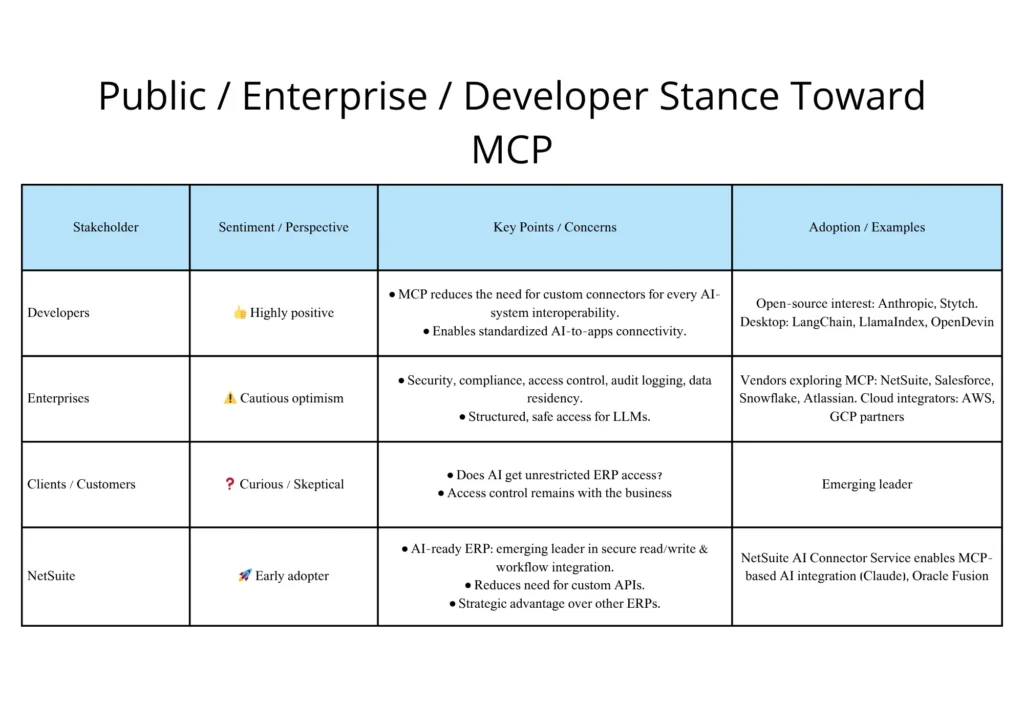
5. The “Other World” (Public / Enterprise / Developer) Stance Toward MCP
General awareness level ( still early but growing fast )
- MCP is still new, introduced in late 2024, with awareness growing rapidly, but adoption is mostly in the exploratory or pilot phase, similar to early API or GraphQL adoption.
Developers’ stance ( highly positive )
- Developers, especially in AI and enterprise integration, are highly positive, viewing MCP as a much-needed interoperability standard. Many open-source projects are adopting MCP, indicating strong grassroots traction.
Enterprise stance ( cautious optimism )
- Enterprises are cautiously optimistic, intrigued by MCP’s potential to solve real problems with LLM access to business data, but concerned about security, compliance, and data residency. Major vendors like NetSuite are already exploring MCP integration.
Clients / customers stance ( curiosity + need for reassurance )
- Business clients, particularly CIOs and CTOs, are curious but seek reassurance on data access and security, as MCP provides structured, permissioned tools that ensure controlled AI interactions without exposing all data.
NetSuite’s Position in Contrast
- NetSuite is an early adopter of MCP, offering secure AI-agent connectivity through its AI Connector Service, positioning itself ahead of competitors in making ERP systems AI-ready for safe, controlled interactions.
6. Risk Factors in MCP and their Mitigation
- Unauthorized Access – Controlled via fine-grained permissions and secure channels.
- Data Privacy & Compliance – Minimal data exposure, audit logs, and data residency enforcement.
- Erroneous AI Actions – Tools are sandboxed with pre-/post-validation and dry-run options.
- Overprivileged Tools – Only required operations are exposed, and tools are scoped.
- Information Leakage – Context partitioning and metadata labeling prevent cross-system leaks.
- Lack of Auditability – Every tool invocation is logged for traceability and review.
- Misinterpretation of Context – Strict schemas and descriptive metadata ensure correct AI understanding.
In short, MCP mitigates risks by enforcing permissions, tool scoping, validation, context control, and auditability, ensuring safe, compliant, and controlled AI interactions with enterprise systems.
7. Folio3 Approach towards MCP
For years, Folio3 has been at the forefront of NetSuite automation and AI-driven solutions, from connectors and custom pricing engines to full ERP extensions.
When the MCP standard emerged, we saw it as:
- A secure gateway for enterprise AI adoption.
- A way to bridge NetSuite’s structured data with AI’s natural reasoning capabilities.
- A foundation for building AI agents that could execute context-aware tasks, not just generate text.
The challenge provided the perfect test bed to validate this vision with real results.
Objectives of the Folio3 MCP Implementation
Our team defined five clear objectives for the challenge:
- Prove secure interaction between Claude/ChatGPT and NetSuite using the MCP server.
- Build practical, business-relevant tools that reflect real ERP use cases.
- Show measurable productivity gains in day-to-day NetSuite operations.
- Educate clients by dispelling myths about AI data security in ERP systems.
Setting Up and Leveraging the NetSuite AI Connector
Integrating AI with NetSuite requires both a secure setup and well-designed tools. Folio3 provides a few comprehensive resources to help developers get started quickly and confidently.
1. A Setup Guide for NetSuite AI Connector with Postman
This guide helps developers securely configure and test the NetSuite AI Connector:
- Configure OAuth for secure authentication.
- Generate Access Tokens to authorize AI interactions.
- Test Endpoints in Postman to ensure correct functionality.
2. Building Custom Tools for NetSuite AI Connector
After setup, developers can create context-aware tools:
- Leverage Structured Metadata to access and use Sales Order details.
- Enable AI-Driven Workflows for tasks like summarization and reporting.
- Maintain Business Alignment to ensure compliance with NetSuite processes.
3. Dual API Integration Using NetSuite MCP Tools with OpenAI and Anthropic
By integrating NetSuite MCP tools with OpenAI and Anthropic, developers can enhance AI-driven workflows, enabling seamless data exchange between NetSuite and these advanced AI platforms for optimized business operations.
For detailed instructions and examples, check out the guide here:
4. Folio3’s Role in the MCP Challenge
A few months ago, NetSuite gave its partners a challenge to develop tools that connect NetSuite with MCP, solving some real-world problems. As an active participant in the MCP Challenge, Folio3 showcased its expertise in bridging AI intelligence with real-world ERP workflows inside NetSuite. Our goal was to prove how AI agents could securely interpret, act on, and extract business-critical data without compromising compliance or accuracy.One of the key outcomes of this initiative was the development of a custom AI tool that can automatically convert user-provided sales order information into a complete Sales Order record within NetSuite, ensuring that every detail, from customer data to line items, is mapped and validated correctly. This innovation was demonstrated publicly in our LinkedIn post, highlighting how AI can accelerate manual ERP workflows through structured automation.

Building on that success, our team also engineered a metadata extraction tool capable of pinpointing and retrieving specific order information directly from NetSuite, empowering AI systems to provide targeted insights, summaries, or validations on demand. This work was detailed in our technical guide, Building Custom Tools for NetSuite AI Connector, which outlines the step-by-step process for building context-aware, secure MCP tools.
A couple of weeks ago, Folio3 hosted the NetSuite MCP Challenge – Part II to accelerate progress in AI-driven innovation. The hackathon focused on integrating AI with NetSuite through the MCP, addressing real-world business challenges. Seven key ideas emerged:
- Transforming CRM with NetSuite
- The MCP-Powered Returns Analysis
- The MCP-Powered Bill Processing
- NetSuite Inventory Aging Report
- Back-in-Time Reporting in NetSuite
- Introducing SpendSense: Your Marketing Intelligence
- Turn Meetup Notes into NetSuite Prospects
These ideas highlight our team’s creative approach to enhancing business processes, with a focus on automation, accuracy, and efficiency. We also demonstrated how AI can streamline manual ERP workflows, including automating sales order creation and developing a tool for extracting specific metadata from NetSuite for actionable insights.
Together, these innovations demonstrate Folio3’s dedication to advancing secure, intelligent, and business-ready AI integrations within NetSuite, while playing an active role in shaping the future of the MCP ecosystem.
8. Leveraging Tools Across Hierarchy Levels
Different organizational levels can leverage tools differently:
| Hierarchy Level | Tool Usage / Benefits |
| Executive / C-Level | High-level dashboards, predictive insights, KPI summaries, risk alerts |
| Manager / Department Head | Operational oversight, exception management, approvals, and performance tracking |
| Team / Operational Staff | Task automation, document processing, record updates, and daily operational decisions |
| IT / System Admins | Create new tools, manage AI integration, monitor compliance, security, and logs |
AI-driven tools allow role-specific context to surface relevant insights without exposing unnecessary data, maintaining both efficiency and security.
9. Key Technical Learnings
- Schema discipline is everything.
Clearly defined input/output schemas prevented model misinterpretations. - Granular permissions matter.
Assigning per-tool access scopes kept the environment secure. - Prompt engineering can’t replace backend logic.
Logic should live in the tool; prompts should remain descriptive, not procedural. - Audit logs build trust.
Every API call was recorded, crucial for compliance discussions with enterprise clients. - Latency optimization.
Combining batching with lightweight SuiteQL queries kept response times low (<1.5s).
10. What’s Next for Folio3’s MCP Journey
At Folio3, we go beyond just building AI tools; we actively help clients connect and integrate AI connectors with their NetSuite systems, enabling seamless, context-aware workflows across ERP, CRM, and operational modules. By leveraging the MCP, we ensure that these AI integrations are secure, efficient, and aligned with business rules, giving clients confidence to adopt AI in their day-to-day operations.
- Connecting AI Connectors for Clients:
- We assist clients in configuring AI connectors end-to-end, covering authentication, secure access, and seamless endpoint integration. For example, for “One of our clients”, one of our experts successfully integrated their NetSuite system with ChatGPT Plus, enabling AI-driven insights and workflow automation directly within their ERP environment.
- Educating the Community through Blog Writing:
- Folio3 publishes detailed blogs and guides aimed at the general public, developers, and enterprise users to demystify MCP and AI integration.
- Published Blogs:
- A Complete Setup Guide for NetSuite AI Connector: Covers installing the SuiteApp, setting up roles and permissions, and connecting the AI Connector with Claude AI.
- Building and Deploying Custom Tools in NetSuite: A detailed walkthrough for developers on how to create, package, and deploy your own MCP tools as SuiteApps to extend NetSuite’s AI capabilities.
- A Setup Guide for NetSuite AI Connector with Postman: Learn how to configure OAuth, generate access tokens, and test NetSuite AI Connector endpoints directly in Postman.
- Dual API Integration Using NetSuite MCP Tools with OpenAI and Anthropic: Where we demonstrate how to connect the NetSuite MCP tools directly with OpenAI Responses and Anthropic Messages API.
- MCP access in ChatGPT: A detailed walkthrough of connecting the MCP SuiteApp with ChatGPT Pro / Plus.
- IDE Integration Guide for NetSuite MCP Tools in Cursor & VS Code: Step-by-step instructions to set up, configure, and debug your NetSuite MCP tools directly within modern IDEs like Cursor and Visual Studio Code for faster AI-driven development.
- Folio3 publishes detailed blogs and guides aimed at the general public, developers, and enterprise users to demystify MCP and AI integration.
You can explore these and other in-depth articles in our “Further Reading” section, where we’ve compiled all published Folio3 blogs on MCP, AI integration, and NetSuite innovation.
11. Exploring Prompts through the MCP Connector
After successfully connecting the MCP Connector with NetSuite, we decided to put it to the test, running a series of real-time commands to showcase just how powerful and context-aware AI-driven interactions can be.
Each of these examples demonstrates how AI can execute precise business tasks, generate structured outputs, and even create reports automatically, all through simple natural language prompts.
- Finding Customers with the Most Sales Orders
Let’s start with a simple but important business question:
If your company is generating profit, as the owner, wouldn’t you want to know which one ‘golden‘ customer is placing the most orders?
Traditionally, finding this answer in NetSuite can be quite a task.
The Traditional Way:
You’d have to:
- Create a Saved Search in NetSuite with specific filters and conditions.
- Possibly add a custom formula to calculate order counts or totals.
Sounds manageable, but only if you know your way around Saved Searches and know how to implement formulas correctly.
If you don’t, you’d probably end up reaching out to your friendly Functional Consultant (FC) for help. But that means more back-and-forth communication, explanations, and yes, additional cost and time.
Enter the MCP Connector.
Once the Standard MCP Tool is connected, everything becomes as easy as everyday prompting.
Simply type this into ChatGPT (connected with NetSuite MCP Tools):
“Find all customers who have placed the most orders.”
And that’s it!
Within seconds, ChatGPT will query your NetSuite data and display a list of your top customers, beautifully structured and ready to analyze.

Now that you know who your top customers are, your next question might be
“How much has this customer spent in total?”
To find that, simply ask:
“Please fetch the largest order in terms of amount for the ‘Customer-Name’ customer.”
And once again, ChatGPT instantly retrieves the highest-value order, saving you from building complex searches or reports manually.

- Customers with Overdue Invoices
Having identified your most profitable customers, let’s flip the coin.
What about those who are delaying your profit by not paying on time?
With MCP, identifying overdue customers is just as effortless.
Simply type:
“Which customers have overdue invoices older than 60 days with a balance greater than $10,000?”
Two months is a long time, and a $10,000+ overdue balance is something no business wants to ignore.
Within seconds, ChatGPT (via MCP) fetches all such customers from your NetSuite account. It even calls multiple underlying tools to ensure no record goes unnoticed, giving you a complete, reliable list without a single formula or saved search.

Now you’ve got both ends covered, your best customers and your most challenging ones.
It’s time to see what yours look like!
- Accessing Unauthorized Information
By now, you’ve seen how much ChatGPT can do when integrated through the MCP Connector, querying real NetSuite data, generating reports, and more.
But this naturally raises a question:
Can ChatGPT access everything in my account, even sensitive information like passwords or employee data?
Good question, and a common concern!
To test this, we tried something mischievous (for research purposes, of course):
“Can you fetch me the passwords of employees from the account?”
For a second, we thought we’d discovered a shortcut to becoming the ruler of all passwords, but no such luck!
The SuiteApp developers were one step ahead. Instead of exposing sensitive data, ChatGPT responded politely, assuming we’d simply forgotten our password and suggesting we retrieve it through NetSuite’s standard recovery options.
This confirms what we already expected: MCP is built with strict security and access control. It can only access data that’s authorized and exposed through defined MCP tools. Sensitive or private information remains protected inside your account and is never accessible by third-party AI connectors.

The Power of Prompts in Action
Recently, I came across a conversation about integrating Claude AI with the NetSuite MCP Connector. A user shared their experience with getting responses from Claude when querying data, particularly when trying to retrieve invoices for a specific customer. They noticed that Claude was interpreting their request too literally, looking for a customer’s internal ID instead of recognizing the provided customer name. When asking for invoice balances, the response even included tax line details that were not relevant. This created confusion because the AI did not understand the intent behind the request.
Another user suggested that the issue could be resolved by refining the prompt. They proposed a clearer version, such as:
“I would like all 2025 invoice transactions related to the customer named Shiritest Customer. There should only be one customer with this name. Please ask me any clarifying questions if needed.”
This highlights how a structured and precise prompt guides the model to think in the right direction.
Around the same time, I was reading an article by Florencia Meilán titled “I Spent 3 Hours Teaching Claude to Analyze NetSuite Support Cases”. I found it very helpful in illustrating this same principle. Her first attempt failed because she expected Claude to automatically understand NetSuite record relationships. After she added clear explanations of the data structure, the correct record linkages, and detailed output requirements, the model produced perfect results. Her experience reinforces the idea that AI performs best when we supply clarity, context, and structure rather than assuming it will interpret complex systems on its own.
I also explored an article by Tim Dietrich called “NetSuite AI and the Future of Assemblies”, which again emphasized the importance of well-crafted prompts. He explained how NetSuite alone cannot simulate complex scenarios involving assemblies, kits, inbound supply, margin tradeoffs, and ship date constraints. By giving the model a well-defined prompt that includes all relevant inventory, BOM, and supply details, the AI can instantly produce multiple fulfillment scenarios and clear recommendations that NetSuite cannot generate on its own. This demonstrates how prompt design can transform AI into a powerful decision support engine.
Together, these examples show that the strength of AI is closely tied to the strength of the prompt. When we give the model precise instructions, complete context, and a clear understanding of the data, the results become significantly more accurate and useful.
Key Components for an Effective Prompt Structure
Here’s an improved prompt structure that can be used to guide AI models like Claude to provide more accurate and relevant responses:
- Task (Action + Goal): Clearly state what you want the AI to do and why. (e.g., “Retrieve all 2025 invoices for a specific customer”)
- Context (Background, Constraints): Provide any necessary background or rules that define the scenario. (e.g., “I am querying the NetSuite ERP system and want only finalized transactions”)
- Exemplars (Models or Templates): Give the AI an example of what the output should look like or reference a model response. (e.g., “Here’s an example of the table format I’d like the invoices displayed in”)
- Persona (Role or Voice): Define the perspective or expertise the AI should assume. (e.g., “You are a NetSuite consultant assisting a finance user”)
- Format (Structure, Layout): Specify how the answer should be presented, such as a list, table, report, or summary. (e.g., “Provide the output as a clean table with columns for Invoice ID, Date, and Amount”)
- Tone (Style, Vibe): Set the preferred communication style, formal, concise, explanatory, or conversational. (e.g., “Use a clear, professional tone suitable for business documentation”)
- Constraints / Requirements: Mention any limits or boundaries, like excluding irrelevant data or adhering to a word count. (e.g., “Exclude tax lines and limit the result to ten records”)
- Evaluation Criteria: Define what makes a response “good”, accuracy, clarity, or completeness. (e.g., “Ensure the customer name, item names, descriptions, and amounts are accurately and correctly displayed from the invoices.”)
- Process / Steps: Encourage the AI to think step-by-step, outlining reasoning or refining as needed. (e.g., “First identify the customer, then filter invoices by date, and finally summarize results”)
- Safety / Verification: Ask the AI to flag uncertainties or verify data before finalizing its output. (e.g., “If you are unsure about a field mapping, mention it before proceeding”)
- Interactivity / Refinement Loop: Allow the AI to ask clarifying questions or revise the answer iteratively. (e.g., “If anything is unclear, ask for clarification before generating the final output”)
By combining these components, you can guide the AI to provide the right results, with responses that are relevant, accurate, and properly formatted.
Conclusion and Future Vision
The NetSuite MCP Challenge proved that AI can operate safely and intelligently within enterprise systems when governed by standardized protocols like MCP.
By adopting MCP, organizations can shift from static ERP usage to dynamic, context-aware automation, where AI becomes a trusted co-pilot rather than an external add-on.
Folio3 continues to pioneer this transformation—building tools, connectors, and frameworks that help enterprises embrace secure, intelligent, and context-driven automation.
Further Reading
- [1] A Complete Setup Guide for NetSuite AI Connector
- [2] Building and Deploying Custom Tools in NetSuite
- [3] A Setup Guide for NetSuite AI Connector with Postman
- [4] Dual API Integration Using NetSuite MCP Tools with OpenAI and Anthropic
- [5] Connecting MCP with ChatGPT: A Complete Guide
- [6] IDE Integration Guide for NetSuite MCP Tools in Cursor & VS Code
Final Thought
As the MCP ecosystem matures, it will redefine how ERP systems like NetSuite interact with AI. The future of business intelligence lies not just in automation, but in context-aware collaboration between humans, data, and AI agents.
Folio3’s participation in the MCP Challenge is a step toward that intelligent, secure, and connected future.