
Ongoing Discussions Around MCP Input Formats
Across AI forums, developer communities, GitHub discussions, and LinkedIn threads, there is an active debate around how data should be structured when interacting with LLM-powered systems. As more teams adopt Model Context Protocol (MCP) tools with platforms like NetSuite, the question is no longer whether structured input is needed, but which format delivers the best balance of clarity, reliability, and token efficiency.
Developers are experimenting with formats such as JSON, CSV, ASON, JDON, TOON, TONL, YAML, and XML. Each format brings different trade-offs related to verbosity, nesting support, schema clarity, and how efficiently Large Language Models consume them.
These discussions are not theoretical. Token usage directly affects:
- Cost
- Latency
- Context window limits
- Stability of long-running AI workflows
This blog takes a practical, data-driven approach. We execute the same NetSuite Sales Order creation request using different input formats via the Anthropic Messages API and compare their actual token usage.
Why Token Efficiency Matters in LLM-Based MCP Workflows
In any LLM integration, tokens are the core billing and performance unit. Every input character and every generated response is tokenized, billed, and processed.
Token efficiency directly impacts:
Cost Optimization:
LLM APIs are priced per token. Even small reductions in input size compound significantly at scale, especially for MCP tools that run frequently.
Performance and Latency
Fewer tokens typically result in faster request processing and more responsive AI-assisted workflows.
Context Window Utilization
Efficient formats allow more business rules, validation logic, or historical context to fit into a single prompt.
Stability
Overly verbose or poorly structured payloads can increase the risk of timeouts, truncation, or misinterpretation by the model.
Prerequisites
Anthropic API Key
For creating an API key: Dual API Integration: Using NetSuite MCP Tools with OpenAI and Anthropic
NetSuite MCP Role and Access Token
To set up MCP Role and permissions in NetSuite: A Complete Setup Guide for NetSuite AI Connector
For generating an access token: A Setup Guide for NetSuite AI Connector with Postman: API Integration Tutorial
Why We Use APIs Instead of LLM Desktop or Web Apps
While LLM desktop and web applications are useful for experimentation, they do not expose token usage metrics.
API responses provide exact token counts, which makes them essential for benchmarking and cost analysis.
Test Methodology
To keep results comparable:
- The same logical Sales Order data was used across all formats
- Payloads were slightly shortened to avoid timeout issues
- Caching was disabled
- Anthropic Messages API was used to retrieve token usage. You can replicate the same tests using OpenAI or other providers.
- MCP tool execution logic remained unchanged
Code Repository for Testing
You can reproduce all tests using the repository: LLM Input Formats
How to Use:
Clone the repository
git clone https://github.com/tk34395/LLM-Input-Formats
cd LLM-Input-Formats
Install dependencies
npm install
Run the main script
node main.js
Converting JSON to Other Formats
- Type 1 and press Enter to see all supported formats for conversion.

2. Paste your JSON input into the input.txt file.

3. Choose the format you want to convert to
4. The tool will:
- Convert the JSON to the desired format
- Log the output in the terminal
- Write the converted output to output.txt

Calling the MCP Tool with the Anthropic API
To send MCP requests to Claude using the Anthropic Messages API, configure your environment and choose how you want to include payloads in your LLM queries.
Environment Configuration
Add the following variables to your .env file:
ANTHROPIC_API_KEY=<api_key>
NETSUITE_ACCOUNT_ID=<account_id>
NETSUITE_AUTHORIZATION_TOKEN=<auth_token>
These credentials are required to authenticate with both the Anthropic API and your NetSuite MCP server.
Including Payloads in LLM Queries
The tool supports two flexible ways to include payloads in your LLM query. This allows both automated benchmarking workflows and manual experimentation.
Option A: Using the <CONVERTED_FORMAT_PAYLOAD> Placeholder (Recommended)
This option is ideal for repeated testing across multiple formats.
How It Works
- Convert your JSON
- Choose Option 1 in the CLI
- The tool reads JSON from input.txt
- Converts it into the selected format (JDON, ASON, TOON, TONL, YAML, XML, etc.)
- Writes the converted result to output.txt
- Add the placeholder
- In llm-query.txt, include the placeholder <CONVERTED_FORMAT_PAYLOAD> where the payload should appear

3. Send the request
- Choose Option 2 in the CLI
- The system will:
- Detect <CONVERTED_FORMAT_PAYLOAD> in llm-query.txt
- Read the payload from output.txt
- Replace all occurrences of the placeholder with the actual converted payload
- Send the fully constructed query to the Anthropic Messages API
Validations
- If <CONVERTED_FORMAT_PAYLOAD>
is present in llm-query.txt: - output.txt must exist
- output.txt must not be empty
- If these conditions are not met, the tool fails with a clear and descriptive error message
Option B: Direct Payload Insertion
This option is useful for quick testing or when you do not want to rely on the conversion workflow.
How It Works
- Copy your payload
- Copy content from output.txt or any external source
- Paste directly into llm-query.txt
- Remove <CONVERTED_FORMAT_PAYLOAD> if present
- Paste the payload inline

3. Send the request
- Choose Option 2
- The query is sent as-is without any modification
Important Note
- If <CONVERTED_FORMAT_PAYLOAD>
is not present in llm-query.txt: - The tool will not attempt to read or inject data from output.txt
- The request payload remains untouched
What Happens When You Send the Request
Choose Option 2 and press Enter:

Regardless of the option used the tool will:
- Construct the final LLM prompt
- Call the Anthropic Messages API
- Log the response in the terminal
- Write the full response to llm-query-response.txt

Important Notes:
- You do not need to copy-paste the JSON every time. The tool reads input directly from files. For format conversion, it reads data from input.txt, and for LLM/MCP queries, it reads the payload from llm-query.txt.
- input.txt and llm-query.txt are never overwritten by the tool. They are read-only inputs.
- output.txt and llm-query-response.txt store the latest results and will be overwritten each time you perform a new conversion or make a new MCP API call.
Abbreviations Used in This Blog
To avoid repetition and keep the discussion concise, the following abbreviations are used throughout the blog:
- JSON – JavaScript Object Notation
- CSV – Comma-Separated Values
- ASON – Aliased Serialization Object Notation
- JDON – JSON-Delimited Object Notation
- TOON – Token-Oriented Object Notation
- TONL – Token-Optimized Notation Language
- YAML – YAML Ain’t Markup Language
- XML – eXtensible Markup Language
These formats are evaluated in the context of NetSuite MCP tools and LLM-based APIs, with a focus on token usage, structure preservation, and real-world applicability.
Using JSON as Input Format for MCP Tools
What Is JSON?
JSON is the most widely used data interchange format in modern APIs. It is strict, explicit, and universally supported. JSON is commonly used due to its strong schema clarity and predictable structure.
Key Features:
- Native support across virtually all programming languages and platforms
- Human-readable structure with clear key-value pairs
- Supports nested objects and arrays for complex data hierarchies
- Industry standard for APIs and web services
JSON – Sample Payload

This example demonstrates JSON’s key capabilities: nested objects (address within customer, country within address), hierarchical structure with multiple nesting levels, and clear key-value pairs enclosed in quotes. JSON uses explicit brackets {} for objects and maintains consistent syntax throughout, making it the universal standard for structured data exchange.
Why Use as LLM Input:
JSON serves as the baseline format because most LLMs are extensively trained on JSON data from web sources. Its widespread use means models have seen countless examples during training, leading to excellent parsing reliability and understanding of structure. While JSON doesn’t optimize for token efficiency like specialized formats (ASON, CSV), it excels at representing complex nested data that flat formats cannot handle. Use JSON when you need guaranteed compatibility, your data has deep hierarchies, or you’re unsure which format to choose. It’s the safe, universal option that works everywhere.
JSON Payload Used
Create a sales order in NetSuite with below data:
{
  "entity": {
    "id": "44247"
  },
  "tranDate": "2024-01-15",
  "location": {
    "id": "23"
  },
  "subsidiary": {
    "id": "20"
  },
  "shippingAddress": {
    "addr1": "123 Main St",
    "addr2": "Suite 100",
    "city": "New York",
    "state": "NY",
    "zip": "10001",
    "country": {
      "id": "US"
    },
    "addressee": "F3 Test Customer",
    "attention": "Shipping Department",
    "addrPhone": "555-1234"
  },
  "billingAddress": {
    "addr1": "456 Business Ave",
    "city": "New York",
    "state": "NY",
    "zip": "10002",
    "country": {
      "id": "US"
    }
  },
  "item": {
    "items": [
      {
        "item": {
          "id": "1945"
        },
        "quantity": 1,
        "rate": 100.00,
        "description": "Product description 1"
      }
    ]
  },
  "shipMethod": {
    "id": "2"
  },
  "shipDate": "2024-01-20",
  "terms": {
    "id": "1"
  },
  "salesRep": {
    "id": "19"
  },
  "memo": "Sales order memo",
  "message": "Customer message",
  "otherRefNum": "PO-12345",
  "email": "[email protected]",
  "toBeEmailed": true,
  "toBePrinted": false
}
Token Usage (JSON)
Below is the token usage returned directly from Anthropic:
 "usage": {
    "input_tokens": 74209,
    "cache_creation_input_tokens": 0,
    "cache_read_input_tokens": 0,
    "cache_creation": {
      "ephemeral_5m_input_tokens": 0,
      "ephemeral_1h_input_tokens": 0
    },
    "output_tokens": 869,
    "service_tier": "standard",
    "server_tool_use": {
      "web_search_requests": 0
    }
  }
JSON with OpenAI API
To demonstrate portability, the same thing can be done with other LLMs, below is the token usage details of the OpenAI API with the same payload used above.

Using CSV as Input Format for MCP Tools
What Is CSV?
CSV is a flat, tabular format often praised for compactness, especially for uniform datasets.
Key Features:
- Extremely simple, flat structure ideal for tabular data
- Minimal syntax overhead (no brackets, braces, or tags)
- Universal support in spreadsheet applications and databases
- Smallest file sizes for row-column data
CSV – Sample Payload

This example shows CSV’s flat, tabular structure where the nested hierarchy is flattened into dot-notation column headers (customer.name, customer.address.city, customer.address.country.id). All data is compressed into a single row with a header row defining columns, demonstrating CSV’s strength for tabular data but revealing its limitation that deeply nested structures must be linearized into flat columns.
Why Use as LLM Input:
CSV eliminates all structural overhead that JSON, XML, and YAML require, with no brackets, quotes, or tags. This makes it exceptionally efficient for tabular data where every row has identical fields. However, CSV cannot represent nested objects or arrays, which is why it works best for flat data structures like logs, reports, financial records, or any dataset that naturally fits in a spreadsheet. If your Sales Order data were simplified to a single row with no nested addresses or line items, CSV would likely be the most efficient choice. For complex nested data like our test case, CSV requires workarounds (escaping nested JSON within fields) that reduce its efficiency advantage.
CSV Payload Used
Create a sales order in NetSuite with below data:
entity.id,tranDate,location.id,subsidiary.id,shippingAddress.addr1,shippingAddress.addr2,shippingAddress.city,shippingAddress.state,shippingAddress.zip,shippingAddress.country.id,shippingAddress.addressee,shippingAddress.attention,shippingAddress.addrPhone,billingAddress.addr1,billingAddress.city,billingAddress.state,billingAddress.zip,billingAddress.country.id,item.items,shipMethod.id,shipDate,terms.id,salesRep.id,memo,message,otherRefNum,email,toBeEmailed,toBePrinted
44247,2024-01-15,23,20,123 Main St,Suite 100,New York,NY,10001,US,F3 Test Customer,Shipping Department,555-1234,456 Business Ave,New York,NY,10002,US,"[{""item"":{""id"":""1945""},""quantity"":1,""rate"":100,""description"":""Product description 1""}]",2,2024-01-20,1,19,Sales order memo,Customer message,PO-12345,[email protected],true,false
Token Usage (CSV)
"usage": {
    "input_tokens": 73696,
    "cache_creation_input_tokens": 0,
    "cache_read_input_tokens": 0,
    "cache_creation": {
      "ephemeral_5m_input_tokens": 0,
      "ephemeral_1h_input_tokens": 0
    },
    "output_tokens": 813,
    "service_tier": "standard",
    "server_tool_use": {
      "web_search_requests": 0
    }
  }
Using ASON as Input Format for MCP Tools
What Is ASON?
ASON is a serialization format designed to optimize token consumption in LLM contexts while maintaining human readability.
Key Features:
- Intelligent Compression: Uses sections (@section), tabular arrays with pipe delimiters, semantic references ($var), and dot notation to achieve token reduction without losing any information
- Human Readable: Maintains a clear and easy-to-read structure
- Perfect Round-Trip: Guaranteed decompression without data loss
- Semantic References: Uses human-readable variable names ($var) for deduplication
- Tabular Arrays: CSV-like format with [N]{fields} syntax and pipe delimiter
Section Organization: @section syntax for grouping related data
ASON – Sample Payload

This example showcases ASON’s powerful compression features: @section (@customer) groups all related customer fields together, nested object notation (address: with indented fields) maintains hierarchy without repetitive syntax, and inline objects (country:{id:US}) for simple nested structures.
Why Use as LLM Input:
ASON addresses a specific problem that neither JSON nor CSV solves well: efficiently representing nested, object-heavy data with repeated field structures. Where JSON repeats every field name for every object, and CSV struggles with nesting entirely, ASON uses semantic references ($var) to define a structure once and reuse it, and section organization (@section) to group related data without repetition. This makes ASON ideal for scenarios like our Sales Order test, where you have nested addresses and line items with consistent schemas. Use ASON when you’re working with bulk data processing, batch operations, or any scenario where you’re sending many records with repeated field structures within LLM context window constraints.
ASON Payload Used
Create a sales order in NetSuite with below data:
entity.id:"44247"
tranDate:"2024-01-15"
location.id:"23"
subsidiary.id:"20"
item.items:
-
 item:{id:"1945"}
 quantity:1
 rate:100
 description:"Product description 1"
shipMethod.id:"2"
shipDate:"2024-01-20"
terms.id:"1"
salesRep.id:"19"
memo:"Sales order memo"
message:"Customer message"
otherRefNum:"PO-12345"
email:"[email protected]"
toBeEmailed:true
toBePrinted:false

@shippingAddress
 addr1:"123 Main St"
 addr2:"Suite 100"
 city:"New York"
 state:NY
 zip:"10001"
 country:{id:US}
 addressee:"F3 Test Customer"
 attention:"Shipping Department"
 addrPhone:"555-1234"

@billingAddress
 addr1:"456 Business Ave"
 city:"New York"
 state:NY
 zip:"10002"
 country:{id:US}
Token Usage (ASON)
"usage": {
    "input_tokens": 73614,
    "cache_creation_input_tokens": 0,
    "cache_read_input_tokens": 0,
    "cache_creation": {
      "ephemeral_5m_input_tokens": 0,
      "ephemeral_1h_input_tokens": 0
    },
    "output_tokens": 797,
    "service_tier": "standard",
    "server_tool_use": {
      "web_search_requests": 0
    }
  }
Using JDON as Input Format for MCP Tools
What Is JDON?
JDON is a compact, LLM-native data format designed for structured data. Inspired by JSON, JDON uses columnar arrays and | (pipe) delimiter to reduce token usage while remaining human-readable and machine-parsable.
Currently, there is no online converter for JSON to JDON. You can use our code repo for conversion.
Key Features:
- LLM-friendly: Predictable patterns and flattened objects make parsing and generation easy for AI models
- Token-efficient: Columnar arrays and minimal punctuation drastically reduce token count
- Human-readable: Simpler than JSON for large datasets, without deep nesting or unnecessary quotes
- Columnar arrays: Perfect for arrays of objects, reducing repetition
- Pipe delimiter: Uses | (pipe) delimiter inspired by JSON for clean data separation
JDON – Sample Payload

This example demonstrates JDON’s pipe delimiters (|) that separate field-value pairs within objects, minimal quoting (only where necessary for strings with spaces), and nested object preservation using curly braces but with reduced punctuation. JDON compresses the structure by removing commas between fields and using pipes as separators, making it more compact than JSON while maintaining clear data relationships.
Why Use as LLM Input:
JDON solves a specific inefficiency in JSON: when you have arrays of objects with the same fields, JSON repeats the field names for every single object. JDON’s columnar arrays address this by listing field names once, then providing values in columns separated by pipes. This makes JDON particularly efficient for API responses with repeated structures, batch records, or any dataset with arrays of uniform objects. However, JDON sacrifices some of JSON’s flexibility with deeply nested arbitrary structures. It works best when your data has predictable patterns and repeated array structures, like our Sales Order line items. If your data structure is highly variable or unique for each request, JSON’s flexibility may outweigh JDON’s token savings.
JDON Payload Used
Create a sales order in NetSuite with below data:
entity:{
    id:44247
  }|
tranDate:2024-01-15|
location:{
    id:23
  }|
subsidiary:{
    id:20
  }|
shippingAddress:{
    addr1:"123 Main St"|
    addr2:"Suite 100"|
    city:"New York"|
    state:NY|
    zip:10001|
    country:{
      id:US
    }|
    addressee:"F3 Test Customer"|
    attention:"Shipping Department"|
    addrPhone:555-1234
  }|
billingAddress:{
    addr1:"456 Business Ave"|
    city:"New York"|
    state:NY|
    zip:10002|
    country:{
      id:US
    }
  }|
item:{
    items:[
  item:{id:1945}|
  quantity:1|
  rate:100|
  description:"Product description 1"
]
  }|
shipMethod:{
    id:2
  }|
shipDate:2024-01-20|
terms:{
    id:1
  }|
salesRep:{
    id:19
  }|
memo:"Sales order memo"|
message:"Customer message"|
otherRefNum:PO-12345|
email:[email protected]|
toBeEmailed:true|
toBePrinted:false
Token Usage (JDON)
"usage": {
    "input_tokens": 73842,
    "cache_creation_input_tokens": 0,
    "cache_read_input_tokens": 0,
    "cache_creation": {
      "ephemeral_5m_input_tokens": 0,
      "ephemeral_1h_input_tokens": 0
    },
    "output_tokens": 834,
    "service_tier": "standard",
    "server_tool_use": {
      "web_search_requests": 0
    }
  }
Using TONL as Input Format for MCP Tools
What Is TONL?
TONL is a production-ready data platform that combines compact serialization with powerful query, modification, indexing, and streaming capabilities. Designed for LLM token efficiency while providing a rich API for data access and manipulation.
Key Features:
- Compact Format: Smaller than JSON in both bytes and tokens
- Human-Readable: Clear text format with minimal syntax
- Round-Trip Safe: Perfect bidirectional JSON conversion with no data loss
- Smart Encoding: Auto-selects optimal delimiters and formatting based on data patterns
- Advanced Compression: Dictionary encoding, delta encoding, run-length encoding, bit packing, and numeric quantization for maximum efficiency
- Tokenizer-Aware: Specifically optimized for LLM tokenizers to minimize token usage
- Schema Support: Optional type hints and validation with TSL (TONL Schema Language)
- Query API: JSONPath queries, filter expressions, and tree traversal capabilities
- Performance Optimized: Hash and BTree indexing for fast lookups, stream processing for large files
TONL – Sample Payload

This example shows TONL’s version declaration (#version 1.0) at the top that establishes the format version, schema-first structure with field definitions in curly braces (customer{address,email,name,phone}, address{addr1,addrPhone,city,country,state,zip}) that explicitly declare what fields each object contains before providing values, hierarchical nesting with clear indentation showing data relationships, and colon-based key-value pairs for actual data. TONL’s unique approach of declaring structure upfront enables validation and compression while maintaining readability.
Why Use as LLM Input:
TONL goes beyond simple serialization to offer a complete data platform with query, indexing, and streaming capabilities that other formats lack. While formats like ASON and CSV focus purely on compact representation, TONL provides advanced features like dictionary encoding for repeated values, delta encoding for sequential data, and schema validation. This makes TONL valuable not just for token efficiency, but for scenarios where you need to query or transform data before sending it to an LLM. However, TONL’s additional features come with complexity; you need to understand its schema language and encoding strategies to use it effectively. Use TONL when you need both token optimization and data manipulation capabilities in a single format, particularly for large-scale applications.
TONL Payload Used
Create a sales order in NetSuite with below data:
#version 1.0
root{billingAddress,email,entity,item,location,memo,message,otherRefNum,salesRep,shipDate,shipMethod,shippingAddress,subsidiary,terms,toBeEmailed,toBePrinted,tranDate}:
  billingAddress{addr1,city,country,state,zip}:
    addr1: 456 Business Ave
    city: New York
    country:
      id: US
    state: NY
    zip: "10002"
  email: [email protected]
  entity:
    id: "44247"
  item:
    items[1]:
      [0]{description,item,quantity,rate}:
        description: Product description 1
        item:
          id: "1945"
        quantity: 1
        rate: 100
  location:
    id: "23"
  memo: Sales order memo
  message: Customer message
  otherRefNum: PO-12345
  salesRep:
    id: "19"
  shipDate: 2024-01-20
  shipMethod:
    id: "2"
  shippingAddress{addr1,addr2,addrPhone,addressee,attention,city,country,state,zip}:
    addr1: 123 Main St
    addr2: Suite 100
    addrPhone: 555-1234
    addressee: F3 Test Customer
    attention: Shipping Department
    city: New York
    country:
      id: US
    state: NY
    zip: "10001"
  subsidiary:
    id: "20"
  terms:
    id: "1"
  toBeEmailed: true
  toBePrinted: false
  tranDate: 2024-01-15
Token Usage (TONL)
"usage": {
    "input_tokens": 74128,
    "cache_creation_input_tokens": 0,
    "cache_read_input_tokens": 0,
    "cache_creation": {
      "ephemeral_5m_input_tokens": 0,
      "ephemeral_1h_input_tokens": 0
    },
    "output_tokens": 869,
    "service_tier": "standard",
    "server_tool_use": {
      "web_search_requests": 0
    }
  }
Using TOON as Input Format for MCP Tools
What Is TOON?
TOON is a compact, human-readable encoding of the JSON data model that minimizes tokens and makes the structure easy for models to follow. It’s intended for LLM input as a drop-in, lossless representation of your existing JSON.
Key Features:
- Compact Syntax: Removes unnecessary brackets, quotes, and whitespace while preserving structure
- Type Inference: Automatically detects numbers, booleans, and null values
- Array-First Design: Optimized for tabular data and arrays of objects (common in APIs)
- Human Readable: Easy to read and understand, similar to CSV but more powerful
TOON – Sample Payload

This example highlights TOON’s indentation-based hierarchy that completely eliminates brackets and braces, colon notation for clean key-value separation, type inference where numbers (123456789, 10001) are recognized without quotes, and minimal punctuation. TOON achieves significant compactness through its whitespace-based structure while remaining highly readable and preserving the full nested data model.
Why Use as LLM Input:
TOON strikes a balance between JSON’s flexibility and CSV’s simplicity by removing unnecessary syntax while preserving the ability to represent nested data. Unlike CSV, which struggles with nesting, or ASON, which requires learning new syntax like @section and $var, TOON keeps a familiar structure that’s easy to read while stripping away brackets and excessive quotes. Its type inference means you don’t need to quote numbers or booleans, reducing tokens without requiring explicit type declarations. TOON is particularly useful when you want something more compact than JSON but don’t need the aggressive optimization of ASON, or when you’re working with API responses that have moderate nesting and arrays. However, for heavily nested or highly repetitive data structures, ASON’s specialized compression techniques prove more effective, as shown in our test results.
TOON Payload Used
Create a sales order in NetSuite with below data:
entity:
  id: "44247"
tranDate: 2024-01-15
location:
  id: "23"
subsidiary:
  id: "20"
shippingAddress:
  addr1: 123 Main St
  addr2: Suite 100
  city: New York
  state: NY
  zip: "10001"
  country:
    id: US
  addressee: F3 Test Customer
  attention: Shipping Department
  addrPhone: 555-1234
billingAddress:
  addr1: 456 Business Ave
  city: New York
  state: NY
  zip: "10002"
  country:
    id: US
item:
  items[1]:
    -
      item:
        id: "1945"
      quantity: 1
      rate: 100
      description: Product description 1
shipMethod:
  id: "2"
shipDate: 2024-01-20
terms:
  id: "1"
salesRep:
  id: "19"
memo: Sales order memo
message: Customer message
otherRefNum: PO-12345
email: [email protected]
toBeEmailed: true
toBePrinted: false
Token Usage (TOON)
 "usage": {
    "input_tokens": 73741,
    "cache_creation_input_tokens": 0,
    "cache_read_input_tokens": 0,
    "cache_creation": {
      "ephemeral_5m_input_tokens": 0,
      "ephemeral_1h_input_tokens": 0
    },
    "output_tokens": 865,
    "service_tier": "standard",
    "server_tool_use": {
      "web_search_requests": 0
    }
  }
Using YAML as Input Format for MCP Tools
What Is YAML?
YAML is a human-friendly, readable data serialization standard used for configuration files, data exchange, and defining complex data structures in a simple, structured way using indentation, key-value pairs, and lists.
Key Features:
- Highly human-readable: Intuitive indentation-based structure that reads like natural text
- Minimal syntax: No brackets, braces, or excessive punctuation needed
- Comment support: Allows inline documentation with # comments
- Native data types: Built-in support for strings, numbers, booleans, null, dates, and more
- References and anchors: Reuse data blocks with & anchors and * aliases to avoid duplication
- Multi-document support: Multiple YAML documents in a single file using — separators
YAML – Sample Payload
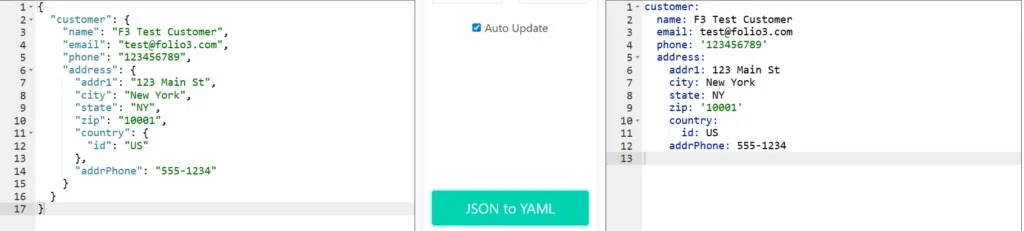
This example demonstrates YAML’s indentation-based structure where hierarchy is defined by spacing rather than brackets, minimal syntax with colons separating keys and values, selective quoting (only for values like ‘123456789’ and ‘10001’ that might be interpreted as numbers), and natural readability. YAML’s clean, prose-like format makes it highly human-readable while maintaining the complete nested structure of the original JSON data.
Why Use as LLM Input:
YAML’s unique advantage is its ability to include comments directly in the data structure, which none of the other formats support well. This makes YAML invaluable when you need to provide context, explanations, or instructions to the LLM alongside the data itself. While JSON, CSV, and ASON focus on compact data representation, YAML prioritizes human and LLM readability through natural indentation and the ability to document what each field means or why certain values are set. Use YAML for configuration files where context matters, for hierarchical data where relationships need explanation, or when you’re providing example data to an LLM and want to annotate what each section represents. The trade-off is slightly higher token usage compared to specialized formats like ASON, but the added context can improve LLM understanding and reduce misinterpretation.
YAML Payload Used
Create a sales order in NetSuite with below data:
entity:
  id: "44247"
tranDate: "2024-01-15"
location:
  id: "23"
subsidiary:
  id: "20"
shippingAddress:
  addr1: "123 Main St"
  addr2: "Suite 100"
  city: "New York"
  state: "NY"
  zip: "10001"
  country:
    id: "US"
  addressee: "F3 Test Customer"
  attention: "Shipping Department"
  addrPhone: "555-1234"
billingAddress:
  addr1: "456 Business Ave"
  city: "New York"
  state: "NY"
  zip: "10002"
  country:
    id: "US"
item:
  items:
    - item:
        id: "1945"
      quantity: 1
      rate: 100
      description: "Product description 1"
shipMethod:
  id: "2"
shipDate: "2024-01-20"
terms:
  id: "1"
salesRep:
  id: "19"
memo: "Sales order memo"
message: "Customer message"
otherRefNum: "PO-12345"
email: "[email protected]"
toBeEmailed: true
toBePrinted: false
Token Usage (YAML)
 "usage": {
    "input_tokens": 73815,
    "cache_creation_input_tokens": 0,
    "cache_read_input_tokens": 0,
    "cache_creation": {
      "ephemeral_5m_input_tokens": 0,
      "ephemeral_1h_input_tokens": 0
    },
    "output_tokens": 857,
    "service_tier": "standard",
    "server_tool_use": {
      "web_search_requests": 0
    }
  }
Using XML as an Input Format for MCP Tools
What Is XML?
XML is a markup language used for storing, transporting, and structuring data in a format that is readable by both humans and machines.
Key Features:
- Self-describing structure: Every piece of data is wrapped in descriptive opening and closing tags
- Strong validation: XML Schema (XSD) and DTD support for strict data validation
- Namespace support: Prevents naming conflicts in complex documents with xmlns declarations
- Attribute and element flexibility: Data can be stored as attributes or nested elements
- Unicode support: Full international character set support
- Mature ecosystem: Extensive tooling (XSLT, XPath, XQuery) and widespread industry adoption
XML – Sample Payload

This example showcases XML’s self-describing tags where every data element is wrapped in opening and closing tags (<name>…</name>, <email>…</email>), nested element structure showing clear parent-child relationships through tag containment, and explicit hierarchy with proper indentation. XML’s verbosity ensures that each piece of data is unambiguously labeled, making the structure self-documenting but token-heavy.
Why Use as LLM Input:
XML’s verbose structure is often seen as a disadvantage for token efficiency, but this explicitness serves a specific purpose that other formats don’t address: every piece of data is wrapped in descriptive tags that make the data type and meaning absolutely clear. Where JSON uses minimalist syntax, and CSV has no type information at all, XML’s opening and closing tags provide redundant validation that the data structure is correct. This makes XML particularly valuable for enterprise or legacy system integration where you need strict validation and schema enforcement, or for document-oriented data where the structure itself carries meaning. Use XML when precision and validation matter more than token efficiency, or when interfacing with systems that require XML (SOAP APIs etc).
XML Payload Used
Create a sales order in NetSuite with below data:
<entity><id>44247</id></entity><tranDate>2024-01-15</tranDate><location><id>23</id></location><subsidiary><id>20</id></subsidiary><shippingAddress><addr1>123 Main St</addr1><addr2>Suite 100</addr2><city>New York</city><state>NY</state><zip>10001</zip><country><id>US</id></country><addressee>F3 Test Customer</addressee><attention>Shipping Department</attention><addrPhone>555-1234</addrPhone></shippingAddress><billingAddress><addr1>456 Business Ave</addr1><city>New York</city><state>NY</state><zip>10002</zip><country><id>US</id></country></billingAddress><item><items><item><id>1945</id></item><quantity>1</quantity><rate>100</rate><description>Product description 1</description></items></item><shipMethod><id>2</id></shipMethod><shipDate>2024-01-20</shipDate><terms><id>1</id></terms><salesRep><id>19</id></salesRep><memo>Sales order memo</memo><message>Customer message</message><otherRefNum>PO-12345</otherRefNum><email>[email protected]</email><toBeEmailed>true</toBeEmailed><toBePrinted>false</toBePrinted>
Token Usage (XML)
"usage": {
    "input_tokens": 73864,
    "cache_creation_input_tokens": 0,
    "cache_read_input_tokens": 0,
    "cache_creation": {
      "ephemeral_5m_input_tokens": 0,
      "ephemeral_1h_input_tokens": 0
    },
    "output_tokens": 857,
    "service_tier": "standard",
    "server_tool_use": {
      "web_search_requests": 0
    }
  }
Token Usage Comparison Summary
Token savings are calculated as:
Tokens Saved = JSON Tokens – Format Tokens
Token Saved in Percentage = ((JSON Tokens – Format Tokens) / JSON Tokens) × 100
| Format | Input Tokens | Tokens Saved as compared to JSON | Tokens Saved in percentage as compared to JSON |
| JSON | 74,209 | Baseline | Baseline |
| CSV | 73,696 | 513 | 0.6913% |
| ASON | 73,614 | 595 | 0.8018% |
| JDON | 73,842 | 367 | 0.4945% |
| TONL | 74,128 | 81 | 0.1092% |
| TOON | 73,741 | 468 | 0.6307% |
| YAML | 73,815 | 394 | 0.5309% |
| XML | 73,864 | 345 | 0.4649% |
Interactive Dashboard: Visual Token Usage Analysis
To make this data more accessible and interactive, we’ve created a comprehensive dashboard that visualizes the token usage comparison across all formats. The dashboard includes:
- Key Metrics Cards: Highlighting the most efficient format, average reduction, and total formats tested
- Interactive Sorting: Sort by efficiency, name, or percentage difference
- Visual Charts: Bar chart for token counts and line chart for efficiency comparison
- Detailed Table: Complete breakdown with rankings, tokens saved, and color-coded efficiency
- Key Insights: Summary of main findings from the data
Explore the Interactive Dashboard
The dashboard provides a dynamic, visual way to understand how different formats perform and helps identify the best format for your specific use case.
Estimated Cost Comparison
When working with LLM APIs, token usage directly translates into cost. Even small percentage reductions in input tokens can compound into significant savings at scale.
Based on our measurements, a reduction of 595 input tokens (approximately 0.8 percent) per request may appear negligible at first glance. However, when applied to real-world MCP workloads, the impact becomes substantial:
- 1 request saves 595 tokens
- 1,000 requests per day save 595,000 tokens per day
- 17.85 million tokens per month (assuming 30 days)
This compounding effect is precisely why input format optimization matters, even when percentage differences seem small on a single request basis.
Final Thoughts and Conclusion
In this benchmark, ASON produced the lowest token usage (0.80% reduction), making it the most efficient choice for our Sales Order payload. Its intelligent compression techniques delivered measurable savings while maintaining perfect data fidelity and human readability.
CSV emerged as the strong second performer with 0.69% token reduction. As a universally recognized format, CSV excels with tabular data and offers practical advantages: easy interpretation for humans and LLMs, no special parsing libraries required, and universal system compatibility. For uniform datasets like logs, reports, or transaction records, CSV provides an excellent balance of efficiency and simplicity.
Busting the Format Myths
When we began this analysis, the AI community was experiencing intense format debates. LinkedIn feeds, GitHub threads, and developer forums were flooded with claims, with TOON particularly hyped as the revolutionary solution for LLM token efficiency.
Our real-world testing tells a different story. TOON ranked 3rd out of 8 formats with 0.63% token reduction, behind ASON (0.80%) and CSV (0.69%). This demonstrates a critical lesson: format performance is highly dependent on data structure and use case, not universal superiority.
The myth that one format dominates all scenarios has been effectively challenged. TOON’s features didn’t translate to optimal performance for our nested, object-heavy Sales Order data, while ASON and CSV, which better aligned with our data characteristics, delivered superior results.
Key Takeaways
- Token efficiency varies significantly based on your specific data structure
- Popular hype doesn’t always translate to practical performance gains
- Established formats like CSV shouldn’t be overlooked for newer alternatives
- Real-world testing beats assumptions and marketing claims
Practical Recommendations
Test multiple formats with your actual data rather than following trends. A powerful approach is building multi-agent pipelines that send payloads in multiple formats, measure token usage dynamically, and auto-select the most efficient format for future requests. This enables systems to adapt automatically rather than relying on assumptions or hype cycles.
In LLM-driven MCP architectures, format intelligence is as important as business logic. The best-performing formats align with your specific data characteristics, not necessarily those generating the most social media buzz.
Exploring Other Formats
Other emerging formats like Machine-Optimized Text Hierarchy (MOTH), LoreTokens, and Universal Real-World Tokenization Framework show promise but currently lack comprehensive documentation and conversion tools. As the ecosystem matures, these may prove valuable for specific use cases
Related Reads:
Before diving deeper into custom AI integrations, make sure you’ve covered the foundational setup steps explained in our earlier guides:
- A Complete Setup Guide for NetSuite AI Connector
- A Development Guide to Build Custom Tools for NetSuite AI Connector
- A Setup Guide for NetSuite AI Connector with Postman: API Integration Tutorial
- Dual API Integration: Using NetSuite MCP Tools with OpenAI and Anthropic
- Connecting NetSuite MCP with ChatGPT: A Complete Guide
- IDE Integration Guide for NetSuite MCP Tools in Cursor & VS Code
- NetSuite MCP Challenge: Implementation Case Study & Results
- Getting Started with NetSuite SuiteTalk REST API in Postman
- Connecting MCP Tools with QWEN
- NetSuite MCP OAuth 2.0 Token Generator Tool
- Connecting ChatGPT Business with NetSuite via MCP: The Future of Enterprise AI Integration
These articles collectively provide the complete foundation from setup, authentication, to advanced tool deployment, helping you integrate AI with NetSuite confidently and efficiently.
Need help with your NetSuite AI integration? Feel free to reach out for additional support and guidance.

