Migrating from SuiteCommerce to BigCommerce is one of the best ways to improve your store’s flexibility. But if poorly executed, you risk losing historical data, crashing your SEO rankings, and suffering costly downtime. On that note, allow me to help you execute a flawless migration.
Key Takeaways
- A successful SuiteCommerce to BigCommerce migration starts long before your website is moved. Cleaning your data, reviewing integrations, and planning each step can prevent costly mistakes later.
- You’re not just migrating an online store. Products, customers, orders, SEO, and third-party integrations all need to move without disrupting your business.
- Broken URLs, missing data, and disconnected integrations are some of the most common SuiteCommerce migration challenges, but they can be avoided with the right migration strategy.
- Testing every part of your store before launch helps catch checkout issues, pricing errors, and broken workflows before customers experience them.
- A well-planned migration gives your business room to grow while keeping your customer experience smooth throughout the transition.
What is a SuiteCommerce to BigCommerce Migration?
Every e-commerce business reaches a point where its online store starts feeling more limiting than helpful.
Adding new features takes longer than expected. Making simple design changes becomes complicated. Integrating new tools feels like a project on its own instead of a quick update.
That’s usually when businesses start thinking about migrating away from SuiteCommerce.
At first, it sounds simple. Move your store to a new platform, transfer the data, and continue selling.
But in reality, you’re moving much more than a website.
You’re moving years of customer information, product catalogs, order history, SEO rankings, integrations, and business processes. If even one piece is overlooked, it can affect your sales, customer experience, and day-to-day operations.
The good news is that most SuiteCommerce to BigCommerce migration challenges can be avoided with proper planning. In this guide, we’ll walk through the biggest challenges businesses face during migration and, more importantly, how to overcome them without disrupting your operations.
Why More Businesses Are Making The Move To BigCommerce?
Businesses don’t decide to migrate because their current platform suddenly stops working.
Most of the time, the platform simply can’t keep up with the way the business has grown.
Maybe your team wants more flexibility to customize the storefront. Maybe adding new features takes too long, or connecting modern e-commerce tools has become more complicated than it should be. Over time, these small frustrations begin slowing the business down.
That’s one of the biggest reasons companies start considering a SuiteCommerce to BigCommerce migration.
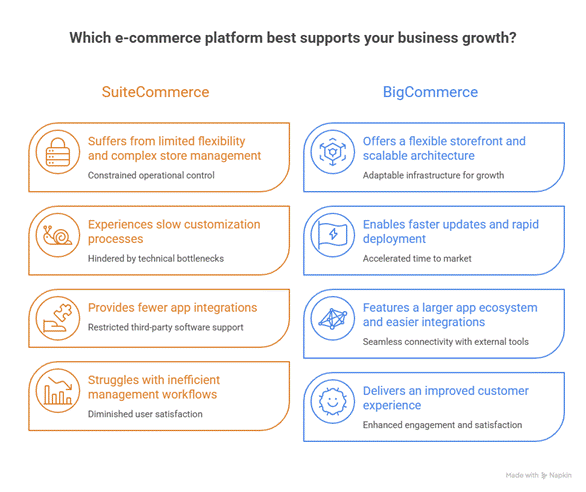
BigCommerce gives businesses more freedom to build and manage their online stores while connecting easily with popular payment gateways, marketing tools, shipping providers, and other business applications. It also offers a large ecosystem of apps and integrations, making it easier to expand your store as your business grows.
Of course, every business has different goals. For some, it’s about creating a better shopping experience. For others, it’s reducing maintenance or preparing for future growth.
Whatever the reason, migrating platforms should ‘solve existing problems, not create new ones.’ That’s why having a clear migration strategy is just as important as choosing the right e-commerce platform, because…
You’re Not Just Migrating A Website
One of the biggest misconceptions about e-commerce migration is that it’s only about moving your website from one platform to another.
In reality, your website is just the part your customers see!
Behind every product page is a network of business data that keeps your store running. Product information, customer accounts, pricing rules, discounts, order history, inventory, images, and integrations all work together behind the scenes.
Imagine moving into a new house.
You wouldn’t simply throw everything into boxes without labeling them. If you did, finding what you need after the move would quickly become frustrating.
The same applies to e-commerce migration.
Moving your data without organizing it first often leads to duplicate products, missing customer records, broken categories, and inaccurate inventory. Fixing these problems after launch usually takes far more time than preventing them in the first place.
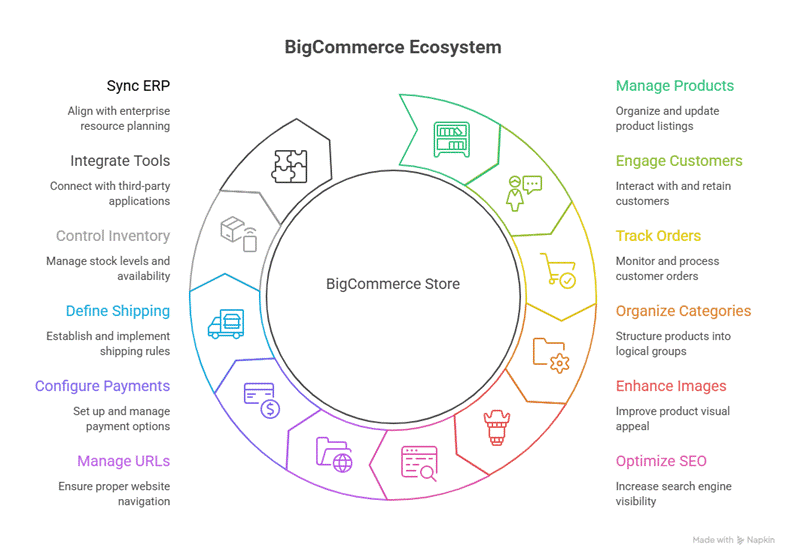
That’s why one of the most important SuiteCommerce to BigCommerce migration steps is understanding exactly what needs to move, what should be cleaned up, and what no longer adds value.
“Before moving your existing store to the BigCommerce environment, you need to check the compatibility of your current plugins, integrations, and custom code. Are they integrable with BigCommerce, or will you need to replace them with new plugins?” – Successive Technologies
What Actually Moves During A SuiteCommerce To BigCommerce Migration?
In case you’re wondering what actually moves during this process, I have got you covered!
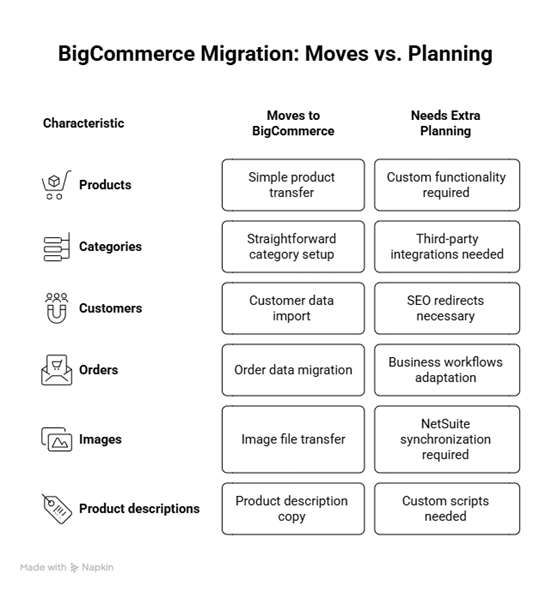
Now, the question arises: how do you actually migrate everything? Because nobody ever tells you the clear steps.
So, here you go…
SuiteCommerce To BigCommerce Migration Steps
A successful migration doesn’t happen in a single day. It’s a series of small, well-planned steps that reduce risk and keep your business running smoothly throughout the process.
Here’s a short overview of a simple roadmap you can follow.
1. Assess Your Current Store
Review your existing SuiteCommerce store, identify what needs to be migrated, and remove outdated products, pages, or customer records.
2. Prepare and Clean Your Data
Organize your product catalog, customer information, and inventory before migration. Clean data makes the entire process smoother.
3. Set Up Your BigCommerce Store
Configure your new store by setting up categories, payment methods, shipping options, taxes, and other essential settings.
4. Migrate Your Data
Transfer products, customers, order history, images, and other important business data while ensuring everything is mapped correctly.
5. Reconnect Your Integrations
Connect BigCommerce with NetSuite, payment gateways, shipping providers, CRM, and any other third-party applications your business relies on.
6. Test Every Workflow
Test product pages, checkout, payments, inventory updates, customer accounts, and integrations to make sure everything works as expected.
7. Launch and Monitor
Once everything is verified, launch your new store and monitor its performance closely. Fix any issues quickly to ensure a smooth experience for your customers.
Moving forward, let’s talk about the Major Challenges we face while migrating, which you came here for.
Major Migration Challenges from SuiteCommerce to BigCommerce
1. Your Data Isn’t As Ready As You Think
When businesses think about migration, they usually focus on choosing the new platform.
In reality, the biggest challenge is often the data itself.
Over the years, e-commerce stores have collected duplicate products, outdated customer records, inactive promotions, missing product images, and inconsistent categories.
These issues may go unnoticed in your current store, but they become much more obvious during migration.
Moving disorganized data into BigCommerce is like moving clutter into a brand-new office. The problems don’t disappear; they simply move with you.
Before starting your migration from SuiteCommerce, review your existing data carefully.
2. Your SEO Shouldn’t Reset Overnight
One of the biggest mistakes businesses make during a SuiteCommerce to BigCommerce migration is focusing only on the new store while forgetting everything that helped customers find the old one.
Search engines have already indexed your product pages, category pages, and blog posts. If those URLs suddenly disappear, customers may land on error pages instead of your store.
To avoid this, create proper 301 redirects, keep important page URLs where possible, and migrate your metadata, headings, and image alt text. It also helps to review your sitemap once the new store is live, so search engines can quickly discover the updated pages.
Your rankings may fluctuate for a short time, but careful planning can prevent a significant drop in organic traffic.
Once your SEO is protected, the next question is whether all the tools behind your store will continue working as expected.
3. Your Integrations Need A New Home Too
Your online store doesn’t work alone. It exchanges information with payment gateways, shipping providers, ERP systems, CRMs, marketing platforms, and inventory software every day.
During a migration from SuiteCommerce, these integrations need to be reviewed, not simply copied over. Some may require new connectors, while others may work differently in BigCommerce.
Before launching your new store, make a list of every integration your business depends on and test each one individually. An order that reaches your website but never reaches your ERP can quickly turn into an unhappy customer.
After your systems are connected again, it’s time to look at something that’s often overlooked: your customizations.
4. Not Every Custom Feature Will Make The Move
Every business runs a little differently.
Maybe you’ve customized your checkout process, built unique pricing rules, or added features specifically for your customers. Those customizations won’t automatically appear in BigCommerce.
Instead of trying to recreate everything, review each feature and ask a simple question:
“Does our business still need this?”
You’ll often find that some customizations solved problems that no longer exist, while BigCommerce already provides built-in alternatives for others.
Once the important features are in place, there’s one final step to take before launch.
5. Don’t Let Your Customers Find The Problems First
A successful migration isn’t complete just because the website is live.
Before launch, test your store the same way your customers would. Browse products, add items to the cart, apply discount codes, complete purchases, request refunds, and check confirmation emails.
It’s also worth testing your store on different devices and browsers. A checkout page that works perfectly on a desktop might not perform the same way on a mobile phone.
Catching these issues before launch is much easier than fixing them after customers start reporting them.
Now that you’ve handled the biggest SuiteCommerce to BigCommerce migration challenges, all that’s left is making sure nothing has been missed before launch. A simple checklist can help you do exactly that.
Ask yourself:
- Are there duplicate products that can be removed?
- Are product descriptions still accurate?
- Do customer records contain outdated information?
- Is inventory data up to date?
- Are product categories organized logically?
Taking the time to clean your data before migration makes the transition much smoother and gives your new BigCommerce store a much stronger starting point.
Mistakes That Can Make Migration More Difficult Than It Needs to Be
Most SuiteCommerce migration challenges don’t happen because businesses choose the wrong platform. They happen because important details are overlooked during the migration process.
Fortunately, these mistakes are easy to avoid if you know what to look for.
| Common Mistake | Why It Causes Problems | How to Avoid It |
| Migrating unnecessary data | Old or duplicate records create confusion in the new store. | Clean your data before migration. |
| Ignoring SEO | Broken URLs can reduce organic traffic and affect search rankings. | Set up 301 redirects and preserve important metadata. |
| Forgetting integrations | Business processes stop working after launch. | Test every integration before going live. |
| Skipping user testing | Small issues remain unnoticed until customers report them. | Test your store from a customer’s perspective. |
| Launching too quickly | Last-minute problems become harder to fix. | Plan enough time for testing and final reviews. |
One Last Checklist Before You Make The Switch
Before launching your new BigCommerce store, take one final step back and review the essentials. A simple checklist can help you catch small issues before they turn into bigger problems after launch.
Before you go live, make sure you have:
- Reviewed and cleaned your existing store data.
- Migrated products, customers, and order history successfully.
- Configured all third-party integrations.
- Set up 301 redirects for important pages.
- Checked SEO elements like page titles and meta descriptions.
- Tested checkout, payments, shipping, and customer accounts.
- Verified inventory and pricing information.
- Confirmed that data syncs correctly with NetSuite.
- Tested the store on desktop and mobile devices.
- Created a backup before making the final switch.
It may seem like a long list, but spending a little more time here is much better than discovering problems after customers start placing orders.
Final Thoughts
One thing I’ve noticed is that businesses often think that a new e-commerce migration platform will solve every problem overnight. In reality, the platform is only one part of the equation. The real difference comes from how well the migration is planned.
A successful SuiteCommerce to BigCommerce migration isn’t about moving your store as quickly as possible. It’s about making sure your products, customers, integrations, and SEO move with it without disrupting your business. Taking the time to prepare your data, test every workflow, and review each integration can save weeks of troubleshooting later.
If you’re planning a migration from SuiteCommerce, working with an experienced BigCommerce and NetSuite partner like Folio3 can help you make the transition with confidence while keeping your business running smoothly throughout the process.
Frequently Asked Questions
Why do businesses migrate from SuiteCommerce to BigCommerce?
Many businesses migrate to gain more flexibility, access to a larger app ecosystem, easier storefront customization, and a better overall ecommerce experience as they continue to grow.
What are the biggest SuiteCommerce to BigCommerce migration challenges?
The most common challenges include migrating data accurately, maintaining SEO rankings, reconnecting third-party integrations, rebuilding custom features, and thoroughly testing the new store before launch.
How long does a SuiteCommerce to BigCommerce migration take?
The timeline depends on the size and complexity of your store. A small store may take a few weeks, while larger businesses with multiple integrations and customizations may require several months.
Can I migrate my order history and customer data?
Yes. Products, customer accounts, order history, categories, and other important business data can all be migrated with proper planning and the right migration tools.