

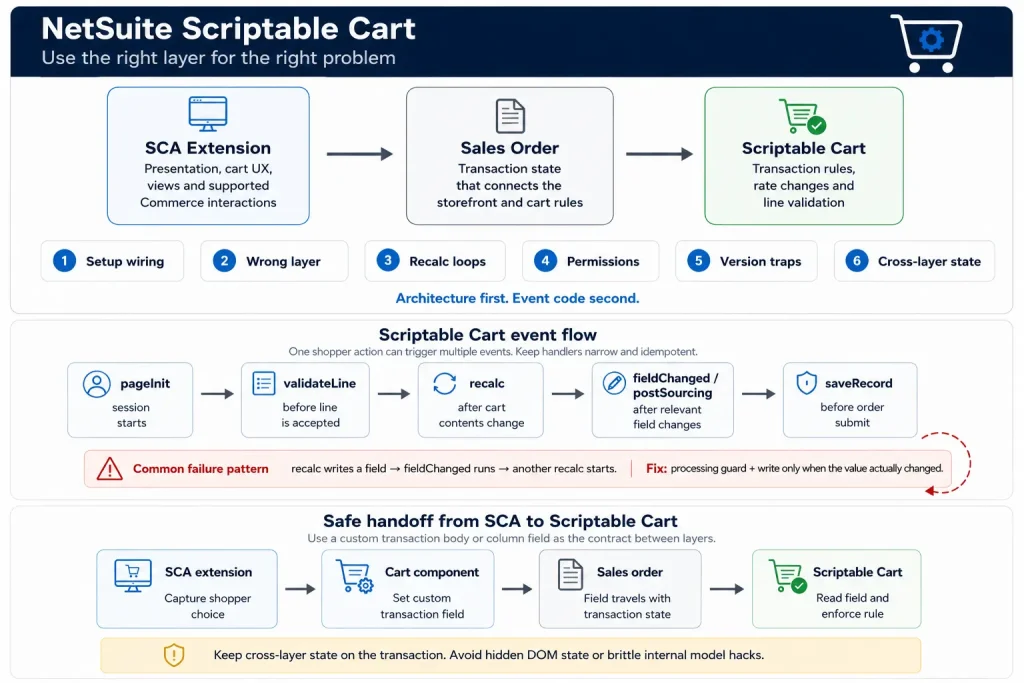
If you already build SuiteCommerce Advanced extensions, Scriptable Cart can look redundant at first. SCA has a Cart component, checkout events, custom views, services, and transaction fields. Why add another scripting layer?
Because Scriptable Cart solves a different class of problem.
An SCA extension is usually the right place for storefront behavior. Scriptable Cart runs against the sales order form used by the web store. That difference matters when a rule must change transaction behavior, modify an item rate, react to sales-order events, or run consistently when the same order is handled through both the web store and NetSuite.
The feature is useful, but it is also easy to wire incorrectly. A script can work on a sales order in the NetSuite UI and do nothing online. A recalc handler can create its own loop. A lookup can work for an administrator and fail for a shopper. A developer can also spend days writing Scriptable Cart code for a requirement that a normal SCA extension or even a standard item preference already solves.
This guide focuses on those problems.
First, what Scriptable Cart actually is
Scriptable Cart is NetSuite’s mechanism for running supported SuiteScript events on the sales order form behind a web-store cart and checkout. The shopper is not editing a visible NetSuite sales order form, but the cart still uses sales-order transaction behavior underneath.
That is why Scriptable Cart and the SCA Cart component should not be treated as two names for the same API.
The SCA Cart component works with the Commerce application’s LiveOrder. It exposes supported methods for operations such as adding and updating lines, promotions, shipping, purchase-order numbers, and custom transaction body fields in supported releases.
Scriptable Cart sits closer to the transaction form and responds to supported sales-order client events such as pageInit, validateLine, recalc, fieldChanged, postSourcing, and saveRecord.
A useful rule is:
Put presentation and normal cart interaction in the extension. Put transaction invariants in Scriptable Cart only when they really need the sales-order scripting layer.
There is one more naming trap worth clearing up. The NetSuite shoppingcart record is not Scriptable Cart. The record is a separate search-oriented record used for shopping-cart information. Scriptable Cart is the feature that attaches SuiteScript behavior to the web-store sales-order flow.
Pain point 1: Scriptable Cart is enabled, but the script never runs
This is the first problem to solve because everything else is irrelevant until the website is actually using the scripted sales-order form.
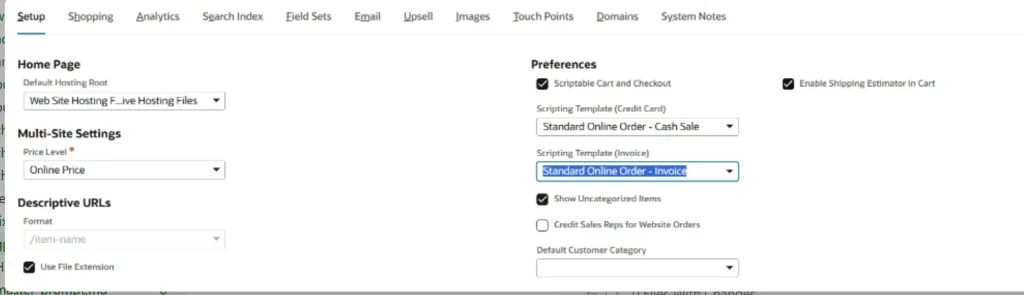
The website record contains the switch and the two scripting-template selections. In the website record shown below, the setting is on the Setup tab under Preferences.
At minimum, verify these pieces together:
- Scriptable Cart and Checkout is enabled on the website record
- The correct Scripting Template (Credit Card) is selected
- The correct Scripting Template (Invoice) is selected when customers can buy on terms
- Your script is attached to the customized online sales-order form used by the selected scripting template
- The client or user-event script deployment is associated with the correct sales-order context
- The deployment audience allows the website customer role that will execute it
- Required SuiteScript and Commerce customization features are enabled for the account
The important detail is the invoice form. If customers can use terms, Oracle documents that the checkout script must be attached to both the customized Online Order Invoice form and the Online Order Cash Sale form. Testing only with a credit-card customer can hide a broken invoice path.
A simple smoke test
Before adding pricing logic, searches, or customer rules, make the smallest possible Scriptable Cart handler and prove that the web store reaches it.
For a SuiteScript 1.0 test:
function customRecalc(type, action)
{
    nlapiLogExecution(
        'AUDIT',
        'Scriptable Cart smoke test',
        'type=' + type + ', action=' + action +
        ', context=' + nlapiGetContext().getExecutionContext()
    );

    return true;
}
Attach customRecalc to the Recalc function on the script record, then change a cart quantity.
If the execution log stays empty, do not debug your business logic yet. Debug the form, scripting template, deployment, website selection, and audience.
Why it works in NetSuite but not online
The NetSuite UI and the web store are not equivalent execution environments. A client script can be loaded on a sales-order form used by an employee while the website uses a different customized online form. The web store also executes with shopper-facing permissions, not your administrator role.
Treat “works on a sales order in NetSuite” and “works in Scriptable Cart” as two separate tests.
Pain point 2: Scriptable Cart is used for the wrong requirement
This is probably the most expensive mistake because the code can be technically correct and still be architecturally unnecessary.
A custom button, inline message, modal, cart badge, extra checkout view, or ordinary line update normally belongs in an SCA extension. The Frontend Extensibility API is designed to customize the Commerce application while keeping the implementation upgrade-safe.
Scriptable Cart becomes a candidate when the requirement depends on the sales-order scripting layer. Oracle gives two particularly useful examples: modifying item rates and applying the same customization in both the Commerce site and the NetSuite UI.
Do not write code for a standard NetSuite preference
Suppose the requirement is:
A shopper cannot buy fewer than 2 units or more than 20.
Before writing validateLine, check the item setup. NetSuite item records support standard minimum and maximum web-store quantities. A custom script is justified when the rule is more specific, for example:
- quantity must be a multiple of a customer-specific case pack
- maximum quantity changes by contract or customer class
- two items cannot coexist in the same order
- rate is calculated from a contract rule that standard pricing cannot represent
- the rule must be identical for web orders and employee-entered orders
That is a much healthier boundary than “cart logic goes in Scriptable Cart.”
Example: customer-specific case-pack validation
Assume a custom transaction column field called custcol_example_case_pack has already been populated with the applicable pack size. The field ID below is an example custom field, not a NetSuite standard field.
function customValidateLine(type)
{
    if (type !== 'item')
    {
        return true;
    }

    var quantity = parseFloat(
        nlapiGetCurrentLineItemValue('item', 'quantity')
    ) || 0;

    var casePack = parseFloat(
        nlapiGetCurrentLineItemValue('item', 'custcol_example_case_pack')
    ) || 1;

    if (casePack > 1 && quantity % casePack !== 0)
    {
        return false;
    }

    return true;
}
This handler has one job. It decides whether the current line is valid. It does not load unrelated records, recalculate the whole order, change shipping, or perform a remote call.
That narrowness is intentional.
Pain point 3: recalc creates a loop or makes the cart feel slow
This is where Scriptable Cart implementations most often become fragile.
Cart changes can trigger recalculation. Your recalculation code changes a field. That field change can fire another event. Another recalculation starts. Even if the loop eventually stops, the shopper experiences repeated server work and a sluggish cart.
A simplified flow looks like this:
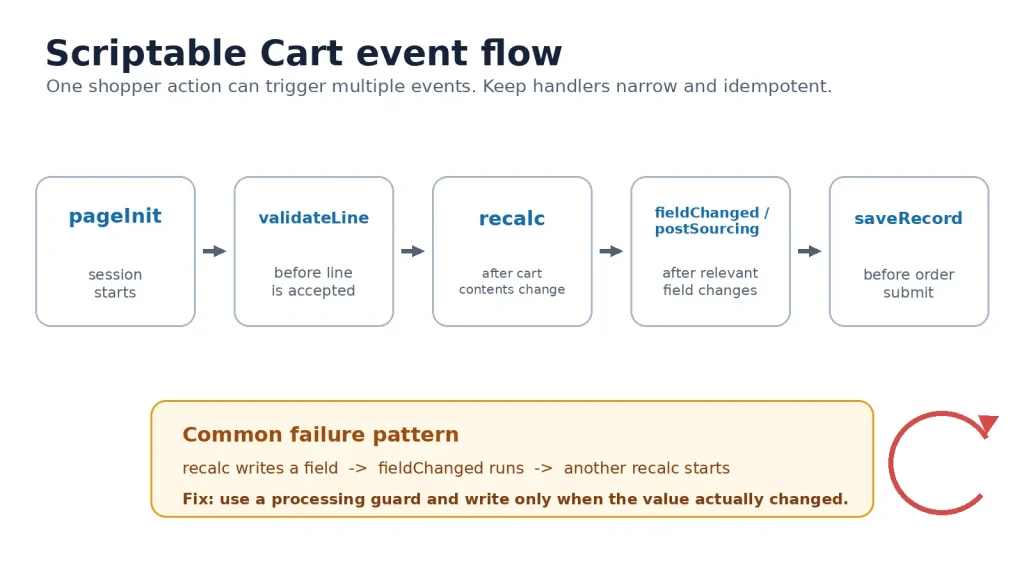
Oracle recommends creating a custom recalculation function and limiting the events that actually do work. The practical extension of that advice is to make handlers idempotent.
An idempotent handler can run twice with the same cart state without making a second unnecessary change.
Use a processing guard
var CART_RULE_PROCESSING = false;

function customRecalc(type, action)
{
    var context = nlapiGetContext().getExecutionContext();

    if (context !== 'webstore')
    {
        return true;
    }

    if (type !== 'item' || CART_RULE_PROCESSING)
    {
        return true;
    }

    try
    {
        CART_RULE_PROCESSING = true;

        // 1. Read only the values needed for this calculation.
        // 2. Calculate the expected result.
        // 3. Compare expected vs current value.
        // 4. Write only when the value actually changed.

        return true;
    }
    finally
    {
        CART_RULE_PROCESSING = false;
    }
}
The flag is not a substitute for good event design. It is a final guard against re-entry.
Do not perform expensive work on every event
A common anti-pattern is:
quantity changes
  -> load customer
  -> run saved search
  -> load item
  -> call Suitelet
  -> set three fields
  -> trigger more events
That can be acceptable in a back-office script that runs once. It is a poor design for an event that may execute repeatedly while somebody is shopping.
For Scriptable Cart:
- read current transaction values first
- cache data reused during the session where appropriate
- avoid loading full records when a field or lightweight lookup is enough
- avoid repeated searches for values that do not change during the session
- separate validation from recalculation
- do not write a field when it already contains the correct value
- move post-order work out of the shopper’s synchronous path
If a rule needs heavy integration work after the order is created, a user event plus scheduled or Map/Reduce processing is a better home.
Pain point 4: the script works for an administrator and fails for a shopper
This problem is easy to misdiagnose as bad data.
The web store does not run your client-side cart logic with Administrator access. Oracle’s Scriptable Cart guidance calls out Customer Center permissions because scripts that access records or fields still operate within the shopper’s permissions.
That leads to a familiar pattern:
- developer tests a search in the NetSuite UI
- administrator can load the related custom record
- Scriptable Cart tries the same lookup
- the shopper role cannot access it
- the cart rule fails, returns incomplete data, or behaves differently
The wrong fix is to make everything execute as Administrator just to make the error disappear.
Design for least privilege
Ask what the cart genuinely needs.
If the shopper only needs a boolean such as “contract pricing applies,” do not expose the full contract record to the browser. Derive the smallest safe value on the server and put the result somewhere the cart is allowed to use.
Good options depend on the requirement:
- standard customer or item fields already exposed to Commerce
- a controlled custom transaction body or column field
- an SCA service that returns only the derived value required by the UI
- server-side validation on submit when the rule does not need to block the shopper earlier
- a backend process for privileged post-order work
Never use a privileged service as a generic proxy that lets a browser request arbitrary NetSuite records.
Context checks should be deliberate
If the same script is attached to a form used both online and in NetSuite, branch deliberately by context instead of assuming both environments should execute identical code paths.
The business rule may be shared while the data-access strategy differs.
For example:
function customRecalc(type, action)
{
    var context = nlapiGetContext().getExecutionContext();

    if (context === 'webstore')
    {
        return processWebStoreCart(type, action);
    }

    return processNetSuiteSalesOrder(type, action);
}
The shared pricing function can still live in one library. The event wrapper decides how the current environment obtains its inputs.
Pain point 5: a SuiteScript upgrade breaks Scriptable Cart
Modern NetSuite development normally pushes developers toward SuiteScript 2.1. Scriptable Cart is one of the places where blindly applying that rule can break a working implementation.
Oracle currently documents two important restrictions:
- SuiteScript 2.1 client scripts are not supported for Scriptable Cart
- A SuiteScript 2.0 user-event script and SuiteScript 2.0 client script cannot be used together for Scriptable Cart at the same time. Oracle recommends, in most cases, SuiteScript 1.0 for the user event and SuiteScript 2.0 for the client side, although the reverse combination is supported
This means a “modernize everything to 2.1” migration plan needs a Scriptable Cart exception.
Why this article uses SuiteScript 1.0 for event examples
The examples in this guide use the documented Scriptable Cart gateway signatures such as:
customRecalc(type, action)
customValidateLine(type)
Using SuiteScript 1.0 keeps those examples aligned with the event model Oracle documents for Scriptable Cart and avoids pretending that 2.1 is supported where it is not.
If your implementation uses a SuiteScript 2.0 client script, use the supported 2.0 Client Script entry points and test the exact event mapping for your account and SCA release.
Do not convert a Scriptable Cart client script to 2.1 just because the rest of the project has moved there.
Treat version choice as architecture, not cleanup
Before changing versions, inventory:
- Scriptable Cart client script version
- Scriptable Cart user-event version
- gateway functions in use
- custom modules they depend on
- forms and deployments using those scripts
- web-store scenarios that trigger each event
Then migrate one side at a time and test the web store, not just the script debugger.
Pain point 6: the SCA extension knows something Scriptable Cart needs
This is a real-world boundary problem.
An extension may collect a shopper choice such as:
Order mode:
- Standard order
- Project order
- Contract release
The UI belongs in the extension. The transaction rule belongs in Scriptable Cart. The two layers need a stable contract.
Oracle documents custom transaction body or column fields as the bridge between Commerce customization and the sales-order transaction. That is much safer than hiding state in the DOM or relying on a global JavaScript variable.
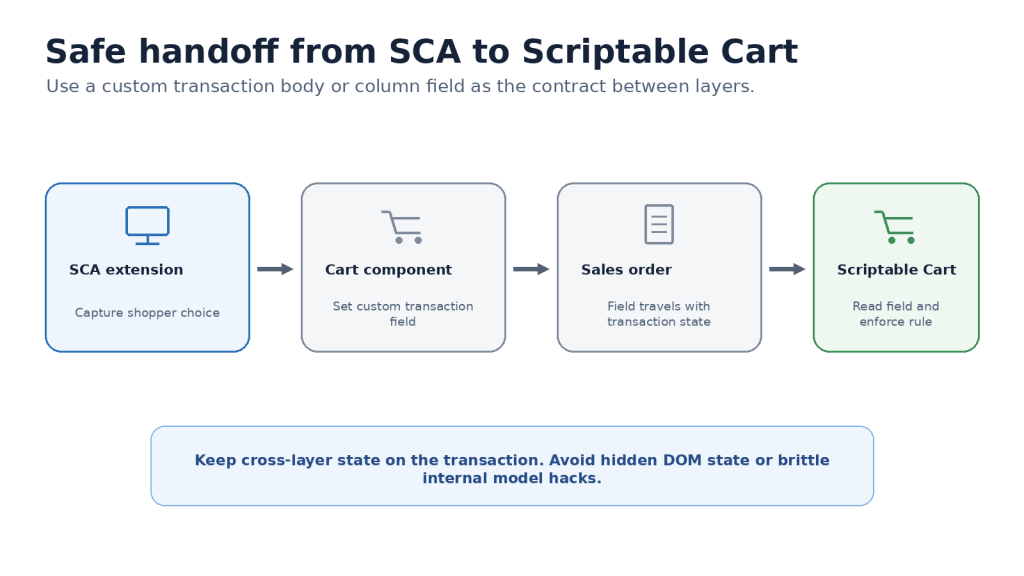
For SuiteCommerce 2021.1 and later, Oracle added setTransactionBodyField() to the Cart component. That gives an extension a supported way to set a custom transaction body field in compatible releases.
A version-aware pattern looks like this:
define('Company.OrderMode', [], function ()
{
    'use strict';

    return {
        mountToApp: function (container)
        {
            var cart = container.getComponent('Cart');

            if (!cart || !cart.setTransactionBodyField)
            {
                throw new Error(
                    'Cart.setTransactionBodyField requires a compatible SuiteCommerce release.'
                );
            }

            return cart.setTransactionBodyField({
                fieldId: 'custbody_example_order_mode',
                type: 'select',
                value: '2'
            });
        }
    };
});
custbody_example_order_mode is an example custom field ID. Replace it with the field configured in your account. The field, its type, and its valid values must be created and verified in your account.
If the site is older than SuiteCommerce 2021.1, do not copy an internal LiveOrder model hack from an old blog and assume it is upgrade-safe. Either use a supported strategy for that SCA release or treat an upgrade as part of the design.
Scriptable Cart reads the transaction value
Once the value is on the transaction, the cart rule can use it without knowing how the extension rendered the UI:
function isContractRelease()
{
    return nlapiGetFieldValue('custbody_example_order_mode') === '2';
}
That separation is useful because the extension can change its view implementation later without changing the transaction contract.
A complex scenario that combines all six problems
Consider a B2B distributor with these rules:
- contract customers receive a negotiated item rate
- selected SKUs must be ordered in multiples of 12
- a single online line cannot exceed 120 units
- orders with at least 60 eligible units receive a freight benefit
- contract-release orders must carry a contract reference
- the same pricing rule must work for sales reps entering orders in NetSuite
A clean architecture would split responsibilities instead of forcing all logic into one script.
SCA extension
The extension owns:
- the contract-release selector
- any explanatory content or validation UI
- setting the custom transaction body field
- normal Cart component interaction
Scriptable Cart
Scriptable Cart owns:
- case-pack line validation
- transaction-level pricing changes that require the sales-order scripting layer
- lightweight recalculation of cart-dependent rules
- final saveRecord checks that must block submission before the order is accepted
Backend SuiteScript
Backend logic owns:
- privileged contract verification that should not be exposed to the browser
- external-system synchronization
- post-order audit records
- heavy processing that should not delay checkout
This is the main design lesson: Scriptable Cart is valuable when it is one small layer in the transaction architecture. It becomes dangerous when it turns into the place where every Commerce rule, lookup, integration, and message is implemented.
A debugging sequence that saves time
When Scriptable Cart behaves incorrectly, debug from the outside in.
1. Prove the website is using the expected scripting template
Check the website record and both credit-card and invoice scripting-template selections.
2. Prove the event fires
Use a minimal audit log. Do not start with the full pricing engine.
3. Log context and only safe identifiers
Capture event name, execution context, and enough state to reproduce the path. Do not dump customer PII, payment information, or entire transaction objects into logs.
4. Test the real shopper role
Administrator testing does not prove Customer Center access.
5. Test both payment paths
If the site supports terms, test invoice and credit-card customers.
6. Test cart mutations, not only checkout
Add a line, change quantity, remove a line, apply a promotion if relevant, change shipping if relevant, and then submit.
7. Watch for duplicate writes
If changing one quantity produces several identical logs or repeated field updates, look for event recursion before adding more code.
8. Retest in a clean shopper session
Stale session data can make a fixed script look broken or a broken script look fixed.
When I would not use Scriptable Cart
I would not choose Scriptable Cart for a requirement that can be cleanly solved by:
- standard item or website configuration
- a supported SCA Frontend Extensibility API method
- an extension view or checkout module
- a normal backend script after order creation
I would also avoid putting remote API calls directly into frequently firing cart events unless there is no safer architecture. A shopper should not wait on an external system every time quantity changes.
Scriptable Cart earns its place when the requirement is transaction-specific and the sales-order event model is the right enforcement point.
Quick reference
| Problem | Better first move |
| Script never fires | Verify website switch, scripting templates, forms, deployment, audience |
| Simple cart UI requirement | Use an SCA extension |
| Simple min/max quantity | Check standard item configuration first |
| Rate or transaction rule | Consider Scriptable Cart |
| recalc repeats | Add narrow event filters, change-only writes, processing guard |
| Works as admin only | Test Customer Center permissions and redesign data access |
| 2.1 migration breaks cart | Keep Scriptable Cart within documented version support |
| Extension and cart script need shared state | Use a custom transaction body or column field |
| Heavy post-order work | Move it to user event plus scheduled or Map/Reduce processing |
FAQ
Is Scriptable Cart the same as the SuiteCommerce Cart component?
No. The Cart component is part of the SuiteCommerce Extensibility API and works with the Commerce application’s LiveOrder. Scriptable Cart runs supported SuiteScript behavior against the sales-order form used by the web store.
Can Scriptable Cart change item rates?
Yes. Rate modification is one of the use cases Oracle identifies for Scriptable Cart when the requirement cannot be handled through ordinary Commerce customization.
Can I use SuiteScript 2.1 for a Scriptable Cart client script?
Oracle currently states that SuiteScript 2.1 client scripts are not supported in Scriptable Cart.
Why does my script work in NetSuite but not on the website?
The website may be using a different customized sales-order form or scripting template, and shopper execution uses different permissions. Verify both before debugging the business logic.
Should I use validateLine or saveRecord?
Use validateLine for a rule that should reject the current line before it is accepted. Use saveRecord for a final whole-order condition that must block submission. Keep both handlers focused so the shopper does not pay for unnecessary work.
Closing takeaway
Scriptable Cart is not the first tool I would reach for in an SCA customization. That is exactly why it is useful when the requirement genuinely belongs there.
Start with configuration. Use the Extensibility API for storefront behavior. Use Scriptable Cart when the transaction itself must enforce a rule through the sales-order event model. Keep the event handlers small, respect shopper permissions, treat SuiteScript version support as a hard constraint, and use transaction fields when the extension and Scriptable Cart need to share state.
That approach prevents Scriptable Cart from becoming a hidden second application inside your checkout.
References
- SuiteScript for Scriptable Cart
- Creating Custom Functions for Scriptable Cart
- Scriptable Cart Fundamentals and Set Up
- Start Using Scriptable Cart with SuiteCommerce or SCA
- Best Practices for Using Scriptable Cart with SuiteCommerce or SCA
- Testing and Debugging Scriptable Cart
- Creating Customer-Facing Messages from Scriptable Cart
- Extensibility API Components
- SuiteCommerce 2021.1 Release Notes
Technical examples use placeholder custom field IDs. Verify custom fields, forms, roles, and script deployments in the target NetSuite account before production use.
Related Reads
Continue building your NetSuite development knowledge with these practical Folio3 guides. They cover API integrations, MCP tools, authentication, development workflows, and real world implementation patterns that complement the SuiteCommerce concepts discussed in this guide.
Getting Started
• A Complete Setup Guide for NetSuite AI Connector
• A Setup Guide for NetSuite AI Connector with Postman: API Integration Tutorial
• Getting Started with NetSuite SuiteTalk REST API in Postman
• NetSuite MCP OAuth 2.0 Token Generator Tool
• SuiteScript Essentials: A Developer’s Getting Started Guide
• Open Source for Dummies: A Beginner’s Open Source Journey
• SuiteCommerce Development: An Illustrated Guide from Setup to Extension Deployment & Troubleshooting
MCP and Client Integrations
• IDE Integration Guide for NetSuite MCP Tools in Cursor & VS Code
• Connecting MCP with ChatGPT: A Complete Guide
• Connecting MCP Tools with Qwen
• Connecting ChatGPT Business with NetSuite via MCP: The Future of Enterprise AI Integration
• OAuth 2.0 in NetSuite: Complete Setup Guide (Client Credentials Flow)
Advanced and Architecture
• Building Custom Tools for NetSuite AI Connector: Development Guide
• Dual API Integration: Using NetSuite MCP Tools with OpenAI and Anthropic
• NetSuite MCP Challenge: Implementation Case Study & Results
• MCP Input Formats Compared: Token Usage Analysis for NetSuite MCP Tools
• Integrating NetSuite MCP Tools with AI-Powered CLI Tools
• WhatsApp Triggered AI Agent for NetSuite Using n8n and MCP Tools
