Key Takeaways
- Shop floor visibility means knowing the current status of a job, a machine, or a material as it happens, not reconstructing it later from paperwork or memory.
- Paper-based job tracking is the most common cause of poor shop floor visibility, since a job’s status only updates when someone writes it down at a checkpoint.
- The gap also comes from batching updates to the end of a shift, no shared view across shifts, one supervisor holding most of the floor knowledge, and material that stops being tracked once it is issued to a job.
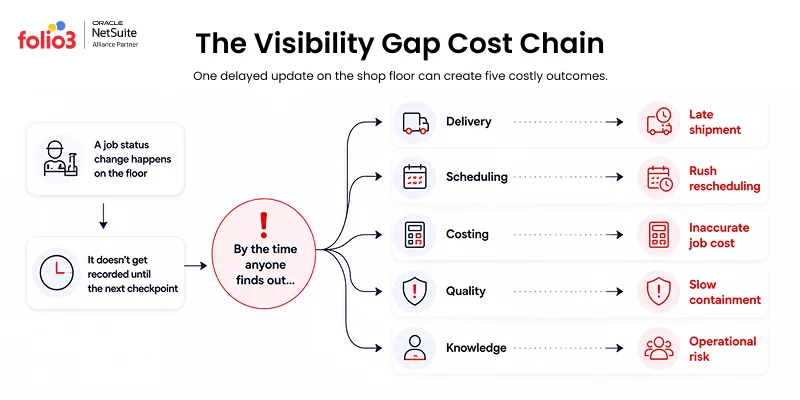
- The cost shows up as late deliveries, reactive scheduling, inaccurate job costing, slow quality containment, and risk tied to one person’s knowledge.
- NetSuite delivers real-time shop floor visibility through work order status, operation-level time tracking, and live WIP data built into the system the team already uses.
What Is Shop Floor Visibility?
Shop floor visibility is the ability to see the current status of jobs, equipment, and material on the production floor as conditions change, rather than learning about them after the fact. It covers where each job stands in its routing, whether a machine is running or stalled, and how much of a material has been consumed against a job.
Why Shop Floor Visibility Gets Worse as a Shop Scales?
A small shop can run on memory and paper without much trouble. One supervisor knows where every job stands, a traveler moves with each part, and the team has learned to work around the rough edges. None of that is a problem until volume and complexity increase.
Growth is what exposes the gap. More jobs running in parallel means more status changes happening at once, across more departments, than any one person can track by memory or any paper record can keep current. Once that threshold is crossed, the record of a job’s status stops reflecting its real status and starts reflecting whatever was last written down, sometimes hours earlier.
This is shop floor visibility. Not a system feature, but the gap between what your records say and what your floor is actually doing.
What Is Real-Time Shop Floor Visibility?
Real-time shop floor visibility means that status information updates the moment something changes on the floor, not at the next scheduled checkpoint. A planner checking a job’s status sees what is happening right now, not what was true an hour or a shift ago.
Why Paper-Based Job Tracking Prevents Real-Time Visibility?
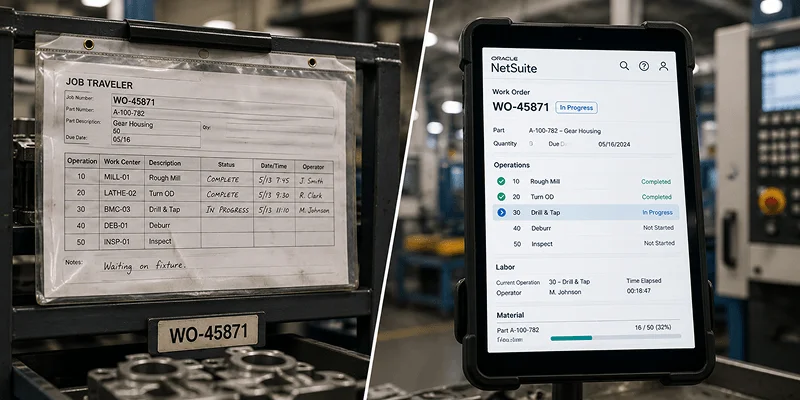
A paper traveler, also called a job traveler, shop traveler, or router, is a physical document that moves with a job through production, listing the routing, materials, drawing revision, and space for operator sign-offs. It updates on its own schedule, not on the job’s schedule. Someone writes on it at the start of an operation, the end of an operation, or the end of a shift, and between those points, nobody outside the machine knows the job’s real status.
This is a structural limit of the paper format itself, not a training issue. A careful, experienced operator filling out every field correctly still cannot report a stall the moment it happens, because the traveler only gets updated at the next checkpoint.
NIST research on maintenance strategy offers a useful, if adjacent, data point here. Shops that lean heavily on reactive maintenance, meaning they respond to problems after they show up rather than catching them early, had 3.3 times more downtime and 16 times more defects than shops that used predictive methods. NIST’s analysis put total preventable losses across U.S. manufacturing at $119.1 billion a year, including $18.1 billion from downtime alone. A shop running entirely on paper travelers is, by structure, running in reactive mode. Problems surface after they have already cost time, not while they can still be caught.
| Paper-Based Tracking | Real-Time Shop Floor Visibility | |
| When status updates | At the next checkpoint someone writes it down | The moment the job state changes |
| Who can see current status | Whoever is holding the paper | Anyone with access to the system |
| How a stall gets noticed | When someone walks over and checks | As soon as it happens |
| What happens on shift change | Next shift reconstructs what happened | Next shift reads the same live record |
| Where job cost data comes from | An estimate written at the end of the day | Actual time logged against the operation |
What Else Causes Poor Shop Floor Visibility?
Paper is the most common cause, but a few other habits make the gap wider even in shops that have gone partly digital.
Batching Updates to the End of the Shift
A supervisor records what happened across an eight hour shift all at once, from memory, at the end of the day. Small stalls that happened mid-shift rarely make it into that record, and timestamps end up rounded or estimated.
Having No Single View Across Shifts
First shift tracks progress one way, second shift tracks it another way, and the two records rarely line up cleanly. Whoever comes in next has to reconstruct what happened instead of simply reading it.
Relying on One Person’s Memory
A senior supervisor often knows exactly where every job stands, which machines are behind, and which operators are fastest on which work centers. That knowledge lives in one person’s head, and when that person is out, nobody else has the full picture.
Losing Track of Material Once It Reaches the Floor
Inventory can look accurate in the system right up until it is issued to a work order. After that point, how much of it remains, gets used, or gets scrapped depends entirely on someone recording it correctly by hand.
How Manufacturers Improve Shop Floor Visibility?
Closing the gap comes down to a small number of consistent moves, regardless of shop size or industry.
Start With the Jobs That Move the Most
Focus real-time tracking first on the work centers with the highest volume or the tightest deadlines. That is where a delay costs the most, and where the payoff shows up fastest.
Capture Data Where the Work Happens
Give operators a way to log status at the machine or work center itself, instead of asking them to remember it and record it somewhere else later.
Put the Same View in Front of Everyone
Supervisors, planners, and floor leads should all be looking at the same live status, not separate versions built from separate sources.
Tie Every Status Change to an Action
A live dashboard only helps if someone owns acting on it when a job falls behind. Assign that ownership before rolling out the tracking itself.
Retire the Paper the Same Day the System Goes Live
Running both in parallel means operators do the work twice. Once the real-time system is live, stop printing new travelers.
What to Look for in a Shop Floor Visibility Tool?
Shops evaluating options usually compare a short list of point solutions built specifically for floor tracking. Whatever is on that list, the same criteria decide whether it solves the problem.
Deployment Time
Some tools require new hardware on every machine and weeks of setup. Others work with equipment and data already in place. Ask how long it takes to go from signed contract to a supervisor seeing live status.
Whether It Needs a Separate Login
A tool that lives outside the ERP means operators and planners work in two systems instead of one, and the two can drift out of sync with each other over time.
Operation-Level vs. Job-Level Tracking
Some tools only show that a job is “in progress.” Better tools show which specific operation it is on, who is working it, and how long it has been there.
How It Handles Work in Process
A tool worth using tracks material and labor consumption as it happens, not just job status. This is what makes job costing accurate instead of estimated.
Whether It Replaces or Duplicates What the ERP Already Does
If the ERP already has manufacturing and mobile capabilities, a bolt-on tool may be solving a problem the ERP could solve on its own, at the cost of a second system to maintain and reconcile.
How NetSuite Delivers Real-Time Shop Floor Visibility?
NetSuite addresses each of the causes above directly, without adding a separate system on top of the ERP.
Work Order Status Updates in Real Time
Operators update job status directly in NetSuite as work happens, from a shop floor terminal or a mobile device. The status a supervisor sees is the current status, not a snapshot from the last checkpoint.
Time Tracking at the Operation Level
Labor time gets recorded against the specific operation being performed, not estimated at the end of the day. This gives job costing a real number to work from instead of an estimate.
Live Work in Process Visibility
Material and labor consumed against a work order shows up as it happens, so WIP stays tracked once it is issued to the floor. Planners can see exactly where a job stands without walking out to check.
One Shared View Across Shifts
Because the data lives in one system rather than one supervisor’s notes or one shift’s paperwork, the next shift starts with the same information the last shift had.
Most shops evaluating a separate shop floor visibility tool already have these capabilities available inside NetSuite. The question is usually whether they have been configured, not whether they need to be purchased somewhere else. To see how this connects to the broader manufacturing setup, take a look at our guide on NetSuite’s manufacturing modules.
Why This Gap Keeps Getting Treated as a Software Problem?
Most shops with poor visibility already know it is slower than it should be. Nobody needs convincing that a paper traveler moves slower than a live status update. What is harder to see from inside the daily grind is that the fix is rarely a new tool. More often, it is configuring what is already sitting inside the ERP the shop is already paying for.
The shops that struggle most with this are not short on technology. They are short on one connected view, because the systems they have were never set up to talk to each other or to the floor. Closing that gap is process work as much as it is software work: deciding what gets tracked, who owns responding to it, and what gets retired once the new system is live.
How Folio3 Approaches Shop Floor Visibility in NetSuite?
We start every shop floor visibility project by mapping the physical path a job takes, from release to shipment, before touching any configuration. That map shows exactly where status updates need to happen and who needs to see them.
From there, we configure work order tracking, mobile time capture, and WIP visibility to match how the shop runs, not a generic template. The goal is a system operators will use consistently, since a real-time system nobody updates is no better than paper.
If your team is still tracking jobs on paper or in spreadsheets, our NetSuite manufacturing implementation services cover shop floor visibility as part of the broader manufacturing setup.
Frequently Asked Questions
1. Is shop floor visibility the same thing as an MES?
Not exactly. An MES is a dedicated software layer built specifically for execution and monitoring on the production floor. Shop floor visibility is the outcome that both an MES and a properly configured ERP, including NetSuite’s WIP and routing tools, can deliver.
2. Do I need new sensors or hardware on my machines to get real-time visibility?
Not always. Machine-level sensor data adds another layer of detail, but a lot of the visibility gap comes from job and labor status, which can be captured through operator entry at a terminal or mobile device without new hardware on the equipment itself.
3. What happens to my old paper travelers once I switch to a digital system?
Most shops keep them as historical records for a defined retention period, since audits or warranty claims sometimes reference older jobs, but stop creating new ones the day the digital system goes live.
4. Is real-time visibility worth it for a shop with only a few machines?
It depends more on how many jobs run in parallel than on machine count. A small shop with one job at a time rarely needs it. A small shop juggling several jobs across a few machines can still lose track of status just as easily as a larger one.
5. How is shop floor visibility different from inventory visibility?
Shop floor visibility tracks the status of jobs and operations in progress. Inventory visibility, covered by tools like NetSuite’s warehouse management module, tracks where materials physically sit. The two overlap once material is issued to a work order, which is exactly where paper tracking tends to lose both at once.
6. How long does it typically take to see results after closing the visibility gap?
Most shops notice a difference within the first few weeks, since late-stage discoveries and end-of-shift surprises drop almost immediately once status updates happen in real time. Improvements in job costing accuracy tend to show up over a full quoting cycle, since that depends on a few completed jobs’ worth of real data.
7. Can real-time tracking catch a problem before a supervisor walking the floor would notice it?
Often, yes. A supervisor walking the floor still checks jobs in sequence, one at a time. A real-time system flags a stall the moment it happens, regardless of where on the floor it occurs or whether anyone happens to be walking past.
8. Does shop floor visibility apply to outsourced or subcontracted production steps?
It can, if the subcontractor reports status back into the same system rather than through a separate email or phone update. Without that connection, the visibility gap simply moves to the handoff point with the subcontractor instead of disappearing.