
ERP optimization is the right choice when your existing ERP system meets core business requirements but needs improvements in configuration, workflows, integrations, or performance. ERP reimplementation is necessary when the current setup no longer supports critical business processes, contains extensive structural problems, or requires fundamental changes that targeted fixes cannot resolve. The decision depends on the severity of existing issues, their underlying causes, and the effort required to achieve your business objectives.
Your ERP system might still process orders, manage inventory, and support financial reporting while making everyday operations harder than they should be. Your employees might depend on manual adjustments, reports might require repeated corrections, and new business requirements might expose limitations in the original implementation.
At this point, you face an important decision. Should you improve the ERP environment you already have, or would a new implementation provide a more reliable foundation for your business?
The right decision depends on what is failing, why it is failing, and whether your current ERP environment can meet your business requirements with a manageable amount of corrective work.
ERP Optimization vs. Reimplementation: What’s the Difference?
The main difference is how much of your existing ERP implementation remains suitable for your business.
ERP optimization retains the current implementation and improves the areas that need attention. Reimplementation revisits the underlying design and rebuilds the system to address limitations that cannot be resolved efficiently through targeted changes.
| Decision factor | ERP optimization | ERP reimplementation |
|---|---|---|
| Existing configuration | Retained and improved where appropriate | Reassessed and configured again |
| Business processes | Refined within the existing setup | Redesigned where required |
| Customizations | Reviewed, corrected, or selectively removed | Rebuilt, replaced, or retired based on requirements |
| Data | Corrected, cleansed, or reconciled as needed | Migrated or restructured according to the new design |
| Integrations | Existing connections repaired or improved | Integrations reassessed and potentially rebuilt |
| Testing | Focuses on affected processes and regression risks | Covers the redesigned implementation and end-to-end processes |
| Project scope | Concentrated on identified deficiencies | Extends across the areas included in the new implementation |
| Business disruption | Usually limited to the processes being changed | Potentially greater because more processes and dependencies change |
These distinctions describe the typical scope of each approach, not guaranteed outcomes. An extensive optimization involving complex integrations and customizations can require substantial effort. A phased reimplementation also limits disruption when the scope and transition are carefully planned.
When Is ERP Optimization the Better Choice?
Optimization is a strong option when your ERP system has a sound underlying design but does not use that design effectively. Your business requirements remain achievable within the current environment, and the problems can be traced to specific configuration, process, data, or technical issues.
1. Your ERP already supports your core business processes
If the system handles your essential operations correctly but certain steps remain inefficient, optimization can address those gaps without rebuilding the entire implementation.
For example, a NetSuite account might support purchasing, inventory management, sales orders, and financial reporting, but the purchasing approval workflow requires unnecessary manual intervention. Reviewing approval conditions, permissions, and process requirements might resolve the issue without replacing the purchasing setup.
The important question is whether the current configuration can support the required process after targeted corrections.
2. Your team is not using the functionality already available
ERP implementations sometimes leave useful capabilities underused because of limited training, incomplete configuration, or business processes that were never fully adopted.
Your finance team might maintain separate reports even though the required information is available through appropriately configured saved searches or reports. Your warehouse team might follow manual procedures because the existing inventory process was never configured to support its operational requirements.
In these cases, optimization starts with identifying what the system already supports, what employees need, and why the current setup falls short. Purchasing additional modules or rebuilding the implementation before investigating those gaps could add unnecessary complexity.
3. Your problems are isolated, and their causes are understood
An incorrect approval condition, inconsistent report criteria, a poorly configured form, or a specific integration mapping problem might be resolved without changing unrelated parts of the ERP environment.
Optimization works best when your team can identify the affected components, understand their dependencies, and test the proposed changes. You should also establish how success will be measured, such as fewer manual adjustments, more reliable transaction processing, or improved reporting accuracy.
If the same issue keeps returning after repeated fixes, however, investigate whether the problem is connected to a deeper design flaw.
4. Your existing customizations still provide business value
Custom scripts, workflows, fields, and integrations are not automatically reasons to reimplement an ERP system. Some support important business requirements that standard functionality does not fully address.
Review each customization to determine whether it remains necessary, works as intended, and can be maintained safely. Retain useful components, simplify overlapping logic, and replace individual elements when a better option exists.
If the customizations are so interconnected that changing one process repeatedly disrupts others, the assessment should examine whether targeted cleanup remains practical or whether a more extensive redesign is justified.
When Does ERP Reimplementation Make More Sense?
Reimplementation deserves consideration when the problems extend beyond individual configuration issues and affect the way the ERP system was designed to support your business.
The decision should follow a detailed assessment. A difficult-to-maintain system does not automatically require a restart, and replacing an implementation without understanding its failures risks recreating the same problems.
1. Your original implementation was built around the wrong business processes
An ERP system might have been configured around assumptions that no longer reflect how your business operates. Perhaps the original design does not support the required approval structure, multi-entity processes, inventory controls, or manufacturing workflows.
Consider a manufacturer whose production process requires work orders, material consumption tracking, routing, and work-in-process visibility. If the implementation was designed around a much simpler inventory process, repeated adjustments might not provide the control the business needs.
Reimplementation becomes a stronger option when the required processes demand fundamental changes to the original design. Before committing, confirm which requirements the current system cannot reasonably support and whether configuration changes or selective redesign could close the gap.
2. Customizations have become difficult to maintain as a connected system
The number of customizations alone does not determine whether an ERP implementation needs rebuilding. The more important question is how those components interact and whether the account remains understandable, testable, and maintainable.
A system might contain overlapping scripts, undocumented workflows, custom transaction logic, and integrations that depend on particular field values. Correcting one component could affect several others, making routine changes increasingly difficult to validate.
An optimization assessment should first identify dependencies and determine whether the customizations can be simplified. Reimplementation becomes more compelling when the current design repeatedly obstructs essential changes, and the cost and risk of correcting it exceed those associated with rebuilding the affected processes.
Even then, the new implementation needs clear requirements, documented design decisions, and testing that prevents the same complexity from returning.
3. Your business requirements have changed fundamentally
Acquisitions, new subsidiaries, international expansion, new distribution channels, or significant changes to manufacturing operations can alter what your ERP system needs to support.
For example, a business that previously operated through one legal entity might now require intercompany transactions, consolidated reporting, additional currencies, and different approval responsibilities. Whether the existing ERP environment can accommodate those requirements depends on its current configuration, licensing, and the scope of the changes.
Optimization remains appropriate when the current design supports the new requirements with manageable adjustments. Reimplementation becomes a consideration when the original implementation cannot support the new operating model without extensive redesign.
4. The cost and risk of continued corrections keep increasing
Repeated fixes deserve closer scrutiny when they introduce new defects, require extensive regression testing, or depend on undocumented workarounds.
Your team should compare the effort required to correct the current environment with the work involved in rebuilding it. That comparison must include more than implementation fees. It should account for data migration, integrations, testing, employee training, business disruption, ongoing support, and the risk of operational errors during transition.
Reimplementation is not automatically less expensive in the long term. It becomes a defensible choice when a documented assessment shows that the current design creates persistent limitations and that rebuilding offers a more manageable route to the required outcomes.
How Do You Decide Which Approach Your ERP System Needs?
Before choosing optimization or reimplementation, establish what is wrong with the current environment and what your business needs it to do. The following assessment helps turn a broad decision into a practical evaluation.
1. Identify the business outcomes that are missing
Start with the problems employees and managers experience. These might include inaccurate inventory availability, slow financial close, delayed order fulfillment, unreliable reporting, or excessive manual adjustments.
For each problem, establish the expected result and how you will measure it. A vague objective such as improving efficiency is less useful than identifying the specific process, error rate, or manual step that needs to change.
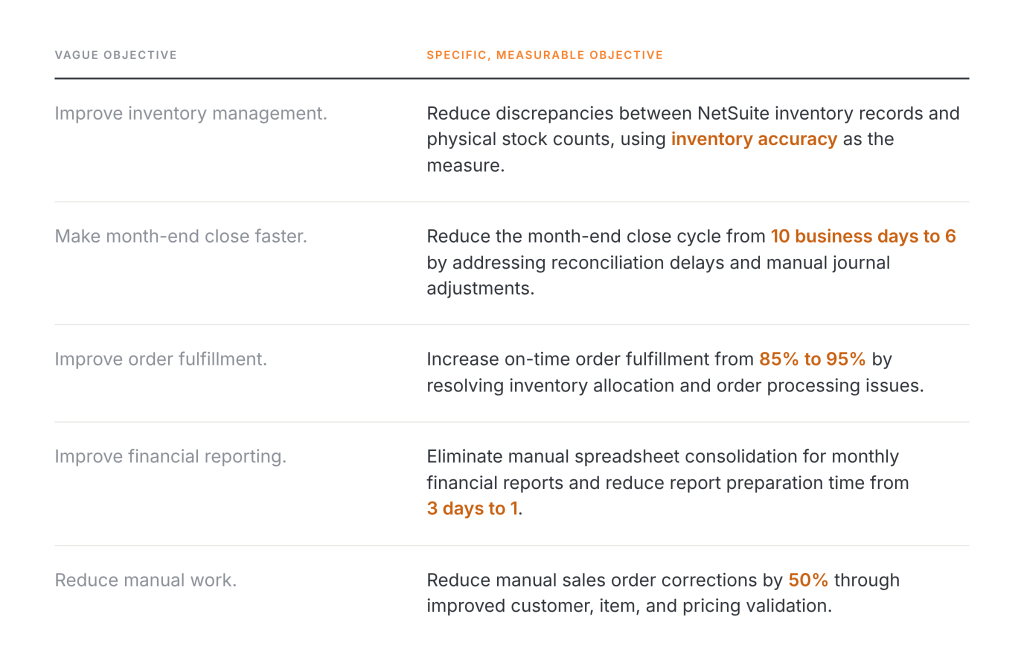
These objectives give your team a basis for evaluating whether existing NetSuite functionality needs correction or whether the system requires more substantial changes. They also help prevent unnecessary reimplementation when targeted improvements would resolve the underlying problems.
2. Trace each problem to its underlying cause
Review the relevant configuration, business processes, data, customizations, integrations, permissions, and supporting documentation. Determine whether the problem is isolated or connected to a larger design issue.
For example, a reporting discrepancy might result from incorrect filters rather than a defective implementation. Conversely, repeated discrepancies across several reports could point to inconsistent transaction data or a deeper configuration problem.
The distinction matters because the solution should address the cause, not just the symptom.
3. Determine what you can retain
Identify the parts of the ERP environment that already meet business requirements. These might include financial configuration, inventory processes, integrations, or custom functionality that delivers clear value.
Retaining working components can reduce unnecessary migration and testing work. But do not preserve a component simply because it already exists. Its dependencies, maintenance requirements, and compatibility with the proposed changes also matter.
4. Compare realistic options
Develop a scoped optimization plan and a reimplementation plan where both are viable. Compare the work required, expected business improvements, project risks, transition requirements, and long-term maintenance implications.
For some organizations, the best solution is a phased approach. Optimize stable processes while redesigning a specific area that no longer meets requirements. This approach still requires careful dependency analysis and testing, particularly when transactions or data move between old and new configurations.
5. Validate the recommendation before committing
The final recommendation should explain why the selected approach addresses the identified problems, what will change, what will remain, and how the business will verify the results.
It should also identify assumptions, dependencies, major risks, and the acceptance criteria for each important outcome. If the recommendation does not explain why optimization is insufficient or why reimplementation is necessary, the assessment needs more work.
Can You Combine ERP Optimization With Reimplementation?
Yes. Your business does not always need to choose one approach for the entire ERP environment.
A phased strategy can retain stable processes while redesigning areas that no longer meet business requirements. For example, a company might optimize financial reporting and user permissions while rebuilding a problematic manufacturing workflow or replacing an integration that no longer supports its operations.
The key is to establish clear boundaries between the workstreams. Your team needs to understand which processes share data, which configurations depend on one another, and how transactions will move between the existing and redesigned components.
A phased approach also requires agreed testing criteria and a controlled deployment plan. Without those safeguards, partial changes introduce inconsistencies between processes that were previously connected.
The decision to combine approaches should come from the assessment findings. Some environments are suitable for selective redesign, while others require a more comprehensive rebuild.
How Folio3 Can Help You Choose the Right Approach?
If your NetSuite environment is difficult to maintain, delivers inconsistent results, or no longer supports your business processes, start by understanding the underlying problems before committing to another major project.
Folio3’s NetSuite rescue services help businesses assess troubled implementations, identify configuration and process gaps, and determine the corrective work required. Depending on the findings, the appropriate path might involve targeted optimization, selective redesign, or a more extensive implementation effort.
The goal is to make the decision based on your existing system, business requirements, and the effort required to achieve reliable results.
FAQs
Is ERP optimization better than reimplementation?
ERP optimization is preferable when the existing implementation can meet business requirements through targeted improvements. Reimplementation deserves consideration when fundamental design problems make the current setup impractical to maintain or extend. The right choice depends on the scope and cause of the problems.
Is reimplementing an ERP system the same as upgrading it?
No. An upgrade typically moves the system to a newer software version or release. Reimplementation revisits the system’s design, configuration, and business processes, with data migration and customization changes as required. A reimplementation does not necessarily involve replacing the ERP platform itself.
Can you optimize NetSuite without replacing your existing customizations?
Yes. NetSuite optimization can retain useful customizations while correcting, simplifying, or removing components that no longer serve a valid business purpose. The decision should account for dependencies, maintenance requirements, and the effect of changes on related processes.
How do you know when ERP optimization is no longer enough?
Optimization might no longer be the most practical option when recurring fixes fail to address the underlying problems, essential business requirements remain unsupported, or the existing design makes necessary changes excessively complex. A documented assessment should compare the cost, risk, and expected results of continued optimization with reimplementation.
Should you migrate all historical data during an ERP reimplementation?
Not necessarily. The migration scope depends on reporting needs, audit and retention requirements, open transactions, reconciliation needs, and access to historical records. Your team should define which records must be migrated, which can remain accessible in the legacy system, and how the new environment will be validated before go-live.
