
Key Takeaways
- A failed NetSuite implementation requires a root cause assessment before you invest in additional fixes or redevelopment.
- Recovery should prioritize financial accuracy, critical business processes, data integrity, integrations, and user readiness.
- Your existing NetSuite configuration, customizations, integrations, and migrated data should be evaluated individually to determine what can be retained.
- A recovery plan needs clear ownership, a realistic budget, measurable outcomes, and decision points for repairing, pausing, or reimplementing the system.
- The first 30 days should establish the current state, stabilize urgent issues, approve a recovery roadmap, and begin work on the highest priority problems.
A failed NetSuite implementation leaves you with more than a delayed project or an unexpected bill. Your finance team might be correcting reports in spreadsheets, warehouse staff might be working around inventory errors, and employees might be avoiding workflows that were supposed to simplify their jobs. If the system is already live, these problems can affect daily operations, financial reporting, customer commitments, and confidence in your ERP investment.
The next step is not necessarily to replace NetSuite or restart the entire implementation. You need to establish what went wrong, determine which parts of the system remain usable, and build a rescue plan around your most urgent business requirements. A structured NetSuite implementation rescue process helps you make those decisions using evidence rather than assumptions.
What Does a Failed NetSuite Implementation Look Like?
A failed NetSuite implementation does not always mean the system is unavailable. NetSuite might be processing transactions while failing to support the business processes it was purchased to improve.
You might recognize the problem through unreliable financial reports, inventory discrepancies, broken integrations, incomplete workflows, or repeated manual adjustments. Teams might maintain separate spreadsheets because they do not trust the information in NetSuite. Managers might still rely on the old system to answer basic operational questions, even months after go-live.
Before deciding what to do next, establish which of these situations describes your organization.
| Warning sign | What it could indicate | What to investigate |
|---|---|---|
| Financial reports do not reconcile | Incorrect account mappings, transaction posting, or migrated balances | General ledger, subledgers, saved searches, and reconciliation records |
| Inventory quantities or valuations are unreliable | Migration errors, transaction issues, or warehouse process gaps | Item records, locations, inventory transactions, and costing |
| Integrations repeatedly fail | Mapping errors, authentication problems, or incomplete exception handling | Integration logs, field mappings, failed transactions, and retry procedures |
| Users maintain manual workarounds | Poor process design, insufficient training, or missing functionality | Role-specific workflows, user feedback, and configuration |
| Project milestones continue to slip | Unresolved requirements, weak governance, or underestimated effort | Scope, outstanding decisions, dependencies, and resource allocation |
| Customizations create recurring problems | Excessive complexity, conflicting scripts, or undocumented dependencies | SuiteScripts, workflows, custom fields, and change history |
One warning sign does not automatically mean the implementation has failed. The concern is whether these issues prevent critical processes from working reliably, remain unresolved despite repeated attempts, or create material operational or financial risk.
Why NetSuite Implementations Fail?
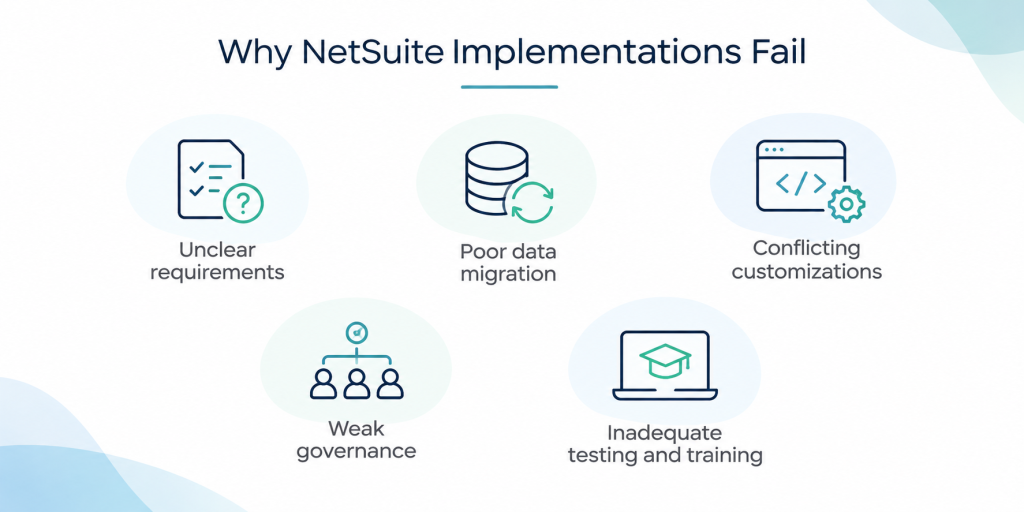
NetSuite Recovery starts by identifying why the implementation fell short. Fixing a visible symptom without addressing its cause usually creates more work for your team and increases the chance of another failure.
1. Incomplete Requirements and Poor Process Alignment
Implementation teams need a clear understanding of how your organization manages purchasing, inventory, order fulfillment, accounting, reporting, and other core activities. When discovery is rushed, requirements remain undocumented, or business stakeholders do not validate decisions, the delivered configuration can reflect assumptions rather than actual operating needs.
For example, a manufacturer might require accurate work order costing and material consumption tracking, while the implementation focuses primarily on basic inventory and financial transactions. The system might go live, but production teams still need spreadsheets to manage essential activities.
2. Data Migration and Reporting Errors
If your data migration is inaccurate, duplicated, incomplete, or inconsistently structured data then it will lead to problems in the new environment. Errors in opening balances, customer records, vendor details, item records, inventory quantities, and historical transactions affect downstream reporting and operations. It is important to follow the best data migration practices to avoid such challenges and keep NetSuite implementation smooth, even after go-live.
Reporting problems require particular attention because their causes are not always visible in the report itself. An incorrect result could stem from account configuration, transaction data, saved search criteria, or the way the original information was migrated.
3. Over-Customization and Configuration Problems
Custom fields, scripts, workflows, forms, and approval rules support specific business requirements. Problems arise when customizations overlap, lack documentation, conflict with each other, or duplicate functionality already available in NetSuite.
Recovery requires reviewing each component against its original purpose and current business value. Removing customizations indiscriminately is just as risky as keeping every customization that the previous team developed.
4. Weak Governance and Unrealistic Timelines
When no one owns final decisions, departments introduce competing requirements and unresolved issues accumulate. Leadership might push for a fixed go-live date even when testing, migration validation, or training remains incomplete.
A recovery project needs an accountable business sponsor, a designated decision-maker, and a documented process for prioritizing requirements. Without those controls, the rescue effort risks repeating the same problems as the original implementation.
5. Inadequate Testing, Training, and Change Management
Technical completion does not prove that a system is ready for business use. If user acceptance testing is compressed, teams discover defects during live transactions instead of controlled testing. If training is generic or delivered too close to go-live, employees struggle to apply the new processes.
Recovery must address both system behavior and the people responsible for using it.
Your NetSuite Implementation Failed… Now What to Do?
If your NetSuite implementation has failed, the following are the steps you should follow:
Step 1: Conduct a NetSuite Health Audit Before Making Changes
The first step is an evidence-based assessment of your existing NetSuite environment. Avoid approving new scripts, extensive reconfiguration, or a complete rebuild until you understand the current system and its dependencies.
Start by comparing the original scope and requirements with the functionality delivered. Review project documentation, outstanding issues, customization records, migration results, testing evidence, and previous attempts to resolve defects. Interview department heads and end users to understand where the system breaks down during daily operations.
The technical assessment should examine:
- Configuration and workflows. Review transaction settings, approval hierarchies, roles, forms, fields, scripts, and automation rules.
- Data integrity. Reconcile relevant financial balances, inventory records, open transactions, and master data against trusted source records.
- Integrations. Inspect failed transactions, field mappings, synchronization schedules, error logs, and manual intervention points.
- Reporting and controls. Validate financial statements, saved searches, dashboards, and operational reports against agreed business rules.
- Security and access. Confirm that roles and permissions support employees’ responsibilities without granting unnecessary access.
- User adoption. Identify where employees struggle, avoid the system, or rely on undocumented workarounds.
The outcome should be a prioritized list of findings, including the business impact, likely cause, dependencies, and evidence required to confirm each issue. Separate verified defects from suspected problems so the recovery team does not treat assumptions as facts.
Our NetSuite Rescue process begins with a health audit covering configuration, customizations, integrations, role-based access, and system performance. The assessment informs the recovery roadmap before remediation begins.
Step 2: Stabilize Critical Business Operations
Once you understand the most serious problems, address the issues that put business continuity, financial accuracy, or customer commitments at risk.
If financial balances do not reconcile, prioritize the relevant accounting investigation before relying on those reports for management decisions. If orders are failing to reach fulfillment, identify where the transaction flow breaks and establish a controlled process for handling affected orders. If inventory records are unreliable, reconcile the relevant quantities and transactions before making changes that could compound the discrepancy.
Temporary workarounds should have a documented owner, review process, and exit condition. For example, a controlled spreadsheet used to track failed integration transactions should record the affected transaction, the correction required, and whether the transaction has been successfully processed in NetSuite. It should not become a permanent second system of record.
Do not change several interconnected components simultaneously without testing their dependencies. A workflow adjustment that resolves one issue could affect approvals, downstream transactions, reporting, or integrations. Use controlled changes, documented testing, and rollback procedures appropriate to the risk.
Step 3: Decide What to Repair, Rebuild, or Replace
Not every failed implementation requires a complete restart. The right approach depends on the quality of the existing configuration, the reliability of the data, the amount of completed work that meets requirements, and the effort needed to correct outstanding issues.
Use the assessment findings to evaluate three recovery paths.
| Recovery path | When it makes sense | What the work involves |
|---|---|---|
| Targeted remediation | Core processes work, but specific configuration, reporting, data, or integration issues remain | Correct identified defects, validate results, and address related dependencies |
| Partial redesign or rebuild | Important components are fundamentally misaligned, but other parts of the implementation remain usable | Rework affected workflows, integrations, data structures, or customizations while preserving sound components |
| Reimplementation | The existing solution is so misaligned or unreliable that repairing it would create unacceptable risk or cost | Redefine requirements, redesign the implementation approach, validate migration, and plan a controlled rollout |
Compare these options using estimated remediation effort, remaining project costs, operational risk, expected business value, and time to a reliable outcome. Include the cost of continuing with the current system, such as manual reconciliation, delayed fulfillment, reporting delays, and ongoing support for defective customizations.
A reimplementation should remain a valid option when the evidence supports it. However, rebuilding everything without assessing the current environment can discard usable work and introduce another round of migration, testing, and change management.
Step 4: Build a Recovery Roadmap With Clear Accountability
The recovery roadmap converts the assessment into an executable plan. Each work item should identify the problem, its business impact, the proposed correction, the owner, dependencies, estimated effort, and the criteria for completion.
Organize work by business priority rather than by the order in which defects were reported. Financial integrity, critical order processing, inventory accuracy, and other essential operations typically require attention before lower-priority dashboard changes or convenience enhancements.
Establish a governance structure that includes an executive sponsor, a business process owner for each critical area, a NetSuite technical lead, and a project manager responsible for progress and dependencies. Define who approves scope changes, accepts completed work, and escalates unresolved risks.
The roadmap should also distinguish between go-live requirements and improvements that can wait. A request for a new dashboard should not delay correction of a material reconciliation problem. Equally, a workaround that keeps an essential process running should not be mistaken for a permanent resolution.
Folio3’s recovery methodology includes phased milestones, assigned ownership, dependency mapping, risk mitigation, and effort and timeline estimates. This gives your team a defined basis for managing the work and tracking progress. Know more about NetSuite Rescue support if your organization needs a structured recovery engagement.
Step 5: Execute Remediation and Validate the Results
With the roadmap approved, the recovery team can begin correcting the underlying problems. Each change should have a defined scope and a test plan that demonstrates whether the intended business outcome has been achieved.
For configuration and workflow fixes, test the complete transaction sequence, including relevant approvals, exceptions, and downstream records. For data corrections, reconcile affected records against trusted source information and document how discrepancies were resolved. For integrations, test successful transactions, error handling, duplicate prevention, and recovery from failed synchronization.
User acceptance testing should involve the people who perform the affected processes. A warehouse user should validate receiving, picking, or inventory adjustments relevant to their role. Finance users should confirm that transaction posting, reconciliations, and reporting meet agreed requirements. Sales and procurement teams should validate their own transaction flows.
Do not approve a fix merely because the error message has disappeared. The team must confirm that the process produces the correct result, the data remains consistent, and downstream activities continue to work. Where risk warrants it, compare outputs with the legacy system or another trusted source before transitioning fully to the corrected process.
Your First 30 Days of NetSuite Implementation Recovery
The first 30 days should establish control, clarify the recovery decision, and begin the highest-priority corrective work. This is a planning framework, not a promise that every failed implementation can be fully recovered within a month. The schedule depends on problem severity, system complexity, data quality, and decision-maker availability.
| Period | Primary focus | Expected outcome |
|---|---|---|
| Days 1–5 | Contain urgent issues and collect project evidence | Critical risks identified, immediate controls established, and assessment scope agreed |
| Days 6–10 | Audit configuration, data, integrations, reporting, and adoption | Root causes documented and prioritized by business impact |
| Days 11–15 | Evaluate recovery options, costs, dependencies, and resources | Decision on targeted remediation, partial rebuild, or reimplementation |
| Days 16–23 | Begin approved high-priority fixes and testing | Initial defects corrected and validated against agreed requirements |
| Days 24–30 | Review results, risks, and remaining work | Updated roadmap, ownership, milestone tracking, and next-phase approvals |
At the end of the first month, leadership should be able to answer five questions. What caused the implementation to fail? Which business processes are stable? What remains at risk? How much effort and investment will recovery require? What evidence will demonstrate that the system is ready for the next stage?
If those answers remain unclear, the next priority is to resolve the outstanding assessment or governance gaps rather than commit to an arbitrary completion date.
Step 6: Measure Financial Recovery and Business Impact
A recovery project should demonstrate more than the number of defects closed. It should show whether the corrected system improves the business processes that justified the original investment.
Establish baseline measures before remediation wherever reliable data is available. Useful indicators include transaction processing time, month-end close duration, inventory accuracy, order and procurement processing time, integration failure rates, manual adjustments, and completion of critical workflows without workarounds.
Financial evaluation should include the remaining recovery investment, ongoing support requirements, and the cost of leaving current problems unresolved. Consider the impact of delayed orders, excess material purchases, rework, inaccurate reporting, and employee time spent maintaining duplicate processes. Keep confirmed savings separate from projected benefits, and avoid attributing every operational improvement to the ERP alone.
Folio3’s work with Civil Clothing illustrates why recovery needs to focus on the business process behind the system issue. The work addressed production orders by size and color, bills of materials, inventory, work in progress, and financial reporting. The reported outcomes included 25% faster order and procurement processing and 30% lower unnecessary material purchases and vendor overspend.
These results show the value of connecting system corrections to measurable operational outcomes. Your own targets should reflect the processes that matter most to your organization rather than adopting another company’s figures as expected results.
Step 7: Prepare Users for the Corrected System
A technically corrected implementation still needs a controlled transition into daily operations. Before releasing changes, confirm that critical workflows have passed testing, users understand their responsibilities, data reconciliation is complete where required, and support arrangements are in place.
Training should reflect the tasks employees actually perform. Finance teams need practice with the relevant accounting and reconciliation processes. Warehouse staff need guidance on the inventory and fulfillment activities they handle. Managers need to understand how to interpret reports and where to escalate discrepancies.
Prepare updated standard operating procedures, communicate changes before they take effect, and provide a clear channel for reporting issues. During the initial period after a major correction or relaunch, monitor transactions, reports, integrations, and user feedback closely. This hypercare period helps the team identify defects before employees develop new workarounds.
NetSuite Rescue concludes with documented acceptance criteria and an agreed support plan, not simply the completion of development tasks.
When Should You Change Your NetSuite Implementation Partner?
Consider an independent assessment when your existing partner repeatedly misses commitments, cannot explain recurring defects, lacks the expertise required for your business processes, or provides estimates without a clear account of the work involved.
Before changing partners, gather the implementation scope, configuration records, customization documentation, integration details, migration files, open issue logs, testing results, and outstanding deliverables. Access to these materials helps a new team assess the environment without repeating discovery unnecessarily.
An outside specialist should be able to explain what is broken, what can be retained, which decisions require leadership input, and what the recovery is expected to cost. You should receive a clear remediation plan with risks, dependencies, milestones, and acceptance criteria rather than a recommendation to rebuild everything before the current system has been examined.
Folio3 provides NetSuite project rescue, remediation, training, and post-rescue support. Its team includes more than 150 certified NetSuite experts across its service offering. You can discuss your current NetSuite environment and challenges with Folio3’s NetSuite Rescue team to determine what assessment and recovery work your environment requires.
What Happens After NetSuite Implementation Recovery?
Recovery is complete only when the corrected system supports the agreed business requirements and the organization has a plan to maintain that performance. Establish ongoing ownership for system administration, integration monitoring, user access, change requests, and periodic review of critical reports and workflows.
Your post-recovery plan should distinguish routine support from future improvements. Break-fix support addresses unexpected problems. Optimization work improves processes and makes better use of existing functionality. Managed services provide continuing system administration and functional support, while integration maintenance helps keep connected applications reliable as systems change.
Regularly review the measures established during recovery. If reporting accuracy declines, manual workarounds return, or integration failures increase, investigate the cause before the issue becomes a larger operational problem.
Recover Your NetSuite Implementation With a Clear Plan
A failed NetSuite implementation does not automatically mean that the platform or your investment is beyond recovery. The important decision is how to move forward based on the condition of your system, the needs of your business, and the cost and risk of each available option.
If your NetSuite implementation is stalled, producing unreliable results, or creating ongoing operational problems, Folio3’s NetSuite Rescue services can help you assess the current environment and develop a recovery roadmap before additional changes are made.
FAQs
1. Our NetSuite implementation failed after multiple go-lives. Is it recoverable with a new partner, or should we start over?
It is usually recoverable, but only after a proper assessment. Do not let a new partner start configuring immediately. First document what is built, what works, what is broken, what data is wrong, and which business processes are unstable.
Then split the issues into:
- Configuration defects that can be fixed
- Data problems that need cleansing or remigration
- Process gaps where the business never agreed on how to work
- Customization or integration problems
- Training and adoption issues
If the foundation, including chart of accounts, subsidiaries, item setup, order-to-cash, procure-to-pay, and financial reporting, is fundamentally wrong, a restart may be cheaper. If the core design is sound but execution was poor, bring in an independent NetSuite rescue consultant, create a prioritized remediation backlog, and stabilize one process at a time. Community advice consistently points to independent assessment, end-to-end testing, business-owner sign-off, and tracking every issue as a ticket.reddit+2
2. We went live but financials are wrong and nobody can fix them. What should we do first?
Stop making broad fixes until you find the first point where the numbers became wrong. Reconcile from the balance sheet backward: opening balances, journals, AR/AP aging, inventory valuation, intercompany entries, and period-end close.
Work through one transaction type at a time and check its GL impact. For example, take a sample sales order, invoice, item fulfillment, and customer payment; confirm every account, subsidiary, department, class, location, and tax code. If inventory or COGS is wrong, check item costing, inventory adjustments, landed costs, and whether transactions were posted before item costs were correct.
Do not keep posting new transactions into a broken structure. Freeze nonessential changes, correct the source of the error, then decide whether historical periods need adjusting journal entries or a period reopen and correction plan. An accountant should review the corrected GL impact before you close the books.reddit+1
3. Our implementation partner missed the contractual go-live date and the project is still failing. What are our options?
First, review the contract: deliverables, acceptance criteria, payment milestones, change-order terms, intellectual property, termination rights, and any go/no-go clause. Put every missed commitment and open defect in writing.
Then request a formal recovery plan from the partner with named owners, dates, acceptance criteria, and a hypercare commitment after the next go-live. If they cannot produce that, get an independent NetSuite consultant to audit the account and recommend whether to remediate, replace the partner, or restart.
Do not simply go live again without a rollback plan. Define the conditions under which you roll back, who can authorize it, how you preserve data entered during the failed period, and how long the partner must remain in hypercare. Community recommendations include prioritized issue lists, clear escalation channels, transparent status reporting, and explicit exit criteria for hypercare.
4. How do we know whether the failure is caused by NetSuite, the partner, our processes, or bad data?
For this you should test the following areas separately to gain clear insight.
- NetSuite limitation: Can the standard system support the approved requirement at all?
- Partner or configuration issue: Is the requirement supported but configured or scripted incorrectly?
- Process issue: Do different departments or subsidiaries follow different procedures for the same transaction?
- Data issue: Are customers, vendors, items, opening balances, historical transactions, or costing data incomplete or inconsistent?
- Adoption issue: Do users understand the process, have the right roles, and actually follow the designed workflow?
Create a simple issue log with process area, business impact, root-cause category, evidence, owner, priority, fix, and validation test. Then test real edge cases, not only the happy path. If multiple subsidiaries use one NetSuite account, confirm their processes were standardized before go-live; otherwise the system will keep producing inconsistent results.reddit+1
5. We paid for NetSuite licenses but have almost no usage because the implementation failed. Should we cancel, pause, or restart?
Do not make the licensing decision until you have an independent assessment. The contract may be non-cancelable and fees non-refundable, so cancellation may not be a realistic option. Review the agreement and speak with NetSuite account management only after you know what you want: remediation, replacement partner, reduced scope, or a phased restart.
In many cases, the best commercial and operational path is to reduce scope to the minimum viable processes, usually financials, AR/AP, purchasing, and core order management, stabilize those first, then add advanced modules later. If the account has been paid but unused, document the business impact, current usage, failed deliverables, and projected recovery cost before negotiating with NetSuite or pursuing contractual remedies.
A practical recovery sequence is independent audit, corrected process design, data cleanup, limited-scope rebuild, user acceptance testing with real scenarios, controlled go-live, and 60-day stabilization.
