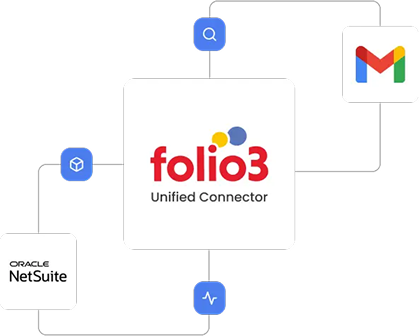
These frequently asked questions (FAQs) are for businesses implementing the Folio3 Gmail-NetSuite Connector to unify their email communications with their CRM and financial records. They are designed to clarify how the integration synchronizes emails, contacts, and attachments to ensure a complete, centralized customer history. This guide helps ensure seamless communication tracking and enhanced visibility across sales, support, and operations teams.
These are not just talking points. They are the engineering decisions that make NetSuite connectors by Folio3 the only NetSuite integrations worth deploying.
Yes. The Folio3 Gmail-NetSuite connector is a pre-built, managed integration solution. It operates via a secure layer that handles API management, queuing, and error handling. This architecture ensures reliability by managing syncs outside of NetSuite’s API limits, providing robust monitoring and queueing messages during downtime. It’s designed for immediate deployment without coding.
The integration is designed to make NetSuite the unified system of record. It synchronizes a complete copy of email conversations, contacts, and attachments into NetSuite, linking them to relevant Customer, Contact, and Transaction records. This ensures all client interactions are auditable and centralized alongside your financial data.
The Folio3 Gmail-NetSuite connector synchronizes:
Absolutely. One of the core features is the ability to view complete email threads attached to NetSuite records. Furthermore, you can reply to email threads directly from within NetSuite and ensure communication continuity without switching between applications.
The connector uses intelligent email address matching to link incoming and sent messages to existing Contact, Lead, or Customer records in NetSuite. This automated matching ensures communications are filed correctly and maintains organized and searchable customer histories.
No. Our connector is built to manage customer information efficiently and includes logic to help prevent duplicates. It performs checks based on key identifiers like email addresses before creating new records. During implementation, we configure these rules to match your specific data structure for optimal results.
Security is paramount. We access Gmail strictly through secure, standard OAuth authentication protocols. Critically, we employ no external storage for your email data. Messages pass transiently through our secure middleware to NetSuite. Your data remains protected by Google’s and NetSuite’s robust security infrastructures.
Folio3’s infrastructure and development processes are SOC 2 Type II compliant. The Gmail-NetSuite connector supports GDPR/CCPA requirements through:
Standard implementation of the Gmail-NetSuite integration takes 2-3 weeks, apart from the one-week BPQ and one-week UAT phases. All timelines depend on the customer providing all access and pre-requisites in a timely manner.
The implementation process follows these steps:
If you do not have a sandbox account, the connector’s deployment will be done on your live production accounts. If you obtain a sandbox later, you will be additionally charged for migration of the connector’s deployment to the sandbox environment.
If your sandbox is refreshed, expired, or deleted, and Folio3 loses any work in progress once the connector’s deployment has started, additional charges will be applicable for re-implementing the solution.
Implementation and explicit testing of the integration against that new release are not included in the scope. Such requests will be treated as a Change Order and will be additionally charged.
Once the connector has been deployed after successful sign-off, if any issues emerge, Folio3 will charge separately for support as per their standard support rates.
Customers get five days of post-go-live support. If additional support is required beyond these hours, Folio3 will provide a separate statement of work (SOW). Dedicated support options (including 24/7 support) are also available at an additional cost for customers who need stricter SLAs.
The connector’s subscription includes regular updates to keep the product compliant with future releases for the standard feature set. But if the integration requires changes due to updates the customer has made in their accounts, or changes in customizations, these changes will be charged separately.
Minimal day-to-day skills are required. An administrator should:
The robust architecture is designed for scalability. It manages sync queues efficiently and includes retry logic for reliability. Our up-to-date dashboards allow you to monitor sync status and volume at a glance. For organizations with exceptionally high volumes, we recommend consulting with our integration experts to ensure optimal configuration.
The integration includes a queuing system. If NetSuite is unavailable, outgoing or incoming sync requests are held securely in the queue and will automatically resume once connectivity is restored, preventing any data loss.
The choice between Folio3’s prebuilt, configurable connector and a fully custom integration depends on your specific requirements for speed, budget, and uniqueness. Our prebuilt connector delivers 80-90% of the required functionality for most businesses at a fraction of the cost and time of custom development. However, our connector can be customized to meet your unique business requirements.
A prebuilt connector may become insufficient in scenarios requiring entirely novel data objects not found in standard NetSuite or Gmail, or when business logic deviates so fundamentally that no core synchronization concepts apply.
With Folio3, outgrowing the connector is not a dead end. Our solution is built on a scalable platform that allows for progressive enhancement. We offer roadmap-aligned development services to extend functionality and ensure the integration evolves with your business rather than requiring a costly and disruptive rip-and-replace project.
While technically possible, building a reliable integration directly using NetSuite’s REST APIs requires significant development expertise and ongoing maintenance. The Folio3 Gmail-NetSuite connector abstracts this complexity by leveraging both REST and SOAP APIs appropriately based on the specific data operation. This provides a stable, optimized layer that handles authentication, error recovery, and performance optimization automatically.
Folio3 provides comprehensive long-term maintenance through our support agreements, including monitoring for compatibility issues, the application of necessary updates, performance optimization, and addressing any emerging requirements. This managed approach transfers the maintenance burden from your internal IT team to our specialized experts and ensures sustained reliability without draining your technical resources.
Folio3 typically charges a fixed annual license fee, a fixed one-time setup fee, variable customization charges, and variable on-demand support charges.
TCO is typically lower than a fully custom build or an unwieldy iPaaS setup for this specific point-to-point integration. You avoid the ongoing developer cost of maintaining custom scripts and benefit from Folio3’s upgrades and support. The biggest cost saver is preventing operational inefficiencies and errors caused by not having the integration.
The Folio3 Gmail-NetSuite connector is ideally suited for NetSuite-powered organizations where sales, support, finance, and operations teams rely heavily on email for customer communication and need to eliminate manual work while ensuring perfect records.
Regret usually comes from:

By submitting the form you agree to terms & condition and privacy policy of Folio3
Find out if your customizations survive the Redwood UI upgrade.