Moving from NetSuite SuiteCommerce to WooCommerce takes more than copying your store. Follow this practical migration checklist to avoid common mistakes.
Key Takeaways
- A successful SuiteCommerce to WooCommerce migration starts with preparation, not data transfer. Reviewing your store before migration can prevent many common issues.
- Cleaning your products, customer records, and categories before migration makes your new WooCommerce store easier to manage.
- Reconnecting integrations, payment gateways, and shipping providers is just as important as migrating your data.
- Testing real Customer journeys before launch helps catch checkout, inventory, and pricing issues before they affect your business.
- Following a structured SuiteCommerce to WooCommerce migration checklist reduces downtime and makes the transition much smoother.
Every Successful Migration Starts Before the First File Is Moved
Moving your e-commerce store to a new platform can feel exciting, but it can also feel overwhelming.
At first, it seems like you’re simply moving products and customer information from one system to another. But once you look a little closer, you realize there’s much more involved. Product catalogs, customer accounts, order history, SEO, payment gateways, shipping settings, and business integrations all need to work together once the migration is complete.
That’s why migration from NetSuite SuiteCommerce to WooCommerce shouldn’t be treated as a one-day task. A successful migration is built on careful planning, not last-minute decisions.
This SuiteCommerce to WooCommerce migration checklist walks you through every stage of the process, from preparing your existing store to testing your new WooCommerce setup before it goes live. By following these steps, you can avoid common migration mistakes and make the transition with confidence.
SuiteCommerce to WooCommerce Migration Steps
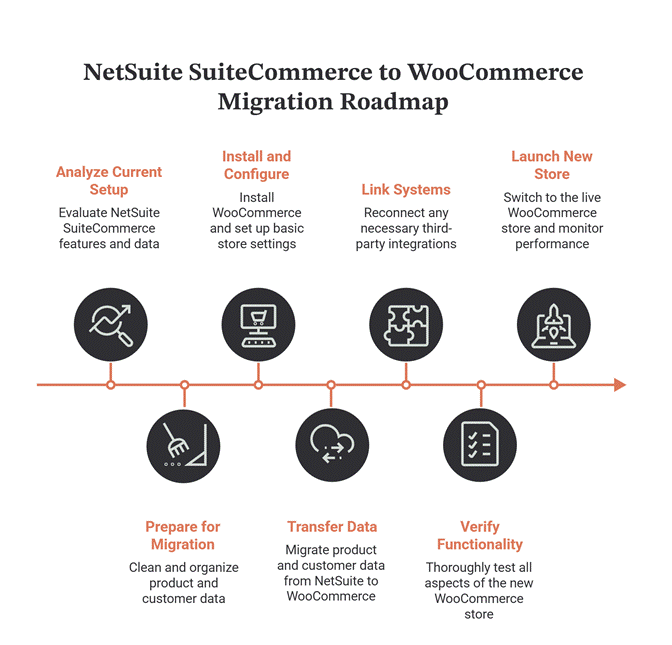
Here are the steps in the SuiteCommerce to WooCommerce migration checklist:
1. Before You Pack the Boxes, Know What You’re Moving
Imagine moving to a new office.
You probably wouldn’t pack everything without checking what’s worth keeping. Old files would be thrown away, broken furniture would be replaced, and unnecessary items wouldn’t make the move.
The same approach works for E-commerce migration.
Before you migrate SuiteCommerce to WooCommerce, take a close look at your existing store. Review your products, customer records, categories, images, and business integrations. You’ll often find duplicate products, outdated information, or features that are no longer being used.
Cleaning these up before migration doesn’t just make the move easier. It gives your new WooCommerce store a cleaner, more organized foundation from day one.
And once you’ve decided what deserves a place in your new store, the next step is making sure the data itself is ready to move.
2. Your Data Deserves A Cleanup Before The Journey Begins
Your migration will only be as good as the data you transfer.
If outdated products, incorrect pricing, duplicate customer records, or missing product details already exist in SuiteCommerce, they’ll likely appear in WooCommerce too.
Take some time to review your product catalog, customer information, inventory, pricing, and categories. Remove duplicate records, update missing information, and archive anything you no longer need.
Think of it as giving your business a fresh start instead of carrying old problems into a new platform.
With your data organized, you’re finally ready to begin the actual SuiteCommerce to WooCommerce migration process. But before moving everything at once, it’s worth creating a roadmap for the journey ahead.
3. Build Your Migration Roadmap Before You Move Anything
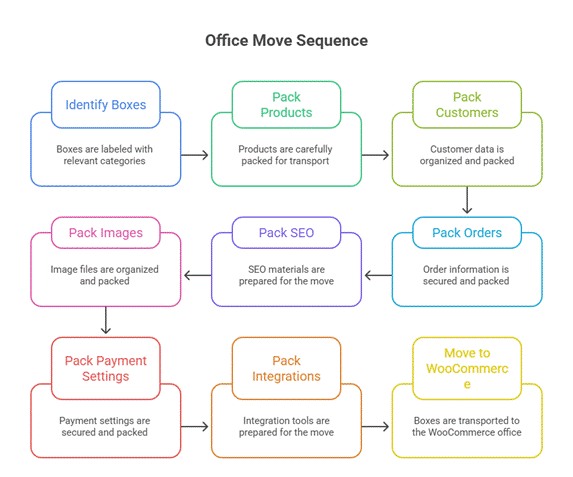
A successful migration isn’t about completing everything as quickly as possible. It’s about knowing what should happen first, what depends on it, and what needs to be checked before moving to the next stage.
Instead of migrating everything at once, divide the project into smaller phases. Start with your store setup, then move products, customers, order history, and finally your integrations. Breaking the process into manageable steps makes it easier to spot issues before they affect your entire store.
A clear roadmap also keeps everyone on the same page, whether it’s your internal team or your implementation partner.
Now that the planning is done, it’s time to start building your new WooCommerce store before bringing your data across.
4. Start With A Store That’s Ready To Welcome Your Data
Before migrating anything, make sure your WooCommerce store is fully set up. Think of it as preparing a new office before the furniture arrives. If the space isn’t ready, everything that follows becomes harder to organize.
Install WooCommerce extensions, choose a theme that fits your brand, configure taxes, shipping methods, payment gateways, currencies, and user roles. Taking care of these basics first means your data has the right place to land once the migration begins.
With your new store ready, it’s time to bring over the heart of your business, your products.
5. Move Your Products Carefully, Not Quickly
Your product catalog is more than a list of items. It includes descriptions, images, SKUs, categories, pricing, variants, and inventory levels. Missing even a small detail can affect the customer experience.
As you migrate SuiteCommerce to WooCommerce, verify that every product appears correctly in its new home. Check product images, pricing, stock availability, and category structure instead of assuming everything transferred perfectly.
Once your products are in place, the next priority is making sure your customers come with them too.
6. Bring Your Customers Along Without Losing Their History
Customers expect their accounts to work just as they did before the migration. They shouldn’t have to create new profiles or lose access to previous orders.
Migrate Customer accounts, billing and shipping details, and order history carefully. After the migration, test a few customer accounts to make sure login credentials, addresses, and past purchases appear correctly.
A smooth customer experience builds trust, but there’s another group of systems that also needs your attention.
7. Don’t Forget The Systems Working Behind The Scenes
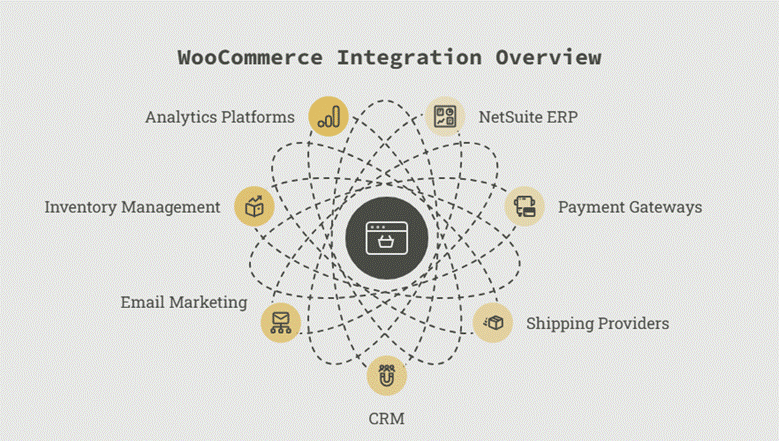
Your e-commerce store relies on much more than products and customers. Payment gateways, shipping providers, CRM platforms, email marketing tools, and NetSuite ERP all play a role in keeping your business running.
As part of your SuiteCommerce to WooCommerce migration process, reconnect these integrations and confirm they’re exchanging data correctly. A successful order means very little if it never reaches your ERP or shipping system.
With everything connected again, there’s one thing left to do before launch, and it’s often the step businesses rush through.
8. Test Like A Customer Before You Launch
Now’s the time to pretend you’re shopping on your own website.
Search for products, add them to your cart, apply a discount code, complete a purchase, request a refund, and check whether confirmation emails arrive as expected. Repeat these tests on both desktop and mobile devices to catch Issues your customers might face.
The goal isn’t just to confirm that your website performance works. You can also discuss your website performance with Folio3’s Consultants. It’s to make sure every part of the buying journey feels smooth from start to finish.
If everything looks good, you’re almost ready to go live. But before making the switch, one final checklist can help ensure nothing has been overlooked.
9. A Quick Reality Check Before You Go Live
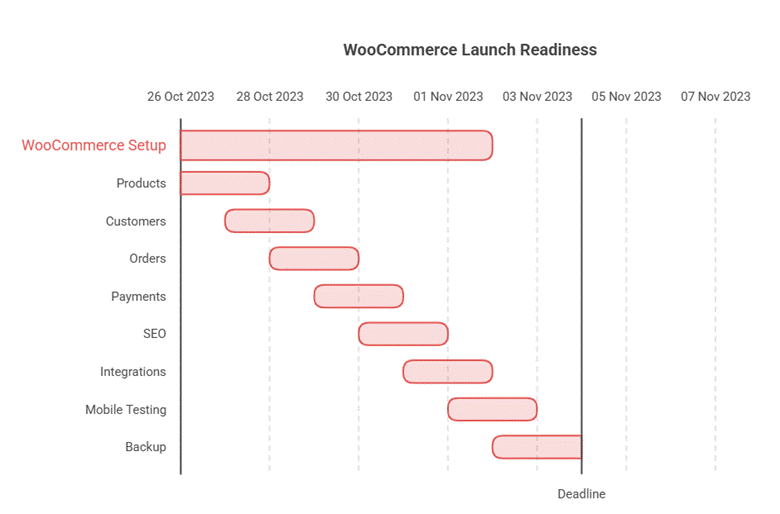
By this stage, your products have been migrated, customer data has been transferred, and your integrations are connected. Before launching, take a few minutes to review the essentials. A simple final check can help you avoid small issues that are much harder to fix later.
Your Pre-Launch Checklist
| ✓ Check | Why It Matters |
| Products display correctly | Prevents missing images, incorrect pricing, and broken product pages. |
| Customer accounts work | Customers can log in and access their previous orders. |
| Inventory is accurate | Avoids overselling or showing out-of-stock items as available. |
| Payment gateways are working | Ensures customers can complete purchases without errors. |
| Shipping methods are configured | Prevents incorrect shipping charges or delivery options. |
| Integrations are syncing | Keeps data flowing between WooCommerce and connected systems. |
| URLs are redirected | Helps preserve SEO migration rankings after migration. |
| Checkout works on mobile and desktop | Creates a smooth Buying experience across devices. |
| Website speed is acceptable | Faster pages improve both user experience and search rankings. |
| Backup has been created | Gives you a recovery point if something unexpected happens. |
Watch Out For These Last-Minute Mistakes
Even well-planned migrations can run into trouble when businesses rush the final stages.
Before launching, avoid these common mistakes:
- Assuming all data migrated correctly without verifying it.
- Forgetting to test guest checkout and registered customer checkout separately.
- Ignoring broken links or missing redirects.
- Launching without checking integrations one final time.
- Skipping mobile testing because everything looks fine on a desktop.
- Making major design changes on launch day.
Most of these issues take only a few minutes to catch, but fixing them after customers notice them is far more time-consuming.
Pro Tip
If possible, run your new WooCommerce store in a staging environment first. Let a few team members place test orders, update inventory, and complete everyday tasks before the store goes live. A fresh pair of eyes often catches issues that are easy to overlook.
SuiteCommerce vs. WooCommerce At A Glance
Migration is also a good opportunity to understand what changes once you move to WooCommerce. While both platforms support e-commerce, they offer different levels of flexibility and control.
| Feature | SuiteCommerce | WooCommerce |
| Customization | Built around the NetSuite ecosystem | Highly customizable with themes and plugins |
| App Ecosystem | More focused on NetSuite integrations | Extensive plugin marketplace |
| Hosting | Managed by NetSuite | Self-hosted or managed hosting of your choice |
| Design Flexibility | Structured customization options | Greater control over storefront design |
| Third-Party Integrations | Strong within the Oracle ecosystem | Supports thousands of third-party tools |
| Best For | Businesses deeply invested in NetSuite | Businesses looking for flexibility and scalability |
The right platform depends on your business goals. If greater customization, flexibility, and plugin support are high on your list, WooCommerce can be a strong choice. But whichever platform you use, a successful migration comes down to careful planning rather than the platform itself.
Why Folio3?
Migrating from SuiteCommerce to WooCommerce takes careful planning to avoid data loss, broken integrations, and unnecessary downtime. Folio3 helps businesses manage every stage of the migration, from data transfer and NetSuite integrations to testing and post-launch support, making the transition as smooth as possible while keeping downtime and disruption to a minimum.
Final Thoughts
A successful SuiteCommerce to WooCommerce migration isn’t about how quickly you can move your store. It’s about making sure every part of your business moves with it.
From cleaning your data to testing your checkout and reconnecting integrations, each step in this checklist plays a role in creating a smooth transition. Skipping even one step can lead to unnecessary delays, unexpected errors, or a frustrating customer experience after launch.
One thing I’ve noticed is that businesses often spend weeks choosing the right e-commerce platform but only a few days planning the migration itself. In reality, the migration deserves just as much attention. A well-planned move doesn’t just protect your data; it sets your business up for future growth.
Frequently Asked Questions
1. Why do businesses migrate from SuiteCommerce to WooCommerce?
Many businesses switch to WooCommerce for greater flexibility, lower ongoing costs, access to thousands of plugins, and more control over their online store.
2. What should be included in a SuiteCommerce to WooCommerce migration?
A complete migration typically includes products, categories, customer accounts, order history, images, SEO data, URLs, payment settings, shipping configurations, and business integrations.
3. How long does a SuiteCommerce to WooCommerce migration take?
The timeline depends on your store’s size and complexity. Smaller stores may take a few weeks, while larger stores with custom integrations and extensive product catalogs can take several months.
4. Can WooCommerce integrate with NetSuite ERP?
Yes. WooCommerce can integrate with NetSuite ERP integrations to synchronize products, inventory, orders, pricing, and customer data, helping teams manage ecommerce and back-office operations more efficiently.
5. What are the biggest challenges during a SuiteCommerce to WooCommerce migration?
The most common challenges include data migration, preserving SEO, reconnecting third-party integrations, rebuilding custom functionality, and thoroughly testing the new store before launch.
6. Should I migrate everything from my existing store?
Not necessarily. A migration is a good opportunity to remove outdated products, duplicate records, and unused content so your new WooCommerce store starts with clean, organized data.