

Key Takeaways
- Compare architecture first, brand second: Almost every connector on the market falls into one of three build patterns, and the pattern predicts more about your experience than the feature list does.
- The demo shows the happy path: Orders flowing into NetSuite are the easy part. Refunds, partial shipments, and multi-warehouse allocation are where products separate.
- “Native” is used two different ways: It can mean a SuiteApp that runs inside your NetSuite account, or it can mean NetSuite’s own storefront where no sync exists at all.
- Volume shape matters more than volume: A store doing 400 orders a day evenly is a different engineering problem than one doing 4,000 in a two-hour flash sale.
- Cost shows up in year two: License fees are visible. Remapping after a catalog change or a NetSuite release is the cost most buyers never model.
Before You Get Started with Connectors
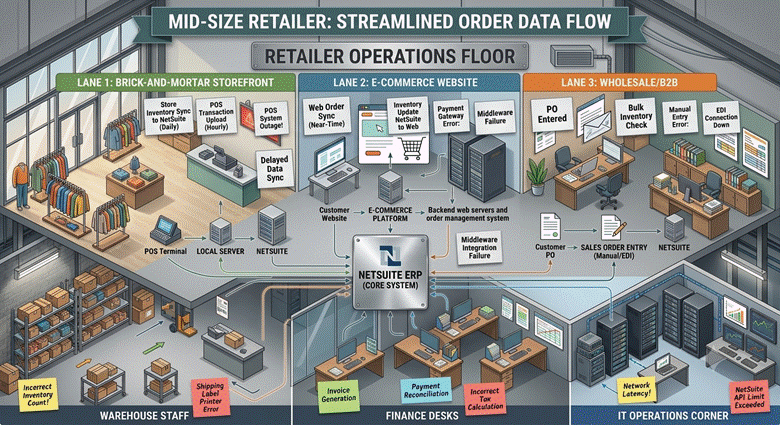
I have sat in on a lot of connector evaluations, and they tend to go the same way. Three vendors demo, all three show an order landing cleanly in NetSuite, and the buyer walks out with a spreadsheet full of green checkmarks and no real basis for a decision.
That is a costly way to choose, because the channel is not getting simpler. The U.S. Census Bureau publishes the official quarterly measure of online retail activity, and its Q1 2026 report put e-commerce at 16.9% of total retail sales, growing 9.8% year over year while retail overall grew 3.9%. More volume through more channels means more edge cases hitting your ERP.
So this article does something different. Instead of ranking products, it compares the three architectures every connector is built on, then gives you the criteria that actually change which one you should pick.
What Buyers Are Really Comparing?
Every connector moves orders, items, inventory, customers, and fulfillments. That list is table entry, not differentiation, and comparing it line by line tells you almost nothing.
The differences live in exception handling. What happens when a customer refunds two items out of a five-item order that shipped from two warehouses? What happens when your storefront sends a discount code that does not map to any NetSuite promotion record? A connector’s answer to those questions is the product.
The second area of difference is ownership of failure. When a sync breaks on a Saturday, someone has to notice, diagnose, and reprocess. Some products give you a retry queue and an alert. Others give you a support ticket and a wait.
A NetSuite E-Commerce Connector Comparison by Architecture
1. Native SuiteApps That Run Inside NetSuite
These install directly into your NetSuite account as a SuiteApp. Configuration, logs, and error records live in the same interface your finance and operations teams already use, so there is no second system to learn or license.
The trade-off is scope. A SuiteApp is built around NetSuite’s own record model and governance limits, which makes it predictable for order-to-cash work and less suited to orchestrating six unrelated systems.
2. Vendor-Hosted Point-to-Point Connectors
Here the connector runs on the vendor’s infrastructure and talks to both sides over APIs. Oracle’s NetSuite Connector sits in this group, along with several marketplace-focused products.
Setup is usually quic,k and the mappings are opinionated, which is a benefit if your processes match the template. If they do not, you are dependent on the vendor’s roadmap for anything the standard flow does not cover.
3. iPaaS Platforms
iPaaS is a defined market category, and using the definition helps you scope it correctly. Gartner defines iPaaS as a set of cloud services for building, executing, and governing integration flows across cloud and on-premises systems.
That breadth is the point. You get a visual builder, queuing, and monitoring across many endpoints, which pays off when NetSuite has to talk to a storefront, a 3PL, a POS, and a payment processor at once.
If middleware is new to your team, it is worth understanding the category before comparing vendors inside it. Our explainer on what iPaaS is walks through how these platforms handle mapping, queuing, and error monitoring between systems.
Side-by-Side View
| Native SuiteApp | Hosted Point-to-Point | iPaaS | |
| Where it runs | Inside NetSuite | Vendor cloud | Third-party cloud |
| Best fit | One to three sales channels, deep NetSuite logic | Standard order flows, fast start | Many systems, complex routing |
| Customisation | High within NetSuite records | Limited to vendor roadmap | High, requires build effort |
| Who troubleshoots | Your NetSuite team or partner | Vendor support | Your integration owner |
| Extra licence | None beyond the SuiteApp | Yes | Yes, often usage-based |
| Main risk | Governance limits at extreme volume | Template mismatch | Build and maintenance cost |
Connector vs. Native Integration: Where the Line Sits
This phrase causes more confusion than any other in the evaluation. Buyers use “native” to mean two very different things, and the difference is worth several hundred thousand dollars over a few years.
One meaning is a connector built as a SuiteApp, running inside NetSuite. Data still moves between two systems, but the moving happens under NetSuite’s own security model and audit trail.
The other meaning is a storefront built on NetSuite itself, where the web store reads the same item and inventory records the ERP uses. Nothing syncs because nothing is separate, which removes a class of problems and adds a different one around storefront flexibility.
Four Criteria That Change the Answer
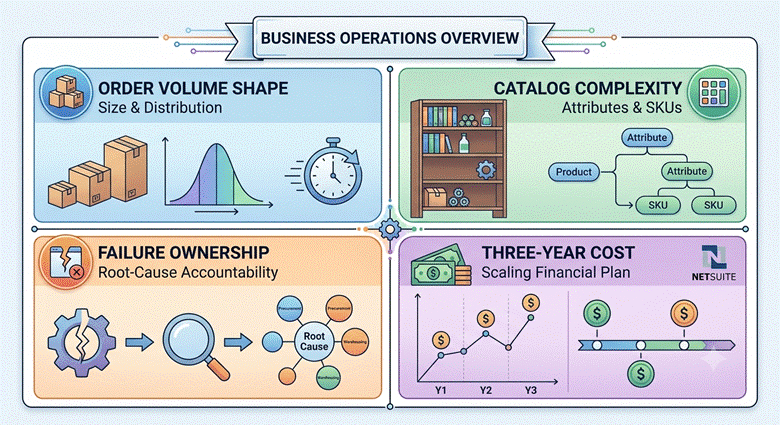
1. The Shape of Your Order Volume
Average daily orders is the wrong number. Ask what your peak hour looks like on your worst day, because that is when queues back up and inventory drifts.
A connector that batches every fifteen minutes is fine for steady flow and dangerous during a flash sale where the same unit can be sold four times before the next sync runs.
2. Catalog Complexity
Matrix items, kits, assemblies, and bundles are where mapping projects overrun. A shirt with five sizes and four colors is twenty NetSuite records, and one storefront product, and the connector has to hold that relationship in both directions.
Most of the real work sits in field mapping and record matching rather than installation. The step-by-step guide to integrating WooCommerce with NetSuite shows how that sequence plays out on a live platform.
3. Who Owns a Failed Sync
Write down the name of the person who gets the alert. If you cannot, you are buying a product whose failure mode is silence.
4. Three-Year Cost, Not Year One
Model the second and third year. Add a channel launch, a catalog restructure, two NetSuite releases, and one storefront replatform, then ask each vendor what each of those costs in license and services.
Where This Leaves You
A useful NetSuite e-commerce connector comparison ends with a shortlist of one architecture, not five products. Decide whether your problem is a deep two-system relationship, a standard flow you want running by next month, or an orchestration problem across many systems.
Once that is settled, the vendor conversation gets short and specific. You stop asking whether orders sync and start asking how refunds, partial shipments, and peak-hour bursts behave, which is the only comparison that survives contact with go-live.
Why Folio3?
We build NetSuite connectors as SuiteApps that run inside your account, which keeps configuration, logs, and error handling in the environment your team already works in. Our team has delivered integrations for Shopify, BigCommerce, WooCommerce, Magento, and the major marketplaces across retail, apparel, food, and distribution.
If you want to see how the pre-built options map to your channels before committing to an architecture, our NetSuite e-commerce connectors page lays out what each one syncs and where custom flows are added.
Frequently Asked Questions
1. What is the difference between a NetSuite connector and a native integration?
A connector moves data between two separate systems. A native integration means the storefront runs on NetSuite itself, so there is no sync. Confusingly, a SuiteApp connector installed inside NetSuite is also called native, so ask vendors which meaning they are using.
2. Is Oracle’s NetSuite Connector enough for most sellers?
It covers standard order, item, and inventory flows well for merchants whose processes match the template. Businesses with kit logic, multi-warehouse allocation rules, or custom fulfillment steps usually need more mapping flexibility than a fixed template allows.
3. Do I need a separate connector for every sales channel?
Usually yes at the channel level, though most vendors sell them as modules on one platform. What matters is whether inventory is allocated from a single source of truth in NetSuite rather than reserved separately per channel.
4. What do connectors not handle?
Anything requiring a decision. Fraud review, returns disposition, and pricing exceptions still need a rule or a person. A connector applies logic you define. It does not create it.
5. How long does a connector implementation take?
A standard pre-built connector with clean data is typically live in two to six weeks. Complex catalogs, historical data migration, and custom fulfillment logic extend that, and data cleanup is almost always the longest phase.