
Key Takeaways
- Boomi serves as a translation and orchestration layer between NetSuite and your enterprise applications. It creates a controlled boundary that allows both systems to evolve independently.
- The NetSuite connector consists of two reusable components of Connections (store authentication and endpoint details) and Operations (define specific actions like Create, Update, Upsert, Query, or Delete).
- Avoid overly complex single processes. Decompose into smaller, focused sub-processes with single responsibilities for easier testing, troubleshooting, and maintenance.
- Never directly map source to NetSuite models across multiple processes. Introduce a canonical data model to isolate schema changes and reduce excessive interdependence.
We’ve implemented NetSuite for more than 500 organizations. And one pattern that has been common in most of them is that while they wanted NetSuite to act as their system of record, some of the operations were performed in other systems.
Some had their storefront set up on Shopify or Magento, some were handling their manufacturing operations via an MES, and so on and so forth. So, we ended up integrating NetSuite with the systems they use.
If you’ve already integrated NetSuite with business applications, you already know that it comes with a number of complexities. On the front end, the user sees records syncing between the two platforms.
We would even dare to say that establishing NetSuite connectivity is the easiest part of the integration process. But a lot goes on behind the scenes that is far more difficult than this.
The integration layer has to deal with authentication, API limits, data mapping and transformation, retries, error handling, transaction boundaries, scheduling, observability, and the differences between NetSuite’s data model and the systems around it.
Boomi provides an integration platform that sits between NetSuite and your enterprise applications and acts as an orchestration and transformation layer.
Understanding the Boomi and NetSuite integration architecture is particularly important for developers and integration architects because many integration problems seem to be issues with NetSuite on the surface.
But the reality is that these are architectural problems in how Boomi processes, connectors, and data flows have been designed. These factors impact Boomi-NetSuite connectivity more than anything else.
This article breaks down the architecture from a technical perspective by focusing on how Boomi communicates with NetSuite, where transformation and orchestration happen, and what to consider when designing enterprise-grade integrations.
The High-level Architecture
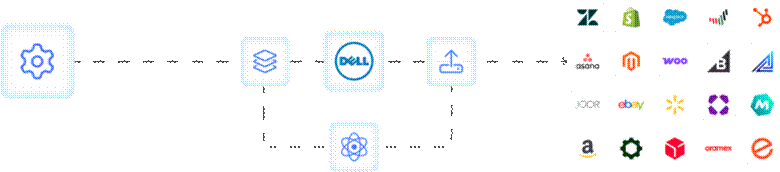
As a matter of fact, the important architectural idea is the boundary between NetSuite and the applications it integrates with. The application doesn’t need to understand all of NetSuite’s internal requirements.
Similarly, NetSuite also doesn’t need to understand the source application’s data model. Because Boomii serves as the translation and orchestration layer between them.
Boomi’s connector is specifically designed around a certain model. The model consists of two reusable components:
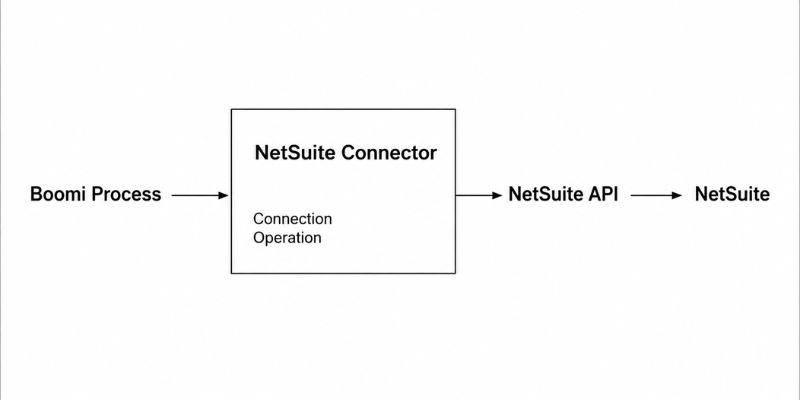
NetSuite Connection
A NetSuite connection stores physical connection details, including token-based authentication or OAuth 2.0 credentials, endpoint-related configuration like the SOAP endpoint URL, and the NetSuite account number.
NetSuite Operation
A NetSuite operation defines the specific action to be performed against the connected account, such as Create, Update, Upsert, Query, Delete, or perform another supported action for specific record types.
This separation of concerns allows integration architects to reuse a single connection across multiple operations and processes to promote consistency and reduce integration maintenance overhead.
SuiteTalk SOAP
The NetSuite connector uses the SuiteTalk SOAP-based web services API to execute data operations over HTTPS. Boomi helps working with this API by automatically handling several technical complexities, such as the following:
Automatic Metadata Caching
When you configure an operation for a record type, such as Sales Order or Customer, Boomi imports the standard and custom field definitions from NetSuite’s metadata. This cached data defines the request and response XML profiles used in Boomi-NetSuite data mapping.
Custom Field Handling
The connector abstracts the raw SOAP custom field structure into strongly-typed, readable XML elements to simplify mapping logic.
Batch Processing
To manage large volumes of data efficiently, the connector groups multiple documents into a single SOAP request using the Batch Size property. This reduces network overhead and increases throughput.
The Deprecation of SOAP
One important consideration for anyone designing a new NetSuite integration is the API technology being used. NetSuite has historically provided SuiteTalk SOAP Web Services, but Oracle has announced a transition toward REST Web Services.
Oracle also states that the 2025.2 SOAP endpoint is the last planned SOAP endpoint and that SOAP won’t be available in NetSuite 2028.2.
Boomi Runtime
The Boomi process definition describes what should happen. But for some action to happen, the integration needs a runtime environment in which that process executes.
The runtime is responsible for:
- Receiving or retrieving documents
- Executing process steps
- Invoking connectors
- Transforming data
- Handling the resulting documents and errors
Boomi Atom
Since we talked about Boomi runtime just above, it would only be fair if we also covered Boomi Atom. By the way, Atom is a more popular term for something Boomi now calls “basic runtime.” Now, you know why we are discussing it.
The Atom, or basic runtime, is responsible for running the processes and executing the integration logic. It is single-tenant, can be deployed anywhere, be it on-premises, in a data center, or in the cloud, and isolates processes.
What are the Critical Technical Constraints in the NetSuite and Boomi Integration Architecture?
For architects who design integration flows, it is important to understand the connector’s inherent limitations for building smooth processes. The following are the limitations of the NetSuite connector:
Batch Size Limits
One of the most critical design constraints is the hard-coded batch size limit for different types of operations within the NetSuite connector. The following are the limits of some of the most common operations:
| Operation Type | Maximum Batch Size |
| Create | 100 records |
| Update | 50 records |
| Upsert | 50 records |
| Delete | 100 records |
It is worth mentioning that although these limits might sound regressive, they are safeguards engineered into the Boomi-NetSuite connector to ensure stable and predictable throughput. This prevents timeouts, request failures, excessive API consumption, throttling, contention, or degraded performance.
So, the question is what happens when you process more records? Well, when you process more records than the limit, Boomi automatically splits them into multiple sequential or parallel batches.
Connection Pooling and Concurrency
The NetSuite connector manages connection pooling behind the scenes to avoid exceeding the maximum number of concurrent connections allowed by NetSuite.
This ensures that the system remains stable. But on the flip side, it has some architectural implications similar to the batch size limit that we discussed above. When multiple processes attempt to call NetSuite simultaneously, the second process waits for the first process.
Schema Browser vs. Connect Browser
An important distinction exists within NetSuite’s data models. The NetSuite connector’s Schema Browser exposes objects available via the SuiteTalk API, such as standard and custom records. But certain objects like TRANSACTION_LINES have conditional nesting that SuiteTalk doesn’t support.
For such objects, the Boomi and NetSuite integration architecture requires a different approach, such as using a Database Connector to access NetSuite’s ODBC/JDBC data source, aka the Connect Browser, for more flexible SQL-based queries.
Why Fit Boomi Between an Application and NetSuite?
One of the most common reasons to introduce the Boomi iPaaS layer in between is that applications hardly present information in the same way as NetSuite wants. Consider a simple order integration. An ecommerce platform might generate an order that looks conceptually like:
{
  "orderId": "WEB-143",
  "customerId": "C-6247",
  "currency": "USD",
  "items": [
{
  "sku": "SKU-051",
  "quantity": 2
  }
 ]
}
NetSuite might require a different representation that involves internal IDs, subsidiaries, locations, item references, customer references, tax information, transaction dates, and other fields.
Due to this reason, the source system cannot send its JSON representation directly to NetSuite. This is where Boomi comes in.
It receives the source document and performs the work required to turn that document into something that NetSuite can use.
Understanding Data Transformation
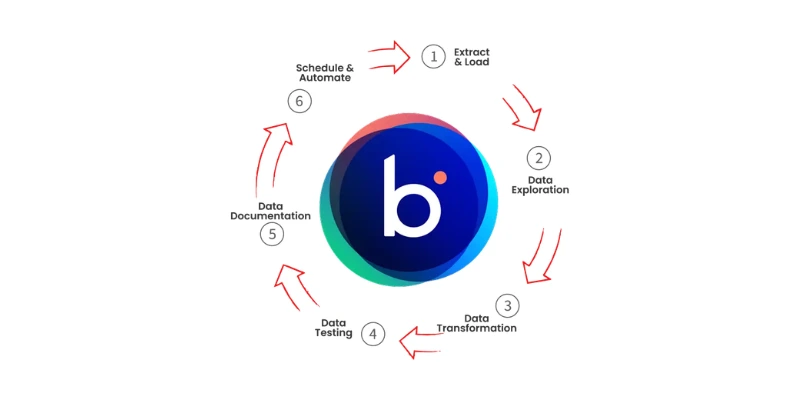
Just right above, we talked about how NetSuite might need a different representation of JSON. This different representation is achieved through data transformation. In simple terms, data transformation is used for Boomi-NetSuite data mapping.
Integration architects know this already, but if you’re a non-technical person, let us tell you that just renaming fields does not successfully map them. Due to the complex nature, you should treat data transformation and field mapping as part of the Boomi and NetSuite integration deployment architecture.
What are the Common Architectural Mistakes of NetSuite and Boomi Integration?
The following are the most common architectural mistakes businesses make when integrating NetSuite with other systems via Boomi:
1. Mistaking the Connector for the Architecture
While the NetSuite connector is an important part of Boomi integration, you should not confuse it with the integration architecture itself.
The connector is responsible for establishing communication with NetSuite and performing supported operations. But it does not decide how the overall business process should be. Concerns, such as data ownership, transaction state, validation, orchestration, and more, still need to be explicitly designed within the integration.
2. Building Overly Complex Boomi Processes
We understand that it can be tempting to build a single Boomi process that handles every variation of a business transaction. While this may appear efficient initially, large processes quickly become difficult to understand and maintain.
A process that contains routing, transformations, lookups, business rules, error handling, and multiple NetSuite operations can become difficult to test and troubleshoot.
3. Directly Mapping Source and NetSuite Data Models
Directly mapping source-system fields to NetSuite fields throughout multiple processes can create a significant amount of interdependence. At first, the approach appears straightforward because the mapping is easy to understand.
The problem emerges when the source application changes its schema or NetSuite introduces changes to its record structure. Those changes can then require modifications across numerous integration processes.
4. Ignoring API Limits and Platform Constraints
An integration that performs well with a small number of records may behave very differently when transaction volume increases.
NetSuite has API and platform constraints that need to be considered when determining batch size, concurrency, scheduling, pagination, and retry behavior.
Boomi and NetSuite Integration Architecture, Understood
The Boomi and NetSuite integration deployment architecture is about creating a controlled boundary between independently evolving applications.
Boomi provides the orchestration layer. The integration process determines how data moves, how it is validated, transformed, enriched, routed, and recovered when things go wrong.
The NetSuite connector provides the application-specific connectivity, while NetSuite remains responsible for its ERP data and transactional behavior.
That is why a production-grade NetSuite and Boomi integration should be designed around more than connectivity.
Frequently Asked Questions
What exactly is Boomi’s role in a NetSuite integration?
Boomi serves as a translation and orchestration layer between NetSuite and your enterprise applications. It sits between the two systems and handles:
- Data transformation (converting formats and structures)
- Authentication and secure communication
- Error handling and retries
- Orchestration of multi-step business processes
- API management and throttling
Is the NetSuite connector limited to SOAP, or does it support REST too?
Previously, the connector was SOAP-based (SuiteTalk). But Boomi now supports REST connections to NetSuite with modern authentication protocols like OAuth 2.0 and Token-Based Authentication.
Can I run Boomi Atoms behind a firewall to access on-premises systems?
Yes. This is one of Boomi’s key strengths. The Atom can be deployed:
- On-premises in your data center
- Behind a firewall with no inbound internet access required (outbound HTTPS only)
- In the cloud (AWS, Azure, GCP)
- In hybrid configurations with some Atoms on-premises and others in the cloud
Why can’t I just map source fields directly to NetSuite fields?
Direct mapping creates a significant amount of interdependence between systems. While it’s faster to implement initially, it leads to maintenance challenges when:
- The source application changes its schema (renames fields, changes data types)
- NetSuite introduces changes to its record structure (new required fields)
You need to add a new source system that uses different terminology.

