
Security is a critical part of any NetSuite integration, especially when your system needs to connect with external applications, APIs, or third-party platforms. Traditional authentication methods like username and password are not only harder to manage but also increase the risk of unauthorized access if not handled properly.
This is where Token-Based Authentication (TBA) comes in. NetSuite provides TBA as a secure, scalable way to authenticate API requests without exposing user credentials. It allows businesses to build reliable integrations while maintaining strict control over access and permissions. Whether you are working with RESTlets, SOAP web services, or external systems, TBA plays a key role in ensuring secure communication.
What Is Token-Based Authentication (TBA) in NetSuite?
Token-Based Authentication (TBA) in Oracle NetSuite is a secure authentication method that allows users and external applications to access NetSuite without using a username and password for every request. Instead, it uses a set of unique tokens that act as credentials for verifying identity.
In TBA, authentication is handled through four key components:
- Consumer Key and Consumer Secret
- These identify the integration or application requesting access.
- They are generated when you create an integration record in NetSuite.
- Token ID and Token Secret
- These are linked to a specific user and role.
- They act as the actual access credentials for API requests.
When a request is sent to NetSuite, these tokens are used to generate a secure signature (typically using OAuth 1.0). NetSuite then validates this signature to confirm that the request is authentic and authorized.
Unlike basic authentication, TBA ensures:
- Credentials are never exposed directly
- Access can be controlled at a granular level (user + role based)
- Tokens can be revoked without affecting user login details
In simple terms, TBA works like a secure access pass. Instead of sharing your password every time, you use a trusted token that proves your identity while keeping sensitive information protected.
One of the major differences between Suitelets and RESTlets is that the latter supports authentication, which makes it easier to restrict access in RESTlets. As you know, NetSuite provides two methods for authentication: OAuth or the NetSuite-specific NLAuth in the HTTP Authorization header. In this post, we’ll take a closer look at both of these authentication methods.
NLAuth
Using the NLAuth method is really easy. All you need to do is pass the following details to the HTTP Authorization Header of your request:
- nlauth_account (required) – NetSuite company ID
- nlauth_email (required) – NetSuite user name
- nlauth_signature (required) – NetSuite password
- nlauth_role (optional) – internal ID of the role used to log in to NetSuite
A sample authorization header using the NLAuth method would look like the following:
Authorization: NLAuth nlauth_account=123456, [email protected], nlauth_signature=xxxxxxxx, nlauth_role=41
Issue with NLAuth
Although using the NLAuth authentication method is relatively easy as compared to OAuth method, it does have a few limitations. One of them being that it is highly sensitive to password rotation policies. For example, you will need to update the password in your scripts if you have changed your NetSuite account password after it has expired. Moreover, if you have used same credentials for multiple authentications, then you will have manually update the password for each script. Issues like these significantly increase the overhead involved when using this method.
Another major flaw with using the NLAuth method is that it sends your NetSuite account password in plain text in the request header. So if a hacker is listening and monitoring your traffic, then your NetSuite account can be easily compromised
How does OAuth take care of these problems?
OAuth uses a token (which is generated prior to using that token in the request) to validate the user. This token is not impacted by password expiry. Furthermore, if a hacker is monitoring your communication with the server, only your account’s token will be compromised, not your password. So your account will remain safe from hackers. You can easily remove the token from your account and generate a new one.
An OAuth Authentication header typically has the following details (since OAuth passes the following parameters).
- oauth_signature (required) – Credentials to verify the authenticity of the request, generated by calling your application. The Token Secret and Consumer Secret are constructed as a key to sign the request, using a supported signature method (HMAC-SHA1 or HMAC-SHA256).
- oauth_version (optional) – Must be set to “1.0”.
- oauth_nonce (required) – Passes a unique, random, alphanumeric string. This string must be a minimum of 6 characters (the maximum length is 64 characters). It is used to verify that a request has never been made before.
- oauth_signature_method (required) – Must be set to HMAC-SHA1 or HMAC-SHA256. Declares which signature method is used.
- oauth_consumer_key (required) – Consumer Key (client application ID) generated for the token-based application in NetSuite. The unique value is matched to the token, to establish ownership of the token.
- oauth_token (required) – Token ID generated for the token-based application in NetSuite.
- oauth_timestamp (required) – Passes in a positive integer expressed as the number of seconds since January 1, 1970 GMT.
- realm (required) – NetSuite company ID

Enabling Token based authentication feature
To enable the token-based authentication feature using OAuth, just follow the steps below.
- Go to Setup > Company > Setup Tasks > Enable Features
- Click on the SuiteCloud subtab.
- Scroll down to the SuiteScript section, and check the following boxes.
- Client SuiteScript.
- Server SuiteScript. Click “I Agree” on the SuiteCloud Terms of Service page.
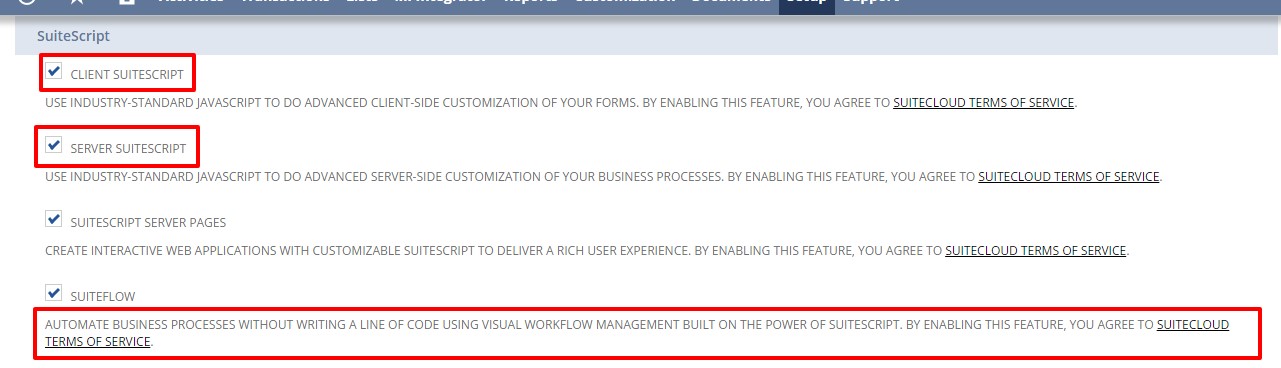
4. Scroll down to the Manage Authentication section, and check the Token-based Authentication box. Click I Agree on the SuiteCloud Terms of Service page.
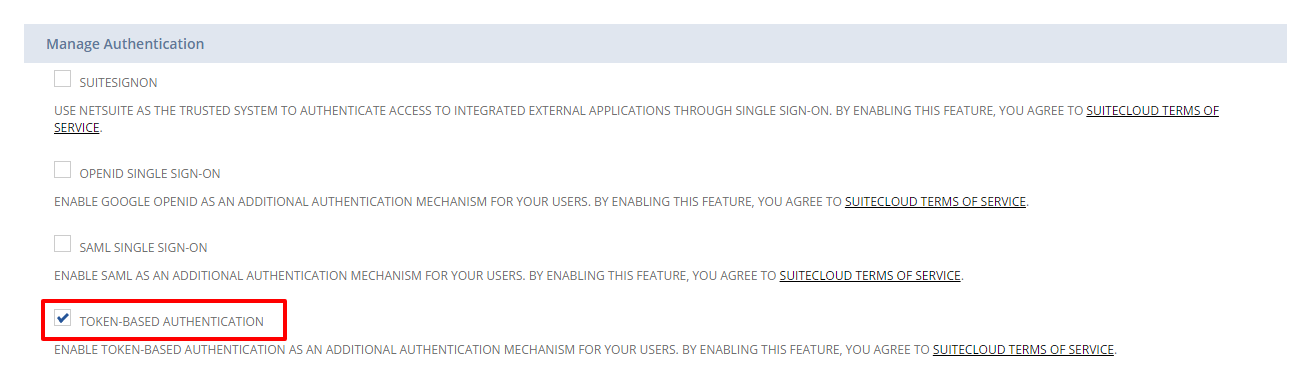
5. Click Save Button.
And that’s it. In my next post, I’ll show you how to assign a user to token based authentication roles, how to create an application using the integration record, and how to call a token endpoint to issue and revoke a token.
How to Set Up Token-Based Authentication for RESTlet Integration
Setting up Token-Based Authentication (TBA) in Oracle NetSuite is mostly configuration inside NetSuite. Coding is only required when you create the RESTlet and when you call it externally.
Step 1: Enable Token-Based Authentication (No Coding)
- Go to Setup → Company → Enable Features
- Open the SuiteCloud tab
- Enable:
- Token-Based Authentication
- REST Web Services
- SuiteScript
Save changes
Step 2: Create an Integration Record (No Coding)
- Navigate to Setup → Integrations → Manage Integrations → New
- Enter application name
- Enable Token-Based Authentication
After saving, you’ll get:
- Consumer Key
- Consumer Secret
Step 3: Create a Role with Permissions (No Coding)
- Go to Setup → Users/Roles → Manage Roles → New
- Add permissions:
- RESTlet
- Required record access
Step 4: Assign Role to a User (No Coding)
- Go to Lists → Employees → Edit User
- Assign the role
Step 5: Generate Access Tokens (No Coding)
- Go to Setup → Users/Roles → Access Tokens → New
- Select:
- Application
- User
- Role
You’ll get:
- Token ID
- Token Secret
Step 6: Create the RESTlet Script (Coding Required)
Now comes the first actual coding step. You need a RESTlet to expose data or functionality.
Example RESTlet (SuiteScript 2.0)
/**
* @NApiVersion 2.x
* @NScriptType Restlet
*/
define(['N/record'], function(record) { function get(context) {
return {
message: "RESTlet is working"
};
} return {
get: get
};
});
- Upload this script to File Cabinet
- Create a Script Record
- Deploy it
Without this script, there’s nothing to authenticate against.
Step 7: Call the RESTlet Using TBA (Coding Required)
This is the second coding step — making an authenticated API request using OAuth 1.0.
Example (Node.js)
const axios = require('axios');
const OAuth = require('oauth-1.0a');
const crypto = require('crypto');const oauth = OAuth({
consumer: {
key: 'CONSUMER_KEY',
secret: 'CONSUMER_SECRET'
},
signature_method: 'HMAC-SHA256',
hash_function(base_string, key) {
return crypto.createHmac('sha256', key)
.update(base_string)
.digest('base64');
}
});const token = {
key: 'TOKEN_ID',
secret: 'TOKEN_SECRET'
};const request_data = {
url: 'https://ACCOUNT_ID.restlets.api.netsuite.com/app/site/hosting/restlet.nl?script=SCRIPT_ID&deploy=DEPLOY_ID',
method: 'GET'
};const headers = oauth.toHeader(oauth.authorize(request_data, token));axios({
url: request_data.url,
method: 'GET',
headers: headers
})
.then(res => console.log(res.data))
.catch(err => console.error(err));
👉 This is where TBA actually happens.
👉 Without this, your tokens are useless.
Step 8: Test the Integration (Minimal Coding / Optional)
- Use Postman (no coding)
OR - Use your application code (coding)
Postman can handle OAuth for testing, but production always involves code.
Conclusion
Token-Based Authentication (TBA) in Oracle NetSuite provides a secure, scalable way to connect external systems and applications without exposing user credentials. By combining configuration steps within NetSuite — like creating integration records, roles, and access tokens — with coded API calls using OAuth 1.0, businesses can ensure reliable, controlled, and efficient integrations. TBA not only strengthens security but also simplifies management of external access, giving organizations confidence that their data remains protected while workflows run seamlessly.
Want to leverage Token-Based Authentication to secure your NetSuite integrations? Our experts can guide you through every step — from setting up tokens and RESTlets to implementing OAuth-based API calls. Contact our team today to streamline your NetSuite integration process and ensure your data stays safe.

