
Key Takeaways
- Boomi reduces or eliminates repetitive data entry and speeds up processes like order processing, reconciliation, and warehouse operations.
- Synchronizing data across systems prevents errors caused by manual updates and ensures all teams work with the same, trusted information.
- Connected data allows leadership to answer critical questions about sales, product performance, inventory, and cash flow with confidence.
- The full value of integration comes from defining data ownership, automation needs, frequency, and error-handling upfront.
One thing is for sure that if your business runs on NetSuite, you already have a powerful ERP at the center of your operations. But NetSuite gets a significant share of its power from the systems that businesses already use and integrate with NetSuite.
Your CRM, ecommerce platform, warehouse management system, payment gateways, 3PL platforms, and other business applications all need to exchange information with your ERP.
But when those systems don’t communicate properly, employees end up filling the gaps with spreadsheets, CSV files, manual data entry, and repetitive processes.
This is where Boomi comes in. It provides an integration platform that connects with the rest of your technology ecosystem, automates data flows, and orchestrates business processes.
Now that we’ve given you a hint into what we’re going to cover in this blog, let’s get started.
10 Key Benefits of Integrating NetSuite with Boomi
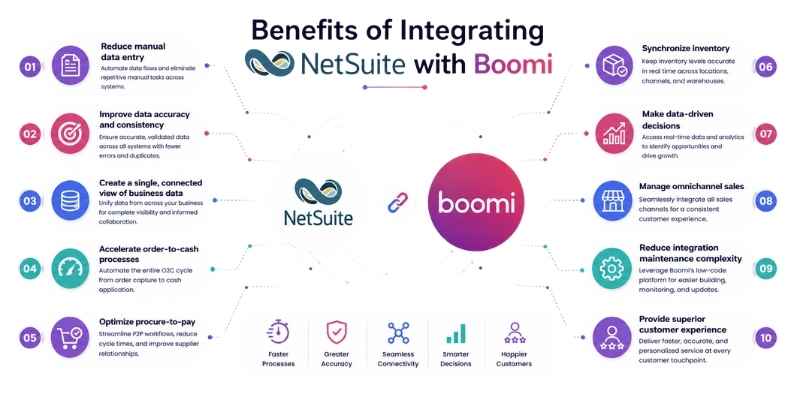
This is in no way an extensive coverage of the benefits of integrating NetSuite with Boomi. But we’re confident that it’s enough for you to decide whether this integration would suit your business needs or not. The following are some of the Boomi and NetSuite integration benefits:
- Reduce manual data entry
- Improve data accuracy and consistency
- Create a single, connected view of business data
- Accelerate order-to-cash processes
- Optimize procure-to-pay
- Synchronize inventory
- Make data-driven decisions
- Manage omnichannel sales
- Reduce integration maintenance complexity
- Provide superior customer experience
1. Reduce Manual Data Entry
Let’s start with one of the most obvious yet rewarding benefits of integrating NetSuite with Boomi. And that is, you don’t need to keep moving information between systems manually.
If you’re a business that receives hundreds of thousands of orders every day, you need to automate NetSuite workflows.
Because without automation, every manual step you take compounds in the form of delays in dock-to-stock time, pick-to-ship time, order processing time, month-end reconciliation, and so on and so forth.
Take the example of an ecommerce brand. Your team would need to transfer order information from your e-commerce platform into NetSuite, update customer records, send information to the warehouse, and then update other systems once the order ships. That’s too much work to be done manually, if you ask us.
And it’s not even the worst part. This manual work creates errors too. But with Boomi, these processes can happen automatically.
Boomi’s NetSuite integrations support operations such as creating, querying, updating, and upserting records. This makes it possible to automate many common NetSuite workflows.
2. Improve Data Accuracy and Consistency
Ask any business, and no one would be confident enough to brag that their data is trusted by the team of the executive leadership.
There is always a sense of panic as the team prepares for all the possible answers to give to the leadership when presenting data on the reports dashboard. Because they’re not confident enough to trust the data, let alone defend it before the leadership in the boardroom.
The team’s lack of trust in the data creates a domino effect, as the leadership also expresses a lack of satisfaction with what is being presented to them.
This is a direct result of the data quality issue present inside the systems you use. When you feed data to multiple systems that are not connected to each other, this is bound to happen.
Let’s take an example. If a customer changes their billing address and you update the CRM you use, be it HubSpot, Salesforce, or whatever, your NetSuite still has the same old address.
You know what happens after that. Your invoicing, reporting, shipping, tax processes, and customer communications, all of them get affected. As Hani M., ERP Consulting Manager at Folio3, says:
“This is a compounding ripple effect, or cripple effect for short. A single unsynced record brings the business closer to the verge of collapse.”
Boomi helps you synchronize the appropriate fields between systems and transform data where necessary. This creates a more consistent information environment without requiring every application to store and manage data in exactly the same way.
3. Create a Single, Connected View of Business Data
Ok, this benefit is somewhat related to the one we just discussed above. One of the significant advantages of Boomi and NetSuite connectivity is the ability to connect operational and financial data that previously existed in silos.
Consider a business that sells through multiple channels, such as its own Shopify store, Amazon marketplace, retail, etc.
NetSuite might contain financial and inventory information, while an ecommerce platform would contain order information. Similarly, a CRM would contain customer interactions, and a warehouse platform would contain fulfillment data.
When all these systems connect with one another, you’ll get a holistic view of all your business operations. And, as a result, you get to improve your business process efficiency.
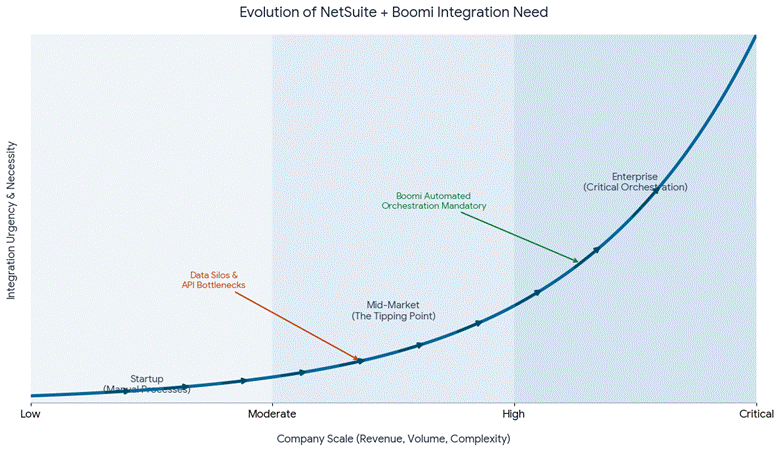
This is especially useful for organizations that are investing in additional sales channels, acquisitions, subsidiaries, or new operational systems.
4. Accelerate Order-to-cash Processes
Order-to-cash is one of the strongest use cases for NetSuite integration. A typical automated workflow connects your sales channel with financial reporting. That’s the scope we’re talking about when automating this process.
Boomi orchestrates the movement of information between all the stages involved in the order-to-cash process. In fact, it:
- Validates customer information
- Checks product identifiers
- Transforms order fields
- Creates or updates the NetSuite Customer record
- Creates the sales order
- Passes fulfillment information to the warehouse
- Receives shipment details
- Updates the relevant NetSuite records
- Passes tracking info back to the ecommerce platform
- Triggers the financial process
5. Optimize Procure-to-pay
Well, customer-facing processes are not the only ones that benefit from real-time data integration between Boomi and NetSuite. Yes, the list of customer-facing NetSuite-Boomi integration benefits is long, but there’s another side as well.
And that side is the purchasing side of the business.
Procure-to-pay involves everything from creating purchase orders to receiving goods, processing invoices, and making payments.
Boomi connects NetSuite with warehouse applications, payment solutions, and other systems. This helps reduce manual purchase order entry, improve visibility into supplier transactions, and helps finance teams process invoices in less time, like say, saving up to 60% of their time.
6. Synchronize Inventory
Inventory synchronization becomes increasingly important as businesses operate across multiple warehouses, stores, marketplaces, and ecommerce channels.
If inventory information is not synchronized, businesses face problems, such as overselling products, incorrect availability information, delayed fulfillment, manual inventory reconciliation, poor customer experiences, and excess inventory in one location and shortages in another.
Boomi and NetSuite integration with ecommerce platforms, warehouse systems, and other operational applications helps distribute inventory information to the systems that need it.
For instance, when inventory changes in NetSuite, Boomi passes the relevant information to systems. Similarly, warehouse events are sent back to NetSuite so that inventory records remain synchronized.
7. Make Data-driven Decisions
Having data is one thing. But being able to trust it and make decisions requires a different ballgame altogether.
When NetSuite is connected to the rest of your business systems, finance and operations leaders gain a 360-degree view of your business. This is possible because now they’re not looking at data that is siloed. In fact, they’re looking at how inventory, sales, and operations relate to each other.
Now, you’re able to answer them about:
- How much are we actually selling?
- Which products are performing best?
- How much inventory do we have left?
- Which customers are bringing in the most sales?
- What’s happening with cash flow?
8. Manage Omnichannel Sales
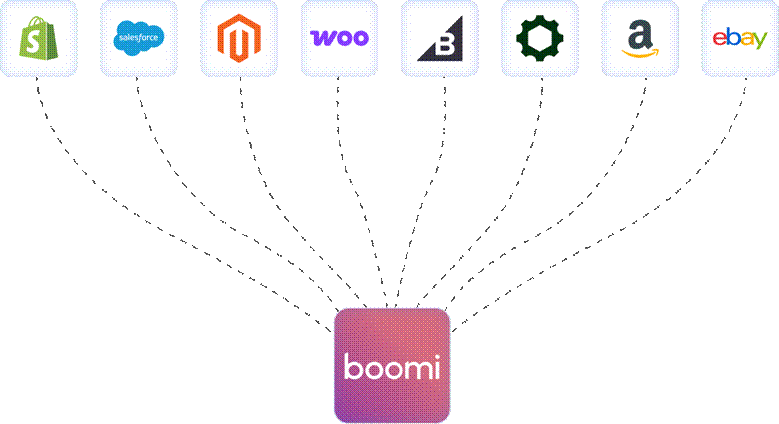
If you’re a business that sells products through multiple channels, you already know how complex it gets.
After all, managing your own website, marketplaces, retail locations, and third-party sales channels is not an easy job. Because each channel generates its own customers, orders, inventory updates, and transactions.
Integrating these channels with NetSuite through Boomi gives your business a way to standardize how that information reaches the ERP. Instead of managing every channel independently, you get to create consistent integration processes for orders, customers, products, inventory, and fulfillment.
9. Reduce Integration Maintenance Complexity
Building an integration is one thing. But maintaining it is what tests the patience of your team. Most businesses go for custom point-to-point integrations. They work fine when they’re first launched.
But when six months pass and an API changes, a field gets renamed, a business rule changes, or a new application needs to be connected, that’s where the problems start showing up. Because now developers will have to modify multiple integrations.
Using Boomi as a central integration layer can help standardize connectivity, mapping, transformation, monitoring, and business logic.
And we’re not saying that the need for maintenance completely goes away. No. You still need to maintain the integration. But the overall maintenance job becomes easier with Boomi and NetSuite connectivity.
10. Provide Superior Customer Experience
In today’s market, a great customer experience is defined by speed and accuracy. But when customer information is spread across multiple systems, you start wondering whether you’re giving the desired experience to your customers or not.
Because now your support team needs to jump between applications to understand what is happening. They juggle CRM, ecommerce platform, 3PL system, and NetSuite to get the complete context of a customer. Isn’t that too much back and forth?
A NetSuite and Boomi integration brings together customer, order, payment, shipping, and account information, so support representatives can resolve issues faster.
For instance, if a customer asks, “Where’s my order?” the support team can access information that connects the original order in the e-commerce platform, the financial transaction in NetSuite, and the shipment status from the 3PL system. It becomes this simple.
Seeing the Bigger Picture
While we have broken down the Boomi and NetSuite integration benefits, the truth is that one of the biggest benefits of integrating NetSuite with Boomi is the ability to connect your business processes.
So, before building an integration, define which system owns each piece of data, which processes need automation, what information actually needs to move, how frequently it should move, and what happens when something goes wrong.
Get those fundamentals right, and Boomi can turn NetSuite from an isolated ERP into a much more connected part of your overall business technology ecosystem.
Frequently Asked Questions
Do I need coding skills to integrate NetSuite with Boomi?
No. Boomi provides a low-code, drag-and-drop interface with pre-built connectors for NetSuite and many other applications. This makes it accessible to integration specialists and even business users, though complex scenarios may still benefit from developer oversight.
Can Boomi handle high-volume order processing?
Yes. Boomi is designed to scale and can automate thousands of daily transactions, such as order creation, inventory updates, and fulfillment syncing, without manual intervention. This makes it ideal for high-volume ecommerce and retail businesses.
How does Boomi improve data accuracy between systems?
Boomi synchronizes fields like customer addresses, order statuses, and inventory levels across all connected systems. It also transforms data as needed, so updates made in one system are automatically reflected in NetSuite and others. So, there’s no chance of mismatched records.
Is Boomi only for customer-facing processes?
No. It also benefits internal operations like procurement, supplier transactions, warehouse receiving, invoice processing, and financial reconciliation.
How does Boomi reduce integration maintenance effort?
Instead of building and maintaining multiple point-to-point integrations that break when APIs or fields change, Boomi acts as a central integration layer. Changes can be managed in one place, and the overall maintenance burden on your development team is reduced.

