Key Takeaways
- NetSuite is the right fit for organizations that need CRM connected to ERP, financial, operational, and customer service data.
- NetSuite provides a broader customer view, as it connects sales activity with transactions, orders, fulfillment, inventory, contracts, commissions, and support information.
- Pipedrive is built around sales pipeline management, with a visual interface for leads, deals, activities, automation, reporting, and sales productivity.
- NetSuite requires a broader implementation effort because it operates across more business processes. Pipedrive requires less operational scope when the requirement is limited to sales CRM.
- NetSuite is the stronger fit when sales, customer records, orders, financials, inventory, and service data need to work together, while Pipedrive suits teams focused on managing leads, deals, and sales activities.
NetSuite CRM and Pipedrive address different levels of CRM requirements. NetSuite CRM connects sales, marketing, customer service, quotes, orders, fulfillment, commissions, and customer information with the broader NetSuite business platform. Pipedrive focuses on sales execution through lead management, deal pipelines, activities, automation, reporting, and sales-focused AI.
For a business that needs CRM data connected to finance, inventory, orders, fulfillment, and customer service, NetSuite provides the broader platform. For a sales team that primarily needs a focused CRM for managing leads and moving deals through a pipeline, Pipedrive provides a simpler operating model.
What Is NetSuite CRM?
NetSuite CRM manages prospects, customers, partners, and suppliers while connecting sales, marketing, customer service, quotes, commissions, forecasting, orders, fulfillment, and support within the same environment.
It covers the customer lifecycle from lead and opportunity through order, fulfillment, renewal, upsell, cross-sell, and support. Its CRM capabilities include sales force automation, marketing automation, customer service management, partner relationship management, mobile access, customer visibility, reporting, and analytics.
The key advantage is the connection between CRM activity and operational information. A sales representative working with a customer has access to relevant business information such as transactions, inventory, contracts, orders, fulfillment activity, and support cases rather than relying on a separate CRM record for sales information.
This means sales teams can move from opportunities and quotes into orders, fulfillment, invoicing, and other downstream processes within the same NetSuite environment.
What Is Pipedrive?
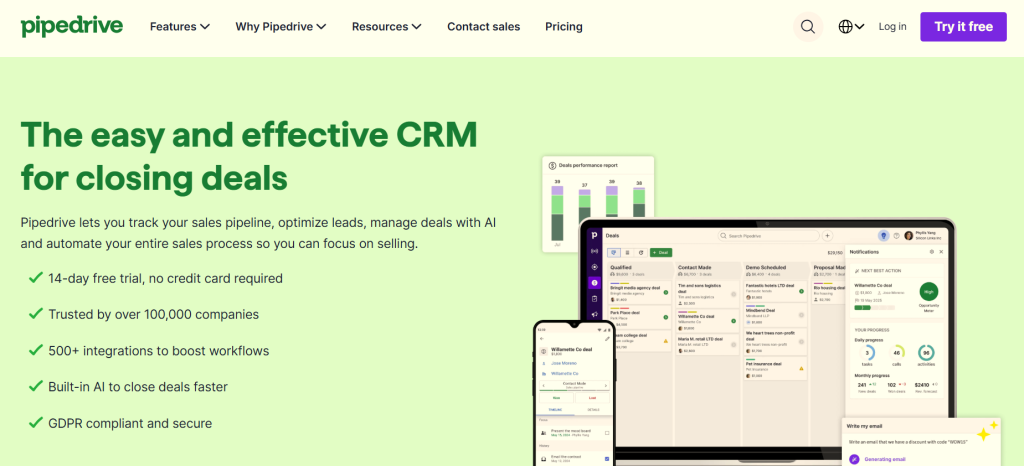
Pipedrive is a sales-focused CRM built around lead, contact, activity, and deal management. Its core experience centers on visual sales pipelines, helping sales teams organize opportunities, track activities, automate repetitive tasks, and monitor sales performance.
It includes sales automation, reporting, forecasting, email synchronization, and integrations with other business applications. Its product ecosystem includes tools for lead generation, email campaigns, documents, and AI-assisted sales workflows, with availability depending on the product, plan, and integration involved.
The platform’s central strength is the sales workflow itself. Representatives get a clear view of which deals are progressing, which opportunities need attention, and what follow-up should happen next. When a business needs accounting, inventory, order fulfillment, or other ERP processes, those functions sit outside Pipedrive’s core CRM and require a separate application or integration.
NetSuite CRM vs. Pipedrive: Complete Feature Comparison
| CRM function or module | NetSuite CRM | Pipedrive |
|---|---|---|
| Contact and account management | Yes. Customer, prospect, company, and contact records connect with related business transactions and activities. | Yes. Person and organization records connect with deals, activities, notes, and communications. |
| Lead capture and qualification | Yes. Lead capture, qualification, scoring workflows, and lead conversion support marketing-to-sales handoff. | Yes. Leads Inbox, lead qualification, and conversion to deals. LeadBooster adds web forms, chatbot, live chat, and prospecting tools, depending on plan. |
| Sales force automation | Yes. Opportunity management, quotes, forecasting, order management, fulfillment, and commissions. | Yes. Deal management, activity tracking, pipeline automation, follow-ups, and sales workflows. |
| Opportunity and pipeline management | Yes. Opportunity status, revenue, contacts, notes, documents, forecasts, and connected transactions. | Yes. Visual, customizable pipelines, deal stages, deal values, activity tracking, and pipeline reporting. |
| Sales forecasting and quota management | Yes. Sales forecasts, pipeline analysis, sales goals, and quota-related reporting. | Yes. Revenue forecasting, sales goals, and pipeline analytics. It is not a substitute for NetSuite’s ERP-linked sales and financial records. |
| Product catalog and pricing | Yes. Product and pricing information connects with quotes, orders, and other transactions. | Yes. A product catalog supports products and deal values. It does not provide full ERP product, inventory, and order processing. |
| Quote and proposal management | Yes. Quote management connects to sales orders and downstream processing. | Yes. Deal-related documents and proposals; Smart Docs supports document templates and tracking, with availability depending on plan or subscription. |
| Configure, price, quote (CPQ) | NetSuite offers CPQ capabilities for complex product and service configurations as a separate solution to evaluate. | No equivalent full native CPQ capability is established by its core CRM feature set. Complex configuration and pricing requirements need a suitable external solution. |
| Sales orders, fulfillment, and invoicing | Yes. CRM sales processes connect to order processing, fulfillment, and financial transactions. | Not as native ERP functionality. Requires an accounting/ERP system and an appropriate integration. |
| Commission management | Yes. Commission-related functionality is available, with advanced compensation requirements dependent on licensing and configuration. | Sales performance and revenue reporting are available. Specialized commission calculation and payout management require a separate solution if needed. |
| Marketing automation and campaigns | Yes. Campaign management, segmentation, lead nurturing, lead qualification, and campaign reporting. | Yes, through Campaigns and related products. Email marketing, segmentation, and nurturing are offered through an add-on/product rather than being identical to NetSuite’s integrated marketing capabilities. |
| Customer service and case management | Yes. Case management, assignment, escalation, customer communication, and self-service capabilities. | No equivalent full native case-management module is established in its core sales CRM. Customer support tools are available through marketplace integrations. |
| Customer self-service and knowledge base | Supports customer case submission and status tracking, with online knowledge resources where configured. | Not a comparable native customer service portal and case-management package in its core CRM; typically requires another application. |
| Partner relationship management (PRM) | Yes. Dedicated partner relationship capabilities include partner lead management, shared sales processes, forecasting, and partner commissions. | No dedicated equivalent PRM module identified. Teams can track partner contacts and deals, but a full partner portal and partner sales process require additional tooling or integration. |
| Renewals, upselling, and cross-selling | Supports connected customer lifecycle workflows, including renewals, upsell, and cross-sell; contract renewal requirements depend on the relevant solution and setup. | Supports deal tracking and sales follow-up for renewals and upsells. Contract lifecycle and automated renewal processing require additional functionality where needed. |
| Reporting and analytics | Yes. Role-based dashboards and reporting across CRM and connected operational and financial records. | Yes. Sales dashboards, activity reports, conversion analysis, forecasting, and customizable sales reports. |
| AI and sales automation | NetSuite AI capabilities and workflow automation operate within the business platform; availability depends on release, account, and configuration. | AI sales assistance, email tools, AI reporting, meeting intelligence, and sales automation, with availability depending on current product terms. |
| Mobile CRM | Yes. Mobile access to relevant CRM and business records, subject to role and feature availability. | Yes. Mobile app for contacts, deals, notes, calls, and activities, including supported offline activity workflows. |
| Project management after a sale | Connected to NetSuite project and business processes where the relevant functionality is licensed and configured. | Yes, through Projects by Pipedrive, which provides project and task management. It is a separate product capability, not ERP project accounting. |
| ERP and accounting integration | Native connection to the NetSuite ERP environment, with access governed by permissions and enabled functionality. | Integrates with external accounting and ERP applications through marketplace apps or other integration methods. Data synchronization must be configured. |
| Custom workflows, fields, and permissions | Supports configurable records, workflows, roles, permissions, dashboards, and reporting. | Supports custom fields, pipelines, automation, and user permissions, with some capabilities varying by plan. |
Reporting, Forecasting, and Business Analytics
NetSuite CRM supports sales forecasting, pipeline tracking, and performance reporting alongside the platform’s financial and operational reporting capabilities. Businesses evaluate opportunities and sales results in the context of customer transactions and financial performance. When the relevant ERP modules and records are available, this connection helps decision-makers compare sales expectations with actual orders, revenue, and other business results.
Pipedrive provides dedicated sales analytics through its Insights functionality, including customizable reports, dashboards, activity tracking, conversion analysis, and revenue forecasting. Teams can examine pipeline progress, expected deal values, sales performance, and forecast results without implementing a full ERP platform.
Sales and Opportunity Management: NetSuite vs. Pipedrive
NetSuite CRM manages the sales process from lead qualification and opportunity management through quotes, sales orders, fulfillment, and commissions. Opportunity records capture deal status, expected revenue, contacts, notes, and related documents, while dashboards help sales managers monitor pipeline performance and forecasts. Quotes incorporate relevant pricing, discounts, tax, and shipping details before moving into sales-order processing. Because sales activity connects with inventory, order history, and financial transactions, representatives have better context when discussing product availability, negotiated terms, or delivery expectations with customers. If your business has complex sales processes that involve more than just merely closing a deal, then check out NetSuite’s sales force automation.
On the contrary, Pipedrive organizes opportunities around a visual sales pipeline that representatives can customize to reflect stages such as qualification, discovery, proposal, negotiation, and closed won or lost. Each deal connects to contacts, organizations, activities, notes, and relevant sales documents, giving representatives a clear view of progress and follow-up tasks. Its straightforward pipeline interface is a practical advantage for teams that prioritize deal visibility and activity management. But businesses that need quotes to progress into sales orders, fulfillment, and financial processing must account for the ERP or other applications handling those steps and how deal information transfers between systems.
Contact and Account Management: NetSuite vs. Pipedrive
NetSuite CRM maintains customer and prospect records connected to related business activity. Depending on permissions and configuration, authorized users can access contacts, opportunities, transactions, sales orders, invoices, support cases, and other account information. This gives sales representatives context for repeat purchases, renewals, and cross-selling, while support and finance teams can work with relevant customer and transaction records in the same environment. NetSuite’s unified customer view is particularly valuable when several departments serve the same account and need consistent information about orders, service history, and financial activity.
Pipedrive manages individuals through person records and companies through organization records, linking them to deals, emails, activities, and notes. Custom fields let sales teams capture information specific to their processes, while communication histories help representatives prepare for meetings and maintain follow-ups. Pipedrive is well suited to teams whose primary need is organizing relationships and sales conversations. Accounting transactions, inventory balances, fulfillment records, and other ERP information remain in the connected systems responsible for those functions, so the level of visibility depends on the integrations and data made available to Pipedrive.
Quotes, Sales Orders, Fulfillment, and Incentive Compensation: NetSuite vs. Pipedrive
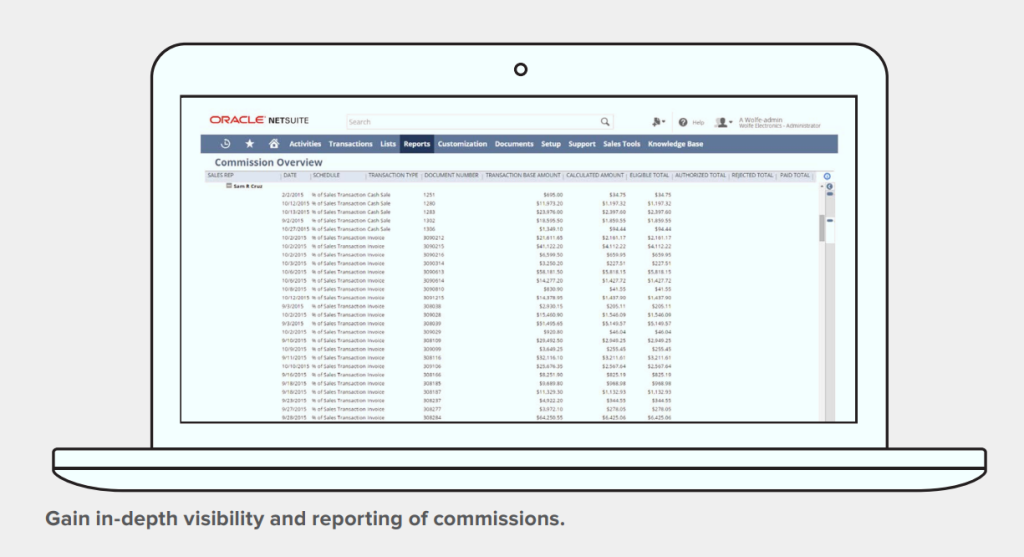
NetSuite CRM connects quotes and opportunities with sales orders, fulfillment, invoicing, and financial processing. Its NetSuite Incentive Management module supports complex, multi-tiered commission plans based on quotas, sales volume, product profitability, and custom criteria.
NetSuite CRM includes marketing automation capabilities for campaign management, lead capture, segmentation, qualification, and performance tracking.
It supports split commissions, partner commissions, commission forecasting, approval workflows, and payment processing. This gives NetSuite a clear advantage for businesses that need to manage complex sales compensation alongside their sales transactions.
Pipedrive supports deal-related products, proposals, contracts, and electronic signatures through available features and integrations. Its sales reports help managers track deal values and representative performance, but businesses with complex commission structures, split payouts, and partner compensation need to evaluate additional tools or integrations to manage those requirements.
Marketing and Lead Nurturing: NetSuite vs. Pipedrive
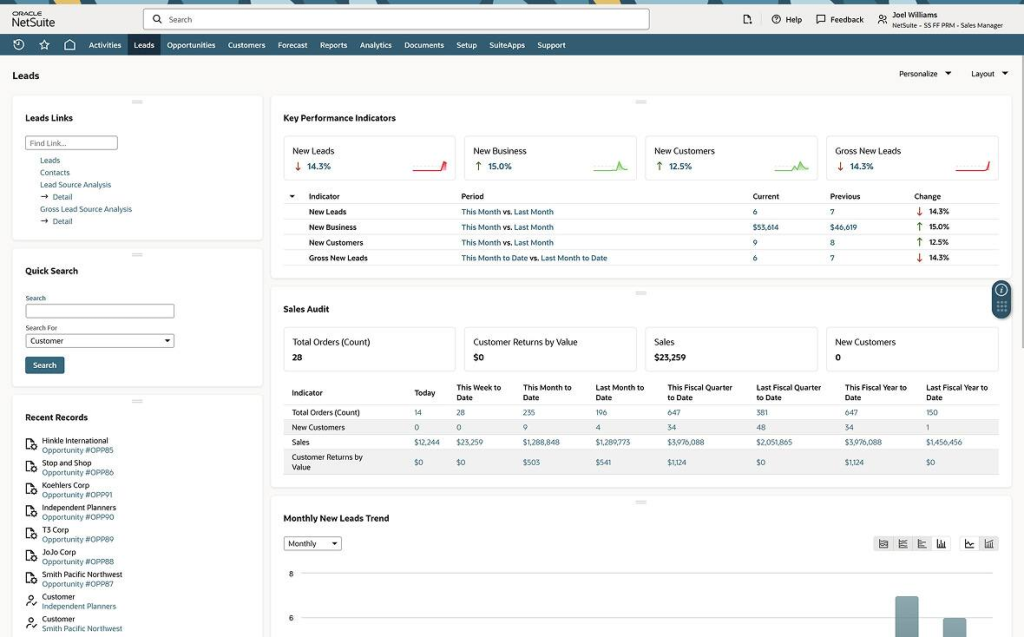
Teams can manage campaigns across relevant channels, use web-to-lead forms to capture prospect information, and establish criteria for passing qualified leads to sales. Campaign reporting connects marketing responses with lead conversion and sales outcomes, helping teams assess which activities contribute to customer acquisition. Since marketing, sales, customer, and transaction records reside within the same business environment, organizations gain a connected view of how prospects progress toward becoming customers. The specific campaigns, channels, and automation available depend on configuration and licensing.
Pipedrive focuses on lead organization and progression into the sales pipeline. Its Leads Inbox keeps unqualified prospects separate from active deals, while lead-generation tools within its ecosystem support prospect capture through forms, chat, and other methods depending on the products selected. For email marketing, Pipedrive offers Campaigns as a separate product, with audience segmentation, campaign creation, templates, and performance reporting. This gives sales-focused teams a way to manage outreach without adopting a full ERP platform. When comparing the two, account for the distinction between NetSuite’s CRM marketing automation and Pipedrive’s separate marketing product, including any additional subscription costs and the campaign, contact, and reporting requirements your team needs to support.
Partner Relationship Management
NetSuite CRM includes partner relationship management capabilities for businesses that sell through resellers, distributors, referral partners, or other channel relationships. Partners can register and track leads, collaborate on sales opportunities, access sales and marketing resources through a partner portal, and monitor relevant sales activity. Partner managers can track partner-generated opportunities, review forecasts, and manage partner commissions and royalties.
On the other hand…
Pipedrive supports partner-led sales through its deal pipelines, contact management, integrations, and partner ecosystem. But it is important to note that its partner program is primarily designed for companies that resell Pipedrive, refer customers, or build integrations; it is not the same as a native PRM system for managing a company’s own reseller network.
Sales Orders, Inventory, and Financial Visibility
NetSuite CRM connects customer and sales information with the ERP processes used to fulfill and account for business transactions. Sales teams working in NetSuite have access to relevant customer records and transaction histories, while connected order management, inventory, fulfillment, and financial capabilities provide visibility into what happens after a deal closes. This connection helps sales representatives check order status, review customer purchasing activity, and coordinate with teams responsible for delivery and billing.
Pipedrive focuses on managing leads, deals, sales activities, and pipelines. Its product catalog supports product information and deal values, while integrations connect it with accounting software, ERP platforms, and other business applications. Pipedrive does not replace an ERP system for native inventory control, order fulfillment, or financial management.
Customer Service and Support Management
NetSuite CRM includes case management capabilities for tracking customer issues and coordinating responses. Businesses can configure case processes, manage customer communications, and provide online case submission and status tracking. Customer service teams working within the NetSuite environment use relevant customer and transaction information when investigating order problems, billing questions, or other service requests.
Pipedrive’s core CRM focuses on sales relationship management, rather than providing the same integrated ERP and customer-service environment. Businesses can connect Pipedrive with help desk and customer support applications through its integration marketplace, allowing sales and support teams to exchange relevant customer information.
Customer Service and Case Management: NetSuite vs. Pipedrive
NetSuite CRM includes customer service management features for recording, assigning, routing, tracking, and resolving support cases. Configured processes support case escalation and assignment, while customer self-service options and knowledge resources help customers find information and follow up on issues. Authorized service representatives can work with relevant customer, order, and transaction records when investigating delivery issues, product questions, or billing concerns. This connection also helps sales teams consider service history when discussing renewals or additional purchases. For organizations that manage sales, service, and order processing within NetSuite, customer service activity remains connected to the operational context needed to resolve issues.
Pipedrive’s core strength is managing sales relationships, contacts, and deal activity. Its records help representatives review communications and customer interactions, but a sales activity history is not equivalent to a dedicated service desk with structured ticket queues, service-level targets, complex escalations, and knowledge-base workflows. Businesses that need these capabilities should evaluate their support requirements against available products and integrations. Pipedrive can connect with external help desk applications, but the extent to which support tickets, statuses, and resolution history appear in the CRM depends on the integration. NetSuite has an advantage for businesses that want service cases connected to customer transactions in the same platform; Pipedrive remains a focused option when sales management is the main requirement and service is handled elsewhere.
Ease of Use and Learning Curve: NetSuite vs. Pipedrive
NetSuite CRM operates within a platform that supports sales, finance, inventory, order management, fulfillment, and customer service. Users therefore need training tailored to their responsibilities, permissions, dashboards, and business processes. A sales representative might focus on leads, opportunities, quotes, and customer records, while finance and service teams work with different transaction and case workflows. Although the learning curve is greater than that of Pipedrive, users benefit from access to connected business information without having to maintain every part of the customer lifecycle in separate systems. Role-based dashboards, saved searches, and structured training help teams concentrate on the functions they use.
Pipedrive is designed around a straightforward visual pipeline, contact records, and activity-based selling. Representatives can see deal stages, identify the next action, schedule follow-ups, and review sales conversations without navigating ERP functions they do not need. This focused interface is a genuine advantage for teams whose main objective is managing leads and closing deals. The trade-off is functional scope: if employees need order, inventory, fulfillment, or financial information from other applications, the business must consider how those systems connect and how users will access the relevant data. The decision depends on whether your team values a focused sales experience above having CRM and ERP workflows in one environment.
NetSuite CRM vs. Pipedrive: Which Platform Should You Choose?
NetSuite CRM is a strong choice for businesses that need sales, marketing, and customer service connected to their core transactions. Its opportunity and quote management links with sales orders, fulfillment, and financial processes; customer records provide context across departments; and reporting can draw on connected operational data. Incentive compensation features, partner relationship management, and workflow automation add value for organizations with more involved sales operations. The right configuration and license are important, but businesses already using NetSuite ERP should evaluate these native capabilities before adding another CRM and creating additional integration and data-maintenance requirements.
Pipedrive is a strong option for teams that prioritize visual pipeline management, lead organization, deal progression, activity scheduling, and sales-focused reporting. Its interface is purpose-built for representatives who need a clear view of opportunities and the actions required to move them forward. Companies that already manage accounting, inventory, fulfillment, and service through other systems can use Pipedrive as their sales platform, provided the integrations support the necessary data flows. For businesses already running NetSuite, the key question is whether Pipedrive solves a specific sales-process gap that justifies another application, subscription, and integration to maintain.
Final Verdict
NetSuite CRM is well suited to businesses that need customer relationship management connected to order processing, fulfillment, financial transactions, and customer service. Pipedrive is well suited to teams that want a focused, accessible sales pipeline and straightforward deal management. NetSuite’s connected CRM and ERP processes are a meaningful advantage when sales activity depends on accurate operational information; Pipedrive’s visual pipeline is a practical advantage when sales execution is the primary requirement.
FAQs
Is NetSuite CRM better than Pipedrive?
NetSuite CRM is better suited to businesses that need CRM connected with order processing, fulfillment, financial transactions, customer service, and other ERP workflows. Pipedrive is better suited to sales teams that prioritize visual pipeline management, lead tracking, activity scheduling, and deal reporting. The right choice depends on the functions your business needs and the systems it already uses.
Does Pipedrive include ERP functionality?
Pipedrive is a sales-focused CRM, not a full ERP system. It manages leads, contacts, deals, activities, and sales reporting. Accounting, inventory management, order fulfillment, and other ERP processes require separate software or integrations.
Does NetSuite CRM manage sales commissions?
NetSuite supports commission-related processes, including sales quota and commission management. The exact compensation rules, calculations, approvals, and payout functionality available depend on the relevant NetSuite products, licensing, and configuration. Businesses with complex incentive plans should verify their requirements against the solution being proposed.
Does NetSuite CRM include marketing automation?
NetSuite CRM includes marketing automation capabilities for campaign management, lead capture, lead qualification, segmentation, and campaign reporting. The available features and setup should be checked against the organization’s specific requirements, channels, and licensing.
Can Pipedrive integrate with NetSuite?
Pipedrive can be connected with NetSuite through an appropriate integration solution. The implementation needs to define which records synchronize, how fields map between systems, which application owns each record, and how updates and errors are handled. Businesses should test the specific workflows they depend on, including customer records, products, won deals, and sales orders.
Which CRM is easier to use?
Pipedrive is generally easier for sales teams to learn because its interface centers on deals, pipeline stages, and follow-up activities. NetSuite has a larger learning scope because it connects CRM with other business functions. Role-based dashboards, training, and well-defined workflows help users learn the NetSuite functions relevant to their responsibilities.
Does Pipedrive have AI features?
Yes. Pipedrive offers AI-assisted sales capabilities, including its AI Sales Assistant, which analyzes CRM information to provide insights and recommendations related to deals and activities. Its AI and automation features focus on sales productivity, with availability depending on the product and plan.
What AI features does NetSuite offer for CRM users?
NetSuite’s AI capabilities include features for summarizing customer and case information, and NetSuite 2026.2 introduces Ask Oracle for conversational access to business information, reporting, and everyday tasks. Availability depends on the release and the customer’s account. Organizations should confirm which capabilities are enabled and whether any additional configuration or licensing is required.
Should a business already using NetSuite add Pipedrive?
Not without first identifying the sales requirement that the current NetSuite setup does not meet. NetSuite CRM already connects customer records with business transactions and operational workflows. Pipedrive may still be appropriate when a team has a specific need for its sales-focused pipeline experience, but the business should weigh that benefit against integration, synchronization, administration, and subscription costs.
Ready to see if NetSuite is the right fit for your business? Book a 30-minute introductory call with our team.