

Key Takeaways
- Most NetSuite problems after go-live come from system ownership, undocumented dependencies, poor data, weak governance, or changes made without testing.
- The first 90 days deserve close attention because your NetSuite environment is handling live transaction volumes, user behavior, and production scenarios for the first time.
- Ongoing support covers release testing, integration monitoring, permissions, performance, documentation, and system changes, which also need clear ownership.
NetSuite issues do not stop when your implementation goes live. In fact, your go-live marks the start of some of the most critical problems your NetSuite instance is going to experience. Some problems appear during the first few weeks, while others take months to surface as transaction volumes increase, users develop workarounds, and new system changes accumulate.
Post-go-live support becomes especially important when NetSuite handles finance, sales, inventory, procurement, and production processes. A workflow failure during month-end close disrupts several teams at once and delays critical financial processes.
The issues below cover the problems that emerge after implementation, why they happen, and what your team should put in place to prevent them from becoming recurring problems.
1. Critical Workflows Stop Working
A workflow that passes testing fails once your team starts processing live transactions at full volume. Month-end close is one example because transaction volume, concurrent users, and unusual scenarios expose problems that did not appear during testing.
Without active monitoring, your finance team discovers the failure only after a critical process has stopped.
What Your Support Process Should Cover?
Monitor business-critical workflows instead of waiting for users to report problems. Scheduled scripts, approvals, integrations, and other critical processes need active monitoring, so your team knows when something stops working.
A proactive support arrangement also gives your team a defined process for investigating and resolving failures before they affect a major business process.
2. Implementation Knowledge Disappears
Your implementation team knows why a script was created, why a workflow uses a particular condition, or why you made a configuration decision. If you never document that knowledge, your internal team has to reconstruct it later.
That becomes especially difficult when the people involved in the implementation are no longer available. Without proper documentation, your team may have to spend significant time figuring out how the system works before they can safely make changes or troubleshoot issues.
Build Documentation Into the Handover
Document custom scripts, workflows, configuration decisions, integrations, and known workarounds before implementation handover is complete.
Your internal administrators should know what each customization does, why it exists, and what could be affected when someone changes it.
3. Small Changes Break Other Parts of NetSuite
A field change affects reports, workflows, scripts, or integrations that depend on it. Without dependency mapping, your team may not discover the connection until a report produces incorrect results or a workflow stops running.
Reactive troubleshooting for undocumented dependencies can cost $250 to $500 per hour since these are the average NetSuite support costs charged by partners.
Map Dependencies Before Making Changes
Your administration process should document important relationships between fields, records, reports, workflows, scripts, and integrations.
Regular administration audits also allow your team to identify dependencies before a routine change creates a larger problem.
4. Support Costs Become Difficult to Predict
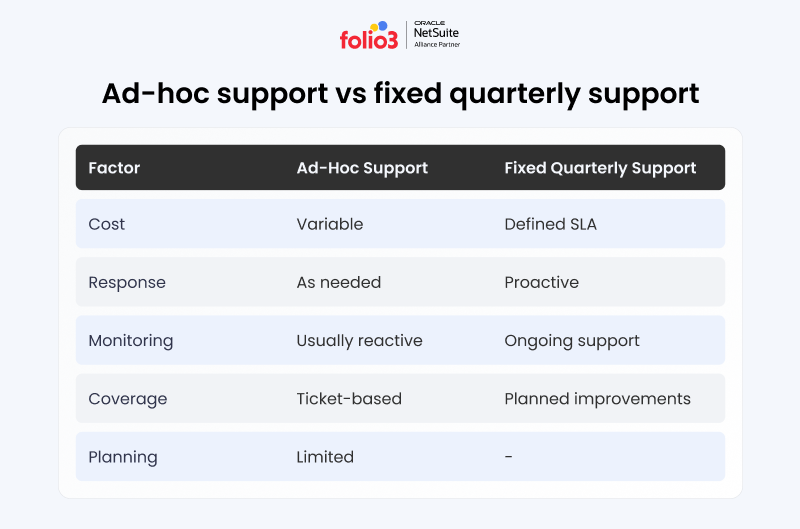
Per-ticket support creates variable costs at the same time your system is likely to generate more issues. Ad-hoc support costs increase by 30% to 40% in the months immediately after go-live.
The problem is not only the number of tickets. Your team also has less certainty about what each issue will cost and how much support the system will require.
Set a Predictable Cost Model
A fixed quarterly support arrangement gives you a known cost regardless of how many issues require attention during that period.
It also gives your support partner an incentive to reduce recurring problems instead of treating every issue as a separate ticket.
5. Poor Data Becomes Visible After Launch
Data problems that pass through migration become much harder to ignore once employees use the system every day. Duplicate customers, incomplete item records, inconsistent naming, and incorrect product information quickly affect reporting and transactions.
A common response is to create a spreadsheet that compensates for the problem. That gives the team a temporary workaround while leaving the underlying NetSuite data unchanged. But this isn’t why you purchased the NetSuite license and implemented NetSuite, right?
Correct the Data in NetSuite
Clean and deduplicate records in NetSuite instead of maintaining a separate correction file.
Your team should also establish data ownership, so someone is responsible for maintaining the accuracy of customer, vendor, item, financial, and operational records after migration. We suggest you read our detailed guide to follow best practices for data migration.
6. Integrations Fail Under Production Volume
Integration testing rarely represents every condition your production environment encounters. A connection that works with a small test dataset can encounter API limits, timing problems, data-format conflicts, or processing failures when transaction volume increases.
For example, a nonprofit organization experienced data and processing problems with a direct Salesforce-NetSuite connection. In another case, critical integration logic was buried in legacy SQL procedures. This made failures difficult to identify until manual audits exposed missing or inconsistent data.
Test for Volume and Monitor Failures
Load-test integrations with transaction volumes that resemble your production environment before go-live.
After launch, monitor integration health and build automated retry and exception handling into critical workflows. A queue-based integration layer can also prevent one system failure from stopping the entire transaction flow.
7. Employees Start Using Shadow Processes
When a NetSuite workflow does not match how your team works, employees usually create another way to complete the task. That might be a spreadsheet, email chain, manual approval, or separate tracking file.
Civil Clothing experienced this problem with production orders that could not handle the size and color combinations required by its business. Manual workarounds increased the time finance and operations teams spent coordinating and validating information.
Fix the Workflow Behind the Workaround
Do not treat every workaround as a training problem. First, determine why employees need the workaround.
For Civil Clothing, Folio3 addressed the production problem with a custom production order engine built around the company’s high-variance orders. The solution addressed the process itself instead of asking employees to continue working around it.
8. Go-Live Gets Treated as the End
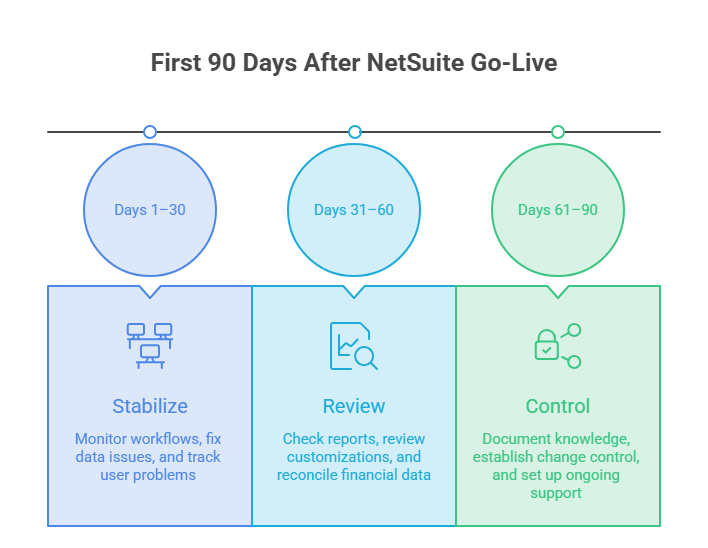
Your first day on NetSuite is the beginning of the stabilization period. During the first 90 days, the system starts handling production transactions, user behavior, transaction volumes, and edge cases that testing could not fully reproduce.
Problems that were invisible before launch often become clear during this period. Treating go-live as the end of the project leaves your team without enough support when those problems emerge.
Plan for the First 90 Days
Budget support and internal resources for the stabilization period instead of ending support when users receive their login credentials. The typical NetSuite implementation process treats stabilization as part of the implementation rather than a separate activity after the project ends.
9. Uncontrolled Changes Create Configuration Drift
Small customization requests accumulate after go-live. One change might have little effect, but several undocumented changes move your live environment further away from the configuration that was tested during implementation.
Over time, this makes troubleshooting and future upgrades harder because your team no longer has a clear record of what changed and why.
Put Change Control Around Customizations
Every post-go-live customization should have a documented reason, owner, impact assessment, and testing process.
Your team should also review security roles, reporting standards, integrations, and other system changes as part of ongoing NetSuite governance.
10. NetSuite Releases Expose Legacy Customizations
NetSuite releases happen twice a year, and new releases affect scripts, workflows, integrations, and other customizations. If your environment still relies on older script versions, your team needs to identify affected scripts and plan the required migration before support ends.
Review Customizations Before Every Release
Create a release-readiness inventory covering custom scripts, workflows, integrations, reports, and business-critical customizations.
Test the items that affect critical business processes before the new release reaches production. Prioritize testing based on business impact instead of testing every customization with the same level of effort.
11. Roles Give Users Too Much or Too Little Access
Permissions configured during implementation may no longer match how your organization operates after go-live. Broad access creates segregation-of-duties (SoD) problems. Financial processes require particular attention. The person who creates a vendor should not automatically have unrestricted authority to approve payments to that vendor.
On the other hand, restrictive permissions push employees toward manual workarounds.
Review Roles as Your Business Changes
Set permissions around the work each role needs to perform.
Review financial segregation of duties, custom-record permissions, third-party bundles, and role changes on a regular schedule. Update access when responsibilities change instead of leaving implementation-era permissions in place indefinitely.
12. Reports and Dashboards Slow Down
A saved search that performed well at go-live becomes slow as your database grows. More records, broader criteria, unnecessary joins, and dashboards containing too many search-based portlets all increase the amount of work NetSuite has to process.
Users may first notice the problem as general system slowness. Meanwhile, the underlying issue is a single saved search that has become expensive to run against a much larger dataset.
Review Searches Against Current Data
Review saved searches and dashboards as transaction volumes grow.
Remove unnecessary joins, narrow search criteria, and keep dashboards focused on information that each role needs. Performance reviews should continue after go-live instead of stopping once the original reports work.
13. The First Month-End Close Exposes Reconciliation Problems
Your test balances may tie out during implementation and still fail during the first complete live close. Opening balances, subledger mappings, transaction volumes, and account structures all face live operating conditions for the first time.
A mapping issue that remained hidden during testing becomes visible when finance reconciles the first full month of production data.
Run a Parallel Close Before Go-Live
If the project allows it, run a complete parallel close before switching fully to NetSuite.
Compare the new system’s results with the legacy system’s known-correct figures. Resolving a discrepancy during a controlled test is much easier than investigating the same difference during a live financial close.
14. Different Teams Report Different Numbers
Finance, sales, and operations may produce different figures for the same metric even when everyone works in the same NetSuite environment.
The problem comes from different report filters, separate saved searches, inconsistent calculation logic, or timing differences between transactions and reporting.
Create One Source for Each Key Metric
Agree on the report or saved search that represents each important business metric.
For example, revenue, inventory value, open orders, or production status should have a defined reporting source. Your teams should use the same calculation logic instead of maintaining separate versions of the same number. Otherwise, what’s the point of NetSuite being your organization’s “single source of truth?”
15. Scripts Hit Governance Limits
A SuiteScript that works against test data can fail when it processes production-level transaction volumes. NetSuite’s governance limits restrict how much processing a script can perform, and high-volume operations can push business-critical scripts toward those limits.
Failures can appear as governance errors or timeouts during periods of heavy processing.
Test Scripts at Production Volume
Test business-critical scripts with realistic data volumes before go-live.
After launch, monitor governance usage and processing performance. Optimize scripts that approach their limits before the same issue causes a production failure.
What Should Post-Go-Live NetSuite Support Cover?
Post-go-live support needs to cover more than fixing tickets after something breaks. Your support process should also address system monitoring, integrations, custom scripts, performance, release management, documentation, and functional issues across the areas your business uses.
Your business may still need help with configuration, integrations, workflows, user issues, and ongoing optimization. For companies evaluating post-go-live support, NetSuite managed services partners may also be worth considering based on their support and ERP requirements.
The right support model depends on your internal resources. If you have a dedicated NetSuite administrator and technical team, you can manage more of this work internally. If your team lacks that coverage, an ongoing managed service gives you access to specialized support without building the entire function in-house.
What Does a NetSuite Rescue Look Like?
Civil Clothing provides a useful example of what happens when several post-go-live issues affect the same environment.
The company had production orders that could not handle its size and color combinations. Raw materials were not tracked in NetSuite inventory, and the lack of real-time WIP visibility affected purchasing decisions. Finance and operations also spent 40% more time coordinating and validating information between systems.
Folio3 re-engineered the existing NetSuite environment instead of starting with another implementation. The work included a custom production order engine, restructured BOMs with raw material tracking, and real-time WIP visibility.
The resulting environment supported $10 million or more in monthly sales and reduced the manual coordination that had been consuming significant operations time.
Keeping Your NetSuite Environment Stable After Go-Live
Go-live gives your team a working NetSuite environment. But keeping that environment stable requires ongoing ownership after implementation ends.
Your team needs a process for monitoring critical workflows, documenting changes, reviewing integrations, managing permissions, testing releases, maintaining data quality, and resolving performance issues. These activities reduce the chance of a small configuration or process problem turning into a larger operational issue.
If your NetSuite environment is already experiencing recurring issues after go-live, review the underlying process before adding another workaround. Ongoing NetSuite support can give your team the technical and functional coverage needed to keep the system stable as your business changes.
Frequently Asked Questions
When do NetSuite problems usually appear after go-live?
Many issues emerge during the first 90 days because your system is processing live transactions and users are working through scenarios that were difficult to reproduce during testing. Other problems develop later as data volumes increase, customizations accumulate, or new NetSuite releases affect your environment.
Is post-go-live support different from implementation support?
Yes. Implementation support focuses on configuring, testing, and launching your NetSuite environment. Post-go-live support focuses on keeping the live environment stable, monitoring critical processes, managing changes, maintaining documentation, and resolving issues as your business continues to operate.
What causes the most post-go-live problems?
A lack of clear system ownership is one major cause. When nobody owns permissions, reporting standards, dependency mapping, documentation, release testing, and change requests, small issues accumulate until they affect business processes.
Does every post-go-live problem mean the implementation was poor?
No. Some problems are part of operating a live ERP system, including release changes and issues that appear only when production volumes increase. Other problems, such as missing documentation, weak permissions, and poor knowledge transfer, point to gaps that should have been addressed during implementation.
Should you manage NetSuite support internally?
That depends on your internal resources. Larger organizations with dedicated NetSuite administrators and technical teams may manage much of the support work themselves. If your team does not have that coverage, managed support provides ongoing expertise for monitoring, troubleshooting, release management, and system administration.
