
NetSuite is moving its scripting environment to SuiteScript 2.1, so review legacy scripts before the transition deadlines. If you’ve started seeing an end-of-life warning for SuiteScript 1.0, SuiteScript 2.0, or SuiteScript 2.x on your NetSuite account dashboard, you need to understand which scripts are affected and what the transition to SuiteScript 2.1 means for your business.

The migration to SuiteScript 2.1 involves more than changing a script’s API version. SuiteScript 1.0 uses a different programming model from SuiteScript 2.1, so migration requires changes to modules, APIs, entry points, and sometimes the way a script handles records, searches, errors, and execution context. In addition to this, the scripts must also be tested against the business processes they support.
Oracle’s SuiteScript transition guidance outlines the transition from legacy scripting versions to SuiteScript 2.1. Your first step is to determine which scripts are affected and how much work each one will require.
When Is SuiteScript 1.0 Reaching End of Life?
Oracle has outlined a phased transition for SuiteScript 1.0 and SuiteScript 2.x. The published transition timeline identifies milestones across NetSuite releases, with the final removal of legacy versions scheduled for 2028.2. You should confirm the applicable milestones against the current SuiteScript transition guidance before setting your internal deadline.
| NetSuite release | Transition milestone | What it means for your account |
|---|---|---|
| 2026.2 | SuiteScript 2.1 becomes the standard scripting model for new and existing customizations | Review your custom scripts and begin planning the migration. |
| 2027.1 | SuiteScript 1.0 enters end-of-life support, with critical issues receiving limited support | Avoid leaving business-critical scripts until the final transition period. |
| 2028.1 | New accounts can no longer deploy SuiteScript 1.0; existing accounts retain deployment capabilities under the published transition plan | Existing accounts should have a migration plan in progress and prioritize scripts that support essential operations. |
| 2028.2 | Legacy scripting versions are scheduled for removal | Scripts that still depend on unsupported versions must be addressed before this milestone. |
SuiteScript 1.0 migration begins with identifying the scripts in your NetSuite account that require an update. Each script needs to be assessed for its dependencies, business purpose, and conversion requirements. The migration plan should also include sufficient time for testing and deployment to prevent disruptions to financial, inventory, fulfillment, and other operational processes.
Which NetSuite Scripts Need to Be Migrated?
Start by identifying scripts that use SuiteScript 1.0 or SuiteScript 2.0. The migration work differs depending on the version, script type, and APIs involved.
| Script version | Migration requirement | What you need to review |
|---|---|---|
| SuiteScript 1.0 | Convert the script to SuiteScript 2.1 | API replacements, module imports, entry points, record handling, searches, error handling, and execution behavior |
| SuiteScript 2.0 or SuiteScript 2.x | Review and transition the script to SuiteScript 2.1 | API version annotations, runtime compatibility, execution behavior, and regression testing |
| SuiteScript 2.1 | Generally no version migration required | Confirm that the script works as expected and that its dependencies remain compatible |
| Vendor-managed or SuiteApp scripts | Confirm the provider’s migration and compatibility plan | Check whether the vendor will supply an updated version and whether your customizations depend on it |
A SuiteScript 1.0 script cannot be migrated by changing its version annotation alone. Its code must be converted to the SuiteScript 2.1 programming model.
SuiteScript 2.0 scripts require a different assessment. Although SuiteScript 2.0 and 2.1 share the modular API model, the runtime transition still needs testing. Keep in mind to not assume that changing an annotation automatically confirms compatibility with your account’s workflows.
For vendor-managed scripts, contact the provider before editing the code because if you modify a managed SuiteApp directly, it might be unsupported or cause complicated future updates.
How to Identify SuiteScript 1.0 Scripts in Your NetSuite Account
You need a complete inventory before estimating migration effort. NetSuite provides several ways to identify scripts that are not using SuiteScript 2.1, including script records, saved searches, and SuiteAnalytics Workbook.
1. Review script records in NetSuite
Navigate to Customization > Scripting > Scripts and review the available API Version information. Filter the list to identify scripts that use SuiteScript 1.0 or SuiteScript 2.0.
Record the script ID, name, version, script type, and deployment status. A list of script records is a starting point, not a complete migration assessment. You also need to understand what each script does and which business processes depend on it.
2. Build a saved search
There is another way where a saved search can help you create a repeatable inventory of scripts that require review. For this, create a saved search on the “Script” record type and use the available script-record fields to filter by API version and include the identifiers and deployment information your team needs to track.
This approach is useful when you need to revisit the inventory throughout the migration project. Confirm the available fields and filters in your account because access and record configurations can vary.
3. Use SuiteAnalytics Workbook
SuiteAnalytics Workbook provides a third option for organizing script inventory information. It can help you review the scripts identified for migration and structure the results for reporting and prioritization.
Choose the method that best supports your team’s access and reporting requirements. You do not need to use all three methods if one produces a complete, verifiable inventory.
For a detailed comparison of NetSuite Saved Searches and SuiteAnalytics Workbooks, including their features and use cases, see our guide to NetSuite Workbooks: Comparison and Usage.
4. Document each script’s business dependencies
A version inventory alone will not tell you which scripts to migrate first. For this, you have to add the operational context for every script so that you can evaluate its importance and testing requirements.
| Inventory field | Why it matters |
|---|---|
| Script ID and name | Provides a reliable identifier for tracking and deployment |
| API version | Establishes the required migration path |
| Script type | Identifies the execution model and relevant entry points |
| Deployment status | Shows whether the script is deployed and where it applies |
| Business process | Connects the script to activities such as order processing, invoicing, or inventory updates |
| Dependencies | Identifies related scripts, records, searches, custom fields, and integrations |
| Business owner | Establishes who can confirm expected behavior |
| Execution frequency | Helps identify infrequent processes that still require testing |
| Migration decision | Records whether the script will be converted, replaced, retired, or handled by a vendor |
A script with little recent execution history is not necessarily unused. Scripts that support month-end close, quarterly reporting, annual processes, or exception-based workflows may run infrequently but still serve essential business functions. Before retiring a script, confirm its purpose and current relevance with the business owner.
What Changes When You Migrate from SuiteScript 1.0 to 2.1?
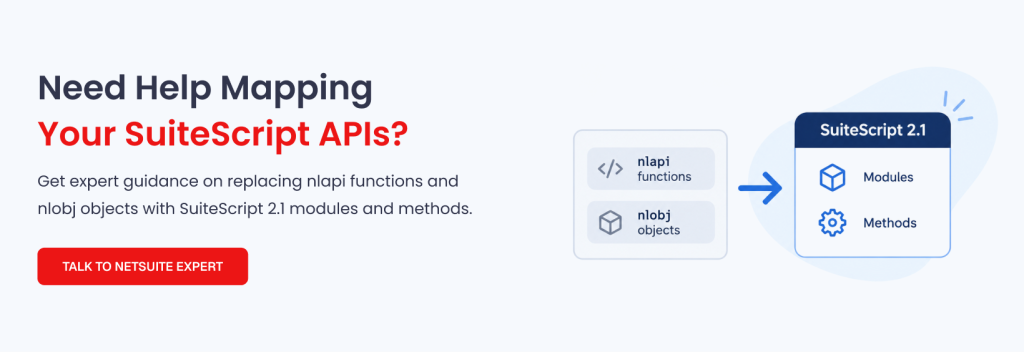
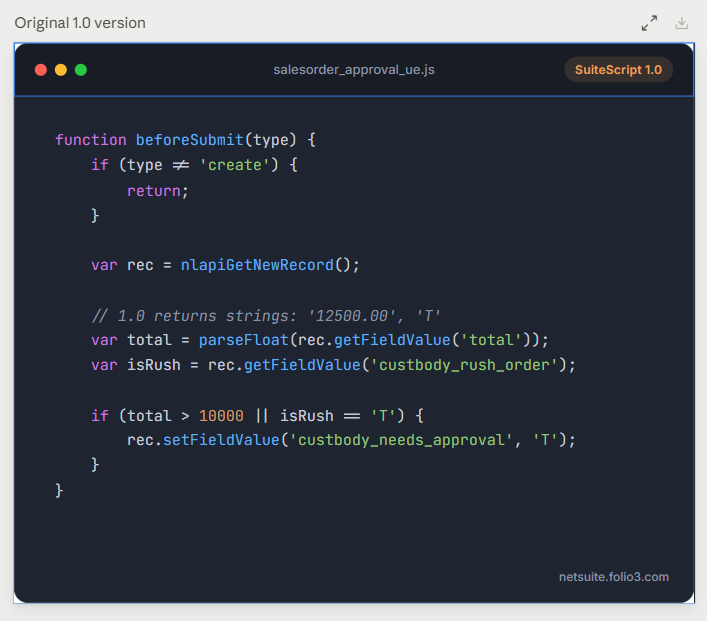
SuiteScript 1.0 and SuiteScript 2.1 use different programming models. SuiteScript 1.0 relies on global APIs such as nlapiLoadRecord() and nlapiSearchRecord(). SuiteScript 2.1 uses modules that you import as dependencies, such as N/record, N/search, and N/runtime.
Here is how it changes.
Vs…
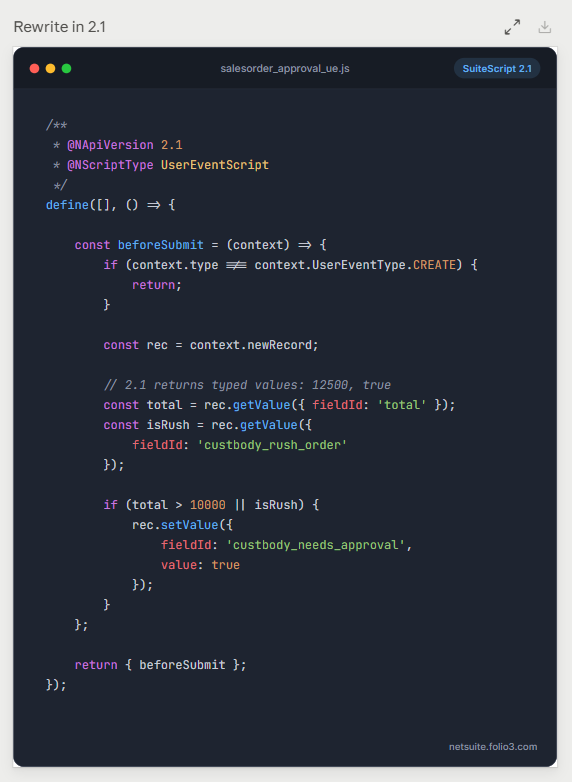
What does this mean? This means transitioning from SuiteScript 1.0 to 2.1 involves reviewing how the script accesses NetSuite data, starts execution, handles errors, and interacts with other customizations. You can also check out the table below to understand SuiteScript 1.0 vs. 2.1.
SuiteScript 1.0 vs. SuiteScript 2.1
| Area | SuiteScript 1.0 | SuiteScript 2.1 | Migration consideration |
|---|---|---|---|
| Programming model | Global API functions | Modular API with explicit dependencies | Replace global API usage with the appropriate module methods |
| API access | Functions such as nlapiLoadRecord() | Methods exposed through modules such as N/record | Map each API to the appropriate supported method |
| Entry points | Legacy script-specific execution patterns | Entry-point functions defined for the relevant script type | Confirm that the converted script uses valid entry points |
| Dependencies | Global functions and implicit dependencies | Module imports declared through define() or supported module syntax | Identify all required modules and dependencies |
| Record operations | Functions such as nlapiCreateRecord() and nlapiSubmitRecord() | Methods such as record.create() and Record.save() | Check record type, field values, sourcing, validation, and save behavior |
| Searches | Functions such as nlapiSearchRecord() | Search methods exposed through N/search | Review filters, columns, result iteration, governance, and pagination |
| Execution context | Legacy context APIs | Context information exposed through N/runtime and relevant script APIs | Confirm that the script behaves correctly in each deployment context |
| Error handling | Legacy error-handling patterns | Module-based error handling, including N/error where appropriate | Preserve useful error messages and expected failure behavior |
| Testing | Tests built around legacy execution behavior | Regression testing against the converted script and its dependencies | Validate the full business process, not just whether the script executes |
Common SuiteScript 1.0 API equivalents
The following mappings illustrate how common legacy functions relate to the SuiteScript 2.1 module model. They are starting points for conversion, not drop-in replacements.
| SuiteScript 1.0 API | SuiteScript 2.1 approach | Module or object |
|---|---|---|
| nlapiLoadRecord() | record.load() | N/record |
| nlapiCreateRecord() | record.create() | N/record |
| nlapiSubmitRecord() | Record.save() | N/record |
| nlapiSearchRecord() | search.create() and the relevant search execution methods | N/search |
| nlapiGetContext() | runtime.getCurrentScript() or other relevant runtime methods | N/runtime |
The correct replacement depends on how the original function is used. For example, replacing nlapiSearchRecord() with search.create() is only part of the conversion. You must also implement the appropriate search execution and result-handling logic.
Likewise, a record load or save operation needs to preserve the original behavior, including field values, validation, sourcing, and error handling. Some legacy APIs do not have direct equivalents, so review the original script’s purpose before choosing a replacement.
A separate API mapping guide can make this work easier to track. A companion article, SuiteScript 1.0 to 2.1 API Map: nlapi and nlobj Equivalents, can provide a deeper reference once it is published.
How to Migrate SuiteScript 1.0 to SuiteScript 2.1
A controlled migration starts with an inventory and ends with production validation. Follow these steps to reduce the risk of breaking existing NetSuite processes.
Step 1. Classify scripts by complexity and business impact
Once you have the inventory, group scripts according to their technical complexity and operational importance.
A simple script that sets a field may require limited conversion and testing. A transaction script that controls order processing, calculates values, updates records, or coordinates with an integration requires more extensive review.
Use a prioritization matrix to determine where to begin.
| Priority | Script characteristics | Recommended action |
|---|---|---|
| High | Supports critical financial, order, inventory, fulfillment, or integration processes | Assign an owner, map dependencies, and plan conversion and regression testing early |
| Medium | Supports important operational workflows with limited dependencies | Schedule conversion after reviewing related scripts and business requirements |
| Low | Has a narrow purpose, limited dependencies, and a confirmed business owner | Assess whether to convert, replace with native functionality, or retire it |
| Vendor-managed | Belongs to a managed SuiteApp or external solution | Confirm the provider’s migration plan and test the updated version |
Business impact should influence priority alongside technical complexity. A short script that controls a critical transaction may deserve more attention than a much longer script used for a low-risk internal task.
Step 2. Choose the right migration path
You must review the legacy script thoroughly and review its purpose, dependencies, and current behavior to decide whether to convert it, replace it, retire it, or obtain an updated version from its provider.
| Migration path | When to choose it | What to validate |
|---|---|---|
| Convert to SuiteScript 2.1 | The script supports a required business process, and its existing functionality remains appropriate | API mappings, entry points, data handling, dependencies, and business outcomes |
| Replace with native NetSuite functionality | The script duplicates a standard capability available in your account | Functional coverage, configuration, permissions, reporting, and process changes |
| Retire the script | The business owner confirms that the process is no longer required | Dependencies, deployments, scheduled tasks, integrations, and downstream effects |
| Obtain a vendor update | The script belongs to a managed SuiteApp or third-party solution | Vendor compatibility, update requirements, and regression testing |
Oracle’s migration-path guidance can help you evaluate the available approaches.
Do not retire a script solely because it appears redundant or has not run recently. Confirm that another process does not depend on it and that the business owner agrees with the decision.
Step 3. Convert the code and review dependencies
During conversion, replace legacy global API calls with the appropriate SuiteScript 2.1 modules and methods. Update the script’s entry points, dependencies, record operations, search logic, and error handling.
Review related components at the same time. A script may depend on custom fields, custom records, saved searches, workflows, other scripts, or integration processes. If any of these dependencies change, the converted script may behave differently even when its code runs successfully.
Pay particular attention to:
- Record creation, loading, updates, and saving.
- Search filters, result columns, pagination, and result processing.
- Sublist access and line-level updates.
- Script parameters, deployment settings, and execution context.
- Error handling and logging.
- Governance limits and performance.
- Dependencies on other customizations or external systems.
Do not treat successful code conversion as proof that the migration is complete. The converted script must preserve the business behavior expected from the original.
Step 4. Test in a sandbox
Convert and test scripts in a sandbox before deploying changes to production. Use representative records and scenarios that reflect how the scripts operate in your account.
For eligible server scripts, Oracle provides an account-level option to test execution under the SuiteScript 2.1 runtime.

Review the applicable transition guidance and testing conditions before using this option. Runtime testing helps identify compatibility issues, but it does not replace code conversion where SuiteScript 1.0 APIs must be rewritten.
Your test plan should cover the following areas.
| Test area | What to verify |
|---|---|
| Functional behavior | The script completes the intended business task |
| Record handling | Records and fields are created, loaded, updated, and saved correctly |
| Search behavior | Filters, results, sorting, and pagination return the expected data |
| Sublist operations | Line-level reads and updates produce the expected results |
| Entry points | The script runs in the intended event, scheduled, user, or other supported context |
| Permissions | Roles and execution contexts retain the necessary access |
| Integrations | Data is transmitted and received correctly, including failure scenarios |
| Error handling | Failures are logged and handled without creating incorrect or incomplete transactions |
| Performance and governance | The script completes within applicable execution limits |
| Regression | Related workflows continue to work as expected |
Test more than the normal success scenario. Include missing values, invalid inputs, duplicate records, failed integrations, permission restrictions, and other relevant exceptions. If a script runs during month-end close or another time-sensitive process, include that process in the test plan.
Step 5. Review deployment settings and references
Code changes are only one part of a successful migration. Review the deployment record, script parameters, associated records, and any references used to manage the script.
If you use SuiteCloud Development Framework (SDF) or another controlled deployment process, confirm that the updated script and its related objects are included correctly. Check that deployment settings, references, and environment-specific values are consistent with the target account.
Before production deployment, confirm that the business owner has approved the test results and that you have a rollback plan appropriate to the change.
Step 6. Deploy in controlled phases and monitor results
Avoid converting and deploying every script at once unless your environment and testing process support that approach. Group related changes into manageable releases and prioritize the scripts according to business impact and dependency relationships.
After deployment, monitor execution logs, transaction outcomes, integration errors, and any process-specific indicators that reveal whether the converted scripts are working correctly.
Keep the inventory updated with the new API version, deployment status, test results, release date, and any follow-up work. This record will help your team track remaining migration tasks and support future maintenance.
Common SuiteScript 1.0 Migration Challenges
The amount of work required depends on the code, its dependencies, and the business process it supports. These are common areas to examine during migration.
| Challenge | Why it matters | How to address it |
|---|---|---|
| Legacy APIs without direct equivalents | A direct replacement may not exist or may not preserve the original behavior | Review the function’s purpose and select a supported alternative based on the required outcome |
| Complex searches | Search filters, columns, result handling, or pagination may behave differently after conversion | Test representative datasets and verify the complete result set |
| Record and sublist handling | Field sourcing, validation, line-level updates, and save behavior can affect transaction outcomes | Compare the converted results with the original process using controlled test records |
| Script dependencies | Other customizations may expect a particular execution sequence or output | Map dependencies and test related workflows together |
| Runtime compatibility | A script that runs under one runtime may behave differently under another | Use the applicable runtime testing options and regression tests |
| Infrequently executed scripts | Periodic tasks may remain undiscovered if the inventory relies only on recent activity | Review scheduled deployments, business calendars, and process-owner input |
| Managed SuiteApps | Direct edits may be unsupported or overwritten by provider updates | Obtain a confirmed compatibility plan from the vendor |
| Limited testing coverage | A script may pass a basic test while failing in an exception or production scenario | Test normal, boundary, failure, and downstream business scenarios |
One of the biggest risks is assuming that every script can be converted in the same way. Two scripts that use the same legacy API may have different dependencies and business consequences. The migration plan should account for what each script does, not just how much code it contains.
How to Prepare Your NetSuite Account for the Transition
Your company can begin preparing for the SuiteScript 1.0 transition before technical migration work starts. Your internal team understands the business processes, identifies the people responsible for them, and helps determine which changes require the most attention. A NetSuite partner can assess the scripts, handle complex conversions, and support technical testing and deployment.
Use this checklist to organize the work.
Internal preparation
Identify the business processes that rely on NetSuite custom scripts.
Assign a business owner who can confirm the purpose and expected behavior of each process.
Gather information about existing customizations, integrations, and known script-related issues.
Confirm which processes are critical to financial reporting, order processing, inventory, and fulfillment.
Coordinate with your NetSuite administrator to arrange the access and sandbox environment required for assessment.
Review the migration plan, agree on priorities, and approve production deployment windows.
Technical assessment and migration
Identify scripts using SuiteScript 1.0, SuiteScript 2.0, SuiteScript 2.x and document their deployment status.
Map script dependencies on records, saved searches, workflows, other scripts, and integrations.
Determine which scripts require conversion, replacement, retirement, or a vendor update.
Assess conversion complexity and estimate the development and testing effort.
Convert affected scripts to SuiteScript 2.1 and resolve API compatibility issues.
Test record handling, searches, sublists, permissions, integrations, and error scenarios in a sandbox.
Review deployment settings and SuiteCloud Development Framework (SDF) references where applicable.
Plan controlled production releases and establish rollback procedures.
Monitor script execution and business process results after deployment.
The division of responsibilities will depend on your internal NetSuite expertise and the complexity of your customizations. Your administrator may be able to handle the initial inventory, while scripts with complex dependencies or critical business functions may require a specialist.
The key is to involve a NetSuite expert early enough to assess the technical work before your company commits to a migration schedule. Your internal team should remain involved throughout the process because only the business owners can confirm whether the migrated scripts continue to support the intended workflows.
How Folio3 Can Help With SuiteScript 2.1 Migration
Migrating legacy scripts requires both technical conversion and an understanding of the business processes those scripts support. A script that appears small in isolation may control a critical step in order processing, financial operations, inventory updates, or an integration.
Our NetSuite experts assess your existing scripts, map dependencies, and help you prioritize migration based on technical complexity and business impact. We can support API mapping, conversion planning, sandbox testing, deployment review, and validation of the business processes affected by the changes.
If your account contains years of accumulated customizations, the first step is to establish what is still in use and which scripts need attention. A structured assessment gives you a clearer view of the work, helps you allocate testing resources, and reduces the risk of leaving critical processes until the final transition period.
Review your SuiteScript environment with Folio3 to identify migration requirements and plan the transition to SuiteScript 2.1.
FAQs
Is SuiteScript 1.0 reaching end of life?
Yes. Oracle has announced a phased transition away from SuiteScript 1.0, with legacy versions scheduled for removal in the 2028.2 release. Check the official transition guidance for the current milestones and requirements.
Can I migrate SuiteScript 1.0 by changing the API version?
No. SuiteScript 1.0 code must be converted to the SuiteScript 2.1 programming model. Changing a version annotation does not replace legacy API calls, add the required module dependencies, or update the script’s entry points.
Do SuiteScript 2.0 and 2.x scripts also need to be reviewed?
Yes. SuiteScript 2.0 and 2.x scripts should be assessed for transition to SuiteScript 2.1 and tested for runtime compatibility. The migration path differs from SuiteScript 1.0 because both versions use the modular API model, but you should still validate execution behavior and dependencies.
How do I find SuiteScript 1.0 scripts in NetSuite?
Navigate to Customization > Scripting > Scripts and review the API Version information. You can also use a saved search or SuiteAnalytics Workbook to organize the inventory. See Oracle’s guide to identifying scripts that do not use SuiteScript 2.1.
How long does SuiteScript 1.0 migration take?
The timeline depends on the number of scripts, their complexity, their dependencies, and the amount of testing required. Simple scripts may require limited conversion, while scripts that support transactions, integrations, or critical operational processes need more extensive review and regression testing. Complete the inventory before estimating the migration schedule.
Can I keep using SuiteScript 1.0 until the final deadline?
The transition includes intermediate milestones before the scheduled removal of legacy versions. Relying on the final deadline leaves less time to resolve compatibility issues and validate business processes. Review Oracle’s current transition requirements and plan migration work well in advance.
Should I convert every legacy script?
Not necessarily. Each script should be assessed to determine whether it should be converted, replaced with native NetSuite functionality, retired, or updated by its vendor. Confirm that a script is no longer needed with its business owner and check for dependencies before retiring it.
What should I test after converting a SuiteScript 1.0 script?
Test the script’s expected business behavior, record and sublist operations, search results, entry points, permissions, integrations, error handling, performance, and related workflows. Include failure scenarios and infrequently executed processes where relevant. Successful execution alone does not prove that the converted script produces the correct business result.

