
Key Takeaways
- With a NetSuite health check, you can review configuration gaps, workflow inefficiencies, integration failures, and technical problems before they disrupt daily operations.
- NetSuite health check improves data reliability as it involves examining transaction processing, data flows, and reporting dependencies to help maintain accurate business information.
- It also strengthens your business and data security by reviewing user roles, permissions, and access controls as responsibilities change.
- By getting a NetSuite health check, your business gets to scale. You can assess whether your current NetSuite environment supports new subsidiaries, warehouses, integrations, and business requirements.
NetSuite supports critical business operations, from financial reporting and inventory management to order processing, procurement, and customer management. But as your business starts to scale, the NetSuite environment behind these processes changes too. New workflows, custom scripts, integrations, users, and modules introduce complexity that your original implementation plan might not have accounted for.
Without regular reviews, outdated configurations, failed integrations, inefficient automation, and excessive user permissions can go unnoticed. These issues affect data accuracy, employee productivity, system performance, and the value you get from your NetSuite investment.
And to diagnose the performance of your business, there is a NetSuite health check that identifies technical issues, configuration gaps, security risks, and opportunities for improvement.
So let’s discuss it and see what it covers, how it works, and what you receive in the assessment.
What Is a NetSuite Health Check?
A NetSuite health check is a comprehensive review of your existing NetSuite environment, including its configuration, customizations, workflows, integrations, user access, and performance.
The assessment examines whether your system supports current business processes efficiently and whether technical or functional issues are creating unnecessary work. It identifies the warning signs that point towards an immediate health check and also checks for opportunities to use existing NetSuite features more effectively before investing in additional development or licenses.
For businesses that depend on NetSuite every day, a health check provides the visibility needed to maintain a reliable system and keep it aligned with changing operational requirements.
For example, a business might discover that employees manually reconcile inventory data because an integration no longer maps fields correctly. Another company might find that approval workflows still reflect an outdated organizational structure. A health check brings these issues to light and provides recommendations for addressing them.
Unlike troubleshooting a single error, a health check evaluates the environment as a whole. The goal is to identify underlying causes, prioritize improvements, and give decision-makers a clear plan for maintaining and improving their ERP system.
Why Is a NetSuite Health Check Important?
A NetSuite environment that worked well during implementation might not meet your needs two or three years later. Business processes change, integrations evolve, employees take on new responsibilities, and customizations accumulate. A periodic health check helps you understand whether your ERP still supports the way your business operates and which issues deserve attention first.
1. You can identify configuration issues before they affect operations
NetSuite configuration decisions affect everyday transactions, from how invoices post to the general ledger to how purchase orders move through approval. When business requirements change but system settings remain the same, configuration gaps can create recurring operational problems.
For example, a growing company might introduce new departments or subsidiaries without reviewing its approval workflows and financial reporting setup. Transactions could follow outdated approval routes, while reports fail to reflect the organization’s current structure.
A health check examines relevant accounting settings, approval hierarchies, subsidiary configurations, and transaction workflows against current requirements. Reviewing these dependencies helps distinguish a configuration issue from a process problem or a need for additional functionality.
2. It improves system performance and workflow efficiency
Slow processing, repeated manual steps, and unnecessary automation can quietly reduce employee productivity. In NetSuite, performance issues sometimes relate to inefficient saved searches, scripts, workflows, or integrations competing for processing resources.
Consider a finance team that experiences delays when running a large report at month-end. The cause might involve the report’s design, the volume of records being processed, or related scripts and workflows. The right fix depends on the underlying cause, so adding more automation without investigating the issue could make the problem harder to resolve.
A technical review helps identify potential bottlenecks and redundant processing. It also highlights opportunities to simplify workflows and use existing NetSuite features more effectively. This gives your team a clearer basis for deciding which improvements are worth making.
3. You have data accuracy and financial reporting
Reliable reporting starts with reliable transaction data. If records are incomplete, duplicated, incorrectly mapped, or posted to the wrong accounts, financial reports and operational dashboards inherit those errors.
Imagine an ecommerce integration that creates sales orders in NetSuite but fails to update inventory consistently. The sales team, warehouse, and finance department could end up working from different figures. Similar discrepancies arise when integrations map fields incorrectly, or transaction workflows do not handle exceptions as expected.
A health check reviews relevant data flows, transaction processing, reconciliation procedures, and reporting dependencies. For finance teams, this is particularly important when evaluating financial results and investigating recurring discrepancies. The review helps identify where errors originate so corrective action addresses the cause rather than just the visible symptom.
4. It strengthens security and access controls
Employee access tends to change as organizations grow. New roles are introduced, responsibilities shift, and former employees leave. Without regular access reviews, NetSuite permissions might no longer reflect who needs access to sensitive records or business functions.
A practical assessment examines user roles, permissions, access assignments, and relevant security controls. It looks for issues such as excessive privileges, outdated role assignments, and conflicts between responsibilities and transaction permissions.
For example, an employee responsible for entering vendor bills should not automatically retain every permission associated with a previous finance management role. Reviewing access against current job responsibilities helps reduce unnecessary exposure and supports more consistent internal controls.
5. You can find and resolve integration problems
When NetSuite exchanges information with Salesforce, an ecommerce store, a WMS, or a 3PL, the reliability of the overall process depends on each connection working as expected. A failure in one system can affect order processing, inventory updates, fulfillment, and financial reconciliation downstream.
Integration problems are not always obvious. A connection might still run while certain records fail because of validation errors, expired credentials, changed field mappings, or unexpected data formats. Reviewing integration logs, failed transactions, synchronization schedules, and mapping rules helps identify these issues.
For businesses with multiple connected applications, this review is especially valuable because it examines how data moves across systems rather than treating each error as an isolated incident. The findings help teams prioritize fixes based on their effect on business operations.
6. It enables you to get more value from your NetSuite investment
Businesses sometimes introduce spreadsheets, manual approvals, or separate tools to work around gaps in their ERP processes. Over time, these workarounds become part of daily operations, even when existing NetSuite functionality could address some of the original requirements.
A health check looks at how your team uses the system and whether its current configuration supports those needs. This includes reviewing relevant modules, workflows, customizations, and recurring manual tasks to identify opportunities for improvement.
For example, a purchasing team might maintain a separate spreadsheet to track approvals because its NetSuite workflow no longer matches the company’s approval policy. Updating the workflow could reduce duplicate effort without requiring a new application.
The important distinction is whether the business needs new functionality or simply needs to configure, maintain, or adopt what it already has. An evidence-based assessment helps make that decision before additional spending is approved.
7. Your business prepares for growth
Expansion puts new demands on an ERP system. Adding subsidiaries, warehouses, sales channels, or product lines affects financial processes, inventory controls, reporting, integrations, and user access. A system that supports one location successfully might need changes before it can support several.
A health check establishes whether the existing environment is ready for those changes. For example, a distributor preparing to open a new warehouse should review its inventory processes, location configuration, fulfillment workflows, and integrations before the new facility goes live.
The review also helps surface technical dependencies that could complicate future projects, such as undocumented custom scripts or integrations maintained by a previous implementation partner. Identifying those dependencies early gives decision-makers time to plan the necessary work, testing, and resources before expansion begins.
How Does Folio3 Conduct a NetSuite Health Check?
Folio3 follows a structured, five-step NetSuite health audit process that combines stakeholder feedback, functional analysis, technical review, and documented recommendations. Our NetSuite consultants work with system administrators and developers to understand how the environment operates, investigate existing issues, and identify improvements based on your business requirements.
1. Stakeholder Interviews
We start by interviewing key stakeholders to understand how your team uses NetSuite and where the system falls short of operational needs. These discussions cover system performance, recurring issues, manual workarounds, functional gaps, and planned business changes.
Speaking directly with users helps us distinguish day-to-day frustrations from underlying system problems. It also gives our consultants the business context needed to evaluate existing configurations and customizations.
2. Technical and Configuration Review
Our consultants review the NetSuite environment, including system configuration, third-party SuiteApps, integrations, workflows, and deployed custom scripts. A NetSuite developer assesses the technical aspects of customizations to identify potential issues, dependencies, and opportunities for improvement.
This review examines how the different components work together, not just whether individual features are functioning. For example, a recurring transaction error might originate in a script, an integration, or a configuration setting. Understanding those dependencies helps us investigate the underlying cause.
3. Clarification With Your Team
After the initial review, we meet with your stakeholders again to validate our findings and understand the reasoning behind existing system decisions.
Some customizations exist to meet specific business requirements, while others reflect limitations or requirements from an earlier stage of growth. We discuss why these decisions were made, whether the original requirements still apply, and whether native NetSuite functionality offers a suitable alternative.
This step ensures that recommendations account for how your business actually operates rather than treating every customization or workaround as a problem.
4. Documentation of Findings
We consolidate the findings into a Business Requirements Document (BRD) that outlines the current state of the system, identified gaps, and recommended improvements.
The document gives your team a structured record of the issues discovered and the actions proposed to address them. Recommendations are tied to the findings so stakeholders can understand what needs to change and why.
This documentation also helps align business and technical teams before implementation work begins.
5. Final Deliverables and Implementation Roadmap
At the end of Folio3’s four-week health audit engagement, we deliver two key outputs:
- Business Requirements Document (BRD): Documents the findings, functional and technical gaps, and recommended solutions.
- Statement of Work (SOW): Outlines the proposed implementation activities, required resources, and estimated timeline for executing the recommended changes.
Together, these deliverables give your team a clear view of the current NetSuite environment and a practical plan for addressing the identified issues. Your organization can use them to prioritize improvements, allocate resources, and plan the next phase of work.
The result is a documented path from assessment to action, grounded in your business requirements and the findings of the health audit.
When Should You Conduct a NetSuite Health Check?
A NetSuite health check is useful as part of routine maintenance and whenever a significant business or system change raises questions about the health of your ERP environment.
Here are a few of the symptoms when you should schedule an immediate NetSuite health check:
- Your business has changed significantly: New subsidiaries, product lines, locations, or approval structures require a review of existing configurations and workflows.
- Users report recurring problems: Repeated errors, slow processes, manual workarounds, or unreliable reports might point to underlying issues.
- Your integrations are becoming difficult to manage: Failed synchronizations, duplicate transactions, and recurring data mismatches warrant a closer review.
- You are planning a major expansion: Assessing your current environment before adding modules, locations, or integrations helps identify gaps early.
- Your NetSuite environment has not been reviewed recently: Without periodic assessments, unused features, outdated customizations, and access issues can accumulate.
- Your implementation or development team has changed: A review helps document the current environment and identify customizations or workflows that lack clear ownership.
- You suspect you are paying for functionality you do not use: An assessment helps distinguish unused capabilities from genuine functional gaps.
Hani Mamdani, Head of ERP Consulting at Folio3, emphasizes the importance of understanding what’s actually preventing a business from getting the expected results from NetSuite. The underlying issue isn’t always a technical fault. It could be an outdated business process, a licensing limitation, or a gap in user training.
A NetSuite health check helps businesses investigate these possibilities systematically before committing to changes, additional customizations, or further investment
What Does a NetSuite Health Check Cover?
A comprehensive NetSuite health check examines the functional and technical elements that influence system reliability, maintainability, and business performance.
| Assessment area | What gets reviewed | Why it matters |
|---|---|---|
| Configuration | Chart of accounts, subsidiaries, accounting periods, approval hierarchies, and relevant settings | Keeps system configuration aligned with current business processes |
| Customizations | SuiteScripts, workflows, custom records, custom fields, and third-party SuiteApps | Identifies redundant, outdated, conflicting, or inefficient customizations |
| Workflow automation | Workflow logic, triggers, saved searches, and scheduled scripts | Helps identify unnecessary processing and automation failures |
| Integration health | Data mappings, synchronization schedules, authentication, and error logs | Reduces data exchange failures and manual reconciliation |
| Security and access | User roles, permissions, access assignments, and relevant security controls | Helps reduce unnecessary access and improve control consistency |
| Performance | Processing bottlenecks, script behavior, and inefficient system processes | Identifies opportunities to improve operational efficiency |
| Reporting and data integrity | Transaction accuracy, reporting dependencies, and data consistency | Supports more reliable financial and operational decisions |
The precise scope depends on your NetSuite environment, the modules you use, your integrations, and the business concerns driving the assessment.
What Do You Receive From a NetSuite Health Check?
The value of a health check lies in the findings and the actions your team can take afterward. A useful assessment should provide a clear view of the current environment, explain the issues discovered, and recommend practical next steps.
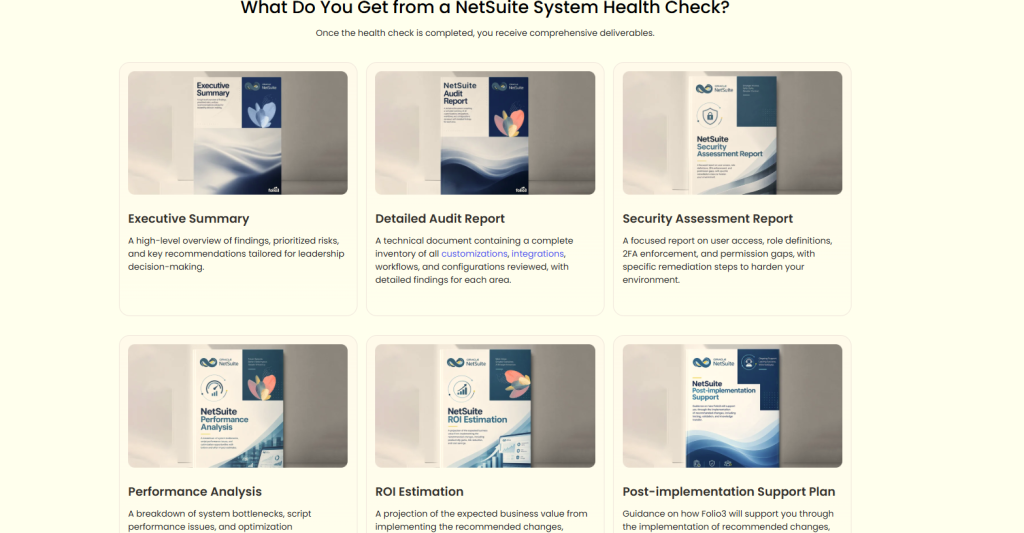
Deliverables include:
- Executive summary: An overview of key findings, business risks, and recommended priorities.
- Detailed assessment report: Documented findings covering the configurations, customizations, workflows, and integrations included in the review.
- Security findings: Identified access-control gaps and recommendations for improving relevant security settings.
- Performance findings: An overview of bottlenecks and opportunities to improve system efficiency.
- Prioritized recommendations: Suggested corrective actions organized according to business impact, urgency, and effort.
- Improvement roadmap: Recommended next steps, including potential implementation work, testing, and validation.
Depending on the provider and scope, the engagement might also include estimated implementation effort or a statement of work for recommended changes.
These deliverables help finance leaders, IT teams, and NetSuite administrators decide what to address first, what requires specialist support, and which improvements deserve investment.
Why Work With a NetSuite Health Check Specialist?
A NetSuite health check requires both functional and technical understanding. A configuration issue might appear to be a user problem, while a recurring transaction error might originate in an integration, workflow, or custom script.
An experienced NetSuite specialist evaluates these dependencies and helps distinguish symptoms from underlying causes. This is particularly valuable when your environment includes extensive customizations, several connected applications, complex financial processes, or limited internal NetSuite expertise.
Folio3’s NetSuite Health Check service reviews system configuration, customizations, workflow automation, integrations, security, and performance. The engagement helps businesses document existing issues, prioritize improvements, and plan the work required to address them.
The objective is to give your team a clearer understanding of its current NetSuite environment and a practical basis for improving it.
Get Your NetSuite Health Assessed
A NetSuite health check helps your business maintain an ERP environment that supports accurate reporting, reliable integrations, appropriate access controls, and efficient daily operations.
Without periodic reviews, configuration gaps, outdated customizations, workflow inefficiencies, and integration failures can accumulate as your organization changes. Identifying these issues early gives your team a chance to address them before they create larger operational problems.
Whether you are troubleshooting recurring issues, preparing for expansion, or reviewing the value of your existing NetSuite investment, a structured health check provides the findings and recommendations needed to plan your next steps.
Review your NetSuite environment regularly to keep it aligned with your business requirements, reduce avoidable risks, and make better use of the system you already have.
Frequently Asked Questions
1. Why is my NetSuite system running slowly?
NetSuite performance issues can stem from inefficient saved searches, resource-intensive scripts, workflow processing, large data volumes, or integration activity. A NetSuite health check examines these areas to identify performance bottlenecks and recommend targeted improvements based on their impact on daily operations.
2. How do I troubleshoot recurring NetSuite errors?
Start by identifying when the errors occur, which transactions or processes they affect, and whether they involve scripts, workflows, permissions, or integrations. If the cause remains unclear or the errors keep returning, a NetSuite health check provides a structured review of the affected configurations and technical components to identify underlying issues and prioritize corrective actions.
3. Can too many customizations affect NetSuite performance?
Yes. Poorly optimized scripts, overlapping workflows, and unnecessary custom logic can increase processing time, complicate maintenance, and make troubleshooting harder. A NetSuite health check reviews existing customizations to identify inefficiencies, assess their business value, and determine whether optimization or standard NetSuite functionality is a better fit.
4. How do I identify unused NetSuite saved searches and workflows?
Review saved searches and workflows for their last usage, business purpose, owners, dependencies, and role assignments before deciding whether to retire them. Avoid deleting items solely because they appear inactive; reports, dashboards, scripts, and other processes might depend on them. A NetSuite health check helps assess these dependencies and identify opportunities to simplify the environment safely.
5. How do I know whether a NetSuite integration needs a health check?
An integration needs closer review when data fails to sync, transactions arrive late, records become inconsistent, errors recur, or employees regularly reconcile data manually. A NetSuite health check examines integration configurations, error patterns, data flows, and connected applications to help pinpoint the source of these problems and define the next steps.
