
Key Takeaways
- MuleSoft’s API-led architecture separates NetSuite connectivity, business-process orchestration, and consumer-specific experiences, reducing direct dependencies on the ERP.
- API contracts, data ownership, transformation, authentication, error handling, idempotency, scalability, observability, and deployment all need to be designed together.
- With NetSuite moving toward the retirement of SuiteTalk SOAP, MuleSoft’s NetSuite REST Connector and OAuth 2.0 provide the preferred foundation for new implementations.
- System APIs abstract NetSuite’s technical interfaces, Process APIs orchestrate shared business processes, and Experience APIs tailor data for specific consumers.
Integrating NetSuite with CRM, ecommerce platforms, WMS, marketplaces, payment processors, and other enterprise applications is not just an API-connection exercise.
The real challenge is that of designing an architecture that handles different data models, business processes, authentication mechanisms, transaction volumes, failures, retries, and future system changes. And all of this needs to be done without turning the integration landscape into a collection of fragile point-to-point connections.
MuleSoft provides an API-led integration model that addresses this challenge by separating system connectivity, business-process orchestration, and application-specific consumption. When applied to NetSuite, this approach turns your ERP into a reusable integration asset rather than a system that every application connects to independently.
For organizations using NetSuite as their ERP and MuleSoft as their integration platform, the architecture needs to account for both MuleSoft’s API-led connectivity and NetSuite’s available integration surfaces.
This guide explains how to design a MuleSoft and NetSuite integration architecture, including architectural layers, API design, data transformation, authentication, error handling, scalability, monitoring, security, common integration patterns, and implementation considerations.
What Is MuleSoft-NetSuite Integration Architecture?
MuleSoft and NetSuite integration architecture is the technical and organizational blueprint used to connect NetSuite with other enterprise applications through MuleSoft’s Anypoint Platform.
Instead of allowing every application to communicate directly with NetSuite, MuleSoft can act as the integration layer between NetSuite and Salesforce, ecommerce platforms, online marketplaces, WMS, 3PL providers, payment processors, and other systems.
According to the Separation of Concerns principle, a Salesforce application should not need to understand the internal structure of NetSuite. Likewise, an ecommerce application doesn’t need to know how NetSuite represents customers, sales orders, inventory locations, subsidiaries, or custom fields.
This is why MuleSoft provides the abstraction layer between these systems. The central architectural idea is the boundary between NetSuite and the applications that depend on it.
Its API-led approach separates system connectivity from business process orchestration and consumer-specific APIs.
Now let’s deep dive into MuleSoft and NetSuite API integration architecture by exploring the following:
NetSuite REST Connector
MuleSoft’s NetSuite REST Connector connects Mule applications to NetSuite’s REST Record Web Services API and SuiteQL query service. It supports operations including Create, Read, Update, Delete, Upsert, Query, SuiteQL, batch processing, asynchronous jobs, metadata discovery, and record-change listening.
The connector uses OAuth 2.0 client credentials with a JWT bearer assertion for unattended server-to-server integrations. This is the connector that should receive particular attention when designing new NetSuite integrations.
Traditional NetSuite Connector
MuleSoft also provides the traditional NetSuite Connector. This connector is SOAP-based and works with NetSuite’s SuiteTalk SOAP Web Services. It provides NetSuite business object generation, authentication support, and error handling.
SuiteTalk REST vs. SOAP
NetSuite’s integration architecture is currently in transition. The 2025.2 SOAP endpoint is the last planned SOAP endpoint. With NetSuite 2027.1, only the 2025.2 SOAP endpoint will be supported, and with NetSuite 2028.2, SOAP Web Services will no longer be available.
This is why we recommend REST with OAuth 2.0 for newly built integrations.
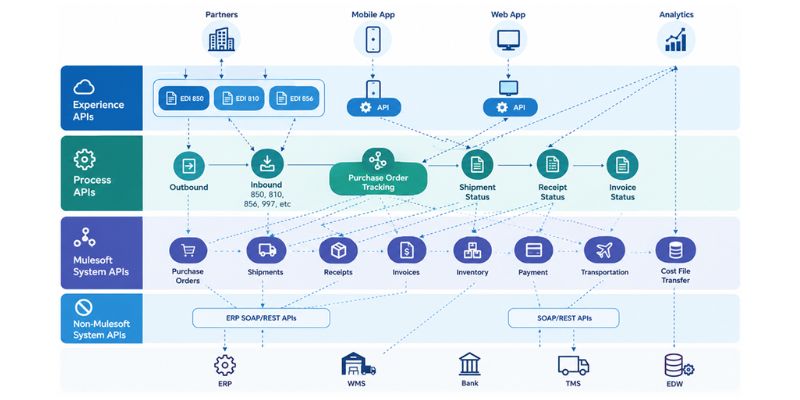
The System API Layer
The System API is where MuleSoft abstracts the technical details of connecting to NetSuite. For instance, you might create a NetSuite Customer System API exposing the following:
GET		/customers/{id}
POST		/customers
PATCH		/customers/{id}
And an Order System API:
GET		/orders/{id}
POST		/orders
PATCH		/orders/{id}
The consumer doesn’t need to know whether the underlying implementation uses SuiteTalk REST, SuiteQL, RESTlets, multiple NetSuite calls, or custom transformation logic. That is the whole point of the abstraction.
The Process API Layer
Process APIs orchestrate business processes that often involve multiple systems. For instance, consider an ecommerce order. Creating the order requires the following:
- Validating the customer
- Resolving the NetSuite customer
- Validating inventory
- Creating the sales order
- Processing payment
- Sending the order to a WMS
- Updating fulfillment status
- Publishing an order event
This workflow is coordinated using the Process API.
The Experience API Layer
Experience APIs are used when a particular consumer needs a representation tailored to its requirements. For instance, an internal customer service application might need the following:
{
  “customer”: {
	“id”:”C-2662”,
	“name”:”Edward Jones”
},
“openOrders”:4,
“outstandingBalance”: 550.00
“recentInvoices”:[]
}
On the other hand, a mobile application might only need the following:
{
  “customerId”: “C-2662”,
  “openOrders”: 4,
  “Balance”: 550.00
}
Both can consume the same underlying Process and System APIs while receiving different payloads.
NetSuite Connection and Authentication
The technical connection to NetSuite is configured within the connector. For the NetSuite REST Connector, MuleSoft supports OAuth 2.0 client credentials using a JWT bearer assertion. This provides a machine-to-machine authentication model without requiring interactive user login.
In production, the authentication architecture should also account for the following:
- Client credentials
- Private key management
- Secure properties
- Secrets management
- NetSuite roles
- Least-privilege permissions
- Environment-specific configuration
- Credential rotation
- Audit requirements
And mind you, authentication should not be embedded directly into transformation or business logic.
Data Transformation with DataWeave
This is where MuleSoft differs significantly from simply connecting one application to another. Enterprise applications rarely use the same data model.
For instance, consider an ecommerce order:
{
  “orderId”: “WEB-143”,
  “customerId”: “C-2662”,
  “currency”: “USD”,
  “items”: [
     {
	 “sku”: “SKU-051”
	 “quantity”: 2
    }
  ]
}
NetSuite might need additional information such as internal record IDs, customer references, item references, subsidiary, location, currency, transaction data, tax information, custom fields, departments, classes, and other account-specific configuration.
This is why the source system should not simply send its native payload directly to NetSuite.
MuleSoft’s DataWeave transformation layer translates the source representation into the structure expected by the target system. Transformation might involve type conversion, conditional logic, array restructuring, reference resolution, data normalization, currency handling, null handling, code translation, default values, data enrichment, and nested object construction.
Should You Use a Canonical Data Model?
One of the most important architecture decisions is whether to introduce a canonical model between source applications and NetSuite. Consider an organization with three sources, such as Salesforce, Shopify, and Amazon.
Without a canonical model, each process has its own transformation logic. But with a canonical model, duplication is reduced, and changes are isolated. But that doesn’t mean that you blindly introduce the canonical model. You should only introduce it if it reduces coupling and provides meaningful reuse.
NetSuite Metadata and Custom Records
One of the biggest challenges in NetSuite integration is that a NetSuite account is rarely identical to another NetSuite account.
This is why the integration needs to understand the target account rather than relying solely on generic NetSuite documentation. The NetSuite REST Connector provides metadata discovery capabilities, which are used to discover available NetSuite record metadata.
Architectural discovery should include the following:
- Standard records
- Custom records
- Custom field
- Required fields
- Reference relationships
- Internal IDs
- External IDs
- Subsidiaries
- Locations
- Business rules
- Workflows
- SuiteScripts
- Permissions
SuiteQL in the MuleSoft Architecture
The NetSuite REST Connector also supports SuiteQL. This is particularly useful when the integration needs query-oriented access to NetSuite data rather than simply retrieving a known record by ID.
SuiteQL is useful for scenarios involving reporting-oriented retrieval, complex filtering, joining related records, data synchronization, lookup operations, and incremental extraction.
But that doesn’t mean that SuiteQL becomes a substitute for proper API and data model design. The queries should be designed with pagination, selectivity, volume, execution time, data freshness, NetSuite governance, and error handling in mind.
Batch and Asynchronous Processing
A common mistake is to process every NetSuite operation synchronously. That approach works reasonably well for low-volume transactional requests, but it becomes problematic when large data sets are involved.
The NetSuite REST Connector supports asynchronous batch operations. MuleSoft documents batch operations for Add List, Update List, Upsert List, Delete List, and Get List. These operations support up to 100 records per batch, return a job ID, and allow Mule applications to poll for job status and retrieve per-record results.
The important point is that the 100-record limit applies to each REST Connector batch operation, not necessarily to the total volume of the integration. Larger datasets can be divided into multiple batches.
NetSuite API Limits and Throughput
A production integration should never be designed around the assumption that NetSuite can accept unlimited concurrent requests.
Throughput depends on several factors, including the following:
- NetSuite account configuration
- API governance
- Request type
- Record complexity
- Batch size
- Concurrency
- Query design
- Processing mode
- Retry behavior
Simply increasing Mule worker concurrency is not automatically a performance improvement. If the target system becomes the bottleneck, additional concurrency can increase failures rather than throughput.
Error Handling in MuleSoft
A production-grade MuleSoft integration needs explicit error handling. Mule 4 provides a typed error model and supports error handlers such as on error continue, on error propagate, try scopes, error mappings, and reconnection strategies.
The NetSuite Connector also exposes NetSuite-specific errors, including connectivity, SOAP faults, session timeouts, retry exhaustion, and other connector errors. For REST-based integrations, errors should similarly be classified according to their operational meaning.
For instance,
A network timeout may be retryable.
A missing NetSuite customer reference is probably not.
A duplicate transaction may require idempotency handling rather than another retry.
This is why the error model should be designed before the integration reaches production.
Retry Strategies
Retries are useful for transient failures. But they are dangerous when applied indiscriminately.
Suppose MuleSoft attempts to create an order in NetSuite. The request times out. The integration cannot determine whether NetSuite created the order.
That is an integration failure even though both API calls technically succeeded. This is why retries must be combined with idempotency.
Idempotency and Duplicate Prevention
Transactional integrations should have a strategy for safely processing the same message more than once.
The NetSuite REST Connector supports idempotency keys for relevant asynchronous batch operations. Its Add List operation, for example, accepts an optional idempotency key when submitting the batch.
The exact strategy should depend on the business transaction. For payments, orders, invoices, and inventory movements, duplicate prevention is not an optional enhancement.
Mule Runtime
The Mule application describes what should happen. The Mule runtime is what executes that logic. At runtime, Mule is responsible for the following:
- Receiving messages
- Executing flows
- Calling connectors
- Applying transformations
- Routing messages
- Managing errors
- Executing asynchronous processing
- Producing logs and telemetry
CloudHub, Runtime Fabric, and Hybrid Deployment
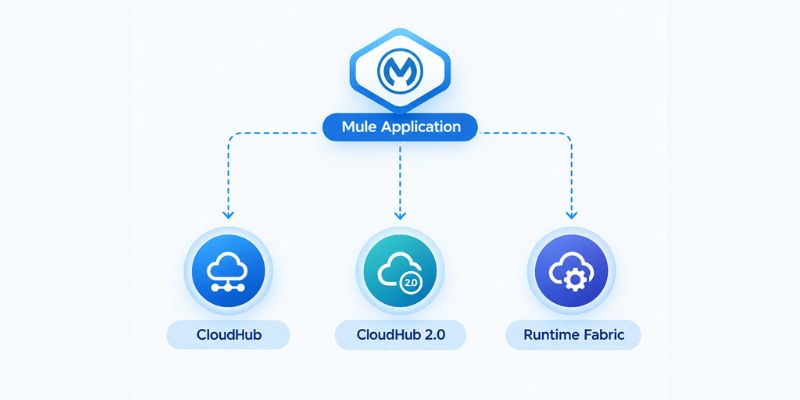
MuleSoft supports multiple deployment approaches. But the right choice depends on infrastructure, security, networking, and operational requirements.
A cloud-native architecture might look different from a hybrid architecture. This difference matters when NetSuite needs to exchange information with applications that are not publicly accessible.
This is why the deployment architecture should be designed alongside the integration architecture rather than afterward.
API Management and Security
Once NetSuite capabilities are exposed through MuleSoft APIs, those APIs become assets that need governance. Security policies can be applied at the API layer for concerns such as authentication and authorization, client access, rate limiting, threat protection, API lifecycle management, monitoring, and versioning.
This creates a controlled boundary around NetSuite. Instead of allowing every application to maintain its own NetSuite credentials and integration logic, MuleSoft centralizes the integration contract and access controls.
Observability and Correlation IDs
It should be kept in mind that a successful API call is not the same thing as a successfully completed business process.
Suppose an order passes through the ecommerce platform, MuleSoft, NetSuite, payment processor, and WMS. A failure at any point can affect the final business outcome. That is why correlation IDs should be carried throughout the transaction.
Scheduling and Event-Driven Integration
Not every NetSuite integration needs to be real-time. Some data is naturally suited to scheduled synchronization, such as product catalogs, historical records, reference data, financial reconciliation, large customer imports, and reporting data.
On the other hand, other transactions might need real-time processing, such as sales orders, payments, inventory changes, shipment updates, and customer updates.
MuleSoft supports different integration patterns within the same architecture. The architecture should choose the pattern according to business requirements rather than defaulting to real-time processing for everything.
Record Change Listening and Event-Based Integration
The NetSuite REST Connector includes record-change listening capabilities. This opens up architectures where MuleSoft reacts to changes instead of repeatedly polling NetSuite. This reduces unnecessary reads and creates more responsive integration flows.
Common Architectural Mistakes in MuleSoft NetSuite Integration
The following are some of the most common architectural mistakes we see when designing MuleSoft-NetSuite integrations.
- Mistaking the connector for the architecture
- Creating too many APIs
- Building one giant Mule application
- Putting business logic in the System API
- Directly mapping every source to NetSuite
1. Mistaking the Connector for the Architecture
The NetSuite connector establishes communication with NetSuite and provides supported operations. It does not determine data ownership, business process orchestration, transaction boundaries, error recovery, idempotency, API contracts, and consumer experience.
Those still need to be designed.
2. Creating Too Many APIs
API-led architecture is powerful, but more APIs do not automatically mean better architecture.
Creating a System API, Process API, and Experience API for every tiny integration introduces unnecessary deployment, testing, monitoring, and governance overhead.
3. Building One Giant Mule Application
The opposite problem is putting everything into one Mule application, like Salesforce, Shopify, Amazon, WMS, NetSuite, payments, and everything else. This becomes difficult to test, deploy, scale, troubleshoot, version, and maintain.
4. Putting Business Logic in the System API
A System API should not become a giant collection of business rules. That’s it.
5. Directly Mapping Every Source to NetSuite
Suppose five applications need to create customers. A poorly designed architecture might contain five separate mappings. What happens is every source now depends directly on the NetSuite model. If NetSuite changes, multiple flows may need modification.
MuleSoft NetSuite Integration Architecture, Understood
The MuleSoft-NetSuite integration architecture is ultimately about creating a controlled boundary between independently evolving systems.
NetSuite remains responsible for ERP data and transactional behavior, while MuleSoft provides the integration and API layer that controls how applications interact with that ERP.
The NetSuite connector provides system-specific connectivity. DataWeave handles transformation. System APIs abstract technical connectivity. Process APIs orchestrate business processes where orchestration needs to be shared. Experience APIs expose consumer-specific representations where needed.
Mule runtime executes the integration logic, and API management, security, monitoring, error handling, and deployment infrastructure provide the operational foundation around it.
Frequently Asked Questions
What is MuleSoft NetSuite integration architecture?
MuleSoft NetSuite integration architecture is the framework used to connect NetSuite with applications such as Salesforce, ecommerce platforms, WMS, marketplaces, payment processors, and other enterprise systems through MuleSoft. It uses API-led connectivity to separate NetSuite system connectivity, business-process orchestration, and consumer-specific APIs.
How does MuleSoft integrate with NetSuite?
MuleSoft integrates with NetSuite through its NetSuite REST Connector, which connects to NetSuite’s REST Record Web Services and SuiteQL capabilities. MuleSoft also works with NetSuite’s traditional SOAP-based SuiteTalk Web Services through its legacy NetSuite Connector.
Should I use REST or SOAP for a new NetSuite integration?
REST with OAuth 2.0 is generally the preferred approach for new integrations. NetSuite has announced the retirement of SOAP Web Services. This makes REST as a more future-oriented foundation for new MuleSoft-NetSuite integrations.
What are System APIs, Process APIs, and Experience APIs in a MuleSoft and NetSuite integration?
System APIs abstract technical connectivity to NetSuite and other systems. Process APIs orchestrate business processes that may involve multiple systems. Experience APIs provide data representations tailored to specific applications or consumers. Not every integration requires all three layers.
Can MuleSoft support real-time NetSuite integration?
Yes. MuleSoft supports real-time, event-driven, scheduled, and batch integration patterns. The appropriate approach depends on business requirements, transaction volume, data freshness, and the capabilities of the systems involved.

