Key Takeaways
- Phantom inventory happens when your Bill of Materials no longer matches what your factory actually builds.
- Five specific BOM problems cause it. A wrong component version, a bad quantity, an outdated revision, a missing part, or a misconfigured phantom assembly.
- The cost shows up in five separate places instead of one number. Wasted material, rush order premiums, scrap, downtime, and cash tied up in stock you didn’t need.
- The root cause is usually a timing gap between engineering and production. Engineering approves a change, and the shop floor keeps building from the old version until someone notices.
- NetSuite fixes this at the source with one live BOM, dated revisions, and an alert the moment actual material use no longer matches the plan.
A Common Scenario on the Factory Floor
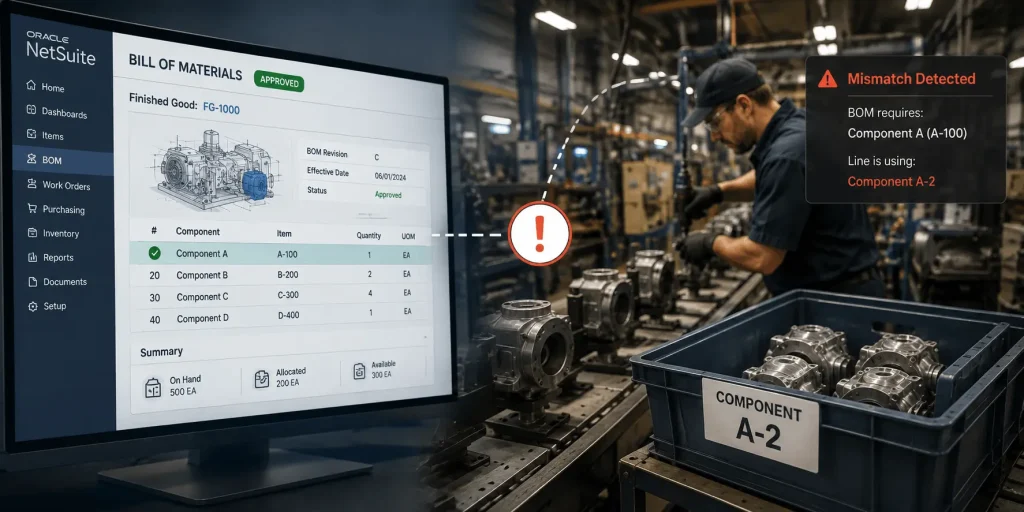
Picture a plant manager starting a routine production run. The system shows 500 units of Component A on the shelf, so the line begins as planned.
By unit 80, someone on the floor notices the build actually calls for Component A-2, not A. The BOM has been showing the wrong version for six months, and this is the first time anyone caught it. The line has to stop. Procurement places a rush order to cover the gap. The delivery date moves back, and the margin on that run is lower than planned.
This kind of mismatch is what this article calls phantom inventory in a manufacturing setting. The Bill of Materials and the real product no longer matched.
A few decades ago, an industry group that studied electronics manufacturers found something that still happens today. One manufacturer got a 75-line Bill of Materials with 40 errors in it. It took two full days just to fix the list before anyone could start building. Source
What Is Phantom Inventory in Manufacturing?
Phantom inventory is inventory that your system records as available, but that your factory cannot actually use in production. The cause is usually a Bill of Materials that stopped matching the current version of the product. When that happens, the system keeps planning purchases and production runs around information that is no longer accurate.
What Is a Phantom BOM?
A phantom BOM is a setting for a sub-assembly that is never stocked on its own. When a work order is created, the components of that sub-assembly flow directly into the finished product instead of being tracked as a separate item.
In NetSuite, a phantom BOM setting saves you a tracking step. You don’t have to stock or count that sub-assembly on its own. The risk shows up when this setting gets turned on for the wrong item. If that happens, the parts inside it can get used up without ever showing in your stock count, and that’s exactly the kind of mismatch this article is about.
What Causes Phantom Inventory in Manufacturing?
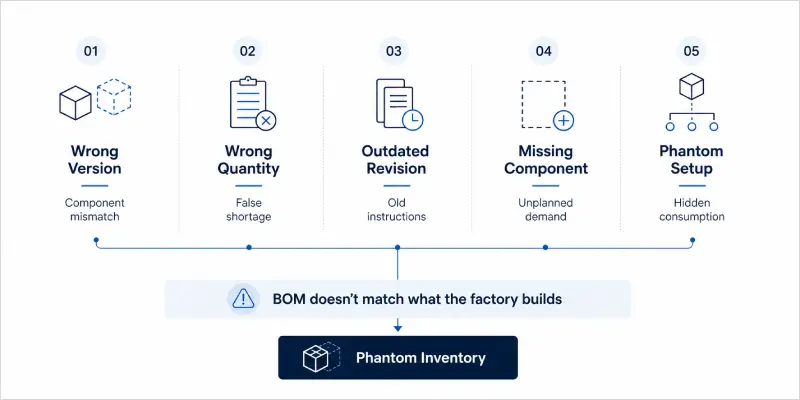
Phantom inventory usually comes down to one of five specific problems with how a BOM is built or maintained.
Using the Wrong Component Version
Engineering updates a design, but the manufacturing BOM does not get updated to match. The floor keeps building with the old component until someone notices the two versions do not line up.
Entering the Wrong Quantity
A typo turns 0.2 into 2.0. The system now expects ten times the material a build actually needs, which can trigger a false shortage and an order that did not need to be placed.
Working From an Outdated Revision
The approved BOM is Revision C, but a printed copy of Revision A is still on the floor and never got replaced. Everyone doing the work is following instructions correctly. The instructions themselves are wrong.
Leaving Out a Component
A part gets added to the product design but does not make it onto the BOM. The system does not plan for it or order it, so the shortage only becomes visible once the line actually needs the part, which is the worst point to find out.
Misconfiguring a Phantom Assembly
A sub-assembly that should be tracked separately gets set up as a phantom instead. Its components get consumed and pass straight through to the parent item without the sub-assembly showing up in a stock count, which can create a mismatch at more than one level of the BOM.
How Much Does BOM Inaccuracy Cost a Factory?
There is no single industry number for this. What is real is that the cost shows up in five separate places on your books.
Rush Orders Cost More Than Planned Purchases
When a missing or wrong component turns up mid-run, procurement pays whatever price gets the part there fastest, not the negotiated price. One rush order can run well above standard cost, and across a year of BOM-driven rush orders, that adds up even though most companies never total it in one place.
Scrap and Rework Add to Cost of Goods Sold
When a part with a tight tolerance cannot be swapped for another, the line stops and units already partway through assembly need rework. That cost lands directly in cost of goods sold, and it rarely gets traced back to the BOM line that caused it.
Quoted Jobs Lose Margin Without Anyone Noticing
A quote built on a BOM that is a few revisions out of date estimates the wrong cost from the start. A job quoted at 28 percent margin can land closer to 19 percent, and the estimator did nothing wrong. They worked from the data they were given.
Carrying Extra Inventory Has a Real Yearly Cost
APQC’s current benchmarking data puts the median cost of carrying inventory at 10 percent of its value per year, once storage, insurance, and the capital tied up in it are counted. Bottom performing companies pay more than double what top performers pay to hold the same stock. A BOM that over-plans a component builds excess that sits there accruing this cost every month it goes unused.
Downtime Costs More Than the Missing Part
A line that stops for a shortage loses the cost of the part, along with paid labor hours, missed output, and often overtime to catch back up. None of that shows up as a line item labeled BOM error, but it comes from the same root cause.
Why Does BOM Inaccuracy Keep Happening?
BOM inaccuracy usually comes from a gap between how engineering and production each keep track of the product.
Engineering and Production Work From Different Versions
Engineering maintains an EBOM, built around design logic. Manufacturing runs from an MBOM, built around how the product is actually assembled. Someone has to manually carry a change from one to the other, and that manual step is where details get missed.
The Working Document Is a Spreadsheet
A lot of BOM errors trace to a spreadsheet somewhere. Someone builds it from the source of truth, and over time it becomes the document that actually drives purchasing or the production line. A spreadsheet does not have real version control. It has a file name and a folder, and that is not the same thing.
Procurement Finds Out About Changes Too Late
An engineering change gets approved and documented, but procurement does not hear about it before the next order goes out. The result sits in the warehouse as parts the new design cannot use.
Quantity Fields Get Entered Once and Trusted Forever
A number gets typed by one person and relied on by every system downstream of it, with no second check. A single transposed digit changes a requirement by a factor of ten, and the shortage or excess does not show up until weeks later.
How Does NetSuite Fix BOM Inaccuracy?
NetSuite addresses each of these causes directly, without adding manual work back into the process.
Dated Revisions
NetSuite tracks every BOM change with a revision ID and a start and end date. The correct revision applies automatically to the correct production period, nothing gets overwritten, and every change leaves a record behind it.
Multi-Level Explosion
NetSuite’s manufacturing tools calculate component requirements at every sub-assembly level as soon as a work order is created. Whether a sub-assembly is stocked separately or set up as a phantom is explicit in the system rather than left to guesswork.
Planning Against the Current BOM
Material Requirements Planning in NetSuite always runs against the current approved BOM, not a saved copy from an earlier point in time. When the BOM changes, the next planning run picks up the new requirements automatically.
Consumption Tracking in Real Time
As components are consumed against a work order, NetSuite logs actual usage against the planned amount. A part consumed at twice the expected rate shows up as a flag right away instead of at the next physical count weeks later.
To see how this fits into the wider manufacturing setup, take a look at our guide on NetSuite’s manufacturing modules.
BOM Accuracy Best Practices
Keep One Source of Truth for Every BOM
One system holds the approved BOM. Engineering, procurement, and production all read from that same record, with no local copies and no BOM living in someone’s inbox.
Tie the Change Process to the BOM Update
An engineering change is not finished until the matching BOM revision is approved and dated in the system. Treat the design change and the BOM update as one step, not two steps that can drift apart.
Cycle Count Based on What Matters Most
Count the highest value and highest volume components more often than the rest. When a count does not reconcile, check the BOM as part of the investigation instead of as an afterthought.
Track BOM Accuracy as a Real Metric
Measure the percentage of production runs that finish without a BOM related exception. When that number drops, start the investigation at the BOM rather than in the warehouse.
Align Supplier Changes With Revision Updates
When a supplier changes a spec, update the BOM before the new stock arrives, not after the line has already built with the wrong version.
How Folio3 Approaches BOM Configuration in NetSuite
Every manufacturing implementation we run starts with a BOM structure workshop before a single item record gets created. We map out single versus multi-level BOM needs, decide which sub-assemblies get stocked versus set up as phantoms, set the revision control policy, and connect the engineering change process directly to BOM approval in NetSuite.
One client we work with, a synthetic turf manufacturer, cut 10 hours of manual data entry per day after we put structured BOM management and production planning in place. That time came from removing the manual back and forth between engineering records and production BOMs that had been running as two separate processes.
If your current BOM setup needs a second look before or after going live on NetSuite, our NetSuite manufacturing implementation services cover BOM structure design as a standard part of the engagement.
Frequently Asked Questions
1. What is phantom inventory in manufacturing?
Phantom inventory is stock your system records as available that your factory cannot actually use, usually because the Bill of Materials driving the system no longer matches what is really being built.
2. How does an inaccurate Bill of Materials cause inventory problems?
An inaccurate BOM feeds wrong information into your planning system. Purchasing orders the wrong quantity, production runs short or long on material, and the mismatch shows up as either a shortage on the floor or excess sitting in the warehouse.
3. What is the difference between a phantom BOM and phantom inventory?
A phantom BOM is a planning setting for a sub-assembly that is never stocked separately. Phantom inventory is a stock record that no longer matches physical reality. One is intentional. The other is a data error.
4. What are the most common causes of BOM inaccuracy in manufacturing?
The most common causes are a wrong component version, an incorrect quantity, an outdated revision still in use on the floor, a missing component, and a misconfigured phantom assembly.
5. How does NetSuite handle BOM revision control?
NetSuite assigns every BOM change a revision ID with a start and end date, so the correct version applies automatically to the correct production period without manual intervention.
6. What does BOM inaccuracy cost in manufacturing?
There is no fixed industry number for this. The cost shows up across rush orders, scrap and rework, lost margin on quoted jobs, inventory carrying cost, and production downtime.
7. How do I fix phantom inventory caused by BOM errors?
Start by tying every engineering change to a mandatory BOM update, put one system in place as the single source of truth, and track BOM accuracy as an ongoing metric instead of a one time audit.
8. What is the difference between an EBOM and an MBOM?
An EBOM is the engineering version of the Bill of Materials, organized around how the product is designed. An MBOM is the manufacturing version, organized around how the product actually gets built on the floor.