
Key Takeaways
- If your NetSuite configuration works in some areas, retain those components and focus on correcting the problems that disrupt your business.
- Before deciding to rescue or reimplement NetSuite, identify the root causes, assess data accuracy, and compare the full cost and risk of each option.
- If you are planning a recovery, establish clear ownership, prioritize critical business processes, and validate results before approving go-live.
- Once NetSuite goes live, use hypercare and ongoing monitoring to resolve production issues and help your team transition to stable operations.
When a NetSuite implementation goes wrong, you need to decide whether the existing system can be corrected or whether starting a new implementation is the better option. Perhaps financial reports do not reconcile, inventory figures are unreliable, integrations keep failing, or employees still rely on spreadsheets because NetSuite does not support their daily processes. Each problem affects the business differently, so the right response depends on what is causing it.
A complete reimplementation might sound like the cleanest solution, especially when employees have lost confidence in the system. However, replacing the entire setup takes time, requires data migration and testing, and introduces another round of implementation risk.
On the other hand, continuing to fix individual issues without addressing the underlying configuration could leave the business dealing with the same problems months later.
The practical approach is to determine which parts of NetSuite are working, which problems can be corrected, and which business requirements the existing setup cannot meet. This article explains how to make that decision, compare the costs and risks, and plan the next steps.
NetSuite Implementation Rescue vs. Reimplementation: What’s the Difference?
A NetSuite implementation rescue corrects problems in an existing account while retaining configuration, data, and processes that already work. Reimplementation involves redesigning and configuring the system again when the existing setup cannot meet essential business requirements reliably. Depending on the circumstances, the work could take place in the current account or a new environment.
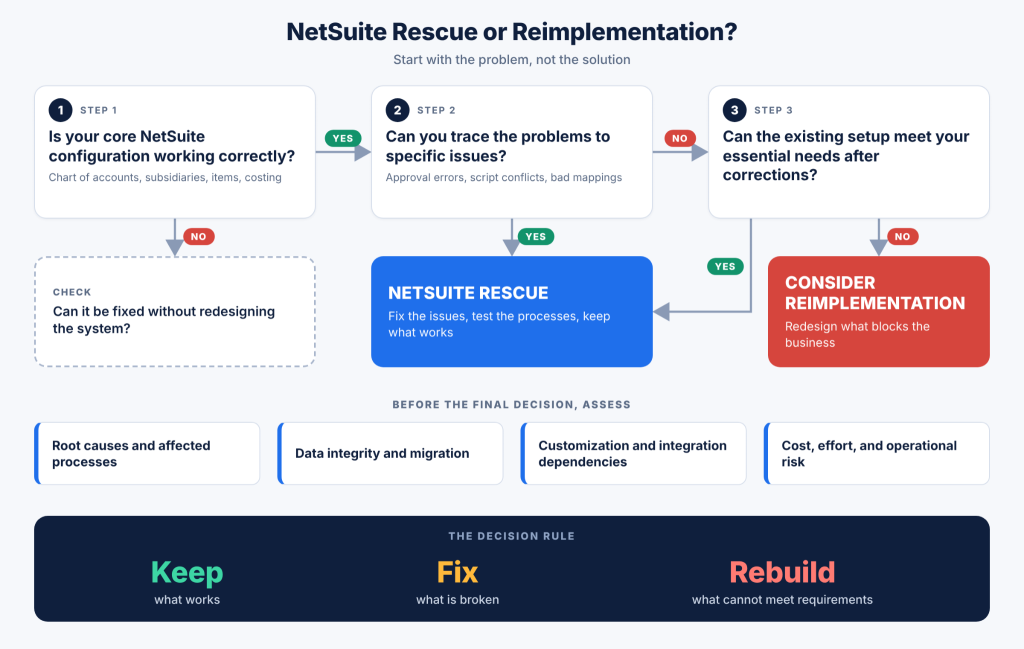
If a company has a correctly configured chart of accounts, accurate inventory records, and reliable financial reporting, but its approval workflows and ecommerce integration are causing delays, then rescue would focus on correcting those specific problems.
Reimplementation becomes a stronger consideration if the original configuration prevents the company from handling its subsidiaries, inventory costing, or required financial processes correctly.
| Area | NetSuite implementation rescue | NetSuite reimplementation |
|---|---|---|
| Existing configuration | Correct defective settings and retain configuration that meets business requirements | Redesign configuration that prevents essential processes from working correctly |
| Financial management | Correct reporting, posting, reconciliation, or period-close issues within the existing setup | Redesign financial configuration when the current setup cannot support required accounting and reporting |
| Inventory and manufacturing | Correct item records, costing settings, workflows, or transaction processes where feasible | Redesign item structures, bills of materials, routings, or production processes when the current setup cannot meet operational requirements |
| Customizations | Review and correct problematic SuiteFlow workflows, SuiteScript, custom fields, and saved searches | Replace or redesign interdependent custom logic that cannot be maintained or corrected reliably |
| Integrations | Correct field mappings, synchronization, duplicate handling, and error processing | Redesign integrations when the existing approach cannot support required data flows or business processes |
| Data | Clean up, reconcile, and correct existing records and transactions | Define migration rules, validate records, reconcile opening balances, and transfer required history |
| Project work | Prioritize root-cause analysis, corrections, regression testing, and controlled deployment | Repeat discovery and design where necessary, followed by configuration, migration, testing, and cutover |
| Main consideration | The existing setup can meet business requirements after identifiable problems are corrected | Essential requirements need a different configuration or process design |
The deciding factor in choosing NetSuite implementation rescue vs reimplementation is whether the existing NetSuite environment can support the business after the necessary corrections or whether fundamental changes are required.
How to Decide Whether to Keep, Fix, or Rebuild Your NetSuite Setup?
The Keep, Fix, or Rebuild framework helps you evaluate the existing implementation before committing to a recovery plan. Instead of treating every reported problem as a reason to start over, it separates working configuration from correctable defects and design decisions that need to change.
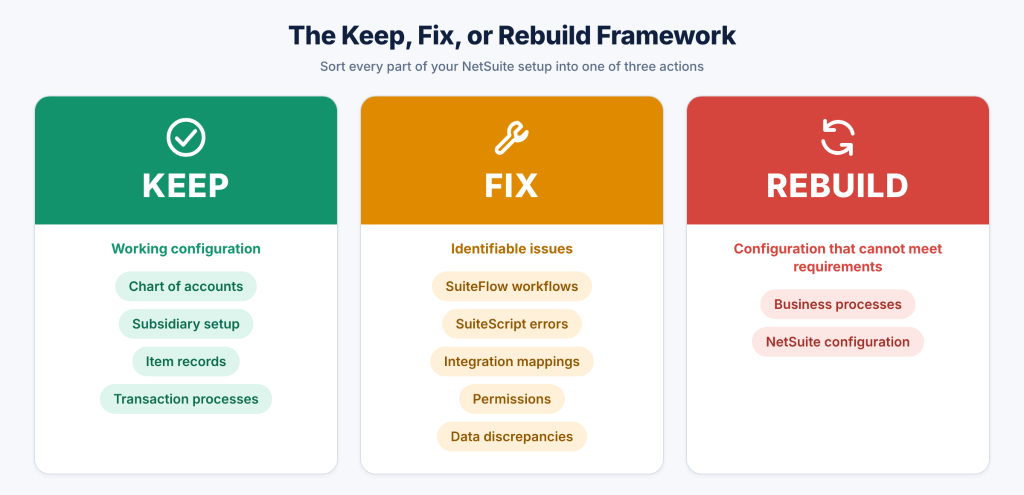
1. Keep the Parts of NetSuite That Already Work
You should start by identifying which parts of your NetSuite account support the business correctly. For this, review the chart of accounts, subsidiary records, accounting periods, item records, inventory locations, financial reports, and core transaction processes. If these elements meet your requirements, retain them wherever possible.
Here we can take an example of a company that has implemented NetSuite OneWorld to manage several legal entities. Its subsidiaries are configured correctly, intercompany transactions process as expected, and consolidated financial statements reconcile. But purchase orders remain pending because an approval workflow applies the wrong conditions. Rebuilding the subsidiary structure would add migration and testing work without addressing the approval problem.
The same principle applies to inventory and order processing. If item records, units of measure, costing methods, and inventory locations are correct, but sales orders fail to reach the warehouse because of an integration issue, the investigation should focus on the affected data flow rather than the entire inventory setup.
Keeping a working configuration reduces unnecessary changes and limits the number of processes that need to be retested. It also preserves business rules and historical data relationships that employees depend on.
2. Fix the NetSuite Configuration, Workflows, and Integrations Causing Problems
Once you know which parts of NetSuite are working, investigate the problems preventing the team from completing their tasks. The review should cover configuration, SuiteFlow workflows, SuiteScript customizations, saved searches, role permissions, integrations, and data quality.
Suppose purchase orders remain pending even after the required approval has been given. The problem could involve workflow conditions, approval routing, role permissions, or a custom script that changes the transaction status. The team needs to reproduce the issue, identify the cause, correct the relevant configuration or code, and test the approval process using the appropriate roles and transaction scenarios.
Integration problems need the same attention to detail. If an ecommerce platform sends duplicate sales orders to NetSuite, review how the integration identifies existing transactions, handles retries, and responds to failed requests. Correcting external ID handling or duplicate-prevention logic could resolve the issue without replacing the integration or reimplementing NetSuite.
Customizations need a similar review. A SuiteScript that duplicates native functionality, conflicts with another script, or runs under the wrong conditions could create processing delays or transaction errors. Before removing it, confirm whether the business still depends on it and whether native NetSuite features can meet the requirement.
3. Rebuild the Parts of NetSuite That Cannot Meet Your Requirements
Some implementation problems originate in the original design rather than an isolated configuration error. If the current setup prevents the business from completing essential processes, repeated adjustments to individual reports, scripts, and workflows will not necessarily resolve the underlying problem.
For example, a company might need separate financial reporting, intercompany accounting, and consolidation for multiple legal entities but have configured its operations around departments or classes instead of the appropriate subsidiary structure. Custom reports could present selected information, but they do not replace the subsidiary accounting and intercompany processes the business requires.
A manufacturer could face a similar problem if its item records, bills of materials, routings, and work order processes were designed around requirements that no longer reflect actual production. If correcting the setup would require extensive changes across inventory, production, costing, and financial reporting, a redesign could be more practical than maintaining a growing collection of workarounds.
Reimplementation does not mean every existing record must be discarded. Customer, vendor, item, transaction, and financial data still require a migration strategy based on the business’s reporting, operational, and audit requirements. The team must determine which records to retain, how to reconcile opening balances, and how to validate migrated transactions before go-live.
So you should consider reimplementation when the current configuration cannot support essential business requirements and a documented assessment shows that correcting it in place would be impractical or carry unacceptable risk.
How Do You Know When NetSuite Rescue Is No Longer Enough?
The number of reported problems does not determine whether an implementation needs to be rebuilt. Several isolated reporting defects could be straightforward to correct, while one fundamental configuration problem could affect financial reporting, inventory valuation, and transaction processing across the business.
You can use the following indicators to evaluate the existing implementation.
| What to investigate | When rescue is a reasonable option | When reimplementation deserves consideration |
|---|---|---|
| Financial configuration | The chart of accounts, accounting periods, posting behavior, and reporting setup support the required accounting processes | The existing configuration prevents required accounting treatment, entity-level reporting, or consolidation |
| Subsidiaries and intercompany transactions | Subsidiary records and intercompany processes are configured correctly, with isolated issues requiring correction | The current setup cannot support the company’s legal entities, intercompany accounting, or consolidated reporting |
| Data integrity | Errors are identifiable, records can be reconciled, and transaction relationships remain reliable | The data model or transaction history requires extensive correction that is impractical within the current setup |
| Customizations | Specific SuiteScript or SuiteFlow issues have identifiable causes and testable corrections | Interdependent custom logic repeatedly disrupts essential processes and cannot be maintained reliably |
| Integrations | Errors trace to mappings, synchronization, authentication, or retry handling | The existing integration approach cannot support required transactions or business processes |
| Operational performance | Critical processes become reliable after specific configuration or code corrections | The underlying process design prevents the system from supporting essential operational requirements |
| Recovery cost and risk | A defined remediation plan offers a credible path to stable operations | Extensive corrections would approach the effort of redesign while leaving substantial technical or operational risk |
These indicators need to be considered together. For example, a financial report that does not reconcile does not automatically justify reimplementation. The cause could be a saved search, incorrect report filters, transaction classification, or an underlying posting issue. Each requires a different response.
The same applies to recurring inventory discrepancies. The problem could originate in transaction entry, item configuration, costing, integration errors, or incomplete data migration. Rebuilding the system before identifying the cause risks carrying the same problem into the next implementation.
A useful assessment documents the root cause, business impact, affected records and processes, dependencies, and proposed correction for each critical issue. That evidence gives leadership a defensible basis for deciding whether to retain the current setup or redesign it.
How to Assess Your Existing NetSuite Implementation Before Deciding?
Before approving a rescue or reimplementation, assess the areas that have the greatest effect on financial accuracy, operational continuity, and business requirements. It should establish what works, what fails, and what each recovery option would involve.
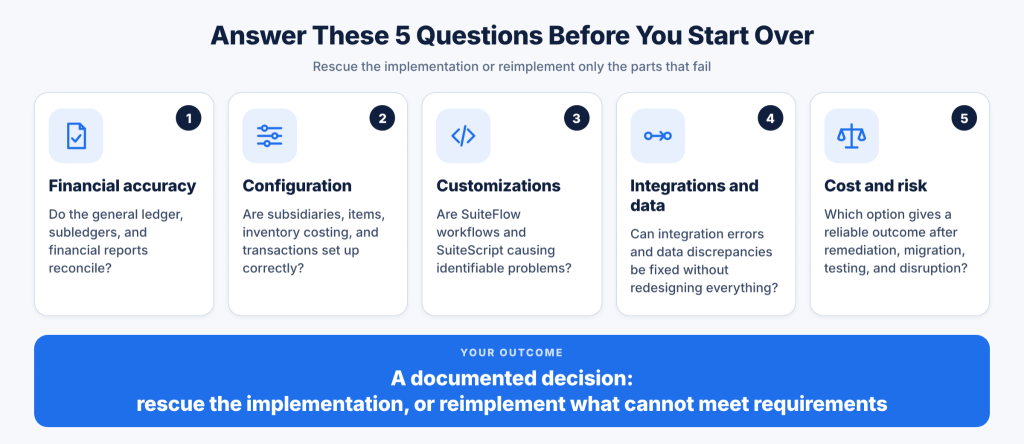
1. Review Financial Configuration and Transaction Integrity
Start with the general ledger and the transactions that feed it, such as examining the chart of accounts, accounting periods, subsidiary configuration, tax setup, posting behavior, and financial reports. Reconcile key balances and investigate discrepancies between source transactions, subledgers, and the general ledger.
For inventory-based businesses, review item types, units of measure, costing methods, locations, and inventory adjustments. For manufacturers, include bills of materials, routings, work orders, material consumption, and production costing. The goal is to establish whether discrepancies originate in configuration, transaction entry, data migration, or reporting logic.
2. Review SuiteFlow Workflows, SuiteScript, and Custom Records
Create an inventory of the custom components supporting critical business processes. This should include SuiteFlow workflows, SuiteScript, custom records, custom fields, saved searches, and other relevant customizations.
For each component, document its business purpose, dependencies, execution conditions, and known issues. Determine whether it supports a genuine business requirement, duplicates native NetSuite functionality, or conflicts with other processes.
Do not remove customization simply because it exists. Some scripts and workflows support requirements that the business relies on. The assessment should identify which components need correction, replacement, consolidation, or removal and validate those decisions against actual business processes.
3. Trace Integrations From the Source System to NetSuite
Review integrations with ecommerce platforms, CRM systems, warehouse management systems, payment providers, and other connected applications. Follow representative transactions from their creation in the source system through transfer to NetSuite and any subsequent processing.
Check field mappings, external IDs, record matching, synchronization schedules, retry behavior, error logs, and duplicate handling. An integration that appears to be running successfully could still omit required fields, create duplicate transactions, or fail to update order statuses.
Testing should confirm that the complete business process works as expected. A successful connection or completed data transfer does not establish that the resulting NetSuite transaction is accurate.
4. Check Roles, Permissions, and Approval Processes
Review roles and permissions alongside approval routing and access to sensitive transactions. Incorrect permissions could prevent employees from completing routine tasks, while excessive access could create internal control and audit concerns.
Test common scenarios using the roles employees actually use. Confirm that authorized users can create and process transactions, approval workflows follow the intended routing, and the appropriate controls remain in place.
5. Compare the Total Cost of Both Options
Prepare separate cost estimates for rescue and reimplementation using the findings from the assessment.
A rescue estimate should include diagnosis, configuration corrections, SuiteScript or SuiteFlow changes, integration fixes, data cleanup, regression testing, and deployment. A reimplementation estimate should include discovery, process redesign, configuration, data migration, integration work, testing, training, cutover, and post-go-live stabilization.
Include internal staff time, partner fees, manual workarounds, business disruption, and the cost of continued errors. A rescue might require less initial work but become expensive if fundamental design problems remain unresolved. Reimplementation could provide a cleaner setup, but migration, validation, and employee training add significant effort.
The money already spent on the original implementation should not dictate the decision. Compare the remaining cost, operational risk, and expected outcome of each option.
What Does a NetSuite Implementation Rescue Plan Look Like?
When the assessment shows that the existing setup can be corrected, organize recovery around business priorities and dependencies. Fixing issues in the order employees report them could leave critical financial or operational risks unresolved while the team spends time on lower-impact defects.
Stage 1: Stabilize Critical Business Processes
You must identify the problems affecting financial close, order processing, purchasing, inventory, fulfillment, or compliance. Assign owners, document the immediate business impact, and establish temporary controls where necessary.
For example, if an integration is creating duplicate sales orders, the team needs to prevent further duplicates while investigating the cause. If inventory discrepancies are affecting fulfillment, establish a controlled reconciliation process and restrict unnecessary changes until the affected records have been reviewed.
Stage 2: Identify the Root Causes
The cited critical problems must be traced to their source. For this, you need to review NetSuite configuration, workflows, scripts, integrations, permissions, and data quality. Further, document the affected transactions and dependent processes so that a correction does not resolve one issue while creating another.
Stage 3: Correct the Highest-Priority Issues
Rank fixes by business impact, urgency, dependency, and implementation risk. Address foundational problems before adjusting reports or workflows that depend on them.
Test configuration and code changes in a sandbox before deploying them to production. Record the changes, obtain the required approvals, and establish a rollback approach for changes that could affect critical operations.
Stage 4: Test Complete Business Processes
Validate full transaction cycles rather than checking isolated screens or individual records. For example, test an order from creation through fulfillment, invoicing, payment application, and its impact on the general ledger.
For manufacturing, test material consumption, work order completion, inventory valuation, and the resulting accounting entries. For a multi-subsidiary business, test intercompany transactions and consolidated reporting. Testing should reflect the actual requirements and exceptions employees encounter.
Stage 5: Confirm the System Is Ready for Normal Operations
Reconcile key financial and inventory balances, verify integrations and approval workflows, train affected employees, and document configuration changes. Establish ownership for monitoring recurring issues and tracking defects that remain unresolved.
The recovery timeline should reflect the severity of the problems, the number of affected processes, customization dependencies, data quality, and stakeholder availability. A fixed deadline should not replace a realistic assessment of the work required.
When Should You Choose NetSuite Reimplementation Instead?
Reimplementation deserves serious consideration when the assessment identifies fundamental design problems that cannot be corrected reliably within the existing setup. The decision should be supported by documented business requirements, technical findings, and a comparison of the cost and risk of each option.
Begin with process requirements rather than configuration decisions. Define the required financial structure, subsidiary and intercompany processes, inventory model, reporting, roles and permissions, integrations, and customizations. Each design decision should address a documented business need and have an agreed acceptance criterion.
Data migration needs a separate plan. Identify the customers, vendors, items, open transactions, balances, and historical records the business must retain. Establish cleansing and transformation rules, map the source records to the target configuration, and reconcile migrated balances.
Open transactions require particular care because incorrect statuses or incomplete migration could disrupt accounts payable, accounts receivable, fulfillment, and financial reporting.
Testing should cover configuration, integrations, security, reports, and complete business scenarios. User acceptance testing should involve employees who perform the relevant tasks and confirm that the redesigned processes meet operational requirements.
Cutover planning should specify responsibilities, timing, reconciliation checks, rollback considerations, and how the business will handle transactions during the transition.
A new configuration does not guarantee a successful outcome. If the original implementation failed because requirements were unclear, ownership was weak, or testing was insufficient, those problems need to be addressed before the next implementation begins.
Common Mistakes When Choosing Between Rescue and Reimplementation
Most decision-makers make the wrong decision between choosing NetSuite rescue vs reimplementation by making mistakes like rebuilding implementation without identifying the cause properly, adding workarounds without making the system correct, removing customizations, and migrating data incorrectly.
1. Rebuilding Before Identifying the Cause
A fresh implementation does not automatically resolve unclear requirements, inadequate testing, or unclear process ownership. Diagnose why the existing implementation failed before deciding which configuration, processes, and data need to change.
2. Continuing to Add Workarounds to a Fundamental Design Problem
Repeated scripts, custom reports, and manual workarounds can hide defects without making the system reliable. If the same underlying problem keeps returning across dependent processes, reassess the original configuration rather than approving another isolated fix.
3. Removing Customizations Without Checking Their Purpose
Some customizations support legitimate business requirements that native NetSuite functionality does not fully address. Review their purpose, dependencies, and maintenance requirements before removing or replacing them.
4. Migrating Data Without Reconciliation
A completed import does not prove that financial balances, record relationships, and transaction statuses are correct. Validate migrated data against agreed control totals and business scenarios before relying on the new setup.
5. Choosing the Lowest Initial Estimate
Compare the total cost of each approach, including internal effort, testing, migration, disruption, continued errors, and post-deployment support. The lowest initial estimate does not necessarily represent the lowest overall cost or risk.
6. Repeating the Same Implementation Process
If reimplementation is necessary, address the project management, requirements, ownership, and testing problems that contributed to the first failure. Otherwise, the business risks repeating the same mistakes in a newly configured account.
Need Help Recovering a Troubled NetSuite Implementation?
If NetSuite is disrupting your financial closing, inventory accuracy, order processing, or other critical operations, start by establishing what is causing the problems and whether the existing configuration can support the business after the necessary corrections.
Folio3’s NetSuite Rescue services help businesses assess implementation problems and determine a recovery approach based on their configuration, customizations, integrations, data, and operational requirements.
You can also get in touch with Anas Merchant FCCA, Principal Consultant at Folio3 Software, to help you answer queries about your NetSuite implementation.
Frequently Asked Questions
Our NetSuite implementation is messy but still working. Should we rescue it or reimplement it?
Start with a rescue if the core structure is usable and the problems are limited to configuration, workflows, scripts, integrations, data cleanup, or training. Choose reimplementation only when the foundation is wrong, such as a bad chart of accounts, subsidiary setup, item structure, or business process design. Community advice is to first complete a full evaluation, identify what works and what does not, and repair the existing setup when possible because a full rebuild is expensive and disruptive.
We have too many customizations and nobody understands the original setup. Is reimplementation the only option?
Not always. First document every active customization, test whether it is still needed, and disable or replace the ones that no longer support the business. If undoing the old setup would take longer than rebuilding it, or if the system is so heavily customized that any change breaks other processes, then reimplementation may make sense. Before rebuilding, create clear business requirements, remove unnecessary customizations, and design the new setup around standard NetSuite processes wherever possible.
We are planning a reimplementation with a new partner. What should we focus on first?
Focus on business requirements, current-state assessment, process design, data cleanup, and testing before configuration begins. Do not simply copy the old system into a new instance. Clarify what each department needs, document end-to-end processes, decide which customizations are truly required, and clean customer, vendor, item, opening balance, and historical transaction data before migration.
Also keep the first phase small. Bring finance and core operations online first, run a controlled parallel period where practical, and test both the happy path and failure cases before go-live. Community recommendations consistently stress clear requirements, a dedicated internal NetSuite expert, smaller initial scope, and thorough testing.

