
Key Takeaways
- NetSuite’s AI transformation builds on years of improvements to its APIs, data accessibility, and application extensibility rather than replacing the existing ERP platform.
- Announced in October 2025 and rolling out since July 15, 2026, NetSuite Next brings Ask Oracle and a redesigned experience to eligible accounts while retaining their existing ERP records and configuration.
- More than 45 SuiteSkills, AI Workspaces, and industry SuiteAgents form part of the 2026 announcements, but availability varies by capability, account, and region; SuiteAgent Studio remains a planned development.
- At Folio3, we built Nexus AI agents for inventory planning, expense risk, vendor bill automation, receivables, spend, revenue, profitability, and customer retention analysis.
- Existing customers should evaluate NetSuite Next compatibility and data quality before introducing AI-driven business processes.
With NetSuite Next and its expanding AI capabilities, Oracle NetSuite is moving toward an ERP experience where users ask business questions, investigate underlying records, and initiate authorized actions through conversational interfaces. Instead of depending entirely on navigation and predefined workflows, users work with AI that understands NetSuite’s business data and available functionality.
In an interview with Techzine published November 2, 2026, Brian Chess, Senior Vice President, AI, Product, and Technology, Oracle NetSuite Global Business Unit, described a platform rebuild that began roughly six years earlier. The work made NetSuite’s functionality more programmable and accessible through APIs before generative AI became mainstream. That groundwork helps explain how NetSuite now exposes ERP records and authorized operations through Ask Oracle, its AI Connector Service, and newer business skills and agents.
The developments also create new opportunities for businesses using specialized solutions such as Folio3 Nexus AI, which applies AI to inventory planning, expense monitoring, vendor bill processing, and financial analysis.
But how much of NetSuite’s AI vision is available today, and what should existing customers actually do with it?
How Did Oracle NetSuite Prepare Its ERP Platform for AI?
NetSuite became AI-ready by making its existing business functionality accessible through programmable interfaces and reusable APIs. These changes allow AI systems to work with ERP data and authorized operations without relying exclusively on the application screens designed for human users.
The technical shift becomes clearer when you examine how traditional ERP software operates. A user understands where to find a transaction, which fields need updating, and what action completes the task. Software interfaces were designed around that interaction. An AI assistant, however, needs structured access to the same records and operations without navigating each screen in the same way.
Why NetSuite’s Existing Business Data Matters
NetSuite’s advantage comes from the relationships already established between business records. A sales order connects to a customer, inventory items, fulfillment transactions, and financial activity. A purchase order connects supplier commitments with receiving, inventory valuation, and accounts payable.
These relationships provide the context an AI assistant needs to investigate business questions. NetSuite’s connected records give authorized AI tools access to the underlying business context. That does not guarantee an accurate answer, but it provides a more reliable foundation than asking a general-purpose language model to interpret isolated exports from several applications.
The remaining challenge is controlling which information the AI retrieves and ensuring the analysis reflects the correct accounting and operational definitions.
Why Programmable APIs Are Central to NetSuite’s AI Strategy
The API improvements also explain why NetSuite supports both embedded AI and external AI assistants.
Through defined tools, an authorized AI system retrieves records, examines available fields, executes supported searches, and performs permitted transactions. Developers extend those capabilities for business requirements that standard tools do not cover.
This is particularly important for companies with customized NetSuite accounts. A manufacturer with custom production records or a distributor using specialized order approval rules needs AI tools that understand its configured business environment.
Rather than creating a separate database for AI, NetSuite exposes supported functionality through its existing platform and security controls. That provides the technical basis for the AI Connector Service and NetSuite’s newer agent capabilities.
What Is NetSuite Next, and How Does It Change ERP Operations?
Oracle announced NetSuite Next at SuiteWorld on October 7, 2025. Its rollout began on July 15, 2026, alongside NetSuite release 2026.2, with a Redwood-based interface, Ask Oracle, contextual business information, and additional AI functionality. NetSuite Next is an evolving experience rather than a feature universally enabled by the 2026.2 upgrade.
Oracle identified the United States and Canada as the initial rollout markets, with other countries following in phases. Eligible existing customers retain their business data and configuration; they can evaluate the experience in a preview account and enable NetSuite Next by role instead of carrying out a full ERP reimplementation.
The significance of NetSuite Next lies in the change to how users complete their work.
Ask Oracle Changes How Users Find and Analyze Information
Ask Oracle provides a conversational interface for interacting with NetSuite. Users describe what they want to investigate, and the assistant accesses permitted business information to respond, produce analyses, or navigate to relevant records.
For a finance team, this means asking which customers have overdue balances rather than manually assembling the same information from reports and customer records.
The assistant also supports more detailed investigations. A user reviewing a variance asks for the transactions contributing to the difference, examines the supporting data, and follows links to the relevant records.
Explanations matter here. Ask Oracle includes a Show explanation option that describes how it reached its answer. Finance teams should still validate the reported figures, filters, accounting periods, and transaction definitions rather than assume the explanation provides a complete source-level audit trail.
However, conversational access does not eliminate the need for financial controls. If the underlying records contain incorrect classifications or incomplete transactions, the resulting analysis will reflect those problems.
What Changes with the Redwood Interface?
The Redwood-based experience changes how information is presented and how users navigate NetSuite.
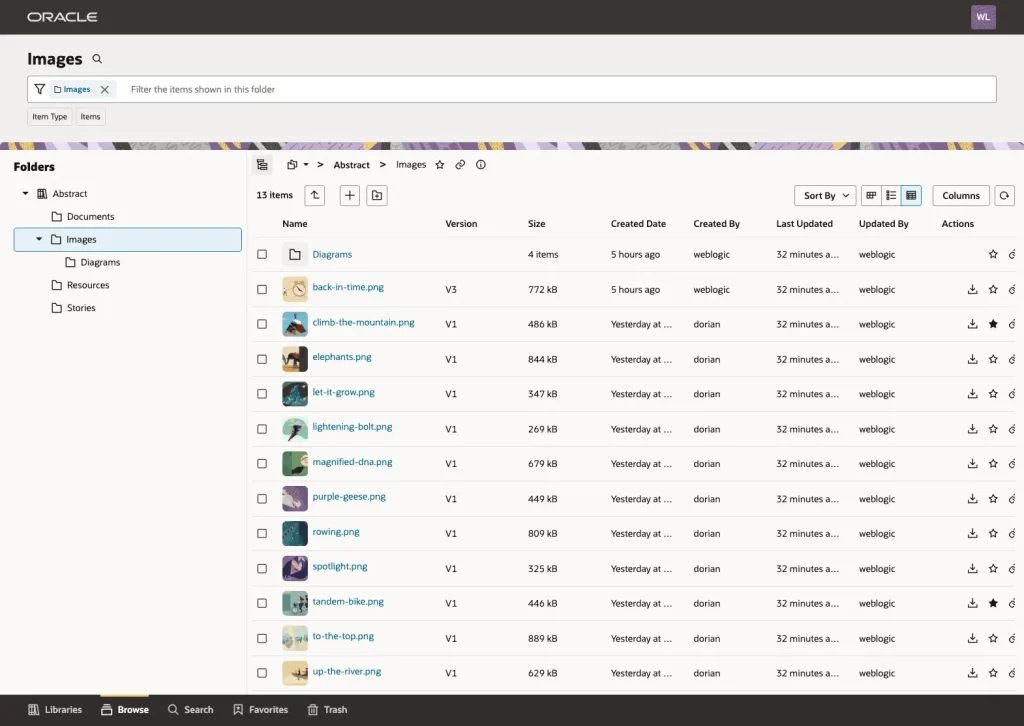
The value is not simply a modernized appearance. When AI assistance is available within the user’s current task, fewer activities depend on switching between records, searches, and reports.
A finance user investigating an exception sees relevant information within the business context instead of treating AI as an unrelated application. This is a meaningful improvement for tasks involving repeated analysis and record navigation.
For NetSuite administrators, the redesigned interface also introduces compatibility considerations. Custom pages, client scripts, and interface-dependent modifications should be reviewed before adoption.
NetSuite Next preserves existing business data, but that does not remove the need to test customizations that depend on specific user-interface behavior.
Which NetSuite AI Updates Were Announced in 2026?
NetSuite’s 2026 announcements extended AI from conversational assistance into reusable business skills, industry-specific agents, and collaborative work environments. The July 15 rollout and October 26 SuiteWorld announcements have different availability timelines. Status below is as of November 25, 2026; check eligibility and enabled features in your own account before planning deployment.
The distinction between available and planned capabilities matters. Businesses should not treat a product announcement as confirmation that every feature is ready for production use.
| AI capability | What it provides | Availability |
|---|---|---|
| Ask Oracle | Conversational access to business data, reports, and supported actions | Available to eligible US and Canada accounts; other regions are being rolled out |
| NetSuite Next | Redwood interface with embedded AI capabilities | Rolling out since July 15, 2026; initial US and Canada availability |
| SuiteSkills | Reusable business expertise for financial and operational tasks | 45+ SuiteSkills announced; use via Ask Oracle and supported external MCP clients where enabled |
| AI Portlets | Conversational analysis and visual information within dashboards | Announced for supported NetSuite Next experiences; verify your account |
| AI Workspaces | Shared environments for business investigations and coordinated activities | Announced; confirm account-level availability before deployment |
| Industry SuiteAgents | Agents focused on specific industry processes | Software, product, and construction available in NetSuite Next; other industries planned |
| SuiteAgent Studio | Tools for creating and managing custom agents | Announced for a future release |
| SuiteFlow Agent | Natural-language assistance for creating business workflows | Planned capability |
SuiteSkills Bring Business Knowledge Into AI Tasks
One limitation of general-purpose AI assistants is that they do not automatically understand how a business defines its financial and operational metrics.
A question about revenue, for instance, requires the correct transaction sources, reporting period, and accounting treatment. Asking an AI assistant to calculate the number without those definitions introduces unnecessary ambiguity.
NetSuite announced more than 45 SuiteSkills at SuiteWorld 2026. They package reusable business instructions and domain expertise for AI-assisted financial and operational tasks. In NetSuite, they operate through Ask Oracle; NetSuite also says SuiteSkills can be used with supported external clients such as Claude and ChatGPT through the AI Connector Service.
Availability depends on the relevant NetSuite and AI-client setup. Do not assume every account has NetSuite Next or that the same skills are enabled in every supported external client.
The benefit is consistency. Finance teams using a defined skill for receivables analysis work from a more structured process than employees creating separate prompts with different assumptions.
That consistency is valuable for recurring investigations, although the results still require appropriate data access and validation.
Industry SuiteAgents Introduce More Specialized Assistance
SuiteAgents focus on business processes associated with particular industries.
Oracle says the initial SuiteAgents for software, product-based businesses, and construction are available in NetSuite Next. Additional industry agents for services, healthcare, and nonprofits remain planned. Availability should be confirmed in the customer’s specific account.
For a product-based company, inventory availability and supply risks affect purchasing and customer commitments. Software businesses face different challenges involving contracts, billing, and revenue-related processes.
Industry-focused agents address these differences rather than providing the same generic functionality to every organization.
However, the availability of an industry agent does not mean it automatically understands every customization in your NetSuite environment. Businesses still need to evaluate whether the supported processes match their actual operations.
What About SuiteAgent Studio and SuiteFlow Agent?
SuiteAgent Studio and SuiteFlow Agent indicate where NetSuite intends to take AI development.
SuiteAgent Studio is designed to support the creation and management of custom AI agents using defined instructions, tools, and execution controls. SuiteFlow Agent is intended to help users create workflows through natural-language instructions.
These announcements are significant for NetSuite administrators and development teams because they extend AI into application configuration.
For now, they belong in future planning rather than an immediate implementation checklist. Their final functionality, release timing, and availability should be verified before organizations make deployment commitments.
How Does the NetSuite AI Connector Service Work with External AI Assistants?
The NetSuite AI Connector Service uses Model Context Protocol (MCP) to connect NetSuite with compatible external AI clients. Claude Pro and ChatGPT are among the supported clients, subject to the client’s version, plan, and MCP connection requirements. This lets an authorized user work with ERP information through defined tools instead of repeatedly exporting records.
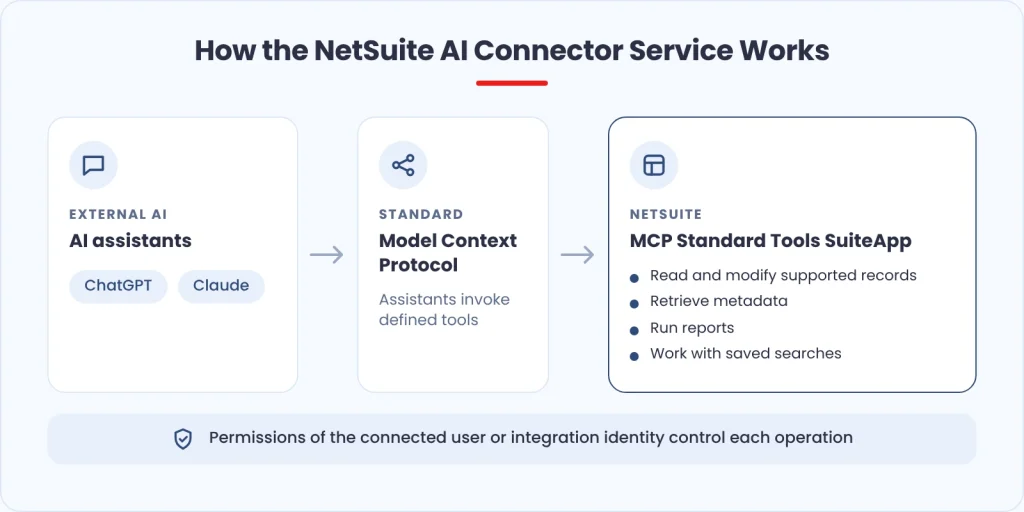
Oracle’s MCP Standard Tools SuiteApp supports permitted record operations, reports, saved searches, and read-only SuiteQL queries. Its published standard-tools overview does not identify a separate metadata tool. The tools enforce the same access rules as the NetSuite UI, granting no more data or actions than the connected user’s NetSuite role permits.
This changes what external assistants are used for.
A procurement manager using a supported Claude connection might investigate supplier-related NetSuite data without exporting a spreadsheet each time. The actual records and operations available to the AI client are restricted by that employee’s selected NetSuite role and the installed MCP tools.
The same connection approach supports custom operations. If your company requires an assistant to prepare a sales order from incoming customer information, developers define the custom tools and transaction validation rules.
This is where implementation complexity increases. Reading a saved search is a different task from creating a financial transaction. The latter requires checks for record accuracy, duplicate processing, appropriate permissions, and exception handling.
The NetSuite AI Connector Service becomes particularly useful when your team wants to retain an existing AI assistant or connect NetSuite to business processes that extend outside the ERP.
NetSuite also introduced the AI Connector Service Companion in March 2026, adding reusable prompts, NetSuite-oriented skills, and role-specific guidance. These resources help teams standardize how external AI systems work with ERP information.
The decision between Ask Oracle and an external AI assistant should therefore begin with the work being performed. Ask Oracle is integrated into the NetSuite experience, while MCP connections are relevant when employees already work in external AI platforms or need cross-application functionality.
Where Do Specialized NetSuite AI Agents Fit Into Business Operations?
NetSuite’s native AI capabilities provide conversational analysis and supported task execution. Specialized agents address processes where businesses need additional decision logic, operational monitoring, or transaction-specific automation.
This distinction becomes important once you move from asking questions about ERP data to improving how recurring work is performed.
Inventory Planning That Responds to Changing Demand
Inventory planners spend considerable time reviewing reorder points and safety stock levels, especially when supplier lead times or product demand change.
NetSuite provides inventory planning functionality, but the quality of its replenishment recommendations depends on the parameters maintained in the system.
We built NetSuite Demand-Sense at Folio3 to examine sales velocity, supplier lead times, and supply patterns in NetSuite, then identify when existing inventory parameters no longer reflect demand.
NetSuite Demand-Sense automatically recalculates and updates configured safety stock and reorder point parameters, flags at-risk SKUs, and identifies excess inventory. Businesses should define oversight and approval controls that match the operational consequences of changing those parameters.
For distributors managing hundreds or thousands of products, the value comes from concentrating attention on inventory parameters that require adjustment. Instead of reviewing every item using the same schedule, planners investigate changes supported by current transaction data.
Because replenishment affects purchasing and customer commitments, your rollout should validate calculation thresholds, lead times, exception reporting, and how planners monitor or override changes. These are implementation safeguards, not proof that every account automatically uses a human approval step.
Identifying Expense Risks Before Approval
Traditional expense approval rules work well for predictable conditions, such as maximum reimbursement amounts or department-specific spending limits.
They are less effective when a transaction looks acceptable individually but becomes suspicious in context.
An employee might submit several expenses to the same vendor within a short period, or file a business meal claim during approved leave. Neither situation is necessarily fraudulent, but both warrant review.
NetSuite Anomaly-Guard examines expense report details alongside relevant employee information, timing, and transaction history. It assigns a risk score from 1 to 10; a score of 8 or higher triggers a mandatory justification prompt before submission, while the existing expense approval chain continues to govern authorization.
This complements NetSuite’s existing approval functionality rather than replacing the approval chain.
The distinction matters for finance leaders. Automated risk identification improves the information available to approvers, while the configured approval process remains responsible for authorization.
Reducing Manual Vendor Bill Processing
Accounts payable teams encounter another problem when suppliers send several invoices inside a single PDF.
Each bill needs to be identified, extracted, associated with the correct supplier, and entered using the appropriate NetSuite transaction fields. Manual processing becomes expensive when invoice volumes grow or documents contain inconsistent layouts.
Our Vendor Bill Automation solution uses AI-powered extraction to separate individual vendor bills in consolidated PDFs and prepare structured fields for NetSuite processing. Folio3’s services material also refers to its custom application as the Bills Import Engine; the public solution name here is Vendor Bill Automation.
The solution stages extracted details for review before posting, including fields such as vendor, subsidiary, invoice date, and amount.
This is a more specific capability than asking a conversational assistant to summarize an invoice. The process must produce usable transaction records while preserving the checks required by accounts payable.
For organizations processing large invoice batches, that distinction determines whether AI produces an interesting response or reduces actual processing work.
Financial Analytics Linked to NetSuite Records
Finance leaders also need reliable answers to recurring questions about revenue, payables, receivables, and customer performance.
Rather than presenting financial analytics as one unverified bundle product, Folio3 lists separate agents for Receivables Collection, Vendor Spend Analysis, Revenue Analysis, Product Profitability Analysis, and Customer Retention Analysis. Each focuses on a different recurring finance or commercial question using NetSuite information.
An accounts receivable analyst needs to identify overdue customer balances and prioritize collection activity; the Receivables Collection agent addresses that process. The Product Profitability Analysis and Revenue Analysis agents target different questions about margins and sales performance. Any claim about direct links to underlying records should be verified on the individual agent page before publication.
These specialized skills illustrate an important direction for ERP AI: the value comes from repeatable business analysis with defined outputs, not simply the ability to ask questions in natural language.
What Security and Governance Changes Does AI Introduce?
AI agents increase the importance of NetSuite permissions because they introduce another way to access records and perform business operations.
An assistant that retrieves inventory information has a limited operational scope. An agent permitted to update customer records, create vendor bills, or modify financial transactions has significantly greater responsibility.
Oracle states that MCP Standard Tools use the same permissions as the NetSuite UI: they cannot exceed the connected user’s role. An authorized connection requires a role with MCP Server Connection and OAuth 2.0 Access Tokens permissions; REST Web Services permissions are additionally required for applicable standard tools. Oracle recommends a dedicated, narrowly scoped role for finer control.
The Administrator role and other roles with unrestricted access cannot be used for the NetSuite AI Connector Service. Review role permissions and enabled tools before granting record creation or update access. Entitlement sprawl occurs when additional permissions accumulate without periodic access review.
For instance, a sales order assistant that originally retrieved customer and item information might later receive permission to create transactions. If the original access remains unchanged while further tools are added, the effective permission scope becomes difficult to control.
A practical NetSuite AI agent security strategy should identify the agent’s assigned business process, permitted record types, available tools, and authorization requirements.
For transaction-processing agents, testing should also establish how the system handles incorrect inputs, duplicate requests, failed operations, and unauthorized actions.
The objective is to allow AI to perform useful work without bypassing the financial and operational controls already established in NetSuite.
Do Existing NetSuite Customers Need to Reimplement ERP to Use NetSuite Next?
Oracle describes NetSuite Next as an experience built on existing account records and business configuration, without a full ERP reimplementation solely to enable it. Eligibility and the work required to validate a customized account still need to be checked.
Eligible customers can request a dedicated Next Preview copy of their account to test the interface, key roles, and customizations before activation. Oracle also provides role-by-role enablement, allowing finance and operations teams to transition on different schedules. Confirm your preview duration and regional availability with Oracle rather than relying on a universal 30-day promise.
However, the effort required depends on how the account has been configured.
A business using standard financial and inventory functionality has a different testing workload from one running heavily customized transaction forms, SuiteScripts, and third-party applications.
Finance teams should also review the quality of saved searches, financial classifications, and reporting data that AI tools will rely on. Adding conversational access to inaccurate records does not improve the underlying information.
The same readiness review should account for platform deadlines: Oracle says NetSuite 2027.1 will prevent creation of new integrations using token-based authentication for SOAP and REST web services and RESTlets, while SOAP web services are scheduled for removal in 2028.2. Existing integrations should be inventoried and their authentication and API migration requirements planned separately from the NetSuite Next interface rollout.
How Should Businesses Prepare for NetSuite’s AI-Driven Future?
The best starting point is a business process that already produces measurable problems, such as excessive inventory, slow invoice processing, recurring reconciliation work, or delayed access to financial information.
Your organization should avoid treating every announcement as an immediately available implementation requirement. Oracle also introduced SuiteExpress as an AI-assisted ERP implementation toolset and methodology under the Autonomous Suite vision. These announcements do not establish that every AI capability is already enabled in your account.
A sensible adoption process includes:
- Review your existing NetSuite setup. Identify data quality issues, customizations, role permissions, and integrations that affect the selected process.
- Select a measurable use case. Establish the current processing effort or operational problem before introducing AI.
- Evaluate available capabilities. Compare Ask Oracle, SuiteSkills, industry SuiteAgents, external MCP connections, and specialized solutions against the actual requirement.
- Validate the complete process. Test record access, transaction accuracy, error handling, and approvals using representative business scenarios.
- Measure the outcome. Compare processing effort, exception rates, and operational results against the original baseline.
For custom agents, ongoing monitoring is equally important. Changes to data structures, permissions, and integrations affect reliability after deployment. Oracle also documents AI Units and usage monitoring, but published announcements do not substantiate a universal free monthly unit allowance; verify your account’s terms and usage controls before budgeting.
Folio3’s AI Connector Service implementation work address use-case selection, MCP setup, custom tool development, and validation of the processes connected to NetSuite.
If you need to establish which native AI capabilities your NetSuite account supports, identify the required MCP permissions, or define a controlled rollout for custom agents, discuss the scope with our NetSuite AI team.
FAQs
What Is the Difference Between NetSuite Next and Traditional NetSuite?
NetSuite Next is Oracle’s Redwood-based experience with embedded Ask Oracle and additional AI functionality. Announced in October 2025 and rolling out since July 2026, it builds on the existing NetSuite account; eligible customers can preview it and enable access by role rather than carry out a full ERP reimplementation.
Is Ask Oracle the Same as NetSuite AI Agents?
No. Ask Oracle is the conversational interface for investigating information and performing supported tasks. SuiteAgents focus on defined business processes and industry requirements. Ask Oracle provides an entry point for interacting with ERP data, while agents support more specialized activities.
Does NetSuite Support ChatGPT and Claude?
Yes. The MCP Standard Tools SuiteApp offers permitted record operations, reports, saved searches, and SuiteQL queries. All actions remain constrained by the connected NetSuite user’s role.
How Are Folio3 Nexus AI Agents Different from Native NetSuite AI?
We built Nexus AI at Folio3 to address defined NetSuite processes: Demand-Sense adjusts inventory parameters; Anomaly-Guard evaluates expense reports; Vendor Bill Automation stages extracted bills for review; and separate financial agents analyze receivables, vendor spend, revenue, product profitability, and retention. Native NetSuite AI and MCP provide different capabilities. Choose by the actual process, required permissions, and deployment scope.
