A returned product arrives without a readable barcode. The description is incomplete, and the receiving team has only a photograph. Could a simple photo lookup help them find the right NetSuite item without searching through the whole catalog?
The difficulty is similar packaging. Two stock keeping units (SKUs) may look almost identical, and the same product may look different after a packaging change. I would use a photo to suggest items for someone to check, without changing inventory automatically.
I first worked with Linear Regression Classification (LRC) for a Master’s assignment. Revisiting it made me wonder whether the same idea could help compare product photos in NetSuite. The unexpected result came before I tried any inventory images: in a controlled test, adding more training examples made the original classifier less accurate.
Where photo matching could help in NetSuite
NetSuite already supports warehouse scanning through its Warehouse Management System (WMS), including WMS item scanning. Photo matching makes more sense when normal identification fails: unreadable identifiers, a photographed return, or an item requiring manual identification. It should suggest candidates to a person, not silently edit a receipt or inventory balance.
The first useful version is a short list of possible matches that someone can verify. The example here ranks the items it knows, but it does not yet decide when to say ‘No reliable match.’ That would need to be tested with photos of products missing from the gallery.
How Linear Regression Classification works
Linear Regression Classification (LRC) groups known images by class and checks how well each group can reconstruct a new image. The method was described by Naseem, Togneri, and Bennamoun. Despite its name, it does not predict a numerical value such as price or demand. Each reference photograph is converted into numbers, and the query is reconstructed separately from each class’s examples.
Imagine a gallery with three products, each photographed from several angles. LRC tries to reconstruct the incoming photo using product A’s examples, then B’s, then C’s. The smallest difference gives us the first candidate.
The two equations describe this process. The first reconstructs the photo using examples from one product class; the second selects the class with the smallest reconstruction error.
Here, Xc⁺ is the pseudoinverse, a mathematical tool for finding the best fit. A smaller reconstruction error means a closer match to that class, not a 90% or 99% probability that the answer is correct.
The original paper also explored dividing an image into smaller sections when parts are hidden. This article focuses on basic LRC.
One detail is easy to get wrong: LRC must attempt a new reconstruction for each incoming photograph against every candidate class. Comparing a new photo with one stored example per class is a different, simpler matching approach.
Reconstructing an image with NumPy
import numpy as np

def class_residuals(train_vectors, queries, rank=None):
    # Rows are examples; columns are image features.
    U, singular_values, _ = np.linalg.svd(
        train_vectors.T, full_matrices=False
    )
    tol = singular_values[0] * max(train_vectors.shape) * np.finfo(float).eps
    effective_rank = int((singular_values > tol).sum())
    k = effective_rank if rank is None else min(rank, effective_rank)
    basis = U[:, :k]
    residual = queries - (queries @ basis) @ basis.T
    return np.square(residual).sum(axis=1)
For the digit benchmark below, I repeated this calculation for every class and compared the reconstruction errors for each test image.
The code calculates the difference between the original image and its reconstruction directly. That avoids a numerical problem caused by subtracting two very similar large numbers.
What happened when I added more training images
To check how LRC behaves before trying real product photos, I used scikit-learn’s handwritten-digits dataset. It contains 1,797 grayscale images of digits from zero to nine. Each image is only 8 by 8 pixels, so this is a controlled mathematical test, not an inventory experiment.
I repeated the experiment 10 times with different random splits. Each run used separate images for training, tuning, and final testing. At every training size (10, 20, 50, or 100 images per digit), the model used 250 images to choose its settings and 500 different images to measure accuracy. The final test images were never used to select the model’s rank.
A training image teaches the model a pattern. A validation image helps choose a setting. A test image is kept aside until the end to check how that choice performs on unfamiliar examples. Keeping these groups separate prevents the reported accuracy from benefiting from answers the model has already seen. In the table, unrestricted LRC uses every independent pattern available in the training images, while rank-limited LRC keeps only a selected number of them.
| Training images per digit | Unrestricted LRC | Rank-limited LRC | Closest image (raw pixels) |
|---|---|---|---|
| 10 | 93.30% | 93.52% | 91.56% |
| 20 | 95.06% | 95.62% | 94.68% |
| 50 | 39.56% | 98.08% | 97.74% |
| 100 | 52.00% | 98.50% | 98.70% |
Table 1. Average accuracy across 10 runs on handwritten digits. The rank limit was selected using separate validation images. These are not inventory-photo results.
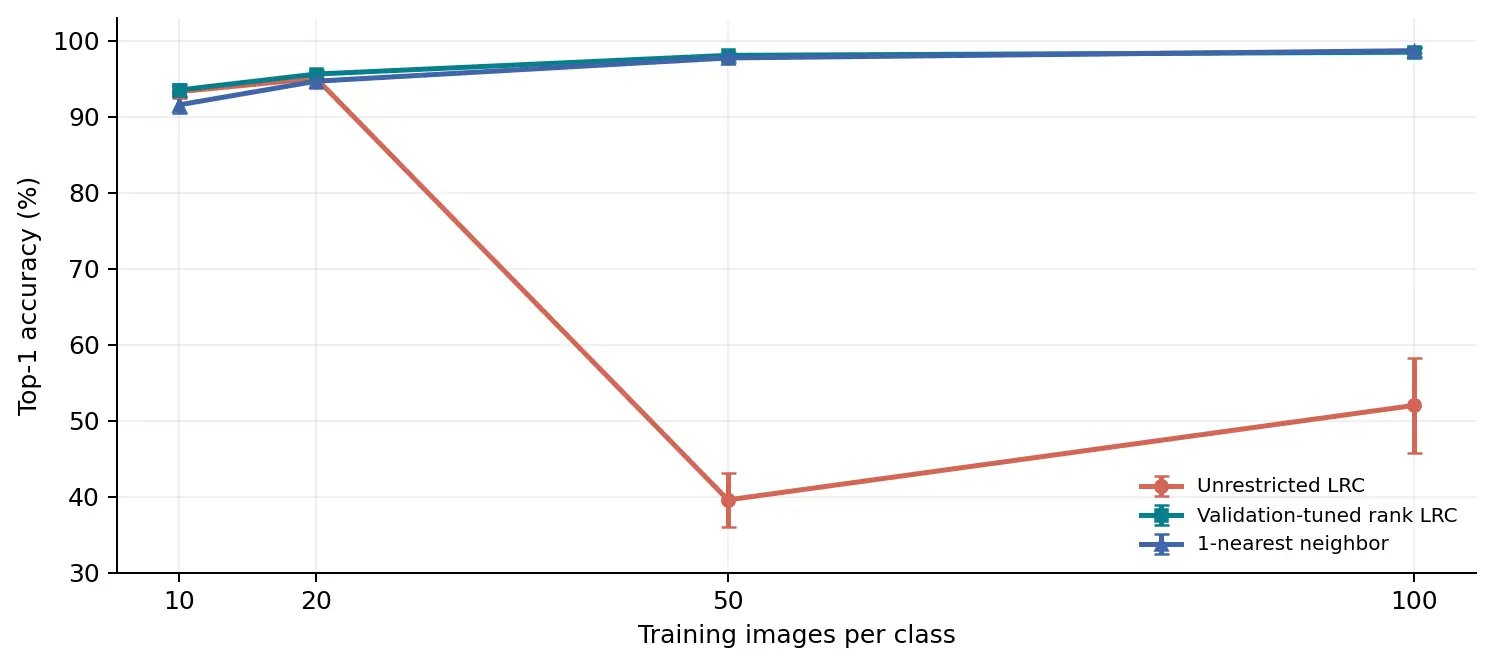
Figure 1. Accuracy on handwritten digits; error bars show variation across repeated runs.
The biggest change came between 20 and 50 training images per digit. With 20, LRC using all available patterns averaged 95.06% accuracy. With 50, that dropped to 39.56%. Keeping only a selected number of patterns raised it to 98.08%. Comparing each test digit directly with the single closest stored digit reached 97.74%.
This drop occurred with this dataset and these settings. It does not establish a general rule that adding training images makes classifiers worse.
Why did accuracy fall?
Each handwritten digit contains 64 pixel values. As we add photographs to a class, the mathematical space formed by those images can become broad enough to recreate images from other classes too. If several classes can recreate the same query almost equally well, the smallest-error decision becomes unreliable.
Limiting the rank reduces how many independent patterns each class can use for reconstruction. I chose the limit with the validation images, keeping the final test images separate.
At 100 training examples per digit, comparing the query directly with stored digit images reached 98.70%, slightly ahead of rank-limited LRC at 98.50%. That’s a good reason to test the simpler approach before choosing a more complicated classifier.
Can the same method identify product photos?
The digit results cannot tell us how accurately either approach would identify NetSuite items. Product photos introduce glare, shelves in the background, shadows, camera angles, and similar packaging, none of which resemble the controlled digit images.
Two public datasets can support the next stage, but they answer different questions. The Grocery Store Dataset contains 5,125 natural smartphone images in 81 fine-grained product varieties, with published train/validation/test manifests. It is suitable for a category or variety-classification benchmark; its labels are not confirmed NetSuite SKU identifiers. Amazon Berkeley Objects (ABO) includes catalog and multi-view product imagery, making its multi-view subset a more natural candidate for exact-object matching.
These datasets are useful for testing image methods, but their labels are not NetSuite item IDs. An inventory benchmark needs photographs tied to the actual IDs in the target catalog.
For a fair product test, each image must have a verified item label. The reference gallery and the query photos must use different photographs. We would also need some query items that do not appear in the gallery, to test whether the system can say ‘no reliable match.’ Using different crops of the same photo for training and testing would make the numbers look better than they really are.
The comparisons worth running on product photos
| Approach | What we would learn |
|---|---|
| Closest image using raw pixels | Simple reference point: does a more complicated method improve the result? |
| Closest image using HOG edges | Compares edges and outlines instead of matching individual pixels. |
| LRC (unrestricted and rank-tuned) | Tests the older reconstruction approach and its behavior as the gallery grows. |
| Pretrained image embeddings + cosine similarity | A modern approach for ranking visually similar photos. |
Contrastive Language–Image Pre-training (CLIP) is a modern model that represents photographs as numbers for similarity searches. Comparing it on the same item photos would be useful future work; the experiment here focuses on LRC and simpler matching methods.
On actual product photos, I would check how often the right item appears first or among the top three suggestions. I would also count wrong suggestions for products missing from the gallery, compare response times, and note which similar packages cause mistakes. I would choose the settings using validation photos and keep separate photos for the final test.
The digit results alone do not tell us which method will work best for inventory photos. In the NetSuite example, I use HOG to summarize image edges, then find the stored photo with the closest HOG features. The earlier LRC experiment is why I would compare different methods against a simple baseline on the same product photos.
Try a local item photo lookup without NetSuite
You can try the example without a NetSuite account. Create a folder called gallery with one subfolder per item and at least three different photos of that item. For example: gallery/1234/front.jpg, gallery/1234/side.jpg, and gallery/1234/back.jpg. Save the photo you want to search for outside the gallery. The number 1234 stands in for an item ID; this script does not connect to NetSuite or modify any records.
Save the example as article_lookup.py. It prints two ranked lists of suggested items. LRC measures how well each item’s reference photos can reconstruct the query photo. The other method uses Histogram of Oriented Gradients (HOG) to describe edges, then finds the stored photo with the closest features. Neither method knows on its own when to return ‘no reliable match’.
For HOG, picture the outline of a cereal box or the edges of a printed label. The method summarizes those edge directions instead of comparing every pixel directly. In this small example, it gives us a useful alternative to LRC, not a guarantee that the first result is right.
from pathlib import Path
import sys
import numpy as np
from PIL import Image, ImageOps
from skimage.feature import hog


def image_features(path):
    with Image.open(path) as file:
        gray = ImageOps.fit(
            ImageOps.exif_transpose(file).convert('L'), (32, 32))
        pixels = np.asarray(gray, dtype=float) / 255.0
    shape = hog(pixels, orientations=9,
                pixels_per_cell=(8, 8), cells_per_block=(2, 2))
    return pixels.ravel(), shape


def find_candidates(gallery, query):
    query_pixels, query_hog = image_features(query)
    results = []
    for item in sorted(Path(gallery).iterdir()):
        if not item.is_dir():
            continue
        photos = [p for p in item.iterdir()
                  if p.suffix.lower() in {'.jpg', '.jpeg', '.png'}]
        if len(photos) < 3:
            continue
        examples = [image_features(p) for p in photos]
        matrix = np.column_stack([x[0] for x in examples])
        U, singular, _ = np.linalg.svd(matrix, full_matrices=False)
        tol = singular[0] * max(matrix.shape) * np.finfo(float).eps
        rank = min(8, int((singular > tol).sum()))
        basis = U[:, :rank]
        error = query_pixels - basis @ (basis.T @ query_pixels)
        lrc_score = float(error @ error)
        hog_score = min(float(np.linalg.norm(query_hog - x[1]))
                        for x in examples)
        results.append((item.name, lrc_score, hog_score))
    if not results:
        raise ValueError('Add at least 3 images per item folder')
    return results


if __name__ == '__main__':
    scores = find_candidates(sys.argv[1], sys.argv[2])
    for label, col in [('LRC', 1), ('HOG nearest neighbor', 2)]:
        print(label, '(lower score is better):')
        for item, lrc, hog_score in sorted(
                scores, key=lambda result: result[col])[:3]:
            print(item, round((lrc, hog_score)[col - 1], 5))
    print('Suggestions only: confirm the item in NetSuite.')
The code needs NumPy, Pillow, and scikit-image. It allows at most eight patterns per class. With just three reference photos, that limit does not change the reconstruction; it becomes relevant only when a class has more independent examples. For a real experiment, choose the rank using separate validation photos.
python -m pip install numpy pillow scikit-image
python article_lookup.py ./gallery ./query.jpg
I ran the script against a tiny folder of generated test images and kept one image out of the reference gallery. Both methods placed its matching group first. This was a smoke test: it shows that the image files can be read and the suggestions can be sorted. It does not measure product recognition. To get meaningful accuracy figures, repeat the experiment with labeled product photos that were not used to build the gallery.
Here is how to read those measurements. Imagine 100 new item photographs whose correct IDs are known. If the correct item comes first for 70 photos, top-1 accuracy is 70%. If it appears anywhere in the first three for 90 photos, top-3 accuracy is 90%. These numbers explain the calculation; they are not results from our item-photo example.
Connecting the photo lookup to NetSuite
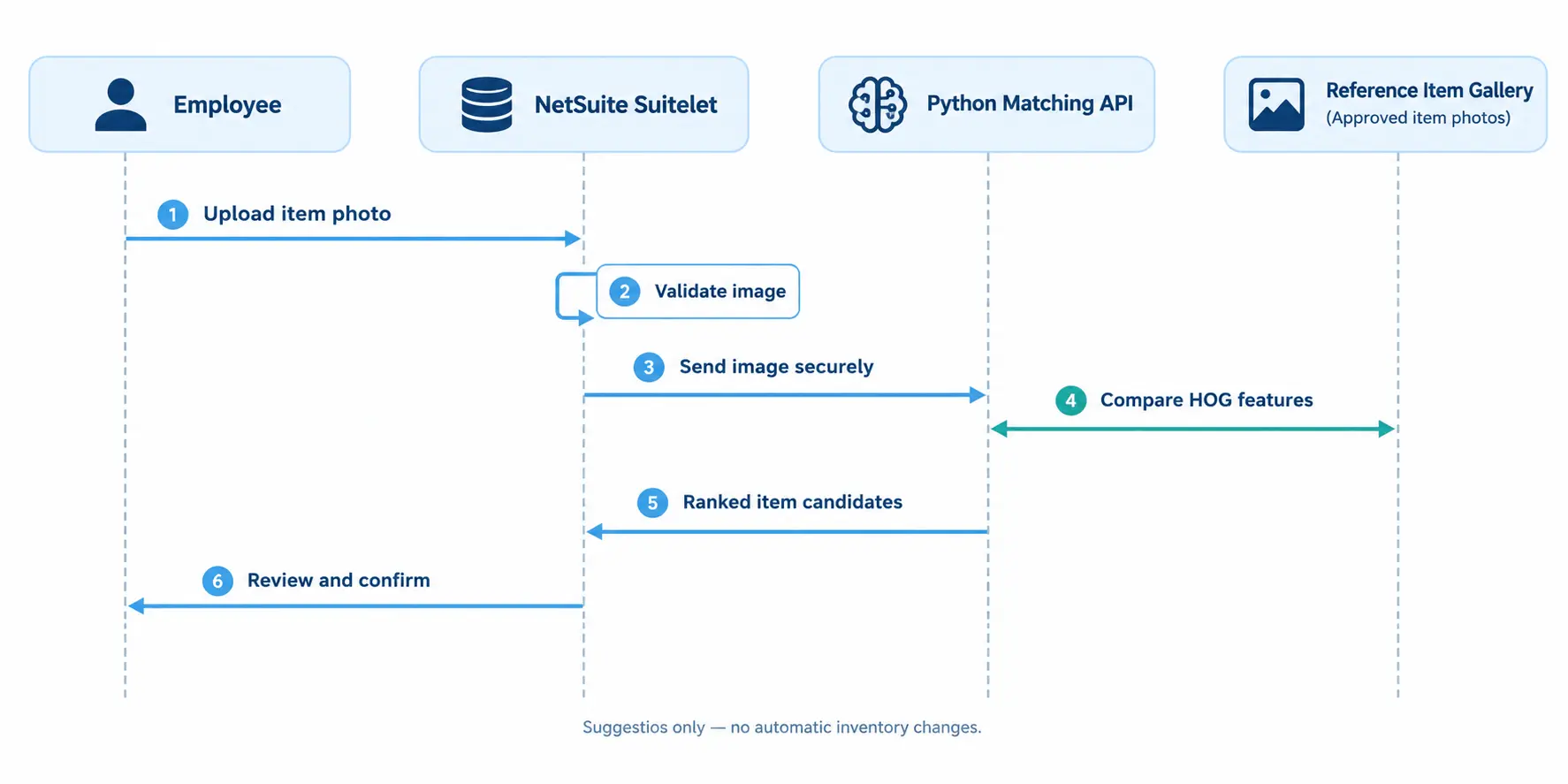
Figure 2. Proposed item photo matching sequence. A Suitelet validates the upload and calls the Python service, which compares the photo against an approved gallery and returns candidates for an employee to review.
NetSuite holds the item records; the Python service keeps a separate gallery of approved reference photographs. A Suitelet presents suggestions to the receiving team. The matching method can then be changed without rebuilding the Suitelet screen.
1. Establish an approved item-image gallery
Oracle documents Commerce item-image association through the File Cabinet. In an account with SuiteCommerce, the Item Search API can also be used to audit item-image URLs; I covered one implementation in an earlier NetSuite Tips and Tricks article. Neither source guarantees that every inventory item has a usable photograph, and Commerce image associations should not be assumed to exist in non-Commerce accounts.
Each approved photograph needs a real NetSuite item ID and a readable name. The Python service below reads these mappings from gallery.csv, with item_id, display_name, and image_path columns. Paths are relative to that CSV file. Unlike the earlier folder-based LRC example, the HOG service can start with one approved photograph per item. It does not download images from NetSuite. For a real account, filter out inactive or unauthorized items and define who can use and retain the photographs.
item_id,display_name,image_path
ITEM-1001,Example carton,photos/item-1001-front.jpg
ITEM-1001,Example carton,photos/item-1001-side.jpg
ITEM-1002,Other carton,photos/item-1002-front.jpg
ITEM-1003,Blue carton,photos/item-1003-front.jpg
Create gallery.csv and place approved photographs at the paths shown above. Replace the sample IDs with item IDs from your NetSuite account. Keep article_lookup.py, gallery.csv, and match_service.py (shown next) in the same folder.
2. Run a small Python matching API
Save this as match_service.py. At startup, the service loads the CSV gallery. For each submitted image, it checks the file, compares its edges with the reference photographs, and returns up to three candidates. Hosting the service for a real account also requires access controls, request limits, and rules for handling uploaded images.
"""Minimal read-only item matcher used in the article; Python 3.10+."""
import base64
import csv
import hmac
import io
import os
from pathlib import Path
from typing import Literal

import numpy as np
from fastapi import FastAPI, Header, HTTPException
from pydantic import BaseModel, Field
from PIL import Image, ImageOps
from skimage.feature import hog
from article_lookup import image_features

app = FastAPI()
API_KEY = os.environ['VISUAL_MATCHING_API_KEY']
manifest = Path(os.environ['VISUAL_MATCHING_GALLERY_CSV']).resolve()
gallery = []
with manifest.open(newline='', encoding='utf-8-sig') as file:
    for row in csv.DictReader(file):
        path = (manifest.parent / row['image_path']).resolve()
        if not path.is_relative_to(manifest.parent):
            raise ValueError('Image path must remain under the gallery folder')
        gallery.append((row['item_id'], row['display_name'],
                        image_features(path)[1]))
if not gallery:
    raise ValueError('Add approved reference images to gallery.csv')


class MatchRequest(BaseModel):
    filename: str
    content_type: Literal['image/png', 'image/jpeg']
    image_base64: str = Field(max_length=8 * 1024 * 1024)


@app.post('/v1/match')
def match(body: MatchRequest, authorization: str | None = Header(None)):
    if not hmac.compare_digest(authorization or '', 'Bearer ' + API_KEY):
        raise HTTPException(status_code=401, detail='Unauthorized')
    try:
        raw = base64.b64decode(body.image_base64, validate=True)
        if not raw or len(raw) > 6 * 1024 * 1024:
            raise ValueError('Invalid size')
        mime = ('image/png' if raw.startswith(b'\x89PNG\r\n\x1a\n') else
                'image/jpeg' if raw.startswith(b'\xff\xd8\xff') else None)
        if mime != body.content_type:
            raise ValueError('File type does not match contents')
        with Image.open(io.BytesIO(raw)) as file:
            if file.width * file.height > 14_000_000:
                raise ValueError('Too many image pixels')
            pixels = np.asarray(ImageOps.fit(
                ImageOps.exif_transpose(file).convert('L'), (32, 32)),
                dtype=float) / 255.0
        query = hog(pixels, orientations=9, pixels_per_cell=(8, 8),
                    cells_per_block=(2, 2))
    except (ValueError, OSError, base64.binascii.Error):
        raise HTTPException(status_code=400, detail='Invalid image')

    best = {}
    for item_id, name, vector in gallery:
        distance = float(np.linalg.norm(query - vector))
        if item_id not in best or distance < best[item_id][1]:
            best[item_id] = (name, distance)
    ranked = sorted(best.items(), key=lambda entry: entry[1][1])[:3]
    return {
        'candidates': [
            {'item_id': item_id, 'display_name': name,
             'distance': round(distance, 5)}
            for item_id, (name, distance) in ranked
        ],
        'model_version': 'hog-nearest-demo-1',
        'status': 'human_review_required'
    }
From that folder, install the dependencies and start the local API with these commands. The example uses a test key and 127.0.0.1 for local testing only. A Suitelet running in NetSuite cannot reach your laptop; using the Suitelet requires deploying the same service behind an approved HTTPS endpoint. On Windows PowerShell, use $env:VISUAL_MATCHING_GALLERY_CSV and $env:VISUAL_MATCHING_API_KEY instead of export.
python -m pip install numpy pillow scikit-image fastapi uvicorn
export VISUAL_MATCHING_GALLERY_CSV="$(pwd)/gallery.csv"
export VISUAL_MATCHING_API_KEY="replace-with-a-test-key"
python -m uvicorn match_service:app --host 127.0.0.1 --port 8000
3. Upload a photograph using a Suitelet
A Suitelet can add a FILE field to its main form, and the POST handler can read the uploaded file from request.files. Oracle also documents the 10 MB in-memory File.getContents() limit. This example limits uploaded images to 6 MiB before reading them, because Base64 adds roughly one-third to the payload sent to the Python service. Native FILE fields appear on the Suitelet main tab and cannot be placed in field groups, tabs, subtabs, or sublists.
The real boundary is not the file extension. The external service checks binary file signatures, image decoding, pixel count, and MIME consistency. A production service should also use request-size limits at the reverse proxy, strict authentication, rate limits, and image retention controls. The code below uses the native NetSuite FILE field, not an INLINEHTML file input or a browser-side Base64 conversion.
4. Send the image to the matching service securely
The browser upload needs no Base64 conversion. NetSuite receives the FILE field as a file.File object with a size property, so the Suitelet checks its type and size before calling getContents(). For a binary image, that method returns Base64 text. We send it in JSON because the Python API in the preceding example accepts JSON, not because HOG requires Base64. The Python service decodes it to image bytes. Base64 is not encryption and the Suitelet does not encode the image a second time.
/**
 * @NApiVersion 2.1
 * @NScriptType Suitelet
 * Read-only example: uploaded image -> external candidate ranking -> human review.
 * Requires a configured API Secret and a fixed HTTPS deployment parameter.
 */
define(['N/ui/serverWidget', 'N/https', 'N/runtime'],
    (ui, https, runtime) => {
    const FILE_FIELD = 'custpage_image';
    function onRequest(context) {
        const form = ui.createForm({title: 'Inventory Image Matching'});
        const upload = form.addField({
            id: FILE_FIELD, type: ui.FieldType.FILE, label: 'Item photograph'
        });
        upload.isMandatory = true;
        form.addSubmitButton({label: 'Find candidate items'});
        if (context.request.method !== 'POST') {
            context.response.writePage(form);
            return;
        }
        try {
            const image = context.request.files && context.request.files[FILE_FIELD];
            if (!image) throw new Error('Image required');
            const mime = image.fileType === 'PNGIMAGE' ? 'image/png'
                       : image.fileType === 'JPGIMAGE' ? 'image/jpeg' : null;
            if (!mime || image.size <= 0 || image.size > 6 * 1024 * 1024)
                throw new Error('Invalid type or size');
            const encoded = image.getContents(); // Base64 for binary files; no extra encoding.
            if (!encoded) throw new Error('Empty image content');
            const endpoint = runtime.getCurrentScript().getParameter({
                name: 'custscript_visual_matching_url'
            });
            if (!endpoint || !/^https:\/\//i.test(endpoint))
                throw new Error('HTTPS endpoint not configured');
            const auth = https.createSecureString({input: 'Bearer '});
            auth.appendSecureString({
                secureString: https.createSecureString({
                    input: '{custsecret_visual_matching_key}'
                }),
                keepEncoding: true
            });
            const res = https.post({
                url: endpoint,
                headers: {'Content-Type': 'application/json', Authorization: auth},
                body: JSON.stringify({
                    filename: image.name, content_type: mime, image_base64: encoded
                })
            });
            if (res.code !== 200) throw new Error('Matcher HTTP ' + res.code);
            const payload = JSON.parse(res.body);
            const candidates = Array.isArray(payload.candidates)
                ? payload.candidates.slice(0, 3) : [];
            const field = form.addField({
                id: 'custpage_results', type: ui.FieldType.LONGTEXT,
                label: 'Candidate items (manual review required)'
            });
            field.defaultValue = candidates.map(c =>
                String(c.item_id || '') + ' - ' + String(c.display_name || '')
            ).join('\n') || 'No candidates. Use normal item search.';
            field.updateDisplayType({displayType: ui.FieldDisplayType.INLINE});
        } catch (e) {
            log.error('Item image matching failed', {name: e.name, message: e.message});
            const field = form.addField({
                id: 'custpage_error', type: ui.FieldType.TEXTAREA, label: 'Message'
            });
            field.defaultValue = 'Matching unavailable. Use normal item search.';
            field.updateDisplayType({displayType: ui.FieldDisplayType.INLINE});
        }
        context.response.writePage(form);
    }
    return {onRequest};
});
The Suitelet is read-only. It displays the image picker, sends the uploaded image to the Python service, and shows the returned item IDs and names. HOG handles this API’s ranking; LRC was explored in the experiments above.
Why an API Secret? The external Python service accepts requests only when they contain the correct API key. When connecting NetSuite, store that key under Setup > Company > Preferences > API Secrets with the script ID custsecret_visual_matching_key, and restrict it to this Suitelet. The same key must be set as VISUAL_MATCHING_API_KEY on the Python service. Configure the Suitelet script parameter custscript_visual_matching_url with the full approved HTTPS URL ending in /v1/match. This credential protects the hosted matching endpoint; it has nothing to do with uploading the image into NetSuite. For local Python tests, use the test key in your environment variable and do not configure a NetSuite secret. See Oracle’s Creating Secrets guide.
Oracle documents JSON payload support for https.post(options) and states that multipart/form-data file sending is not supported directly. Here, the image is sent as Base64 text inside a JSON request. API Secrets and SecureString keep the credential out of plaintext script parameters. Each HTTPS POST consumes 10 governance units before other script work.
For a real deployment, restrict the outbound host rather than relying only on an HTTPS prefix; limit access to the API Secret; enforce request size and timeouts on the Python service; and avoid logging uploaded images or credentials. The service must also check the image bytes themselves, because a filename or MIME label can be incorrect.
5. Show candidates without changing inventory
The service returns up to three item IDs, names, and distances, along with its model version. The Suitelet shows the IDs and names for someone to verify. A smaller distance is not a confidence percentage, and an item absent from the gallery may still receive a suggestion. A tested ‘no reliable match’ rule would be needed before relying on the output.
For example, the sample gallery might rank ITEM-1001 (Example carton), ITEM-1003 (Blue carton), and ITEM-1002 (Other carton) in that order. The ranking is illustrative, not a measured result. A receiving employee would open the NetSuite item records and compare the details before making a selection.
The employee can confirm a candidate or return to normal item search. This example makes no changes to records, receipts, quantities, or transactions. A future write action would need separate permissions and explicit human confirmation.
What about NetSuite’s native vision capability?
NetSuite also has a native vision option. Oracle’s N/llm module supports passing an image to llm.generateText() with the Cohere Command A Vision model. It can describe packaging, text, colors, and visible objects, using AI Units where the model is available. The documented embedding API handles text, so it is not a ready-made way to rank thousands of product photographs by image similarity.
A description of the packaging can help someone search, but finding the exact item ID is a different problem, particularly when two products look almost identical. Oracle also documents that Cohere Vision cannot use tools and toolResults in the same vision call. Native vision may be enough for a small description-based workflow; a separate image matcher only makes sense if tests on the real catalog show it is useful.
If someone only needs help describing a product, native vision may provide useful search terms. If the goal is a ranked list of exact item IDs, test a matcher against labeled photographs from the actual catalog before choosing an approach.
For tests of the native module’s behavior, see our N/llm Under the Microscope article.
What still needs testing
The examples cover a controlled LRC benchmark, a local photo lookup, and a Suitelet that could request suggestions from the Python service. I tested the Python examples locally and checked the Suitelet request and response with mocks. Before relying on it in a receiving process, I would check these things using actual catalog photos:
- How often the right item appears first or among the top three, using new photos with confirmed item IDs.
- A tested rule for returning ‘no reliable match,’ including how often it incorrectly suggests an item.
- How LRC, direct pixel comparison, HOG matching, and a modern image model perform on the same test photos.
- A NetSuite sandbox run covering file uploads, API Secret permissions, HTTPS responses, size limits, and errors.
- Who can submit images, where they are stored, when they are deleted, and who approves an item selection.
A ranked list can help an employee search, but it cannot approve an inventory adjustment or receipt. Unknown products and unclear photographs need a safe fallback to normal item lookup.
Where I would start on a real NetSuite project
I returned to LRC because I knew it from my Master’s work. On the digit dataset, using every available pattern became a weakness as the number of training examples grew. Limiting the patterns helped, but simply finding the closest stored image performed slightly better at 100 examples per digit. For a NetSuite project, I would start by testing that simpler comparison on real item photos.
I would start with a small gallery of photos linked to verified item IDs and show a few suggestions in a Suitelet. The receiving team would still have barcode scanning and normal item search. Then I would check how often the right item appears, how often a wrong item is suggested, and whether the lookup saves the team time. Only after that would I consider automating anything beyond the suggestions.
Glossary
A few terms appear in the code and benchmark. Here is what they mean in this article:
| Term | Meaning |
|---|---|
| LRC | Linear Regression Classification. It compares which class can best reconstruct an image. |
| Feature vector | An image converted into numbers the matching code can compare. |
| HOG | Histogram of Oriented Gradients. A description of edges and their directions in an image. |
| Nearest neighbor | The stored example that is most similar to the incoming example under a chosen distance measure. |
| Rank / rank limit | How many independent directions or patterns a class is allowed to use in its reconstruction. |
| Training / validation / test | Training builds the model; validation chooses settings; testing checks results on separate examples. |
| Top-1 / top-3 | Whether the correct item is first, or appears among the first three suggested items. |
| Embedding | A compact numerical representation of an image produced by a model, used to compare similarity. |
| Unknown-item rejection | Returning no reliable match when the query item is absent or too different from known examples. |
| Base64 | A text encoding for binary files, used here to send an uploaded image in JSON; it is not encryption. |
Frequently asked questions
Should this replace barcode scanning in NetSuite WMS?
No. Barcode scanning remains the better way to identify an item when the code is available and readable. Photo matching is an extra option for exceptions, such as a damaged label.
Does the machine learning model run inside NetSuite?
No. SuiteScript provides the upload form and displays the results. The model runs in Python outside NetSuite. The N/llm module offers a different native vision option, discussed earlier.
Is the item with the lowest LRC error definitely correct?
No. A low reconstruction error means a closer fit among the known examples, not proof of identity. If the product is missing from the gallery, an incorrect item may still appear first. A real implementation also needs a tested way to return ‘No reliable match.’
Why not ask an AI vision model to identify every item?
A vision model can describe what it sees, which may help a person search. Matching an exact NetSuite item ID is harder: two products may have nearly identical packaging. The choice should be based on measured results for the actual catalog.
Related Reads
Continue with these Folio3 NetSuite guides for SuiteScript, AI integrations, and related development work.
Getting Started
- A Complete Setup Guide for NetSuite AI Connector
- A Setup Guide for NetSuite AI Connector with Postman: API Integration Tutorial
- Getting Started with NetSuite SuiteTalk REST API in Postman
- NetSuite MCP OAuth 2.0 Token Generator Tool
- SuiteScript Essentials: A Developer’s Getting Started Guide
- Open Source for Dummies: A Beginner’s Open Source Journey
- SuiteCommerce Development: An Illustrated Guide from Setup to Extension Deployment & Troubleshooting
MCP and Client Integrations
- Connecting MCP with ChatGPT: A Complete Guide
- IDE Integration Guide for NetSuite MCP Tools in Cursor & VS Code
- Connecting MCP Tools with Qwen
- Connecting ChatGPT Business with NetSuite via MCP: The Future of Enterprise AI Integration
- OAuth 2.0 in NetSuite: Complete Setup Guide (Client Credentials Flow)
Advanced and Architecture
- A Development Guide to Build Custom Tools for NetSuite AI Connector
- Dual API Integration: Using NetSuite MCP Tools with OpenAI and Anthropic
- NetSuite MCP Challenge: Implementation Case Study & Results
- MCP Input Formats Compared: Token Usage Analysis for NetSuite MCP Tools
- Integrating NetSuite MCP Tools with AI-Powered CLI Tools
- WhatsApp Triggered AI Agent for NetSuite Using n8n and MCP Tools
- Advanced NetSuite PDF and HTML Template Tricks
- NetSuite Scriptable Cart in SuiteCommerce Advanced: 6 Problems Developers Actually Need to Solve
- Prompt Studio: From SuiteQL Rows to a Business Summary
- Yup and Joi Validation Guide: Dynamic Schemas, Conditional Rules And React Hook Form Integration
- NetSuite Map/Reduce Script Guide: Concurrency, Governance, Yielding & Restarts
- SuiteCommerce Development: A Complete Practical Guide to SuiteCommerce Extension Development
- NetSuite Transaction Anomaly Detection with Autoencoders
- NetSuite N/llm Under the Microscope: What Worked, What Broke, and What We Learned
- NetSuite Tips and Tricks: Practical Lessons from Real-World Development
- NetSuite SuiteCloud Developer Assistant vs. Claude Code vs. Cursor: A 12-Task Benchmark
- How to help AI agents traverse large codebases efficiently