
Every form in a modern web application asks the same two questions: Is the user having a smooth experience, and is the data we receive actually usable?
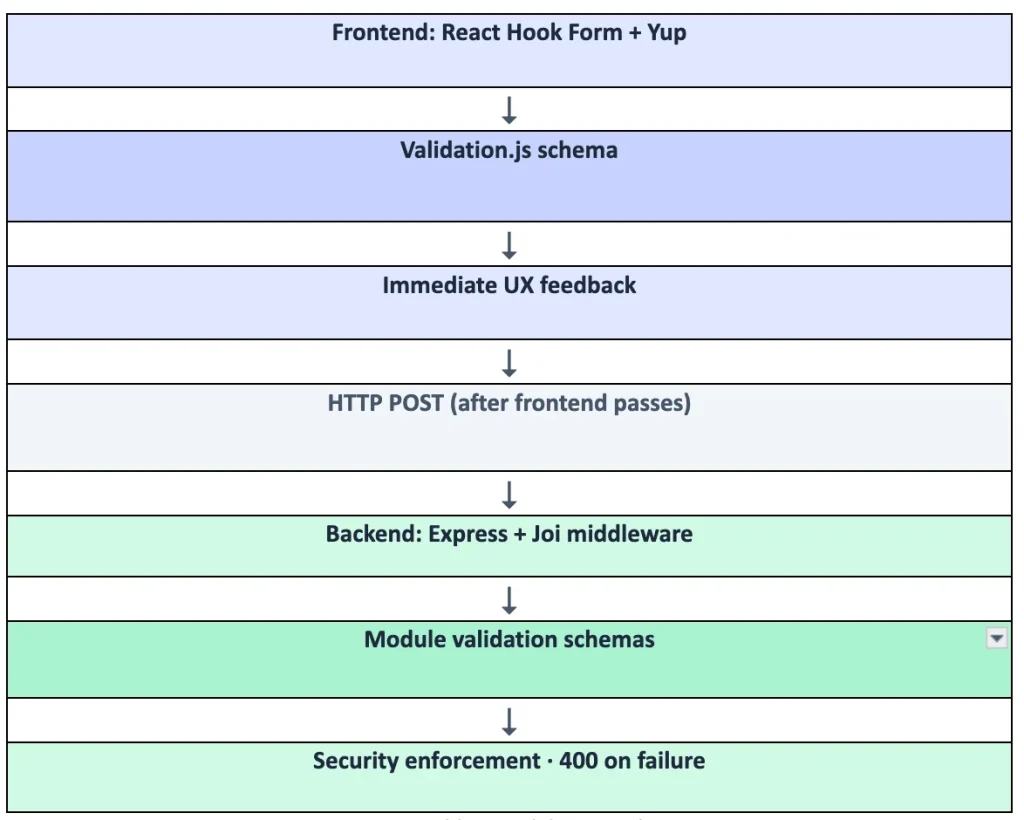
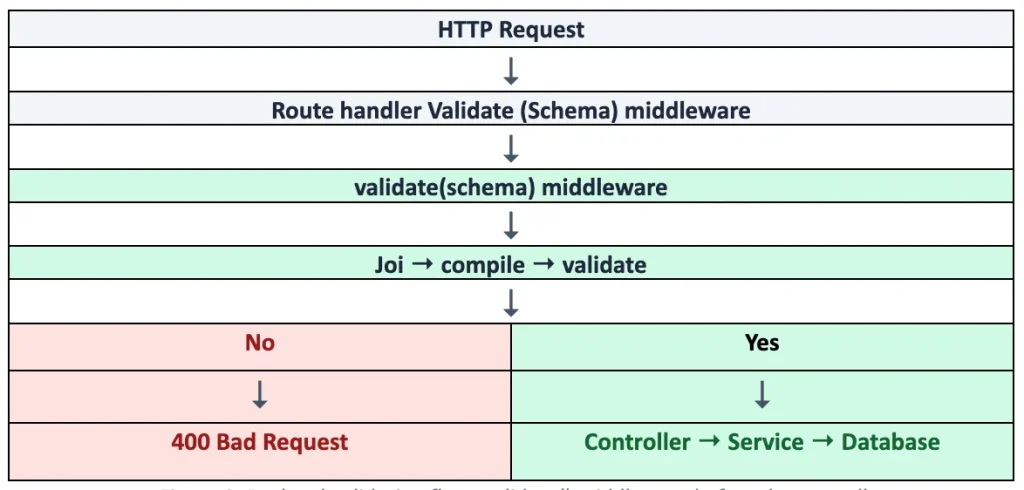
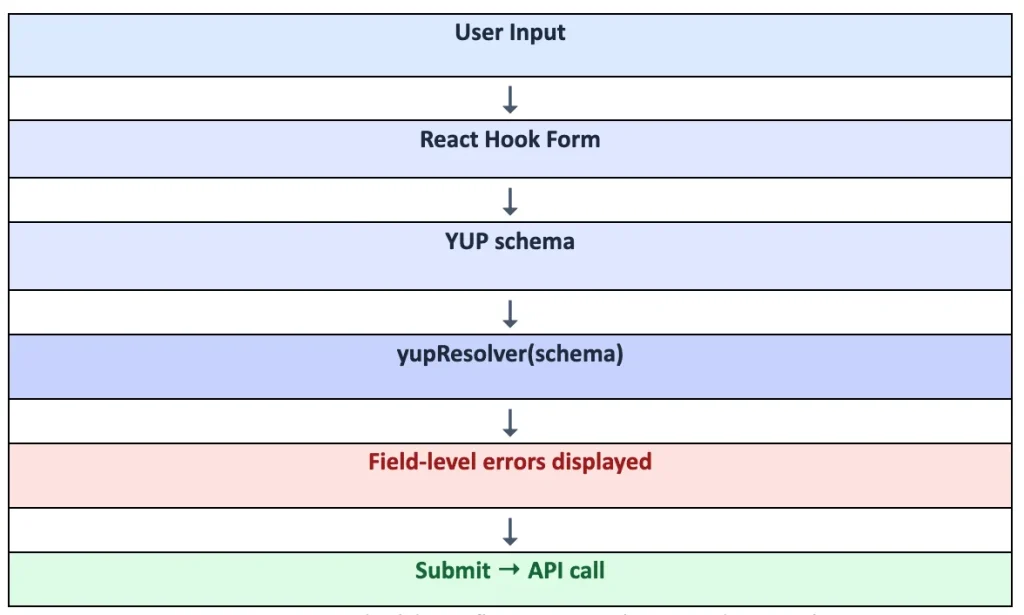
Validation runs at two layers. Yup validates React forms in the browser before submission. Joi validates every API request on the Express backend, regardless of what the client sends.
This guide covers how those layers work together, with flow diagrams, end-to-end flows, and practical patterns, including dynamic schemas, conditional fields, lazy validation, and multi-step wizards.
Why Two Layers?
Frontend validation improves UX with immediate field-level feedback. Backend validation enforces security and business rules that a malicious or buggy client cannot bypass.
| Layer | Form handling | Purpose |
| Frontend | React Hook Form + yupResolver | Immediate user feedback |
| Backend | Express validate() middleware | Enforce rules on every request |

What is Yup?
Yup is a JavaScript object schema validator. You define the shape and rules of form data as a schema object. Before submission, Yup checks whether input matches that schema and returns per-field error messages.
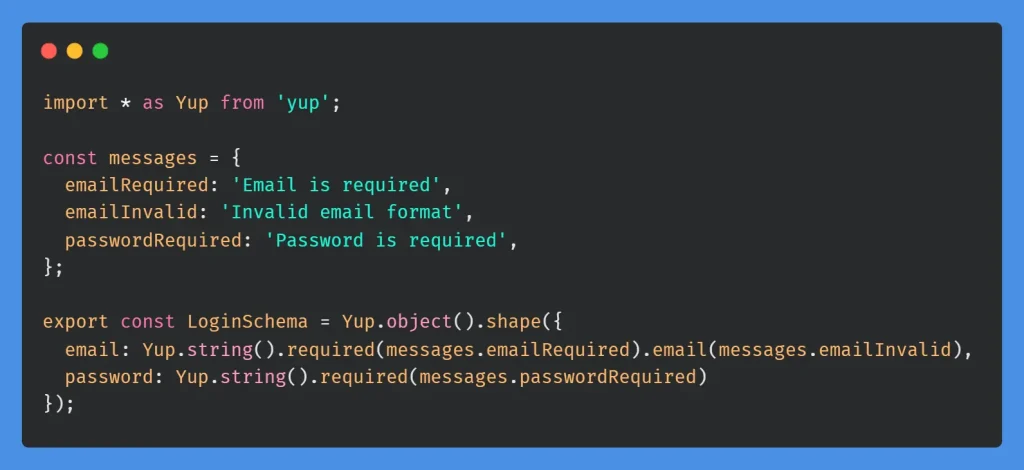
Login schema example
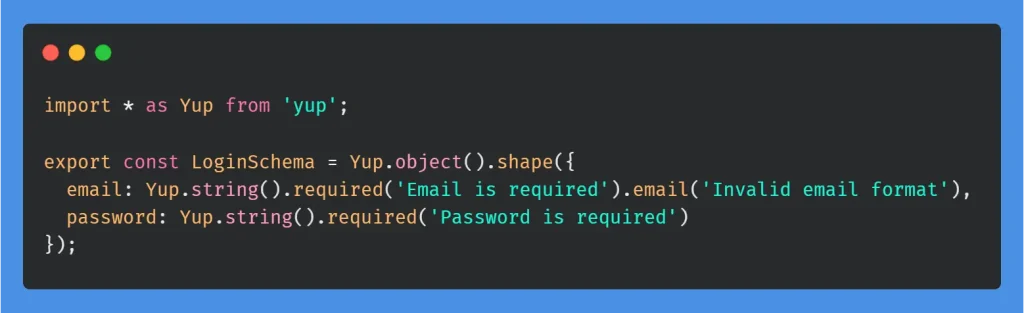
| Field | Input | Error |
| “” | “Email is required” | |
| “not-an-email” | “Invalid email format” | |
| password | “” | “Password is required” |
In production, error messages use i18n keys via intl.formatMessage() or translate().
What is Joi?
Joi validates object data on the server, typically HTTP request body, query parameters, and URL params.
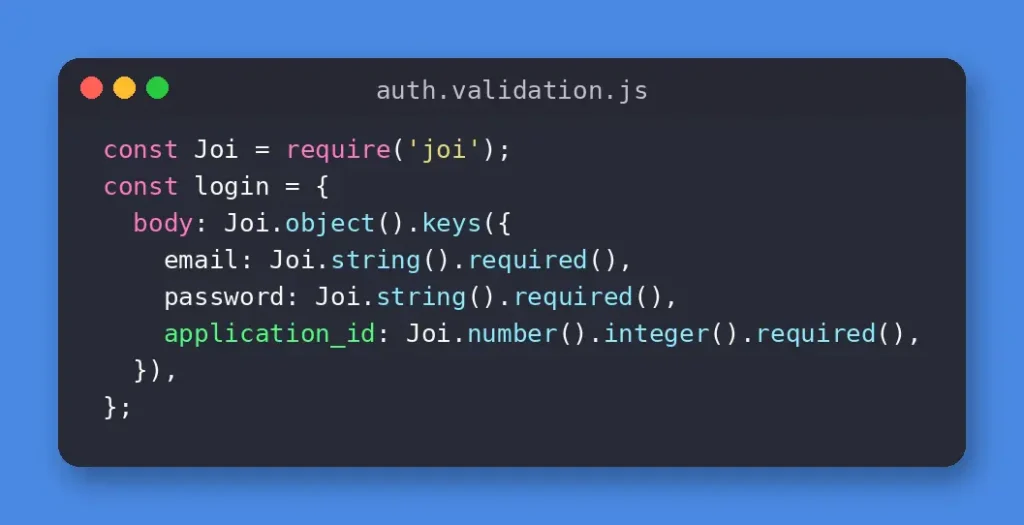
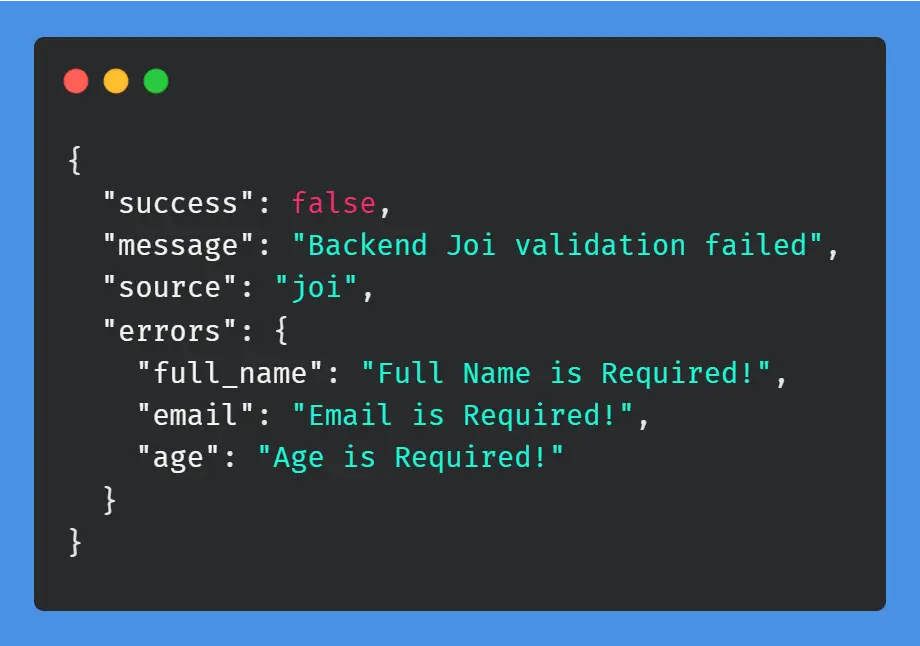
If validation fails, the API responds with 400 Bad Request and an error message before any controller or database logic runs.
React Hook Form Integration
React Hook Form manages form state and connects Yup schemas to UI inputs via yupResolver.
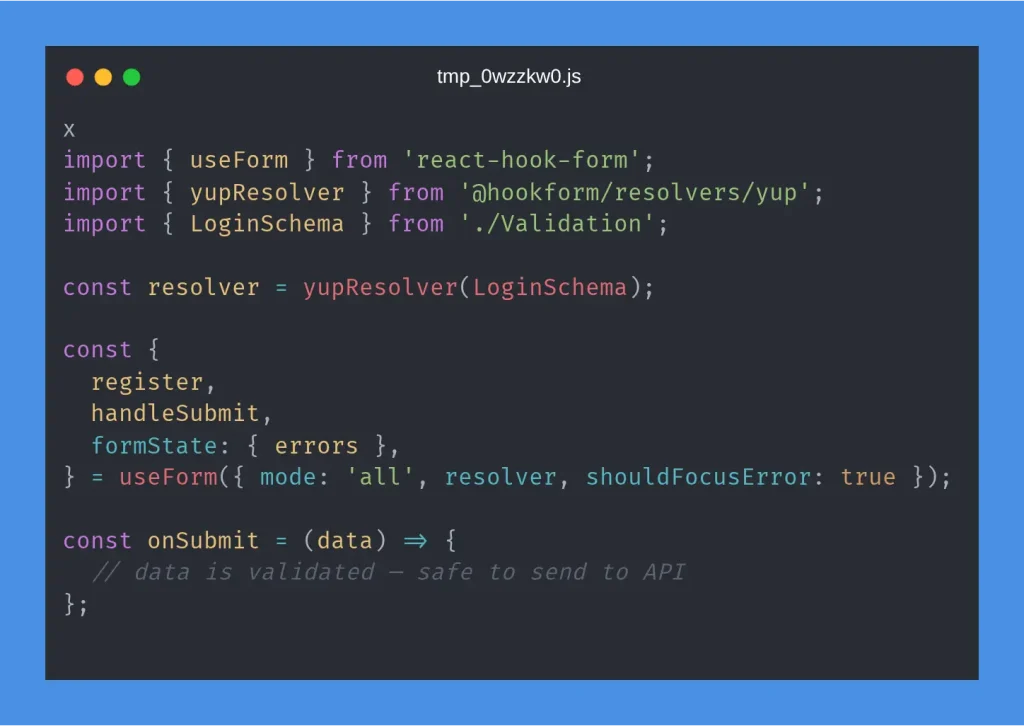
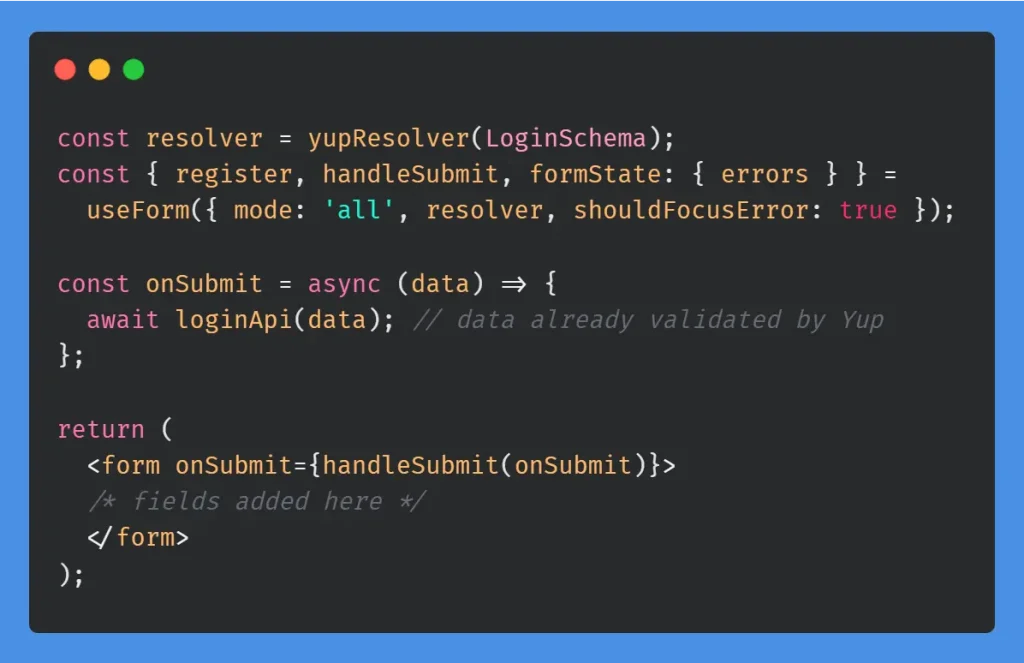
| Option | Value | Purpose |
| mode | ‘all’ | Validate on both change and blur before submission |
| resolver | yupResolver(schema) | Run Yup schema on every validation |
| shouldFocusError | true | Focus first invalid field on submit |
Architecture Overview
Naming conventions
| Type | Pattern | Example |
| Backend validation | {module}.validation.js | user.validation.js |
| Frontend validation | Validation.js | Login Validation.js |
| Shared custom validators | custom.validation.js | Password, ObjectId, date rules |
Get Started: Complete Flow
This walkthrough covers the full path: define a Yup schema, connect React Hook Form, register fields, handle errors, and validate again on the backend.
Step 1: Define the schema
Step 2: Set up React Hook Form
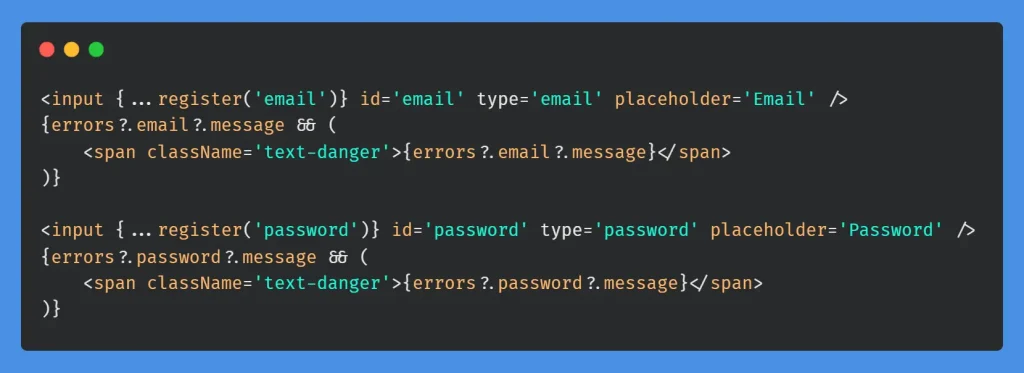
Step 3: Register fields and show errors
Step 4: Backend validation with Joi

Joi Backend Validation Patterns
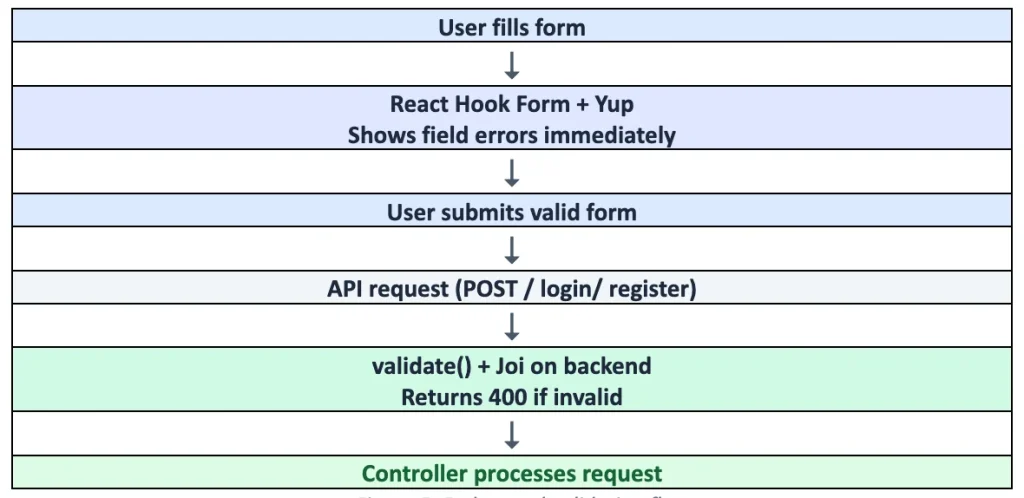
Key behaviors:
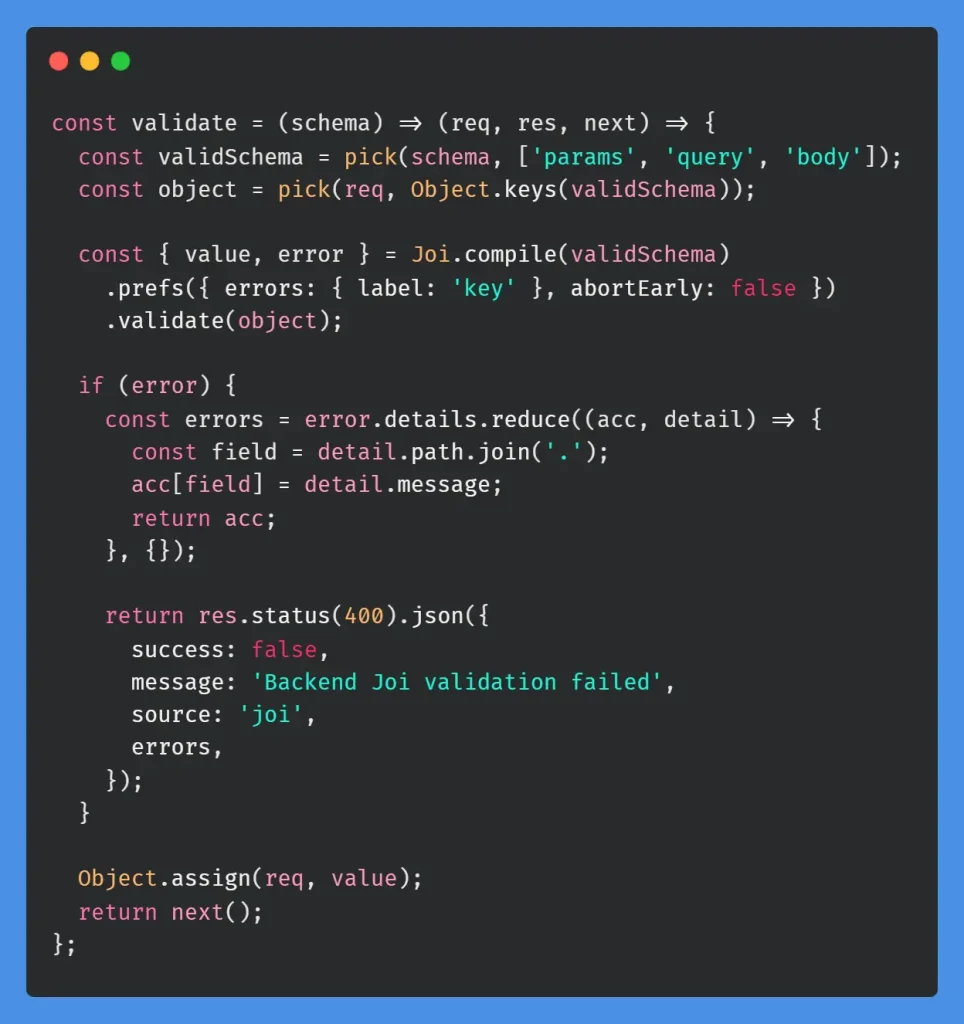
- Validates only the sections defined in the schema (params, query, body).
- Collects all errors (abortEarly: false).
- On success, merges validated/coerced values back onto the request object.
Validation middleware
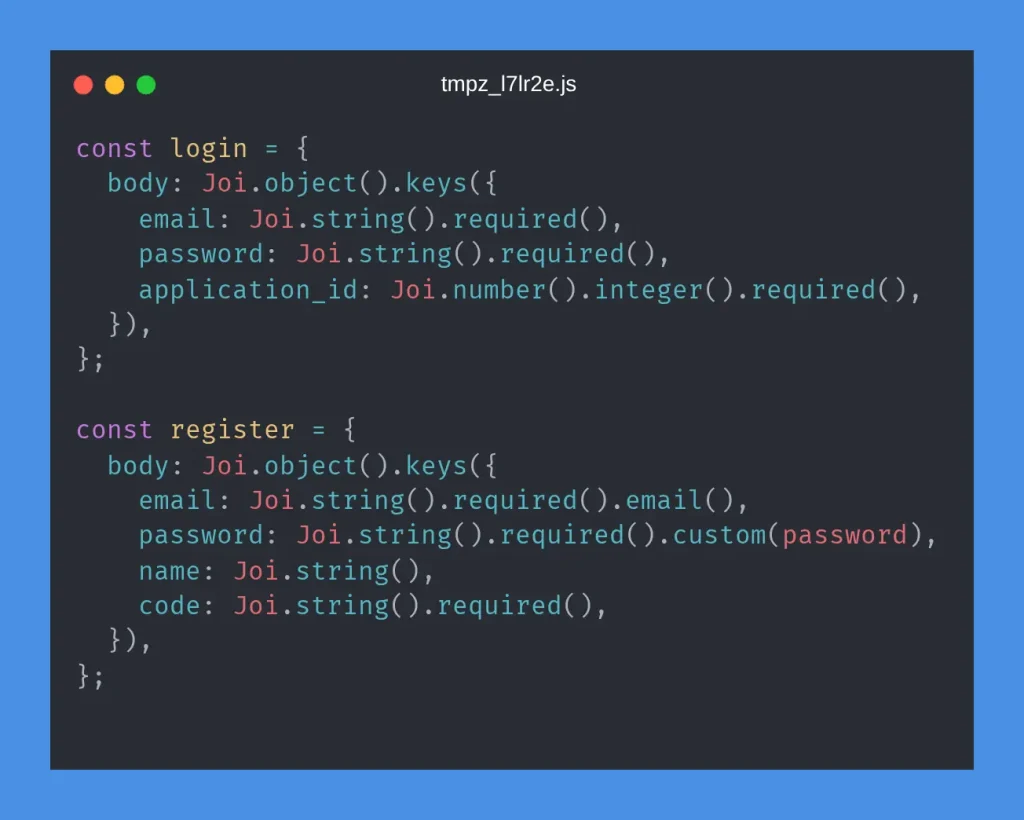
Pattern 1: Basic auth schema
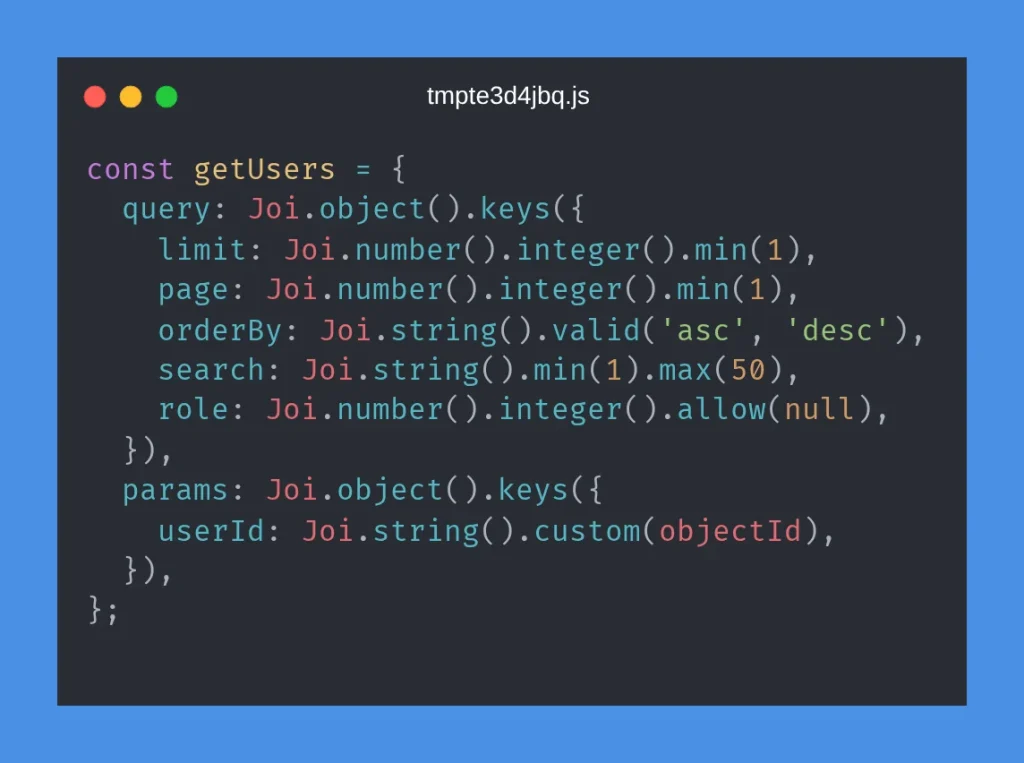
Pattern 2: Pagination and query parameters
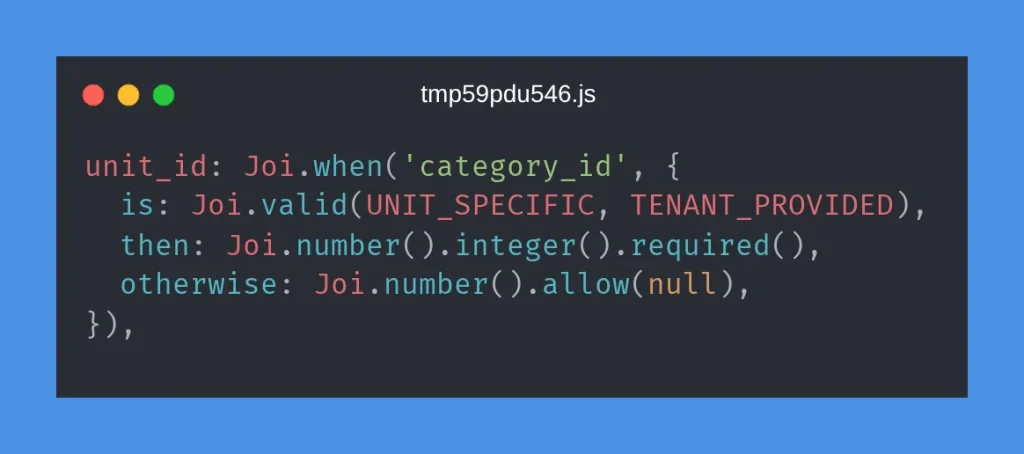
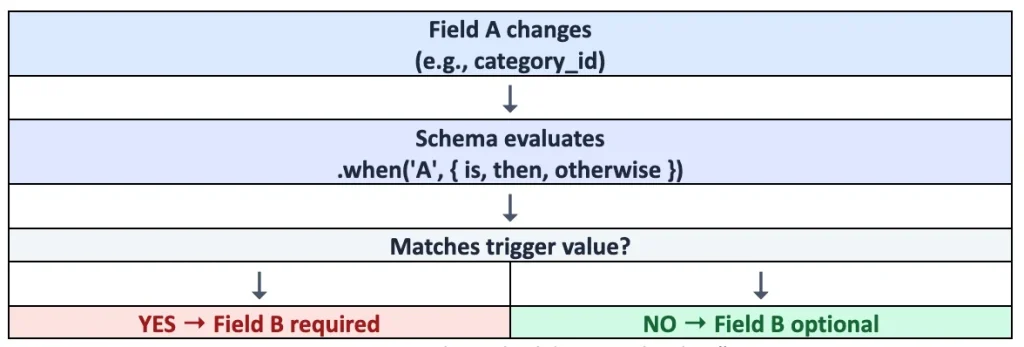
Pattern 3: Conditional fields with Joi.when
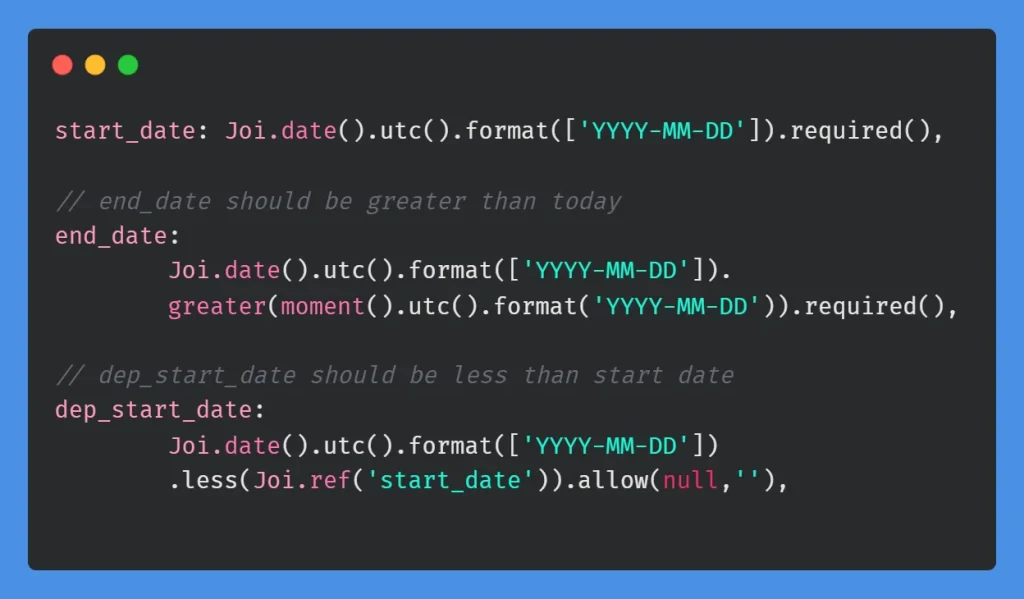
Pattern 4: Date validation with @joi/date
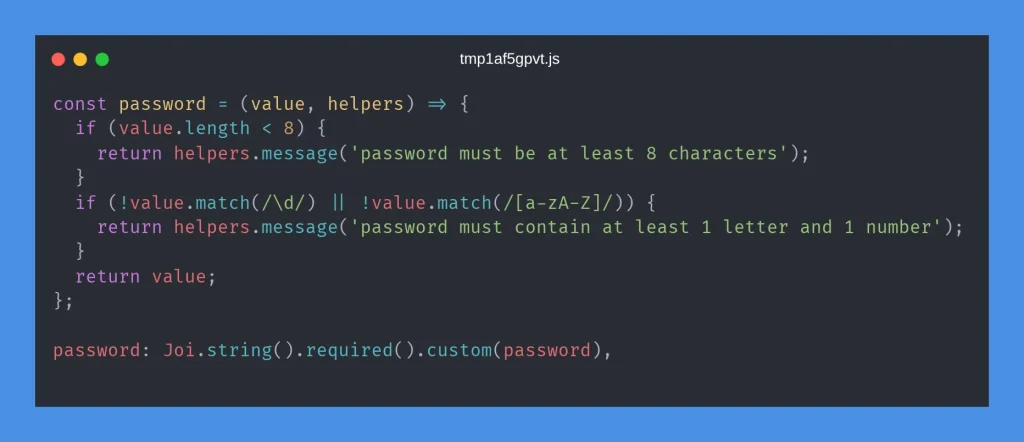
Pattern 5: Custom validators
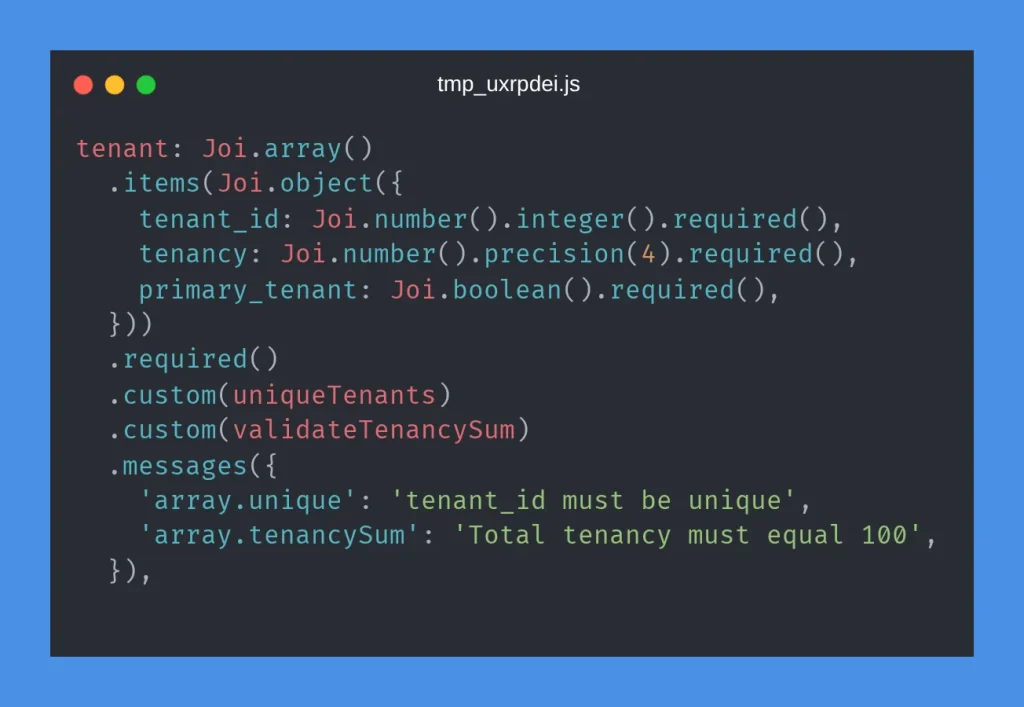
Pattern 6: Array-level custom validation
Joi quick reference
| Need | Joi syntax |
| Required string | Joi.string().required() |
| Optional / nullable | .allow(null, ”) or .optional() |
| .email() | |
| Conditional field | Joi.when(‘field’, { is, then, otherwise }) |
| Cross-field ref | Joi.ref(‘other_field’) |
| Custom logic | .custom(fn) |
| Decimal places | .precision(2) |
| Partial update | Joi.object().keys({…}).min(1) |
Yup Frontend Validation Patterns
The frontend patterns below are where dynamic validation shines: schemas that change based on user input, feature flags, or wizard step.
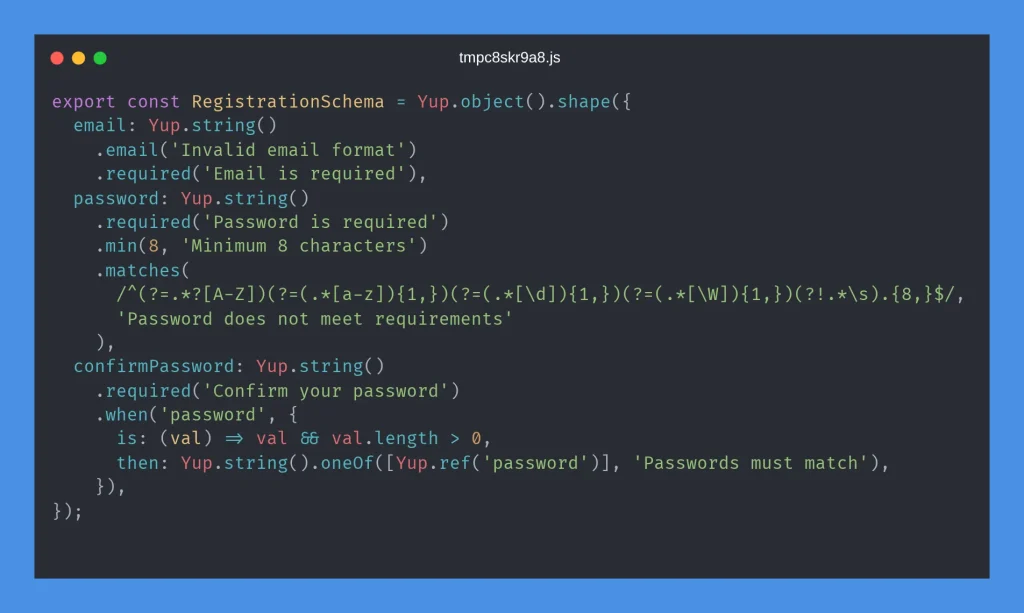
Pattern 1: Login and registration
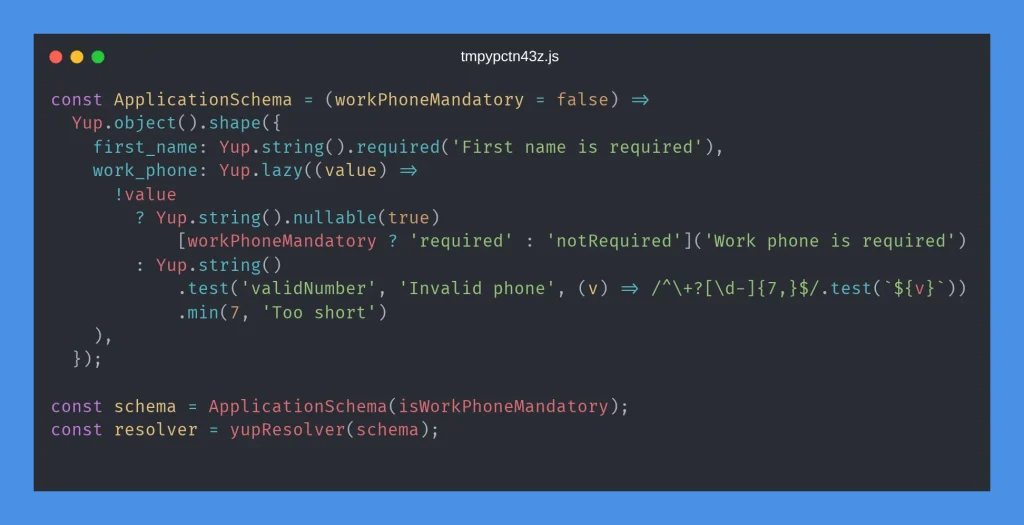
Pattern 2: Dynamic schema factory
Schemas can be functions that accept configuration flags: essential when rules depend on feature toggles (workPhoneMandatory).
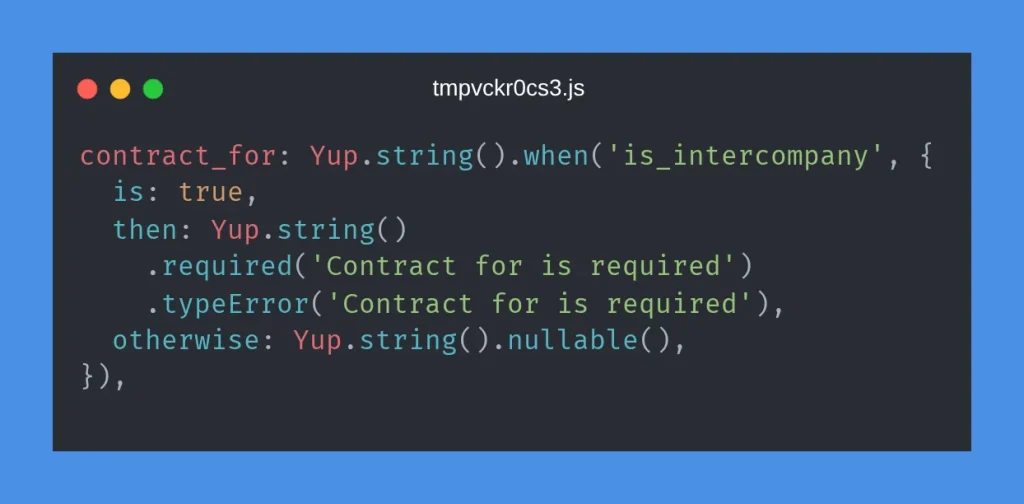
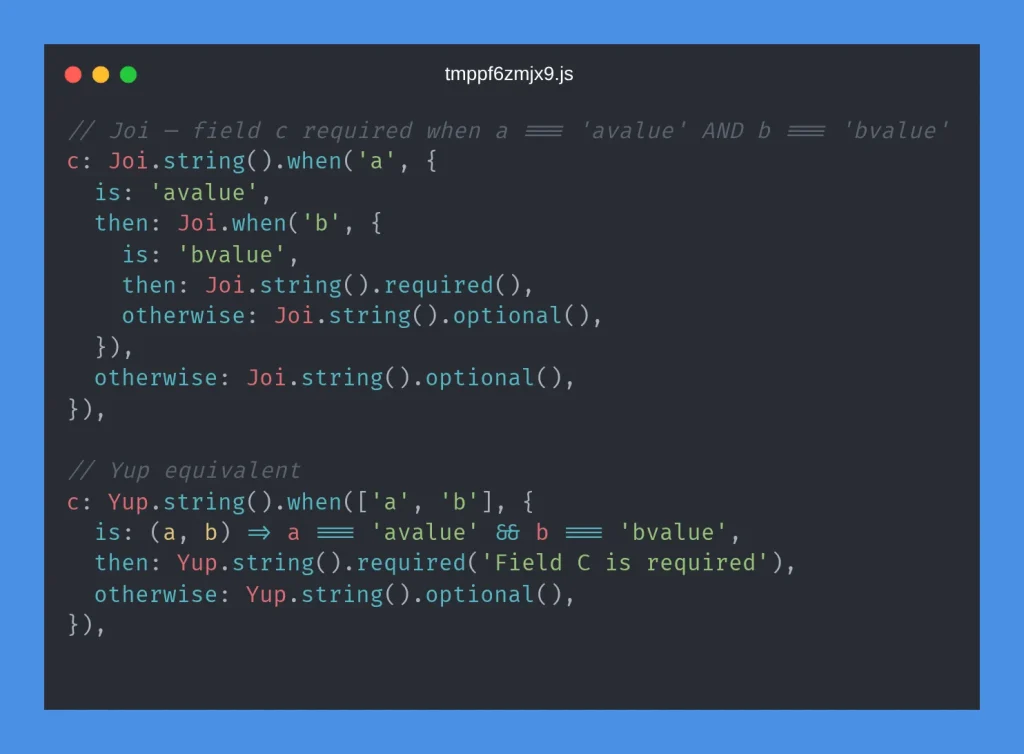
Pattern 3: Conditional validation with .when()
Pattern 4: Lazy validation for empty strings vs dates
A common pattern when form fields start as empty strings but should validate as dates once filled:
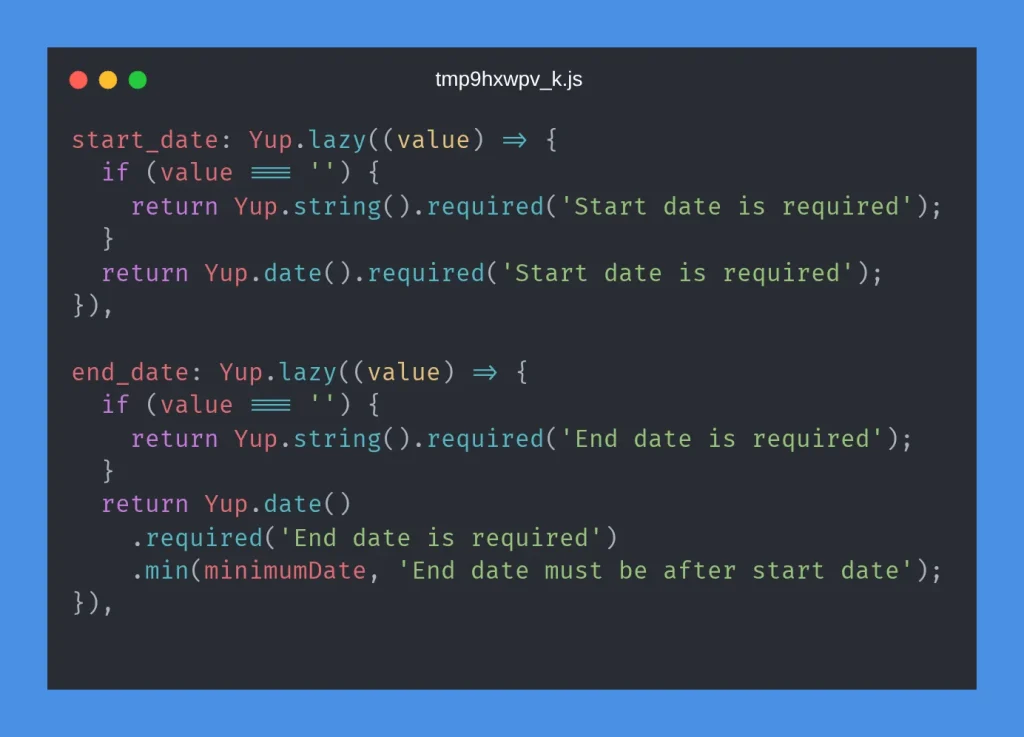
Why Yup.lazy()? Phone and date fields may be empty on first render. Lazy validation skips format checks when empty but applies rules when the user types a value.
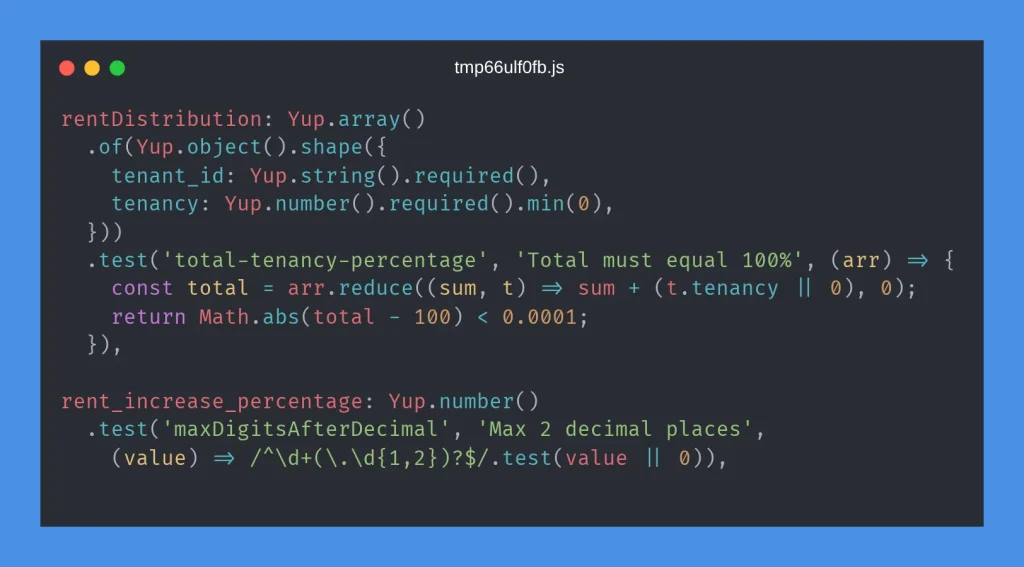
Pattern 5: Custom .test() validators
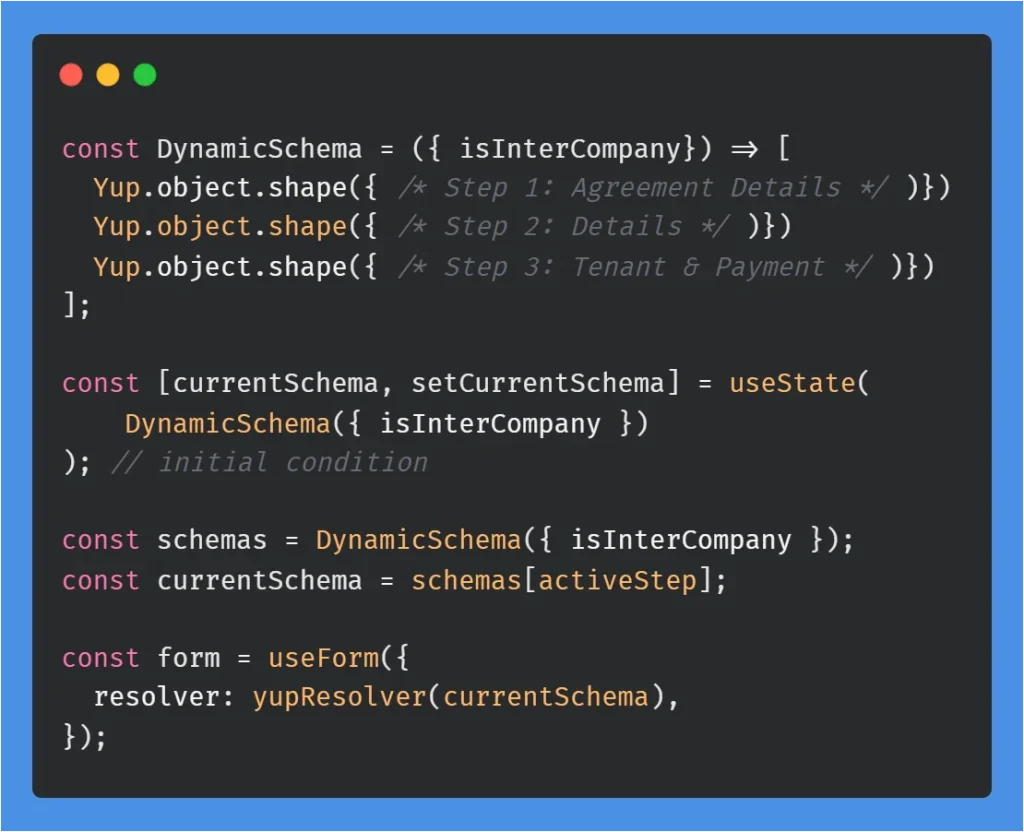
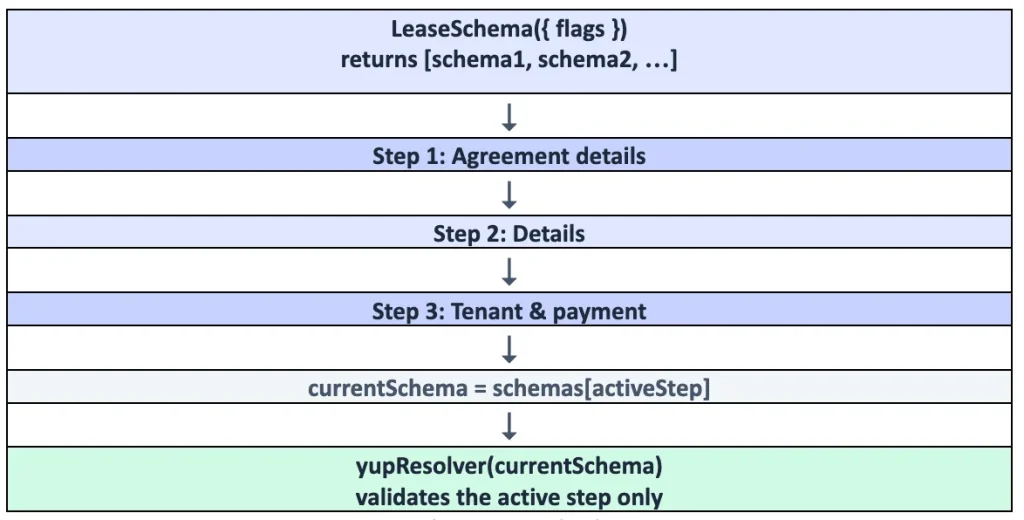
Pattern 6: Multi-step wizard schemas
Multi-step forms return an array of schemas: one per step. Swap currentSchema on step navigation.
Yup quick reference
| Need | Yup syntax |
| Required string | Yup.string().required(‘message’) |
| Conditional | .when(‘field’, { is, then, otherwise }) |
| Cross-field match | .oneOf([Yup.ref(‘password’)], ‘Must match’) |
| Custom logic | .test(‘name’, ‘message’, (value, context) => boolean) |
| Dynamic schema | Yup.lazy((value) => …) |
| Factory schema | const Schema = (flag) => Yup.object().shape({…}) |
| Array-level rule | Yup.array().test(‘name’, ‘msg’, (arr) => boolean) |
Complete Form Example
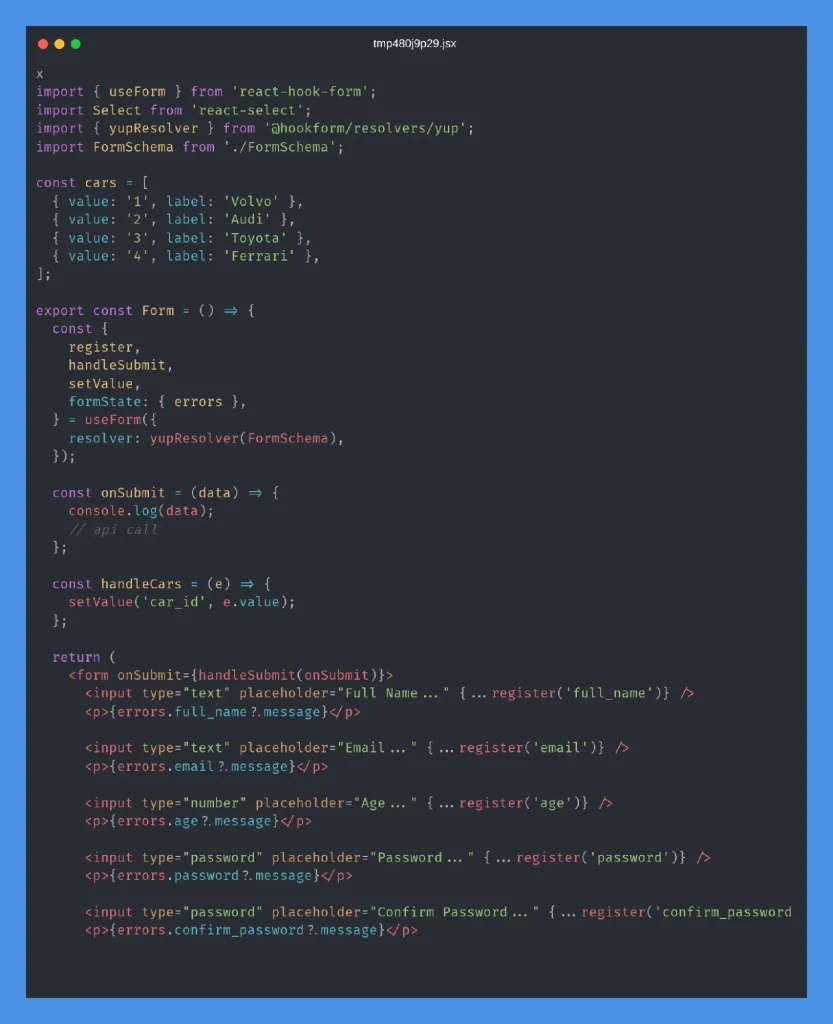
This end-to-end example wires React Hook Form, react-select, and a Yup FormSchema together. The schema covers basic fields (Part 1), password regex (Part 2), Amount Validation (Part 3), and custom decimal validation on amount.
Select a car to see conditional validation in action, Volvo requires first_field, Audi requires second_field, and so on.
FormSchema
Part 1: Basic fields (name, email, age):
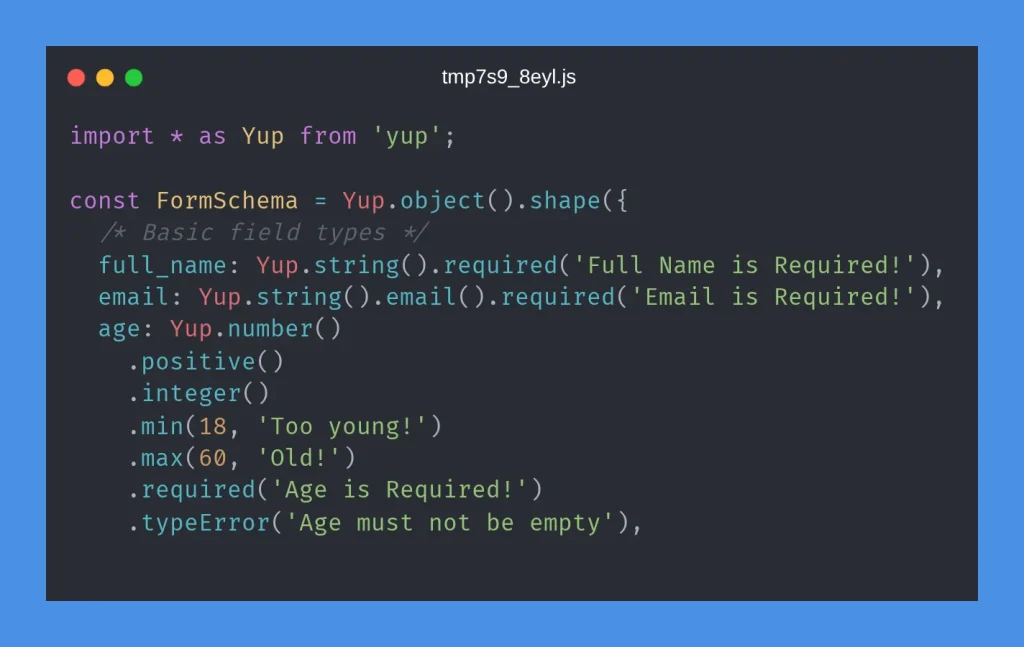
Part 2: Password and confirm password:
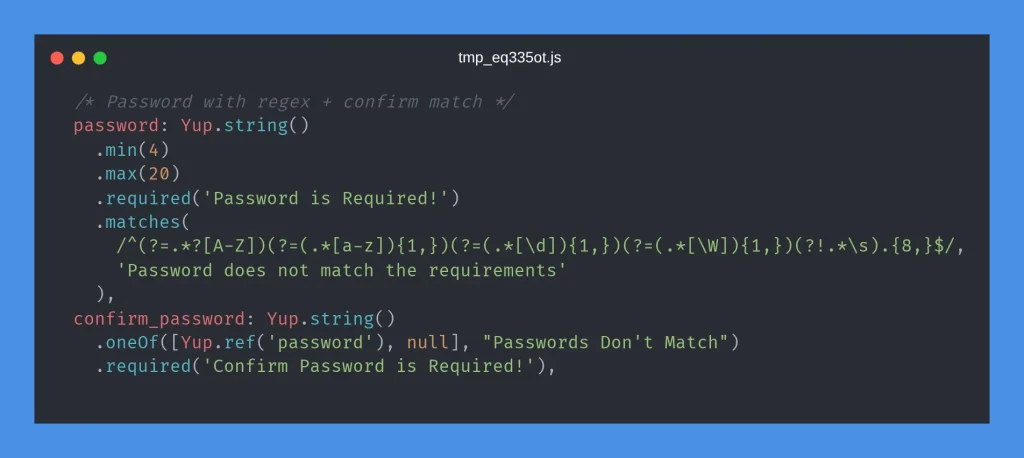
Part 3: Amount validation:
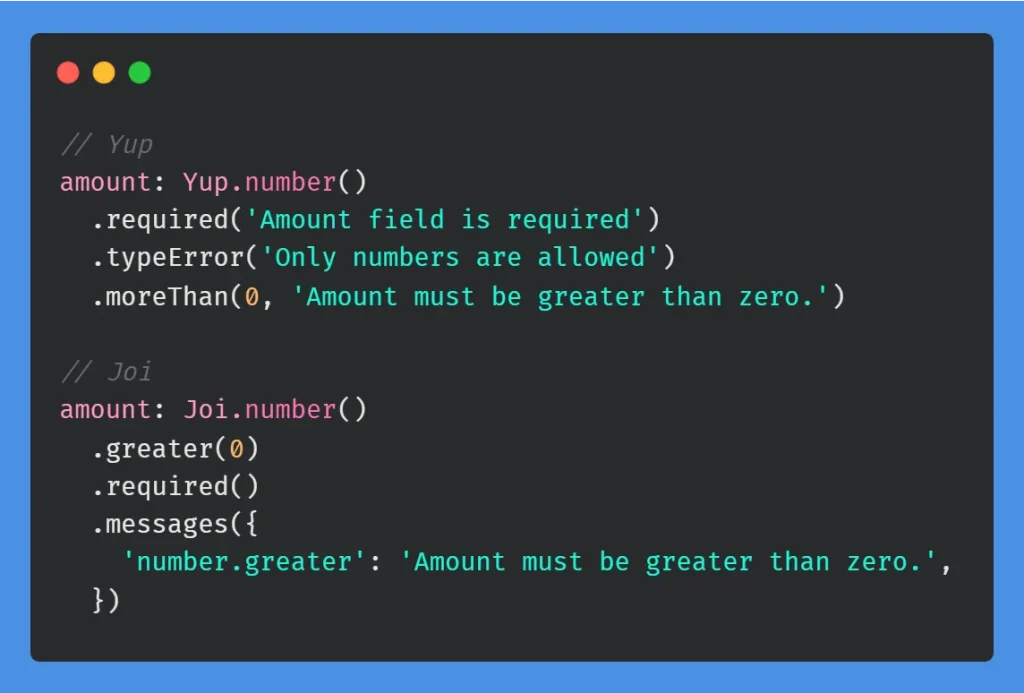
Form component
Part 1: Setup, handlers, and basic fields:
Part 2: Car select, conditional fields, and submit:
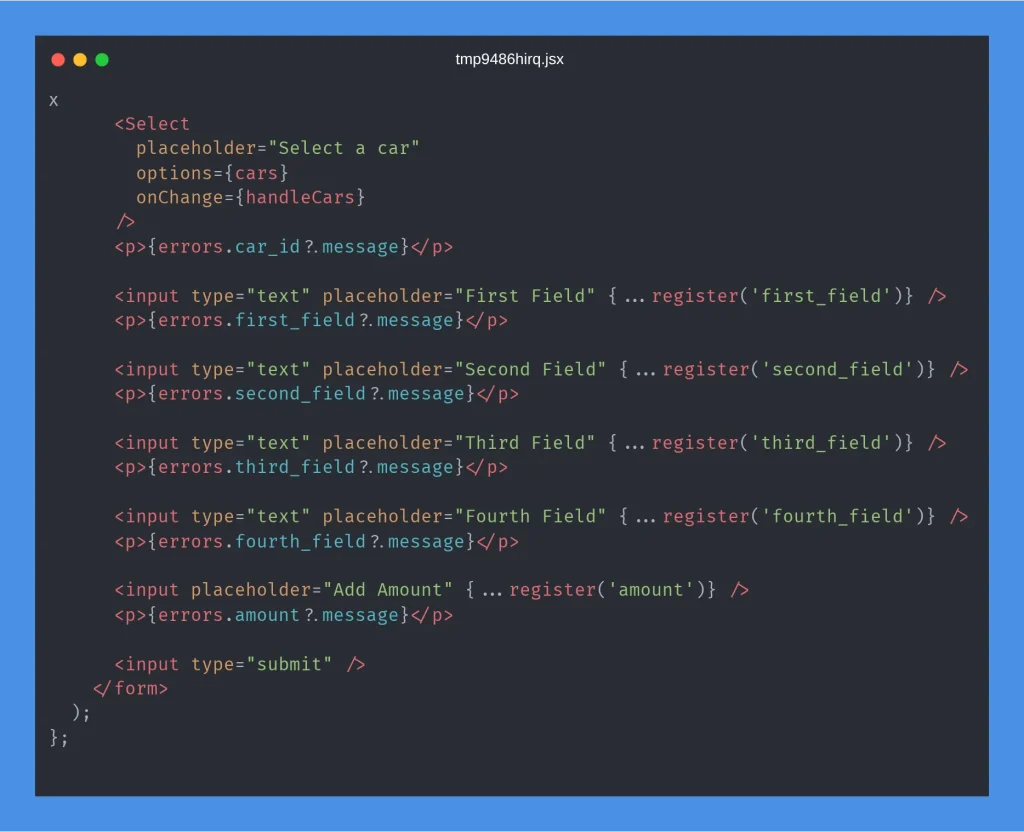
The react-select dropdown calls setValue(‘car_id’, id) on change so Yup’s .when(‘car_id’, …) rules re-evaluate immediately.
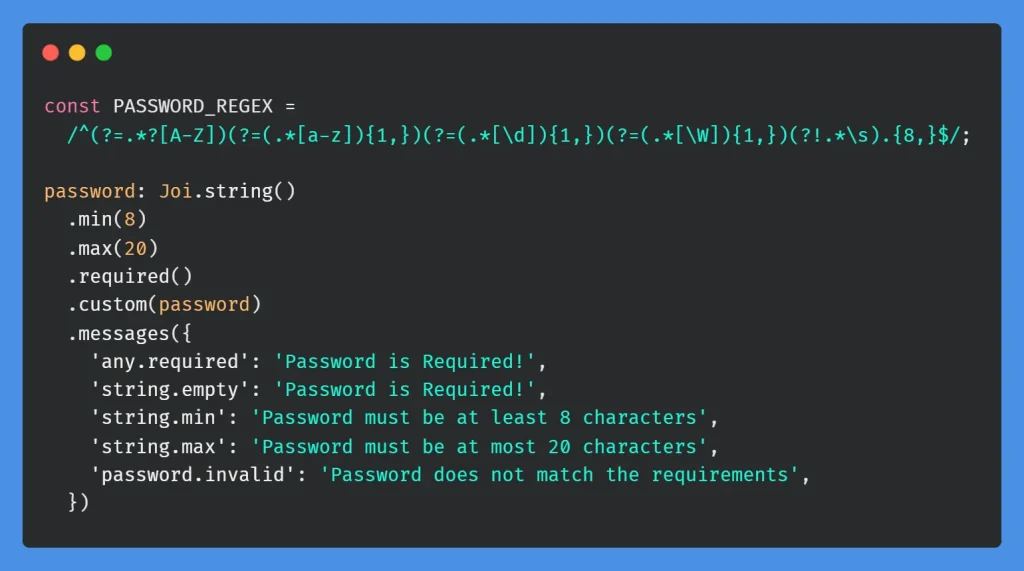
Password regex patterns
Yup Example
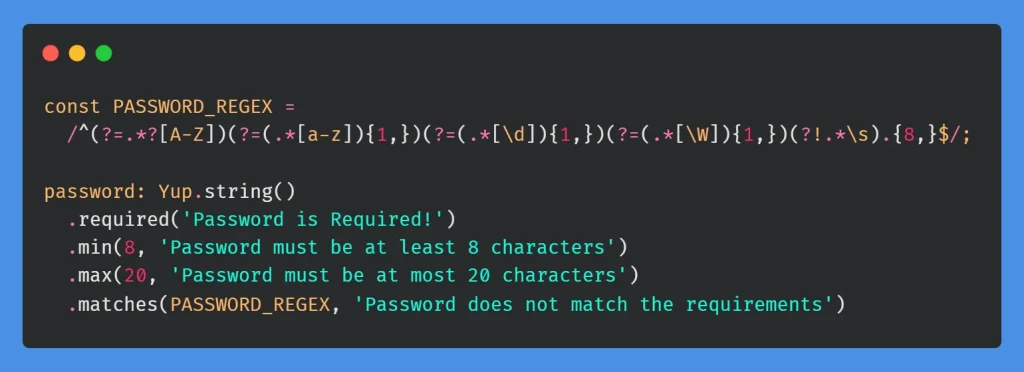
JOI Example
Nested conditional validation (Joi + Yup)
Quick decision guide
| I need to… | Use |
| Validate a React form before submit | Yup schema with yupResolver |
| Require field B when field A = X | .when(‘A’, { is: X, then, otherwise }) |
| Different fields per enum/type value | Joi: alternatives().conditional() / Yup: multiple .when() |
| Optional phone with format check | Yup.lazy(), skip when empty, validate when filled |
| Password + confirm match | .oneOf([Yup.ref(‘password’)]) |
| Limit decimal places | Yup: .test() + regex / Joi: .precision(n) |
Pattern Comparison: Joi vs Yup
| Scenario | Joi (Backend) | Yup (Frontend) |
| Required email | Joi.string().required().email() | Yup.string().required().email(‘msg’) |
| Optional null/empty | .allow(null, ”) | .nullable(true) |
| Conditional required | Joi.when(‘x’, { is, then, otherwise }) | .when(‘x’, { is, then, otherwise }) |
| Cross-field date | .greater(Joi.ref(‘start_date’)) | .min(startDate, ‘msg’) via .when() |
| Custom validator | .custom(fn) | .test(‘id’, ‘msg’, fn) |
| Array items | .items(Joi.object({…})) | .of(Yup.object().shape({…})) |
| Decimal places | .precision(2) | .test() with regex |
Best Practices
General (both layers)
- One validation file per module; keep schemas close to the feature they validate.
- Mirror business rules; frontend validates UX; backend enforces security. Never rely on frontend-only validation.
- Use named constants for reusable business limits such as password length, age limits, percentage totals, decimal precision and reusable regex patterns.
- Consistent error messages: backend returns messages; frontend can use i18n keys for translations.
Joi (backend)
- Use ‘@joi/date’ when strict custom date formats or advanced date parsing are required. For ordinary date validation, Joi’s built-in date schema is sufficient.
- Export one object per HTTP action (createUser, getUsers, updateUser).
- Use .custom() for reusable rules (password, objectId).
- Chain multiple .custom() calls for complex array validation.
- Apply .precision(n) on monetary fields.
Yup (frontend)
- Place schemas alongside the form component.
- Use yupResolver with React Hook Form (mode: ‘all’ for immediate feedback).
- Use Yup.lazy() when empty string vs typed value needs different schemas.
- Return schema arrays for multi-step wizards; swap currentSchema on step change.
- Use factory functions (flag) => schema when validation depends on props/settings.
- Access sibling fields in .test() via context.parent.
Adding a new feature checklist
Backend:
- Create a validation schema file for the feature module.
- Define schemas for each endpoint (create, get, update, delete).
- Apply validate(schema) in the route definitions.
- Add reusable custom validators where needed.
Frontend:
- Create a Validation.js schema alongside the form component.
- Define Yup.object().shape({…}) with i18n messages with translations.
- Wire yupResolver(schema) in the form component.
- For wizards, return an array of schemas and update on step navigation.
Live Demo & Source Code
GitHub repository: https://github.com/Mudassir-Kidwai/Yup-Validator
Working example: https://yup-validator.vercel.app/
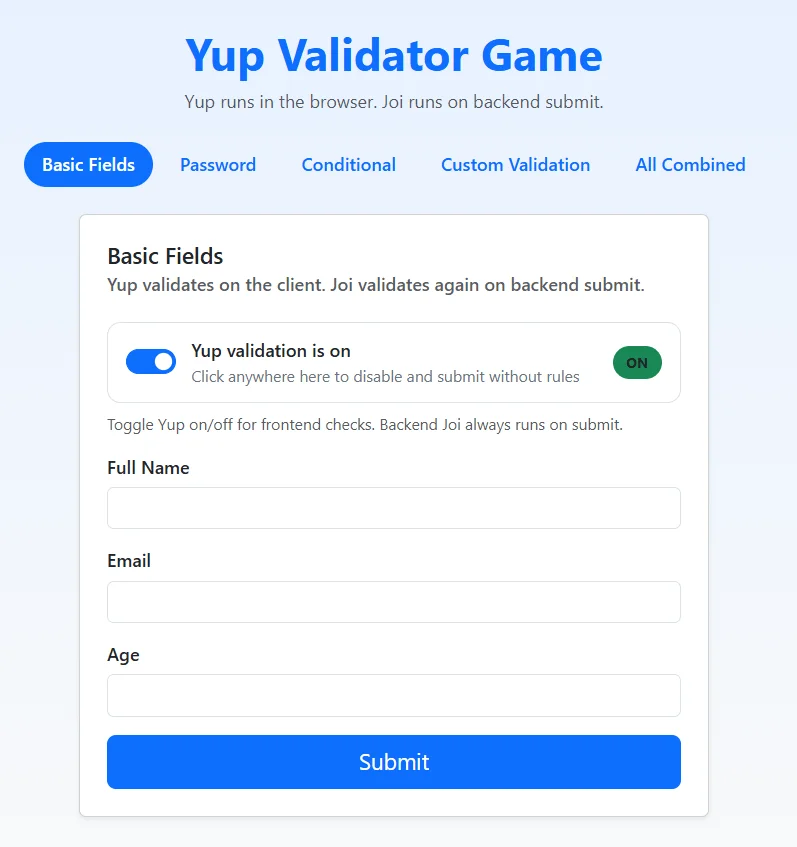
APP VIEW: Yup Validator Game
What the Demo Covers
Yup Validator is a small React + Express project that demonstrates the same dual-layer validation model described in this guide: Yup validates in the browser for immediate feedback, and Joi validates again on every API submit so client-side checks cannot be bypassed.
Note: The companion app demonstrates the article’s core dual-layer flow and selected validation patterns. It is not an executable example of every pattern covered in the guide; advanced examples such as the multi-step wizard, `Yup.lazy()`, `@joi/date`, pagination/query schemas, and array-level validation remain article-only examples.
| Blog topic | Where to see it in the demo |
| Why two layers? | Toggle Yup on/off — backend Joi always runs on submit |
| React Hook Form + yupResolver | Every tab uses useForm with yupResolver(schema) |
| Basic fields (email, age) | Basic Fields tab |
| Password regex + confirm match | Password tab |
| Conditional .when() / Joi.when() | Conditional tab (car_id → required field) |
| Custom decimal validation | Custom Validation tab (amount, max 2 decimals) |
| Complete combined form | All Combined tab |
| Structured backend errors | Submit invalid data — field keys returned in errors object |
| Backend validate() middleware | backend/src/middlewares/validate.js |
How to Try the Live App
- Open https://yup-validator.vercel.app/ in your browser.
- Switch tabs to explore Basic Fields, Password, Conditional, Custom Validation, and All Combined.
- Leave Yup validation ON to see frontend errors before submit.
- Turn Yup OFF and submit: the request still hits Joi on the backend.
- On the Conditional tab, pick a car (Volvo, Audi, Toyota, or Ferrari) and leave the mapped field empty to see matching Yup/Joi errors.
Run Locally (Optional)
Clone the repository, install dependencies, and follow the readme file from here
Related Reads
Continue exploring practical development patterns with these Folio3 guides covering NetSuite AI, MCP tools, API integrations, authentication, and modern development workflows.
Getting Started
- A Complete Setup Guide for NetSuite AI Connector
- A Setup Guide for NetSuite AI Connector with Postman: API Integration Tutorial
- Getting Started with NetSuite SuiteTalk REST API in Postman
- NetSuite MCP OAuth 2.0 Token Generator Tool
- SuiteScript Essentials: A Developer’s Getting Started Guide
- Open Source for Dummies: A Beginner’s Open Source Journey
- SuiteCommerce Development: An Illustrated Guide from Setup to Extension Deployment & Troubleshooting
MCP and Client Integrations
- IDE Integration Guide for NetSuite MCP Tools in Cursor & VS Code
- Connecting MCP with ChatGPT: A Complete Guide
- Connecting MCP Tools with Qwen
- Connecting ChatGPT Business with NetSuite via MCP: The Future of Enterprise AI Integration
- OAuth 2.0 in NetSuite: Complete Setup Guide (Client Credentials Flow)
Advanced and Architecture
- Building Custom Tools for NetSuite AI Connector: Development Guide
- Dual API Integration: Using NetSuite MCP Tools with OpenAI and Anthropic
- NetSuite MCP Challenge: Implementation Case Study & Results
- MCP Input Formats Compared: Token Usage Analysis for NetSuite MCP Tools
- Integrating NetSuite MCP Tools with AI-Powered CLI Tools
- WhatsApp Triggered AI Agent for NetSuite Using n8n and MCP Tools
- Advanced NetSuite PDF and HTML Template Tricks
- NetSuite Scriptable Cart in SuiteCommerce Advanced: 6 Problems Developers Actually Need to Solve
- Prompt Studio: From SuiteQL Rows to a Business Summary

