
A first-answer benchmark of Oracle’s SuiteCloud Developer Assistant against two general-purpose coding tools, covering SuiteScript, searches, SDF, SuiteCommerce and integration design.
Why I ran this benchmark
Most AI coding demos use tasks where “it compiles and the test passes” is a reasonable definition of done. NetSuite work doesn’t fit that model well. A SuiteScript file can be perfectly valid JavaScript and still call a method that only exists in client scripts, ignore a governance limit, or return an object that Map/Reduce doesn’t accept. An SDF project can be well-formed XML and still fail validation because the manifest is missing a feature dependency. None of that shows up until you deploy to an account, and by then you have already spent the review time.
That gap is the pitch for NetSuite’s SuiteCloud Developer Assistant (SDA). It is a platform-specific assistant that runs against your account through the SuiteCloud tooling, and the assumption is that platform knowledge should beat general coding ability on platform work. I wanted to test that assumption instead of taking it on faith. The question I set out to answer was simple: when you give SDA and two general-purpose tools the same NetSuite tasks, which one produces a first answer you could actually use, and what does each one get wrong?
The experiment setup
The benchmark uses twelve tasks from a fixed task document, and each prompt was frozen before any tool saw it. The tasks start simple: a User Event that flags Sales Orders over 10,000, and loading a Customer to change a phone number. They move through two N/search problems (recent orders, then line-level data with joins), a Suitelet with a filter form, a RESTlet doing CRUD on a custom record, and a Map/Reduce-scale job computing lifetime sales for roughly 500,000 customers. After that come a governance rewrite of a deliberately wasteful script, a debugging task on a deliberately broken N/search script, a full SDF project, a SuiteCommerce item-reviews feature, and an architecture task: send approved Sales Orders to a warehouse API without ever failing the order when the API is down. The runs were captured in October 2026.
Three tools were compared, each driven through its CLI from an empty temporary workspace:
- NetSuite SDA: model ID
NetSuite, via the SuiteCloud CLI proxy and Cline CLI 3.0.62. Cline ran in Act mode for all twelve tasks, including the SDF task. - Claude: Claude Code 2.1.272 using
claude-sonnet-5 - Cursor: Cursor Agent CLI using
composer-2.5, with write mode for the SDF task.
The rules were strict about one thing: only the first completed response per task was scored. Completed answers were not improved through follow-up prompts or silent repair; interrupted or timed-out runs could be restarted. That happened once, for Claude on Task 7, described below. The answers, CLI streams, timings and usage fields were retained for this review.
Validation was more limited than I would like. Code answers got a Node 20 syntax check. The SDF projects went through an isolated suitecloud project:validate against a test account.
Correctness was scored with the task document’s seven-part rubric: code correctness 25%, NetSuite API accuracy 25%, hallucination control 20%, architecture 10%, debugging and error handling 10%, explanation 5%, and speed 5%. Each part is scored 0–5 and weighted to a total out of 100. The scores come from a single review pass of every answer against its prompt, its validation output and Oracle’s documentation, and every sub-score has a written reason in the companion notes. Treat them as one careful reviewer’s judgement, not as ground truth.
What the results show
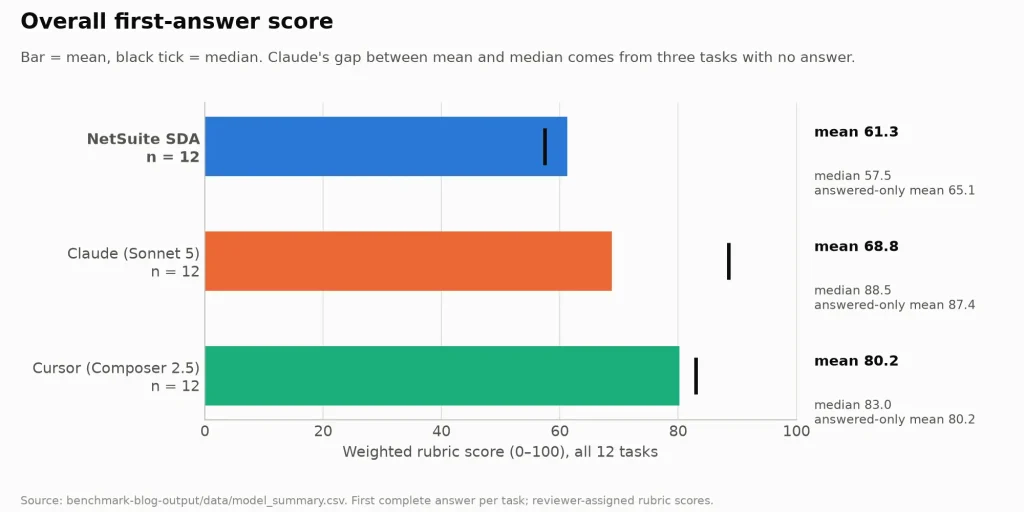
Across all twelve tasks, the mean scores were 80.2 for Cursor, 68.8 for Claude and 61.3 for SDA. That ordering hides the most important pattern in the data, though. Claude’s median was 88.5, far above its mean, because three of its twelve first answers contained no implementation at all. When Claude answered, it averaged 87.4, the highest of the three. When it didn’t, it scored near zero. Cursor was the most consistent tool: it never failed to produce an answer, and its worst score was 51. SDA sat between the two. It almost always produced something, but seven of its twelve answers would not run as written or did not do what the prompt asked.
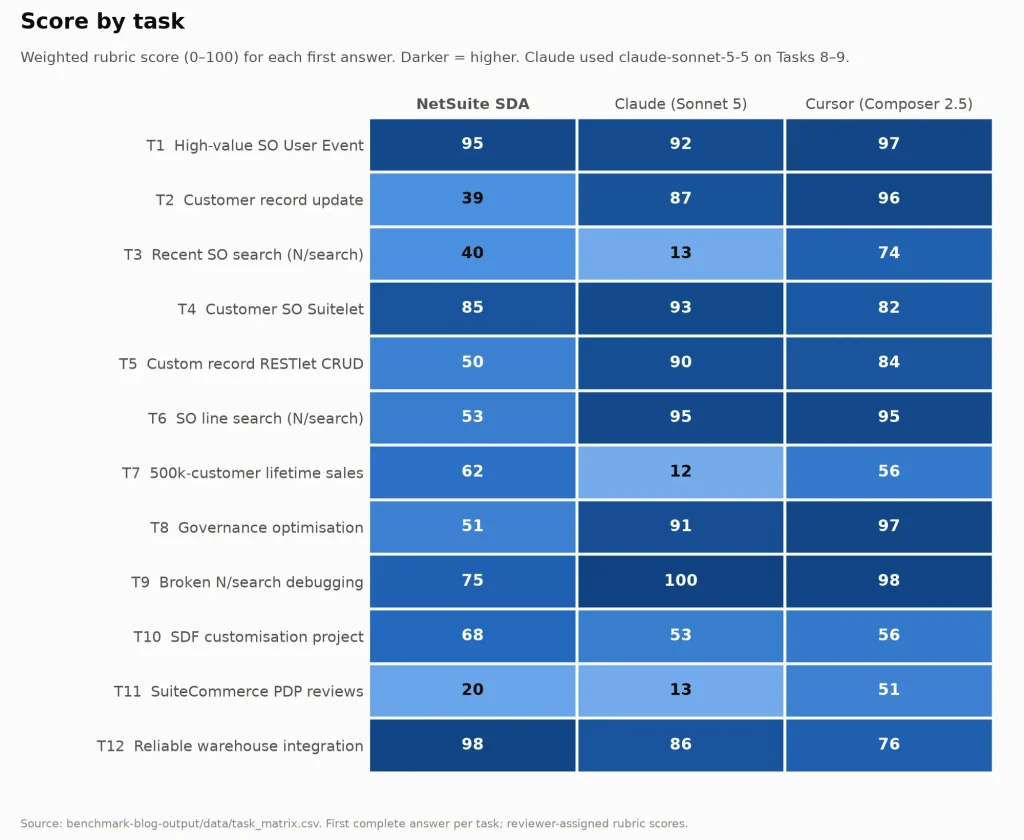
The task-level view shows why one average is not enough. All three tools handled the simplest User Event well (92–97). All three wrote solid Suitelets (82–93). All three produced a credible design for the warehouse integration, and SDA scored 98 on that task, its highest score in the benchmark. The scores split apart on the tasks where a NetSuite rule decides the outcome. On those, the specialised tool was not the one that followed the rule.
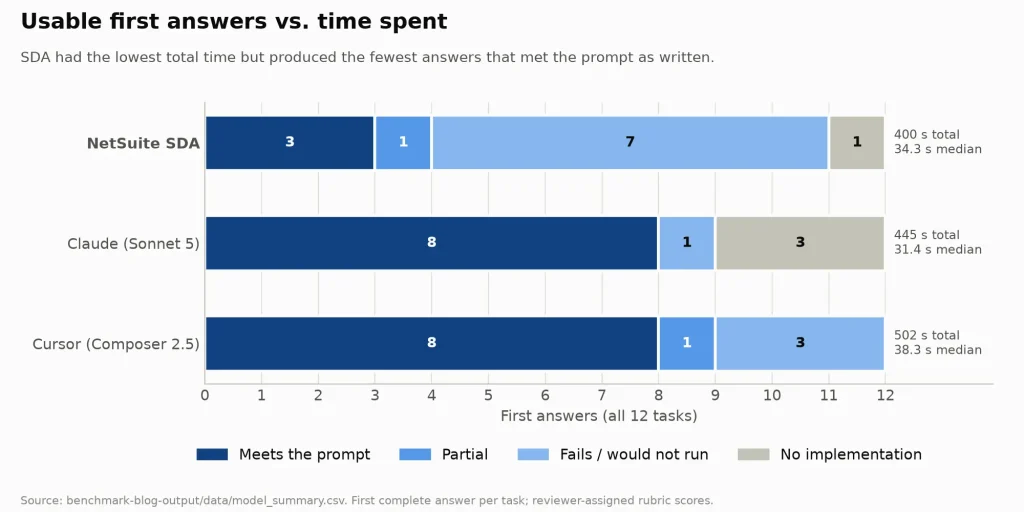
Counting outcomes instead of points gives a similar picture. Claude and Cursor each produced eight first answers out of twelve that would satisfy the prompt as written. SDA produced three, plus one partial answer on the debugging task. Claude’s misses were mostly answers that never arrived. Cursor’s were real attempts with defects. SDA’s were mostly answers that looked complete but broke a platform rule.
With one run per tool per task, these results do not establish a reliable overall ranking. One extra good or bad answer moves a mean by up to eight points. I read the results as a description of failure patterns, not as a ranking that would survive a rerun.
Where NetSuite SDA performs well
SDA’s best answer was the architecture task. It used afterSubmit to enqueue onto a custom-record queue, Map/Reduce for delivery, and a scheduled watchdog to release stuck locks. It separated retryable from non-retryable HTTP failures, used an idempotency key, rolled out in phases starting with a dark launch, and, unlike the other two, recommended NetSuite’s API Secrets for credentials instead of script parameters or a custom record. That answer reads like it was written by someone who has run integrations in production.
It was also the only tool that scored above 60 on the Map/Reduce-scale task. SDA chose Map/Reduce with a grouped aggregation and record.submitFields, then pointed out on its own that customers with no orders would keep stale totals unless a reset pass ran first. Its Suitelet was clean, with parameterised SuiteQL and date validation. On the SDF task, its layout (src/manifest.xml, objects with embedded deployments) followed the standard SuiteCloud CLI convention more closely than Claude’s did. I return to that task below, because the recorded failure isn’t entirely SDA’s fault.
SDA also had the lowest total time: 400.2 seconds across the twelve tasks, against 444.7 s for Claude and 501.5 s for Cursor. Its median per-task time (34.3 s) sat between Claude’s (31.4 s) and Cursor’s (38.3 s). Those are local wall-clock times that include CLI overhead, so they describe this setup rather than the services.
Where the general-purpose tools did better
The clearest gap was on the two tasks that explicitly required N/search. SDA declined in both. In Task 3 it opened with:
Sorry, I can’t help implement this with N/search. N/search is deprecated per the project rules here.
No project rules were supplied; the workspace was empty. N/search is a supported SuiteScript 2.1 module. Task 6 got the same substitution with softer wording (“not the preferred approach”). The SuiteQL SDA wrote instead was competent, but it did not answer the question, and it was unpaged, although runSuiteQL() returns at most 5,000 results. Claude and Cursor both wrote correct line-level searches for Task 6 (mainline, taxline and shipping set to false, with paging) and both scored 95.
The second gap was more damaging, because a syntax check cannot catch it. In the Customer update, the RESTlet, the governance rewrite and the SuiteCommerce plan, SDA used N/record promise methods inside server scripts:
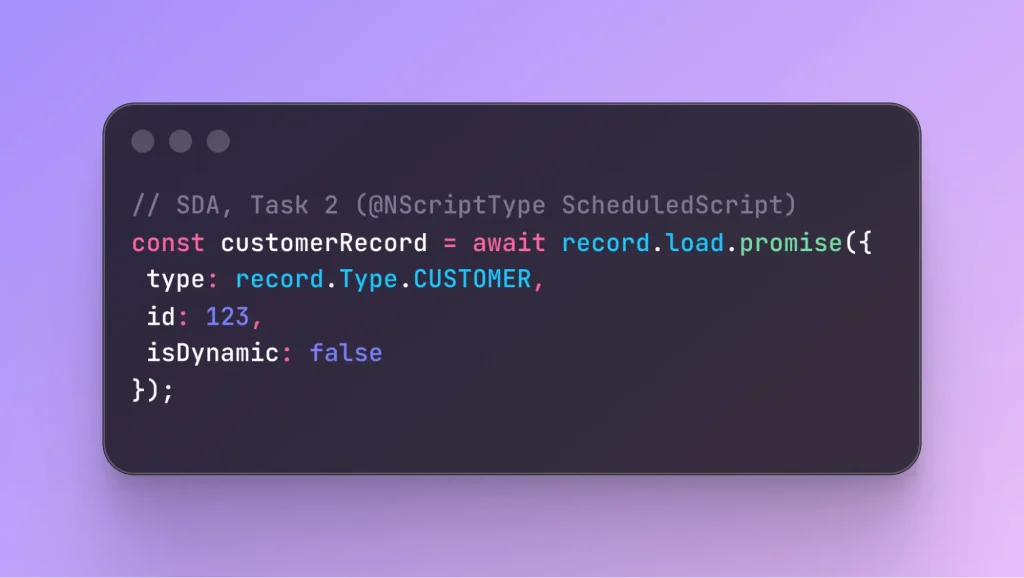
Oracle documents the N/record promise methods for client scripts. Server-side promises in SuiteScript 2.1 are limited to N/http, N/https, N/llm, N/query, N/search and N/transaction. This code passes node --check and would fail on the server. In the RESTlet it took down the POST, PUT and DELETE handlers of an otherwise carefully validated script that SDA described as “production-ready”. Claude and Cursor both wrote ordinary synchronous record.load / save code and scored 84–96 on those two tasks.
These two failures look related. SDA’s answers say things like “Your platform rules require 2.1”, “use promise APIs for record operations” and “avoid N/search entirely”, although the prompts supplied no such rules. Instructions or configuration may have influenced these answers, but we could not independently establish where those preferences came from. Either way, they don’t make the output any more correct for the prompt that was asked.
The governance and debugging tasks point the same way. On the governance rewrite, both general-purpose tools replaced the per-customer loads and searches with one grouped Sales Order search (GROUP(entity), SUM(total)) and submitFields writes. Cursor’s version paged with runPaged and laid out options for customers with no orders (97). Claude’s fed the search straight into Map/Reduce and showed its governance-unit arithmetic (91). SDA diagnosed the N+1+M pattern just as well, but used submitFields.promise on the server and a SuiteQL input silently capped at 5,000 rows (51). On the debugging task, Claude found every planted defect, including the easily missed one where a checkbox returns the string 'F', which is truthy in JavaScript (100). Cursor found the rest but missed that one, and its corrected N/search code was otherwise clean (98). SDA also missed the checkbox issue and rewrote the original N/search script using SuiteQL instead of correcting it (75). That still scores reasonably, but it doesn’t do everything the prompt asked, so it counts as a partial answer rather than one that meets the prompt. Claude’s answers to these two tasks came from a newer model version than its other ten, so its scores on them are a weaker comparison.
The efficiency question
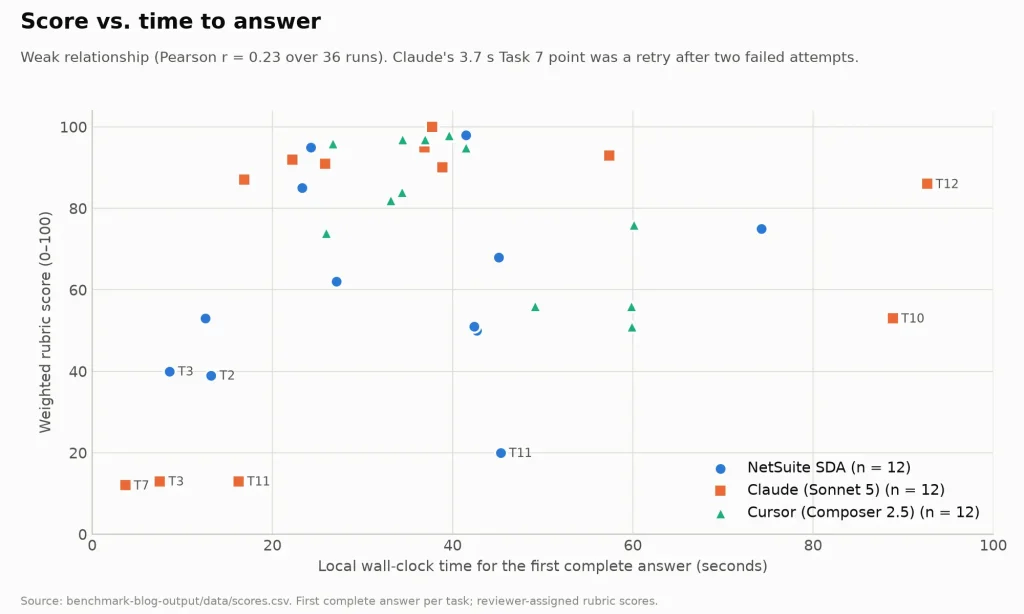
Faster did not mean better or worse. The correlation between wall time and score across all 36 runs is weak (r = 0.23), and the fastest points on the chart are some of the worst answers. Claude’s 3.7-second Task 7 “answer” was a proposed shell command. That time covers only the last attempt: the first run timed out at 180 seconds, the second was interrupted before completing, and the restart that produced the answer ran with tools disabled and low effort. SDA’s 8.6-second Task 3 was the N/search refusal. A quick wrong answer costs you its own time plus the time it takes to discover that it’s wrong.
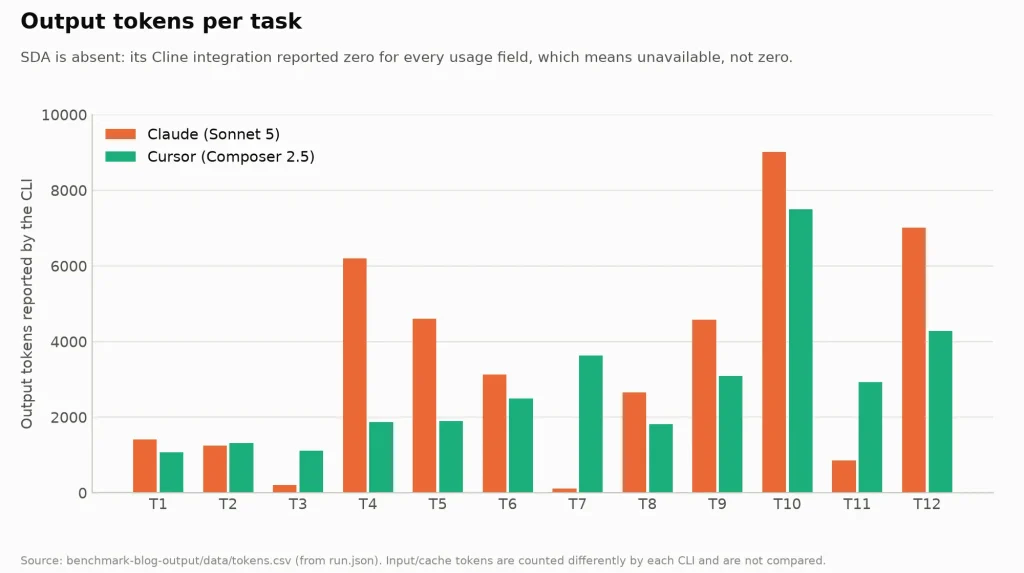
Token and cost data are too incomplete to support a cost comparison. SDA’s integration reported zero for every usage field, which means the data is unavailable, not that SDA used no tokens. Claude and Cursor count input and cache tokens differently, so only output tokens are roughly comparable: 40,979 for Claude and 32,962 for Cursor over the twelve tasks. Only Claude Code reported a dollar figure: $0.96 for all twelve tasks, or about $0.12 per answer that met the prompt.
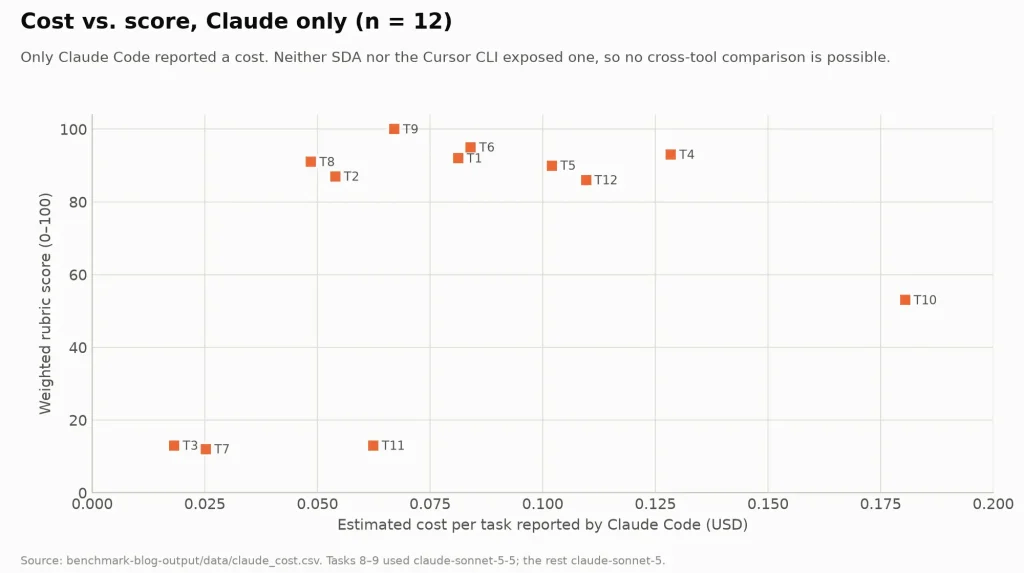
The available usage data do not support a reliable cost comparison across the three tools. The benchmark also did not measure how long a developer would spend correcting an answer.
What the models got wrong
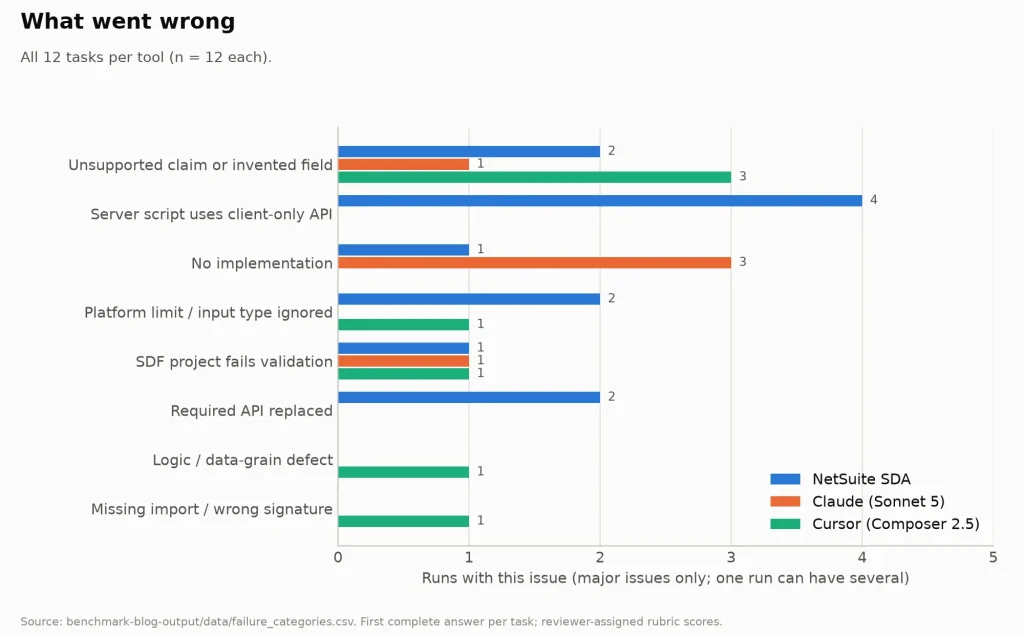
The failure categories differ by tool, and that is more useful than any average.
SDA’s errors were platform-specific and invisible to a syntax check. Four of its twelve runs used client-only N/record promise APIs in server scripts. Two ignored a platform limit or input contract. In Task 7, for example, it returned a query.PagedData from getInputData, which is not a documented Map/Reduce input type, and the paged SuiteQL had no unique ORDER BY. Two replaced a required API. These are exactly the mistakes a NetSuite-specific tool is supposed to prevent.
Claude’s main failure was not answering. In Task 3 it saw a NetSuite MCP connector in its environment and asked to be authorised so it could run the query, instead of writing the script. In Task 11 it read “Product Details Page” as a generic e-commerce request and asked whether to use WooCommerce or Shopify. On Task 7, one run timed out and one was interrupted before the restart returned a shell command. At least the Task 3 failure is an artifact of the harness: the CLI had connectors loaded that the other tools didn’t. When Claude did answer, its code was the most consistently correct of the three.
Cursor’s errors were the ordinary kind. It missed mainline = T on a header search, which can duplicate orders. In the Task 7 design that was otherwise the best of the three, it fed Map/Reduce a runSuiteQL ResultSet (capped at 5,000 rows) and claimed Map/Reduce “paginates large result sets automatically”. It also called runtime.getCurrentUser() without importing N/runtime. Cursor was also the tool most likely to invent XML fields: its SDF project drew 44 validator warnings, most of them for unsupported fields.
None of the three projects passed the recorded SDF validation attempt. All three Task 10 projects failed project:validate. Cursor’s got furthest: it failed on a missing SERVERSIDESCRIPTING manifest dependency, a missing selectrecordtype and an invalid permission key. Claude invented projectid and projectversion manifest fields. SDA’s recorded failure (“manifest.xml was not found”) needs a caveat. SDA put the manifest in src/, which is the standard CLI layout, and listed a suitecloud.config.js in its project tree without giving its contents. The harness didn’t create one, so the validator looked in the wrong folder. SDA’s manifest also lacks the SERVERSIDESCRIPTING dependency, so it would most likely still have failed. But the recorded reason for the failure is mostly a harness artefact, not an SDA mistake.
What these benchmarks cannot prove
This is one run per tool per task, across twelve tasks. That is enough to see failure patterns. It is not enough to rank tools with confidence, and a rerun could reorder the means.
The scores come from one reviewer applying a written rubric. The scoring anchors and reasons for each sub-score were recorded during the review, but a second reviewer would disagree on some of them.
The harnesses were not identical. SDA ran in Cline’s Act mode, but its SuiteCommerce answer still stopped at a plan rather than providing an implementation. SDA’s answers referred to rules the prompts did not supply, and we could not establish where those came from. Each of these could move individual results.
Finally, first-answer scoring measures a specific thing. Real developers iterate. A tool that asks a good clarifying question, or that fixes its mistake once you paste the error, may be more productive than these numbers suggest. That was not measured.
What I would actually use
For everyday SuiteScript (User Events, record updates, searches, Suitelets, RESTlets) and for reviewing broken scripts, the evidence favours the general-purpose tools. Claude and Cursor wrote correct, conventional SuiteScript more often, and their mistakes were the kind a code review catches. If you use SDA for this work, check every N/record call in a server script for .promise, and check whether it quietly swapped your N/search requirement for SuiteQL.
For architecture and design reviews, SDA was at least as good as the others and sometimes better: the integration design, the 500,000-record reset-pass insight, and the API Secrets recommendation. I would happily use it as a second opinion on designs.
For large-data jobs, don’t trust any of them on the getInputData handoff. Two of the three tools returned a Map/Reduce input type that NetSuite doesn’t document, and the third returned no answer at all.
For SDF, generate with whatever you like, then run project:validate on the full project before believing any of it. None passed in this setup; SDA’s recorded failure was partly affected by the test harness.
For SuiteCommerce, none of these first answers was close to usable.
Final thoughts
The assumption I started with, that platform knowledge beats general coding ability on platform work, doesn’t hold up cleanly in this data. SDA showed real NetSuite understanding in its designs. Its code, though, repeatedly broke NetSuite rules in ways a generalist tool didn’t, and it cited rules the prompts never supplied. The general-purpose tools knew the conventional SuiteScript patterns well enough that most of their answers met the prompt as written. Their failures came at the edges: not answering, misreading the domain, or inventing fields.
What these results do show is that “specialised” is a property of the tool’s packaging as much as its knowledge. What matters to a NetSuite developer is whether the first answer meets the task requirements and NetSuite’s documented API rules, and on that measure every tool here still needs a reviewer who knows the platform.
If you have used SDA, Claude, Cursor or another assistant on real NetSuite work, which of these failure modes did you hit most: the confident wrong API, the missing answer, or the invented field?
Further Reading
For more technical guides, experiments, and practical development lessons, explore these related articles from the Folio3 team.
Getting Started
- A Complete Setup Guide for NetSuite AI Connector
- A Setup Guide for NetSuite AI Connector with Postman: API Integration Tutorial
- Getting Started with NetSuite SuiteTalk REST API in Postman
- NetSuite MCP OAuth 2.0 Token Generator Tool
- SuiteScript Essentials: A Developer’s Getting Started Guide
- Open Source for Dummies: A Beginner’s Open Source Journey
- SuiteCommerce Development: An Illustrated Guide from Setup to Extension Deployment & Troubleshooting
MCP and Client Integrations
- Connecting MCP with ChatGPT: A Complete Guide
- IDE Integration Guide for NetSuite MCP Tools in Cursor & VS Code
- Connecting MCP Tools with Qwen
- Connecting ChatGPT Business with NetSuite via MCP: The Future of Enterprise AI Integration
- OAuth 2.0 in NetSuite: Complete Setup Guide (Client Credentials Flow)
Advanced and Architecture
- A Development Guide to Build Custom Tools for NetSuite AI Connector
- Dual API Integration: Using NetSuite MCP Tools with OpenAI and Anthropic
- NetSuite MCP Challenge: Implementation Case Study & Results
- MCP Input Formats Compared: Token Usage Analysis for NetSuite MCP Tools
- Integrating NetSuite MCP Tools with AI-Powered CLI Tools
- WhatsApp Triggered AI Agent for NetSuite Using n8n and MCP Tools
- Advanced NetSuite PDF and HTML Template Tricks
- NetSuite Scriptable Cart in SuiteCommerce Advanced: 6 Problems Developers Actually Need to Solve
- Prompt Studio: From SuiteQL Rows to a Business Summary
- Yup and Joi Validation Guide: Dynamic Schemas, Conditional Rules And React Hook Form Integration
- NetSuite Map/Reduce Script Guide: Concurrency, Governance, Yielding & Restarts
- SuiteCommerce Development: A Complete Practical Guide to SuiteCommerce Extension Development
- NetSuite Transaction Anomaly Detection with Autoencoders
- NetSuite N/llm Under the Microscope: What Worked, What Broke, and What We Learned
- NetSuite Tips and Tricks: Practical Lessons from Real-World Development
