
We built a debugging assistant inside NetSuite to see what N/llm really does under pressure, and what broke along the way.
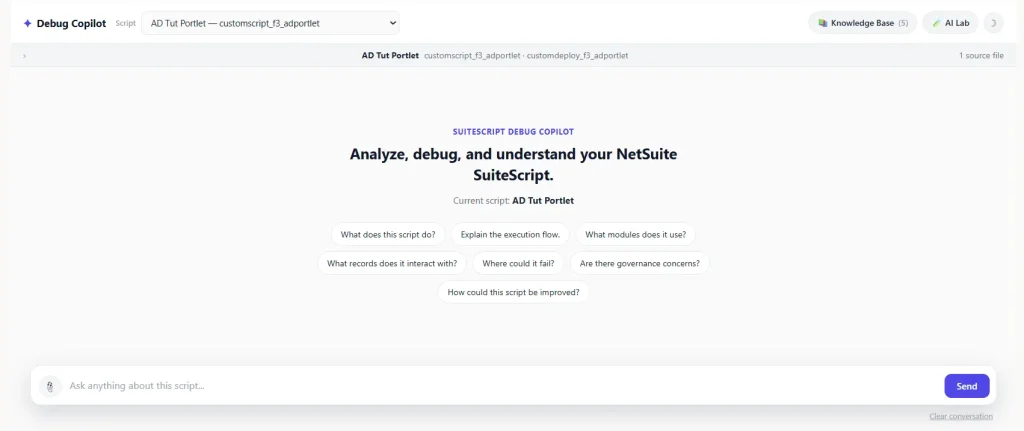
NetSuite’s N/llm module comes with an impressive list of capabilities: generating text, creating embeddings, grounding responses in documents, calling tools, processing images, and working with Prompt Studio. On paper, that is a lot of AI packed into SuiteScript. But documentation tells you what a feature is designed to do; it does not always tell you what happens when you give it a 60,000-character script, a long conversation, a semantic cache, live NetSuite data, and a developer who keeps asking, “Okay, but what happens if I do this?”
That is exactly what we set out to investigate.
We built a SuiteScript Debug Copilot in a real NetSuite account and used it as our test bench. There was no external vector database and no separate AI microservice. The application used a Suitelet, the File Cabinet, custom records, and N/llm to handle the AI workflow. We then pushed each capability beyond a simple demo to see where it held up, where it needed engineering around it, and where it behaved differently than expected.
Some features worked as expected. Others worked, but only with specific constraints. A few failed in our account strongly enough to become their own investigation. And a handful of the most useful findings came from testing our own code, not from the platform.
Testing note: N/llm behavior can vary by account, configuration, model availability, permissions, and platform version. Throughout this article we distinguish between documented NetSuite capabilities, our implementation choices, and behavior we observed in our account. Account-specific findings should be re-verified before being treated as universal limits.
Companion code: every claim in this article can be re-run. The Suitelet, deployment objects, setup guide and 63 automated checks are in the companion GitHub repo.
The short version
- Tool calling: we built two ways to fetch live NetSuite data. In the first, our own code decides when to fetch it. In the second, the model decides, and that is what N/llm tool calling actually means. Only the second counts as tool calling, and in our account it needed extra model calls and failed on long prompts, so we kept the first as the default.
- RAG: citations only cover content passed as documents. Anything you paste into the prompt is invisible to them.
- Semantic cache: the right similarity threshold is something you measure. Ours ended up at 0.69, and we show the numbers.
- Contextual safety, streaming, and long prompts: each broke a working pipeline in our account in a different way.
- Vision and Prompt Studio: both work, but each quietly bypasses most of the pipeline around it.
- Telemetry: the “N/llm this turn” panel turned vague AI failures into engineering problems, and it also helped us catch our own bugs.
What Is NetSuite N/llm?
N/llm is the SuiteScript module for calling supported large language model capabilities from NetSuite applications. Depending on the supported model and configuration, developers can work with text generation, embeddings, document-grounded responses, tool calling, structured output, image inputs, and Prompt Studio prompts. A few terms used throughout this article:
- Embedding: a vector that represents the meaning of a piece of text, produced by llm.embed().
- RAG (retrieval-augmented generation): passing reference documents to the model with llm.createDocument() so answers can be grounded and cited.
- Tool calling: the model decides to call a function you described with llm.createTool(), and your code runs it.
- Prompt Studio: NetSuite’s UI for managing prompts, called from code with llm.evaluatePrompt().
The chatbot itself was never really the point of this project. NetSuite already provides chatbot-style experiences. Our goal was different: to understand what happens when N/llm becomes one component inside a real SuiteScript application, where prompt size, source files, conversation history, caching, live data, permissions, and error handling all interact. That required something more useful than an API demonstration. We needed a test bench.
Our NetSuite N/llm Test Bench
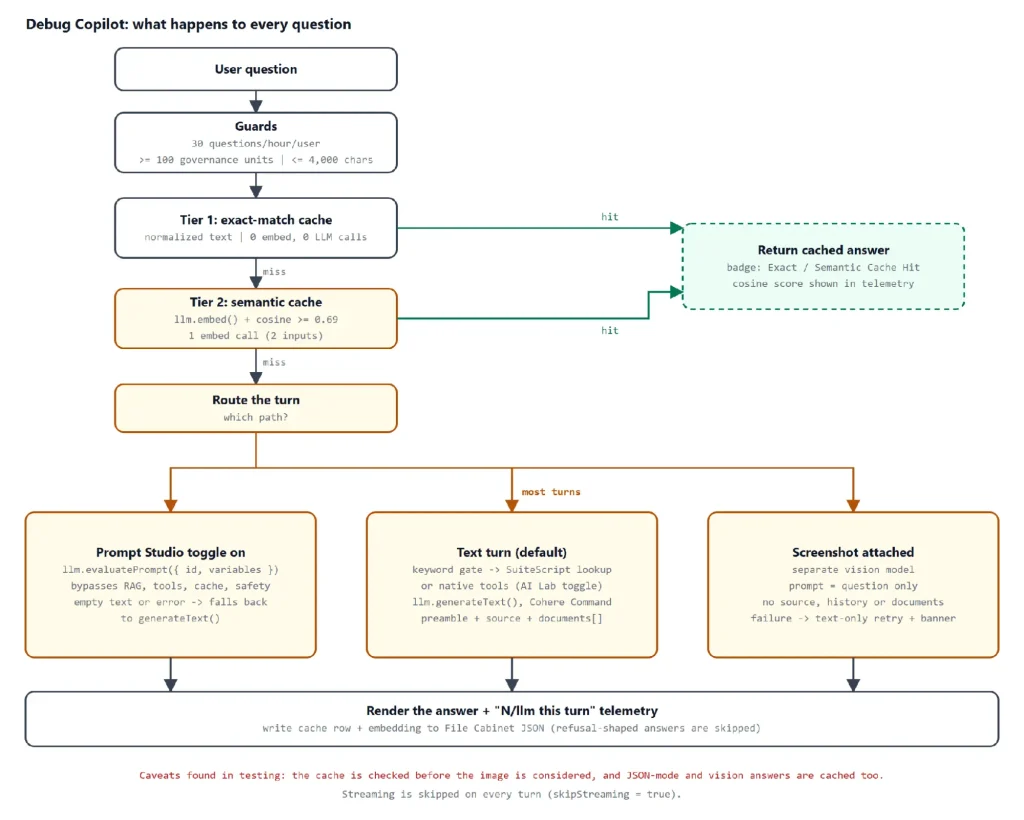
The Debug Copilot is a single Suitelet. You pick a deployed script, ask questions about it, and get answers grounded in that script’s real source. Supporting state lives in two custom records (cached Q&A and Knowledge Base documents) and JSON files in the File Cabinet. Every question follows the same path:
Step 1: Guards. The code rejects the request if the user has asked more than 30 questions this hour, if fewer than 100 governance units remain, or if the message is longer than 4,000 characters.
Step 2: Exact-match cache. The question is normalized (case, whitespace, trailing punctuation) and compared with earlier questions for the same script. A hit costs no embedding and no LLM call.
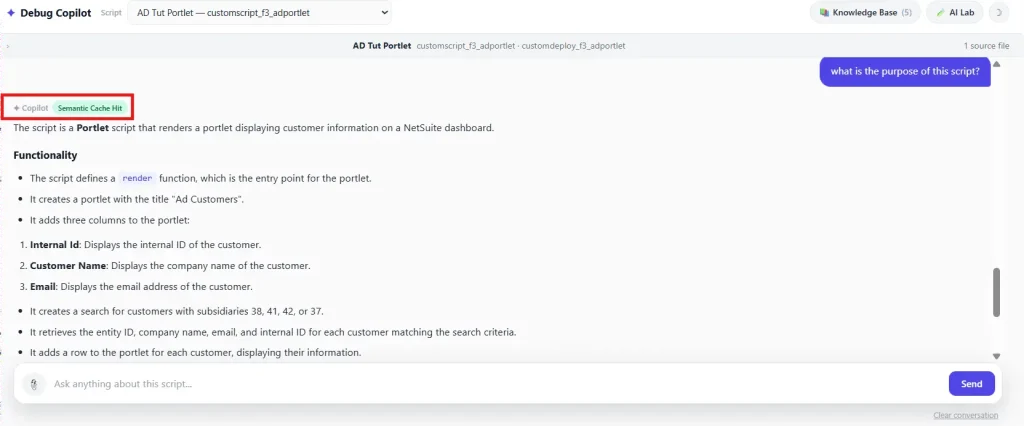
Step 3: Semantic cache. On a miss, llm.embed() turns the question into a vector and cosine similarity compares it with stored vectors. At 0.69 or higher it is a hit.
Step 4: Route the turn. If the Prompt Studio toggle is on, the turn goes to llm.evaluatePrompt(). If a screenshot is attached, it goes to the vision model. Otherwise it is a normal text turn.
Step 5: Build the prompt. A text turn combines a preamble, the script source (up to 60,000 characters), a trimmed conversation transcript, and, depending on the question, live data or Knowledge Base documents.
Step 6: Generate, render, and cache. llm.generateText() produces the answer, the page shows it with its telemetry, and the answer is written to the cache unless it looks like a refusal.
Every response also gets an “N/llm this turn” panel. It records the API and model used, prompt and completion tokens, embedding similarity, the semantic-cache cosine score, safety and JSON settings, documents and tools offered, citations, Lab Notes, and the AI units remaining. Think of it as a dashcam for every AI request. It let us inspect how an answer was produced rather than judging the final text alone.
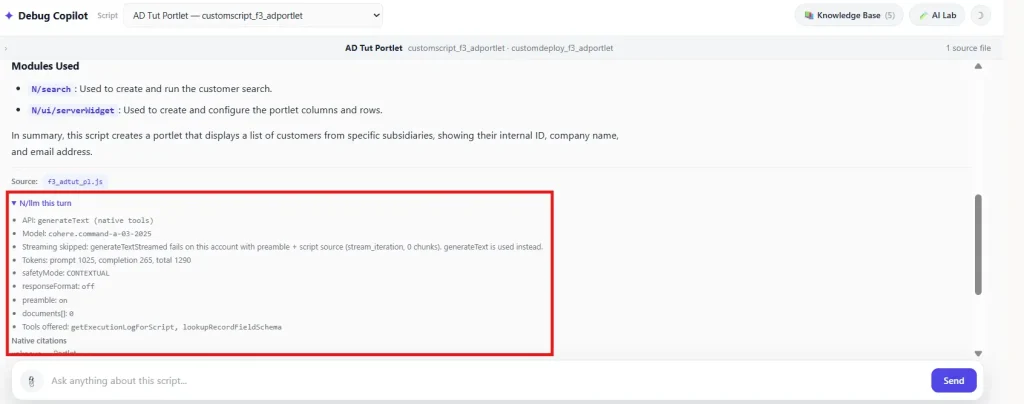
The numbers in this panel are useful on their own. On a Knowledge Base turn (five documents, one source file) the same panel showed 4,698 prompt tokens and 345 completion tokens (5,043 total), against 1,290 tokens for the native-tools turn above, which sends no documents. That gap is roughly what you would expect from adding about 13.5 KB of reference documents to a prompt, and it is a good reminder that RAG is not free.
Code example: the core generateText() request (simplified from buildTextOnlyOptions)
const options = {
  prompt: promptText,                       // source + live data + transcript + question
  modelFamily: llm.ModelFamily.COHERE_COMMAND,
  modelParameters: { maxTokens: 1200, temperature: 0.2 },
  preamble                                  // stable role + rules, kept out of the prompt
};
if (documents.length) options.documents = documents;          // Knowledge Base (RAG)
if (useSafety) options.safetyMode = llm.SafetyMode.CONTEXTUAL; // off by default
if (useJson)   options.responseFormat = STRUCTURED_RESPONSE_FORMAT;

const response = llm.generateText(options);
// response.text, response.citations, response.usage, response.model
Code example: the cache-first flow in handleAsk
// Steps 1-3 of handleAsk, condensed
if (message.length > MAX_MESSAGE_LENGTH) { /* notice, stop */ }
if (runtime.getCurrentScript().getRemainingUsage() < MIN_GOVERNANCE_UNITS_REQUIRED) { /* notice, stop */ }
if (!checkRateLimit()) { /* 30 per hour per user */ }

let cached = findExactCachedAnswer(question, scriptId, contextHash);   // no embed, no LLM
if (!cached) {
  const embeddingResult = llm.embed({
    embedModelFamily: llm.EmbedModelFamily.COHERE_EMBED,
    inputs: previousQuestion ? [previousQuestion, question] : [question],
    truncate: llm.Truncate.END
  });
  cached = findSemanticCachedAnswer(questionEmbedding, scriptId, contextHash);
}
// no hit: route to evaluatePrompt, vision, or generateText, then write the cache
Which Models Did We Test?
Our implementation used Cohere Command as the default text-generation model (the panel above reports cohere.command-a-03-2025), with additional handling for another model family and a separate vision-model path.
| Model | RAG | JSON schema | Notes |
|---|---|---|---|
| Cohere Command | Yes | Yes | Default text model. Embeddings use Cohere Embed (COHERE_EMBED). |
| GPT-OSS | No | No | Selectable in the AI Lab. If the family is missing from llm.ModelFamily, the app falls back to Cohere and says so in Lab Notes. |
| Vision model | N/A | N/A | Separate path for image requests: COHERE_COMMAND_A_VISION, else COHERE_COMMAND_VISION. The model dropdown is ignored on those turns. |
For text requests we configured a temperature of 0.2 and a maximum of 1,200 tokens. That limit applies to output tokens only: it caps how long the answer can be, not how large the prompt can be. Vision requests used a maximum of 800 tokens. We also captured response.usage, response.model, and response.citations where available so the test bench could report more than the generated answer. The cache is scoped per model, so an answer generated by one model is never served as if another produced it.
NetSuite N/llm Tool Calling: Who Actually Decides?
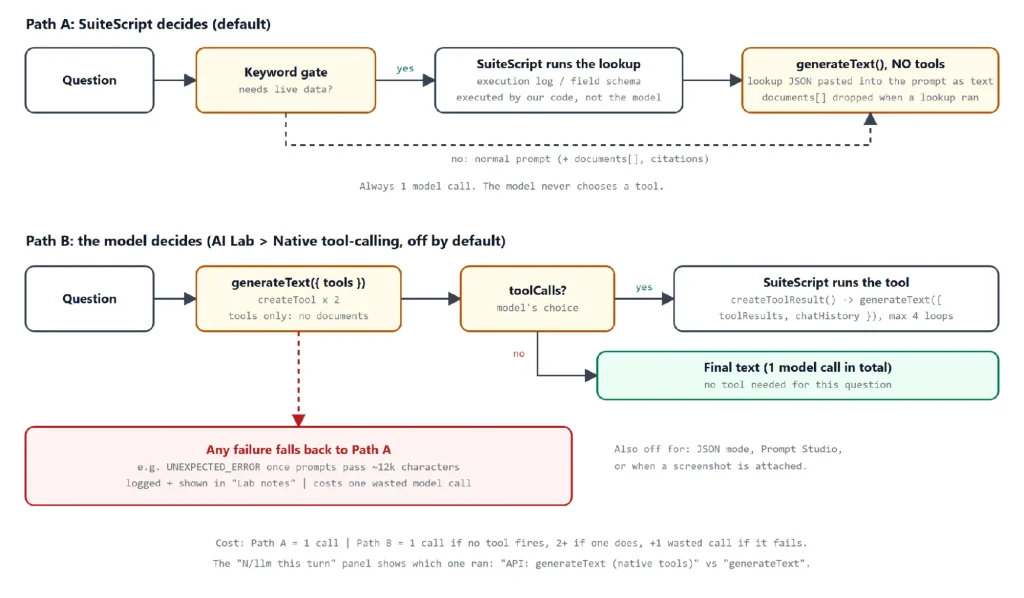
Tool calling was the part that confused us most, so it is worth being precise. Our Debug Copilot has two completely different mechanisms that both fetch live account data (execution logs and record field schemas). Only one of them is N/llm tool calling.
| Path A: SuiteScript decides | Path B: the model decides | Cost | |
|---|---|---|---|
| Status | Default. Always on. | Experimental. AI Lab toggle, off by default. | Path A: one model call. |
| Who decides? | A keyword list in our code. | The model, via toolCalls. | Path B: one call if no tool fires, two or more if one does. |
| N/llm API | generateText() with no tools option. | createTool, generateText({ tools }), createToolResult. | A failed Path B attempt wastes one call before Path A runs. |
| Documents | Dropped when a lookup runs. | Never sent in the same call. |
Path A: the keyword path
Our first “tools” implementation used keyword matching to decide whether to run SuiteQL, then pasted the result into the prompt as text. That is useful application logic, but it is not N/llm tool calling because the model never gets to decide whether anything runs. We removed a “Tools” switch from the UI for exactly that reason: the rule became that if a switch claims to enable AI functionality, it has to touch the AI workflow.
Testing this path against the real code turned up three problems worth sharing:
- Substring matching is too loose. The check for log also matches “logic” and “catalog”, so “Explain the logic of this script” triggers an execution-log lookup. “truncate” and “runtime” trip the gate through run.
- Two keyword lists disagree. One list decides whether to treat a question as needing live data; a second, shorter pattern decides what to fetch. Words such as “fail”, “ran”, “run”, “deploy” and “recent” pass the first list but match nothing in the second. For “Why did this script fail?” the Copilot dropped the Knowledge Base documents to save prompt space and then fetched nothing. The “Where could it fail?” suggestion chip does the same.
- A silent default. inferRecordTypeForSchema falls back to salesorder when it cannot tell which record the user means, which can hand the model the wrong schema.
Code example: LIVE_DATA_KEYWORDS and the fetch patterns that disagree with it
const LIVE_DATA_KEYWORDS = [
  'error', 'errors', 'exception', 'failure', 'failed', 'fail',
  'log', 'logs', 'execution log', 'executed', 'ran', 'run',
  'deploy', 'deployment', 'recent', 'latest', 'last run', 'happened',
  'field', 'fields', 'schema', 'record type', 'record metadata',
  'field metadata', 'lookuprecordfieldschema', 'sublist'
];
const questionNeedsLiveTools = (q) =>
  LIVE_DATA_KEYWORDS.some((k) => String(q).toLowerCase().indexOf(k) !== -1);

// ...but what is actually fetched is decided by a second, different pattern:
if (/error|exception|log|latest|last run|happened/.test(lower)) { /* getExecutionLogForScript */ }
if (/field|schema|lookuprecordfieldschema|sublist/.test(lower)) { /* lookupRecordFieldSchema */ }
Path B: native N/llm tool calling
We then added genuine createTool / toolCalls support as a separate experiment, isolated so a failure could never break the working path. The model receives two tools (getExecutionLogForScript and lookupRecordFieldSchema), decides whether to call one, our code runs it, and createToolResult hands the output back for a second generation. The loop is capped at four iterations, and it runs without documents so that any failure can be pinned on tool calling alone. It is switched off in JSON mode, with Prompt Studio, and when a screenshot is attached.
Code example: createTool() and createToolParameter()
llm.createTool({
  name: 'getExecutionLogForScript',
  description: 'Retrieves recent execution log entries (scriptnote) for the currently selected script ...',
  parameters: [
    llm.createToolParameter({ name: 'limit', description: 'Max number of log entries (1-100, default 20)', type: 'STRING' })
  ]
})
// a second tool, lookupRecordFieldSchema, takes recordType and an optional fieldId
Code example: the native tool-call loop (attemptNativeToolCalling)
let response = llm.generateText({ prompt, preamble, modelFamily, tools,
  modelParameters: { maxTokens: 1200, temperature: 0.2 } });
let iterations = 0;
while (response.toolCalls && response.toolCalls.length && iterations < MAX_NATIVE_TOOL_ITERATIONS) {
  iterations += 1;
  const toolResults = response.toolCalls.map((call) => {
    const outputs = executeNamedTool(call.name, call.parameters || {}, state);   // our code runs it
    return llm.createToolResult({ call, outputs });
  });
  response = llm.generateText({ modelFamily, tools, toolResults, chatHistory: response.chatHistory });
}
In our account, generateText({ tools }) threw UNEXPECTED_ERROR once prompts reached roughly 12,000 characters, or when the model actually had to emit a call. Our real debugging prompts routinely exceed that size, which is why native tool calling is opt-in. It does work on small prompts: the panel earlier in this article shows a native turn on a small script completing normally.
Code example: the fallback to Path A
try {
  nativeAttempt = attemptNativeToolCalling({ promptText, preamble, modelFamily, state });
} catch (nativeErr) {
  log.error({ title: 'Debug Copilot - native tool-calling failed, falling back to SuiteScript keyword prefetch', /* ... */ });
  featureNotes.push('Native N/llm tool-calling attempt failed (...) - fell back to SuiteScript keyword prefetch.');
  nativeAttempt = null;   // Path A runs next
}
The fallback is not hidden. It is written to the execution log and shown in the Lab Notes panel. Two details about cost, which we verified by running the real code against mocked N/llm calls: a native turn where the model chooses not to call a tool needs only one model call, and a failed native attempt costs one wasted call before Path A answers. So the keyword path is the cheaper one, and native tool calling is the one that needs the safety net.
What we learned: Calling something a “tool” does not make it AI tool calling. The important distinction is whether the model participates in deciding when the tool runs, and what that decision costs you in calls, prompt size, and failure modes.
NetSuite N/llm RAG: Grounded Answers and Citations
Retrieval-augmented generation was another capability we wanted to test inside a real application rather than a standalone example. Our Knowledge Base uses createDocument, passes documents through the documents option, and reads citations from response.citations.
The implementation includes four built-in documents (SAFE guide, OWASP secure coding, records reference, and roles and permissions) totaling about 13.5 KB, plus .txt and .md uploads of up to 200 KB each (20 uploads, and at most 12 documents sent per turn). PDFs, DOCX files, and images are deliberately rejected because our implementation has no text-extraction path for them. The document set is part of the cache context hash, so adding or removing a document never lets an older answer be reused as if it had considered the new one.
Code example: createDocument(), the documents option, and response.citations
const doc = llm.createDocument({
  id: 'safe_guide',
  data: file.load({ id: 'SuiteScripts/debug-copilot/knowledge/safe_guide.txt' }).getContents()
});
options.documents = [doc /* , ...active uploads, up to 12 total */];

const response = llm.generateText(options);
const citations = (response.citations || []).slice(0, 8).map((c) => ({
  documentIds: c.documentIds || [], text: c.text || '', start: c.start, end: c.end
}));
The most important discovery was the distinction between document content and prompt content. Our script source is inserted directly into the prompt. Knowledge Base content is passed through the document mechanism. As a result, native citations point to the Knowledge Base documents but never to the script itself. That caused an early “Source: unknown” issue: the answer clearly used the script while the citation system had no document to point at. We now show the loaded source files separately, as “Source” chips on each answer.
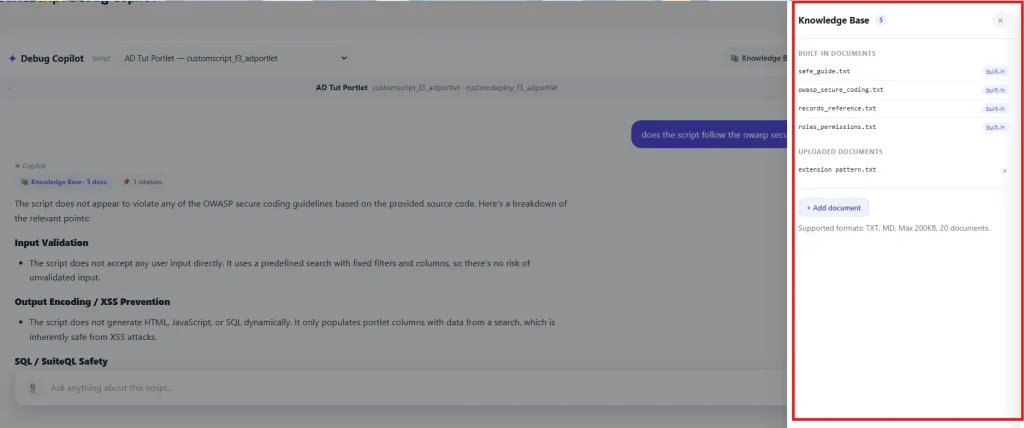
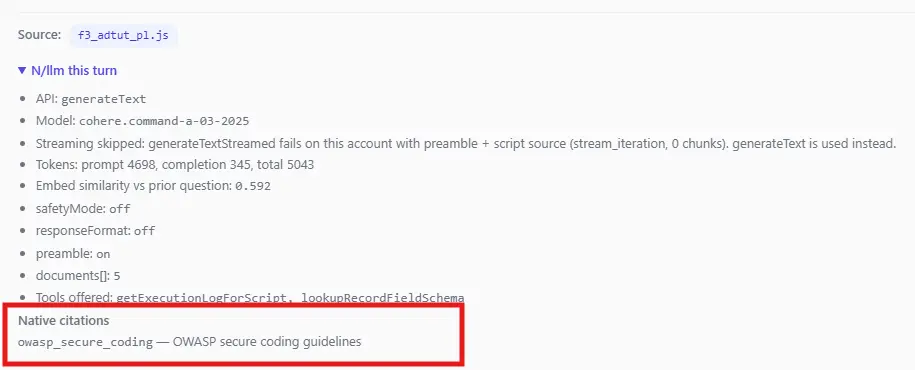
One more RAG detail: when a question triggers the live-data path, documents[] is skipped for that turn to keep the prompt smaller, so those answers carry no citations. In our account the RAG path was also tied to the supported model configuration (GPT-OSS cannot use it), so model selection became an architectural consideration, not just a dropdown.
What we learned: RAG citations only know about content passed through the document mechanism. Content that you simply inline in a prompt is not automatically part of the citation system.
NetSuite N/llm Embeddings and Semantic Caching
Semantic caching looked straightforward at first: generate an embedding for the incoming question, compare it with previous questions, and reuse an answer when the similarity is high enough. The hard part was deciding what “high enough” means in a real application.
We implemented two levels. The first normalizes case, whitespace, and trailing punctuation and gives an exact-match path with no embedding and no LLM call. If that misses, the second calls llm.embed() and compares the result with stored vectors using cosine similarity. Both levels are scoped to the same script, the same Knowledge Base state, and the same model.
Storage added a practical constraint. Our vectors exceed the 4,000-character TEXTAREA limit, and LONGTEXT was rejected by our SDF approach, so the vectors live in one JSON file per script in the File Cabinet. The cache scans the 200 most recent rows and loads that JSON on each lookup. The threshold then became an empirical question:
| Threshold | Outcome in our testing |
|---|---|
| 0.90 | Rejected genuine paraphrases. |
| 0.86 | Still rejected some paraphrases. |
| 0.69 | Deployed threshold. |
Two real question pairs drove this. “What does this script do?” against “What is the purpose of this script?” scored about 0.791. A looser rewording scored about 0.692, measured against the immediately preceding question. The data suggested a threshold near 0.78 could have been reasonable for the first pair, but that value was never deployed, so we do not treat it as a validated production threshold. At 0.69 the margin against genuinely different questions about the same script is unverified, so every lookup logs its best score, hit or miss, to be watched and tuned.
Code example: cosine comparison, threshold, and cache telemetry
const cosineSimilarity = (a, b) => {
  let dot = 0, magA = 0, magB = 0;
  for (let i = 0; i < a.length; i += 1) { dot += a[i] * b[i]; magA += a[i] * a[i]; magB += b[i] * b[i]; }
  return dot / (Math.sqrt(magA) * Math.sqrt(magB));   // (length and NaN guards omitted)
};

const SIMILARITY_THRESHOLD = 0.69;
const hit = !!best && bestScore >= SIMILARITY_THRESHOLD;

// logged on EVERY lookup, hit or miss: this is the number to tune against
log.audit({ title: 'Debug Copilot - semantic cache lookup',
  details: JSON.stringify({ scriptId, rowsScanned: rows.length, bestScore, threshold: SIMILARITY_THRESHOLD, hit }) });
We hit two cache-specific problems along the way. First, a refusal answer was once served from the cache at a similarity of about 1.0. The match was technically perfect and the answer was still useless, so the implementation now skips caching refusal-shaped answers using a six-pattern blocklist. It is best effort: a refusal worded differently can still slip through. Second, JSON-mode answers can leak into normal text requests, because the cache context hash does not distinguish JSON mode. A cached JSON string can therefore be returned for a later question that expected ordinary text. We reproduced this against the real code, and it was still open in the tested build.
What we learned: Do not choose an embedding threshold because the number looks reasonable. Log the actual similarity scores, test real paraphrases, and tune the cache from observed behavior.
Contextual Safety: The Setting That Said “No” to Everything
safetyMode: CONTEXTUAL sounds purely beneficial. In our account it made every question return “I can’t determine that from the selected script’s source code,” even though diagnostic logging showed real source reaching the model: a 26,945-character prompt containing 21,767 characters of source across four files, none empty. We ruled out missing source, truncation, escaping, tool-loop context loss, and stale cache before suspecting the one remaining ingredient. Cohere’s safety mode is designed to make the model hedge when it is not confident a claim is grounded, and that is exactly the behavior we saw.
It is now an off-by-default toggle in the AI Lab, and scope control relies on the prompt instructions instead. It is also our favorite live demo, because one innocent parameter breaks a working pipeline.
NetSuite N/llm Vision: Promising, but Not Fully Verified
Image input was another capability we wanted to explore, because a debugging assistant could eventually benefit from understanding screenshots and on-screen errors. Our implementation accepts PNG and JPEG and routes image requests to a separate vision model. The browser caps uploads at 2 MB and the server handles up to about 3,000,000 base64 characters. The image is saved to the File Cabinet, and if the vision request fails the app retries the question as text-only and shows a banner saying the model did not see the image.
Code example: the vision generateText() call and text-only retry
const imageFile = saveVisionImageFile(imageData, imageType);   // fixed filename in SuiteScripts
const response = llm.generateText({
  prompt: visionPrompt,            // the question + "Describe what is on screen..."
  image: imageFile,
  modelFamily: visionFamily,       // COHERE_COMMAND_A_VISION, else COHERE_COMMAND_VISION
  modelParameters: { maxTokens: 800, temperature: 0.2 }
});
// on any error: log, retry the text-only options, and surface imageWarning:
// "The attached screenshot could not be processed (...). Continuing with text only - the model did not see the image."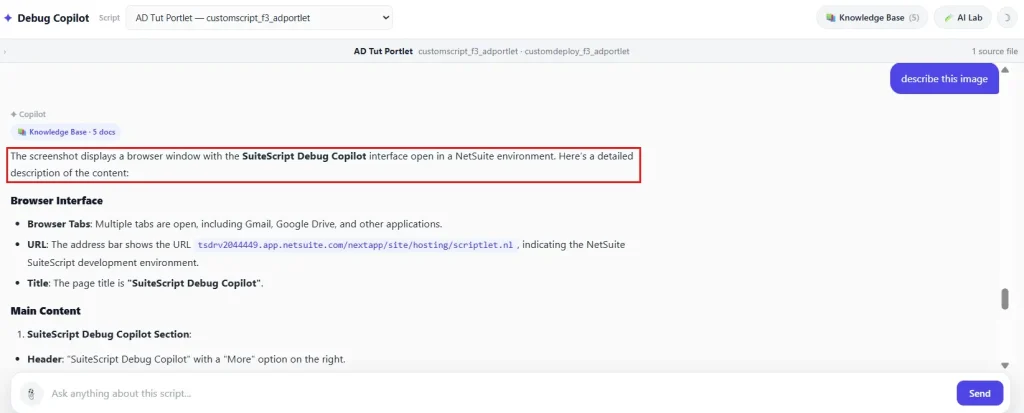
The vision path behaves very differently from a normal turn, and testing it against the real code showed why:
- It is a different request. The vision call carries only the question and a short instruction. It does not include the script source, the preamble, the conversation history, or the Knowledge Base documents.
- The telemetry overstates it. The panel still reports the Knowledge Base document count on a vision turn, even though no documents were sent. The app loads the documents at the start of every turn, before it knows a screenshot will take the vision path. The vision call then ignores them, but the chip still reports the count it loaded.
- The cache comes first. The cache is checked before the image is considered. Repeat an earlier question with a screenshot attached and the app returns the cached text answer without ever sending the image. Vision answers are also cached by question text alone.
- Image handling is blunt. An oversize image is cut to the size limit with substring instead of being rejected, which would corrupt it. Uploads reuse one filename, so a later upload overwrites an earlier one, and the screenshot stays in the File Cabinet.
Because the live behavior was not fully confirmed in our account, we classify vision as unverified rather than presenting the implementation as proof the feature works end to end. The model did return a description of the page in our test, but descriptions of on-screen details should be checked against the original image before you rely on them.
What we learned: Building an image-input path is not the same as proving that the model interpreted the image correctly, and an image path that quietly drops your source and history is a different feature from the one the rest of your app is tuned for.
NetSuite Prompt Studio and N/llm: Testing evaluatePrompt()
Prompt Studio offers a different kind of flexibility. Instead of hard-coding every instruction inside the SuiteScript application, we connected llm.evaluatePrompt({ id, variables }) to a Prompt Studio prompt used by the Debug Copilot. The practical advantage is that prompt wording can be edited and tested in the NetSuite UI without a code deployment.
We could not rely on documentation for the SDF object schema, so we did not guess it. We imported the account’s existing Prompt Studio prompts with suitecloud object:import and read the real XML. That gave us the exact fields and the ${variable} syntax, and the new prompt mirrors a custom prompt already proven to deploy. The deployment carries a parameter (custscript_dcs_prompt_id) that names which prompt to use.
Code example: llm.evaluatePrompt({ id, variables })
response = llm.evaluatePrompt({
  id: promptStudioId,                    // custscript_dcs_prompt_id on the deployment
  variables: {
    scriptSource: scriptContextBlock,
    question,
    scriptId: state.targetScriptId || '',
    scriptName: state.targetScriptName || ''
  }
});
text = (response && response.text) || '';   // empty text or an error falls back to generateText()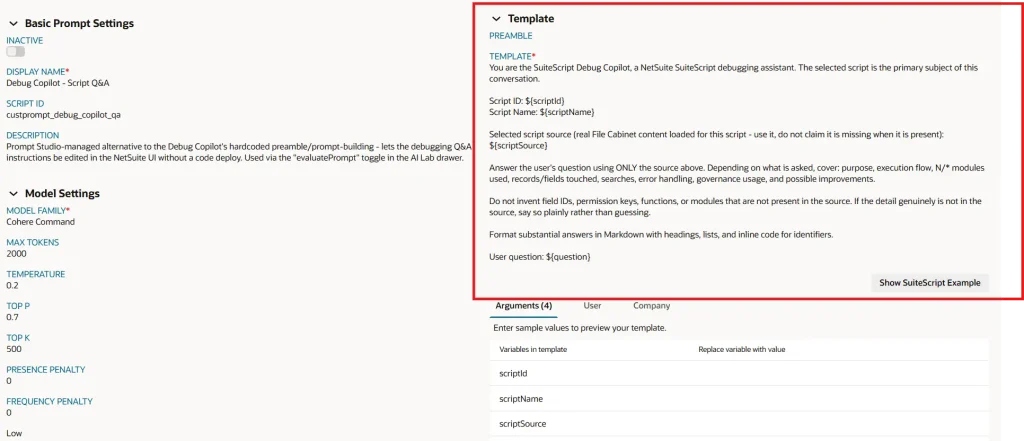
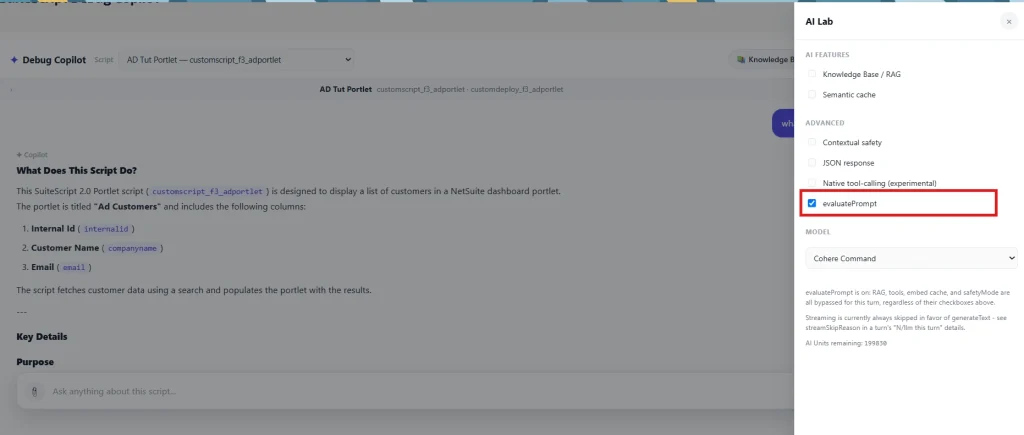
There is an architectural trade-off. Our evaluatePrompt() path replaces the normal Debug Copilot pipeline, so RAG, tools, the semantic cache, JSON mode, and safety settings are all bypassed. The AI Lab disables those checkboxes to make that visible. If evaluatePrompt() throws or returns empty text, the turn falls back to generateText() with a note. Treat it as a separate execution strategy, not a transparent replacement. For the SuiteQL-to-summary side of Prompt Studio, see Folio3’s Prompt Studio walkthrough.
What we learned: Prompt Studio is useful when prompt management is the problem. It should not be treated as a drop-in replacement for an application pipeline that performs retrieval, caching, tool execution, and other preprocessing.
NetSuite N/llm Context Limits: The Timeout We Blamed on Script Size
Timeouts affected some scripts but not others, so our first assumption was script size. It certainly contributed: a request can carry up to 60,000 characters of source. But conversation history turned out to be the variable we had missed. The original design limited history by turn count, not by size. A conversation could reach 24 turns while each stored answer could approach 3,900 characters, and those turns piled up into a large transcript quietly added to every request. Bigger scripts needed more turns to explore, which is why it looked script-specific.
We changed the design to enforce a roughly 6,000-character history budget, trimming the oldest turns first, and added one automatic retry that fires only when the error matches /timed out/, so a genuinely broken request still fails fast. The app does not use chatHistory for the conversation (only inside the native tool loop). It flattens the conversation into a controlled transcript instead. That makes the request predictable, but it also means the application owns the context budget.
Code example: buildConversationTranscript() and the timeout retry condition
const MAX_TRANSCRIPT_CHARS = 6000;
// walk newest -> oldest and stop when the budget is spent
for (let i = lines.length - 1; i >= 0; i -= 1) {
  totalChars += lines[i].length + 1;
  if (totalChars > MAX_TRANSCRIPT_CHARS && kept.length > 0) {
    kept.unshift("[Earlier turns omitted to keep this turn's prompt a reasonable size.]");
    break;
  }
  kept.unshift(lines[i]);
}

// one retry, only for timeouts
const isTimeout = /timed out/i.test((e && e.message) || '');
if (isTimeout) { const retryResponse = llm.generateText(options); /* ... */ }
What we learned: Context should be managed by size, not just turn count. A problem that looks like a source-file limitation can actually be accumulated conversation history.
NetSuite N/llm Streaming: What Happened in Our Account
Streaming worked differently once it was inside the complete application. Our isolated test, llm_streaming_test.js, worked on its own. The problems appeared when streaming was combined with more request context. In our testing it failed when used with tools or documents, and later also failed with a preamble plus source, producing zero chunks from the iterator (stream_iteration). Because the Debug Copilot depends on exactly that context, the Suitelet currently disables streaming outright, and the AI Lab says so on every turn.
Code example: the skipStreaming flag
// Stream fails on this account with preamble + script source even when
// tools/documents are off (stream_iteration, 0 chunks).
const skipStreaming = true;
What we learned: Test AI capabilities in combinations, not only in isolation. A feature can work perfectly in a small test and still fail once tools, documents, prompts, source files, and history are combined.
The Details That Still Matter: Limits, Permissions, and Governance
The model API is only one part of a production NetSuite AI implementation. The surrounding application, role configuration, File Cabinet permissions, governance, and input limits all affect whether it works reliably. These are the limits we built in:
| Limit | Value |
|---|---|
| Questions per user | 30 per hour (stored in a PUBLIC N/cache) |
| Governance guard | Refuse the turn below 100 units |
| User message | 4,000 characters |
| Script source | 6 files, 20,000 characters per file, 60,000 in total; same-folder ./ imports only |
| Conversation | Last 24 turns considered, about 6,000-character budget; 60 turns kept in the view |
| Stored answer | 3,900 characters (TEXTAREA cap is 4,000) |
| Semantic cache scan | Most recent 200 rows per script |
| Knowledge Base | .txt / .md, 200 KB each, 20 uploads, 12 documents per turn |
| Screenshot | PNG or JPEG, 2 MB in the browser, about 3,000,000 base64 characters on the server |
| Native tool loop | 4 iterations |
| Live-data output | Tool results capped at 12,000 characters; schema lookups cut to 40 fields and 8 sublists |
On permissions, there is no separate N/llm permission key in our implementation. The relevant gate is the SuiteScript Generative AI APIs feature together with the deployment audience. The custom role and audience also required manual handling because our SDF workflow would not deploy them. Embeddings are written to the File Cabinet under the caller’s role, so that role needs LIST_FILECABINET edit access. Logging had its own limit: scriptnote has no per-deployment column, so execution logs are interpreted per script. Finally, the UI escapes generated text before applying Markdown formatting, which matters whenever an application renders model output directly in a browser.
These are not the most exciting parts of an AI project, but they often decide whether a prototype can become a reliable application.
What Actually Worked?
After testing the capabilities individually and then combining them, the result was more nuanced than a works / doesn’t work checklist.
| Capability | Verdict | What we observed |
|---|---|---|
| Grounded answers (RAG) | Worked | Document-based RAG with native citations on Cohere. Citation scope matters: inlined source is not cited. |
| Semantic caching | Worked | Embeddings plus cosine similarity. The threshold needs measurement, and cache scoping needs care (JSON mode, images). |
| JSON schema output | Worked, with a gap | Cohere only. A cached JSON answer can be served to a plain-text request. |
| Native tool calling | Experimental | Works on small prompts. Failed once prompts passed roughly 12,000 characters. We only tested two tools, so the failure tracked prompt size; we didn’t test larger tool sets. |
| Prompt Studio | Worked | A separate execution path that bypasses RAG, tools, cache, JSON, and safety. |
| Contextual safety | Too restrictive | Over-refused with the source clearly present. Off by default. |
| Streaming | Failed | Worked in our isolated test (a bare prompt). Failed once combined with tools, documents, and then a preamble plus source. |
| Vision | Unverified | Returned the right page description in our first test. However, repeating a question with a new screenshot can return a cached answer. Not validated for reading error dialogs, and the path bypasses most of the pipeline. |
The most useful result was not any single N/llm feature. It was the visibility provided by the instrumentation around those features. Once we could see the model, token usage, similarity scores, documents, tools, citations, cache state, and fallback behavior, failures became engineering problems rather than mysteries.
What Our Own Tests Found
Before publishing, we checked every claim in this article against the code. We loaded the Suitelet’s real source in Node with the NetSuite modules mocked, then ran 63 automated checks covering the cache, the tool paths, vision, Prompt Studio, the limits, and the guards. The mocks stand in for NetSuite and the model, so these checks prove how our code behaves, not how the live model answers. They found several issues that no screenshot had shown us:
| Finding | What happens | Suggested fix |
|---|---|---|
| Gate and fetch lists disagree | “Why did this script fail?” and the “Where could it fail?” chip drop the Knowledge Base documents and fetch no live data. | One keyword list drives both decisions. |
| Substring matching | “logic”, “catalog”, “truncate”, and “runtime” trigger live-data lookups. | Whole-word matching. |
| Cache ignores JSON mode | A JSON answer can be returned for a later plain-text question. | Add JSON mode to the context hash, or skip caching JSON answers. |
| Cache before image | Same question plus a screenshot returns the cached text; the image is never sent. | Skip the cache when an image is attached. |
| Misleading telemetry | “Tools offered” appears on turns where no tools were sent to N/llm, and vision turns report a document count. | Report what was actually sent. |
| Oversize image truncated | The base64 string is cut at the limit instead of rejected. | Reject with a clear message. |
| Unguarded embed call | An embedding failure surfaces as a page error instead of falling through to generation. | Wrap the cache lookup so a failure means a cache miss. |
That last point is the same lesson as the rest of the article in miniature: the interesting failures are rarely where you were looking.
How to Test NetSuite N/llm Yourself
If you are evaluating N/llm for a NetSuite application, you do not need to reproduce the entire Debug Copilot. A small test harness can expose many of the same behaviors. Run these in order:
- A fresh question. Ask “What does this script do?” and inspect both the answer and any citations.
- An exact repeat. Ask it again verbatim and confirm the exact cache answers it with no embedding and no LLM call.
- A paraphrase. Ask “What is the purpose of this script?” and read the embedding similarity and the cache decision.
- A live-data question. Ask “What errors appeared in the latest execution log?” and check which path ran. Use wording that matches your fetch patterns, and compare with “Why did this script fail?” to see how fragile keyword gates are.
- JSON mode. Enable it with a question that has not been cached, and check that an empty field such as risks: [] stays empty rather than being filled in to satisfy the schema.
- A screenshot. Attach one to a question you have not asked before, then to one you have, and compare.
The most valuable test, though, is to combine features: long source files with a long conversation, tools with large prompts, documents with streaming, and safety settings with realistic debugging content. That is where the difference between an API capability and a production-ready application becomes visible.
To follow along, the code, deployment objects, and tests are in the companion repo. Its README has a step-by-step setup guide, so you can deploy the Debug Copilot to a sandbox and run the checks below yourself.
Code example: the responseFormat schema used for JSON mode
const STRUCTURED_RESPONSE_FORMAT = {
  type: 'object',
  required: ['answer'],
  properties: {
    purpose: { type: 'string' },
    modules: { type: 'array', items: { type: 'string' } },
    records: { type: 'array', items: { type: 'string' } },
    risks:   { type: 'array', items: { type: 'string' } },
    answer:  { type: 'string' }
  }
};
Where This Applies
These findings are not specific to a debugging assistant. They apply to any SuiteScript application that puts N/llm in front of real data:
- Support or finance assistants that answer from reference documents and need citations.
- Anything that caches model answers, where scoping rules decide whether a stale or wrong answer is served.
- Workflows that mix model-chosen tool calls with plain SuiteScript lookups.
- Prompt Studio deployments where non-developers edit prompts and the surrounding pipeline must still hold.
- Any long-prompt scenario, where context budgets, timeouts, and streaming behavior decide reliability.
What This Investigation Taught Us About NetSuite N/llm
N/llm gives NetSuite developers powerful building blocks for generative AI applications, but those blocks do not remove the need for application engineering. A semantic cache needs measurement. RAG needs clear source boundaries. Tool calling needs a fallback you can see. Long prompts need context budgets. Prompt Studio needs architectural boundaries. Vision needs validation.
The other lesson was telemetry. When an AI request fails, the final error rarely tells the whole story. Knowing which model ran, whether the cache hit, which documents were supplied, whether a tool was offered, how similar the previous question was, and which fallback executed can turn a vague AI failure into something a developer can diagnose. It also lets you check your own app’s claims against what it actually did, and ours were not all correct.
The biggest lesson was not which N/llm feature is best. It was that the fastest way to understand an AI API is to instrument it, stress it, and pay attention when it says no. That is where the documentation ends and engineering begins.
Frequently Asked Questions
What is N/llm in NetSuite?
N/llm is a SuiteScript module that lets developers integrate supported large language model capabilities into NetSuite applications, including text generation, embeddings, document-grounded answers, and tool calling.
What can NetSuite N/llm do?
Depending on the supported model and configuration, N/llm can be used for text generation, embeddings, document-grounded responses, tool calling, structured output, image inputs, and Prompt Studio integrations.
Does NetSuite N/llm support RAG?
Yes. Our implementation used N/llm documents to provide grounded context and read native citations. Content inserted directly into the prompt is not automatically a citation source, and in our account RAG was available on Cohere Command but not GPT-OSS.
Can N/llm call NetSuite tools?
N/llm supports tool-calling workflows. In our Debug Copilot we tested native, model-decided tools alongside a keyword-based path run by SuiteScript. They are not equivalent: only the first involves the model in the decision, and the two differ in cost and failure modes.
Does NetSuite N/llm support embeddings?
Yes. We used llm.embed() to build a semantic cache that compares questions with cosine similarity.
Does NetSuite N/llm support image input?
It can accept an image with a vision-capable model. In our account the path worked in a basic test, but we classify it as unverified, and an application has to decide what else (source, history, documents) travels with the image.
Does NetSuite N/llm support streaming?
Streaming worked in our isolated test, but the Debug Copilot hit failures when it was combined with tools, documents, or a preamble plus a large source, so we disabled it.
What is a good similarity threshold for a semantic cache?
There is no universal number. Ours is 0.69, chosen from measured paraphrase pairs, with every lookup score logged so it can be tuned.
Does safetyMode improve answers?
Not automatically. In our account, CONTEXTUAL caused over-refusal even with the source present, so we keep it as an opt-in toggle.
Final Takeaway
If you are evaluating NetSuite N/llm, do not stop at the capability list. Build a small test harness, log the request, measure the embeddings, inspect the citations, force a cache miss, force a cache hit, test a tool failure, increase the prompt size, and add conversation history.
The important result is not always “it worked.” Sometimes the more useful result is:
“It failed here, for this reason, and now we know exactly where to build the guardrail.”
That is what turns an AI API experiment into engineering knowledge.
Further Reading
Continue exploring NetSuite AI and development with these practical Folio3 guides.
Getting Started
- A Complete Setup Guide for NetSuite AI Connector
- A Setup Guide for NetSuite AI Connector with Postman: API Integration Tutorial
- Getting Started with NetSuite SuiteTalk REST API in Postman
- NetSuite MCP OAuth 2.0 Token Generator Tool
- SuiteScript Essentials: A Developer’s Getting Started Guide
- Open Source for Dummies: A Beginner’s Open Source Journey
- SuiteCommerce Development: An Illustrated Guide from Setup to Extension Deployment & Troubleshooting
MCP and Client Integrations
- IDE Integration Guide for NetSuite MCP Tools in Cursor & VS Code
- Connecting MCP with ChatGPT: A Complete Guide
- Connecting MCP Tools with Qwen
- Connecting ChatGPT Business with NetSuite via MCP: The Future of Enterprise AI Integration
- OAuth 2.0 in NetSuite: Complete Setup Guide (Client Credentials Flow)
Advanced and Architecture
- Building Custom Tools for NetSuite AI Connector: Development Guide
- Dual API Integration: Using NetSuite MCP Tools with OpenAI and Anthropic
- NetSuite MCP Challenge: Implementation Case Study & Results
- MCP Input Formats Compared: Token Usage Analysis for NetSuite MCP Tools
- Integrating NetSuite MCP Tools with AI-Powered CLI Tools
- WhatsApp Triggered AI Agent for NetSuite Using n8n and MCP Tools
- Advanced NetSuite PDF and HTML Template Tricks
- NetSuite Scriptable Cart in SuiteCommerce Advanced: 6 Problems Developers Actually Need to Solve
- Prompt Studio: From SuiteQL Rows to a Business Summary
- Yup and Joi Validation Guide: Dynamic Schemas, Conditional Rules And React Hook Form Integration
- NetSuite Map/Reduce Script Guide: Concurrency, Governance, Yielding & Restarts
- SuiteCommerce Development: A Complete Practical Guide to SuiteCommerce Extension Development

