Most NetSuite fixes look small once you know the cause. Finding that cause is the difficult part. I have run into cases where a sublist changes its ID between CREATE and EDIT, an Invoice Group relationship is not searchable until the original execution finishes, and a query needs a different pagination approach to get beyond 100,000 rows.
These are the tips and code examples I have used while working with SuiteScript, SuiteQL, Saved Searches, Workflows, SuiteCommerce, integrations, PDF templates and SDF. I have kept the field IDs, errors, request parameters and steps that made a difference in each case.
A few examples came from inspecting NetSuite’s own requests in the browser. I have identified those separately because they describe what I observed, not documented SuiteScript APIs.
SuiteScript, Record Behavior and the UI
Compare committed and current sublist values before commitLine()
While testing sublist behavior, I compared the committed quantity on an item line with the value currently being edited. Before commitLine(), getSublistValue() returns the committed value, while getCurrentSublistValue() returns the uncommitted value on the selected line.
// rec is a dynamic N/record or N/currentRecord instance.
const previousQuantity = rec.getSublistValue({
  sublistId: 'item', fieldId: 'quantity', line: 0
});
const editingQuantity = rec.getCurrentSublistValue({
  sublistId: 'item', fieldId: 'quantity'
});
Once commitLine() runs, the new value becomes the committed value. I used this for an old-versus-new comparison on a line, similar in purpose to oldRecord and newRecord in a User Event. I tested it with N/currentRecord and dynamic N/record.
Adding multiple item lines through the native UI
Adding many item lines through a Client Script can become slow because each new line goes through sourcing, calculation, validation and commitLine(). I compared this with NetSuite’s native Add Multiple functionality, which handled the same kind of task much faster in my test.
I opened DevTools and followed the native request. NetSuite sent the chosen item IDs, quantities and sourcing options together, prepared the line data on the server, and applied it to the transaction. I reproduced that request from the browser console and saw a significant difference from adding lines individually. The example is an experiment with an internal UI method, not a supported SuiteScript API.
// Browser-console proof of concept only. NOT a supported SuiteScript API.
async function bulkAddItems(items) {
  const separator = '\x05';
  const itemIds = items.map(item => String(item.id)).join(separator);
  const quantities = items.map(item => String(item.quantity ?? 1)).join(separator);
  const jrparams = JSON.stringify([JSON.stringify({
    quantity: true,
    rate: true,
    amount: true,
    location: true
  })]);

  const url = new URL(window.location.href);
  url.searchParams.set('jrr', 'T');
  url.searchParams.set('jrmethod', 'remoteObject.getAdjustedGroupScript');
  url.searchParams.set('ai', itemIds);
  url.searchParams.set('aiq', quantities);
  url.searchParams.set('jrparams', jrparams);

  const response = await fetch(url);
  if (!response.ok) throw new Error(`Request failed: ${response.status}`);
  const text = await response.text();
  const payload = text.split('<!--')[0].trim();
  const { result } = JSON.parse(payload);
  if (!result) return;

  const originalAlert = window.alert;
  const originalConfirm = window.confirm;
  try {
    window.alert = () => {};
    window.confirm = () => true;
    window.eval(result); // Unsafe/private server response evaluation.
  } finally {
    window.alert = originalAlert;
    window.confirm = originalConfirm;
  }
}

// Values used in the browser experiment:
bulkAddItems([
  { id: 481, quantity: 1 },
  { id: 478, quantity: 1 },
  { id: 482, quantity: 1 },
  { id: 488, quantity: 1 }
]);
An Invoice Group relationship that was not ready in afterSubmit
While generating JSON for an Invoice Group PDF, I searched invoice lines using groupedto inside an Invoice Group CREATE afterSubmit User Event:
search.createFilter({
  name: 'groupedto',
  operator: search.Operator.ANYOF,
  values: invoiceGroupId
});
Inside the Invoice Group CREATE afterSubmit User Event, the groupedto search returned no lines. I tried an artificial delay, then a synchronous Suitelet request using N/https. Neither helped: the Suitelet still searched before the relationship was ready. I also tried a promise-based Suitelet request, expecting it to finish after the User Event. In my test the pending promise kept that execution open, so the lines were still unavailable.
The groupedto relationship became searchable only after the CREATE User Event completed. I queued the Invoice Group ID and submitted a Map/Reduce script when another deployment was not already running. The Map/Reduce script loaded and saved the Invoice Group, triggering the EDIT User Event. This time the search returned the invoice lines and the PDF JSON was generated.
The queue and deployment-check functions below are helpers from that customization, not SuiteScript APIs. The important part of the fix was starting a new execution after CREATE had finished, not waiting inside the original User Event.
queue(invoiceGroupId);
if (!anotherDeploymentIsExecuting(scriptId)) {
  submitMapReduce();
}

// In the subsequent Map/Reduce execution:
const group = record.load({
  type: record.Type.INVOICE_GROUP,
  id: invoiceGroupId
});
group.save();
A sublist ID can change between CREATE and EDIT
While inspecting a Prospect record, I found that the Contacts sublist ID was contact in CREATE mode and contactroles in EDIT mode. I have also seen the Inventory Detail subrecord expose a different sublist ID on some transactions.
When getLineCount() unexpectedly returned -1, I checked the sublist ID in the actual record context. On the Prospect, the ID differed between CREATE and EDIT.
Prefill a custom Shipping Address through Client Script
I needed to prefill a Custom Shipping Address on a new Sales Order through Client Script without opening NetSuite’s address popup or manipulating the DOM. I initially tried working with the address subrecord and tested different values for Ship To Select (shipaddresslist). Setting the dropdown to Custom (-2) opened the popup. In my test, null did not clear the selection, but an empty string (”) did.
currentRecord.setValue({
  fieldId: 'shipaddresslist',
  value: ''
});

setTimeout(() => {
  currentRecord.setValue({
    fieldId: 'shipaddress',
    value: formattedAddress
  });
});
Clearing shipaddresslist also cleared the shipaddress textarea. When I assigned formattedAddress immediately, NetSuite sometimes cleared the textarea again. Using setTimeout() let NetSuite finish handling the selection before I set the formatted text. The dropdown initially remained blank; after the Sales Order was saved and reopened, Ship To Select displayed Custom and the formatted address was retained. When I opened the address details, the full text appeared in the Address box with Override selected, but the individual Attention, Address 1, City and ZIP inputs were not populated by this method. In a separate Item Fulfillment test, the formatted address also carried forward to the next transaction. This was useful when I already had a formatted Shipping Address from another Sales Order and wanted to copy that same text to a new Sales Order without splitting it into individual address fields.
Populate individual shipping address fields through N/currentRecord
I also tried populating the address subrecord directly from N/currentRecord in the Sales Order UI. After clearing Ship To Select with an empty string, I retrieved shippingaddress and set the country, attention, street, city and ZIP. The Ship To textarea did not update immediately after I set the subrecord values. After saving and reopening the Sales Order, Ship To Select showed Custom, the formatted address appeared in the textarea, and the address popup retained the individual field values. That was the important difference from setting only the formatted shipaddress text.
// Client Script/browser-console test with the N/currentRecord module.
const currRec = require('N/currentRecord').get();
currRec.setValue({ fieldId: 'shipaddresslist', value: '' });

const addrSubRec = currRec.getSubrecord({ fieldId: 'shippingaddress' });
addrSubRec.setValue({ fieldId: 'country', value: 'US' });
addrSubRec.setValue({ fieldId: 'attention', value: 'SO Automation Intl' });
addrSubRec.setValue({ fieldId: 'addr1', value: '3001 Clearview Way' });
addrSubRec.setValue({ fieldId: 'city', value: 'San Mateo' });
addrSubRec.setValue({ fieldId: 'zip', value: '94400' });
When I already have the source Sales Order’s address subrecord values, I can carry those fields over rather than reverse-engineer them from formatted text. The displayed address follows a configurable template with optional parts such as <ADDR1> and <ADDRPHONE>, so parsing the text with a regular expression is not a reliable way to reconstruct the original components.
Populate shipping address body fields with SuiteScript 1.0
Transaction records expose shipping and billing address body fields such as shipcountry, shipattention, shipaddr1, shipcity and shipzip, and the corresponding bill-prefixed fields. I compared setting them through SuiteScript 2.x currentRecord.setValue() and SuiteScript 1.0 nlapiSetFieldValue() on a Sales Order. In the 2.x test, the saved address was only partially populated: the address details showed the city, state and ZIP, but not the attention or street. With nlapiSetFieldValue(), the complete custom address was retained after saving, and reopening its address details showed the attention, street, city, state and ZIP in their respective fields. nlapiGetFieldValue() also returned the Ship Attention value I had set.
nlapiSetFieldValue('shipcountry', 'US');
nlapiSetFieldValue('shipattention', 'SO Automation Domestic');
nlapiSetFieldValue('shipaddr1', '3000 Clearview Way');
nlapiSetFieldValue('shipcity', 'San Mateo');
nlapiSetFieldValue('shipzip', 94402);

// Read-back from the browser test:
nlapiGetFieldValue('shipattention'); // 'SO Automation Domestic'
The difference I observed was not whether those transaction fields exist, but how the two APIs handled the address values when the record was saved. This is separate from the previous technique, which sets the formatted shipaddress textarea instead of populating the individual address components.
Edit a shipping address through a loaded N/record subrecord
I also investigated setting an address subrecord while working on a User Event requirement. In my browser-console test on an existing Sales Order, the version loaded without dynamic mode failed with Cannot read properties of undefined (reading ‘getRecordManager’). Enabling isDynamic: true was needed for the successful save. The tested code also used try/catch around clearing shipaddresslist with null: that step could raise the same error, and the catch logged it and retried the clear before populating the shippingaddress subrecord.
// Browser-console test on an existing Sales Order for the User Event use case.
require(['N/record'], function(record) {
  const soRec = record.load({
    type: nlapiGetRecordType(),
    id: nlapiGetRecordId(),
    isDynamic: true // The non-dynamic attempt failed in this test.
  });

  try {
    // In this loaded-record test, -2 and '' were not accepted.
    soRec.setValue({ fieldId: 'shipaddresslist', value: null });
  } catch (e) {
    // Observed error: Cannot read properties of undefined
    // (reading 'getRecordManager').
    console.error('Error Message:', e.message);
    soRec.setValue({ fieldId: 'shipaddresslist', value: null });
  }

  const addrSubRec = soRec.getSubrecord({ fieldId: 'shippingaddress' });
  addrSubRec.setValue({ fieldId: 'country', value: 'US' });
  addrSubRec.setValue({ fieldId: 'attention', value: 'SO Automation Domestic' });
  addrSubRec.setValue({ fieldId: 'addr1', value: '3000 Clearview Way' });
  addrSubRec.setValue({ fieldId: 'city', value: 'San Mateo' });
  addrSubRec.setValue({ fieldId: 'zip', value: '94402' });

  soRec.save();
});
This was a different approach from setting the formatted text in a CREATE-mode Client Script. Here I cleared shipaddresslist on a loaded dynamic N/record, set the country, attention, street, city and ZIP directly on the shippingaddress subrecord, and saved. The tested record save completed. I have kept the original try/catch because removing it changes the sequence I actually tested.
Suitelet POST body fields and sublists are read differently
In a Suitelet POST request, values from body fields are available in context.request.parameters. Sublist values are retrieved with context.request.getSublistValue(), using the sublist ID, field ID and line number.
// Body field:
context.request.parameters.custpage_xyz;

// Sublist field:
context.request.getSublistValue({
  group: 'sublistId',
  name: 'fieldId',
  line: 0
});
For sublist values, group is the sublist ID, name is the field ID, and line is zero-based.
Multiselect payloads differ between native forms and regular HTML
I compared a Suitelet MULTISELECT field submitted through a standard HTML form with the same type of field on a NetSuite native form. The HTML request sent three separate custpage_customer[] name/value pairs. The native NetSuite request sent one custpage_customer parameter with the selected IDs separated by a control character.
The examples below show the raw payload and its decoded representation. In the raw native request, the separator is %05; after URL decoding, that character is U+0005 (written as \u0005 in a JavaScript string). In DevTools, the character may appear as a space between values.
// Standard HTML form: raw application/x-www-form-urlencoded payload
custpage_customer%5B%5D=15603&custpage_customer%5B%5D=315332&custpage_customer%5B%5D=2354436

// Standard HTML form: parsed field names
custpage_customer[]=15603&custpage_customer[]=315332&custpage_customer[]=2354436

// NetSuite native MULTISELECT: raw form payload
custpage_customer=15603%05315332%052354436

// NetSuite native form: parsed DevTools display
// custpage_customer: 15603 315332 2354436

// NetSuite native MULTISELECT: decoded JavaScript value
const nativeValue = '15603\u0005315332\u00052354436';
const selectedIds = nativeValue.split('\u0005');
// ['15603', '315332', '2354436']
Fixing a missing client script after a Suitelet navigation
While binding a Client Script to a form in a User Event, I ran into an Invalid module path error that appeared only after a multi-Suitelet navigation. A relative clientScriptModulePath worked in the original screen but was resolved from the wrong folder later in the flow.
My Suitelet manager was under modules/managers/xyz.js. The path was ../client/oas_master_po_cs, and the navigation was Button > Suitelet 1 (DataTable) > Submit > Suitelet 2 (PDF view). In that sequence, NetSuite looked for the module under modules/client instead of the intended client folder. Changing the form attachment to the absolute File Cabinet path fixed the error in my test:
Invalid module path:
/SuiteScripts/ns_os_master_po_customizations/modules/client/oas_master_po_cs

// Relative path that failed in this flow:
form.clientScriptModulePath = '../client/oas_master_po_cs';

// Absolute path that worked in this project:
form.clientScriptModulePath =
  '/SuiteScripts/ns_os_master_po_customizations/client/oas_master_po_cs';
Find a deployed script in Script Debugger
For a script to appear under Script Debugger > Debug Existing, the Script Owner must match the logged-in user and the deployment must have Testing status.
When a script parameter ignores its deployment value, check Preference
I had a Map/Reduce script with two deployments, both using the same script parameter but different values to control the execution flow. The deployment values were set correctly, yet runtime.getCurrentScript().getParameter() did not read them. After debugging the parameter definition, I found that Preference was set to User, although I had not set a value under User Preferences.
The Preference setting determines where NetSuite reads the value:
Company: Setup > Company > General Preferences > Custom Preferences
User: Home > Set Preferences > Custom Preferences
Blank: Script Deployment > Parameters
I also tested Company and found that it took the value from Company Preferences even when I had another value on the deployment. Leaving Preference blank was the fix for my requirement, because each deployment could then use its own parameter value.
Copy an Inventory Adjustment through its URL
Inventory Adjustment did not offer the native Make Copy button in the UI I was using. I opened an existing adjustment, added &e=T&memdoc=0 to its URL, and NetSuite opened a populated copy with the body fields and lines from the original. I could review it and save it as a new transaction. This came from testing a UI URL, not a documented copy API:
https://<ACCOUNT_ID>.app.netsuite.com/app/accounting/transactions/invadjst.nl?id=14295407&e=T&memdoc=0SuiteQL, Saved Searches and Audit Trails
Find deleted transactions with TransactionHistory
I used TransactionHistory to find deleted transactions by date and user. Joining Account and Entity also gave me the related account and entity details:
SELECT
    th.*,
    a.accountSearchDisplayName,
    e.entityTitle
FROM
    TransactionHistory th
JOIN
    Account a
        ON th.account = a.id
JOIN
    Entity e
        ON th.entity = e.id
WHERE
    th.action = 'DELETE'
    AND TRUNC(th.datetime) = TO_DATE('1/30/25', 'MM/DD/YY')
    AND th.username = -4;
This is transaction-level deletion history. It does not recover every line from a deleted transaction.
Audit transaction line changes with SystemNote
I also used SystemNote to retrieve tracked changes to standard and custom transaction line fields. The query below filters by a particular transaction record, line ID and two field IDs:
The example includes both TRANLINE.MAMOUNT and CUSTCOL_F3_MARKETING_BUNDLE so that I could see old and new values for the same transaction line.
SELECT
    sn.record AS transaction,
    sn.recordid AS record_id,
    sn.lineid AS line_id,
    sn.date AS change_date,
    sn.field AS field_id,
    sn.oldvalue AS old_value,
    sn.newvalue AS new_value,
    CASE
        WHEN sn.type = 4 THEN 'Change'
        WHEN sn.type = 2 THEN 'Set'
        ELSE 'Other'
    END AS change_type
FROM
    SystemNote sn
WHERE 1=1
    AND sn.recordid = 27391325
    AND sn.lineid = 32
    AND sn.field IN (
        'TRANLINE.MAMOUNT', -- Standard line field
        'CUSTCOL_F3_MARKETING_BUNDLE' -- Custom line field
    )
ORDER BY
    sn.date DESC;
Handle the runSuiteQLPaged() row cap
Without SuiteAnalytics Connect, runSuiteQLPaged() is capped at 100,000 rows in total, across its pages. Plain runSuiteQL() returns up to 5,000 rows per call. I used both pageRanges/fetch() and the PagedData iterator to traverse pages:
const sampleQuery = 'SELECT id, fullname, email FROM Customer WHERE rownum < 11';
const pagedData = query.runSuiteQLPaged({query: sampleQuery, pageSize: 5});

let results = [];

// Way one
pagedData.pageRanges.forEach((pageRange, i) => {
    const page = pagedData.fetch({index: pageRange.index});
    const resultSet = page.data;

    results = results.concat(resultSet.asMappedResults());
});

// Way two
pagedData.iterator().each((itrObj) => {
    const page = itrObj.value;
    const resultSet = page.data;

    results = results.concat(resultSet.asMappedResults());

    return true;
});

console.log('Final results collection:', results);
Use last-ID pagination for large SuiteQL exports
For larger exports, multiple independent runSuiteQL() queries with the last returned ID as the next cursor can process more data than one 100,000-row paged result. I compared three approaches: last-ID pagination, ROWNUM-based ranges and FETCH FIRST.
These are the SQL patterns from that comparison. For repeatable paging, sort by a stable key such as a unique internal ID.
-- 1. Last-ID (Keyset) pagination
-- Fetch first batch
SELECT
    id,
    name,
    date_created
FROM
    my_record_type
WHERE
    id > 0
ORDER BY
    id ASC
FETCH FIRST 5000 ROWS ONLY;

-- Then use the last returned ID (say 12345) for next batch
SELECT
    id,
    name,
    date_created
FROM
    my_record_type
WHERE
    id > 12345
ORDER BY
    id ASC
FETCH FIRST 5000 ROWS ONLY;

-- 2. ROWNUM-based pagination
-- ORDER BY added to make ordering deterministic - without it, result order is not guaranteed
SELECT
    *
FROM (
    SELECT
        ROWNUM AS rn,
        t.*
    FROM (
        SELECT
            id,
            name,
            date_created
        FROM
            my_record_type
        ORDER BY
            id ASC
    ) t
)
WHERE
    rn BETWEEN 5001 AND 10000;

-- 3. FETCH FIRST N rows
SELECT
    id,
    name,
    date_created
FROM
    my_record_type
ORDER BY
    id ASC
FETCH FIRST 5000 ROWS ONLY;
How ResultSet.each() and getRange() retrieve results
I examined the network requests made by Saved Search result methods. search.run() returned a ResultSet, and calling .each() or .getRange() caused results to be retrieved. In that test, .each() used nlapiContinueSearch in apparent batches of 500. A 4,000-result search was processed in eight chunks.
With .getRange({ start: 0, end: 1000 }), I saw nlapiSearchRange requests using the supplied offset and range. Getting 4,000 rows a thousand at a time meant four calls. These chunk sizes describe what I saw internally; the supported result limits remain 4,000 for .each() traversal and up to 1,000 for one .getRange() call.
The different requests helped explain the behavior I saw from .each() and .getRange() on the same Saved Search.
Why I Prefer Loading Saved Searches by ID in SuiteScript
I have long preferred creating Saved Searches in the NetSuite UI and loading them by ID in SuiteScript instead of defining the complete search in code. It gives me more control over the criteria without changing the script.
For example, if a Map/Reduce script processes Sales Orders, I can restrict the Saved Search to a few orders while testing. I then remove that restriction when the script needs to process all matching orders. Administrators can also update the search criteria directly without involving a developer.
const salesOrderSearch = search.load({
  id: 'customsearch_sales_orders'
});
Use COALESCE for a commission fallback formula
In one commission Saved Search, the rate was determined in this order: Customer, Sales Order line (including exclusion rules), Item (including date validity), then Sales Order. COALESCE() let me express the priority without a deeply nested CASE expression.
COALESCE(
    {customer.custentity_f3_customer_commission_rate},
    CASE
        WHEN {custcol_f3_exclude_from_comm_checkbox} = 'F'
            AND NVL({custcol_f3_special_case.id}, 0) <> 1
        THEN NULL
        ELSE 0
    END,
    {custcol_f3_commission_rate_override},
    NVL2({item.custitem_f3_item_commission_rate},
        NULL, {custbody_f3_cust_comm_rate}),
    CASE
        WHEN {item.custitem_f3_item_comm_valid_from} IS NOT NULL
            AND {item.custitem_f3_item_comm_valid_to} IS NOT NULL
        THEN NULL
        ELSE {item.custitem_f3_item_commission_rate}
    END,
    CASE
        WHEN {trandate} BETWEEN {item.custitem_f3_item_comm_valid_from}
            AND {item.custitem_f3_item_comm_valid_to}
        THEN {item.custitem_f3_item_commission_rate}
        ELSE {custbody_f3_cust_comm_rate}
    END
)
In this formula, zero and NULL do different things. Zero is a selected commission result; NULL tells COALESCE() to try the next expression. Those branches were required by this commission logic.
Discover custom-record and field metadata with SuiteQL
These SuiteQL queries came from a dynamic integration where I needed to discover Custom Record fields, field metadata, List/Record and Multi-Select sources, and Custom List values for dropdowns.
The first query finds Multi-Select fields and their source record or list. The second variant returns only fields backed by Custom Lists. The other two find fields belonging to Custom Records and their detailed metadata.
SELECT
    crt.scriptid AS record_name,
    cl.scriptid AS list_name,
    cf.*
FROM
    CustomField cf
LEFT JOIN
    CustomRecordType crt
        ON crt.internalid = cf.fieldvaluetyperecord
LEFT JOIN
    CustomList cl
        ON cl.internalid = cf.fieldvaluetyperecord
WHERE 1 = 1
    AND cf.fieldtype = 'ITEM'
    AND cf.fieldvaluetype = 'Multiple Select';
SELECT
cl.scriptid AS list_name,
cf.*
FROM
CustomField cf
JOIN
CustomList cl
ON cl.internalid = cf.fieldvaluetyperecord
WHERE 1 = 1
AND cf.fieldtype = 'ITEM'
AND cf.fieldvaluetype = 'Multiple Select';SELECT
crt.scriptid AS record_id,
cf.scriptid AS field_id
FROM
CustomRecordType crt
JOIN
CustomField cf
ON cf.recordtype = crt.internalid
WHERE 1 = 1
AND cf.fieldtype = 'RECORD';SELECT
cf.Name,
cf.ScriptID AS field_id,
cf.Description,
cf.FieldType,
cf.FieldValueType,
cf.IsMandatory
FROM
CustomField cf
JOIN
CustomRecordType crt
ON crt.InternalID = cf.RecordType
WHERE 1 = 1
AND UPPER(crt.ScriptID) LIKE UPPER('%RECORD_ID_HERE%')
ORDER BY
cf.Name ASC;Combine multiple custom-list queries with UNION ALL
To load values from multiple Custom Lists in one result, I used UNION ALL and included a fixed list name in each SELECT:
SELECT
    'CUSTOM_LIST_NAME_1' AS list_name,
    id AS value_id,
    name AS value
FROM
    CUSTOMLIST_LIST_ID_1
WHERE 1=1

UNION ALL

SELECT
    'CUSTOM_LIST_NAME_2' AS list_name,
    id AS value_id,
    name AS value
FROM
    CUSTOMLIST_LIST_ID_2
WHERE 1=1;
Filter transaction statuses with SuiteQL
I used two ways to filter transaction status in SuiteQL. When I knew the exact combined status value, I filtered Transaction.status directly. For example:
-- When the full stored transaction status is known:
SELECT
    id,
    status
FROM
    Transaction
WHERE
    status = 'WorkOrd:B';
Alternatively, I joined TransactionStatus when I wanted to work with the status ID. In that query, I matched t.type to ts.trantype and t.status to ts.id:
The first filter uses the stored format <transactionType>:<statusId> (for example WorkOrd:B). The joined form lets you work with the transaction status ID, such as B.
SELECT
    t.id,
    t.type,
    t.status,
    ts.id AS status_id
FROM
    Transaction t
JOIN
    TransactionStatus ts
        ON t.type = ts.trantype
        AND t.status = ts.id
WHERE
    ts.id = 'B';
For the transaction status names and codes, see this community-maintained reference.
Saved Search filters containing backslashes need care
I hit UNEXPECTED_ERROR when a Saved Search filter used a text value containing backslashes, such as Item\Assembly\850 - Sub-Assembly. Escaping the backslashes before setting the filter resolved that case.
const raw = String.raw`Item\Assembly\850 - Sub-Assembly`;
const escaped = raw.replace(/\\/g, '\\\\');
Escaping the backslashes in the text value resolved the UNEXPECTED_ERROR I was getting in that Saved Search filter.
Page SuiteQL results for DataTables
For a DataTables Suitelet I used params.start and params.length to calculate the SuiteQL page index and size. I then used asMappedResults() to return the requested rows, along with the total count in the format DataTables expects.
// DataTables page request:
const offset = Number(params.start);
const rowCount = Number(params.length);

log.debug(`${logTitle}`, `offset: ${offset} rowCount: ${rowCount}`);

const pageParams = {
  index: Math.floor(offset / rowCount),
  size: rowCount
};
const pagedData = query.runSuiteQLPaged({
  query: sql,
  pageSize: pageParams.size || 50
});
const total = pagedData.count;
const page = pagedData.fetch({ index: pageParams.index || 0 });
const results = page.data.asMappedResults();

// Inspect mapped data one row at a time:
page.data.iterator().each((row) => {
  log.debug('row data', row.value.asMap());
  return true;
});

// Inspect column values by index:
page.data.iterator().each((row) => {
  row.value.values.forEach((colValue, colIndex) => {
    log.debug(`getColName at index: ${colIndex}`, row.value.getValue(colIndex));
  });
  return true;
});

return {
  total,
  results,
  recordsTotal: total,
  recordsFiltered: total,
  data: results
};
asMappedResults() did the row and column mapping for me. The iterator examples show what I inspected underneath: row.value.asMap() and value-by-index access.
Keep multiple test queries without deleting your previous work
While testing SuiteQL in the editor, I kept several queries on the same page by commenting out those I was not currently running. A multiline /* … */ block comment was enough, so I could switch between queries without deleting previous attempts.
/*
SELECT * FROM RevenuePlan
FETCH FIRST 10 ROWS ONLY;
*/

/*
SELECT * FROM TransactionLine
FETCH FIRST 10 ROWS ONLY;
*/

SELECT * FROM PreviousTransactionLineLink
FETCH FIRST 10 ROWS ONLY;
Display multiple price levels in an Item Saved Search
In an Item Saved Search, adding Other Prices to the Results tab showed the available item price levels together on one result line. That made it easier for me to compare the prices without opening each item.
Workflows, Transactions and Native Processing
A Workflow formula can reach a related field the visual builder cannot
The requirement was to show different RMA buttons for Domestic (US) and International (non-US), based on Ship Country from the Original Sales Order. The Workflow Visual Builder did not expose RMA > Original Sales Order > Ship Country, but a Custom Formula did:
{createdfrom.shipcountry.id} != 'US'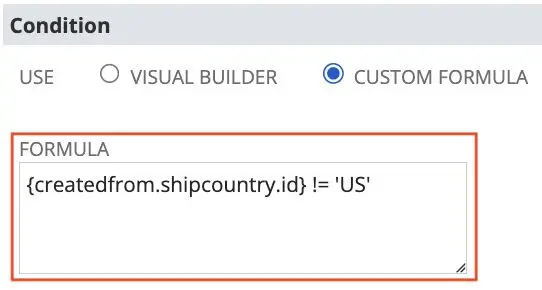
Using that condition in a Workflow Add Button action let me show the appropriate button without adding another User Event script.
Save Record First also changes the Save menu
The Create RMA Sales Order (INTL) workflow button appeared as expected, but Save & Create RMA Sales Order (INTL) was missing from the native Save dropdown. Comparing the workflow actions showed that Save Record First was off.
After I enabled Save Record First, NetSuite added the Save & Create RMA Sales Order (INTL) option to the Save dropdown. The button label stayed Create RMA Sales Order (INTL).
Carry custom line fields to Kit components
When I wanted custom transaction line field values to carry from a Kit item to the component lines on an Item Fulfillment, the field needed Apply to Kit/Assembly Components enabled. I found the setting at Customization > Lists, Records, & Fields > Transaction Line Fields > Applies To.
Without Apply to Kit/Assembly Components, those custom line values were not carried to the kit component lines.
Filtering a sourced dropdown with either of two customer references
A dropdown on a Sales Order was sourced from a custom record. It needed to show records where the Customer matched either Ship To Customer or Bill To Customer. Filtering the two List/Record fields separately gave me AND behavior, not the OR match I needed.
I added a hidden text field to the custom record and stored the Ship To and Bill To internal IDs together, for example SHIP_TO_ID BILL_TO_ID. On the Sales Order dropdown, I used this hidden field under Filter Using, set Compare Type to contains, and compared it with the Customer Entity ID.
rec.setValue({
  fieldId: CUSTOMER_FILTER_KEY_HIDDEN,
  value: [billToEntityId, shipToEntityId].join(' ').trim()
});
With Compare Type set to contains, the Sales Order dropdown matched either the Ship To or Bill To Customer in my test. That gave me the OR behavior the two separate filters could not provide.
Keep the new PO open after a VRMA transformation
I transformed a Vendor Return Authorization into a Purchase Order. The new PO opened in CREATE mode with its data populated, but after saving it NetSuite returned me to the VRMA instead of opening the new PO.
const poUrl = url.resolveRecord({
  recordType: record.Type.PURCHASE_ORDER,
  recordId: newRecord.id,
  isEditMode: true,
  params: {
    memdoc: 0,
    transform: 'vendauth',
    whence: ''
  }
});
Setting whence: ” in the resolved PO URL stopped that redirect in my flow. NetSuite then stayed on the newly created Purchase Order after save.
Trigger and track native cost processing
I was working on Inventory Cost Revaluation that needed labor costs from WIP and Routings. A Map/Reduce customization was already reproducing two native processes: Planned Standard Cost Rollup followed by Revalue Standard Cost Inventory. I investigated whether the native processes could be triggered directly through SuiteScript instead of adding more custom costing logic.
By inspecting what the native forms submitted, I found the internal POST requests and successfully triggered both processes in a PoC. The difficult part was not submitting them. Both run asynchronously, and Inventory Revaluation must start only after the Cost Rollup has completed.
These are the request bodies I tested. The .nl URLs are NetSuite’s internal handlers observed during this investigation, not documented SuiteScript endpoints.
// Planned Standard Cost Rollup: request from the PoC.
var sep = '\u0001';
var res = https.post({
  url: 'https://<ACCOUNT_ID>.app.netsuite.com/app/accounting/inventory/plannedstandardcostrollup.nl',
  body: {
    subsidiary: 1,
    standardcostversion: 18,
    effectivedate: '8/28/2026',
    usedefaultstandardcost: 'T',
    includeparentassemblies: 'T',
    type: 'rollupplannedstandardcost',
    itemsfields: ['itemid', 'select', 'itemurl'].join(sep),
    itemsdata: [431, 'T', '/app/common/item/item.nl'].join(sep),
    nextitemsidx: 2
  }
});
// Revalue Standard Cost Inventory. Research only: private UI endpoint.
var sep = '\u0001';
var resp = https.post({
url: 'https://<ACCOUNT_ID>.app.netsuite.com/app/accounting/inventory/revaluestandardcostinventory.nl',
body: {
subsidiary: 1,
standardcostversion: 18,
effectivedate: '8/28/2026',
account: 478,
revalueassemblies: 'T',
type: 'revaluestandardcostinventory',
itemsfields: ['itemid', 'select', 'itemurl'].join(sep),
itemsdata: [15000, 'T', '/app/common/item/item.nl'].join(sep),
nextitemsidx: 2
}
});I needed to track the native job’s completion before triggering revaluation, rather than submit both operations at once.
Track native processing through BulkProcSubmission
To monitor that flow, I found three SuiteAnalytics record types in the Records Catalog: BulkProcSubmission, BulkProcSubmissionLine and BulkProcError. I used them to check submission status, percent complete, processed records, failures and error messages. The old Analytics Browser was removed in NetSuite 2021.2, which made the Records Catalog particularly useful for this investigation.
This query returned submission details for the two native operations:
SELECT
    submissionid,
    createdby,
    percentcomplete,
    createddate,
    numberoffailures,
    submissionstatus,
    type,
    submissionmessage
FROM
    BulkProcSubmission
WHERE
    type IN ('ROLLUPITEMCOST', 'REVALUESTDCOSTINVENTORY')
    AND ROWNUM < 10
ORDER BY
    submissionid DESC;
The original query filtered ROWNUM before ordering, which is fine for inspecting some records but doesn’t guarantee the latest nine. For the latest submissions, order inside a subquery and filter the rows outside it:
SELECT
    *
FROM
    (
        SELECT
            submissionid,
            type,
            submissionstatus,
            percentcomplete,
            numberoffailures
        FROM
            BulkProcSubmission
        WHERE
            type IN ('ROLLUPITEMCOST', 'REVALUESTDCOSTINVENTORY')
        ORDER BY
            submissionid DESC
    )
WHERE
    ROWNUM < 10;
Bulk create memorized transactions: an internal UI finding
I also tested the form request for bulk processing memorized transactions. NetSuite did not expose a normal SuiteScript API to create them directly from memorized templates, but I could reproduce the request that its UI sent to the bulk processing job. The example uses an internal URL observed in that test:
https.post({
  url: 'https://<ACCOUNT_ID>.app.netsuite.com/app/accounting/transactions/bulkmemdoc.nl',
  body: {
    // keyN = memorized document ID, cbN = selected state
    memdocs_key1: 4,
    memdocs_cb1: 'T',
    memdocs_key2: 5,
    memdocs_cb2: 'T'
  }
});
Integrations, Authentication and Security
Discover NetSuite account domains with DataCenterUrls
The DataCenterUrls service returned Web Services, RESTlets and NetSuite application domains, which let an external integration discover the correct account domains rather than hardcode them. I tested the request and response below:
For a sandbox identifier, the request used underscores, for example 123456_sb1 rather than 123456-sb1.
GET https://rest.netsuite.com/rest/datacenterurls?account=<ACCOUNT_ID>&c=<ACCOUNT_ID>

{
  "webservicesDomain": "https://<ACC_ID>.suitetalk.api.netsuite.com",
  "restDomain": "https://<ACC_ID>.restlets.api.netsuite.com",
  "systemDomain": "https://<ACC_ID>.app.netsuite.com"
}
The REST Roles service is not a login API
The REST Roles service returned a list of roles and account domains for a user. It did not log that user in. The old example below shows the request and part of its JSON response.
This is the NLAuth request format from my original test. The service returned available roles; calling it did not log the user in.
GET https://rest.netsuite.com/rest/roles
// Historical request used:
// Authorization: NLAuth nlauth_account=<ACC_ID>,
//   nlauth_email=<ACC_EMAIL>, nlauth_signature=<ACC_PASS>

[
  {
    "account": {
      "internalId": "<ACC_ID>",
      "name": "<ACC_NAME>",
      "type": "SANDBOX"
    },
    "role": { "internalId": 3, "name": "Administrator" },
    "dataCenterURLs": {
      "webservicesDomain": "https://<ACC_ID>.suitetalk.api.netsuite.com",
      "restDomain": "https://<ACC_ID>.restlets.api.netsuite.com",
      "systemDomain": "https://<ACC_ID>.app.netsuite.com"
    }
  }
]
OAuth 1.0/TBA signature parameters
Two details mattered in a NetSuite OAuth 1.0/TBA signature. For application/json, I did not include the JSON body as form parameters in the OAuth signature. For application/x-www-form-urlencoded, the body parameters were included with the other signature parameters. Correct parameter sorting and percent-encoding were also required.
When the caller and NetSuite calculate the signature from differently ordered or encoded parameters, the signatures won’t match.
Postman Web and Desktop may use different OAuth callbacks
Postman Web and Postman Desktop used different OAuth 2.0 callback URLs in my test, even when the Desktop app had Authorize using browser enabled:
Postman Web:     https://oauth.pstmn.io/v1/browser-callback
Postman Desktop: https://oauth.pstmn.io/v1/callback
The mismatch surfaced as an “Invalid login attempt” in my OAuth test. Once I matched the callback URL in the NetSuite Integration record to the one Postman was using, authorization succeeded. I also found that other Postman setup problems could produce the same error.
A role setting behind “Role does not support OAuth2 login”
After the NetSuite 2026.2 upgrade, connecting Claude failed with: “Your role does not support OAuth2 login, please select a different one.” I found that the role had Core Administration Permissions enabled. I unchecked that option under Setup > Users/Roles > Manage Roles, then retried the connection.
With Core Administration Permissions unchecked, the connection worked in my test.
Trusted and untrusted Client Script contexts
A Client Script always runs in the browser, but the browser context matters. Inside NetSuite’s authenticated UI, scripts run in a trusted context. Shopper-facing and other untrusted client contexts, including some SuiteCommerce scenarios, have different module restrictions.
In the untrusted client context, I noted restrictions on N/https, url.resolveScript, https.requestSuitelet, https.requestRestlet, N/search, N/query, N/dataset and N/workbook. This explained cases where code worked inside NetSuite but failed when moved to a shopper-facing browser.
For an external API such as OpenAI or Stripe, I used N/https from server-side code. For internal server calls, requestSuitelet() and requestRestlet() handled the NetSuite session or authentication context. For a browser outside NetSuite, I noted the separate case of an external Suitelet URL with “Available Without Login” enabled. These were the contexts behind my comparison (SuiteAnswers 1013055).
SuiteCommerce and Advanced PDF/HTML Templates
Audit SuiteCommerce item image URLs through the Item Search API
I needed the image URLs for every item in a SuiteCommerce storefront. I first called the Item Search API to get the total item count, then fetched the pages using offset and limit, traversed itemimages_detail, and collected each url. The output mapped each item ID to an array of image URLs.
I used this for bulk image audits, identifying items without images, migrations and exporting image data. The full routine is below:
const flattenObject = (obj = {}, flattenKey, flattenedObjArr) => {
    if (!obj || typeof obj !== 'object') {
        return;
    }

    Object.keys(obj).forEach((key) => {
        if (typeof obj[key] === 'object') {
            flattenObject(obj[key], flattenKey, flattenedObjArr);
        } else if (key === flattenKey) {
            flattenedObjArr.push(obj[key]);
        }
    });
};

const getItemImageUrl = (imagesDetail, asArray = false) => {
    const flattenedObjArr = [];
    flattenObject(imagesDetail, 'url', flattenedObjArr);
    return asArray ? flattenedObjArr : flattenedObjArr[0] || '';
};

const getAllItemsWithImages = async (itemSearchApiURL, totalAvailableItems) => {
    const promises = [];
    const limit = 100;
    const itemImages = {};

    if (totalAvailableItems) {
        const totalIterations = Math.ceil(totalAvailableItems / limit);

        for (let iterator = 0; iterator < totalIterations; iterator++) {
            promises.push(
                fetch(`${itemSearchApiURL}&offset=${iterator * limit}&limit=${limit}`)
            );
        }

        try {
            const responses = await Promise.all(promises);

            const jsonResponses = await Promise.all(
                responses.map((response) => response.json())
            );

            jsonResponses.forEach((jsonResponse) => {
                jsonResponse.items.forEach((item) => {
                    itemImages[item.itemid] = getItemImageUrl(
                        item.itemimages_detail,
                        true
                    );
                });
            });
        } catch (ex) {
            console.error(ex);
        }
    }

    return itemImages;
};

// Usage

const itemSearchApiURL =
    'YOUR_SUITECOMMERCE_ITEM_SEARCH_API_URL?fieldset=search';

fetch(itemSearchApiURL)
    .then((response) => response.json())
    .then((data) => {
        getAllItemsWithImages(itemSearchApiURL, data.total).then(
            (itemWithImages) => console.log(itemWithImages)
        );
    });
Add a conditional watermark to an Advanced PDF
For an Advanced PDF watermark, I defined one macro inside macrolist and selected it through the body’s background-macro attribute. I set it for Pending Approval and Rejected in the template:
<macrolist>
  <macro id="nlWatermark">
    <table><tr><td><img src="DRAFT_WATERMARK_URL" /></td></tr></table>
  </macro>
</macrolist>
<#assign draftWatermark = '' />
<#if record.approvalstatus == 'Pending Approval'
|| record.approvalstatus == 'Rejected'>
<#assign draftWatermark = 'nlWatermark' />
</#if>
<body background-macro="${draftWatermark}">The body background-macro attribute selected the DRAFT macro when the status was Pending Approval or Rejected.
Combine existing PDFs and images into one PDF
To combine existing PDFs and an image into one PDF, BFO supports a pdfset containing the source PDFs and a separate PDF body for the image:
// SuiteScript server-side example. Assume N/render is available as render.
// The URLs must be accessible to the BFO renderer.
const xml = `<?xml version="1.0"?>
<!DOCTYPE pdf PUBLIC "-//big.faceless.org//report" "report-1.1.dtd">
<pdfset>
  <pdf src="${pdf1Url}" />
  <pdf src="${pdf2Url}" />
  <pdf>
    <body>
      <img src="${pngUrl}" />
    </body>
  </pdf>
</pdfset>`;

const combinedPdf = render.xmlToPdf({ xmlString: xml });
render.xmlToPdf() renders the combined XML into a single PDF. The PDF and image URLs must be accessible to BFO. I also found that DOCX markup is not supported by the BFO renderer.
Handle missing values in FreeMarker
In some of my Advanced PDF FreeMarker expressions, the usual unsafe_expr!default_expr syntax did not behave as I expected. I used ?has_content with ?string() to make the choice explicit:
<#assign variable = unsafe_expr?has_content?string(unsafe_expr, default_expr) />This let me provide the default value in the case I was handling without relying on the shorthand operator.
Build FreeMarker sequences and hashes
In the same templates, I needed to group transaction lines by marketing bundle and collect A La Carte items separately. FreeMarker sequences and hashes are built through assignments and concatenation rather than JavaScript-style mutation, so I used the following pattern:
<#assign solutions = {} />
<#assign aLaCarteItems = [] />

<#list transaction.item as listItem>
    <#if listItem.custcol_skiponinvoice != 'T'>
        <#assign solutionName = (
            listItem.custcol_f3_marketing_bundle?has_content
        )?string(
            listItem.custcol_f3_marketing_bundle, 'A La Carte'
        ) />

        <#if solutionName == 'A La Carte'>
            <#assign aLaCarteItems += [listItem] />
        <#else>
            <#if solutions[solutionName]?has_content>
                <#assign solution = solutions[solutionName] />
            <#else>
                <#assign solution = [] />
            </#if>

            <#assign solution += [listItem] />
            <#assign solutions += {solutionName: solution} />
        </#if>
    </#if>
</#list>
When render.mergeEmail() cannot take your custom JSON
I needed a Custom Data Source for an approval email, but render.mergeEmail() did not accept one. I used an Advanced PDF template as the email template, with PDF root tags in its markup:
<pdf>
    Email HTML goes here...
</pdf>
Then I rendered the template through N/render, supplied the custom JSON with addCustomDataSource(), and replaced pdf with html in the rendered string before sending the email. This is the code I used:
const renderer = render.create();

renderer.setTemplateByScriptId({
    scriptId: APPROVAL_EMAIL_TEMPLATE.scriptId,
});

renderer.addCustomDataSource({
    format: render.DataSource.OBJECT,
    alias: 'JSON',
    data: poDetailsWithApprovalHierarchy,
});

approvalEmailResult.body = renderer.renderAsString().replace(/pdf/g, 'html');

log.debug(`${logTitle} approvalEmailResult`, approvalEmailResult);
SuiteCloud, SDF and Platform Investigations
Resolve SDF deployment dependencies with deploy.xml
While configuring NetSuite Auto Upload in Cursor/VS Code, we kept getting a circular-dependency error around scriptId. The code and authentication were fine. The issue in this project was the order of files and objects in deploy.xml.
<deploy>
  <files>
    <path>~/FileCabinet/SuiteScripts/*</path>
  </files>
  <objects>
    <path>~/Objects/*</path>
  </objects>
</deploy>
Moving <files> before <objects> in deploy.xml resolved the circular-dependency error around scriptId in our Auto Upload project.
Inspecting SuiteCloud CLI deployment requests
I followed the network requests from suitecloud project:deploy and suitecloud project:deploy --dryrun. The CLI called ideinstallhandler.nl for deploy and idepreviewhandler.nl for preview. I then reproduced the deployment request through Postman to see the complete flow.
The project ZIP was submitted to the internal handler along with the Sdf-Action header. These were the values used in my test:
I sent mediafile as the ZIP upload. The other fields in the request were applyinstallprefs, accountspecificvalues and, for a retry, token:
POST https://<ACCOUNT_ID>.app.netsuite.com/app/suiteapp/devframework/ideinstallhandler.nl
Sdf-Action: deploy   // preview for the dry-run handler
Content-Type: multipart/form-data

mediafile: dist.zip         // required ZIP project payload
applyinstallprefs: F       // T or F
accountspecificvalues: WARNING   // or ERROR
token: <RETRY_TOKEN>       // only on retry if returned by server
dist/
|-- deploy.xml
|-- FileCabinet/
| `-- SuiteScripts/
| `-- F3_NS_[redacted]_Customizations/
| `-- custom_tools/
| |-- f3_add_reverse_tool_schema.json
| `-- f3_add_reverse_tool.js
|-- manifest.xml
`-- Objects/
`-- customtool_f3_add_reverse_tool.xmlPostman returned a deployment log. It showed one permission field being ignored and a custom tool XML warning that <toolset> was required instead of <tool>.
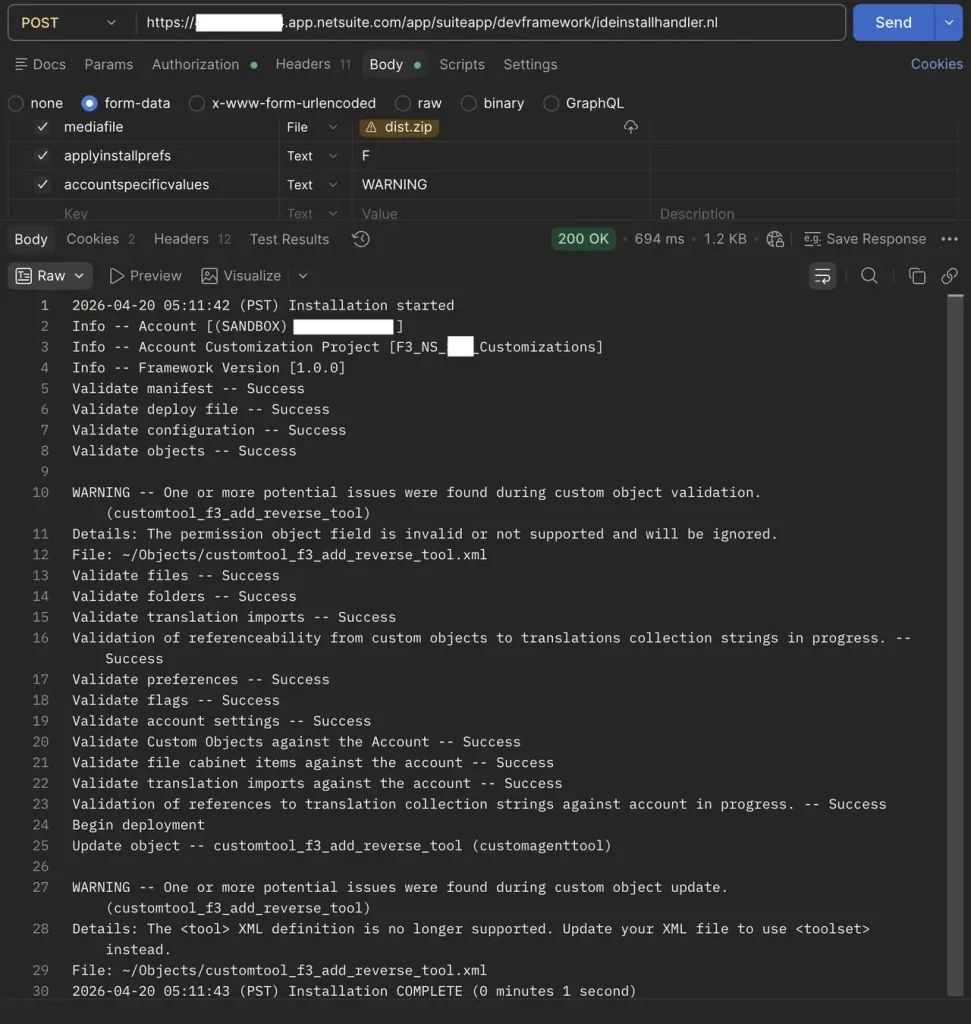
From the CI/CD perspective, I found this useful for understanding and debugging the CLI flow, not as a replacement for account:setup:ci. The handlers are internal, and this PoC still involved OAuth 2.0 user interaction.
Inspect record initialization defaults from the browser
While logged into the NetSuite UI, I ran the browser command below to inspect the record types and their initializedefaults and transformdefaults entries:
// NetSuite browser console research only, not supported SuiteScript.
nsServerCall(nsJSONProxyURL, 'getRecordTypes');
This command exposed values used inside the UI session I was inspecting. It is an internal browser helper, not part of the public SuiteScript modules.
Prefill new records through URL parameters
I learned that passing record.<field_id>=<value> in a record URL could prefill body fields while creating a new record. Earlier, I assumed I was limited to the fields documented under record.create({ defaultValues }). I tested the following CREATE-mode URL pattern:
https://<ACCOUNT_ID>.app.netsuite.com/app/accounting/transactions/salesord.nl?record.<FIELD_ID>=<URL_ENCODED_VALUE>The finding applies to opening a new record through the UI. It does not edit a saved record.
NetSuite DevAssist API chatbot PoC
I built a chatbot PoC with NetSuite’s DevAssist API, using OCI Generative AI with a model from Cohere’s Command family. The app had OAuth 2.0 with PKCE, streaming responses and multiple chat sessions. It was useful for generating SuiteScript skeletons, but my SuiteQL tests sometimes returned incorrect field names, longer conversations hit HTTP 413, and generated code needed debugging.
I published the PoC source on GitHub. The code helped me explore the API and build scaffolding, but I still reviewed the generated scripts and queries before using them.
Model providers used by NetSuite AI features
In SuiteAnswers 1023335, Oracle mapped Ask Oracle to OpenAI models and identified Cohere as the provider behind Text Enhance and Prompt Studio at that point in time. I found it interesting that different NetSuite AI features used different model families.
The provider mapping comes from that SuiteAnswers reference; it may change as NetSuite updates those features.
Closing Notes
The recurring lesson across these examples is to follow what NetSuite actually does. The Invoice Group relationship was only available after CREATE finished, the workflow Save option depended on Save Record First, and the native costing jobs had to be sequenced after completion.
Those details mattered more than adding extra script logic around the problem.
Further Reading
Continue exploring NetSuite development and integrations with these Folio3 guides.
Getting Started
- A Complete Setup Guide for NetSuite AI Connector
- A Setup Guide for NetSuite AI Connector with Postman: API Integration Tutorial
- Getting Started with NetSuite SuiteTalk REST API in Postman
- NetSuite MCP OAuth 2.0 Token Generator Tool
- SuiteScript Essentials: A Developer’s Getting Started Guide
- Open Source for Dummies: A Beginner’s Open Source Journey
- SuiteCommerce Development: An Illustrated Guide from Setup to Extension Deployment & Troubleshooting
MCP and Client Integrations
- Connecting MCP with ChatGPT: A Complete Guide
- IDE Integration Guide for NetSuite MCP Tools in Cursor & VS Code
- Connecting MCP Tools with Qwen
- Connecting ChatGPT Business with NetSuite via MCP: The Future of Enterprise AI Integration
- OAuth 2.0 in NetSuite: Complete Setup Guide (Client Credentials Flow)
Advanced and Architecture
- A Development Guide to Build Custom Tools for NetSuite AI Connector
- Dual API Integration: Using NetSuite MCP Tools with OpenAI and Anthropic
- NetSuite MCP Challenge: Implementation Case Study & Results
- MCP Input Formats Compared: Token Usage Analysis for NetSuite MCP Tools
- Integrating NetSuite MCP Tools with AI-Powered CLI Tools
- WhatsApp Triggered AI Agent for NetSuite Using n8n and MCP Tools
- Advanced NetSuite PDF and HTML Template Tricks
- NetSuite Scriptable Cart in SuiteCommerce Advanced: 6 Problems Developers Actually Need to Solve
- Prompt Studio: From SuiteQL Rows to a Business Summary
- Yup and Joi Validation Guide: Dynamic Schemas, Conditional Rules And React Hook Form Integration
- NetSuite Map/Reduce Script Guide: Concurrency, Governance, Yielding & Restarts
- SuiteCommerce Development: A Complete Practical Guide to SuiteCommerce Extension Development
- NetSuite Transaction Anomaly Detection with Autoencoders
- NetSuite N/llm Under the Microscope: What Worked, What Broke, and What We Learned