Key Takeaways
- A manufacturing BOM (MBOM) lists every part, quantity, and step your shop floor needs not only to design the product but also to build it.
- The engineering BOM (EBOM) describes how a product is designed, whereas the MBOM describes how it gets built, including routing, labor, and packaging.
- Most MBOMs are multi-level. A finished good breaks down into subassemblies, and each subassembly breaks down into raw materials or purchased parts.
- Manufacturing and production teams own the MBOM day to day, but it starts with the EBOM that engineering releases.
- The MBOM lives on an assembly item’s Bill of Materials subtab. It automatically drives work orders, MRP runs, and cost rollups.
- Most shop floor errors we see trace back to an MBOM that wasn’t updated after an engineering change.
No great product in the world has been built by engineering intent alone. Don’t get us wrong. A raw design or blueprint created by engineers sets the baseline. But one thing is for sure: it is not enough to successfully mass-produce a product.
For that, manufacturing teams need a product structure that reflects the materials, assemblies, production requirements, and sequence involved in actually making the product. This is where the distinction between an Engineering Bill of Materials (EBOM) and a Manufacturing Bill of Materials (MBOM) becomes important.
An EBOM organizes the product around how it is designed, while an MBOM organizes it around how it is produced. Both have a fair share of points of parity, but there are differences as well. The manufacturing structure introduces different assemblies, production materials, quantities, and relationships required on the shop floor.
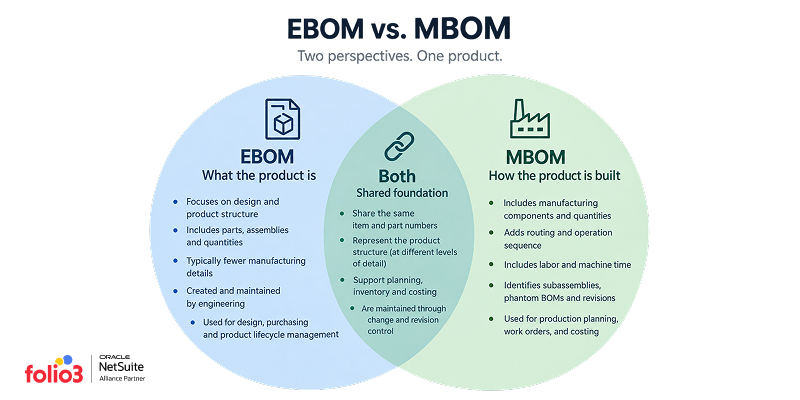
That difference is further realized when the product structure moves into an ERP. In NetSuite, the MBOM needs to work with items, assemblies, work orders, routings, inventory, and manufacturing processes rather than simply mirror the engineering structure.
This guide explains how MBOMs differ from EBOMs, what information belongs in a manufacturing BOM, how to structure one for production, and how the MBOM fits into a NetSuite manufacturing environment.
What Is a Manufacturing BOM (MBOM)?
A manufacturing Bill of Materials (BOM) is a structured list of every material, component, subassembly, and production instruction required to build a finished product on your specific shop floor. That too, with your specific equipment and workforce. It’s not merely a performative checklist that gets reduced to a “tick-boxing” activity. In fact, it is highly critical to the production process as it is the actual build plan.
Where the MBOM Sits in the Product Lifecycle
A product’s BOM moves through a predictable chain before it becomes a finished unit. Here is what the chain looks like:
- Engineering designs it and releases an EBOM.
- Manufacturing translates that EBOM into a buildable process, which becomes the MBOM.
- The ERP turns that MBOM into a work order.
The work order drives the actual production run. Skip a step, or let two steps fall out of sync, and you get the exact mismatch we opened with in the form of a bracket that’s correct on paper and wrong on the floor.
What’s the Difference Between an MBOM and an EBOM?
This is the single most common mix-up we run into with manufacturing clients, and it’s not really their fault. Most CAD and design tools, like SolidWorks and Autodesk, generate a BOM automatically, so teams get used to calling that list “the BOM” and assume production works from the same one.
EBOM vs MBOM at a Glance
| Engineering BOM (EBOM) | Manufacturing BOM (MBOM) | |
|---|---|---|
| Focus | Product design and function | Production and assembly |
| Owner | Engineering | Manufacturing and production |
| Source | CAD models, design specs | The EBOM, translated into a build process |
| Content | Part specs, tolerances, materials | Routing, labor, quantities, packaging, work instructions |
| Structure | Reflects how the product is designed | Reflects how the product is actually built |
What Does a Manufacturing BOM Include?
A Manufacturing Bill of Materials contains more than a list of parts and quantities. It needs to represent the product structure and the manufacturing information required to plan, cost, and execute production. The exact information varies by manufacturing process, but several elements are important for building a usable MBOM.
1. Item or Part Number
Every material, component, and assembly included in the MBOM needs a specific item or part identifier. This allows the manufacturing structure to connect the physical component to its inventory record, purchasing information, costing data, and other ERP records.
The item should also represent the way the material is actually managed. A purchased component, manufactured subassembly, raw material, consumable, or packaging item may have different inventory and planning requirements. Using the correct item rather than treating everything as a generic BOM line keeps the manufacturing structure aligned with how the business actually manages materials.
2. Quantity per Assembly
The quantity specifies how much of a component is required to produce the parent assembly. This should represent the quantity used in the manufacturing process, rather than simply the theoretical quantity shown on an engineering drawing.
Where the manufacturing process has expected material loss, scrap, or yield considerations, those requirements need to be reflected in the manufacturing setup appropriately. Otherwise, material planning and production requirements can be understated even though the product structure appears correct.
3. Unit of Measure
The unit of measure defines how the component quantity is expressed and consumed. Depending on the product, this could be each, kilograms, meters, liters, feet, or another applicable unit.
The manufacturing unit must align with how the item is purchased, stocked, issued, and consumed. A mismatch between the BOM quantity and the item’s units of measure can result in incorrect material requirements, purchasing quantities, and inventory consumption.
4. Routing and Operation Sequence
The MBOM needs to work with the sequence of manufacturing operations required to turn its components into the finished assembly. Routing information identifies the operations involved and, where applicable, the work center or manufacturing resource associated with each operation.
This is what separates a production-oriented structure from a parts list alone. The materials may be correct, but production still needs to know where and in what sequence those materials are processed, assembled, tested, or otherwise transformed.
5. Labor and Machine Time
Manufacturing operations may require defined labor and machine time to support production costing and capacity planning. The relevant times are generally associated with the routing and its operations rather than simply being treated as another BOM component.
Accurate operation times give the organization a basis for estimating manufacturing cost and understanding how much production capacity a work order will require. If these values are missing or outdated, the BOM may produce a correct material requirement while still producing an unreliable view of production cost or capacity demand.
6. Subassembly Relationships
An MBOM can contain assemblies that have their own underlying BOM structures. These relationships create the multi-level product structure used to represent how a finished product is built from smaller assemblies and components.
For example, a finished product may contain a housing assembly, which contains several purchased components and internally manufactured parts. Maintaining these relationships allows the manufacturing system to trace the structure through each level rather than flattening every component into one large list.
7. Revision and Version Control
An MBOM needs to identify which approved version of the manufacturing structure is being used. This becomes important whenever engineering changes a component, quantity, material, or product design.
Revision control provides a way to distinguish the manufacturing structure that was valid at one point from a later version. It also gives manufacturing teams a controlled basis for determining which structure should be used when producing a particular product.
8. Phantom BOMs
Some subassemblies are needed to organize the manufacturing structure but are not intended to be stocked as separate inventory. These can be represented as phantom structures where the manufacturing system treats the underlying components as part of the parent assembly rather than requiring the intermediate assembly to be built and stocked independently.
Phantom structures can simplify BOM organization while preserving the component relationships needed for planning and production. Whether a subassembly should be treated as a stocked assembly or a phantom structure should reflect the actual manufacturing and inventory process, not simply how the product is represented in engineering documentation.
Putting the Elements Together
These elements work together to create a manufacturing structure that can support more than material identification. The item and quantity information establishes what is required, the unit of measure defines how it is consumed, the subassembly relationships establish the product hierarchy, and the routing and operation information connects the structure to how production is performed.
In an ERP such as NetSuite, this distinction is important because the BOM does not operate in isolation. Its structure needs to work with the item records, inventory, work orders, routings, revisions, costing, and planning processes that use the manufacturing data.
Single-Level vs. Multi-Level MBOMs
A single-level MBOM works for simple products assembled directly from raw materials or purchased parts, with no intermediate subassembly. Most real manufactured products aren’t that simple.
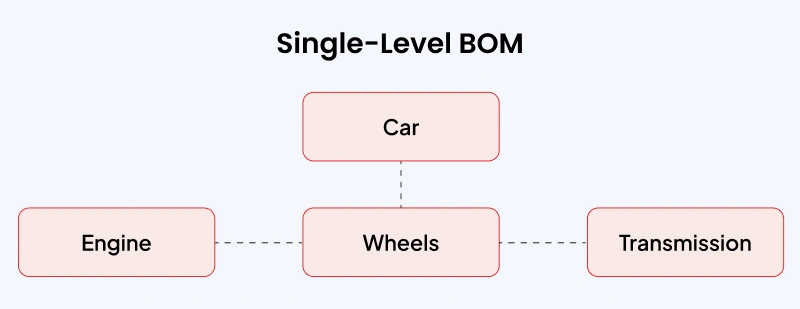
A multi-level MBOM shows the full parent-child chain. It includes a finished goods breakdown into subassemblies, and each subassembly breaks down into its own components. A pump assembly, for example, might have a motor subassembly, a housing subassembly, and a fastener kit, each with its own BOM nested inside the parent.
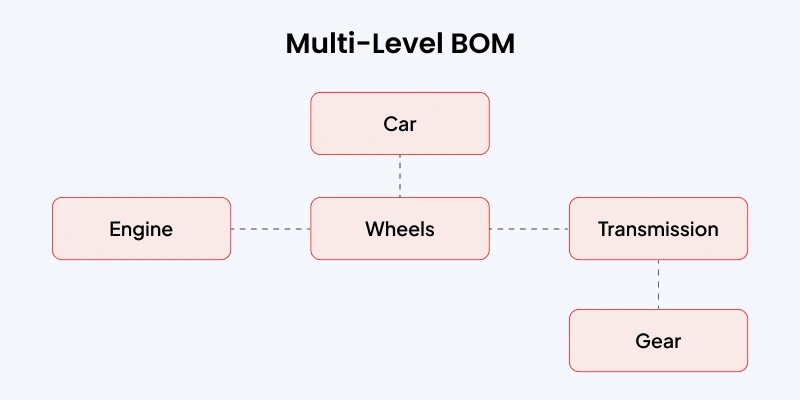
Get the nesting wrong and every level above it inherits the error. That’s why multi-level accuracy matters more as your product gets more complex.
How Do You Create a Manufacturing BOM?
Building an MBOM is a repeatable process that runs every time engineering releases a new design or a meaningful change.
Step 1: Start From the Approved EBOM
Never build an MBOM from a draft or an in-progress design. Start from the EBOM that’s actually been released and approved. Otherwise, you’re building a production plan around a design that might still change.
Step 2: Assign Revision Control and Change Tracking
Every MBOM needs a version tied to the EBOM revision it came from. When engineering issues a change, you need a clear, auditable way to know which MBOMs are affected and need updating before the next production run.
Step 3: Break the Design Into Buildable Subassemblies
Look at how the product will be assembled on your floor, not how it’s grouped in the CAD file. Group components the way your work centers will actually build them, in stages that make sense for your equipment and layout.
Step 4: Add Routing, Labor, and Machine Data
This is the step an EBOM never covers. For every operation, define which work center performs it, how long it takes, and what machine or tooling is required. This data becomes the backbone of your cost rollup later.
Step 5: Validate With the Production Team Before Release
An MBOM built entirely at a desk can miss problems that are immediately obvious to people on the production floor. Apply the Gemba principle and review the BOM where the work actually happens, with the operators, supervisors, and manufacturing engineers who will use it. Their feedback can expose missing components, incorrect quantities, impractical assembly sequences, or process requirements that are easy to overlook during an office-based review. This helps close the gap between what the MBOM defines and how the product is actually built.
Step 6: Load It Into Your ERP as an Assembly Item
Once the MBOM is validated, it needs to live somewhere production can actually act on it rather than in a spreadsheet that only one person maintains. In NetSuite, this means setting the item up as an assembly item and building the MBOM directly on its Bill of Materials subtab, where it’s tied to real inventory, routing, and cost data instead of random spreadsheets or documents that no one could keep a tab on.
What Are the Benefits of a Well-Managed MBOM?
A clean MBOM pays off well past the shop floor. Here’s where the impact actually shows up.
Cost Accuracy
An MBOM ties material and labor costs to the actual build. When labor time and routing are captured accurately, your assembled item cost reflects reality, which matters the moment you’re quoting a customer or evaluating whether a product line is still profitable.
Less Waste and Fewer Shortages
Accurate quantities, including scrap and yield allowance, mean you’re not over-ordering components you don’t need or discovering mid-run that you’re short three units of a fastener.
This is one of the most measurable savings we see clients realize once their MBOMs are accurate, and it compounds. Less scrap and fewer emergency reorders also mean less material sitting in a dumpster or a warehouse corner at the end of the quarter.
Faster Engineering Change Turnaround
A revision-controlled MBOM gives an engineering change a clear place to land. Instead of you manually re-explaining the update to the floor, the change flows through the linked MBOM to every open work order it affects.
Cross-Team Alignment
Engineering, procurement, and production work from the same BOM instead of maintaining separate spreadsheets that can quickly get out of sync. Everyone is working from the same product structure, so changes are easier to track and fewer errors get passed from one team to another.
Audit-Ready Traceability
For regulated industries like automotive, medical device, and aerospace, a well-managed MBOM is how you prove a part was built to spec. Auto parts manufacturers feel this is the hardest, since a single wrong bracket spec, like the one in the example above, can halt a production line entirely.

What Does a Manufacturing BOM Example Look Like?
Here’s what an actual multi-level MBOM looks like for a hydraulic pump bracket assembly.
Sample MBOM: Pump Bracket Assembly
| Level | Item Number | Description | Qty per Assembly | UOM | Operation / Routing Step | Notes |
| 0 | PBA-1000 | Pump Bracket Assembly (finished good) | 1 | Each | — | Parent assembly |
| 1 | PB-2001 | Steel Bracket Base | 1 | Each | Op 10: Cut & Form | Sourced from raw steel sheet |
| 1 | PB-2002 | Mounting Plate Subassembly | 1 | Each | Op 20: Weld | Multi-level, see below |
| 1 | PB-2003 | Hex Bolt, M8x25 | 4 | Each | Op 30: Fasten | Scrap allowance: 5% |
| 1 | PB-2004 | Primer Coating | 0.05 | Liter | Op 40: Coat | Consumable, not stocked as a unit |
| 2 (under PB-2002) | PB-3001 | Steel Plate, 4mm | 1 | Each | Op 15: Punch | Component of Mounting Plate Subassembly |
| 2 (under PB-2002) | PB-3002 | Weld Nut, M8 | 2 | Each | Op 16: Weld | Component of Mounting Plate Subassembly |
Notice what’s on this table that would never appear on an EBOM. The primer quantity, the scrap allowance on the bolts, the operation sequence, and the fact that the mounting plate subassembly has its own nested level underneath it. That’s the difference between a design document and a build document, in one table.
How Does an MBOM Work Inside an ERP Like NetSuite?
Most manufacturers don’t manage their MBOM in a separate Product Lifecycle Management (PLM) tool at all. They manage it as an assembly item inside their ERP, because that’s where the BOM needs to connect to work orders, purchasing, and cost accounting.
Assembly Items and BOM Setup
Every MBOM in NetSuite lives on an assembly item. This is one of NetSuite’s core item types built specifically for manufactured goods. You configure the Bill of Materials directly on that item record, including components, quantities, and the routing that ties back to work centers.
Getting the item type right at this stage matters more than it looks like it should. Set a component up as the wrong item type, and you’ll run into problems in purchasing and fulfillment long before you notice the BOM itself is fine.
Matbock, a military gear manufacturer, and its sister company Cardomax, which makes liquid supplements, needed exactly this kind of separation. One veteran-owned company, two completely different products, and neither one buildable off a generic BOM structure.
Folio3 set up Multi UOM, BOMs, and routing independently for each business inside NetSuite, so a supplement batch and a piece of tactical gear could each get an MBOM built around how that specific product actually gets made, instead of forcing both through one shared setup.
You can read the complete Matbock case study to understand the challenges they faced, the solution we implemented, and the impact that was created.
How Does NetSuite Display and Analyze a Manufacturing BOM?
Once a manufacturing BOM is configured in NetSuite, users can examine its structure, component relationships, revisions, and costs without relying on a separate spreadsheet. The most useful views depend on whether you need to understand what goes into an assembly, where a component is used, or what the assembly costs to manufacture.
Viewing the BOM Structure in NetSuite
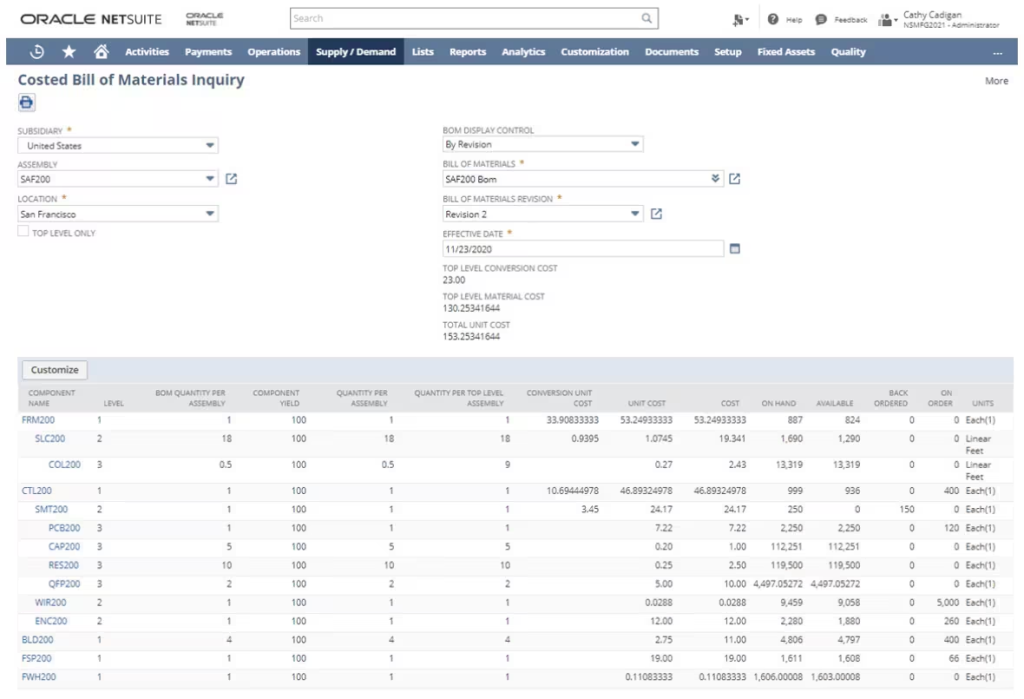
Bill of Materials Inquiry provides a detailed view of an assembly’s BOM structure.
The Top Level Only option determines how much of the hierarchy is displayed. With it selected, the inquiry shows the components directly associated with the selected assembly. When it is cleared, NetSuite expands the structure to show lower-level components and subassemblies.
Depending on the BOM configuration, the inquiry can show information such as:
- Component
- BOM level
- Quantity per assembly
- Quantity per top-level assembly
- Yield
- Quantity on hand
- Quantity available
- Quantity on order
- Quantity back-ordered
This makes the inquiry useful for reviewing both the structure of a multi-level BOM and the inventory position of its components.
BOM Explosion Display
BOM explosion is a top-down analysis of the product structure. It starts with an assembly and expands the BOM to identify the components and subassemblies required to produce it.
For example:
Finished Assembly → Subassembly → Component → Raw Material
A multi-level BOM view is useful when production or planning teams need to understand the complete material structure behind a finished product.
The depth of the explosion matters. Looking only at the immediate components can hide materials that sit several levels below the finished assembly.
BOM Implosion Display
BOM implosion works in the opposite direction. Instead of starting with a finished assembly and moving downward, it starts with a component and traces upward to identify the assemblies and subassemblies that use it.
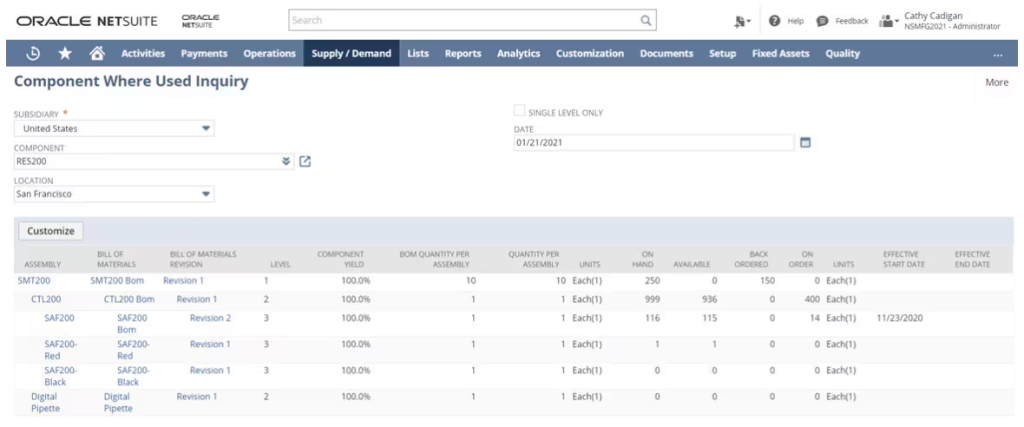
For example:
Raw Material → Component → Subassembly → Finished Assembly
This becomes particularly useful when a component is discontinued, substituted, has a cost change, or becomes unavailable. The question is no longer “what goes into this product?” but “which products are affected by this component?”
Reviewing BOM Revisions
If the manufacturing setup uses BOM revisions, you need to consider the structure in terms of when a particular component relationship was effective.
NetSuite’s BOM inquiry provides BOM Display Control options that can be used to examine the structure By Date or By Revision, where supported by the BOM configuration.
This is important when investigating historical production because the current BOM may not be the structure that was effective when an earlier work order was processed.
Reviewing the Costed BOM
The Costed Bill of Materials Inquiry provides a cost-oriented view of the assembly rather than focusing only on its component structure.
You should use it to review the costs contributing to an assembly, including material and conversion costs where the relevant costing and manufacturing configuration is in place.
This connects the product structure to the cost information used in the manufacturing environment and helps users investigate how changes to component costs or manufacturing operations affect the assembly’s calculated cost.
From MBOM to Work Order
The MBOM on its own doesn’t build anything. It’s just the blueprint. NetSuite’s Work Orders and Assemblies module is what actually executes it on the floor. It commits components, tracks the build through each stage, and, with backflushing enabled, automatically decrements component inventory and increments finished goods the moment the build completes.
Skydio is a good example of what that connection needs to hold up under. The drone manufacturer’s work orders now sync automatically with its vehicle testing system, and every component carries serial number tracking through the build. So, now a finished drone’s full manufacturing history traces back to the exact MBOM and work order it came from. That’s the kind of traceability an MBOM sitting outside the ERP can’t give you.
Exploding Multi-Level BOMs Through MRP and Demand Planning
This is where a multi-level MBOM earns its complexity back. When a demand plan runs, NetSuite Materials Requirement Planning automatically explodes the MBOM down through every level, subassemblies, raw materials, and purchased parts, so shortages surface before they hit the floor instead of after.
Run alongside NetSuite Demand Planning, that same calculation runs across multiple locations and lead times, which matters the moment your MBOM has more than one or two levels.
Cost Rollups and Real-Time Visibility
Because labor and routing data live on the same MBOM that drives the work order, NetSuite rolls component cost and labor cost up into a real assembled item cost automatically, and updates it as actuals come in instead of waiting until month-end to reconcile against a standard cost. BOM, work orders, and MRP aren’t three separate systems here. They’re three views into the same underlying data.
MBOMs Across Outsourced Production
If part of your build happens outside your own walls, a subcontracted operation or a contract manufacturer, the MBOM structure still has to hold up across company lines. Vendor-supplied components need to sit inside the same multi-level BOM as everything built in-house, with the same routing logic and the same revision control.
Otherwise, you end up with two versions of the truth. One about what your ERP thinks is happening, and the other about what’s actually happening at the vendor’s facility.
What Are Common MBOM Mistakes to Avoid?
MBOM problems usually arise when the manufacturing structure is treated as a static parts list rather than as production data. The structure needs to stay aligned with engineering changes, carry the information required for costing and scheduling, and remain connected to the ERP processes that use it. Common issues include:
Letting the MBOM Drift Out of Sync With the EBOM
This is the single biggest source of shop floor errors we see. An engineering change gets released, the EBOM updates, and nobody flags every MBOM that needs the same update. The fix is revision control tied directly between the two documents so that there is proper trail for the changes made.
Skipping Routing and Labor Data
An MBOM with just parts and quantities, and no operation sequence or labor time, is really still an EBOM wearing a different name. Without routing data, you can’t cost the build accurately or schedule capacity against it.
No Formal Revision Control
If your MBOM revisions live in file names like “bracket_v2_final_FINAL.xlsx,” you’re in for big trouble. You need formal revision control to keep a tab on updates being made. A real revision process ties each MBOM version to a specific EBOM release and keeps a clear audit trail of what changed and when.
Managing It in a Spreadsheet Instead of the ERP
Spreadsheets don’t link to your work orders, your MRP run, or your cost accounting. Every update has to be manually re-entered somewhere else, which is exactly where errors creep in. If your MBOM still resides in a spreadsheet, that’s usually the clearest sign it’s time to move it into the same system that runs your work orders and your inventory.
Ignoring Phantom BOMs and Subassembly Nesting
Not every subassembly needs to be stocked as its own item. A phantom BOM exists purely for planning and routing purposes. It gets consumed straight into the parent during the build. Treating a phantom BOM like a stocked item, or missing the nesting on a real multi-level subassembly, both throw off your MRP calculations in ways that are hard to trace back to the source.
Managing MBOMs in NetSuite
A well-structured MBOM gives manufacturing teams a production structure they can actually work from. It brings together the components, quantities, assemblies, and manufacturing requirements needed to move from product design to production, while giving planning, costing, inventory, and shop floor teams a consistent source of information.
For manufacturers using NetSuite, this means treating the MBOM as part of the broader manufacturing setup rather than as a standalone document. When the BOM, routing, work order, inventory, and costing structures are properly aligned, NetSuite can use the same production information across planning and execution.
If your team is still working through what that setup should look like inside NetSuite, that’s the exact conversation Hani Mamdani and Folio3’s manufacturing consultants have with clients every week. Talk to us before you build your next MBOM, not after you get it wrong.
FAQs
Is an MBOM the same thing as a BOM?
No. “BOM” is a general term that covers several types of parts lists, including engineering BOMs, manufacturing BOMs, and sales BOMs. An MBOM is specifically the version built for production.
How many BOM levels can NetSuite handle?
NetSuite supports multi-level BOMs with as many nested subassembly levels as your product actually requires, and MRP explodes through all of them when calculating material requirements.
Who creates the MBOM, engineering or manufacturing?
Manufacturing and production teams own and maintain the MBOM, but it always starts from an EBOM that engineering releases. The MBOM is a translation of that design into a buildable process, not a separate invention.
Does every manufactured product need an MBOM?
Yes, if it’s built from more than one component. Even a simple two-part assembly needs quantities, a sequence, and a place for that information to live that production can actually reference.
What’s a phantom BOM?
A phantom BOM is a subassembly structure that exists for planning and routing purposes but is never stocked or built as a standalone item. It gets consumed directly into its parent assembly during the build.
Can an MBOM be generated automatically from an EBOM?
Some PLM and ERP systems can generate a starting MBOM structure from an EBOM automatically, but routing, labor time, and production-specific quantities still need manufacturing input. Treat an auto-generated MBOM as a draft, not a final version.
What happens to the MBOM when there’s an engineering change?
The change needs to flow from the EBOM into every MBOM that references the affected component, along with any open work orders built from the old revision. This is exactly the kind of change control that prevents the “wrong part built” scenario described earlier in this piece.