
Key Takeaways
- NetSuite Connector is better suited to focused NetSuite integrations. It fits standardized use cases such as ecommerce, marketplaces, POS, and 3PL connections.
- MuleSoft is built for complex multi-system environments. It provides API management, data transformation, orchestration, monitoring, and reusable integration capabilities.
- NetSuite Connector offers a more focused approach. Businesses with a limited number of NetSuite integrations might not need MuleSoft’s additional platform capabilities.
- MuleSoft becomes more relevant as integration requirements expand. It is designed for organizations managing multiple applications, APIs, data sources, and integration workflows.
- The right choice depends on the integration landscape. The question is less about which product has more features and more about which platform fits the systems, workflows, and technical requirements involved.
NetSuite Connector and MuleSoft solve different integration problems. NetSuite Connector is designed for focused connections between NetSuite and platforms such as ecommerce stores, marketplaces, point-of-sale (POS) systems, and third-party logistics providers. MuleSoft Anypoint Platform is a broader integration and API management platform designed to connect multiple applications, APIs, data sources, and business processes.
The right integration choice depends on what you need to connect and how much control you need over those connections, because a business connecting an ecommerce platform to NetSuite has different requirements than an enterprise connecting NetSuite, Salesforce, a WMS, 3PL providers, payment platforms, and internal applications.
In this blog, we are going to look at NetSuite Connector and MuleSoft side by side to understand which integration approach would be right for your business.
What Is NetSuite Connector?
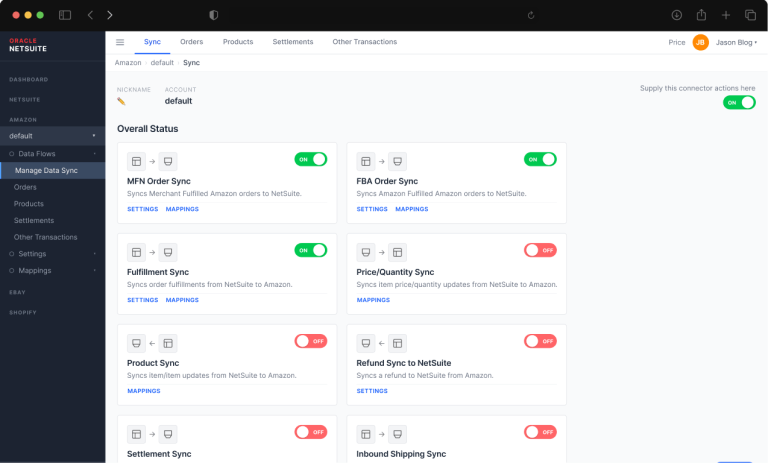
NetSuite Connector provides prebuilt connections between NetSuite and several external business platforms. It is particularly useful for organizations that need to synchronize information between NetSuite and ecommerce, marketplace, point-of-sale, and logistics systems.
For example, an ecommerce business might need customer, product, order, inventory, and fulfillment information to move between its online store and NetSuite. A focused connector reduces the amount of integration development required for this type of workflow.
The main advantage is its focus on common NetSuite integration scenarios. Businesses with straightforward requirements get a connection designed around NetSuite rather than adopting a full integration platform for a relatively narrow use case.
What Is MuleSoft Anypoint Platform?
MuleSoft Anypoint Platform is an integration and API management platform for connecting applications, systems, APIs, and data sources. It supports API design and management, data transformation, integration development, deployment, monitoring, and governance.
MuleSoft is particularly relevant when NetSuite is one part of a larger technology environment. A company might have Salesforce for CRM, NetSuite for ERP, a warehouse management system, a 3PL platform, ecommerce applications, payment services, and internal applications that all need to exchange information.
Instead of creating separate point-to-point connections for every system, MuleSoft provides a platform for managing those integrations through reusable APIs and integration workflows.
NetSuite Connector vs MuleSoft: At a Glance
| Area | NetSuite Connector | MuleSoft |
|---|---|---|
| Primary use | Focused connections involving NetSuite | Integration across multiple applications, APIs, and systems |
| Best fit | Ecommerce, marketplaces, POS, 3PL, and similar NetSuite workflows | Complex environments with many systems and integration requirements |
| NetSuite focus | Designed around common NetSuite integration scenarios | NetSuite is one system within a larger integration environment |
| Data transformation | Supports the data mapping required by supported integrations | DataWeave provides extensive data transformation capabilities |
| API management | Focused on the supported integration use case | Full API design, management, security, governance, and lifecycle capabilities |
| Integration model | Prebuilt or focused connections | API-led and application integration |
| Monitoring | Integration-specific monitoring and error handling | Platform-level monitoring and management across integrations |
| Technical requirements | Lower complexity for focused integrations | Greater technical expertise and platform management |
| Best for | Businesses with specific NetSuite integration requirements | Organizations managing complex, multi-system integration environments |
What Is the Main Difference Between NetSuite Connector and MuleSoft?
The biggest difference between NetSuite and MuleSoft is that the former focuses on connecting NetSuite with specific external applications and services, whereas the latter provides an integration platform for managing connections between many different systems, with NetSuite representing one part of that environment.
To understand this better, consider an online retailer using an ecommerce platform and NetSuite. The business needs orders, customers, inventory, products, and fulfillment information to stay synchronized. A focused NetSuite Connector fits that requirement well.
Now consider a larger organization using NetSuite, Salesforce, a WMS, multiple 3PL providers, an ecommerce platform, payment services, and internal applications. Those requirements involve more systems, more data transformations, more APIs, and more integration workflows. MuleSoft becomes more relevant in that environment.
Which Is Better for Ecommerce and Marketplace Integrations?
NetSuite Connector is the better fit for standardized ecommerce and marketplace integrations. Its purpose is to support common data flows between NetSuite and external commerce platforms.
An ecommerce company might need to synchronize customer records, product information, sales orders, inventory quantities, order status, fulfillment information, and shipping details for OTIF.
NetSuite connector provides a practical way to manage these flows without introducing a full integration platform when the business does not require one.
MuleSoft remains relevant when ecommerce is part of a much larger integration environment. For example, a company with several commerce platforms, Salesforce, NetSuite, warehouse systems, payment services, and internal applications might need centralized API management and reusable integration services.
Choosing an integration approach for your ecommerce environment?
If you’re connecting an ecommerce platform, marketplace, WMS, or 3PL to NetSuite, the right integration approach depends on your existing systems and the complexity of the data flows.
How Do NetSuite Connector and MuleSoft Handle Data Transformation?
NetSuite Connector is suited to the data mapping required for its supported integration workflows, while MuleSoft provides a dedicated data transformation framework for complex integration scenarios.
Simple integrations usually involve mapping fields between two systems. For example, an ecommerce platform’s customer fields need to correspond with the appropriate NetSuite customer fields, while order and inventory information follows the required structure on both sides.
MuleSoft takes this further through DataWeave, its data transformation language. DataWeave supports transformations between different data structures and formats, making it useful when information passes through several systems with different requirements.
This distinction matters when integration data needs substantial transformation before reaching NetSuite or another application.
For example, a business might receive an order from an ecommerce platform, enrich it with customer information from Salesforce, apply business rules, and then send the resulting transaction to NetSuite. That type of workflow requires more than basic field mapping.
NetSuite Connector vs MuleSoft for API Management
MuleSoft is the stronger choice when API management is a central requirement.
NetSuite Connector focuses on the integration itself rather than providing a full enterprise API management environment. For a business with a few defined NetSuite connections, that focused approach keeps the integration landscape relatively straightforward.
MuleSoft’s Anypoint Platform provides capabilities for designing, securing, managing, monitoring, and governing APIs. Its API-led approach separates integrations into reusable layers, which helps organizations avoid rebuilding the same connection logic for different applications.
For example, customer information might need to be accessed by a CRM, ecommerce platform, mobile application, and internal service. Instead of developing separate integration logic for every application, an organization could expose reusable API services through its integration layer.
That approach becomes more valuable as the number of systems and applications increases.
For a deeper look at how MuleSoft fits into a NetSuite integration environment, see our guide to MuleSoft NetSuite integration architecture.
NetSuite Connector vs MuleSoft: Which Provides Better Monitoring and Error Management?
Both approaches provide ways to monitor integrations and handle errors, but MuleSoft provides broader platform-level capabilities for organizations managing many integrations.
With a focused NetSuite integration, monitoring usually centers on whether records are transferring successfully and identifying failed transactions or synchronization issues.
A larger MuleSoft environment requires a different level of visibility. IT teams might need to monitor multiple APIs, applications, integration flows, transformations, and system dependencies from one platform.
That distinction becomes important when an integration failure affects several downstream systems. A failed order synchronization between an ecommerce platform and NetSuite is one problem. A failure involving an ecommerce platform, CRM, WMS, 3PL, and ERP introduces additional dependencies that require more detailed monitoring.
Which Is Easier to Implement?
NetSuite Connector is generally easier to implement for supported integrations, while MuleSoft requires more planning and technical expertise for complex, multi-system integrations.
NetSuite Connector implementations typically involve configuring the connected systems, mapping records and fields, setting synchronization rules, and handling errors. MuleSoft implementations require additional work around API design, data transformation, security, deployment, monitoring, and governance, with the effort increasing as the number of systems and workflow complexity grows.
Planning a MuleSoft integration with NetSuite?
MuleSoft delivers the most value when the integration requires more than a single system connection. If you’re working with NetSuite alongside CRM, WMS, ecommerce, logistics, or internal applications, the integration design deserves attention before development begins.
Which Is More Scalable? NetSuite Connector vs MuleSoft
NetSuite Connector is well suited to businesses expanding their supported NetSuite integrations, while MuleSoft is designed for larger integration environments with many applications and APIs.
Scalability in this context is not only about transaction volume. It is about how many systems, APIs, workflows, and data dependencies the organization needs to manage.
A growing ecommerce company might add another marketplace, warehouse, or logistics provider. A focused connector approach remains practical when those connections fit supported integration patterns.
A larger enterprise might add new CRM systems, regional applications, acquisitions, internal services, and third-party platforms. In that environment, the ability to manage reusable APIs and integration services becomes increasingly important.
How Does NetSuite’s 2026 Integration Direction Affect the Decision?
NetSuite’s integration environment continues to move toward REST-based services. This makes REST APIs increasingly important for new integration work. NetSuite 2026.1 introduced additional REST capabilities while the platform continues its transition away from older SOAP-based integration approaches.
That shift matters when evaluating a new integration because the integration layer needs to work with the interfaces supported by the systems involved.
For businesses using MuleSoft, this means NetSuite integrations need to be designed around the appropriate NetSuite APIs and authentication methods. For businesses using a focused connector, the question is whether the connector supports the required NetSuite integration capabilities for the specific workflow or not.
Does NetSuite AI Change the Integration Decision?
NetSuite’s newer AI capabilities add another consideration, but they do not replace the need for a suitable integration layer.
NetSuite has introduced AI capabilities that extend how external AI applications interact with NetSuite data and functionality. NetSuite’s AI Connector Service, for example, supports connections between NetSuite and AI platforms through the Model Context Protocol (MCP).
For organizations exploring AI workflows, the important question remains what systems need to exchange information and how that information should be governed.
A focused NetSuite integration remains appropriate for defined application-to-NetSuite workflows. MuleSoft becomes more relevant when AI services form part of a larger environment involving multiple applications, APIs, and data sources.
AI should therefore be treated as one part of the integration landscape rather than the deciding factor by itself.
Which Should You Choose: NetSuite Connector or MuleSoft?
It is better to choose NetSuite Connector when you need to connect NetSuite with a specific ecommerce, marketplace, POS, or 3PL platform. And choose MuleSoft when NetSuite needs to exchange data with several business systems, such as Salesforce, a WMS, ecommerce platforms, 3PLs, payment services, and internal applications.
For example, a retailer that needs to synchronize orders, customers, inventory, and fulfillment between Shopify and NetSuite has a relatively defined integration requirement. NetSuite Connector is a better fit for this type of connection.
Choose NetSuite Connector if …
- You need to connect NetSuite with an ecommerce platform, marketplace, POS system, or 3PL.
- Your integration mainly involves standard records such as customers, products, orders, inventory, and fulfillment.
- You have a small number of external systems to connect.
- Your integration requirements follow established workflows supported by the connector.
- You do not need enterprise API management across multiple applications.
Choose MuleSoft if …
- NetSuite needs to exchange data with several business applications.
- Your environment includes systems such as Salesforce, WMS, ecommerce, 3PL, payment platforms, and internal applications.
- Data needs significant transformation before moving between systems.
- Multiple applications need to consume or share the same APIs.
- Your IT team needs centralized API management, monitoring, security, and governance.
- You expect your integration environment to grow beyond a few NetSuite connections.
NetSuite Connector vs MuleSoft: Which one to implement?
NetSuite Connector is the better choice for focused NetSuite integrations, particularly when the requirement involves ecommerce, marketplaces, POS, or 3PL systems. It addresses a defined integration problem without introducing the additional complexity of a full integration platform.
MuleSoft is the better fit when the integration environment extends well beyond NetSuite. Organizations connecting CRM, ERP, WMS, ecommerce, logistics, payment services, internal applications, and APIs benefit from MuleSoft’s API management, data transformation, orchestration, monitoring, and reusable integration capabilities.
The simplest way to frame the decision is to look at your actual systems.
If the requirement is “We need to connect our ecommerce platform with NetSuite,” a focused NetSuite Connector approach is worth considering.
If the requirement is “We need NetSuite, Salesforce, WMS, 3PL, ecommerce, and internal applications to exchange data through a managed integration layer,” MuleSoft is the more appropriate platform.
The right choice comes down to the complexity of your integration environment, the number of systems involved, and how much control your organization needs over APIs and data flows.
FAQs
Is MuleSoft the same as NetSuite Connector?
No. NetSuite Connector focuses on specific connections involving NetSuite, while MuleSoft is a broader integration and API management platform designed for multiple applications, APIs, and data sources.
Is NetSuite Connector better than MuleSoft?
NetSuite Connector is better suited to focused NetSuite integration requirements such as ecommerce, marketplace, POS, and 3PL workflows. MuleSoft is better suited to complex environments where NetSuite is one of several connected systems.
Is MuleSoft useful for NetSuite integrations?
Yes. MuleSoft supports NetSuite integrations as part of larger application and API environments. It is particularly relevant when the integration requires data transformation, API management, orchestration, monitoring, or connections with several other systems.
Does MuleSoft replace NetSuite Connector?
No, as they address different integration requirements. NetSuite Connector provides focused NetSuite connectivity, while MuleSoft provides a platform for managing broader integration requirements.
Do I need MuleSoft if I only have one NetSuite integration?
No, not if you only need one straightforward NetSuite integration. A NetSuite Connector is the better fit for a defined connection such as ecommerce, marketplace, POS, or 3PL integration. MuleSoft makes more sense when NetSuite needs to exchange data with multiple applications or when the integration requires advanced data transformation, API management, and complex workflows.
Is MuleSoft suitable for large NetSuite environments?
Yes. MuleSoft is designed for integration environments involving multiple applications, APIs, and data sources. Its API management, transformation, monitoring, and governance capabilities make it suitable for organizations with complex integration requirements.

