Key Takeaways
- NetSuite MRP helps prevent shortages through demand planning, reorder points, safety stock, supply allocation, and what-if scenarios.
- Many shortages originate upstream and are caused by inaccurate forecasts, lead times, and limited visibility into committed inventory.
- MRP depends on accurate data, including BOMs, lead times, inventory levels, and safety stock settings.
- Janco Electronics shows how better MRP and raw material visibility address shortage-related problems.
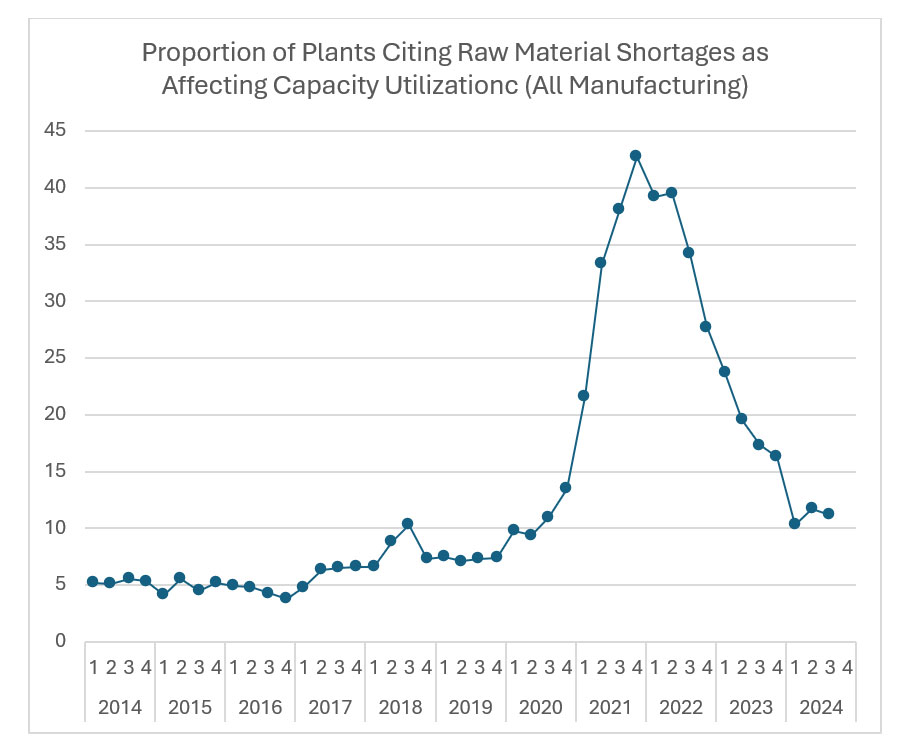
About 11% of US manufacturing plants currently cite raw material shortages as a real constraint on capacity utilization, according to an analysis of Federal Reserve manufacturing data by Supply Chain Management Review. That’s a steep drop from the roughly 40% peak during 2021 and 2022, but it’s still more than double the 5% rate manufacturers dealt with from 2014 to 2016.
Computer and electronic products manufacturers are still sitting at 37.1%. Electrical equipment makers are at 31.8%. Shortages didn’t go away. In fact, they settled at a new, permanently higher baseline.
On the floor, a raw material shortage starts as a demand forecast that was never connected to actual sales orders, a reorder point set without accounting for a supplier’s real lead time, or a component that looks available in inventory but is already committed to three other open work orders. By the time a work order actually stalls waiting on material, the failure happened weeks earlier, upstream, where nobody was watching.
NetSuite’s Material Requirements Planning module exists to catch that failure before it reaches the floor. This article breaks down the specific mechanisms it uses to do that, what actually causes shortages in the first place, how those mechanisms compare to manual or spreadsheet-based planning, and what this looks like in two real manufacturing operations that had exactly this problem.
What Causes Raw Material Shortages on the Production Floor?
A shortage that stops a work order is usually a visibility problem that existed for weeks before anyone noticed.
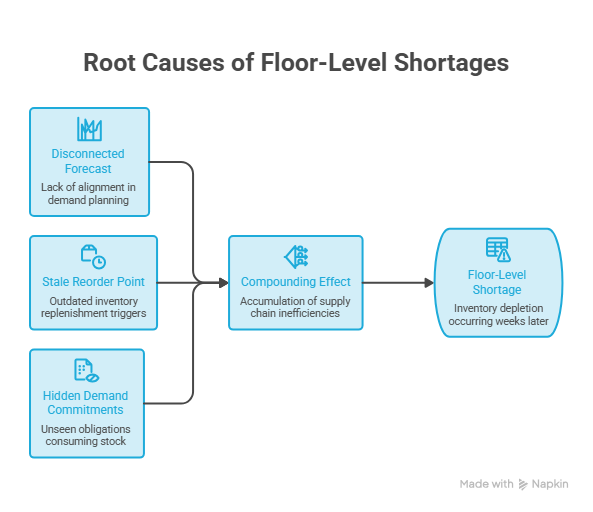
Demand Forecasts Disconnected From Actual Orders
When sales forecasts and production planning are managed separately, production plans can quickly fall out of sync with actual orders. This can lead to inaccurate material requirements and unexpected shortages.
Reorder Points That Ignore Real Lead Time
A reorder point set once, based on a supplier’s lead time from two years ago, doesn’t adjust when that supplier’s lead time doubles or a new supplier gets added with different terms. Static reorder points are usually the root cause of shortages that look like a supply chain problem on the surface.
No Visibility Into What’s Already Committed
Inventory that shows as on-hand but is already allocated to other open work orders or sales orders creates a false sense of availability. A planner looking at raw inventory counts without seeing committed demand against them will make the wrong call every time.
Safety Stock Set by Guesswork Instead of Data
Safety stock levels picked as a round number, or copied from a competitor’s rule of thumb, either tie up working capital unnecessarily or fail to cover the actual variability in demand and supply. Neither error shows up until it’s already causing a problem.
How Does NetSuite MRP Prevent These Shortages?
Each cause above maps to a specific mechanism inside NetSuite MRP. None of them work as a single generic feature, and here’s what each one does.
NetSuite Supply Planning Workbench
This is the central console where exceptions are displayed. For instance, potential shortages, scheduling conflicts, and recommended actions are consolidated across locations instead of being buried in separate reports. You can review and bulk-approve recommendations from one screen instead of searching for issues across multiple systems.
Reorder Points and Safety Stock by Location
NetSuite MRP lets you configure reorder points, safety stock, and lead times per item, per location, rather than applying one static number company-wide. A component with a 90-day lead time from one supplier and a 10-day lead time from a backup supplier is planned differently depending on which sourcing rule actually applies.
Supply Allocation Across Open Orders
Supply allocation assigns inventory from purchase orders, transfer orders, and work orders against specific demand. So a planner sees what’s genuinely available rather than a raw, uncommitted count. This is the mechanism that closes the “looks available but isn’t” gap directly.
What-If Scenario Planning
Before committing to a sourcing decision or a production schedule change, planners can model the outcome first. Running a scenario against a potential supplier delay or a demand spike surfaces a shortage risk before it’s locked into a live schedule instead of after.
Preferred Supplier and Sourcing Rules
Defining preferred suppliers and sourcing rules per item means MRP recommendations automatically route to the right source given current lead time and cost data, instead of defaulting to whichever supplier was used last time regardless of whether that’s still the fastest or most reliable option.
Demand planning and MRP work together rather than as separate tools. NetSuite’s demand planning module feeds item- and location-level forecasts into MRP’s calculations, and advanced procurement picks up the resulting purchase recommendations and carries them through to the actual supplier order.
[VISUAL: Diagram showing demand planning, MRP, and procurement as a connected loop rather than three separate systems]
How Does NetSuite MRP Compare to Manual or Spreadsheet-Based Planning?
| Spreadsheet or Manual Planning | NetSuite MRP | |
|---|---|---|
| Reorder points | Usually one static number, rarely revisited | Configurable per item, per location, with lead time built in |
| Visibility into committed inventory | Often shows raw on-hand counts only | Supply allocation shows what’s actually available after commitments |
| Exception detection | Found manually, usually after a shortage already hit | Surfaced automatically in the Planners Workbench before it hits the floor |
| Scenario testing | Rarely done before a decision is made | What-if modeling before committing to a schedule or sourcing change |
| Update frequency | Weekly or monthly, if that | Continuous, tied to live sales orders and inventory transactions |
The gap isn’t that spreadsheets can’t technically track reorder points. It’s that nobody has time to keep hundreds of them current by hand once your company is running more than a handful of SKUs, and a reorder point that’s six months stale is functionally the same as having no reorder point at all.
What Does This Look Like in a Real Manufacturing Operation?
Janco Electronics, an electronics manufacturing services provider serving defense, medical, and industrial clients, ran manual, disconnected material requirements planning on a legacy system before its NetSuite implementation.
Procurement wasn’t automatically aligned with production schedules, and there was no automated lot-level costing to show true production cost.
Folio3’s implementation connected MRP directly to the shop floor, automating procurement recommendations against actual production schedules and restoring the lot-controlled visibility the business needed for both cost accuracy and compliance.
How Do You Set Up NetSuite MRP to Prevent Shortages?
Turning the module on isn’t the same as making it work. A few things have to be true first.
- Accurate BOMs: MRP uses BOMs to calculate material requirements, so even a small component-level error can affect every purchase recommendation.
- Current lead times: Supplier lead times should reflect current delivery times rather than outdated setup values.
- Realistic safety stock: Safety stock should reflect actual demand variability for each item instead of applying the same percentage across all inventory.
- Updated sourcing rules: Preferred suppliers and sourcing rules should be current, especially when backup suppliers have different lead times.
- Regular exception review: Someone needs to review and act on Planners Workbench exceptions regularly. An exception that nobody follows up on will not prevent a shortage.
[VISUAL: Checklist of the five setup inputs, BOM accuracy, lead times, safety stock, sourcing rules, and exception review cadence, that determine whether MRP actually prevents shortages]
For a full walkthrough of setting this up from scratch, Folio3’s guide to configuring NetSuite MRP covers the setup process in more detail.
What Mistakes Undermine NetSuite MRP’s Shortage Prevention?
The biggest MRP mistakes are outdated lead times, poorly calculated safety stock, ignored planning exceptions, and inaccurate BOMs. These data and process gaps can cause MRP to produce recommendations that look correct but fail to prevent actual shortages.
Leaving Lead Times Outdated
A lead time that was accurate at go-live can quickly become unreliable as supplier performance changes. Outdated lead times cause MRP to recommend purchasing too late to meet demand.
Applying the Same Safety Stock Rule to Every Item
High-variability and stable items require different safety stock levels. Applying one rule across all items ties up excess inventory or leaves critical components exposed to shortages.
Ignoring NetSuite Supply Planning Workbench Exceptions
An exception only helps when someone reviews and acts on it. Regularly reviewing NetSuite Supply Planning Workbench recommendations is essential to address potential shortages before they affect production.
Migrating BOMs Without Verifying Accuracy
Incorrect BOMs produce incorrect material requirements. Any component, quantity, or revision error carried over from the legacy system affects MRP calculations and purchasing recommendations.
FAQs
What is NetSuite MRP?
NetSuite Material Requirements Planning is a supply planning module that calculates raw material and component requirements from sales orders, forecasts, and current inventory, then generates purchase and production recommendations through a central exception console called the Planners Workbench.
How does NetSuite MRP prevent raw material shortages specifically?
It combines per-location reorder points and safety stock, supply allocation that shows true available inventory after commitments, what-if scenario planning before a decision is locked in, and automatic exception flagging for potential shortages, so gaps surface weeks before they’d otherwise stall a work order.
Is NetSuite MRP the same as demand planning?
No. Demand planning forecasts what will need to be sold and produced. MRP takes that forecast, along with current inventory and open orders, and calculates exactly what raw materials and components need to be purchased or produced, and when.
Does NetSuite MRP work without accurate BOMs and lead times?
Not reliably. MRP’s recommendations are only as accurate as the bill of materials and lead time data feeding it. Inaccurate inputs produce confident-looking recommendations that are still wrong.
How is NetSuite MRP different from a manual reorder point spreadsheet?
A spreadsheet reorder point is usually a static number nobody revisits. NetSuite MRP ties reorder points to per-location lead times, updates continuously against live sales and inventory data, and surfaces exceptions automatically instead of waiting for someone to notice a problem manually.
What This Means for Your Team
Raw material shortages on the production floor are rarely floor problems. They’re upstream visibility problems, a disconnected forecast, a stale reorder point, inventory that looks available but isn’t, that only become floor problems once it’s too late to fix them cheaply.
NetSuite MRP closes that gap through specific, configurable mechanisms rather than a single dashboard, and both Janco Electronics show what happens when those mechanisms are actually turned on and fed accurate data.
If your team has NetSuite already and MRP still isn’t catching shortages before they hit the floor, that’s usually a configuration and data problem, not a software limitation. Folio3’s NetSuite for Manufacturing team can walk through what’s actually misconfigured before the next shortage forces the question.