
Key Takeaways
- NetSuite MRP answers three fundamental questions: What materials do we need? How much? When? It calculates answers automatically using live ERP data instead of spreadsheets.
- NetSuite MRP compares demand against available and expected supply to generate actionable planning recommendations. Demand inputs include sales orders, forecasts, and BOM-driven component requirements. Supply inputs include on-hand inventory, open purchase orders, and in-progress work orders.
- The Planner’s Workbench is where planning decisions happen. It gives planners a single view of every exception, shortage, and recommended order, with bulk approval or rejection without screen-by-screen review.
- MRP is only as good as its master data. Lead times, bill-of-materials accuracy, and inventory records determine whether MRP recommendations are actionable or misleading.
- Two Folio3 customers show what good MRP implementation looks like in practice. Skydio improved visibility into production planning for a complex drone manufacturing operation. Matbock-Cardomax brought order to multi-location inventory management across defense and tactical gear production.
- NetSuite MRP has improved significantly since 2020. The 2025 platform includes extended planning horizons (up to three years), MOQ flexibility, multi-level pegging, and SuiteAnalytics integration for custom MRP reporting.
We spoke with an operations manager at a mid-sized contract manufacturer earlier this year. Her planning process worked like this: every Monday, one of her team members spent half the day pulling data from NetSuite into a spreadsheet. They would check open sales orders, then manually cross-reference BOMs, then look up supplier lead times, then make educated guesses about what to order. By Wednesday, half of what they planned had already changed.
That is the core problem MRP solves. Not complexity for its own sake. The straightforward problem of making a plan from current data, across every item, every location, and every level of your bill of materials, faster than any human can do it manually.
NetSuite MRP accelerates the production process by determining what raw materials, components, and subassemblies are needed, and when, to assemble finished goods, based on demand and bills of materials. This blog covers how that works, what the key inputs are, how the Planner’s Workbench operates, and what NetSuite’s MRP looks like in practice for manufacturers.
What Is Material Requirements Planning (MRP)?
Material Requirements Planning (MRP) is a supply planning methodology that calculates what materials you need to meet production demand, in what quantities, and when. It is not a forecasting tool. It is a planning engine.
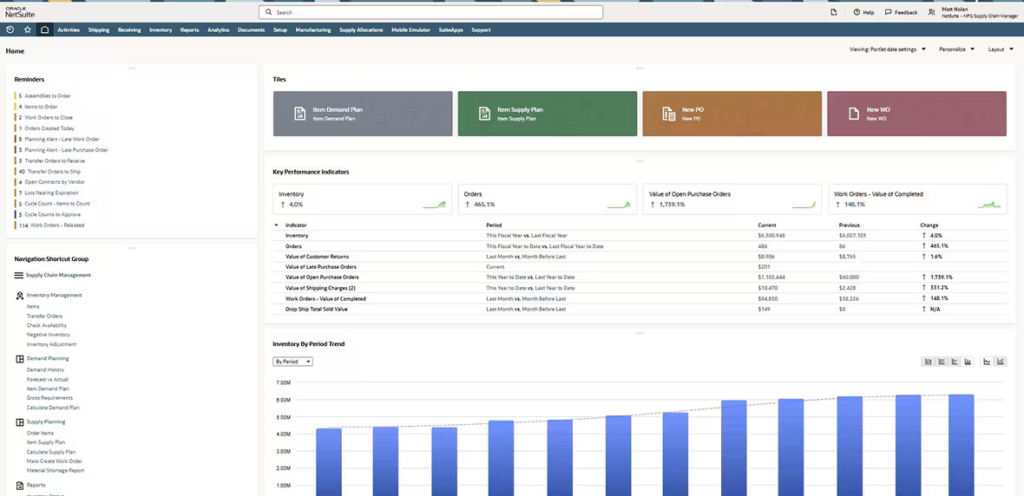
Before MRP software, manufacturers planned with physical cards, production boards, and eventually spreadsheets. Each approach had the same weakness: the plan was static while the reality it described was constantly moving.
MRP is a system-driven process that ensures the right materials are available at the right time to meet production schedules and customer demand. In NetSuite, MRP goes beyond simple reorder points by factoring in demand forecasts, existing inventory, purchase orders, and work orders at the same time.
The system then recommends when and how much to order or produce. It does not just identify that you have a shortage. It tells you when the shortage will occur, which orders it will affect, and what action resolves it.
How Does NetSuite MRP Work? The Four-Step Process
NetSuite MRP follows a four-step planning cycle every time a planning run executes. Understanding each step helps you understand what the system needs from you and what it will tell you back.
Step 1: Identify Demand
MRP begins by collecting all demand signals across the planning horizon. This includes:
- Open sales orders: confirmed customer demand with specific delivery dates
- Demand forecasts: statistical projections from historical sales, generated by NetSuite’s Demand Planning module
- Safety stock requirements: buffer quantities you define to protect against variability
- Transfer orders: demand from other locations within a multi-location operation
The first step of the MRP process is identifying customer demand and the requirements needed to meet it, which starts with inputting customer orders and sales forecasts. The quality of this demand signal determines everything downstream. Stale forecasts produce stale plans.
NetSuite handles both independent and dependent demand. Independent demand is what customers are ordering. Dependent demand is everything the BOM requires to fulfill that order. If someone orders 100 finished pumps, the dependent demand includes every sub-assembly, component, and raw material in the BOM.
Step 2: Explode the Bill of Materials
Once MRP has the finished good demand, it works backward through every level of the bill of materials to calculate what components and raw materials are needed at each level.
This is called BOM explosion. A single finished good might require five sub-assemblies. Each sub-assembly requires multiple components. Each component has its own lead time from a specific supplier. MRP calculates all of it at once, accounting for each level’s lead time to determine when each order or work order needs to release.
MRP takes demand for a parent item and calculates the quantity and timing needed for every component at every level. Planners can then trace demand from top-level orders all the way down through sub-assemblies to the lowest-level components. This is called multi-level pegging, and it tells you exactly which customer order is driving a specific component requirement.
Step 3: Net Against Available Supply
Once MRP knows what is needed and when, it checks against what is already available or incoming:
- On-hand inventory at each location
- Open purchase orders and their expected receipt dates
- In-progress work orders
- Inventory in transit or in an inbound shipment
Utilizing MRP to check demand against inventory and allocating resources accordingly, you can see both what items you have in stock and where they are. This is especially important if you have inventory across several locations or inventory discrepancies.
After netting supply against demand, MRP knows the gap: what you need that you do not have. It also knows the timing: when each gap becomes a problem based on lead times and demand dates.
Step 4: Generate Recommendations
With gaps identified and timed, MRP generates planning recommendations for each item:
- Create a new purchase order: when a component needs to be ordered from a supplier
- Create a new work order: when a sub-assembly or finished good needs to be produced
- Reschedule an existing order: when an existing order is scheduled for the wrong date
- Cancel an order: when demand has dropped and an order is no longer needed
- Exception messages: alerts for situations that require human judgment
These recommendations appear in the Planner’s Workbench for review. Planners can approve them in bulk or review each individually before releasing orders to procurement and production.
What Is the NetSuite Planner’s Workbench?
The Planner’s Workbench is the interface where MRP recommendations become decisions. It is the most operationally important part of NetSuite MRP for day-to-day planning.
Think of it as a decision dashboard. After a planning run, everything that requires a planner’s attention is organized in one place: shortages, exceptions, recommended orders, and overdue items. Planners do not have to hunt through the system to find problems. The Workbench surfaces them.
The Planners Workbench spotlights situations that require attention, allowing planners to prevent both shortages and excess supplies, and provides what-if analysis capabilities. Planners can monitor, firm up, or release orders for approval and aggregation. They can also review and accept action messages individually or in bulk.
What the Planner’s Workbench covers:
- Full view of supply and demand across items, locations, and time periods
- Exception messages showing what requires action and why
- Bulk review and release capabilities for planned orders (added in recent releases)
- Full pegging support to trace supply-demand relationships across BOM levels
- What-if scenario analysis to model the impact of changes before committing
- Filters for firm and unfirm supply orders, lead time thresholds, and subsidiary-level filtering
The bulk review and release capability matters in practice. Before it was added, a planner with 200 recommended purchase orders had to review and release each one individually. Now they can filter by criteria and approve relevant groups in one action.
What Are the Key Inputs NetSuite MRP Needs?
MRP is only as accurate as the data feeding it. This is not a caveat. It is the central operational reality of every MRP implementation.
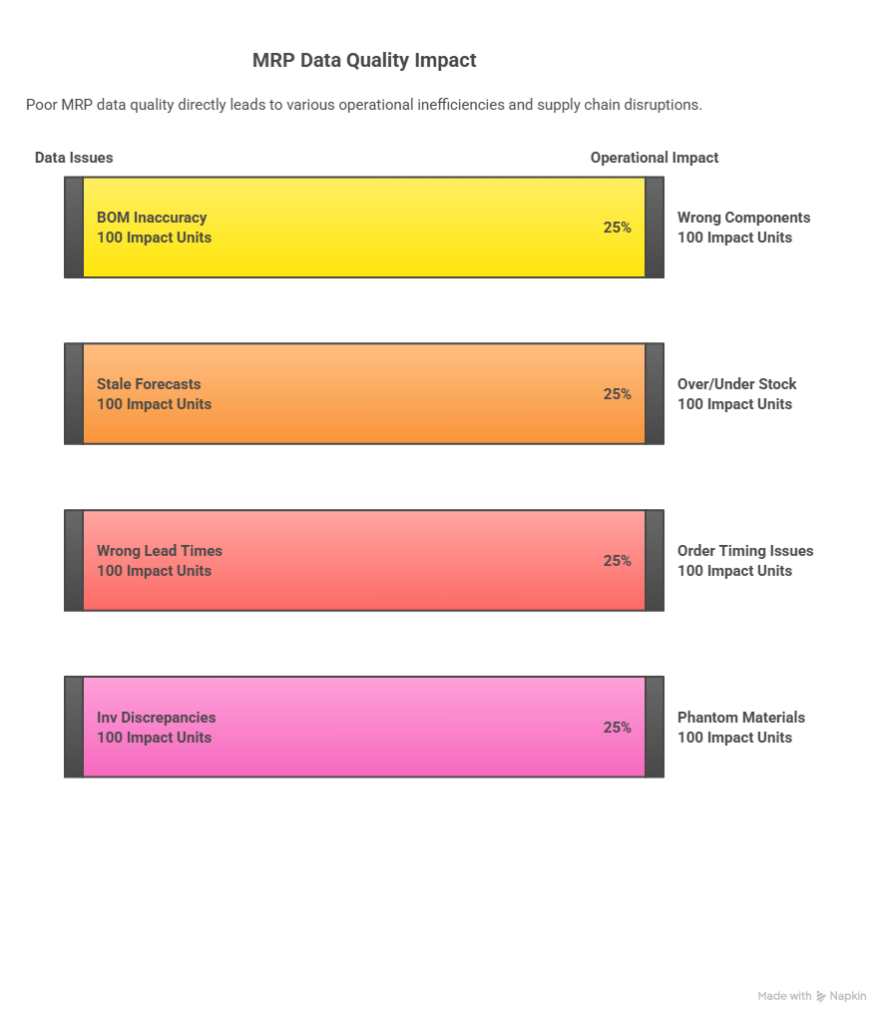
How well your MRP system works depends on the quality of the data you provide it. For an MRP system to work efficiently, each input must be accurate and updated. Three areas drive MRP behavior in NetSuite.
Demand Data
Sales forecasts and open customer orders are the starting point. An MRP run using inaccurate demand produces inaccurate recommendations. For businesses with seasonal patterns or lumpy demand, keeping forecasts current is a regular operational discipline, not a one-time setup task.
NetSuite’s Demand Planning module generates statistical forecasts from historical sales using moving average, linear regression, or seasonal methods. These forecasts feed directly into MRP, which nets them against supply and generates planned orders.
Bill of Materials Accuracy
Keeping a single updated version of the bill of materials is essential for accurate supply forecasting and planning. A system that’s integrated into the enterprise-wide inventory management system avoids version control issues and building against outdated bills, which results in reworks and increased waste.
Every time a product changes, a new component, a changed quantity, revised supplier, the BOM needs to reflect it before the next planning run. Stale BOMs produce planned orders for components that are no longer needed and miss components that are.
Inventory and Lead Time Data
Real-time inventory visibility across all locations is the third required input. MRP needs to know what is on hand, what is on order, where it is, and when it is expected. Lead times for each item and supplier determine when planned orders need to release to meet demand dates.
NetSuite allows lead time configuration at the item and item-location level, including fixed production lead times, variable supplier lead times, and safety time buffers. These parameters drive the timing of every MRP recommendation.
NetSuite MRP vs. Master Production Schedule (MPS): What Is the Difference?
NetSuite includes both MRP and MPS as part of the supply planning module. They serve related but different purposes.
MPS (Master Production Schedule) answers: What finished goods should we produce, and when? MPS works with finished goods and focuses on capacity and production timing at the top level. It creates a production plan for finished goods based on demand.
MRP answers: What materials and components do we need to execute that production plan? MRP works at the component level. It takes the MPS plan for finished goods, explodes it through the BOM, and determines what raw materials, components, and sub-assemblies need to be ordered or produced and when.
In practice, businesses use MPS and MRP together. MPS sets the production plan. MRP determines what buying and production is required to execute it. For businesses with complex multi-level BOMs, running MPS before MRP produces more accurate and coordinated recommendations across the planning horizon.
For context on how MRP fits within the broader NetSuite module landscape and what other modules support manufacturing and supply chain planning, our guide on the top Oracle NetSuite modules every business should know covers the full module infrastructure.
What NetSuite MRP Looks Like in Practice: Two Customer Examples
Research and feature lists describe MRP in the abstract. Customer results describe what it actually changes.
Skydio: Planning for Complex Drone Manufacturing
Skydio manufactures autonomous drones for commercial and defense applications. Their products involve complex multi-level BOMs, components sourced from specialized suppliers with long lead times, and production runs that cannot tolerate material shortages.
Folio3 implemented NetSuite for Skydio, including MRP to manage the production planning complexity of drone manufacturing. The implementation gave Skydio’s operations team real-time visibility into component requirements across the full BOM, with MRP generating planned orders that account for supplier lead times and production schedules.
For a detailed look at how NetSuite changed Skydio’s operations, read the full Skydio success story.

Matbock-Cardomax: Multi-Location Inventory for Defense and Tactical Gear
Matbock manufactures defense and tactical products across multiple locations with complex inventory management needs. Their product lines include items with long supplier lead times, specialized components, and demand that changes with contract awards and procurement cycles.
Folio3 implemented NetSuite MRP to bring order to Matbock’s multi-location inventory planning. MRP’s supply allocation functionality allowed the team to assign inventory already in-house and stock anticipated on incoming purchase orders to specific customer requirements, giving customer service visibility into when orders could be fulfilled.
The full Matbock-Cardomax success story covers the implementation in detail. Read now!

What Has Changed in NetSuite MRP for this year?
NetSuite’s MRP module has changed substantially since 2020. If your impression of NetSuite MRP is based on a pre-2022 experience, it is worth revisiting.
NetSuite rebuilt its supply planning engine to include robust MRP capabilities. What was once viewed as limited has evolved into a powerful, built-in solution that helps businesses turn supply planning into a strategic advantage.
Key improvements through the releases:
- Extended planning horizons: Demand planning and purchase lead times increased from one year to three years, enabling long-cycle manufacturing and procurement planning
- MOQ flexibility: Planners can now use fixed lots or multiples rather than being limited by minimum order quantity rules
- Multi-level pegging: Full visibility into how demand flows through the supply chain from finished goods down to lowest-level components
- Planner’s Workbench upgrades: Bulk review and release capabilities for planned orders, plus full pegging support
- SuiteAnalytics integration: MRP data is now available for custom reporting and analysis in SuiteAnalytics
- Enhanced BOM handling: More accurate material requirement calculations for complex assemblies
- Subsidiary-level filtering: Multi-entity planning with subsidiary-level Workbench filters
These additions make NetSuite MRP a realistic production planning tool for manufacturers with complex multi-level BOMs, long supplier lead times, and multi-location inventory.
How to Set Up MRP in NetSuite: The Core Configuration Steps
NetSuite MRP configuration happens at three levels: system setup, item setup, and planning parameters.
System Setup
Enable the required features in Setup > Company > Enable Features:
- Items and Inventory tab: Enable Demand Planning
- Also enable: Advanced Inventory Management and Supply Chain Control Tower
Item-Level Configuration
For each item you want to include in MRP planning, configure in the item record under the Supply Chain Planning subtab:
- Supply Planning Method: Set to MRP
- Lead Time: Days required to receive the item after ordering
- Safety Stock Level: Buffer quantity to protect against variability
- Planning Time Fence: Days within which no new orders will be planned
- Replenishment Method: MRP, reorder point, time-phased, or min/max
Planning Run Configuration
When setting up a planning run, configure:
- Demand Time Fence: Period within which the system will not generate new supply orders
- Planning Horizon: Number of days MRP will plan (up to three years)
- Planning Method: MRP or MPS
- Items and Locations: Scope of the planning run
After the planning run completes, all recommendations appear in the Planner’s Workbench for review before orders are released.
For a detailed look at Folio3’s implementation approach and what the NetSuite MRP module covers at each configuration level, our NetSuite Materials Requirement Planning covers the full implementation scope.
Who Should Use NetSuite MRP?
NetSuite MRP is especially valuable for companies in manufacturing, distribution, and wholesale. Specifically, it fits businesses where:
- You build products from components: MRP is designed for multi-level BOMs. If you assemble finished goods from purchased components and sub-assemblies, MRP is the right tool.
- You have lead times that matter: when supplier or production lead times are long enough that you need to plan weeks or months ahead, MRP’s time-phased planning prevents shortages.
- You carry inventory across multiple locations: MRP’s supply allocation function assigns available and incoming inventory to specific demand, giving customer service and planning a real answer to “when can we ship?”
- You currently plan in spreadsheets: if your planning process involves exporting data from NetSuite into Excel for analysis, you are already running a manual version of what MRP does automatically.
MRP is not the right tool for every business. Simple reorder-point replenishment handles low-complexity, stable-demand environments well and requires less configuration overhead. The decision between MRP and simpler replenishment methods depends on BOM complexity, lead time variability, and how much demand uncertainty your operation faces.
Final Thoughts
MRP is not about software. It is about whether your planning process is faster than your supply chain is changing.
When planning runs on spreadsheets, it is always slower. By the time the data is pulled, analyzed, and acted on, some of it has already changed. MRP running inside NetSuite means the plan updates whenever the data does. Planners spend their time on exceptions and judgment calls, not on assembling information that the system already has.
For manufacturers and distributors ready to move from reactive planning to proactive supply management, NetSuite MRP is the right starting point.
If you want to understand how Folio3 configures NetSuite MRP for manufacturers with complex BOMs and multi-location inventory, reach out for a straight answer on what the right setup looks like for your specific operation.
See how NetSuite MRP can work for your specific production operation.
Schedule a Demo
FAQs
What is Material Requirements Planning (MRP) in NetSuite?
NetSuite MRP is a supply planning module that calculates what materials and components are needed to meet production demand, in what quantities, and when. It works by comparing demand signals (sales orders, forecasts, safety stock requirements) against available and incoming supply (on-hand inventory, open purchase orders, in-progress work orders), then generating recommendations to close the gaps. All recommendations appear in the Planner’s Workbench for review before orders release to procurement or production.
How does NetSuite MRP work?
NetSuite MRP follows four steps: it collects demand signals, explodes those demands through the bill of materials to calculate component requirements at every BOM level, nets the requirements against available and incoming supply, and generates recommended purchase orders, work orders, and rescheduling actions. The planning run can cover up to a three-year horizon and handles multi-level BOMs, multiple locations, and multiple demand sources at the same time.
What is the difference between MRP and MPS in NetSuite?
MPS (Master Production Schedule) plans what finished goods to produce and when, working at the top level of the production hierarchy. MRP works at the component level, taking the finished good production plan and calculating what materials, sub-assemblies, and components are needed to execute it. Most manufacturers use both: MPS to set the production plan, MRP to determine what buying and production the plan requires.
What is the NetSuite Planner’s Workbench?
The Planner’s Workbench is the interface where MRP planning recommendations become decisions. After a planning run, the Workbench shows all exceptions, shortages, and recommended orders in one place. Planners can review recommendations individually or in bulk, trace demand to supply across BOM levels using pegging, run what-if scenarios, and release or reject orders without navigating screen by screen.
What inputs does NetSuite MRP require?
NetSuite MRP requires three types of input: accurate demand data (sales orders, forecasts, safety stock targets), accurate bills of materials (current and version-controlled), and real-time inventory and lead time data. The quality of MRP output is directly determined by the accuracy of these inputs. Stale forecasts, outdated BOMs, or incorrect lead times all produce planning recommendations that do not reflect operational reality.
Q: Which industries benefit most from NetSuite MRP?
NetSuite MRP benefits any industry where products are assembled from multiple components with varying lead times: manufacturing, defense and tactical products, electronics, consumer goods, medical devices, and industrial equipment. It is also useful in distribution for managing replenishment across multiple warehouses with demand forecasting.

